解密微信小程序Java登录流程(ssm实现具体功能)
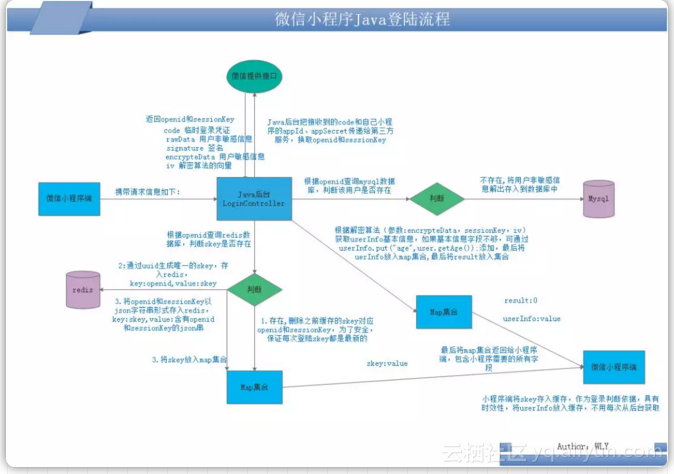
一、登录流程图 这里写图片描述 二、小程序客户端 doLogin:function(callback=()=>{}){letthat=this; wx.login({ success:function(loginRes){ if(loginRes){ //获取用户信息 wx.getUserInfo({ withCredentials:true,//非必填默认为true success:function(infoRes){ console.log(infoRes,'>>>'); //请求服务端的登录接口 wx.request({ url:api.loginUrl, data:{ code:loginRes.code,//临时登录凭证 rawData:infoRes.rawData,//用户非敏感信息 signature:infoRes.signature,//签名 encrypteData:infoRes.encryptedData,//用户敏感信息 iv:infoRes.iv//解密算法的向量 }, success:function(res){ console.log('loginsuccess'); res=res.data; if(res.result==0){ that.globalData.userInfo=res.userInfo; wx.setStorageSync('userInfo',JSON.stringify(res.userInfo)); wx.setStorageSync('loginFlag',res.skey); console.log("skey="+res.skey); callback(); }else{ that.showInfo('res.errmsg'); } }, fail:function(error){ //调用服务端登录接口失败 //that.showInfo('调用接口失败'); console.log(error); } }); } }); }else{ } } }); } 微信小程序端发起登录请求,携带的参数主要有: code:loginRes.code,//临时登录凭证 rawData:infoRes.rawData,//用户非敏感信息 signature:infoRes.signature,//签名 encrypteData:infoRes.encryptedData,//用户敏感信息 iv:infoRes.iv//解密算法的向量 参数解释: code:loginRes.code,//临时登录凭证:必传,通过code来换取后台的sessionKey和openId rawData:infoRes.rawData,//用户非敏感信息 signature:infoRes.signature,//签名 encrypteData:infoRes.encryptedData,//用户敏感信息 iv:infoRes.iv//解密算法的向量 signature,//签名、encryptedData,//用户敏感信息、iv//解密算法的向量: 这三个参数是用来解码用户敏感信息的,比如电话号码等信息。 需要的数据主要有:skey,用于标志用户的唯一性。 三、Java后台 /** *登陆接口 */ @RequestMapping("/login") @ApiResponses({ @ApiResponse(code=404,message="服务器未找到资源"), @ApiResponse(code=200,message="请求成功"), @ApiResponse(code=500,message="服务器错误"), @ApiResponse(code=401,message="没有访问权限"), @ApiResponse(code=403,message="服务器拒绝访问"), }) @ApiOperation(value="小程序登录",httpMethod="POST",notes="小程序登录") publicResponseEntity<LoginDataResult>login( @ApiParam(required=true,value="临时登录凭证code",name="code")Stringcode, @ApiParam(required=true,value="用户非敏感信息",name="rawData") @RequestParam(value="rawData",required=true)StringrawData, @ApiParam(required=true,value="签名",name="signature") @RequestParam(value="signature",required=true)Stringsignature, @ApiParam(required=true,value="用户敏感信息",name="encrypteData") @RequestParam(value="encrypteData",required=true)StringencrypteData, @ApiParam(required=true,value="解密算法的向量",name="iv") @RequestParam(value="iv",required=true)Stringiv ){ ObjectMappermapper=newObjectMapper(); logger.info("signature============================================================="+signature); logger.info("encrypteData=========================================================="+encrypteData); logger.info("iv========================================================================"+iv); RawDatadata=null; WxMaJscode2SessionResultsession=null; Stringopenid=null; StringsessionKey=null; StringphoneNumber=null; try{ if(rawData!=null&&!"".equals(rawData)){ //1、获取用户非敏感信息 data=mapper.readValue(rawData,RawData.class); } session=this.wxService.getUserService().getSessionInfo(code); //获取到openid和sessionkey openid=session.getOpenid(); sessionKey=session.getSessionKey(); logger.info("sessionkey========================================================="+sessionKey); /*//2、获取用户手机号 phoneNumber=phone(code,signature,rawData,encrypteData,iv); logger.info("phoneNumber========================================="+phoneNumber); */ }catch(IOExceptione){ e.printStackTrace(); logger.info("获取用户信息失败"); LoginDataResultloginDataResult=newLoginDataResult(); loginDataResult.setCode("2"); loginDataResult.setMsg("请求失败"); returnResponseEntity.status(HttpStatus.INTERNAL_SERVER_ERROR).body(loginDataResult); }catch(WxErrorExceptione){ e.printStackTrace(); logger.info("获取用户信息失败"); } //3、向数据库插入用户信息 Stringskey=insertUser(data,openid,phoneNumber); //4、缓存openid,sessionKey,skey到redis redisCache(openid,sessionKey,skey); //5、把新的skey返回给小程序 LoginDataResultloginDataResult=newLoginDataResult(); loginDataResult.setSkey(skey); loginDataResult.setCode("1"); loginDataResult.setMsg("请求成功"); returnResponseEntity.status(HttpStatus.OK).body(loginDataResult); } /** *缓存openid,sessionKey,skey等信息 *@paramopenid小程序用户唯一标志 *@paramsessionKey小程序会话标志 *@paramskey后台生成的用户唯一标志,会话管理 */ privatevoidredisCache(Stringopenid,StringsessionKey,Stringskey){ //根据openid查询skey是否存在 Stringskey_redis=jedisClient.hget("WEXIN_USER_OPENID_SKEY",openid); if(StringUtils.isNotBlank(skey_redis)){ //存在删除skey重新生成skey将skey返回 jedisClient.hdel("WEXIN_USER_OPENID_SKEY",openid); jedisClient.hdel("WEIXIN_USER_SKEY_OPENID",skey_redis); jedisClient.hdel("WEIXIN_USER_SKEY_SESSIONKEY",skey_redis); } //缓存一份新的 jedisClient.hset("WEXIN_USER_OPENID_SKEY",openid,skey); jedisClient.expire("WEXIN_USER_OPENID_SKEY",432000);//设置5天过期 jedisClient.hset("WEIXIN_USER_SKEY_OPENID",skey,openid); jedisClient.expire("WEIXIN_USER_SKEY_OPENID",432000);//设置5天过期 jedisClient.hset("WEIXIN_USER_SKEY_SESSIONKEY",skey,sessionKey); jedisClient.expire("WEIXIN_USER_SKEY_SESSIONKEY",432000);//设置5天过期 } /** *将用户信息插入到数据库 *@paramdata用户信息 *@paramopenid *@paramphoneNumber手机号 *@return */ privateStringinsertUser(RawDatadata,Stringopenid,StringphoneNumber){ //判断用户数据库是否存在,不存在,入库。 Memberuser=userService.selectUserByOpenid(openid); //uuid生成唯一key Stringskey=UUID.randomUUID().toString(); if(user==null){ //入库 user=newMember(); user.setId(skey); user.setCountry(data.getCountry()); user.setCreatedate(newDate()); user.setDf(1); user.setGender(data.getGender().equals("1")?1:2);//1为男,2为女 user.setHeadimg(data.getAvatarUrl()); user.setNickname(data.getNickName()); user.setOpenid(openid); user.setCitycode(data.getCity()); user.setProvincecode(data.getProvince()); user.setMobileno(phoneNumber); //插入到数据库 userService.insertUser(user); }else{ //已存在 logger.info("用户openid已存在,不需要插入"); returnuser.getId();//返回用户唯一标志skey } returnskey; } /** *获取用户板绑定的手机号 *@paramsessionKey小程序session *@paramsignature签名 *@paramrawData用户信息 *@paramencryptedData小程序加密数据 *@paramiv小程序向量 *@return */ @ApiOperation(value="用户手机号获取",httpMethod="GET",notes="用户手机号获取") publicStringphone(StringsessionKey,Stringsignature,StringrawData,StringencryptedData,Stringiv){ StringphoneNumber=null; try{ byte[]bytes=WxMiniappUtils.decrypt(Base64.decodeBase64(sessionKey),Base64.decodeBase64(iv),Base64.decodeBase64(encryptedData)); Stringphone=newString(bytes,"UTF8"); logger.info("phone====================================="+phone); }catch(NoSuchPaddingExceptione){ e.printStackTrace(); }catch(NoSuchAlgorithmExceptione){ e.printStackTrace(); }catch(InvalidAlgorithmParameterExceptione){ e.printStackTrace(); }catch(InvalidKeyExceptione){ e.printStackTrace(); }catch(BadPaddingExceptione){ e.printStackTrace(); }catch(IllegalBlockSizeExceptione){ e.printStackTrace(); }catch(UnsupportedEncodingExceptione){ e.printStackTrace(); } returnnull; } 下面对上面代码进行分析: 3.1获取openid和sessionKey session=this.wxService.getUserService().getSessionInfo(code); //获取到openid和sessionkey openid=session.getOpenid(); sessionKey=session.getSessionKey(); 这段代码是不是十分的简洁,这里用到了一个第三方的sdk(weixin-java-tools),通过这个sdk可以非常简便的获取到openid和sessionKey,具体的demo。 当然,如果你不想用第三方的sdk,也可以自己实现,实现代码如下: publicstaticJSONObjectgetSessionKeyOrOpenId(Stringcode){ //微信端登录code StringwxCode=code; StringrequestUrl="https://api.weixin.qq.com/sns/jscode2session"; Map<String,String>requestUrlParam=newHashMap<String,String>(); requestUrlParam.put("appid","你的小程序appId");//小程序appId requestUrlParam.put("secret","你的小程序appSecret"); requestUrlParam.put("js_code",wxCode);//小程序端返回的code requestUrlParam.put("grant_type","authorization_code");//默认参数 //发送post请求读取调用微信接口获取openid用户唯一标识 JSONObjectjsonObject=JSON.parseObject(UrlUtil.sendPost(requestUrl,requestUrlParam)); returnjsonObject; } 3.2解密用户敏感数据获取用户信息 3.2.1controller 这个部分自己遇到了好多的坑,由于需要获取用户的手机号码,需要解密用户的信息。 /** *获取用户板绑定的手机号 *@paramsessionKey小程序session *@paramsignature签名 *@paramrawData用户信息 *@paramencryptedData小程序加密数据 *@paramiv小程序向量 *@return */ @ApiOperation(value="用户手机号获取",httpMethod="GET",notes="用户手机号获取") publicStringphone(StringsessionKey,Stringsignature,StringrawData,StringencryptedData,Stringiv){ StringphoneNumber=null; try{ byte[]bytes=WxMiniappUtils.decrypt(Base64.decodeBase64(sessionKey),Base64.decodeBase64(iv),Base64.decodeBase64(encryptedData)); Stringphone=newString(bytes,"UTF8"); logger.info("phone====================================="+phone); }catch(NoSuchPaddingExceptione){ e.printStackTrace(); }catch(NoSuchAlgorithmExceptione){ e.printStackTrace(); }catch(InvalidAlgorithmParameterExceptione){ e.printStackTrace(); }catch(InvalidKeyExceptione){ e.printStackTrace(); }catch(BadPaddingExceptione){ e.printStackTrace(); }catch(IllegalBlockSizeExceptione){ e.printStackTrace(); }catch(UnsupportedEncodingExceptione){ e.printStackTrace(); } returnnull; } 3.2.2decrypt工具类 这里调用了WxMiniappUtils.decrypt这个工具类,工具类如下: /** *解密用户手机号算法 *@paramsessionkey小程序登录sessionKey *@paramiv向量 *@paramencryptedData *@return *@throwsNoSuchPaddingException *@throwsNoSuchAlgorithmException *@throwsInvalidAlgorithmParameterException *@throwsInvalidKeyException *@throwsBadPaddingException *@throwsIllegalBlockSizeException */ publicstaticbyte[]decrypt(byte[]sessionkey,byte[]iv,byte[]encryptedData) throwsNoSuchPaddingException,NoSuchAlgorithmException,InvalidAlgorithmParameterException, InvalidKeyException,BadPaddingException,IllegalBlockSizeException{ AlgorithmParameterSpecivSpec=newIvParameterSpec(iv); Ciphercipher=Cipher.getInstance("AES/CBC/PKCS5Padding"); SecretKeySpeckeySpec=newSecretKeySpec(sessionkey,"AES"); cipher.init(Cipher.DECRYPT_MODE,keySpec,ivSpec); returncipher.doFinal(encryptedData); } 这里用到的Cipher类是javax.crypto的类。 3.2.3问题 但是这里使用这个decrypt工具类的时候,遇到了好多的问题。 第一:AES解密是报错javax.crypto.BadPaddingException: pad block corrupted 这个问题是由于,工具类使用了Cipher.getInstance("AES/CBC/PKCS5Padding")。 解决:Cipher cipher = Cipher.getInstance("AES/ECB/ZeroBytePadding");。 第二:java.security.InvalidAlgorithmParameterException: Wrong IV length: must be 16 这个问题是由于,解码出来的iv不是16位,好像是15位,这个为什么我也不太清楚。 解决:这个怎么解决,自己也没有找到方法,如果有大神解决,望告知! 我的解决方法:其实我发现这个问题并不是这个工具类的问题,我折腾了一天发现,这个工具类并不是不能够解码手机号,有的是可以的,有的解析不到手机号,只有普通的信息,所以我觉得,这个可能是微信用户注册的时候,是不是用手机号注册的,所以会出现有些能够解析,有的不能解析。如果有大神有其他方法,望告知! 3.2.4解析成功数据 {"phoneNumber":"13880684012","purePhoneNumber":"13880684012","countryCode":"86","watermark":{"timestamp":1519460296,"appid":"wx6ede2086ee29a89f"}} 如果解析到了这样的json数据,说明是成功了的。 3.2.5 另外一种方案 publicclassAES{ publicstaticfinalAESinstance=newAES(); publicstaticbooleaninitialized=false; /** *AES解密 *@paramcontent密文 *@return *@throwsInvalidAlgorithmParameterException *@throwsNoSuchProviderException */ publicbyte[]decrypt(byte[]content,byte[]keyByte,byte[]ivByte)throwsInvalidAlgorithmParameterException{ initialize(); try{ Ciphercipher=Cipher.getInstance("AES/CBC/PKCS7Padding"); KeysKeySpec=newSecretKeySpec(keyByte,"AES"); cipher.init(Cipher.DECRYPT_MODE,sKeySpec,generateIV(ivByte));//初始化 byte[]result=cipher.doFinal(content); returnresult; }catch(NoSuchAlgorithmExceptione){ e.printStackTrace(); }catch(NoSuchPaddingExceptione){ e.printStackTrace(); }catch(InvalidKeyExceptione){ e.printStackTrace(); }catch(IllegalBlockSizeExceptione){ e.printStackTrace(); }catch(BadPaddingExceptione){ e.printStackTrace(); }catch(NoSuchProviderExceptione){ //TODOAuto-generatedcatchblock e.printStackTrace(); }catch(Exceptione){ //TODOAuto-generatedcatchblock e.printStackTrace(); } returnnull; } publicstaticvoidinitialize(){ if(initialized)return; Security.addProvider(newBouncyCastleProvider()); initialized=true; } //生成iv publicstaticAlgorithmParametersgenerateIV(byte[]iv)throwsException{ AlgorithmParametersparams=AlgorithmParameters.getInstance("AES"); params.init(newIvParameterSpec(iv)); returnparams; } } 这个也会有上面的问题,有时候会解析失败!具体方法,还在摸索中,有大神知道方法和原有,望告知! 3.2.6第三方sdk方法 WxMaPhoneNumberInfophoneNoInfo=this.wxService.getUserService().getPhoneNoInfo(sessionKey,encryptedData,iv); phoneNumber=phoneNoInfo.getPurePhoneNumber(); 这个也会有上面的问题出现,有时候会解析失败! 四、总结 1.小程序端发起请求并携带主要参数 2.java后台接到/login请求后,根据code去调用微信接口获取用户唯一标识openid和sessionKey 3.根据openid查询mysql数据库,判断该用户是否存在,如果不存在将用户非敏感信息和其他初始化数据存入到数据库中,如果已存在,不操作 4.根据openid查询redis数据库,判断openid对应的skey是否存在,如果存在则删除原来老的skey以及对应的openid和sessionKey 5.通过uuid生成唯一的skey,用openid做键,skey做值,存入到redis中 6.然后把skey做键,openid和sessionKey的json串做值也重新存入到redis中 7.根据解密算法,参数有encryptedData、sessionKey和iv,获取用户信息userInfo,如果userInfo字段不满足需要,可通过userInfo.put( "balance",user.getUbalance() );添加所需要的字段和值 8.将微信小程序需要的数据封装到map中,返回给小程序端。 参考资料(感谢) ● https://blog.csdn.net/abcwanglinyong/article/details/80267901 ● https://github.com/binarywang/weixin-java-miniapp-demo ● https://www.cnblogs.com/nosqlcoco/p/6105749.html ● https://www.cnblogs.com/suxiaoqi/p/7874635.html 原文发布时间为:2018-10-18 本文作者:全栈开发者社区 本文来自云栖社区合作伙伴“全栈开发者社区”,了解相关信息可以关注“全栈开发者社区”。