在ESP32上使用umqtt接入阿里云物联网平台
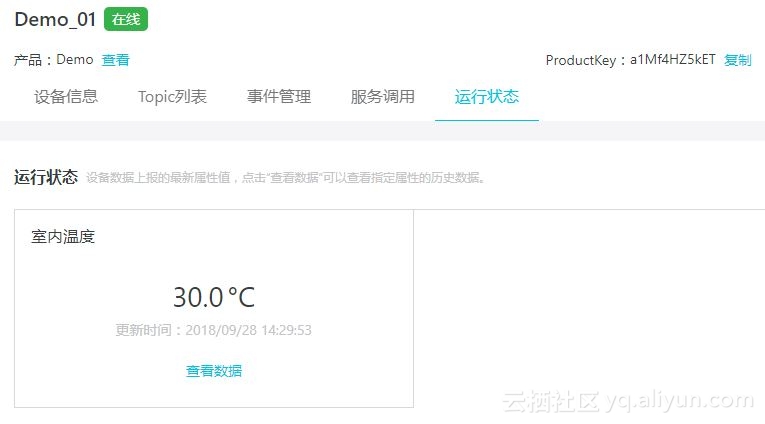
网络上已经有使用python 模拟设备接入阿里云,手里刚好有块ESP32的小板子,在上面跑过Alios Things,然后接入阿里云。但是终究感觉麻烦,有的时候只是做一个很简单的应用,跑os确实不太方便。使用micropython直接操作ESP32很是方便,就想着如果能通过micropython 直接接入物联网,那就方便多了。可以非常简单地接入云端,而且操作简单。先放上主干部分,有时间再补充细节 from umqtt.simple import MQTTClient import usocket as socket import time import wifi wifi.connect() #Demo_01 ProductKey = "a1Mf4HZ5k**" ClientId = "1234|securemode=3,signmethod=hmacsha1|" DeviceName = "Demo_01" DeviceSecret = "****************************" strBroker = ProductKey + ".iot-as-mqtt.cn-shanghai.aliyuncs.com" Brokerport = 1883 user_name = "Demo_01&a1Mf4HZ5k**" user_password = "***************************************" print("clientid:",ClientId,"\n","Broker:",strBroker,"\n","User Name:",user_name,"\n","Password:",user_password,"\n") def connect(): client = MQTTClient(client_id = ClientId,server= strBroker,port=Brokerport,user=user_name, password=user_password,keepalive=60) #please make sure keepalive value is not 0 client.connect() temperature =25.00 while temperature < 30: temperature += 0.5 send_mseg = '{"params": {"IndoorTemperature": %s},"method": "thing.event.property.post"}' % (temperature) client.publish(topic="/sys/a1Mf4HZ5kET/Demo_01/thing/event/property/post", msg=send_mseg,qos=1, retain=False) time.sleep(3) while True: pass #client.disconnect() 连接成功后和可以在设备运行状态下看到上传的温度数据 demo中做了一个温度递增的上传,以下是数据记录: 做的过程中参考了一下链接,放在这里,读者可以阅读,以获得更多细节: 子设备接入 https://help.aliyun.com/document_detail/66641.html ESP8266 and MicroPython - Part 2 https://www.home-assistant.io/blog/2016/08/31/esp8266-and-micropython-part2/ 使用MQTT客户端连接阿里云MQTT服务器 https://yq.aliyun.com/articles/592279 使用Python模拟设备接入阿里云物联网的MQTT服务器 https://yq.aliyun.com/articles/162978