首页 文章 精选 留言 我的

精选列表

搜索[快速入门],共10000篇文章
优秀的个人博客,低调大师

快速上手物联网解决方案(4)—— 数据转储

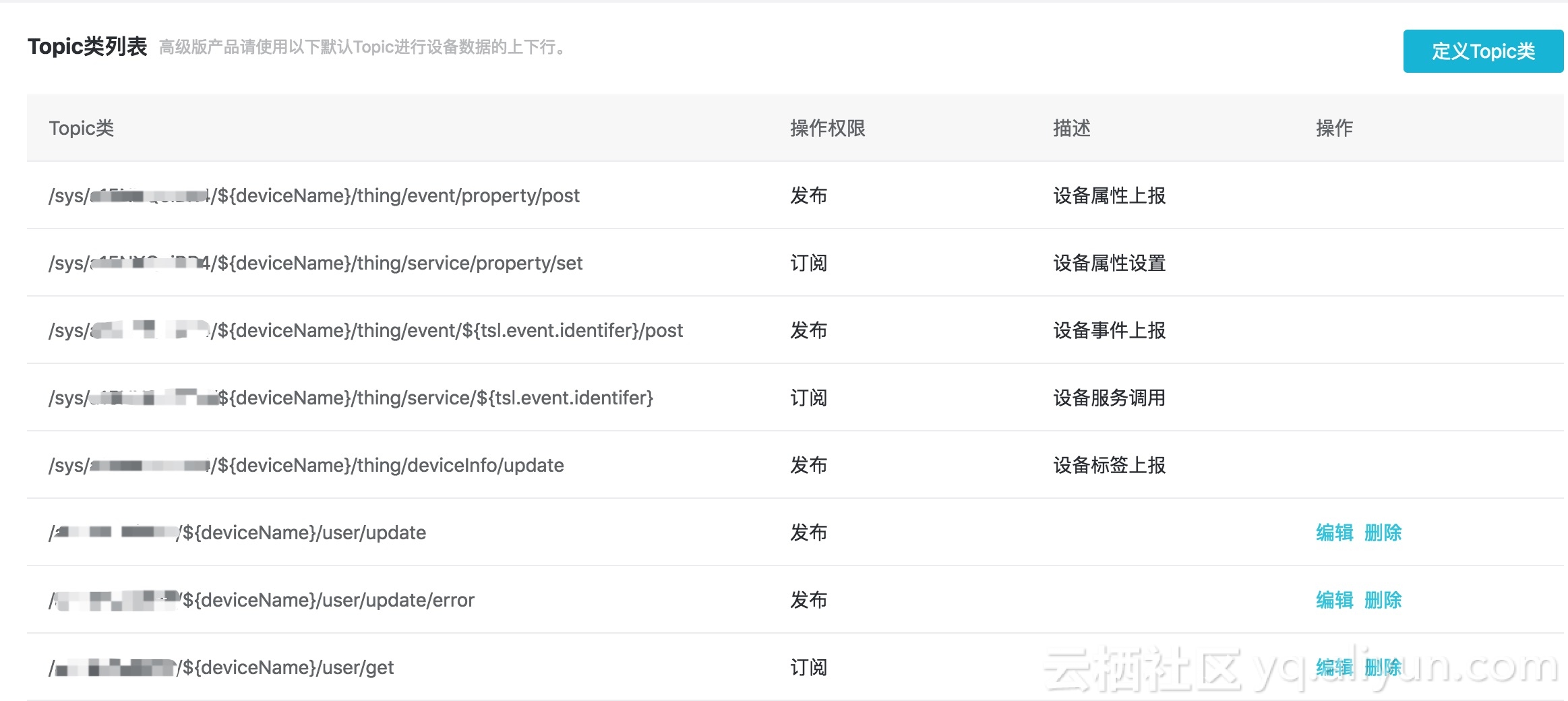
『物联网平台』默认将设备上传的数据存放在公有云中,实际业务场景下,时常有数据转储到私有数据库的需求,这时我们就需要用到『数据转发』功能。 数据转发前,我们得先了解设备上传到云端的数据到底长什么样。具体来说就是设备数据上报的 Topic 是什么? 在『物联网平台』中打开 设备管理 —— 查看 —— Topic类列表,即可查看该设备数据上下行的默认 Topic: 有了 Topic,我们对数据如何提取就有了底,接着我们跳转到『规则引擎』部分,选择创建规则 —— JSON 格式 —— 处理数据 —— 编辑 —— 输入以下查询字段: items.Accelerometer.value.X, items.Accelerometer.value.Y, items.Accelerometer.value.Z, deviceName() as device

优秀的个人博客,低调大师

docker学习系列1 使用docker 快速实现多版本PHP

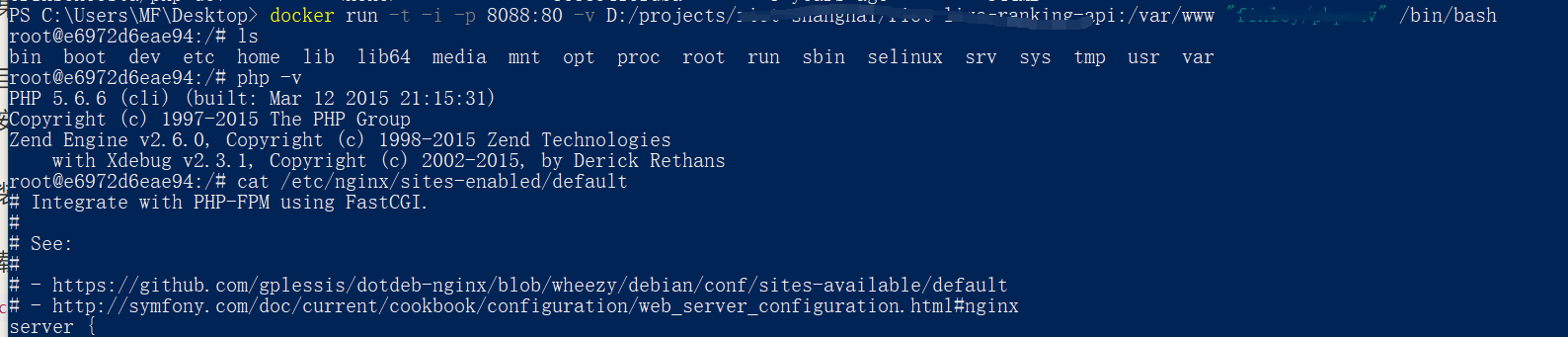
多谢此文:https://blog.eriksen.com.br/en/docker-image-multi-version-php-development 最近一个新的后台API项目需要运行在PHP5.3环境中,而无论是本地还是测试服务器都安装的是PHP7.x PHP5.3官方已经不维护了,通过源码安装配置也很麻烦,我又不想污染了现有的环境。 所以想到了docker 我觉得docker适合以下情况: 运行特定的开发环境,比如要运行两个项目。一个要求PHP5.6,一个PHP7.0。不想来回切换。 喜欢尝鲜,折腾,docker有很强的隔离性。在docker里搞坏也不会破坏本地 新项目是基于 ThinkPHP3.2 想通过docker跑起来,可以按如下步骤: 安装 docker,略 记得一定要切换为国内源,不然速度巨慢,还容易报错,推荐免费的https://www.daocloud.io/mirror#accelerator-doc 下载镜像docker pull eriksencosta/php-dev 项目目录是已经存在的 路径是 D:/projects/live-ranking-api 运行容器 其中参数:-p 端口映射 -v 挂载目录,冒号前是宿主机目录,后面的是容器内目录 -t -i 参数 表示已交互方式运行容器,运行成功后会执行 /bin/bash 就是进去终端docker run -t -i -p 8088:80 -v D:/projects/live-ranking-api:/var/www -d "eriksencosta/php-dev:latest" /bin/bash image.png 打开浏览器输入 localhost:8088 正常的话项目已经成功跑起来了 切换PHP版本,在容器内的终端内输入 phpenv命令 列出当前可选择的PHP版本 # phpenv versions 5.3 5.3.29 5.4 5.4.35 5.5 5.5.19 5.6 * 5.6.3 (set by /opt/phpenv/version) 执行 phpenv global 5.4 # phpenv global 5.4 # php -v PHP 5.4.35 (cli) (built: Dec 14 2014 00:35:12) Copyright (c) 1997-2014 The PHP Group Zend Engine v2.4.0, Copyright (c) 1998-2014 Zend Technologies with Zend OPcache v7.0.3, Copyright (c) 1999-2014, by Zend Technologies with Xdebug v2.2.6, Copyright (c) 2002-2014, by Derick Rethans 启动nginx # webserver start Starting PHP-FPM (PHP version 5.3) server. Starting Nginx server. Done. 参考:https://hub.docker.com/r/eriksencosta/php-dev/https://github.com/eriksencosta/silex-docker-example

优秀的个人博客,低调大师

Python:用numpy+OpenCV快速实现矫正图像的功能

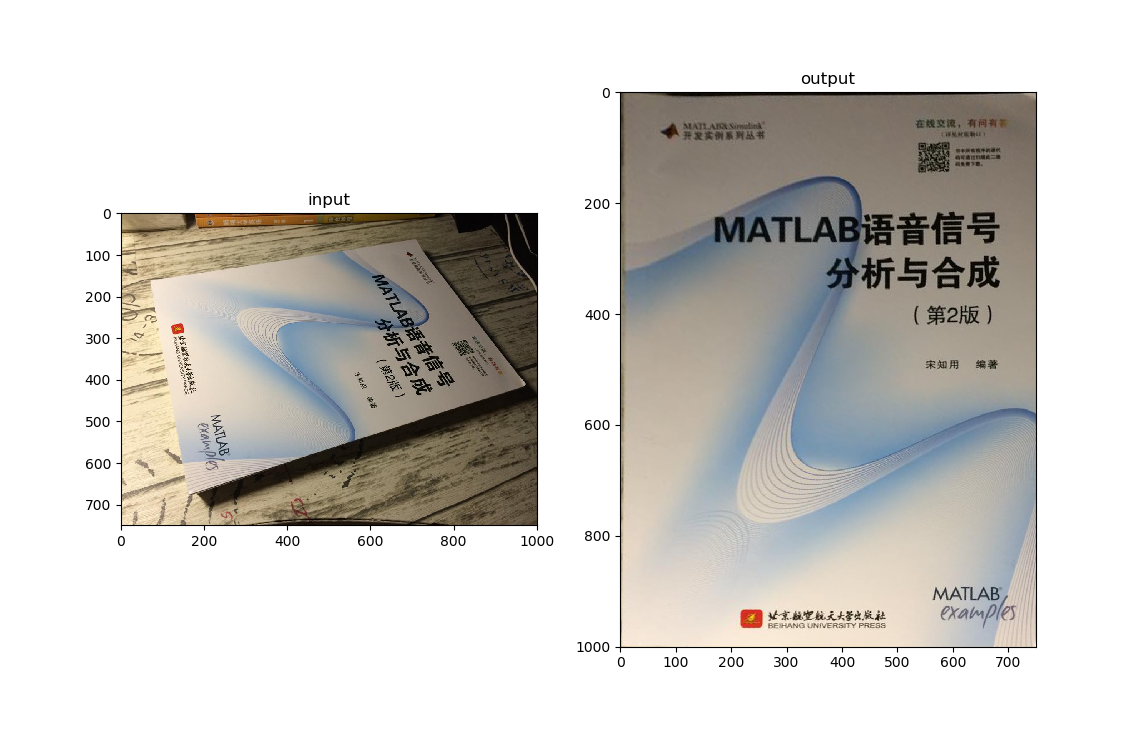
透视变换是一个很实用的功能,当用手机去拍证件或者名片时,经常会拍歪,或者有边框。如果你使用过类似“扫描全能王”的软件,你应该知道,他们会自动把证件矫正并除边框,它就是通过透视变换实现的,和numpy中的仿射变换一样。 左图为原图,右图为矫正后的图 1.运行环境 Python3.6.5 pycharm win10 安装oponcv, numpy 库安装教程链接 2.代码 import cv2 import numpy as np import matplotlib.pyplot as plt img = cv2.imread('E:\\card2.jpg') rows, cols = img.shape[:2] # 原图中书本的四个角点 pts1 = np.float32([[69, 163], [704, 62], [162, 675], [970, 411]]) # 变换后分别在左上、右上、左下、右下四个点 pts2 = np.float32([[0, 1000], [0, 0], [750, 1000], [750, 0]]) # 生成透视变换矩阵 M = cv2.getPerspectiveTransform(pts1, pts2) # 进行透视变换 dst = cv2.warpPerspective(img, M, (750, 1000)) plt.subplot(121), plt.imshow(img[:, :, ::-1]), plt.title('input') plt.subplot(122), plt.imshow(dst[:, :, ::-1]), plt.title('output') # img[:, :, ::-1]是将BGR转化为RGB plt.show() 3.解析 图中角点坐标需要自己设定 通过锁定书的角点,并设定改变后的角点,来达到矫正图像的目的。 坐标原点在图片左上角!

优秀的个人博客,低调大师

Python进行数据可视化分析快速教程实例

Jupyter Notebook介绍 Jupyter Notebook是一个交互式笔记本,支持运行 40 多种编程语言。IPython notebook 是一个基于 IPython REPL 的 web 应用,安装 IPython 后在终端输入 ipython notebook 即可启动服务。jupyter 是把 IPython 和 Python 解释器剥离后的产物,将逐渐替代 IPython 独立发行。jupyter 可以和 Python 之外的 程序结合,提供新的、强大的服务。比如 Ruby REPL 环境 IRuby 和 Julia REPL 环境 IJulia。相对的,jypyter 也提供 jupyter notebook。 Jupyter Notebook的安装 安装pyzmq,Pyzmq是zeromq的Python绑定。z

优秀的个人博客,低调大师

Centos7YUM快速搭建LNMP环境并简易优化

下载并安装NGINX wget http://nginx.org/packages/mainline/centos/7/x86_64/RPMS/nginx-1.13.9-1.el7_4.ngx.x86_64.rpm rpm -ivh nginx-1.13.9-1.el7_4.ngx.x86_64.rpm systemctl enable nginx systemctl start nginx 下载并安装MYSQL wget https://dev.mysql.com/get/mysql57-community-release-el7-11.noarch.rpm rpm -ivh mysql57-community-release-el7-11.noarch.rpm yum install -y mysql-server systemctl enable mysqld systemctl start mysqld 下载并安装PHP yum install http://rpms.remirepo.net/enterprise/remi-release-7.rpm yum --enablerepo=remi,remi-php72 install php php-common php-cli php-fpm php-pdo php-bcmath php-mysqlnd php-mbstring php-mcrypt php-gd php-dom php-xml php-zip chmod 777 -R /var/lib/php/session systemctl enable php-fpm systemctl start php-fpm 开启PHP缓存 - 修改php.ini中: realpath_cache_size = 4096k realpath_cache_ttl = 120 开启NGINX的GZIP并隐藏版本号 - 修改nginx.conf中: server_tokens off; gzip on; gzip_min_length 20k; gzip_buffers 4 16k; gzip_comp_level 4; gzip_types text/plain text/css text/javascript application/x-javascript application/xml application/x-httpd-php; server { listen 80 default; return 444; } 说明:优化仅针对低配服务器,是最简易的优化,可明显提升运行效率,配置不高的服务器不要过分优化,否则反而会增加服务器压力。

优秀的个人博客,低调大师

(转)C# 快速高效率复制对象的方式

1、需求 在项目代码中经常需要把对象复制到新的对象中,或者把属性名相同的值复制一遍。 比如: public class Student { public int Id { get; set; } public string Name { get; set; } public int Age { get; set; } } public class StudentSecond { public int Id { get; set; } public string Name { get; set; } public int Age { get; set; } } Student s = new Student() { Age = 20, Id = 1, Name = "Emrys" }; 我们需要给新的Student赋值 Student ss = new Student { Age = s.Age, Id = s.Id, Name = s.Name }; 给另一个类StudentSecond的属性赋值,两个类属性的名称和类型一致。 StudentSecond ss = new StudentSecond { Age = s.Age, Id = s.Id, Name = s.Name }; 2、解决办法 当然最原始的办法就是把需要赋值的属性全部手动手写。这样的效率是最高的。但是这样代码的重复率太高,更重要的是浪费时间,如果一个类有几十个属性,那一个一个属性赋值太浪费了,像这样重复的劳动工作更应该是需要优化的。 2.1、反射 反射应该是很多人用过的方法,就是封装一个类,反射获取属性和设置属性的值。 private static TOut TransReflection<TIn, TOut>(TIn tIn) { TOut tOut = Activator.CreateInstance<TOut>(); var tInType = tIn.GetType(); foreach (var itemOut in tOut.GetType().GetProperties()) { var itemIn = tInType.GetProperty(itemOut.Name); ; if (itemIn != null) { itemOut.SetValue(tOut, itemIn.GetValue(tIn)); } } return tOut; } 调用:StudentSecond ss= TransReflection<Student, StudentSecond>(s); 调用一百万次耗时:2464毫秒 2.2、序列化 序列化的方式有很多种,有二进制、xml、json等等,今天我们就用Newtonsoft的json进行测试。 调用:StudentSecondss= JsonConvert.DeserializeObject<StudentSecond>(JsonConvert.SerializeObject(s)); 调用一百万次耗时:2984毫秒 3、表达式树 3.1、简介 关于表达式树不了解的可以百度。 也就是说复制对象也可以用表达式树的方式 Expression<Func<Student, StudentSecond>> ss = (x) => new StudentSecond { Age = x.Age, Id = x.Id, Name = x.Name }; var f = ss.Compile(); StudentSecond studentSecond = f(s); 这样的方式我们可以达到同样的效果。看似说这样的写法和最原始的复制没有什么区别,代码反而变多了呢,然而这个只是第一步。跟着来!!!!!!!!!!!!!!!!!!!!!!! 3.2、分析代码 用ILSpy反编译下这段表达式代码如下: ParameterExpression parameterExpression; Expression<Func<Student, StudentSecond>> ss = Expression.Lambda<Func<Student, StudentSecond>>(Expression.MemberInit(Expression.New(typeof(StudentSecond)), new MemberBinding[] { Expression.Bind(methodof(StudentSecond.set_Age(int)), Expression.Property(parameterExpression, methodof(Student.get_Age()))), Expression.Bind(methodof(StudentSecond.set_Id(int)), Expression.Property(parameterExpression, methodof(Student.get_Id()))), Expression.Bind(methodof(StudentSecond.set_Name(string)), Expression.Property(parameterExpression, methodof(Student.get_Name()))) }), new ParameterExpression[] { parameterExpression }); Func<Student, StudentSecond> f = ss.Compile(); StudentSecond studentSecond = f(s); 只要用反射循环所有的属性然后Expression.Bind所有的属性。最后调用Compile()(s)就可以获取正确的StudentSecond。 到这有的人又要问了,如果用反射的话那岂不是效率很低,和直接用反射或者用序列化没什么区别吗? 当然这个可以解决的,就是我们的表达式树可以缓存。只是第一次用的时候需要反射,以后再用就不需要反射了 3.3、复制对象通用代码 为了通用性所以其中的Student和StudentSecond分别泛型替换。 private static Dictionary<string, object> _Dic = new Dictionary<string, object>(); private static TOut TransExp<TIn, TOut>(TIn tIn) { string key = string.Format("trans_exp_{0}_{1}", typeof(TIn).FullName, typeof(TOut).FullName); if (!_Dic.ContainsKey(key)) { ParameterExpression parameterExpression = Expression.Parameter(typeof(TIn), "p"); List<MemberBinding> memberBindingList = new List<MemberBinding>(); foreach (var item in typeof(TOut).GetProperties()) { if (!item.CanWrite) continue; MemberExpression property = Expression.Property(parameterExpression, typeof(TIn).GetProperty(item.Name)); MemberBinding memberBinding = Expression.Bind(item, property); memberBindingList.Add(memberBinding); } MemberInitExpression memberInitExpression = Expression.MemberInit(Expression.New(typeof(TOut)), memberBindingList.ToArray()); Expression<Func<TIn, TOut>> lambda = Expression.Lambda<Func<TIn, TOut>>(memberInitExpression, new ParameterExpression[] { parameterExpression }); Func<TIn, TOut> func = lambda.Compile(); _Dic[key] = func; } return ((Func<TIn, TOut>)_Dic[key])(tIn); } 调用:StudentSecond ss= TransExp<Student, StudentSecond>(s); 调用一百万次耗时:564毫秒 3.4、利用泛型的特性再次优化代码 不用字典存储缓存,因为泛型就可以很容易解决这个问题。 public static class TransExpV2<TIn, TOut> { private static readonly Func<TIn, TOut> cache = GetFunc(); private static Func<TIn, TOut> GetFunc() { ParameterExpression parameterExpression = Expression.Parameter(typeof(TIn), "p"); List<MemberBinding> memberBindingList = new List<MemberBinding>(); foreach (var item in typeof(TOut).GetProperties()) { if (!item.CanWrite) continue; MemberExpression property = Expression.Property(parameterExpression, typeof(TIn).GetProperty(item.Name)); MemberBinding memberBinding = Expression.Bind(item, property); memberBindingList.Add(memberBinding); } MemberInitExpression memberInitExpression = Expression.MemberInit(Expression.New(typeof(TOut)), memberBindingList.ToArray()); Expression<Func<TIn, TOut>> lambda = Expression.Lambda<Func<TIn, TOut>>(memberInitExpression, new ParameterExpression[] { parameterExpression }); return lambda.Compile(); } public static TOut Trans(TIn tIn) { return cache(tIn); } } 调用:StudentSecond ss= TransExpV2<Student, StudentSecond>.Trans(s); 调用一百万次耗时:107毫秒 耗时远远的小于使用automapper的338毫秒。 4、总结 从以上的测试和分析可以很容易得出,用表达式树是可以达到效率与书写方式二者兼备的方法之一,总之比传统的序列化和反射更加优秀。 最后望对各位有所帮助 借鉴之处:http://www.cnblogs.com/emrys5/


优秀的个人博客,低调大师

一分钟使用Docker快速搭建Wordpress

版权声明:本文可能为博主原创文章,若标明出处可随便转载。 https://blog.csdn.net/Jailman/article/details/79081418 1. apt install docker.io -y 2. pip install docker-compose 3. vimwordpress_stack.yml version: '3.1' services: wordpress: image: wordpress restart: always ports: - 80:80 environment: WORDPRESS_DB_PASSWORD: mysqlrootpasswd mysql: image: mysql:5.7 restart: always environment: MYSQL_ROOT_PASSWORD: mysqlrootpasswd4. vim start.sh #!/bin/bash docker-compose -f wordpress_stack.yml up -d5. ./start.sh 6. iptables -I INPUT 1 -p tcp --dport 80 -j ACCEPT 7. 打开http://localhost安装Wordpress

优秀的个人博客,低调大师

win10+py35,两步快速安装xgboost

win10+python3.5.2+xgboost 首先从https://www.lfd.uci.edu/~gohlke/pythonlibs/#xgboost下载xgboost-0.6-cp35-cp35m-win_amd64.whlamd64代表64位 进入下载完后的地址后pip install xgboost-0.6-cp35-cp35m-win_amd64.whl完事! 官方示例代码: import xgboost as xgb # read in data dtrain = xgb.DMatrix('agaricus.txt.train') print(dtrain) dtest = xgb.DMatrix('agaricus.txt.test') # specify parameters via map param = {'max_depth':2, 'eta':1, 'silent':1, 'objective':'binary:logistic' } num_round = 2 bst = xgb.train(param, dtrain, num_round) # make prediction preds = bst.predict(dtest) print(preds)

优秀的个人博客,低调大师

如何快速把hdfs数据动态导入到hive表

1. hdfs 文件 1 { "retCode" : 1 , "retMsg" : "Success" , "data" :[{ "secID" : "000001.XSHE" , "ticker" : "000001" , "secShortName" : "深发展A" , "exchangeCD" : "XSHE" , "tradeDate" : "1991-10-21" , "preClosePrice" : 24 , "actPreClosePrice" : 24 , "openPrice" : 24 , "highestPrice" : 24.4 , "lowestPrice" : 23.85 , "closePrice" : 23.9 , "turnoverVol" : 355700 , "turnoverValue" : 8582250 , "turnoverRate" : 0.0058 , "accumAdjFactor" : 0.0117201563 , "negMarketValue" : 1462295257.8 , "marketValue" : 2145064267.7 , "PB" : 2.2666 , "isOpen" : 1 },{ "secID" : "000002.XSHE" , "ticker" : "000002" , "secShortName" : "深万科A" , "exchangeCD" : "XSHE" , "tradeDate" : "1991-10-21" , "preClosePrice" : 8 , "actPreClosePrice" : 8 , "openPrice" : 8 , "highestPrice" : 8 , "lowestPrice" : 7.7 , "closePrice" : 7.9 , "turnoverVol" : 375000 , "turnoverValue" : 2944200 , "turnoverRate" : 0.0066 , "accumAdjFactor" : 0.0117337592 , "negMarketValue" : 451011000 , "marketValue" : 615927450 , "PB" : 1.0001 , "isOpen" : 1 },{ "secID" : "000004.XSHE" , "ticker" : "000004" , "secShortName" : "深安达A" , "exchangeCD" : "XSHE" , "tradeDate" : "1991-10-21" , "preClosePrice" : 7.25 , "actPreClosePrice" : 7.25 , "openPrice" : 7.25 , "highestPrice" : 7.25 , "lowestPrice" : 7.2 , "closePrice" : 7.2 , "turnoverVol" : 92000 , "turnoverValue" : 665125 , "turnoverRate" : 0.0078 , "accumAdjFactor" : 0.2649084628 , "negMarketValue" : 84977100 , "marketValue" : 175500000 , "PB" : 7.4199 , "isOpen" : 1 },{ "secID" : "000005.XSHE" , "ticker" : "000005" , "secShortName" : "深原野A" , "exchangeCD" : "XSHE" , "tradeDate" : "1991-10-21" , "preClosePrice" : 6.46 , "actPreClosePrice" : 6.46 , "openPrice" : 6.49 , "highestPrice" : 6.49 , "lowestPrice" : 6.49 , "closePrice" : 6.49 , "turnoverVol" : 94500 , "turnoverValue" : 613305 , "turnoverRate" : 0.0021 , "accumAdjFactor" : 0.1016459912 , "negMarketValue" : 287756865 , "marketValue" : 584100000 , "PB" : 9.1783 , "isOpen" : 1 },{ "secID" : "000009.XSHE" , "ticker" : "000009" , "secShortName" : "深宝安A" , "exchangeCD" : "XSHE" , "tradeDate" : "1991-10-21" , "preClosePrice" : 5.75 , "actPreClosePrice" : 5.75 , "openPrice" : 5.7 , "highestPrice" : 5.8 , "lowestPrice" : 5.65 , "closePrice" : 5.75 , "turnoverVol" : 767500 , "turnoverValue" : 4382245 , "turnoverRate" : 0.0084 , "accumAdjFactor" : 0.1026538759 , "negMarketValue" : 524745000 , "marketValue" : 1293922500 , "PB" : 2.4503 , "isOpen" : 1 },{ "secID" : "600601.XSHG" , "ticker" : "600601" , "secShortName" : "延中实业" , "exchangeCD" : "XSHG" , "tradeDate" : "1991-10-21" , "preClosePrice" : 65.7 , "actPreClosePrice" : 65.7 , "openPrice" : 66.4 , "highestPrice" : 66.4 , "lowestPrice" : 66.4 , "closePrice" : 66.4 , "turnoverVol" : 5333 , "turnoverValue" : 354111 , "dealAmount" : 81 , "turnoverRate" : 0.0053 , "accumAdjFactor" : 0.0010592167 , "negMarketValue" : 66400000 , "marketValue" : 66400000 , "PB" : 40.7703 , "isOpen" : 1 },{ "secID" : "600602.XSHG" , "ticker" : "600602" , "secShortName" : "真空电子" , "exchangeCD" : "XSHG" , "tradeDate" : "1991-10-21" , "preClosePrice" : 640.6 , "actPreClosePrice" : 640.6 , "openPrice" : 647 , "highestPrice" : 647 , "lowestPrice" : 647 , "closePrice" : 647 , "turnoverVol" : 2589 , "turnoverValue" : 1675083 , "dealAmount" : 227 , "turnoverRate" : 0.0051 , "accumAdjFactor" : 0.0019640692 , "negMarketValue" : 330552300 , "marketValue" : 1294000000 , "PB" : 287.6707 , "isOpen" : 1 },{ "secID" : "600651.XSHG" , "ticker" : "600651" , "secShortName" : "飞乐音响" , "exchangeCD" : "XSHG" , "tradeDate" : "1991-10-21" , "preClosePrice" : 119.6 , "actPreClosePrice" : 119.6 , "openPrice" : 120.8 , "highestPrice" : 120.8 , "lowestPrice" : 120.8 , "closePrice" : 120.8 , "turnoverVol" : 1102 , "turnoverValue" : 133122 , "dealAmount" : 14 , "turnoverRate" : 0.0022 , "accumAdjFactor" : 0.0008192464 , "negMarketValue" : 60400000 , "marketValue" : 60400000 , "PB" : 39.6397 , "isOpen" : 1 },{ "secID" : "600652.XSHG" , "ticker" : "600652" , "secShortName" : "爱使电子" , "exchangeCD" : "XSHG" , "tradeDate" : "1991-10-21" , "preClosePrice" : 83.2 , "actPreClosePrice" : 83.2 , "openPrice" : 0 , "highestPrice" : 0 , "lowestPrice" : 0 , "closePrice" : 83.2 , "turnoverVol" : 0 , "turnoverValue" : 0 , "dealAmount" : 0 , "turnoverRate" : 0 , "accumAdjFactor" : 0.0006920481 , "negMarketValue" : 22464000 , "marketValue" : 22464000 , "PB" : 33.8019 , "isOpen" : 0 },{ "secID" : "600653.XSHG" , "ticker" : "600653" , "secShortName" : "申华电工" , "exchangeCD" : "XSHG" , "tradeDate" : "1991-10-21" , "preClosePrice" : 103.4 , "actPreClosePrice" : 103.4 , "openPrice" : 104.4 , "highestPrice" : 104.4 , "lowestPrice" : 104.4 , "closePrice" : 104.4 , "turnoverVol" : 240 , "turnoverValue" : 25056 , "dealAmount" : 4 , "turnoverRate" : 0.0005 , "accumAdjFactor" : 0.0009289199 , "negMarketValue" : 52200000 , "marketValue" : 52200000 , "PB" : 97.279 , "isOpen" : 1 },{ "secID" : "600654.XSHG" , "ticker" : "600654" , "secShortName" : "飞乐股份" , "exchangeCD" : "XSHG" , "tradeDate" : "1991-10-21" , "preClosePrice" : 633.2 , "actPreClosePrice" : 633.2 , "openPrice" : 639.5 , "highestPrice" : 639.5 , "lowestPrice" : 639.5 , "closePrice" : 639.5 , "turnoverVol" : 101 , "turnoverValue" : 64590 , "dealAmount" : 26 , "turnoverRate" : 0.0048 , "accumAdjFactor" : 0.000663586 , "negMarketValue" : 13429500 , "marketValue" : 134358950 , "PB" : 282.9834 , "isOpen" : 1 },{ "secID" : "600656.XSHG" , "ticker" : "600656" , "secShortName" : "浙江凤凰" , "exchangeCD" : "XSHG" , "tradeDate" : "1991-10-21" , "preClosePrice" : 1242.9 , "actPreClosePrice" : 1242.9 , "openPrice" : 1255.3 , "highestPrice" : 1255.3 , "lowestPrice" : 1255.3 , "closePrice" : 1255.3 , "turnoverVol" : 140 , "turnoverValue" : 175742 , "dealAmount" : 7 , "turnoverRate" : 0.0031 , "accumAdjFactor" : 0.0007136096 , "negMarketValue" : 56502308.3 , "marketValue" : 321798665.6 , "PB" :- 604.4303 , "isOpen" : 1 }]} 1 2. 创建 hive 临时表 1 2 3 4 5 6 7 8 9 10 11 12 13 14 15 16 17 18 19 20 21 22 23 24 25 26 27 28 CREATE EXTERNAL TABLE if not exists sensitop.equd_json_tmp ( retCode string, retMsg string, data array<struct< secID: string, tradeDate: date, ticker: string, secShortName: string, exchangeCD: string, preClosePrice: double , actPreClosePrice: double , openPrice: double , highestPrice: double , lowestPrice: double , closePrice: double , turnoverVol: double , turnoverValue: double , dealAmount: int , turnoverRate: double , accumAdjFactor: double , negMarketValue: double , marketValue: double , PE: double , PE1: double , PB: double , isOpen: int >>) ROW FORMAT SERDE 'org.apache.hive.hcatalog.data.JsonSerDe' LOCATION 'hdfs://hdfs1.wdp:8020/sensitop/finance/equd' ; 1 3. 创建 hive 表 1 需要把上面表里数组里的数据一条一条放入这个表: 1 2 3 4 5 6 7 8 9 10 11 12 13 14 15 16 17 18 19 20 21 22 23 24 25 CREATE TABLE if not exists sensitop.equd_h( secID string, ticker string, secShortName string, exchangeCD string, tradeDate date, preClosePrice double , actPreClosePrice double , openPrice double , highestPrice double , lowestPrice double , closePrice double , turnoverVol double , turnoverValue double , dealAmount int , turnoverRate double , accumAdjFactor double , negMarketValue double , marketValue double , PE double , PE1 double , PB double , isOpen int ) partitioned by (year string) ROW FORMAT SERDE 'org.apache.hive.hcatalog.data.JsonSerDe' 1 1 然后新建一个最张表 1 2 3 4 5 6 7 8 9 10 11 12 13 14 15 16 17 18 19 20 21 22 23 24 CREATE TABLE if not exists sensitop.equd( secID string, ticker string, secShortName string, exchangeCD string, tradeDate date, preClosePrice double , actPreClosePrice double , openPrice double , highestPrice double , lowestPrice double , closePrice double , turnoverVol double , turnoverValue double , dealAmount int , turnoverRate double , accumAdjFactor double , negMarketValue double , marketValue double , PE double , PE1 double , PB double , isOpen int ) partitioned by (year string) 1 1 <strong>注意:这里的字段顺序和上面临时表的顺序要一致。</strong> 1 4. 用 Partition 更新数据 1 2 3 4 5 6 7 8 9 10 11 12 13 14 15 16 17 18 19 20 21 22 23 24 25 26 insert overwrite table sensitop.equd_tmp partition (year= '2016' ) select b.dt.secID, b.dt.ticker, b.dt.secShortName, b.dt.exchangeCD, b.dt.tradeDate, b.dt.preClosePrice, b.dt.actPreClosePrice, b.dt.openPrice, b.dt.highestPrice, b.dt.lowestPrice, b.dt.closePrice, b.dt.turnoverVol, b.dt.turnoverValue, b.dt.dealAmount, b.dt.turnoverRate, b.dt.accumAdjFactor, b.dt.negMarketValue, b.dt.marketValue, b.dt.PE, b.dt.PE1, b.dt.PB, b.dt.isOpen from sensitop.equd_json_tmp LATERAL VIEW explode(equd_json_tmp.data) b AS dt where dt.tradedate >= '2016-01-01' and dt.tradedate <= '2016-12-31' ; 1 1 1 2 3 4 5 6 7 8 9 10 11 12 13 14 15 16 17 18 19 20 21 22 23 24 25 26 insert overwrite table sensitop.equd partition (year= '2016' ) select secID, ticker, secShortName, exchangeCD, tradeDate, preClosePrice, actPreClosePrice, openPrice, highestPrice, lowestPrice, closePrice, turnoverVol, turnoverValue, dealAmount, turnoverRate, accumAdjFactor, negMarketValue, marketValue, PE, PE1, PB, isOpen from sensitop.equd_tmp dt where year = '2016' ; 1 5. 用nifi实现动态插入数据 1 1 这里有二个分支,左边一个是每天 20 : 00 更新当年的partion; 右边一个是更新 1990 到 2015 年的数据,而且只需要更新一次。 1 1 2 3 4 5 6 7 8 9 10 11 12 13 14 15 16 17 18 19 20 21 22 23 24 25 26 insert overwrite table sensitop.equd_h partition (year= '${year}' ) select b.dt.secID, b.dt.ticker, b.dt.secShortName, b.dt.exchangeCD, b.dt.tradeDate, b.dt.preClosePrice, b.dt.actPreClosePrice, b.dt.openPrice, b.dt.highestPrice, b.dt.lowestPrice, b.dt.closePrice, b.dt.turnoverVol, b.dt.turnoverValue, b.dt.dealAmount, b.dt.turnoverRate, b.dt.accumAdjFactor, b.dt.negMarketValue, b.dt.marketValue, b.dt.PE, b.dt.PE1, b.dt.PB, b.dt.isOpen from sensitop.equd_json_tmp LATERAL VIEW explode(equd_json_tmp.data) b AS dt where dt.tradedate >= '${year}-01-01' and dt.tradedate <= '${year}-12-31' 1 1 1 2 3 4 5 6 7 8 9 10 11 12 13 14 15 16 17 18 19 20 21 22 23 24 25 26 insert overwrite table sensitop.equd partition (year= '${year}' ) select secID, ticker, secShortName, exchangeCD, tradeDate, preClosePrice, actPreClosePrice, openPrice, highestPrice, lowestPrice, closePrice, turnoverVol, turnoverValue, dealAmount, turnoverRate, accumAdjFactor, negMarketValue, marketValue, PE, PE1, PB, isOpen from sensitop.equd_tmp dt where year = '${year}' 1 本文转自疯吻IT博客园博客,原文链接:http://www.cnblogs.com/fengwenit/p/6022599.html,如需转载请自行联系原作者

资源下载

更多资源
腾讯云软件源

腾讯云软件源

为解决软件依赖安装时官方源访问速度慢的问题,腾讯云为一些软件搭建了缓存服务。您可以通过使用腾讯云软件源站来提升依赖包的安装速度。为了方便用户自由搭建服务架构,目前腾讯云软件源站支持公网访问和内网访问。

Nacos

Nacos

Nacos /nɑ:kəʊs/ 是 Dynamic Naming and Configuration Service 的首字母简称,一个易于构建 AI Agent 应用的动态服务发现、配置管理和AI智能体管理平台。Nacos 致力于帮助您发现、配置和管理微服务及AI智能体应用。Nacos 提供了一组简单易用的特性集,帮助您快速实现动态服务发现、服务配置、服务元数据、流量管理。Nacos 帮助您更敏捷和容易地构建、交付和管理微服务平台。

Sublime Text

Sublime Text

Sublime Text具有漂亮的用户界面和强大的功能,例如代码缩略图,Python的插件,代码段等。还可自定义键绑定,菜单和工具栏。Sublime Text 的主要功能包括:拼写检查,书签,完整的 Python API , Goto 功能,即时项目切换,多选择,多窗口等等。Sublime Text 是一个跨平台的编辑器,同时支持Windows、Linux、Mac OS X等操作系统。

WebStorm

WebStorm

WebStorm 是jetbrains公司旗下一款JavaScript 开发工具。目前已经被广大中国JS开发者誉为“Web前端开发神器”、“最强大的HTML5编辑器”、“最智能的JavaScript IDE”等。与IntelliJ IDEA同源,继承了IntelliJ IDEA强大的JS部分的功能。

用户登录
用户注册