CentOS7.x 安装Hive
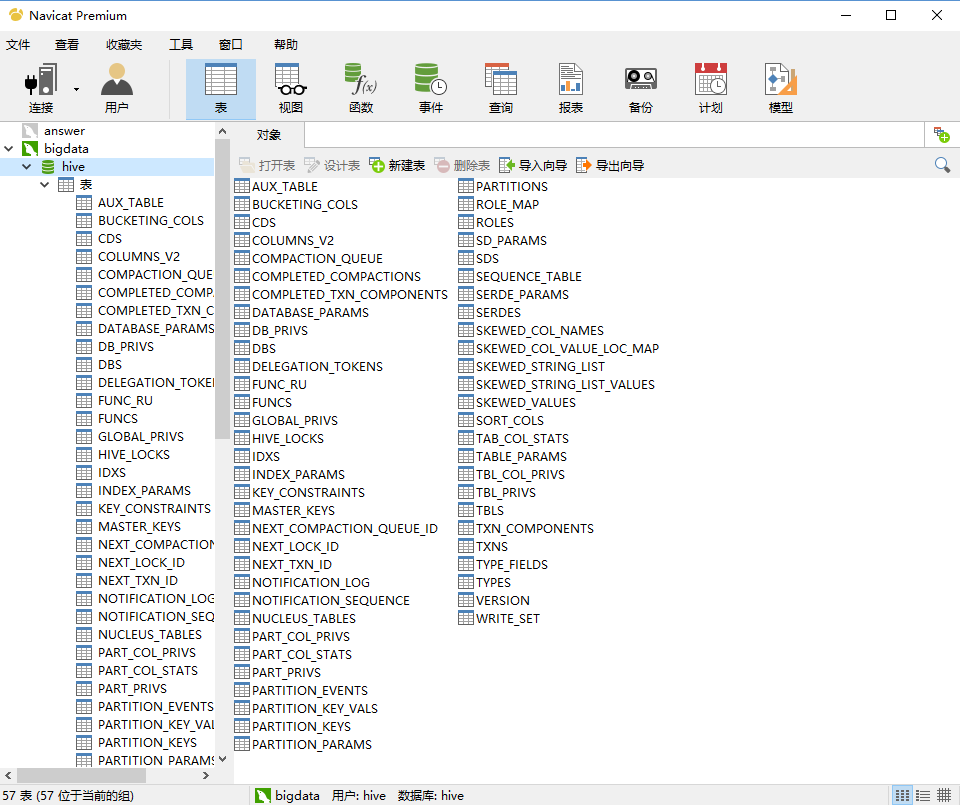
1. 准备 1.1 apache-hive-2.1.0-bin.tar.gz包 1.2 mysql中创建新的数据库hive 2. 解压 3. 修改环境变量 vim /etc/profile export HIVE_HOME=xxxx export PATH=$PATH:$HIVE_HOME/bin 然后刷新配置source /etc/profile 4. 修改配置文件 首先需要下载并把mysql-connector-java-5.1.17.jar拷贝到hive/lib目录下,作为驱动要用到。 配置文件都在hive/conf目录下 4.1 hive-site.xml 更名:mv hive-default.xml.template hive-site.xml 然后搜索关键字,把下面这部分做修改 <property> <name>javax.jdo.option.ConnectionURL</name> <value>jdbc:mysql://192.168.27.166:3306/hive?createDatabaseIfNotExist=true</value> </property> <property> <name>javax.jdo.option.ConnectionDriverName</name> <value>com.mysql.jdbc.Driver</value> </property> <property> <name>javax.jdo.option.ConnectionUserName</name> <value>hive</value> </property> <property> <name>javax.jdo.option.ConnectionPassword</name> <value>hive</value> </property> <property> <name>hive.metastore.warehouse.dir</name> <value>/user/hive/warehouse</value> </property> 然后把全文中的${system:java.io.tmpdir} 替换成/home/fantj/hive/fantj ${system:user.name}替换成 root 最后,创建该目录 mkdir -p /home/fantj/hive/fantj/root 4.2 hive-env.sh 更名:mv hive-env.sh.template hive-env.sh 添加环境参数: export JAVA_HOME=/soft/jdk export HIVE_HOME=/soft/hive export HADOOP_HOME=/soft/hadoop 5. 创建数据库表到mysql里面 schematool -initSchema -dbType mysql [root@s166 conf]# schematool -initSchema -dbType mysql which: no hbase in (/usr/local/sbin:/usr/local/bin:/usr/sbin:/usr/bin:/home/fantj/jdk/bin:/home/fantj/hadoop/bin:/usr/local/sbin:/usr/local/bin:/usr/sbin:/usr/bin:/home/fantj/jdk/bin:/home/fantj/hadoop/sbin:/root/bin:/home/fantj/jdk/bin:/home/fantj/hadoop/bin:/usr/local/sbin:/usr/local/bin:/usr/sbin:/usr/bin:/home/fantj/jdk/bin:/home/fantj/hadoop/bin:/usr/local/sbin:/usr/local/bin:/usr/sbin:/usr/bin:/home/fantj/jdk/bin:/home/fantj/hadoop/sbin:/root/bin:/home/fantj/jdk/bin:/home/fantj/hadoop/sbin:/home/fantj/hive/bin) SLF4J: Class path contains multiple SLF4J bindings. SLF4J: Found binding in [jar:file:/home/fantj/download/apache-hive-2.1.0-bin/lib/log4j-slf4j-impl-2.4.1.jar!/org/slf4j/impl/StaticLoggerBinder.class] SLF4J: Found binding in [jar:file:/home/fantj/download/hadoop-2.7.0/share/hadoop/common/lib/slf4j-log4j12-1.7.10.jar!/org/slf4j/impl/StaticLoggerBinder.class] SLF4J: See http://www.slf4j.org/codes.html#multiple_bindings for an explanation. SLF4J: Actual binding is of type [org.apache.logging.slf4j.Log4jLoggerFactory] Metastore connection URL: jdbc:mysql://192.168.27.166:3306/hive?createDatabaseIfNotExist=true Metastore Connection Driver : com.mysql.jdbc.Driver Metastore connection User: hive Starting metastore schema initialization to 2.1.0 Initialization script hive-schema-2.1.0.mysql.sql Initialization script completed schemaTool completed 运行成功后查看hive数据库: 6. 测试hive环境 注意:注意hadoop要启动 6.1 输入hive命令 [root@s166 bin]# hive which: no hbase in (/usr/local/sbin:/usr/local/bin:/usr/sbin:/usr/bin:/home/fantj/jdk/bin:/home/fantj/hadoop/bin:/usr/local/sbin:/usr/local/bin:/usr/sbin:/usr/bin:/home/fantj/jdk/bin:/home/fantj/hadoop/sbin:/root/bin:/home/fantj/jdk/bin:/home/fantj/hadoop/bin:/usr/local/sbin:/usr/local/bin:/usr/sbin:/usr/bin:/home/fantj/jdk/bin:/home/fantj/hadoop/bin:/usr/local/sbin:/usr/local/bin:/usr/sbin:/usr/bin:/home/fantj/jdk/bin:/home/fantj/hadoop/sbin:/root/bin:/home/fantj/jdk/bin:/home/fantj/hadoop/sbin:/home/fantj/hive/bin) SLF4J: Class path contains multiple SLF4J bindings. SLF4J: Found binding in [jar:file:/home/fantj/download/apache-hive-2.1.0-bin/lib/log4j-slf4j-impl-2.4.1.jar!/org/slf4j/impl/StaticLoggerBinder.class] SLF4J: Found binding in [jar:file:/home/fantj/download/hadoop-2.7.0/share/hadoop/common/lib/slf4j-log4j12-1.7.10.jar!/org/slf4j/impl/StaticLoggerBinder.class] SLF4J: See http://www.slf4j.org/codes.html#multiple_bindings for an explanation. SLF4J: Actual binding is of type [org.apache.logging.slf4j.Log4jLoggerFactory] Logging initialized using configuration in jar:file:/home/fantj/download/apache-hive-2.1.0-bin/lib/hive-common-2.1.0.jar!/hive-log4j2.properties Async: true Hive-on-MR is deprecated in Hive 2 and may not be available in the future versions. Consider using a different execution engine (i.e. spark, tez) or using Hive 1.X releases. hive> 6.2 sql语言测试 hive> show databases; OK default mydb2 Time taken: 1.55 seconds, Fetched: 2 row(s) hive> create database fantj; OK Time taken: 0.801 seconds hive> use fantj; OK Time taken: 0.035 seconds hive> create table test(id int,name string,age int); OK Time taken: 0.833 seconds hive> insert into test values(1,'fantj',18); WARNING: Hive-on-MR is deprecated in Hive 2 and may not be available in the future versions. Consider using a different execution engine (i.e. spark, tez) or using Hive 1.X releases. Query ID = root_20180727115808_c39d95f3-9bbd-4a60-b627-d5f0016ff6c3 Total jobs = 3 Launching Job 1 out of 3 Number of reduce tasks is set to 0 since there's no reduce operator Job running in-process (local Hadoop) 07-27 11:58:19,477 Stage-1 map = 0%, reduce = 0% 07-27 11:58:20,487 Stage-1 map = 100%, reduce = 0% Ended Job = job_local1311590634_0001 Stage-4 is selected by condition resolver. Stage-3 is filtered out by condition resolver. Stage-5 is filtered out by condition resolver. Moving data to directory hdfs://s166/user/hive/warehouse/fantj.db/test/.hive-staging_hive_07-27_11-58-08_359_7490410987943534015-1/-ext-10000 Loading data to table fantj.test [Warning] could not update stats. MapReduce Jobs Launched: Stage-Stage-1: HDFS Read: 11 HDFS Write: 88 SUCCESS Total MapReduce CPU Time Spent: 0 msec OK Time taken: 39.138 seconds hive> select * from test; OK 1 fantj 18 Time taken: 3.26 seconds, Fetched: 1 row(s)