React 入门儿
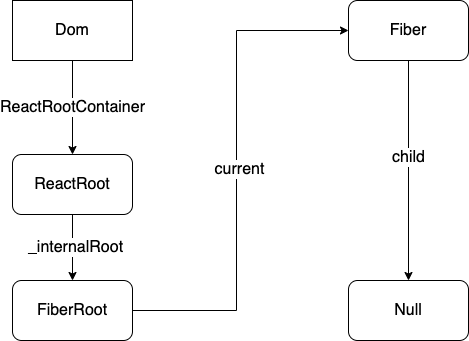
共计 10137 字,阅读时长约 25 分钟 谁都没有看见过风,更不用说你和我了。但是当纸币在飘的时候,我们知道那是风在数钱。 React 影响着我们工作的方方面面,我们每天都在使用它,只窥其表却难以窥其里。正所谓看不如写,本篇文章的目的就是从原理层面探究 React 是如何工作的。 工具— 在写文章之前,为了方便理解,我准备了一个懒人调试仓库 simple_react[1] ,这个仓库将 benchmark 用例(只有两个 ^ ^)和 React 源码共同放在 src 文件夹中,通过 snowpack 进行热更新,可以直接在源码中加入 log 和 debuger 进行调试。当然这里的“源码”并不是真的源码,因为 React 源码中充斥着巨量的 dev 代码和不明确的功能函数,所以我对源码进行了整理,用 typescript 对类型进行了规范,删除了大量和核心流程无关的代码(当然也误删了一些有关的 ^ ^)。 如果你只是希望了解 React 的运行流程而不是写一个可以用的框架的话,那么这个仓库完全可以满足你学习的需要。当然,这个仓库基于 React16.8 ,虽然这个版本并不包括当前的航道模型 Lane 等新特性,但是是我个人认为比较稳定且更适合阅读的一个版本。 (如果希望调试完整的源码,也可以参考 拉取源码[2] 通过 yarn link 来进行 debug) 文章结构— fiber 架构设计及首次渲染流程 事件委托机制 状态的更新 时间片 在了解 React 是如何工作之前,我们应该确保了解几点有关 React 的基础知识。 Why Framework— 首先,我们需要知道使用框架对于开发的意义是什么。如果我们还处于远古时期使用纯 JS 的阶段,每次数据的改变都会引发组件的展示状态改变,因此我们需要去手动的操作 DOM 。如果在某一秒内,数据异步的连续改变了几十次,根据展示逻辑我们也需要连续对 DOM 进行几十次修改。频繁的 DOM 操作对网页性能的影响是很大的,当然,创建 DOM 元素和修改 DOM 元素的属性都不过分消耗性能,主要在于每次将新的 DOM 插入 document 都会导致浏览器重新计算布局属性,以及各个视图层、合并、渲染。所以,这样的代码性能是十分低下的。 可以试想这样一个场景。对于一个前端列表组件而言,当存在 3 条数据的时候展示 3 条,当存在 5 条数据的时候展示 5 条。也就是说 UI 的呈现在某种程度上必然会和数据存在某种逻辑关系。如果 JS 能够感知到关键数据的改变,使用一种高效的方式将 DOM 改写成与数据相对应的状态。那么于开发者而言,就可以专注于业务逻辑和数据的改变,工作效率也会大幅提高。 所以, 框架 最核心的功能之一就是 高效地 达成 UI 层和数据层的统一。 React 哲学— React 本身并不是框架, React 只是一个 JavaScript 库,他的作用是通过组件构建用户界面,属于 MVC 应用中的 View 视图层。React 通过 props 和 state 来简化关键数据的存储,对于一个 react 组件函数而言,在 1 秒内可能被执行很多次。而每一次被执行,数据被注入 JSX , JSX 并不是真实的 DOM ,在 React 中会被转换成 React.createElement(type, props, children) 函数,执行的结果就是 ReactElement 元素 ,也即是 虚拟 DOM ,用来描述在浏览器的某一帧中,组件应该被呈现为什么样子。 Virtual Dom— VirtualDom 并非 React 专属,就像 redux 也可以在非 React 环境下使用一样,它们只是一种设计的思路。 事实上, React 在使用 fiber 架构之前的 Virtual Dom 和 diff 过程要相对直观一些。但是在引入了 fiber 架构之后整个流程变得冗长,如果单纯想了解 VirtualDom 和 diff 过程的原理也可以通过 simple-virtual-dom[3] 这个仓库来学习。 VirtualDom 的本质是利用 JS 变量 对真实 DOM 进行抽象,既然每一次操作 DOM 都可能触发浏览器的重排消耗性能,那么就可以使用 VirtualDom 来缓存当前组件状态,对用户交互和数据的变动进行批次处理,直接计算出每一帧页面应该呈现的最终状态,而这个状态是以 JS 变量 的形式存在于内存中的。所以通过 VirtualDom 既能够保证用户看到的每一帧都响应了数据的变化,又能节约性能保证浏览器不出现卡顿。 第一次渲染 First Render 首先我们应该注意到 React(浏览器环境) 代码的入口 render 函数 ReactDOM.render(<App />, domContainer) 这个 render 过程中, React 需要做到的是根据用户创造的 JSX 语法,构建出一个虚拟的树结构(也就是 ReactElement 和 Fiber )来表示用户 期望中 页面中的元素结构。当然对于这个过程相对并不复杂(误),因为此时的 document 内还是一片虚无。就思路上而言,只需要根据虚拟 DOM 节点生成真实的 DOM 元素然后插入 document ,第一次渲染就算圆满完成。 createReactElement— 通常我们会通过 Babel 将 JSX 转换为一个 JS 执行函数。例如我们在 React 环境下用 JSX 中写了一个标题组件 <h1 className='title'><div>Class Component</div></h1> 那么这个组件被 Babel 转换之后将会是 React.createElement('h1', { className: 'title' }, [React.createElement('div', null, [ 'Class Component' ]]) 传统编译讲究一个 JSON 化,当然 JSX 和 React 也没有什么关系, JSX 只是 React 推荐的一种拓展语法。当然你也可以不用 JSX 直接使用 React.createElement 函数,但是对比上面的两种写法你就也能知道,使用纯 JS 的心智成本会比简明可见的 JSX 高多少。我们可以看出, React.createElement 需要接收 3 个参数,分别是 DOM 元素的标签名,属性对象以及一个子元素数组,返回值则是一个 ReactElement 对象。 事实上, JSX 编译后的 json 结构本身就是一个对象,即使不执行 React.createElement 函数也已经初步可以使用了。那么在这个函数中我们做了什么呢。 一个 ReactElement 元素主要有 5 个关键属性,我们都知道要构建成一个页面需要通过 html 描述元素的类型和结构,通过 style 和 class 去描述元素的样式呈现,通过 js 和绑定事件来触发交互事件和页面更新。 所以最重要的是第一个属性,元素类型 type 。如果这个元素是一个纯 html 标签元素,例如 div ,那么 type 将会是字符串 div ,如果是一个 React 组件,例如 function App() {return ( <div>Hello, World!</div>)} 那么 type 的值将会指向 App 函数,当然 Class 组件 也一样(众所周知 ES6 的 Class 语法本身就是函数以及原型链构成的语法糖) 第二个属性是 props ,我们在 html 标签中写入的大部分属性都会被收集在 props 中,例如 id 、 className 、 style 、 children 、点击事件等等。 第三个第四个属性分别是 key 和 ref ,其中 key 在数组的处理和 diff 过程中有重要作用,而 ref 则是引用标识,在这里就先不做过多介绍。 最后一个属性是 $$typeof ,这个属性会指向 Symbol(React.element) 。作为 React 元素的唯一标识的同时,这个标签也承担了安全方面的功能。我们已经知道了所谓的 ReactElement 其实就是一个 JS 对象。那么如果有用户恶意的向服务端数据库中存入了某个有侵入性功能的 伪 React 对象,在实际渲染过程中被当做页面元素渲染,那么将有可能威胁到用户的安全。而 Symbol 是无法在数据库中被存储的,换句话说, React 所渲染的所有元素,都必须是由 JSX 编译的拥有 Symbol 标识的元素。(如果在低版本不支持 Symbol 的浏览器中,将会使用字符串替代,也就没有这层安排保护了) ok,接下来回到 render 函数。在这个函数中到底发生了什么呢,简单来说就是创建 Root 结构。 enqueueUpdate 从设计者的角度,根据 单一职责原则 和 开闭口原则 需要有与函数体解耦的数据结构来告诉 React 应该怎么操作 fiber 。而不是初次渲染写一套逻辑,第二次渲染写一套逻辑。因此, fiber 上有了更新队列 UpdateQueue 和 更新链表 Update 结构 如果查看一下相关的定义就会发现,更新队列 updateQueue 是多个更新组成的链表结构,而 update 的更新也是一个链表,至于为什么是这样设计,试想在一个 Class Component 的更新函数中连续执行了 3 次 setState ,与其将其作为 3 个更新挂载到组件上,不如提供一种更小粒度的控制方式。一句话概括就是, setState 级别的小更新合并成一个状态更新,组件中的多个状态更新在组件的更新队列中合并,就能够计算出组件的新状态 newState。 对于初次渲染而言,只需要在第一个 fiber 上,挂载一个 update 标识这是一个初次渲染的 fiber 即可。 // 更新根节点export function ScheduleRootUpdate ( current: Fiber, element: ReactElement, expirationTime: number, suspenseConfig: SuspenseConfig | null, callback?: Function) { // 创建一个update实例 const update = createUpdate(expirationTime, suspenseConfig) // 对于作用在根节点上的 react element update.payload = { element } // 将 update 挂载到根 fiber 的 updateQueue 属性上 enqueueUpdate( current, update ) ScheduleWork( current, expirationTime )} Fiber— 作为整个 Fiber 架构 中最核心的设计, Fiber 被设计成了链表结构。 child 指向当前节点的第一个子元素 return 指向当前节点的父元素 sibling 指向同级的下一个兄弟节点 如果是 React16 之前的树状结构,就需要通过 DFS 深度遍历来查找每一个节点。而现在只需要将指针按照 child → sibling → return 的优先级移动,就可以处理所有的节点 这样设计还有一个好处就是在 React 工作的时候只需要使用一个全局变量作为指针在链表中不断移动,如果出现用户输入或其他优先级更高的任务就可以 暂停 当前工作,其他任务结束后只需要根据指针的位置继续向下移动就可以继续之前的工作。指针移动的规律可以归纳为 自顶向下,从左到右 。 康康 fiber 的基本结构 其中 tag fiber 的类型 ,例如函数组件,类组件,原生组件, Portal 等。 type React 元素 类型 详见上方 createElement。 alternate 代表双向缓冲对象(看后面)。 effectTag 代表这个 fiber 在下一次渲染中将会被如何处理。例如只需要插入,那么这个值中会包含 Placement ,如果需要被删除,那么将会包含 Deletion 。 expirationTime 过期时间,过期时间越靠前,就代表这个 fiber 的优先级越高。 firstEffect 和 lastEffect 的类型都和 fiber 一样,同样是链表结构,通过 nextEffect 来连接。代表着即将更新的 fiber 状态 memorizeState 和 memorizeProps 代表在上次渲染中组件的 props 和 state 。如果成功更新,那么新的 pendingProps 和 newState 将会替代这两个变量的值 ref 引用标识 stateNode 代表这个 fiber 节点对应的真实状态 对于原生组件,这个值指向一个 dom 节点(虽然已经被创建了,但不代表就被插入了 document ) 对于类组件,这个值指向对应的类实例 对于函数组件,这个值指向 Null 对于 RootFiber,这个值指向 FiberRoot (如图) 接下来是初次渲染的几个核心步骤,因为是初次渲染,核心任务就是将首屏元素渲染到页面上,所以这个过程将会是同步的。 PrepareFreshStack— 因为笔者是土货没学过英语,百度了下发现是 准备干净的栈 的意思。结合了下流程,可以看出这一步的作用是在真正工作之前做一些准备,例如初始化一些变量,放弃之前未完成的工作,以及最重要的—— 创建双向缓冲变量 WorkInProgress let workInProgress: Fiber | null = null...export function prepareFreshStack ( root: FiberRoot, expirationTime: number) { // 重置根节点的finishWork root.finishedWork = null root.finishedExpirationTime = ExpirationTime.NoWork... if (workInProgress !== null) { // 如果已经存在了WIP,说明存在未完成的任务 // 向上找到它的root fiber let interruptedWork = workInProgress.return while (interruptedWork !== null) { // unwindInterruptedWork // 抹去未完成的任务 unwindInterruptedWork(interruptedWork) interruptedWork = interruptedWork.return } } workInProgressRoot = root // 创建双向缓冲对象 workInProgress = createWorkInProgress(root.current, null, expirationTime) renderExpirationTime = expirationTime workInProgressRootExitStatus = RootExitStatus.RootImcomplete} 双向缓冲变量 WorkInProgress 这里简称 WIP 好了,与之对应的是 current , current 代表的是当前页面上呈现的组件对应的 fiber 节点,你可以将其类比为 git 中的 master 分支,它代表的是已经对外的状态。而 WIP 则代表了一个 pending 的状态,也就是下一帧屏幕将要呈现的状态,就像是从 master 拉出来的一个 feature 分支,我们可以在这个分支上做任意的更改。最终协调完毕,将 WIP 的结果渲染到了页面上,按照页面内容对应 current 的原则, current 将会指向 WIP ,也就是说, WIP 取代了之前的 current ( git 的 master 分支)。 在这之前 current 和 WIP 的 alternate 字段分别指向彼此。 那么 WIP 是如何被创造出来的呢: // 根据已有 fiber 生成一个 workInProgress 节点export function createWorkInProgress ( current: Fiber, pendingProps: any, expirationTime): Fiber { let workInProgress = current.alternate if (workInProgress === null) { // 如果当前fiber没有alternate // tip: 这里使用的是“双缓冲池技术”,因为我们最多需要一棵树的两个实例。 // tip: 我们可以自由的复用未使用的节点 // tip: 这是异步创建的,避免使用额外的对象 // tip: 这同样支持我们释放额外的内存(如果需要的话 workInProgress = createFiber( current.tag, pendingProps, current.key, current.mode ) workInProgress.elementType = current.elementType workInProgress.type = current.type workInProgress.stateNode = current.stateNode workInProgress.alternate = current current.alternate = workInProgress } else { // 我们已经有了一个 WIP workInProgress.pendingProps = pendingProps // 重置 effectTag workInProgress.effectTag = EffectTag.NoEffect // 重置 effect 链表 workInProgress.nextEffect = null workInProgress.firstEffect = null workInProgress.lastEffect = null } 可以看出 WIP 其实就是继承了 current 的核心属性,但是去除了一些副作用和工作记录的 干净 的 fiber。 工作循环 WorkLoop 在工作循环中,将会执行一个 while 语句,每执行一次循环,都会完成对一个 fiber 节点的处理。在 workLoop 模块中有一个指针 workInProgress 指向当前正在处理的 fiber ,它会不断向链表的尾部移动,直到指向的值为 null ,就停止这部分工作, workLoop 的部分也就结束了。 每处理一个 fiber 节点都是一个工作单元,结束了一个工作单元后 React 会进行一次判断,是否需要暂停工作检查有没有更高优先级的用户交互进来。 function workLoopConcurrent() { // 执行工作直到 Scheduler 要求我们 yield while (workInProgress !== null && !shouldYield()) { workInProgress = performUnitOfWork(workInProgress); }} 跳出条件只有: 所有 fiber 都已经被遍历结束了 当前线程的使用权移交给了外部任务队列 但是我们现在讨论的是第一次渲染,触屏渲染的优先级高于一切,所以并不存在第二个限制条件。 function workLoopSync () { // 只要没有完成reconcile就一直执行 while(workInProgress !== null) { workInProgress = performUnitOfWork(workInProgress as Fiber) }} PerformUnitOfWork & beginWork— 单元工作 performUnitOfWork 的主要工作是通过 beginWork 来完成。beginWork 的核心工作是通过判断 fiber.tag 判断当前的 fiber 代表的是一个类组件、函数组件还是原生组件,并且针对它们做一些特殊处理。这一切都是为了最终步骤:操作真实 DOM 做准备,即通过改变 fiber.effectTag 和 pendingProps 告诉后面的 commitRoot 函数应该对真实 DOM 进行怎样的改写。 switch (workInProgress.tag) { // RootFiber case WorkTag.HostRoot: return updateHostRoot(current as Fiber, workInProgress, renderExpirationTime) // class 组件 case WorkTag.ClassComponent: { const Component = workInProgress.type const resolvedProps = workInProgress.pendingProps return updateClassComponent( current, workInProgress, Component, resolvedProps, renderExpirationTime ) } ...} 此处就以 Class 组件为例,查看一下具体是如何构建的。 之前有提过,对于类组件而言, fiber.stateNode 会指向这个类之前构造过的实例。 // 更新Class组件function updateClassComponent ( current: Fiber | null, workInProgress: Fiber, Component: any, nextProps, renderExpiration: number) { // 如果这个 class 组件被渲染过,stateNode 会指向类实例 // 否则 stateNode 指向 null const instance = workInProgress.stateNodeif (instance === null) {// 如果没有构造过类实例...} else {// 如果构造过类实例 ...}// 完成 render 的构建,将得到的 react 元素和已有元素进行调和const nextUnitOfWork = finishClassComponent( current, workInProgress, Component, shouldUpdate, false, renderExpiration)return nextUnitOfWork 如果这个 fiber 并没有构建过类实例的话,就会调用它的构建函数,并且将更新器 updater 挂载到这个类实例上。(处理 setState 逻辑用的,事实上所有的类组件实例上的更新器都是同一个对象,后面会提到) if (instance === null) {// 这个 class 第一次渲染 if (current !== null) { // 删除 current 和 WIP 之间的指针 current.alternate = null workInProgress.alternate = null // 插入操作 workInProgress.effectTag |= EffectTag.Placement } // 调用构造函数,创造新的类实例 // 给予类实例的某个指针指向更新器 updater constructClassInstance( workInProgress, Component, nextProps, renderExpiration ) // 将属性挂载到类实例上,并且触发多个生命周期 mountClassInstance( workInProgress, Component, nextProps, renderExpiration )} 如果实例已经存在,就需要对比新旧 props 和 state ,判断是否需要更新组件(万一写了 shouldComponentUpdate 呢)。并且触发一些更新时的生命周期钩子,例如 getDerivedStateFromProps 等等。 else {// 已经 render 过了,更新 shouldUpdate = updateClassInstance( current, workInProgress, Component, nextProps, renderExpiration )} 属性计算完毕后,调用类的 render 函数获取最终的 ReactElement ,打上 Performed 标记,代表这个类在本次渲染中已经执行过了。 // 完成Class组件的构建function finishClassComponent ( current: Fiber | null, workInProgress: Fiber, Component: any, shouldUpdate: boolean, hasContext: boolean, renderExpiration: number) {// 错误 边界捕获 const didCaptureError = false if (!shouldUpdate && !didCaptureError) { if (hasContext) { // 抛出问题 return bailoutOnAlreadyFinishedWork( current, workInProgress, renderExpiration ) } } // 实例 const instance = workInProgress.stateNode let nextChildren nextChildren = instance.render() // 标记为已完成 workInProgress.effectTag |= EffectTag.PerformedWork // 开始调和 reconcile reconcileChildren( current, workInProgress, nextChildren, renderExpiration ) return workInProgress.child} 调和过程 如果还记得之前的内容的话,我们在一切工作开始之前只是构建了第一个根节点 fiberRoot 和第一个无意义的空 root ,而在单个元素的调和过程 reconcileSingleElement 中会根据之前 render 得到的 ReactElement 元素构建出对应的 fiber 并且插入到整个 fiber 链表中去。 并且通过 placeSingleChild 给这个 fiber 的 effectTag 打上 Placement 的标签,拥有 Placement 标记后这里的工作就完成了,可以将 fiber 指针移动到下一个节点了。 // 处理对象类型(单个节点)const isObjectType = isObject(newChild) && !isNull(newChild)// 对象if (isObjectType) { switch (newChild.$$typeof) { case REACT_ELEMENT_TYPE: { // 在递归调和结束,向上回溯的过程中 // 给这个 fiber 节点打上 Placement 的 Tag return placeSingleChild( reconcileSingleElement( returnFiber, currentFirstChild, newChild, expirationTime ) ) } // 还有 Fragment 等类型 }}// 如果这时子元素是字符串或者数字,按照文字节点来处理// 值得一提的是,如果元素的子元素是纯文字节点// 那么这些文字不会被转换成 fiber// 而是作为父元素的 prop 来处理if (isString(newChild) || isNumber(newChild)) { return placeSingleChild( reconcileSingleTextNode( returnFiber, currentFirstChild, '' + newChild, expirationTime ) )}// 数组if (isArray(newChild)) { return reconcileChildrenArray( returnFiber, currentFirstChild, newChild, expirationTime )} 文章篇幅有限,对于函数组件和原生组件这里就不做过多介绍。假设我们已经完成了对于所有 WIP 的构建和调和过程,对于第一次构建而言,我们需要插入大量的 DOM 结构,但是到现在我们得到的仍然是一些虚拟的 fiber 节点。 所以,在最后一次单元工作 performUnitOfWork 中将会执行 completeWork ,在此之前,我们的单元工作是一步步向尾部的 fiber 节点移动。而在 completeWork 中,我们的工作将是自底向上,根据 fiber 生成真实的 dom 结构,并且在向上的过程中将这些结构拼接成一棵 dom 树。 export function completeWork ( current: Fiber | null, workInProgress: Fiber, renderExpirationTime: number): Fiber | null { // 最新的 props const newProps = workInProgress.pendingProps switch (workInProgress.tag) { ... case WorkTag.HostComponent: { // pop 该 fiber 对应的上下文 popHostContext(workInProgress) // 获取 stack 中的当前 dom const rootContainerInstance = getRootHostContainer() // 原生组件类型 const type = workInProgress.type if (current !== null && workInProgress.stateNode !== null) { // 如果不是初次渲染了,可以尝试对已有的 dom 节点进行更新复用 updateHostComponent( current, workInProgress, type as string, newProps, rootContainerInstance ) } else { if (!newProps) { throw new Error('如果没有newProps,是不合法的') } const currentHostContext = getHostContext() // 创建原生组件 let instance = createInstance( type as string, newProps, rootContainerInstance, currentHostContext, workInProgress ) // 将之前所有已经生成的子 dom 元素装载到 instance 实例中 // 逐步拼接成一颗 dom 树 appendAllChildren(instance, workInProgress, false, false) // fiber 的 stateNode 指向这个 dom 结构 workInProgress.stateNode = instance // feat: 这个函数真的藏得很隐蔽,我不知道这些人是怎么能注释都不提一句的呢→_→ // finalizeInitialChildren 作用是将props中的属性挂载到真实的dom元素中去,结果作为一个判断条件被调用 // 返回一个bool值,代表是否需要auto focus(input, textarea...) if (finalizeInitialChildren(instance, type as string, newProps, rootContainerInstance, currentHostContext)) { markUpdate(workInProgress) } } } } return null} 构建完毕后,我们得到了形如下图,虚拟 dom 和 真实 dom,父元素和子元素之间的关系结构 截止到当前,调和 reconcile 工作已经完成,我们已经进入了准备提交到文档 ready to commit 的状态。其实从进入 completeUnitOfWork 构建开始,后面的过程就已经和时间片,任务调度系统没有关系了,此时一切事件、交互、异步任务都将屏气凝神,聆听接下来 dom 的改变。 // 提交根实例(dom)到浏览器真实容器root中function commitRootImpl ( root: FiberRoot, renderPriorityLevel: ReactPriorityLevel) {... // 因为这次是整个组件树被挂载,所以根 fiber 节点将会作为 fiberRoot 的 finishedWorkconst finishedWork = root.finishedWork ... // effect 链表,即那些将要被插入的原生组件 fiber let firstEffect = finishedWork.firstEffect...let nextEffect = firstEffectwhile (nextEffect !== null) { try { commitMutationEffects(root, renderPriorityLevel) } catch(err) { throw new Error(err) } }} 在 commitMutationEffects 函数之前其实对 effect 链表还进行了另外两次遍历,分别是一些生命周期的处理,例如 getSnapshotBeforeUpdate ,以及一些变量的准备。 // 真正改写文档中dom的函数// 提交fiber effectfunction commitMutationEffects ( root: FiberRoot, renderPriorityLevel: number) { // @question 这个 while 语句似乎是多余的 = = while (nextEffect !== null) { // 当前fiber的tag const effectTag = nextEffect.effectTag // 下方的switch语句只处理 Placement,Deletion 和 Update const primaryEffectTag = effectTag & ( EffectTag.Placement | EffectTag.Update | EffectTag.Deletion | EffectTag.Hydrating ) switch (primaryEffectTag) { case EffectTag.Placement: { // 执行插入 commitPlacement(nextEffect) // effectTag 完成实名制后,要将对应的 effect 去除 nextEffect.effectTag &= ~EffectTag.Placement } case EffectTag.Update: { // 更新现有的 dom 组件 const current = nextEffect.alternate commitWork(current, nextEffect) } } nextEffect = nextEffect.nextEffect }} 截至此刻,第一次渲染的内容已经在屏幕上出现。也就是说,真实 DOM 中的内容不再对应此时的 current fiber ,而是对应着我们操作的 workInProgress fiber ,即函数中的 finishedWork 变量。 // 在 commit Mutation 阶段之后,workInProgress tree 已经是真实 Dom 对应的树了// 所以之前的 tree 仍然是 componentWillUnmount 阶段的状态// 所以此时, workInProgress 代替了 current 成为了新的 currentroot.current = finishedWork 一次点击事件 如果你是一个经常使用 React 的打工人,就会发现 React 中的 event 是“阅后即焚的”。假设这样一段代码: import React, { MouseEvent } from 'react'function TestPersist () {const handleClick = ( event: MouseEvent<HTMLElement, globalThis.MouseEvent>) => { setTimeout(() => console.log('event', event)) }return ( <div onClick={handleClick}>O2</div>)} 如果我们需要异步的获取这次点击事件在屏幕中的位置并且做出相应处理,那么在 setTimeout 中能否达到目的呢。 答案是否定的,因为 React 使用了 事件委托 机制,我们拿到的 event 对象并不是原生的 nativeEvent ,而是被 React 挟持处理过的合成事件 SyntheticEvent ,这一点从 ts 类型中也可以看出, 我们使用的 MouseEvent 是从 React 包中引入的而不是全局的默认事件类型。在 handleClick 函数同步执行完毕的一瞬间,这个 event 就已经在 React 事件池中被销毁了,我们可以跑这个组件康一康。 当然 React 也提供了使用异步事件对象的解决方案,它提供了一个 persist 函数,可以让事件不再进入事件池。(在 React17 中为了解决某些 issue ,已经重写了合成事件机制,事件不再由 document 来代理,官网的说法是合成事件[4]不再由事件池管理,也没有了 persist 函数) 那,为什么要用事件委托呢。还是回到那个经典的命题,渲染 2 个 div 当然横着写竖着写都没关系,如果是 1000 个组件 2000 个点击事件呢。事件委托的收益就是: 简化了事件注册的流程,优化性能。 dom 元素不断在更新,你无法保证下一帧的 div 和上一帧中的 div 在内存中的地址是同一个。既然不是同一个,事件又要全部重新绑定,烦死了(指浏览器)。 ok,言归正传。我们点击事件到底发生了什么呢。首先是在 React 的 render 函数执行之前,在 JS 脚本中就已经自动执行了事件的注入。 事件注入— 事件注入的过程稍微有一点复杂,不光模块之间有顺序,数据也做了不少处理,这里不 po 太详细的代码。可能有人会问为啥不直接写死呢,浏览器的事件不也就那么亿点点。就像 Redux 不是专门为 React 服务的一样, React 也不是专门为浏览器服务的。文章开头也说了 React 只是一个 javascipt 库,它也可以服务 native 端、桌面端甚至各种终端。所以根据底层环境的不同动态的注入事件集也是非常合理的做法。 当然注入过程并不重要,我们需要知道的就是 React 安排了每种事件在 JSX 中的写法和原生事件的对应关系(例如 onClick 和 onclick ),以及事件的优先级。 /* ReactDOM环境 */// DOM 环境的事件 pluginconst DOMEventPluginOrder = [ 'ResponderEventPlugin', 'SimpleEventPlugin', 'EnterLeaveEventPlugin', 'ChangeEventPlugin', 'SelectEventPlugin', 'BeforeInputEventPlugin',];// 这个文件被引入的时候自动执行 injectEventPluginOrder// 确定 plugin 被注册的顺序,并不是真正引入EventPluginHub.injectEventPluginOrder(DOMEventPluginOrder)// 真正的注入事件内容EventPluginHub.injectEventPluginByName({ SimpleEventPlugin: SimpleEventPlugin}) 这里以 SimpleEventPlugin 为例,点击事件等我们平时常用的事件都属于这个 plugin。 // 事件元组类型type EventTuple = [ DOMTopLevelEventType, // React 中的事件类型 string, // 浏览器中的事件名称 EventPriority // 事件优先级]const eventTuples: EventTuple[] = [ // 离散的事件 // 离散事件一般指的是在浏览器中连续两次触发间隔最少 33ms 的事件(没有依据,我猜的) // 例如你以光速敲打键盘两次,这两个事件的实际触发时间戳仍然会有间隔 [ DOMTopLevelEventTypes.TOP_BLUR, 'blur', DiscreteEvent ], [ DOMTopLevelEventTypes.TOP_CANCEL, 'cancel', DiscreteEvent ], [ DOMTopLevelEventTypes.TOP_CHANGE, 'change', DiscreteEvent ], [ DOMTopLevelEventTypes.TOP_CLICK, 'click', DiscreteEvent ], [ DOMTopLevelEventTypes.TOP_CLOSE, 'close', DiscreteEvent ], [ DOMTopLevelEventTypes.TOP_CONTEXT_MENU, 'contextMenu', DiscreteEvent ], [ DOMTopLevelEventTypes.TOP_COPY, 'copy', DiscreteEvent ], [ DOMTopLevelEventTypes.TOP_CUT, 'cut', DiscreteEvent ], [ DOMTopLevelEventTypes.TOP_DOUBLE_CLICK, 'doubleClick', DiscreteEvent ], [ DOMTopLevelEventTypes.TOP_AUX_CLICK, 'auxClick', DiscreteEvent ], [ DOMTopLevelEventTypes.TOP_FOCUS, 'focus', DiscreteEvent ], [ DOMTopLevelEventTypes.TOP_INPUT, 'input', DiscreteEvent ],...] 那么,这些事件的监听事件是如何被注册的呢。还记得在调和 Class 组件的时候会计算要向浏览器插入什么样的 dom 元素或是要如何更新 dom 元素。在这个过程中会通过 diffProperty 函数对元素的属性进行 diff 对比,其中通过 ListenTo 来添加监听函数 大家都知道,最终被绑定的监听事件一定是被 React 魔改过,然后绑定在 document 上的。 function trapEventForPluginEventSystem ( element: Document | Element | Node, topLevelType: DOMTopLevelEventType, capture: boolean): void {// 生成一个 listener 监听函数 let listener switch (getEventPriority(topLevelType)) { case DiscreteEvent: { listener = dispatchDiscreteEvent.bind( null, topLevelType, EventSystemFlags.PLUGIN_EVENT_SYSTEM ) break } ... default: { listener = dispatchEvent.bind( null, topLevelType, EventSystemFlags.PLUGIN_EVENT_SYSTEM ) } } // @todo 这里用一个getRawEventName转换了一下 // 这个函数就是 →_→ // const getRawEventName = a => a // 虽然这个函数什么都没有做 // 但是它的名字语义化的说明了这一步 // 目的是得到浏览器环境下addEventListener第一个参数的合法名称 const rawEventName = topLevelType // 将捕获事件listener挂载到根节点 // 这两个部分都是为了为了兼容 IE 封装过的 addEventListener if (capture) { // 注册捕获事件 addEventCaptureListener(element, rawEventName, listener) } else { // 注册冒泡事件 addEventBubbleListener(element, rawEventName, listener) }} 大家应该都知道 addEventListener 的第三个参数是控制监听捕获过程 or 冒泡过程的吧 ok,right now,鼠标点了下页面,页面调用了这个函数。开局就一个 nativeEvent 对象,这个函数要做的第一件事就是知道真正被点的那个组件是谁,其实看了一些源码就知道, React 但凡有什么事儿第一个步骤总是找到需要负责的那个 fiber 。 首先,通过 nativeEvent 获取目标 dom 元素也就是 dom.target const nativeEventTarget = getEventTarget(nativeEvent) export default function getEventTarget(nativeEvent) { // 兼容写法 let target = nativeEvent.target || nativeEvent.srcElement || window // Normalize SVG // @todo return target.nodeType === HtmlNodeType.TEXT_NODE ? target.parentNode : target} 那么如何通过 dom 拿到这个 dom 对应的 fiber 呢,事实上, React 会给这个 dom 元素添加一个属性指向它对应的 fiber 。对于这个做法我是有疑问的,这样的映射关系也可以通过维护一个 WeekMap 对象来实现,操作一个 WeakMap 的性能或许会优于操作一个 DOM 的属性,且后者似乎不太优雅,如果你有更好的想法也欢迎在评论区指出。 每当 completeWork 中为 fiber 构造了新的 dom,都会给这个 dom 一个指针来指向它的 fiber // 随机Keyconst randomKey = Math.random().toString(36).slice(2)// 随机Key对应的当前实例的Keyconst internalInstanceKey = '__reactInternalInstance$' + randomKey// Key 对应 render 之后的 propsconst internalEventHandlersKey = '__reactEventHandlers$' + randomKey// 对应实例const internalContianerInstanceKey = '__reactContainer$' + randomKey// 绑定操作export function precacheFiberNode ( hostInst: object, node: Document | Element | Node): void { node[internalInstanceKey] = hostInst}// 读取操作export function getClosestInstanceFromNode (targetNode) { let targetInst = targetNode[internalInstanceKey] // 如果此时没有Key,直接返回null if (targetInst) { return targetInst }// 省略了一部分代码// 如果这个 dom 上面找不到 internalInstanceKey 这个属性 // 就会向上寻找父节点,直到找到一个拥有 internalInstanceKey 属性的 dom 元素 // 这也是为什么这个函数名要叫做 从 node 获取最近的 (fiber) 实例... return null} 此时我们已经拥有了原生事件的对象,以及触发了事件的 dom 以及对应的 fiber ,就可以从 fiber.memorizedProps 中取到我们绑定的 onClick 事件。这些信息已经足够生成一个 React 合成事件 ReactSyntheticEvent 的实例了。 React 声明了一个全局变量 事件队列 eventQueue ,这个队列用来存储某次更新中所有被触发的事件,我们需要让这个点击事件入队。然后触发。 // 事件队列let eventQueue: ReactSyntheticEvent[] | ReactSyntheticEvent | null = nullexport function runEventsInBatch ( events: ReactSyntheticEvent[] | ReactSyntheticEvent | null) { if (events !== null) { // 存在 events 的话,加入事件队列 // react 自己写的合并数组函数 accumulateInto // 或许是 ES3 时期写的吧 eventQueue = accumulateInto<ReactSyntheticEvent>(eventQueue, events) }const processingEventQueue = eventQueue // 执行完毕之后要清空队列 // 虽然已经这些 event 已经被释放了,但还是会被遍历 eventQueue = null if (!processingEventQueue) return// 将这些事件逐个触发 // forEachAccumulated 是 React 自己实现的 foreach forEachAccumulated(processingEventQueue, executeDispatchesAndReleaseTopLevel)} // 触发一个事件并且立刻将事件释放到事件池中,除非执行了presistentconst executeDispatchesAndRelease = function (event: ReactSyntheticEvent) { if (event) { // 按照次序依次触发和该事件类型绑定的所有 listener executeDispatchesInOrder(event) } // 如果没有执行 persist 持久化 , 立即销毁事件 if (!event.isPersistent()) { (event.constructor as any).release(event) }} 可以看到合成事件的构造函数实例上挂载了一个函数 release ,用来释放事件。我们看一看 SyntheticEvent 的代码,可以发现这里使用了一个事件池的概念 eventPool 。 Object.assign(SyntheticEvent.prototype, {// 模拟原生的 preventDefault 函数 preventDefault: function() { this.defaultPrevented = true; const event = this.nativeEvent; if (!event) { return; } if (event.preventDefault) { event.preventDefault(); } else { event.returnValue = false; } this.isDefaultPrevented = functionThatReturnsTrue; }, // 模拟原生的 stopPropagation stopPropagation: function() { const event = this.nativeEvent; if (!event) { return; } if (event.stopPropagation) { event.stopPropagation(); } else { event.cancelBubble = true; } this.isPropagationStopped = functionThatReturnsTrue; }, /** * 在每次事件循环之后,所有被 dispatch 过的合成事件都会被释放 * 这个函数能够允许一个引用使用事件不会被 GC 回收 */ persist: function() { this.isPersistent = functionThatReturnsTrue; }, /** * 这个 event 是否会被 GC 回收 */ isPersistent: functionThatReturnsFalse, /** * 销毁实例 * 就是将所有的字段都设置为 null */ destructor: function() { const Interface = this.constructor.Interface; for (const propName in Interface) { this[propName] = null; } this.dispatchConfig = null; this._targetInst = null; this.nativeEvent = null; this.isDefaultPrevented = functionThatReturnsFalse; this.isPropagationStopped = functionThatReturnsFalse; this._dispatchListeners = null; this._dispatchInstances = null; },}); React 在构造函数上直接添加了一个事件池属性,其实就是一个数组,这个数组将被全局共用。每当事件被释放的时候,如果线程池的长度还没有超过规定的大小(默认是 10 ),那么这个被销毁后的事件就会被放进事件池 // 为合成事件构造函数添加静态属性// 事件池为所有实例所共用function addEventPoolingTo (EventConstructor) { EventConstructor.eventPool = [] EventConstructor.getPooled = getPooledEvent EventConstructor.release = releasePooledEvent}// 将事件释放// 事件池有容量的话,放进事件池function releasePooledEvent (event) { const EventConstructor = this event.destructor() if (EventConstructor.eventPool.length < EVENT_POOL_SIZE) { EventConstructor.eventPool.push(event) }} 我们都知道单例模式,就是对于一个类在全局最多只会有一个实例。而这种事件池的设计相当于是 n 例模式,每次事件触发完毕之后,实例都要还给构造函数放进事件池,后面的每次触发都将复用这些干净的实例,从而减少内存方面的开销。 // 需要事件实例的时候直接从事件池中取出function getPooledEvent(dispatchConfig, targetInst, nativeEvent, nativeInst) { const EventConstructor = this if (EventConstructor.eventPool.length) { // 从事件池中取出最后一个 const instance = EventConstructor.eventPool.pop() EventConstructor.call( instance, dispatchConfig, targetInst, nativeEvent, nativeInst ) return instance } return new EventConstructor ( dispatchConfig, targetInst, nativeEvent, nativeInst )} 如果在短时间内浏览器事件被频繁触发,那么将出现的现象是,之前事件池中的实例都被取出复用,而后续的合成事件对象就只能被老老实实重新创建,结束的时候通过放弃引用来被 V8 引擎的 GC 回收。 回到之前的事件触发,如果不特地将属性名写成 onClickCapture 的话,那么默认将被触发的就会是冒泡过程。这个过程也是 React 模拟的,就是通过 fiber 逐层向上触发的方式,捕获过程也是同理。 我们都知道正常的事件触发流程是: 事件捕获 处于事件 事件冒泡 处于事件 阶段是一个 try-catch 语句,这样即使发生错误也会处于 React 的错误捕获机制当中。我们真正想要执行的函数实体就是在此被触发: export default function invodeGuardedCallbackImpl< A, B, C, D, E, F, Context>( name: string | null, func: (a: A, b: B, c: C, d: D, e: E, f: F) => void, context?: Context, a?: A, b?: B, c?: C, d?: D, e?: E, f?: F,): void { const funcArgs = Array.prototype.slice.call(arguments, 3) try { func.apply(context, funcArgs) } catch (error) { this.onError(error) }} 类与函数 当我们使用类组件或是函数组件的时候,最终目的都是为了得到一份 JSX 来描述我们的页面。那么其中就存在着一个问题—— React 是如何分辨函数组件和类组件的。 虽然在 ES6 中,我们可以轻易的看出 Class 和 函数的区别,但是别忘了,我们实际使用的往往是 babel 编译后的代码,而类就是函数和原型链构成的语法糖。可能大部分人最直接的想法就是,既然类组件继承了 React.Component ,那么应该可以直接使用类类型判断就就行: App instanceof React.Component 当然, React 采用的做法是在原型链上添加一个标识 Component.prototype.isReactComponent = {} 源码中需要判断是否是类组件的时候,就可以直接读取函数的 isReactComponent 属性时,因为在函数(也是对象)自身找不到时,就会向上游原型链逐级查找,直到到达 Object.prototype 对象为止。 为什么 isReactComponent 是一个对象而不是布尔以及为什么不能用 instanceOf [5] 状态的更新 之前我们已经看懂了 React 的事件委托机制,那么不如在一次点击事件中尝试修改组件的状态来更新我们的页面。 首先康康 setState 是如何工作的,我们知道 this.setState 是 React.Component 类中的方法: /*** @description 更新组件state* @param { object | Function } partialState 下个阶段的状态* @param { ?Function } callback 更新完毕之后的回调*/Component.prototype.setState = function (partialState, callback) { if (!( isObject(partialState) || isFunction(partialState) || isNull )) { console.warn('setState的第一个参数应为对象、函数或null') return } this.updater.enqueueSetState(this, partialState, callback, 'setState')} 看起来核心步骤就是触发挂载在实例上的一个 updater 对象。默认的, updater 会是一个展位的空对象,虽然实现了 enqueueSetState 等方法,但是这些方法内部都是空的。 // 我们初始化这个默认的update,真正的updater会被renderer注入this.updater = updater || ReactNoopUpdateQueue export const ReactNoopUpdateQueue = { /** * 检查组件是否已经挂载 */ isMounted: function (publishInstance) { // 初始化ing的组件就别挂载不挂载了 return false }, /** * 强制更新 */ enqueueForceUpdate: function (publishInstance, callback, callerName) { console.warn('enqueueForceUpdate', publishInstance) }, /** * 直接替换整个state,通常用这个或者setState来更新状态 */ enqueueReplaceState: function ( publishInstance, completeState, callback, callerName ) { console.warn('enqueueReplaceState', publishInstance) }, /** * 修改部分state */ enqueueSetState: function ( publishInstance, partialState, callback, callerName ) { console.warn('enqueueSetState', publishInstance) }} 还记得我们在 render 的过程中,是通过执行 Component.render() 来获得一个类组件的实例,当 React 得到了这个实例之后,就会将实例的 updater 替换成真正的 classComponentUpdater : function adoptClassInstance ( workInProgress: Fiber, instance: any): void { instance.updater = classComponentUpdate ...} 刚刚我们触发了这个对象中的 enqueueSetState 函数,那么可以看看实现: const classComponentUpdate = { isMounted, /** * 触发组件状态的更新 * @param inst ReactElement * @param payload any * @param callback 更新结束之后的回调 */ enqueueSetState( inst: ReactElement, payload: any, callback?: Function ) { // ReactElement -> fiber const fiber = getInstance(inst) // 当前时间 const currentTime = requestCurrentTime() // 获取当前 suspense config const suspenseConfig = requestCurrentSuspenseConfig() // 计算当前 fiber 节点的任务过期时间 const expirationTime = computeExpirationForFiber( currentTime, fiber, suspenseConfig ) // 创建一个 update 实例 const update = createUpdate(expirationTime, suspenseConfig) update.payload = payload // 将 update 装载到 fiber 的 queue 中 enqueueUpdate(fiber, update) // 安排任务 ScheduleWork(fiber, expirationTime) }, ...} 显然,这个函数的作用就是获得类组件对应的 fiber ,更新它在任务调度器中的过期时间(领导给了新工作,自然要定新的 Deadline ),然后就是创建一个新的 update 任务装载到 fiber 的任务队列中。最后通过 ScheduleWork (告诉任务调度器来任务了,赶紧干活) 要求从这个 fiber 开始调和,至于调和和更新的步骤我们在第一次渲染中已经有了大致的了解。 顺带提一提 Hooks 中的 useState 。网络上有挺多讲解 hook 实现的文章已经讲得很全面了,我们只需要搞清楚以下几点问题。 Q1. 函数组件不像类组件一样拥有实例,数据存储在哪里 A1. 任何以 ReactElement 为粒度的组件都需要围绕 fiber ,数据存储在 fiber.memorizedState 上 Q2. useState 的实现 A2. 如果你听过了 useState 那么你就应该听过 useReducer ,如果听过 reducer 就应该知道 redux。首先,useState 的本质就是 useReducer 的语法糖。我们都知道构建一个状态库需要一个 reducer ,useState 就是当 reducer 函数为 a => a 时的特殊情况。 function basicStateReducer<S>(state: S, action: BasicStateAction<S>): S { return typeof action === 'function' ? action(state) : action}function updateState<S>( initialState: (() => S) | S): [ S, Dispatch<BasicStateAction<S>> ] { return updateReducer<S, (() => S) | S, any>(basicStateReducer, initialState)} Q3. 为什么 Hooks 的顺序和个数不允许改变 A3. 每次执行 Hooks 函数需要取出上一次渲染时数据的最终状态,因为结构是链表而不是一个 Map,所以这些最终状态也会是有序的,所以如果个数和次序改变会导致数据的错乱。 时间调度机制— 虽然今年过期时间 expirationTime 机制已经被淘汰了,但是不管是航道模型还是过期时间,本质上都是任务优先级的不同体现形式。 在探究运行机制之前我们需要知道一个问题就是,为什么时间片的性能会优于同步计算的性能。此处借用司徒正美老师文章[6]中的例子。 实验 1,通过 for 循环一次性向 document 中插入 1000 个节点 function randomHexColor(){ return "#" + ("0000"+ (Math.random() * 0x1000000 << 0).toString(16)).substr(-6);}setTimeout(function() { var k = 0; var root = document.getElementById("root"); for(var i = 0; i < 10000; i++){ k += new Date - 0 ; var el = document.createElement("div"); el.innerHTML = k; root.appendChild(el); el.style.cssText = background:${randomHexColor()};height:40px ; }}, 1000); 实验 2,进行 10 次 setTimeout 分批次操作,每次插入 100 个节点 function randomHexColor() { return "#" + ("0000" + (Math.random() * 0x1000000 << 0).toString(16)).substr(-6);}var root = document.getElementById("root");setTimeout(function () { function loop(n) { var k = 0; console.log(n); for (var i = 0; i < 100; i++) { k += new Date - 0; var el = document.createElement("div"); el.innerHTML = k; root.appendChild(el); el.style.cssText = background:${randomHexColor()};height:40px ; } if (n) { setTimeout(function () { loop(n - 1); }, 40); } } loop(100);}, 1000); 相同的结果,第一个实验花费了 1000 ms,而第二个实验仅仅花费了 31.5 ms。 这和 V8 引擎的底层原理有关,我们都知道浏览器是单线程,一次性需要做到 GUI 描绘,事件处理,JS 执行等多个操作时,V8 引擎会优先对代码进行执行,而不会对执行速度进行优化。如果我们稍微给浏览器一些时间,浏览器就能够进行 JIT ,也叫热代码优化。 简单来说, JS 是一种解释型语言,每次执行都需要被编译成字节码才能被运行。但是如果某个函数被多次执行,且参数类型和参数个数始终保持不变。那么这段代码会被识别为 热代码 ,遵循着“万物皆可空间换时间”的原则,这段代码的字节码会被缓存,下次再次运行的时候就会直接被运行而不需要进行耗时的解释操作。也就是 解释器 + 编译器 的模式。 做个比喻来说,我们工作不能一直蛮干,必须要给自己一些时间进行反思和总结,否则工作速度和效率始终是线性的,人也不会有进步。 还记得在 WorkLoop 函数中,每次处理完一个 fiber 都会跳出循环执行一次 shouldYield 函数进行判断,是否应该将执行权交还给浏览器处理用户时间或是渲染。看看这个 shouldYield 函数的代码: // 当前是否应该阻塞 react 的工作function shouldYield (): boolean { // 获取当前的时间点 const currentTime = getCurrentTime() // 检查任务队列中是否有任务需要执行 advanceTimers(currentTime) // 取出任务队列中任务优先级最高的任务 const firstTask = peek(taskQueue) // 以下两种情况需要yield // 1. 当前任务队列中存在任务,且第一个任务的开始时间还没到,且过期时间小于当前任务 // 2. 处于固定的浏览器渲染时间区间 return ( ( currentTask !== null && firstTask !== null && (firstTask as any).startTime <= currentTime && (firstTask as any).expirationTime < currentTask.expirationTime ) // 当前处于时间片的阻塞区间 || shouldYieldToHost() )} 决定一个任务当前是否应该被执行有两个因素。 这个任务是否非执行不可,正所谓一切的不论是不是先问为什么都是耍流氓。如果到期时间还没到,为什么不先把线程空出来留给可能的高优先级任务呢。 如果多个任务都非执行不可,那么任务的优先级是否是当前队列中最高的。 如果一个任务的过期时间已经到了必须执行,那么这个任务就应该处于 待执行队列 taskQueue 中。相反这个任务的过期时间还没到,就可以先放在 延迟列表 中。每一帧结束的时候都会执行 advanceTimer 函数,将一些延迟列表中到期的任务取出,插入待执行队列。 可能是出于最佳实践考虑,待执行队列是一个小根堆结构,而延迟队列是一个有序链表。 回想一下 React 的任务调度要求,当一个新的优先级更高的任务产生,需要能够打断之前的工作并插队。也就是说,React 需要维持一个始终有序的数组数据结构。因此,React 自实现了一个小根堆,但是这个小根堆无需像堆排序的结果一样整体有序,只需要保证每次进行 push 和 pop 操作之后,优先级最高的任务能够到达堆顶。 所以 shouldYield 返回 true 的一个关键条件就是,当前 taskQueue 堆中的堆顶任务的过期时间已经到了,那么就应该暂停工作交出线程使用权。 那么待执行的任务是如何被执行的呢。这里我们需要先了解 MessageChannel[7] 的概念。Message Channel 的实例会拥有两个端口,其中第一个端口为发送信息的端口,第二个端口为接收信息的端口。当接收到信息就可以执行指定的回调函数。 const channel = new MessageChannel()// 发送端const port = channel.port2// 接收端channel.port1.onmessage = performWorkUntilDeadline // 在一定时间内尽可能的处理任务 每当待执行任务队列中有任务的时候,就会通过 Channel 的发送端发送一个空的 message ,当接收端异步地接收到这个信号的时候,就会在一个时间片内尽可能地执行任务。 // 记录任一时间片的结束时刻let deadline = 0// 单位时间切片长度let yieldInterval = 5// 执行任务直到用尽当前时间片空闲时间function performWorkUntilDeadline () { if (scheduledHostCallback !== null) { // 如果有计划任务,那么需要执行 // 当前时间 const currentTime = getCurrentTime() // 在每个时间片之后阻塞(5ms) // deadline 为这一次时间片的结束时间 deadline = currentTime + yieldInterval // 既然能执行这个函数,就代表着还有时间剩余 const hasTimeRemaining = true try { // 将当前阻塞的任务计划执行 const hasMoreWork = scheduledHostCallback( hasTimeRemaining, currentTime ) if (!hasMoreWork) { // 如果没有任务了, 清空数据 isMessageLoopRunning = false scheduledHostCallback = null } else { // 如果还有任务,在当前时间片的结尾发送一个 message event // 接收端接收到的时候就将进入下一个时间片 port.postMessage(null) } } catch (error) { port.postMessage(null) throw(error) } } else { // 压根没有任务,不执行 isMessageLoopRunning = false }} 我们在之前说过,阻塞 WorkLoop 的条件有两个,第一个是任务队列的第一个任务还没到时间,第二个条件就是 shouldYieldToHost 返回 true,也就是处于时间片期间。 // 此时是否是【时间片阻塞】区间export function shouldYieldToHost () { return getCurrentTime() >= deadline} 总结一下,时间调度机制其实就是 fiber 遍历任务 WorkLoop 和调度器中的任务队列争夺线程使用权的过程。不过区别是前者完全是同步的过程,只会在每个 while 的间隙去询问 调度器 :我是否可以继续执行下去。而在调度器拿到线程使用权的每个时间片中,都会尽可能的处理任务队列中的任务。 传统武术讲究点到为止,以上内容,就是这次 React 原理的全部。在文章中我并没有放出大量的代码,只是放出了一些片段用来佐证我对于源码的一些看法和观点,文中的流程只是一个循序思考的过程,如果需要查看更多细节还是应该从源码入手。 当然文中的很多观点带有主观色彩,并不一定就正确,同时我也不认为网络上的其他文章的说法就和 React 被设计时的初衷完全一致,甚至 React 源码中的很多写法也未必完美。不管阅读什么代码,我们都不要神话它,而是应该辩证的去看待它。总的来说,功过 91 开。 前端世界并不需要第二个 React ,我们学习的意义并不是为了证明我们对这个框架有多么了解。而是通过窥探这些顶级工程师的实现思路,去完善我们自己的逻辑体系,从而成为一个更加严谨的人。 参考资料 [1]simple_react: https://github.com/XHFkindergarten/simple_react [2]拉取源码: https://react.iamkasong.com/preparation/source.html#%E6%8B%89%E5%8F%96%E6%BA%90%E7%A0%81 [3]simple-virtual-dom: https://github.com/livoras/simple-virtual-dom [4]合成事件: https://zh-hans.reactjs.org/docs/legacy-event-pooling.html [5]为什么 isReactComponent 是一个对象而不是布尔以及为什么不能用 instanceOf : https://github.com/facebook/react/pull/4663 [6]文章: https://zhuanlan.zhihu.com/p/37095662 [7]MessageChannel: https://developer.mozilla.org/zh-CN/docs/Web/API/MessageChannel 本文分享自微信公众号 - 凹凸实验室(AOTULabs)。如有侵权,请联系 support@oschina.cn 删除。本文参与“OSC源创计划”,欢迎正在阅读的你也加入,一起分享。