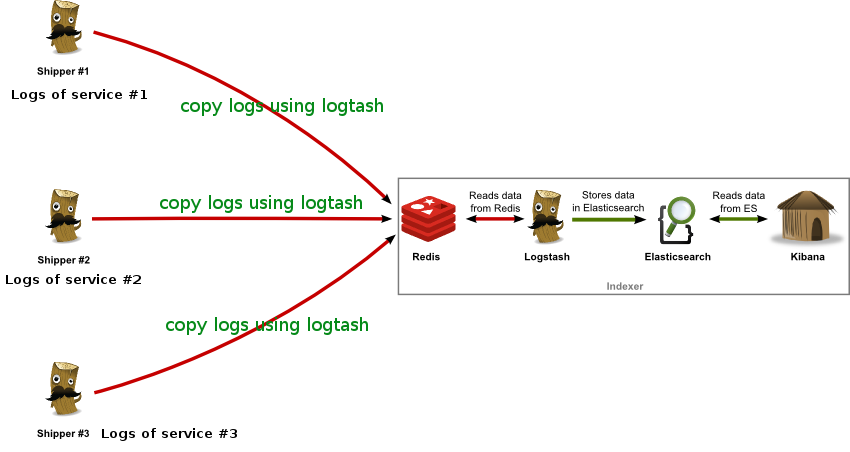
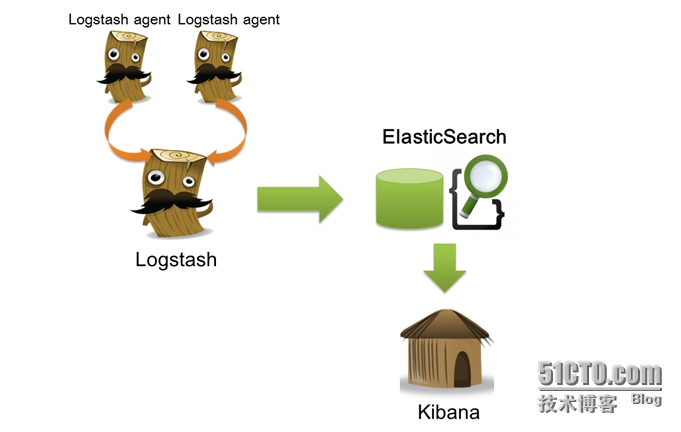
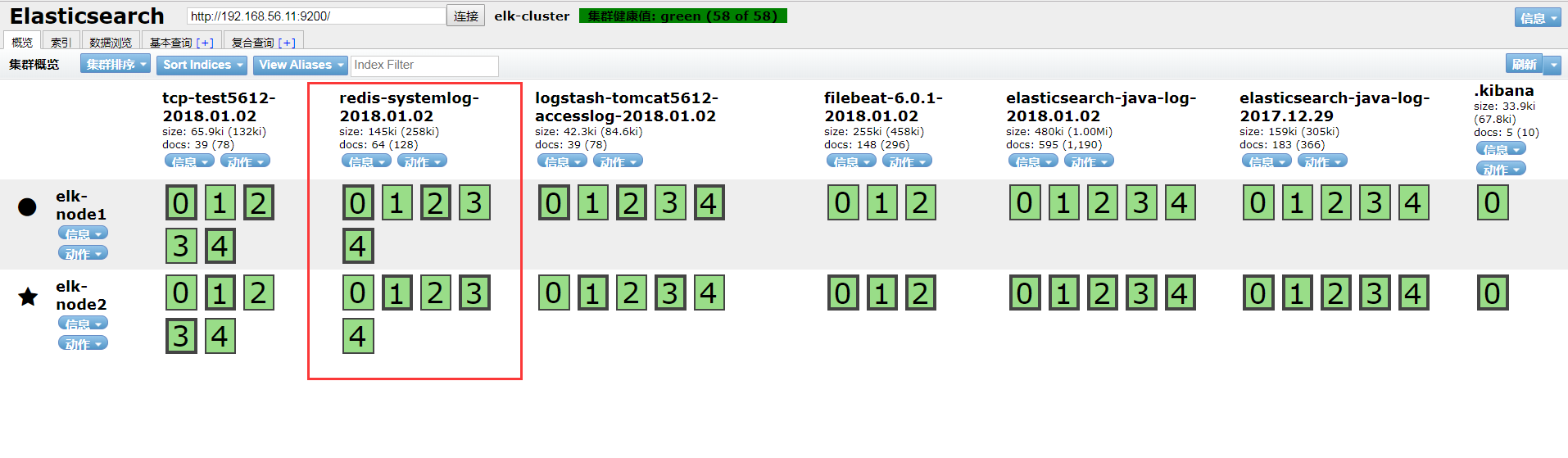
ELK实战之logstash收集日志写入redis
一、部署redis 1、下载redis [root@linux-node2 ~]# wget http://download.redis.io/releases/redis-4.0.6.tar.gz [root@linux-node2 ~]# tar -zxvf redis-4.0.6.tar.gz [root@linux-node2 ~]# mv redis-4.0.6 /usr/loca/src [root@linux-node2 ~]# cd /usr/local/src/redis-4.0.6 [root@linux-node2 redis-4.0.6]# make [root@linux-node2 redis-4.0.6]# ln -sv /usr/local/src/redis-4.0.6 /usr/local/redis [root@linux-node2 redis-4.0.6]# cd /usr/local/redis 2、配置redis [root@linux-node2 redis]# vim redis.conf bind 192.168.56.12 daemonize yes save "" requirepass 123456 #开启认证 [root@linux-node2 redis]# cp /usr/local/src/redis-4.0.6/src/redis-server /usr/bin/ [root@linux-node2 redis]# cp /usr/local/src/redis-4.0.6/src/redis-cli /usr/bin/ [root@linux-node2 redis]# redis-server /usr/local/redis/redis.conf 26617:C 02 Jan 10:35:26.801 # oO0OoO0OoO0Oo Redis is starting oO0OoO0OoO0Oo 26617:C 02 Jan 10:35:26.801 # Redis version=4.0.6, bits=64, commit=00000000, modified= 26617:C 02 Jan 10:35:26.801 # Configuration loaded 3、测试redis [root@linux-node2 ~]# netstat -tulnp |grep 6379 tcp 0 0 192.168.56.12:6379 0.0.0.0:* LISTEN 26618/redis-server [root@linux-node2 redis]# redis-cli -h 192.168.56.12 192.168.56.12:6379> KEYS * (error) NOAUTH Authentication required. 192.168.56.12:6379> auth 123456 OK 192.168.56.12:6379> KEYS * (empty list or set) 192.168.56.12:6379> quit 二、配置logstash将日志写入redis 1、配置logstash的system.conf [root@linux-node1 conf.d]# vim system.conf input { file { path => "/var/log/messages" type => "systemlog" start_position => "beginning" stat_interval => "2" } } output { if [type] == "systemlog" { redis { data_type => "list" host => "192.168.56.12" db => "1" port => "6379" password => "123456" key => "systemlog" } } } 2、检测配置语法 [root@linux-node1 conf.d]# /usr/share/logstash/bin/logstash -f /etc/logstash/conf.d/sy OpenJDK 64-Bit Server VM warning: If the number of processors is expected to increase CThreads=N WARNING: Could not find logstash.yml which is typically located in $LS_HOME/config or Could not find log4j2 configuration at path /usr/share/logstash/config/log4j2.properti Configuration OK [root@linux-node1 conf.d]# systemctl restart logstash 3、写入messages日志测试 [root@linux-node1 conf.d]# cat /etc/hosts >> /var/log/messages [root@linux-node1 conf.d]# echo "helloword" >> /var/log/messages 4、登陆redis中查看 [root@linux-node2 ~]# redis-cli -h 192.168.56.12 192.168.56.12:6379> KEYS * (error) NOAUTH Authentication required. 192.168.56.12:6379> AUTH 123456 OK 192.168.56.12:6379> 192.168.56.12:6379> select 1 OK 192.168.56.12:6379[1]> KEYS * 1) "systemlog" 192.168.56.12:6379[1]> LLEN systemlog #查看key的长度 (integer) 248 192.168.56.12:6379[1]> LLEN systemlog (integer) 249 192.168.56.12:6379[1]> LPOP systemlog #展示一条记录会减少一条 "{\"@version\":\"1\",\"host\":\"linux-node1\",\"path\":\"/var/log/messages\",\"@timestamp\":\"2018-01-02T03:04:40.424Z\",\"type\":\"systemlog\",\"tags\":[\"_geoip_lookup_failure\"]}" 192.168.56.12:6379[1]> LLEN systemlog (integer) 248 三、配置logstash从reids中取出数据到elasticsearch 1、使用linux-node2上的logstash从redis取数据 [root@linux-node2 conf.d]# vim redis-es.conf input { redis { data_type => "list" host => "192.168.56.12" db => "1" port => "6379" key => "systemlog" password => "123456" } } output { elasticsearch { hosts => ["192.168.56.11:9200"] index => "redis-systemlog-%{+YYYY.MM.dd}" } } [root@linux-node2 conf.d]# /usr/share/logstash/bin/logstash -f /etc/logstash/conf.d/redis-es.conf -t OpenJDK 64-Bit Server VM warning: If the number of processors is expected to increase from one, then you should configure the number of parallel GC threads appropriately using -XX:ParallelGCThreads=N WARNING: Could not find logstash.yml which is typically located in $LS_HOME/config or /etc/logstash. You can specify the path using --path.settings. Continuing using the defaults Could not find log4j2 configuration at path /usr/share/logstash/config/log4j2.properties. Using default config which logs errors to the console Configuration OK [root@linux-node2 conf.d]# systemctl restart logstash 2、从linux-node1上写入数据查看 [root@linux-node1 conf.d]# cat /etc/passwd >> /var/log/messages [root@linux-node2 ~]# redis-cli -h 192.168.56.12 192.168.56.12:6379> KEYS * (error) NOAUTH Authentication required. 192.168.56.12:6379> AUTH 123456 OK 192.168.56.12:6379> select 1 OK 192.168.56.12:6379[1]> KEYS * 1) "systemlog" 192.168.56.12:6379[1]> LLEN systemlog #查看数据长度为38 (integer) 38 192.168.56.12:6379[1]> LLEN systemlog #配置成功logstash从redis中取完数据,redis长度变成0 (integer) 0 3、head插件和Kibana添加索引查看 本文转自 IT_外卖小哥 51CTO博客,原文链接:http://blog.51cto.com/jinlong/2056563