一、logstash的安装
1、logstash介绍
Logstash是一个开源的数据收集引擎,可以水平伸缩,而且logstash是整个ELK当中拥有最多插件的一个组件,其可以接收来自不同源的数据并统一输入到指定的且可以是不同目的地。
logstash收集日志基本流程: input-->codec-->filter-->codec-->output
1.input:从哪里收集日志。
2.filter:发出去前进行过滤
3.output:输出至Elasticsearch或Redis消息队列
4.codec:输出至前台,方便边实践边测试
5.数据量不大日志按照月来进行收集
2、安装logstash
环境准备:关闭防火墙和Selinux,并且安装java环境
logstash下载地址:https://artifacts.elastic.co/downloads/logstash/logstash-6.0.0.rpm
[root@linux-node1 ~]
[root@linux-node1 ~]
[root@linux-node1 ~]
[root@linux-node2 ~]
[root@linux-node1 ~]
总用量 0
3、测试logstash是否正常
3.1logstash的基本语法
input {
        指定输入
}

output {
        指定输出
}
3.2测试标准输入输出
#使用rubydebug方式前台输出展示以及测试
[root@linux-node1 ~]
OpenJDK 64-Bit Server VM warning: If the number of processors is expected to increase from one, then you should configure the number of parallel GC threads appropriately using -XX:ParallelGCThreads=N
WARNING: Could not find logstash.yml which is typically located in $LS_HOME/config or /etc/logstash. You can specify the path using --path.settings. Continuing using the defaults
Could not find log4j2 configuration at path /usr/share/logstash/config/log4j2.properties. Using default config which logs errors to the console
The stdin plugin is now waiting for input:
hello
{
"@version" => "1",
"host" => "linux-node1",
"@timestamp" => 2017-12-08T14:56:25.395Z,
"message" => "hello"
}
3.3测试输出到文件
[root@linux-node1 ~]
OpenJDK 64-Bit Server VM warning: If the number of processors is expected to increase from one, then you should configure the number of parallel GC threads appropriately using -XX:ParallelGCThreads=N
hello
[root@linux-node1 ~]
{"@version":"1","host":"linux-node1","@timestamp":"2017-12-09T08:23:14.896Z","message":"hello"}
开启gzip压缩输出
[root@linux-node1 ~]
OpenJDK 64-Bit Server VM warning: If the number of processors is expected to increase from one, then you should configure the number of parallel GC threads appropriately using -XX:ParallelGCThreads=N
hello
[root@linux-node1 ~]
-rw-r--r-- 1 root root 105 12月 9 16:26 /tmp/test-2017.12.09.log.tar.gz
3.4测试输出到elasticsearch
[root@linux-node1 ~]
验证elasticsearch服务器收到数据
[root@linux-node1 ~]
总用量 0
drwxr-xr-x 8 elasticsearch elasticsearch 59 12月 8 22:39 qXKBlUFnQ5yB6jOMDVMttQ
drwxr-xr-x 4 elasticsearch elasticsearch 27 12月 9 15:11 rYbzoI3pQlS8ZSMqxkuDPA
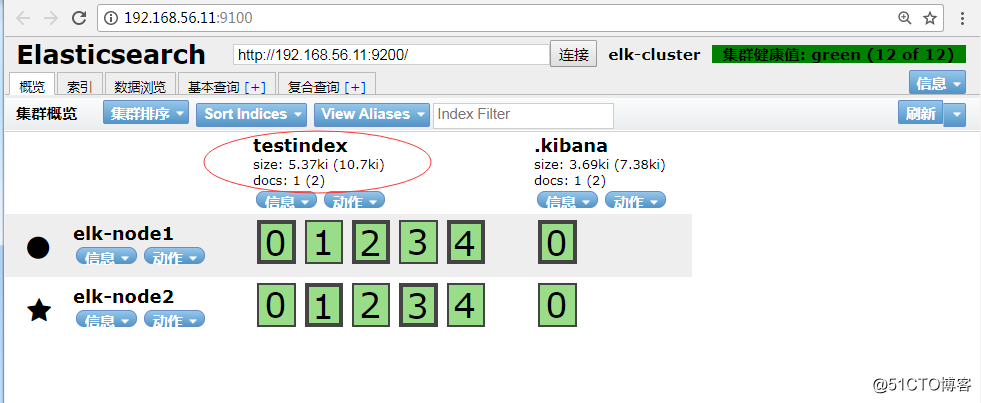
在这里可以看到服务器收到的数据,上面两个数据是属于testindex
![ELK实战之logstash部署及基本语法]()
在该界面删除testindex,"动作"-->"删除",再查看上面目录.
tips:在删除数据时,在该界面删除,切勿在上面的目录删除,因为集群节点上每个都有这样的数据,删除某一个,可能会导致elasticsearch无法启动。
[root@linux-node1 ~]
总用量 0
执行上面的命令,再查看该目录:
[root@linux-node1 ~]
总用量 0
drwxr-xr-x 4 elasticsearch elasticsearch 27 12月 9 15:11 rYbzoI3pQlS8ZSMqxkuDPA
drwxr-xr-x 8 elasticsearch elasticsearch 59 12月 9 16:42 WrdgEmA3QkK_uKhVxdPgSA
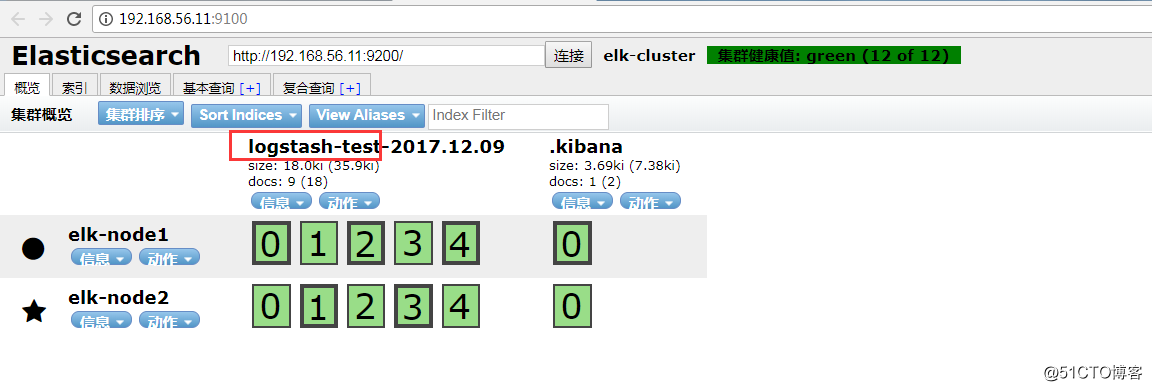
在192.168.56.11:9100查看,如图:
![ELK实战之logstash部署及基本语法]()
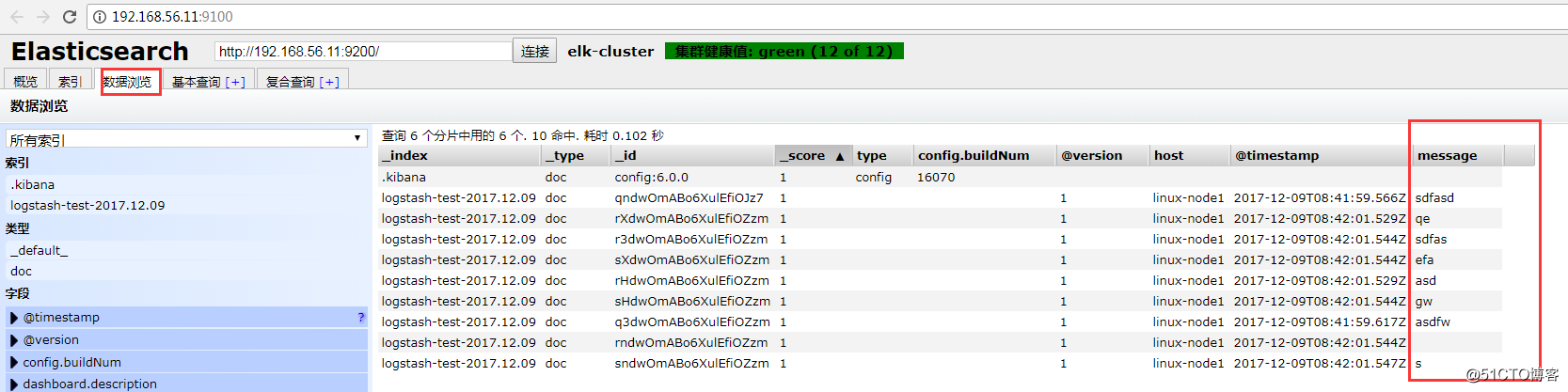
可以在数据浏览中,看到我们输入的内容,如图:
![ELK实战之logstash部署及基本语法]()