filebeat+kafka+ELK5.4安装与部署
用ELK打造强大的日志分析平台,具体拓扑结构如下:
在这里我们将进行kafka+filebeat+ELK5.4的部署
各软件版本
|
1
2
3
4
5
6
|
jdk-8u131-linux-i586.
tar
.gz
filebeat-5.4.0-linux-x86_64.
tar
.gz
elasticsearch-5.4.0.
tar
.gz
kibana-5.4.0-linux-x86_64.
tar
.gz
logstash-5.4.0.
tar
.gz
kafka_2.11-0.10.0.0.tgz
|
1、JDK安装配置(略过)
2、ELK安装与配置
|
1
2
3
4
5
6
7
8
9
10
11
12
13
14
15
16
17
18
19
20
21
22
23
24
25
26
27
28
29
30
31
32
33
34
35
36
37
38
39
40
41
42
43
44
45
46
47
48
49
50
|
创建ELK用户,并进行文件解压
1.elasticsearch配置
[elk@localhost elasticsearch-5.4.0]$
vi
config
/elasticsearch
.yml
.....
network.host: 192.168.12.109
#
# Set a custom port for HTTP:
#
http.port: 9200
..........
保存,启动
[elk@localhost elasticsearch-5.4.0]$
nohup
bin
/elasticsearch
&
验证
#
[elk@localhost elasticsearch-5.4.0]$ curl http:
//192
.168.12.109:9200
{
"name"
:
"aCA2ApK"
,
"cluster_name"
:
"elasticsearch"
,
"cluster_uuid"
:
"Ea4_9kXZSaeDL1fYt4lUUQ"
,
"version"
: {
"number"
:
"5.4.0"
,
"build_hash"
:
"780f8c4"
,
"build_date"
:
"2017-04-28T17:43:27.229Z"
,
"build_snapshot"
:
false
,
"lucene_version"
:
"6.5.0"
},
"tagline"
:
"You Know, for Search"
}
2、kibana安装与配置
[elk@localhost kibana-5.4.0-linux-x86_64]$
vi
config
/kibana
.yml
## Kibana is served by a back end server. This setting specifies the port to use.
server.port: 5601
# Specifies the address to which the Kibana server will bind. IP addresses and host names are both valid values.
# The default is 'localhost', which usually means remote machines will not be able to connect.
# To allow connections from remote users, set this parameter to a non-loopback address.
server.host:
"192.168.12.109"
..........
# The URL of the Elasticsearch instance to use for all your queries.
elasticsearch.url:
"http://192.168.12.109:9200"
..........
[elk@localhost kibana-5.4.0-linux-x86_64]$
nohup
bin
/kibana
&
在浏览器访问 能访问即可
|
3、kafka安装与配置
这里我们只做单机192.168.12.105部署单节点《centos kafka单包单机部署》
4、logstah安装与配置
|
1
2
3
4
5
6
7
8
9
10
11
12
13
14
15
16
17
18
19
20
21
22
23
24
25
26
27
28
29
30
31
32
33
34
35
36
37
38
39
40
41
42
43
44
45
46
47
48
49
50
51
52
53
54
55
56
57
58
59
60
|
[elk@localhost logstash-5.4.0]$
vi
nginx.conf 这里新生成一个配置文件
input {
kafka {
codec =>
"json"
topics_pattern =>
"logstash-.*"
bootstrap_servers =>
"192.168.12.105:9092"
auto_offset_reset =>
"latest"
group_id =>
"logstash-g1"
}
}
filter {
if
"nginx-accesslog"
in
[tags] {
grok {
match => {
"message"
=>
"%{IPORHOST:http_host} %{IPORHOST:clientip} - %{USERNAME:remote_user} \[%{HTTPDATE:timestamp}\] \"(?:%{WORD:http_verb} %{NOTSPACE:http_request}(?: HTTP/%{NUMBER:http_version})?|%{DATA:raw_http_request})\" %{NUMBER:response} (?:%{NUMBER:bytes_read}|-) %{QS:referrer} %{QS:agent} %{QS:xforwardedfor} %{NUMBER:request_time:float} %{GREEDYDATA:traceID}"
}
}
mutate {
convert => [
"status"
,
"integer"
]
convert => [
"body_bytes_sent"
,
"integer"
]
convert => [
"request_time"
,
"float"
]
}
geoip {
source
=>
"remote_addr"
}
date
{
match => [
"timestamp"
,
"dd/MMM/YYYY:HH:mm:ss Z"
]
}
useragent {
source
=>
"http_user_agent"
}
}
if
"tomcat-accesslog"
in
[tags] {
grok {
match => {
"message"
=>
"%{IPORHOST:clientip} \[%{HTTPDATE:timestamp}\] \"(?:%{WORD:http_verb} %{NOTSPACE:http_request}(?: HTTP/%{NUMBER:http_version})?|%{DATA:raw_http_request})\" %{NUMBER:response} (?:%{NUMBER:bytes_read}|-) %{QS:referrer} %{NUMBER:request_time:float} %{GREEDYDATA:traceID}"
}
}
date
{
match => [
"timestamp"
,
"dd/MMM/YYYY:HH:mm:ss Z"
]
}
}
}
output {
elasticsearch {
hosts => [
"192.168.12.109:9200"
]
index =>
"logstash-%{type}-%{+YYYY.MM.dd}"
document_type =>
"%{type}"
}
#stdout { codec => rubydebug }
}
保存,并启动
[elk@localhost logstash-5.4.0]$
nohup
bin
/logstash
-f nginx.conf &
|
5、filebeat安装与配置
将filebeat分别拷贝到需要采集的服务器,进行解压,在这里我们分别采集Nginx,tomcat日志
Nginx服务器
|
1
2
3
4
5
6
7
8
9
10
11
12
13
14
15
|
[user@localhost filebeat-5.4.0-linux-x86_64]$
vi
filebeat.yml
filebeat.prospectors:
- input_type: log
paths:
-
/data/programs/nginx/logs/access
.log
tags: [
"nginx-accesslog"
]
document_type: nginxaccess
tags: [
"nginx-test-194"
]
output.kafka:
enabled:
true
hosts: [
"192.168.12.105:9092"
]
topic: logstash-%{[
type
]}
[user@localhost filebeat-5.4.0-linux-x86_64]$
nohup
filebeat -c filebeat.yml &
|
tomcat服务器
|
1
2
3
4
5
6
7
8
9
10
11
12
13
14
15
|
[user@localhost filebeat-5.4.0-linux-x86_64]$
vi
filebeat.yml
filebeat.yml
filebeat.prospectors:
- input_type: log
paths:
-
/data/tomcat/logs/localhost_access_log
*
tags: [
"tomcat-accesslog"
]
document_type: tomcataccess
tags: [
"tomcat103"
]
output.kafka:
enabled:
true
hosts: [
"192.168.12.105:9092"
]
topic: logstash-%{[
type
]}
[user@localhost filebeat-5.4.0-linux-x86_64]$
nohup
filebeat -c filebeat.yml &
|
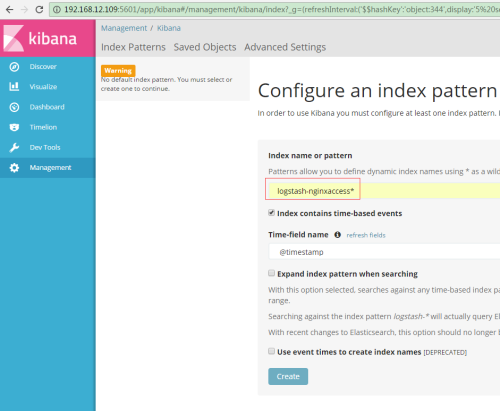
完成以上,我们的平台就搭建好了,接下来我们创建索引
输入:logstash-nginxaccess*
输入logstash-tomcataccess*
数据通过filebeat到kafka、ELK成功展示出来
来张炫图
本文转自 jackjiaxiong 51CTO博客,原文链接:http://blog.51cto.com/xiangcun168/1933509