首页 文章 精选 留言 我的

精选列表

搜索[指标分析],共10000篇文章
优秀的个人博客,低调大师

Knative 健康检查机制分析

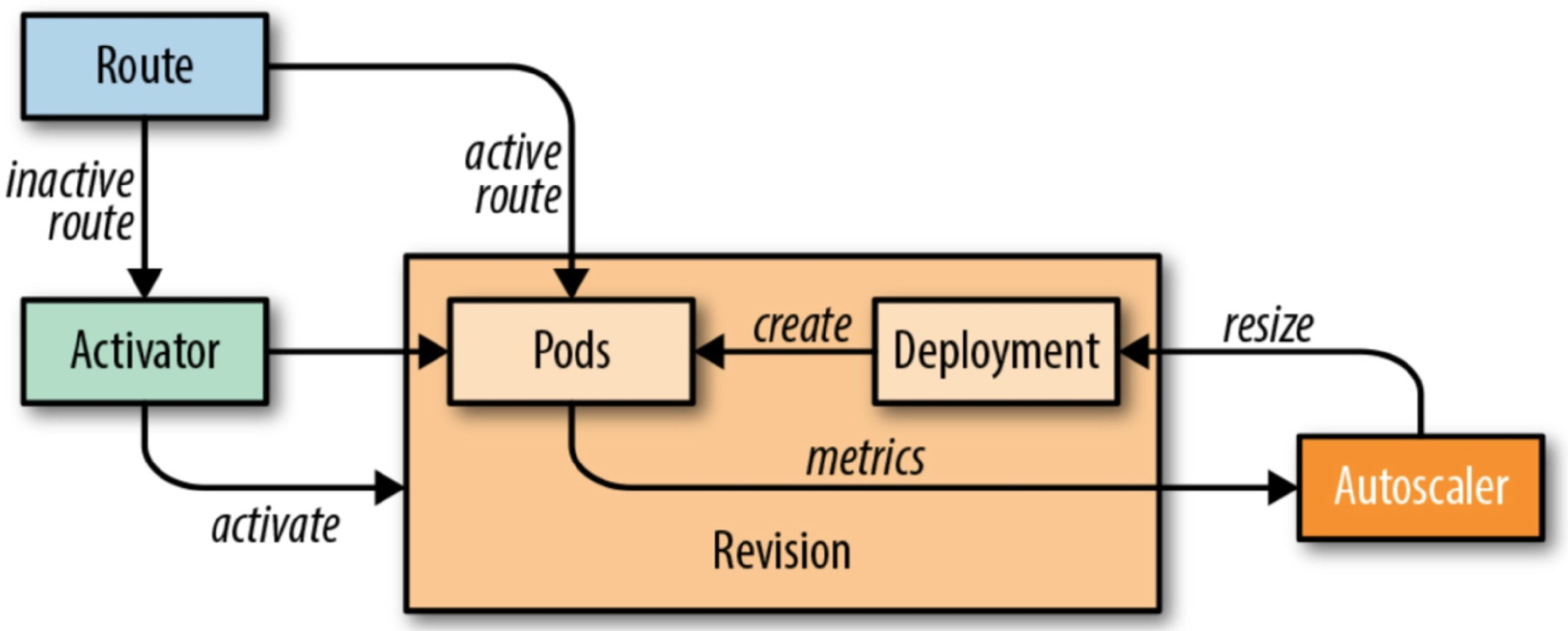
从头开发一个 Serverless 引擎并不是一件容易的事情,今天咱们就从 Knative 的健康检查说起。通过健康检查这一个点来看看 Serverless 模式和传统的模式都有哪些不同以及 Knative 针对 Serverless 场景都做了什么思考。Knative Serving 模块的核心原理如下图所示。下图中的 Route 可以理解成是 Istio Gateway 的角色。 当缩容到零时进来的流量就会指到 Activator 上面 当 Pod 数不为零时流量就会指到对应的 Pod 上面,此时流量不经过 Activator 其中 Autoscaler 模块根据请求的 Metrics 信息实时动态的扩缩容 关于这部分的详细介绍可以参见 https://yq.aliyun.com/articles/702969 这篇文章。 Knativ

优秀的个人博客,低调大师

({} + {}).length的答案结果分析详解

JavaScript的({} + {}).length结果是什么?码笔记告诉你答案是30,那么,为什么是30呢?详解如下: ({} + {}).length答案详解 ({} + {}).length等价于({}.toString() + {}.toString()).length ({}).length结果为undefined,这是因为对象{}没有length属性,所以是undefined 由于javascript是弱类型语言,加法运算间接调用了对象的toString()方法,其结果是字符串的相加,于是{}.toString()的值为[object Object] 码笔记来数一下[object Object],为15,如下所示: [ o b j e c t O b j e c t ] 1 2 3 4 5 6 7 8 9 10 11 12 13 14 15 所以,最终15+15=30 懂了吗?码笔记梳理一下: ({} + {}).length ->> ({}.toString() + {}.toString()).length {}.toString() ->> [object Object]所以,({} + {}).length = ({}.toString() + {}.toString()).length = [object Object]+[object Object] = 15+15 = 30 阿里云大学推出《JavaScript入门与实战》免费视频课程,大家可以关注下。

优秀的个人博客,低调大师

深入分析java I/O

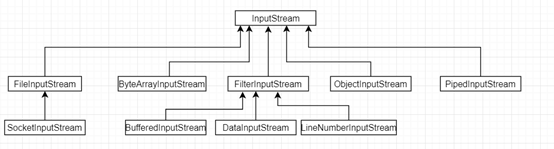
I/O 是最为基础重要的一门工程,它是数据信息交换的渠道方式。在爆炸性海量数据的互联网时代,I/O问题尤其重要,往往影响我们系统的性能祸首之一。常常有网络I/O网络数据上传与下载能力, 磁盘I/O即是我们硬盘的读写能力。而I/O类主要在JDK包java.io下,类比较繁多,我们只需要挑一两个来study。根据数据流的格式和方式如下分类:1)基于字节(抽象类):InputStream 和 OutputStream2)基于字符(抽象类):Writer 和 Reader3)基于磁盘文件(类):File4)基于网络传输(类):Socket 基于字节的I/O操作InputStream类的相关层级关系 代码1 private static void inputStreamForFile(File file) throws IOException { InputStream fis = null; try { fis = new FileInputStream(file); /* int result; while ((result = fis.read()) != -1) { System.out.print((char)result); }*/ byte[] buffer = new byte[(fis.available())]; // 缓存大小跟文件字节数一致 fis.read(buffer); System.out.println(new String(buffer)); } finally { fis.close(); } } 与InputStream输入字节流相对应的是OutputStream输出字节流 代码2 public static void outputStreamToFile(File file) { String bufferStr = new String("\n hello from outStream!"); byte buffer[] = bufferStr.getBytes(); OutputStream out = null; try { // 以追加的方式写入文件 out = new FileOutputStream(file, true); out.write(buffer); } catch (Exception ex) { ex.printStackTrace(); } finally { try { out.close(); } catch (IOException ioEx) { System.out.println(ioEx.toString()); } } } 其中,FileOutputStream(File file, boolean append)以追加的方式,添加入文件的末尾。通过类层次可以知道,FileOutputStream 的子类有SocketOutputStream, 即网络输出字节流其实也是以文件流形式进行传输。 基于字符的I/O操作最小的存储单元是字节而不是字符,所以I/O操作都是针对字节进行存储。那为啥需要引入字符呢?那是因为在我们的程序中,通常操作的数据都是以字符形式,为了操作方便需要提供一个直接写字符的 I/O 接口。 Reader 字符流,它的类层次结构如下 代码3 private static void readForFile(File file) throws IOException { StringBuffer sb; FileReader fileReader = null; try { sb = new StringBuffer(); char[] buf = new char[1024]; fileReader = new FileReader(file); while (fileReader.read(buf) > 0) { sb.append(buf); } } finally { fileReader.close(); } System.out.println("readForFile, " + sb.toString()); } Writer的类层次结构 代码4 private static void writeForFile(File file) throws IOException { FileWriter fw = null; try { fw = new FileWriter(file, true); fw.write("this is from write"); } finally { fw.close(); } } 刚才说了,底层是以最小单元为字节进行存储,而程序中经常以字符来进行操作,所以存在字节与字符的转化,拿InputStream 输入字节流举例,类结构如下 如果转换时,没有指定编码,会以默认的字符编码进行转义,默认的是“UTF-8” public static Charset defaultCharset() { if (defaultCharset == null) { synchronized (Charset.class) { String csn = AccessController.doPrivileged( new GetPropertyAction("file.encoding")); Charset cs = lookup(csn); if (cs != null) defaultCharset = cs; else defaultCharset = forName("UTF-8"); } } return defaultCharset; } java 访问磁盘文件在 java 中通常的 File 并不代表一个真实存在的文件对象,当你指定一个路径描述符时,他就会返回代表这个路径的虚拟对象,它可能是一个真实存在的文件或者一个包含多个文件的文件夹。多数情况下,我们并不关心这是文件是否存在,只关心这个文件到底如何操作。那么什么时候会检查这个文件是否真实存在呢?只有在真正需要读取文件的时候,才会去检查这个文件是否存在前文已经提到,文件存盘的最小单位是字节,所以直接和硬盘打交道的是字节流,针对于输入文件字节流FileInputStream,在它实例化时会创建一个 FileDescritor 对象,其实FileDescritor就是代表一个存在的文件对象的描述。当我们在操作一个FileInputStream文件对象时,可以通过其 getFD() 方法来获取FileDescriptor对象。而FileDescriptor是与底层操作系统相关联文件的行为描述。 具体的行为包括如下: /** * Force all system buffers to synchronize with the underlying * device. This method returns after all modified data and * attributes of this FileDescriptor have been written to the * relevant device(s)… **/ FileDescriptor.sync() 方法将操作系统缓存中的数据强制刷新到物理磁盘中。 /** * Tests if this file descriptor object is valid. */ FileDescriptor.valid() 方法将检测描述对象是否有效。 当传入一个文件路径时,将会根据这个路径创建一个 File 对象,然后创建StreamDecoder进行编码解码,最后将会真正创建一个关联真实存在的磁盘文件的文件描述符 FileDescriptor,这个对象可以用来操作磁盘文件。

优秀的个人博客,低调大师

jdk11 CountDownLatch源码分析

@[toc] 概述 CountDownLatch也是利用的AQS队列,关于AQS队列的讲述请参考前面两篇文章: jdk11源码-ReentrantLock源码 jdk11源码--ReentrantReadWriteLock源码 AQS类是一个模板类,我们可以根据根据具体的需求通过重写以下几个方法来自定义实现同步器 tryAcquire (排它锁获取) tryRelease (排它锁释放) tryAcquireShared (共享锁获取) tryReleasedShared (共享锁释放) 我们看一下官方文档中的代码案例: import java.util.Random; import java.util.concurrent.CountDownLatch; import java.util.concurrent.TimeUnit; class Dri

优秀的个人博客,低调大师

Flink 闭包清除源码分析

0x1 摘要 本文主要讲解Flink里为什么需要做闭包清除?Flink是怎么实现闭包清除的? 0x2 Flink 为什么要做闭包清除 大家都知道Flink中算子都是通过序列化分发到各节点上,所以要确保算子对象是可以被序列化的,很多时候大家比较喜欢直接用匿名内部类实现算子,而匿名内部类就会带来闭包问题,当匿名内部类引用的外部对象没有实现序列化接口时,就会导致内部类无法被序列化,因此Flink框架底层必须做好清除工作。 0x3 Flink 闭包清除实现 先来看一个Map算子代码: final StreamExecutionEnvironment env = StreamExecutionEnvironment.getExecutionEnvironment(); final DataStreamSource<String> source = env.addSource(new SourceFunction<String>() { @Override public void run(SourceContext<String> ctx) throws Exception { } @Override public void cancel() { } }); source.map(new MapFunction<String, String>() { @Override public String map(String value) throws Exception { return null; } }); 跟进源码查看map方法: public <R> SingleOutputStreamOperator<R> map(MapFunction<T, R> mapper) { TypeInformation<R> outType = TypeExtractor.getMapReturnTypes(clean(mapper), getType(), Utils.getCallLocationName(), true); return transform("Map", outType, new StreamMap<>(clean(mapper))); } 重点关注clean(mapper)代码,继续跟进源码,最终会走到StreamExecutionEnvironment类的以下方法: @Internal public <F> F clean(F f) { if (getConfig().isClosureCleanerEnabled()) { ClosureCleaner.clean(f, true); } ClosureCleaner.ensureSerializable(f); return f; } 到这里已经可以看出来闭包清除工具类ClosureCleaner,下面我们详细剖析一下此类。先看clean方法: public static void clean(Object func, boolean checkSerializable) { if (func == null) { return; } final Class<?> cls = func.getClass(); // First find the field name of the "this$0" field, this can // be "this$x" depending on the nesting boolean closureAccessed = false; for (Field f: cls.getDeclaredFields()) { if (f.getName().startsWith("this$")) { // found a closure referencing field - now try to clean closureAccessed |= cleanThis0(func, cls, f.getName()); } } if (checkSerializable) { try { InstantiationUtil.serializeObject(func); } catch (Exception e) { String functionType = getSuperClassOrInterfaceName(func.getClass()); String msg = functionType == null ? (func + " is not serializable.") : ("The implementation of the " + functionType + " is not serializable."); if (closureAccessed) { msg += " The implementation accesses fields of its enclosing class, which is " + "a common reason for non-serializability. " + "A common solution is to make the function a proper (non-inner) class, or " + "a static inner class."; } else { msg += " The object probably contains or references non serializable fields."; } throw new InvalidProgramException(msg, e); } } } 方法参数: func:要清除的对应 checkSerializable:清除完成后是否需要调用序列方法进行验证 第一步:查找闭包引用的成员变量,通过反射判断成员变量名是否包含this$来判定,代码片断: for (Field f: cls.getDeclaredFields()) { if (f.getName().startsWith("this$")) { // found a closure referencing field - now try to clean closureAccessed |= cleanThis0(func, cls, f.getName()); } } 找到闭包引用的成员变量后,调用内部私有方法cleanThis0方法处理,看方法源码: private static boolean cleanThis0(Object func, Class<?> cls, String this0Name) { This0AccessFinder this0Finder = new This0AccessFinder(this0Name); getClassReader(cls).accept(this0Finder, 0); final boolean accessesClosure = this0Finder.isThis0Accessed(); if (LOG.isDebugEnabled()) { LOG.debug(this0Name + " is accessed: " + accessesClosure); } if (!accessesClosure) { Field this0; try { this0 = func.getClass().getDeclaredField(this0Name); } catch (NoSuchFieldException e) { // has no this$0, just return throw new RuntimeException("Could not set " + this0Name + ": " + e); } try { this0.setAccessible(true); this0.set(func, null); } catch (Exception e) { // should not happen, since we use setAccessible throw new RuntimeException("Could not set " + this0Name + " to null. " + e.getMessage(), e); } } return accessesClosure; } 核心代码this0.set(func, null);将闭包引用置空处理,此方法还用到了ASM包,具体逻辑没完成整明白。

优秀的个人博客,低调大师

Spring MVC请求处理流程分析

一、简介 Spring MVC框架在工作中经常用到,配置简单,使用起来也很方便,很多书籍和博客都有介绍其处理流程,但是,对于其原理,总是似懂非懂的样子。我们做技术,需要做到知其然,还要知其所以然。今天我们结合源码来深入了解一下Spring MVC的处理流程。 以上流程图是Spring MVC的处理流程(参考:spring-mvc-flow-with-example),原作者对流程的解释如下: Step 1: First request will be received by DispatcherServlet. Step 2: DispatcherServlet will take the help of HandlerMapping and get to know the Controller class name associated with the given request. Step 3: So request transfer to the Controller, and then controller will process the request by executing appropriate methods and returns ModelAndView object (contains Model data and View name) back to the DispatcherServlet. Step 4: Now DispatcherServlet send the model object to the ViewResolver to get the actual view page. Step 5: Finally DispatcherServlet will pass the Model object to the View page to display the result. 针对以上流程,这里需要更加详细一点: 1、请求被web 容器接收,并且根据contextPath将请求发送给DispatcherServlet 2、DispatcherServlet接收到请求后,会设置一些属性(localeResolver、themeResolver等等),在根据request在handlerMappings中查找对应的HandlerExecutionChain;然后根据HandlerExecutionChain中的handler来找到HandlerAdapter,然后通过反射来调用handler中的对应方法(RequestMapping对应的方法) 3、handler就是对应的controller,调用controller中的对应方法来进行业务逻辑处理,返回ModelAndView(或者逻辑视图名称) 4、ViewResolver根据逻辑视图名称、视图前后缀,来获取实际的逻辑视图 5、获取实际视图之后,就会使用model来渲染视图,得到用户实际看到的视图,然后返回给客户端。 二、Demo样例 我们运行一个小样例(github地址:https://github.com/yangjianzhou/spring-mvc-demo)来了解Spring MVC处理流程,项目结构如下: web.xml配置如下: <?xml version="1.0" encoding="UTF-8"?> <web-app version="2.5" xmlns="http://java.sun.com/xml/ns/javaee" xmlns:xsi="http://www.w3.org/2001/XMLSchema-instance" xsi:schemaLocation="http://java.sun.com/xml/ns/javaee http://java.sun.com/xml/ns/javaee/web-app_2_5.xsd"> <context-param> <param-name>contextConfigLocation</param-name> <param-value>classpath:/applicationContext.xml</param-value> </context-param> <listener> <listener-class>org.springframework.web.context.ContextLoaderListener</listener-class> </listener> <servlet> <servlet-name>smart</servlet-name> <servlet-class>org.springframework.web.servlet.DispatcherServlet</servlet-class> <load-on-startup>1</load-on-startup> </servlet> <servlet-mapping> <servlet-name>smart</servlet-name> <url-pattern>/</url-pattern> </servlet-mapping> <welcome-file-list> <welcome-file>index.jsp</welcome-file> </welcome-file-list> </web-app> smart-servlet.xml的内容如下: <context:component-scan base-package="com.iwill.mvc"/> <!-- 在使用Excel PDF的视图时,请先把这个视图解析器注释掉,否则产生视图解析问题--> <bean class="org.springframework.web.servlet.view.InternalResourceViewResolver" p:order="100" p:viewClass="org.springframework.web.servlet.view.JstlView" p:prefix="/WEB-INF/views/" p:suffix=".jsp"/> UserController.java的代码如下: package com.iwill.mvc; import org.apache.log4j.Logger; import org.springframework.stereotype.Controller; import org.springframework.web.bind.annotation.RequestMapping; import org.springframework.web.bind.annotation.RequestMethod; import org.springframework.web.servlet.ModelAndView; @Controller @RequestMapping("/user") public class UserController { Logger logger = Logger.getLogger(UserController.class); @RequestMapping("register") public String register() { logger.info("invoke register"); return "user/register"; } @RequestMapping(method = RequestMethod.POST) public ModelAndView createUser(User user) { ModelAndView mav = new ModelAndView(); mav.setViewName("user/createSuccess"); mav.addObject("user", user); return mav; } } 三、请求接收 DispatcherServlet的类继承关系如下: 可以看出,DispatcherServlet是一个HttpServlet,因此,它可以处理http请求。 在浏览器中输入http://localhost:8080/spring-mvc-demo/user/register,因为在web服务器上配置了spring-mvc-demo的contextPath为spring-mvc-demo,所以/spring-mvc-demo/user/register的请求就会被DispatcherServlet处理,请求处理路径如下: 请求由tomcat传递给了DispatcherServlet了,DispatcherServlet接收后,就开始自己的特殊处理了。 红框中是Spring MVC自己特有的逻辑,主要是与视图、主题有关。 接下来的主要处理逻辑在org.springframework.web.servlet.DispatcherServlet#doDispatch中: protected void doDispatch(HttpServletRequest request, HttpServletResponse response) throws Exception { HttpServletRequest processedRequest = request; HandlerExecutionChain mappedHandler = null; boolean multipartRequestParsed = false; WebAsyncManager asyncManager = WebAsyncUtils.getAsyncManager(request); try { ModelAndView mv = null; Exception dispatchException = null; try { processedRequest = checkMultipart(request); multipartRequestParsed = processedRequest != request; // 根据request在handlerMappings中获取HandlerExecutionChain mappedHandler = getHandler(processedRequest, false); if (mappedHandler == null || mappedHandler.getHandler() == null) { noHandlerFound(processedRequest, response); return; } //根据handler在handlerAdapters中获取HandlerAdapter HandlerAdapter ha = getHandlerAdapter(mappedHandler.getHandler()); // Process last-modified header, if supported by the handler. String method = request.getMethod(); boolean isGet = "GET".equals(method); if (isGet || "HEAD".equals(method)) { long lastModified = ha.getLastModified(request, mappedHandler.getHandler()); if (logger.isDebugEnabled()) { String requestUri = urlPathHelper.getRequestUri(request); logger.debug("Last-Modified value for [" + requestUri + "] is: " + lastModified); } if (new ServletWebRequest(request, response).checkNotModified(lastModified) && isGet) { return; } } if (!mappedHandler.applyPreHandle(processedRequest, response)) { return; } try { //适配器调用实际的handler mv = ha.handle(processedRequest, response, mappedHandler.getHandler()); } finally { if (asyncManager.isConcurrentHandlingStarted()) { return; } } applyDefaultViewName(request, mv); mappedHandler.applyPostHandle(processedRequest, response, mv); } catch (Exception ex) { dispatchException = ex; } //逻辑视图名转换为物理视图名,并进行视图渲染 processDispatchResult(processedRequest, response, mappedHandler, mv, dispatchException); } catch (Exception ex) { triggerAfterCompletion(processedRequest, response, mappedHandler, ex); } catch (Error err) { triggerAfterCompletionWithError(processedRequest, response, mappedHandler, err); } finally { if (asyncManager.isConcurrentHandlingStarted()) { // Instead of postHandle and afterCompletion mappedHandler.applyAfterConcurrentHandlingStarted(processedRequest, response); return; } // Clean up any resources used by a multipart request. if (multipartRequestParsed) { cleanupMultipart(processedRequest); } } } 首先获取HandlerExecutionChain(入口:mappedHandler = getHandler(processedRequest, false);),方法如下: protected HandlerExecutionChain getHandler(HttpServletRequest request) throws Exception { for (HandlerMapping hm : this.handlerMappings) { if (logger.isTraceEnabled()) { logger.trace( "Testing handler map [" + hm + "] in DispatcherServlet with name '" + getServletName() + "'"); } HandlerExecutionChain handler = hm.getHandler(request); if (handler != null) { return handler; } } return null; } 之后就是根据handler获取HandlerAdapter(入口:HandlerAdapter ha = getHandlerAdapter(mappedHandler.getHandler())): protected HandlerAdapter getHandlerAdapter(Object handler) throws ServletException { for (HandlerAdapter ha : this.handlerAdapters) { if (logger.isTraceEnabled()) { logger.trace("Testing handler adapter [" + ha + "]"); } if (ha.supports(handler)) { return ha; } } throw new ServletException("No adapter for handler [" + handler + "]: The DispatcherServlet configuration needs to include a HandlerAdapter that supports this handler"); } handler适配器调用handler的方法(入口:mv = ha.handle(processedRequest, response, mappedHandler.getHandler())): protected ModelAndView invokeHandlerMethod(HttpServletRequest request, HttpServletResponse response, Object handler) throws Exception { ServletHandlerMethodResolver methodResolver = getMethodResolver(handler); Method handlerMethod = methodResolver.resolveHandlerMethod(request); ServletHandlerMethodInvoker methodInvoker = new ServletHandlerMethodInvoker(methodResolver); ServletWebRequest webRequest = new ServletWebRequest(request, response); ExtendedModelMap implicitModel = new BindingAwareModelMap(); Object result = methodInvoker.invokeHandlerMethod(handlerMethod, handler, webRequest, implicitModel); ModelAndView mav = methodInvoker.getModelAndView(handlerMethod, handler.getClass(), result, implicitModel, webRequest); methodInvoker.updateModelAttributes(handler, (mav != null ? mav.getModel() : null), implicitModel, webRequest); return mav; } 通过Object result = methodInvoker.invokeHandlerMethod(handlerMethod, handler, webRequest, implicitModel)会调用底层的方法: 红框中,通过反射调用UserController的register方法。这样请求就被传递到了实际的controller方法了。 四、响应返回 UserController#register处理后,就返回逻辑视图名:user/register。在org.springframework.web.servlet.mvc.annotation.AnnotationMethodHandlerAdapter.ServletHandlerMethodInvoker#getModelAndView中,就会将String转化为ModelAndView: 在org.springframework.web.servlet.DispatcherServlet#render中,就会将逻辑视图ModelAndView转化物理视图。 resolveViewName就是使用ViewResolver来获取物理视图名: protected View resolveViewName(String viewName, Map<String, Object> model, Locale locale, HttpServletRequest request) throws Exception { for (ViewResolver viewResolver : this.viewResolvers) { View view = viewResolver.resolveViewName(viewName, locale); if (view != null) { return view; } } return null; } 物理视图名会被缓存,不需要重复解析,提高性能。 这里就是prefix和suffix的用途了,用于定位实际视图。 获取到了物理视图之后,就进行视图渲染了。 针对jsp格式的视图,我们配置的view是org.springframework.web.servlet.view.JstlView,渲染过程就是将model中的值set到request的attribute中,之后就是使用jsp自己的规则来显示jsp文件就好。

资源下载

更多资源
Nacos

Nacos

Nacos /nɑ:kəʊs/ 是 Dynamic Naming and Configuration Service 的首字母简称,一个易于构建 AI Agent 应用的动态服务发现、配置管理和AI智能体管理平台。Nacos 致力于帮助您发现、配置和管理微服务及AI智能体应用。Nacos 提供了一组简单易用的特性集,帮助您快速实现动态服务发现、服务配置、服务元数据、流量管理。Nacos 帮助您更敏捷和容易地构建、交付和管理微服务平台。

Rocky Linux

Rocky Linux

Rocky Linux(中文名:洛基)是由Gregory Kurtzer于2020年12月发起的企业级Linux发行版,作为CentOS稳定版停止维护后与RHEL(Red Hat Enterprise Linux)完全兼容的开源替代方案,由社区拥有并管理,支持x86_64、aarch64等架构。其通过重新编译RHEL源代码提供长期稳定性,采用模块化包装和SELinux安全架构,默认包含GNOME桌面环境及XFS文件系统,支持十年生命周期更新。

Sublime Text

Sublime Text

Sublime Text具有漂亮的用户界面和强大的功能,例如代码缩略图,Python的插件,代码段等。还可自定义键绑定,菜单和工具栏。Sublime Text 的主要功能包括:拼写检查,书签,完整的 Python API , Goto 功能,即时项目切换,多选择,多窗口等等。Sublime Text 是一个跨平台的编辑器,同时支持Windows、Linux、Mac OS X等操作系统。

WebStorm

WebStorm

WebStorm 是jetbrains公司旗下一款JavaScript 开发工具。目前已经被广大中国JS开发者誉为“Web前端开发神器”、“最强大的HTML5编辑器”、“最智能的JavaScript IDE”等。与IntelliJ IDEA同源,继承了IntelliJ IDEA强大的JS部分的功能。

用户登录
用户注册