首页 文章 精选 留言 我的

精选列表

搜索[android studio],共10000篇文章
优秀的个人博客,低调大师

OpenCV的+安卓+号牌识别(OpenCV + Android +水平矫正)

ImageView imgView = (ImageView) findViewById(R.id.imageView1); Bitmap bmp = BitmapFactory.decodeResource(getResources(),car); //First convert Bitmap to Mat Mat ImageMatin = new Mat ( bmp.getHeight(), bmp.getWidth(), CvType.CV_8U, new Scalar(4)); Mat ImageMatout = new Mat ( bmp.getHeight(), bmp.getWidth(), CvType.CV_8U, new Scalar(4)); Mat ImageMatBk = new Mat ( bmp.getHeight(), bmp.getWidth(), CvType.CV_8U, new Scalar(4)); Mat ImageMatTopHat = new Mat ( bmp.getHeight(), bmp.getWidth(), CvType.CV_8U, new Scalar(4)); Mat temp = new Mat ( bmp.getHeight(), bmp.getWidth(), CvType.CV_8U, new Scalar(4)); Bitmap myBitmap32 = bmp.copy(Bitmap.Config.ARGB_8888, true); Utils.bitmapToMat(myBitmap32, ImageMatin); //Converting RGB to Gray. Imgproc.cvtColor(ImageMatin, ImageMatBk, Imgproc.COLOR_RGB2GRAY,8); Imgproc.dilate(ImageMatBk, temp, Imgproc.getStructuringElement(Imgproc.MORPH_RECT, new Size(9, 9))); Imgproc.erode(temp, ImageMatTopHat, Imgproc.getStructuringElement(Imgproc.MORPH_RECT, new Size(9,9))); //Core.absdiff(current, previous, difference); Core.absdiff(ImageMatTopHat, ImageMatBk, ImageMatout); //Sobel operator in horizontal direction. Imgproc.Sobel(ImageMatout,ImageMatout,CvType.CV_8U,1,0,3,1,0.4,Imgproc.BORDER_DEFAULT); //Converting GaussianBlur Imgproc.GaussianBlur(ImageMatout, ImageMatout, new Size(5,5),2); Imgproc.dilate(ImageMatout, ImageMatout, Imgproc.getStructuringElement(Imgproc.MORPH_RECT, new Size(3,3))); Mat element = Imgproc.getStructuringElement(Imgproc.MORPH_RECT, new Size(17, 3)); Imgproc.morphologyEx(ImageMatout, ImageMatout, Imgproc.MORPH_CLOSE, element); //threshold image Imgproc.threshold(ImageMatout, ImageMatout, 0, 255, Imgproc.THRESH_OTSU+Imgproc.THRESH_BINARY); Now I need to extract number Plate Please help me to convert following C++ code to java+opencv:. std::vector rects; std::vector<std::vector >::iterator itc = contours.begin(); while (itc != contours.end()) { cv::RotatedRect mr = cv::minAreaRect(cv::Mat(*itc)); float area = fabs(cv::contourArea(*itc)); float bbArea=mr.size.width * mr.size.height; float ratio = area/bbArea; if( (ratio < 0.45) || (bbArea < 400) ){ itc= contours.erase(itc); }else{ ++itc; rects.push_back(mr); } } import java.util.*; import org.opencv.imgproc.Imgproc; import org.opencv.core.*; /* ... */ ArrayList<RotatedRect> rects = new ArrayList<RotatedRect>() ArrayList<MatOfPoint> contours = new ArrayList<MatOfPoint>(); Imgproc.findContours(image, contours, new Mat(), Imgproc.RETR_EXTERNAL, Imgproc.CHAIN_APPROX_NONE); ListIterator<MatOfPoint> itc = contours.listIterator(); while(itc.hasNext()) { MatOfPoint2f mp2f = new MatOfPoint2f(itc.next().toArray()); RotatedRect mr = Imgproc.minAreaRect(mp2f); double area = Math.abs(Imgproc.contourArea(mp2f)); double bbArea= mr.size.area(); double ratio = area / bbArea; if( (ratio < 0.45) || (bbArea < 400) ) { itc.remove(); // other than deliberately making the program slow, // does erasing the contour have any purpose? } else { rects.add(mr); } }

优秀的个人博客,低调大师

Android开发实践:自定义带动画的View

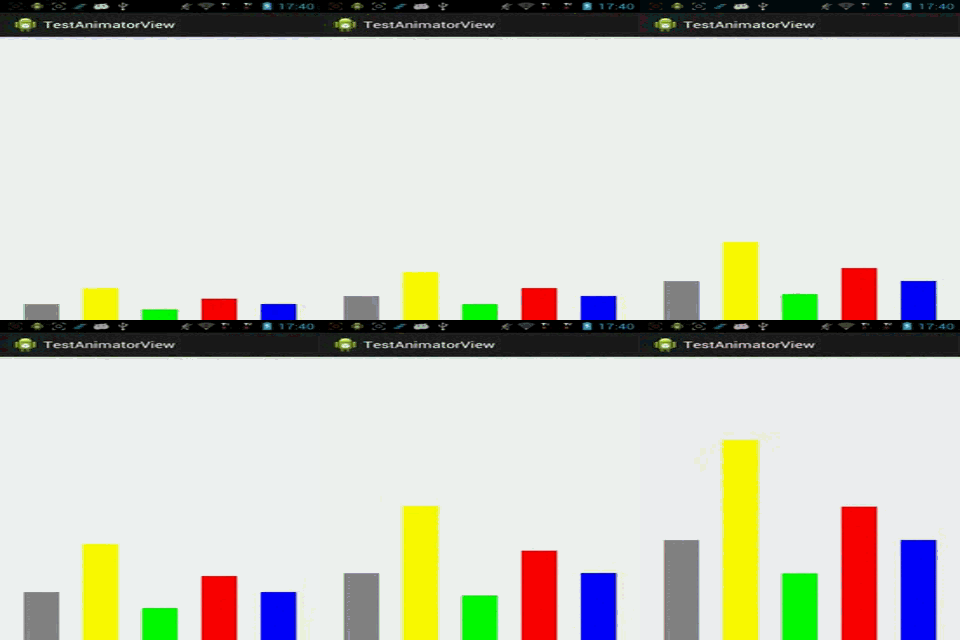
对于一个自定义View来说,onMeasure只是用来计算View尺寸,onDraw()才是真正执行View的绘制,所以一般我们都需要重写onDraw()函数来绘制我们期望的UI界面。下面我以一个具体的例子探索自定义View的onDraw()的实现过程和关键点。 我们的目标是制作一个柱状图动画,View的动画启动后,会显示一排柱状图增长的画面,这种动画多用于财务类或者统计类的APP中,效果如图所示(截屏的格式转换过程导致有些变形,还好不影响演示,图中设置了反复播放,真机上只会播放一次): 1. 首先,自定义View的派生类 1 2 3 4 5 6 7 8 9 10 11 12 13 14 15 16 17 18 19 20 21 22 23 24 25 public class AnimatorView extends View{ private PaintmPaint; public AnimatorView(Contextcontext){ super (context); initialize(); } public AnimatorView(Contextcontext,AttributeSetattrs){ super (context,attrs); initialize(); } public AnimatorView(Contextcontext,AttributeSetattrs, int defStyle){ super (context,attrs,defStyle); initialize(); } protected void initialize(){ mPaint= new Paint(); mPaint.setAntiAlias( true ); mPaint.setStyle(Style.FILL); } } 注: Paint是用来绘图的画笔,可以设置其样式、画面的粗细、填充模式、颜色等等。 2. 定义待绘制的图形数据 待绘制的图形数据一般是在程序中动态给出的,这里为了演示,直接定义好: 1 2 3 4 5 6 7 8 9 10 11 12 13 14 15 16 17 18 public class AnimatorView extends View{ private static final int RECT_WIDTH= 60 ; //每个矩形块的宽度 private static final int RECT_DISTANCE= 40 ; //矩形块之间的间距 private static final int TOTAL_PAINT_TIMES= 100 ; //控制绘制速度,分100次完成绘制 //待绘制的矩形块矩阵,left为高度,right为颜色 private static final int [][]RECT_ARRAY={ { 380 ,Color.GRAY}, { 600 ,Color.YELLOW}, { 200 ,Color.GREEN}, { 450 ,Color.RED}, { 300 ,Color.BLUE} }; private int mPaintTimes= 0 ; //当前已经绘制的次数 } 3. 重载onDraw()函数,实现绘制 1 2 3 4 5 6 7 8 9 10 11 12 13 14 15 16 17 18 19 20 21 22 public class AnimatorView extends View{ @Override protected void onDraw(Canvascanvas){ mPaintTimes++; for ( int i= 0 ;i<RECT_ARRAY.length;i++){ mPaint.setColor(RECT_ARRAY[i][ 1 ]); int paintXPos=i*(RECT_WIDTH+RECT_DISTANCE)+RECT_DISTANCE; int paintYPos=RECT_ARRAY[i][ 0 ]/TOTAL_PAINT_TIMES*mPaintTimes; canvas.drawRect(paintXPos,getHeight(),paintXPos+RECT_WIDTH,getHeight()-paintYPos,mPaint); } if (mPaintTimes<TOTAL_PAINT_TIMES){ invalidate(); //实现动画的关键点 } } } (1) onDraw()函数一般由系统布局管理器来调用,在View第一次加载的时候会调用一次,或者在系统认为需要重绘的时候也会被调用。当然,你也可以在程序中手动触发该View的重绘,通过调用View的invalidate()函数或者postInvalidate()函数即可,前者用于UI线程,后者用于非UI线程。 (2) onDraw()的参数Canvas我们可以理解成系统提供给我们的一块内存区域,所有的绘制都是在这块内存中进行的,绘制完成后系统会显示到屏幕中去。该Canvas对象提供了各种绘制点、线、矩形、圆、位图的方法,基本可以满足各种绘制要求。 (3) drawRect函数需要提供四个坐标,其中,前两个参数代表是被绘制矩形的起始点坐标,后两个参数则是相对于起点的斜对角坐标,注意,原点坐标(0,0)在屏幕的左上角。 (4) 注意,onDraw()每次被调用的时候,原来画布中的内容会被清空。 (5)本示例中,矩形高度每次增加Height/TOTAL_PAINT_TIMES,宽度不变。 4. Activity中测试该View 1 2 3 4 5 6 7 8 9 10 11 12 public class MainActivity extends Activity{ private AnimatorViewmAnimatorView; @Override protected void onCreate(BundlesavedInstanceState){ super .onCreate(savedInstanceState); mAnimatorView= new AnimatorView( this ); setContentView(mAnimatorView); } } 当然,也可以把该View放到layout文件中,这里就不赘述了。 本文转自 Jhuster 51CTO博客,原文链接:http://blog.51cto.com/ticktick/1545863,如需转载请自行联系原作者

资源下载

更多资源
优质分享App

优质分享App

近一个月的开发和优化,本站点的第一个app全新上线。该app采用极致压缩,本体才4.36MB。系统里面做了大量数据访问、缓存优化。方便用户在手机上查看文章。后续会推出HarmonyOS的适配版本。

Mario

Mario

马里奥是站在游戏界顶峰的超人气多面角色。马里奥靠吃蘑菇成长,特征是大鼻子、头戴帽子、身穿背带裤,还留着胡子。与他的双胞胎兄弟路易基一起,长年担任任天堂的招牌角色。

腾讯云软件源

腾讯云软件源

为解决软件依赖安装时官方源访问速度慢的问题,腾讯云为一些软件搭建了缓存服务。您可以通过使用腾讯云软件源站来提升依赖包的安装速度。为了方便用户自由搭建服务架构,目前腾讯云软件源站支持公网访问和内网访问。

Nacos

Nacos

Nacos /nɑ:kəʊs/ 是 Dynamic Naming and Configuration Service 的首字母简称,一个易于构建 AI Agent 应用的动态服务发现、配置管理和AI智能体管理平台。Nacos 致力于帮助您发现、配置和管理微服务及AI智能体应用。Nacos 提供了一组简单易用的特性集,帮助您快速实现动态服务发现、服务配置、服务元数据、流量管理。Nacos 帮助您更敏捷和容易地构建、交付和管理微服务平台。

用户登录
用户注册