RPA迁移场景批量数据录入与表单自动化
## 一、批量数据录入场景  ## 二、表单自动化架构 ### 2.1 表单自动化架构 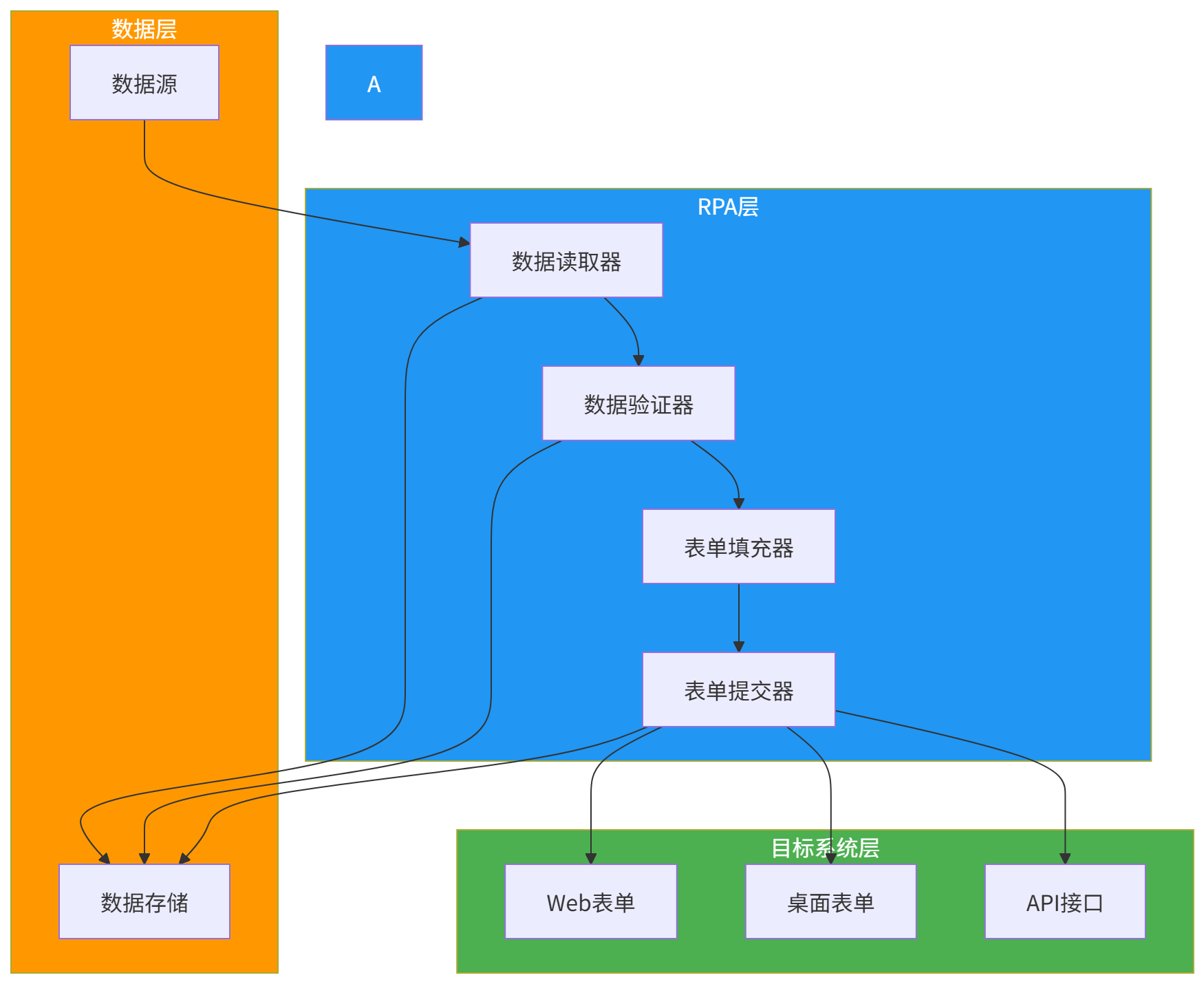 ### 2.2 RPA表单自动化流程 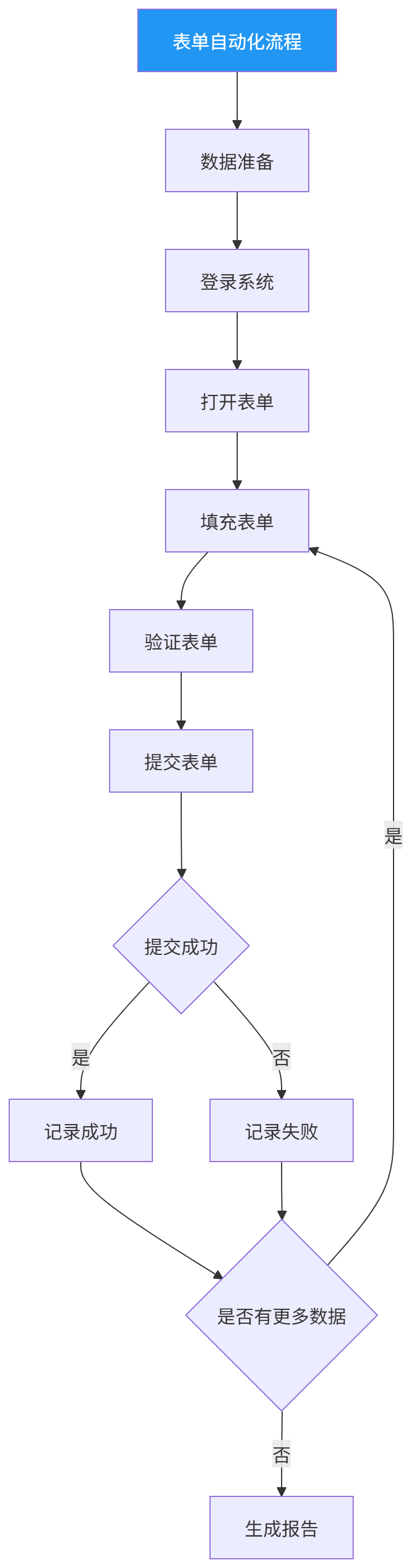 ## 三、数据准备阶段 ### 3.1 数据源类型  ### 3.2 数据读取代码示例 **Excel数据读取**: ``` import pandas as pd class ExcelDataReader: def __init__(self, file_path): self.file_path = file_path def read(self, sheet_name=0): df = pd.read_excel(self.file_path, sheet_name=sheet_name) return df.to_dict('records') def read_with_validation(self, sheet_name=0, required_columns=None): df = pd.read_excel(self.file_path, sheet_name=sheet_name) records = df.to_dict('records') if required_columns: valid_records = [] errors = [] for i, record in enumerate(records): missing_columns = [col for col in required_columns if col not in record or pd.isna(record[col])] if missing_columns: errors.append({ 'row': i + 2, 'record': record, 'errors': f"Missing required columns: {', '.join(missing_columns)}" }) else: valid_records.append(record) return valid_records, errors return records, [] def read_chunked(self, sheet_name=0, chunk_size=1000): for chunk in pd.read_excel(self.file_path, sheet_name=sheet_name, chunksize=chunk_size): yield chunk.to_dict('records') ``` **CSV数据读取**: ``` import csv class CSVDataReader: def __init__(self, file_path, delimiter=','): self.file_path = file_path self.delimiter = delimiter def read(self): with open(self.file_path, 'r', encoding='utf-8') as f: reader = csv.DictReader(f, delimiter=self.delimiter) return list(reader) def read_with_validation(self, required_columns=None): with open(self.file_path, 'r', encoding='utf-8') as f: reader = csv.DictReader(f, delimiter=self.delimiter) records = list(reader) if required_columns: valid_records = [] errors = [] for i, record in enumerate(records): missing_columns = [col for col in required_columns if col not in record or not record[col].strip()] if missing_columns: errors.append({ 'row': i + 2, 'record': record, 'errors': f"Missing required columns: {', '.join(missing_columns)}" }) else: valid_records.append(record) return valid_records, errors return records, [] def read_chunked(self, chunk_size=1000): with open(self.file_path, 'r', encoding='utf-8') as f: reader = csv.DictReader(f, delimiter=self.delimiter) chunk = [] for row in reader: chunk.append(row) if len(chunk) >= chunk_size: yield chunk chunk = [] if chunk: yield chunk ``` ## 四、数据验证阶段 ### 4.1 数据验证规则  ### 4.2 验证规则配置 ``` { "validation_rules": { "email": { "required": true, "type": "string", "format": "email", "max_length": 100 }, "phone": { "required": false, "type": "string", "format": "phone", "max_length": 20 }, "age": { "required": false, "type": "integer", "min": 0, "max": 150 }, "salary": { "required": true, "type": "number", "min": 0, "max": 1000000 }, "join_date": { "required": true, "type": "date", "format": "YYYY-MM-DD" } } } ``` ### 4.3 数据验证代码示例 ``` import re from datetime import datetime class DataValidator: def __init__(self, rules): self.rules = rules def validate(self, record): errors = {} for field, rule in self.rules.items(): value = record.get(field) if rule.get('required') and (value is None or value == '' or value == 'nan'): errors[field] = f"{field} is required" continue if value is None or value == '' or value == 'nan': continue if rule.get('type') == 'string': if not isinstance(value, str): errors[field] = f"{field} must be a string" else: if rule.get('max_length') and len(value) > rule['max_length']: errors[field] = f"{field} exceeds maximum length of {rule['max_length']}" if rule.get('min_length') and len(value) rule['max']: errors[field] = f"{field} must be at most {rule['max']}" elif rule.get('type') == 'number': try: float_value = float(value) except ValueError: errors[field] = f"{field} must be a number" continue if rule.get('min') and float_value rule['max']: errors[field] = f"{field} must be at most {rule['max']}" elif rule.get('type') == 'date': date_format = rule.get('format', '%Y-%m-%d') try: datetime.strptime(str(value), date_format) except ValueError: errors[field] = f"{field} must be in format {date_format}" return { 'is_valid': len(errors) == 0, 'errors': errors } def validate_batch(self, records): valid_records = [] invalid_records = [] for record in records: validation = self.validate(record) if validation['is_valid']: valid_records.append(record) else: invalid_records.append({ 'record': record, 'errors': validation['errors'] }) return { 'valid': valid_records, 'invalid': invalid_records, 'total': len(records), 'valid_count': len(valid_records), 'invalid_count': len(invalid_records) } ``` ## 五、表单填充阶段 ### 5.1 表单元素定位  ### 5.2 表单填充代码示例 **Playwright表单填充**: ``` from playwright.sync_api import sync_playwright class FormFiller: def __init__(self): self.playwright = None self.browser = None self.page = None def init(self, headless=True): self.playwright = sync_playwright().start() self.browser = self.playwright.chromium.launch(headless=headless) self.page = self.browser.new_page() def login(self, url, username, password): self.page.goto(url) self.page.fill('#username', username) self.page.fill('#password', password) self.page.click('#loginBtn') self.page.wait_for_load_state('networkidle') def fill_form(self, form_data): for field, value in form_data.items(): self._fill_field(field, value) def _fill_field(self, field, value): selectors = [ f'#{field}', f'[name="{field}"]', f'[data-field="{field}"]', f'//input[@placeholder="*{field}"]', f'//input[contains(@id, "{field}")]' ] for selector in selectors: try: element = self.page.query_selector(selector) if element: element.fill(str(value)) return except: continue print(f"Warning: Could not find field '{field}'") def select_option(self, field, option_text): selectors = [ f'select#{field}', f'select[name="{field}"]', f'[data-field="{field}"]' ] for selector in selectors: try: element = self.page.query_selector(selector) if element: element.select_option(label=option_text) return except: continue print(f"Warning: Could not find select field '{field}'") def click_button(self, button_text): xpath = f'//button[contains(text(), "{button_text}")]' try: self.page.click(xpath) return True except: print(f"Warning: Could not find button '{button_text}'") return False def submit(self): return self.click_button('Submit') or self.click_button('Save') or self.click_button('提交') def close(self): if self.browser: self.browser.close() if self.playwright: self.playwright.stop() ``` ### 5.3 复杂表单处理 **文件上传处理**: ``` class FileUploadHandler: def __init__(self, page): self.page = page def upload_file(self, field_name, file_path): selectors = [ f'input[type="file"]#{field_name}', f'input[type="file"][name="{field_name}"]', f'input[type="file"][data-field="{field_name}"]' ] for selector in selectors: try: element = self.page.query_selector(selector) if element: element.set_input_files(file_path) return True except: continue return False def upload_files(self, field_name, file_paths): selectors = [ f'input[type="file"]#{field_name}', f'input[type="file"][name="{field_name}"]' ] for selector in selectors: try: element = self.page.query_selector(selector) if element: element.set_input_files(file_paths) return True except: continue return False ``` ## 六、表单提交阶段 ### 6.1 提交策略 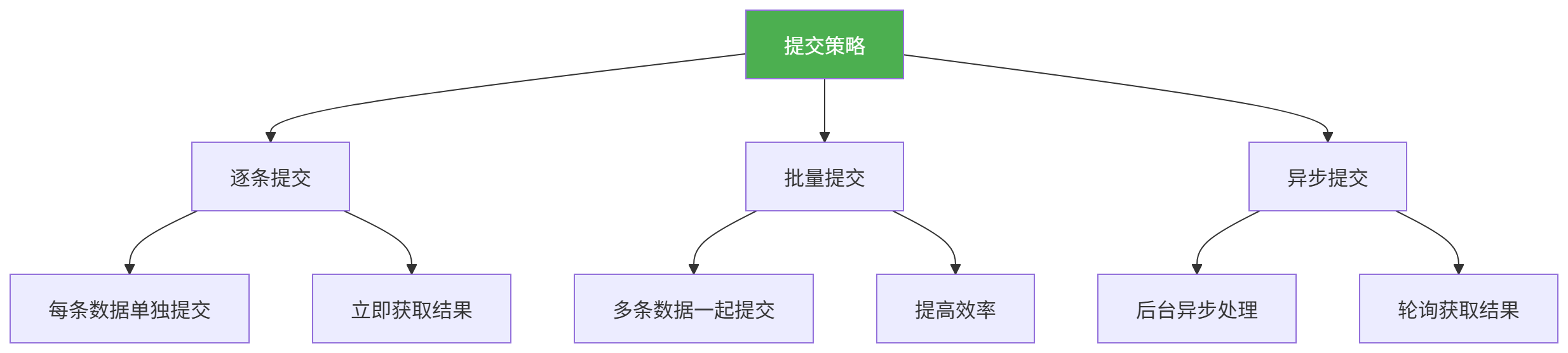 ### 6.2 提交结果处理 ``` class SubmissionHandler: def __init__(self): self.success_count = 0 self.fail_count = 0 self.results = [] def handle_result(self, record, success, message=''): if success: self.success_count += 1 else: self.fail_count += 1 self.results.append({ 'record': record, 'success': success, 'message': message, 'timestamp': datetime.now().isoformat() }) def get_summary(self): return { 'total': self.success_count + self.fail_count, 'success': self.success_count, 'fail': self.fail_count, 'success_rate': (self.success_count / (self.success_count + self.fail_count)) * 100 } def save_results(self, output_file): with open(output_file, 'w', encoding='utf-8') as f: json.dump({ 'summary': self.get_summary(), 'results': self.results }, f, ensure_ascii=False, indent=2) ``` ## 七、批量数据录入实现 ### 7.1 完整流程代码示例 ``` import json from datetime import datetime class BatchDataEntry: def __init__(self, config): self.config = config self.reader = None self.validator = None self.filler = None self.handler = SubmissionHandler() def init_components(self): if self.config['data_source']['type'] == 'excel': self.reader = ExcelDataReader(self.config['data_source']['path']) elif self.config['data_source']['type'] == 'csv': self.reader = CSVDataReader(self.config['data_source']['path']) self.validator = DataValidator(self.config['validation_rules']) self.filler = FormFiller() def run(self): self.init_components() print("Reading data...") data, read_errors = self.reader.read_with_validation( required_columns=self.config.get('required_columns') ) print(f"Read {len(data)} records, {len(read_errors)} errors") if read_errors: with open('read_errors.json', 'w', encoding='utf-8') as f: json.dump(read_errors, f, ensure_ascii=False, indent=2) print("Validating data...") validation_result = self.validator.validate_batch(data) print(f"Valid: {validation_result['valid_count']}, Invalid: {validation_result['invalid_count']}") if validation_result['invalid']: with open('validation_errors.json', 'w', encoding='utf-8') as f: json.dump(validation_result['invalid'], f, ensure_ascii=False, indent=2) print("Starting form filling...") self.filler.init(headless=self.config.get('headless', True)) try: self.filler.login( self.config['login']['url'], self.config['login']['username'], self.config['login']['password'] ) for i, record in enumerate(validation_result['valid']): print(f"Processing record {i+1}/{validation_result['valid_count']}") try: self.filler.page.goto(self.config['form_url']) self.filler.fill_form(record) if self.filler.submit(): self.handler.handle_result(record, True, 'Submitted successfully') else: self.handler.handle_result(record, False, 'Submit button not found') except Exception as e: self.handler.handle_result(record, False, str(e)) print(f"Error processing record {i+1}: {e}") finally: self.filler.close() print("Generating report...") self.handler.save_results('submission_results.json') summary = self.handler.get_summary() print(f"Batch entry complete: {summary['success']} success, {summary['fail']} fail") print(f"Success rate: {summary['success_rate']:.2f}%") return summary ``` ### 7.2 配置文件示例 ``` { "data_source": { "type": "excel", "path": "data/users.xlsx" }, "required_columns": ["username", "email", "department"], "validation_rules": { "username": { "required": true, "type": "string", "min_length": 3, "max_length": 50 }, "email": { "required": true, "type": "string", "format": "email", "max_length": 100 }, "department": { "required": true, "type": "string" }, "age": { "required": false, "type": "integer", "min": 18, "max": 65 } }, "login": { "url": "https://example.com/login", "username": "admin", "password": "password" }, "form_url": "https://example.com/users/add", "headless": true, "batch_size": 100 } ``` ## 八、错误处理与重试机制 ### 8.1 错误类型  ### 8.2 重试机制 ``` class RetryHandler: def __init__(self, max_retries=3, delay=1, backoff=2): self.max_retries = max_retries self.delay = delay self.backoff = backoff def retry(self, func, *args, **kwargs): delay = self.delay for attempt in range(self.max_retries): try: return func(*args, **kwargs) except Exception as e: print(f"Attempt {attempt + 1} failed: {e}") if attempt < self.max_retries - 1: print(f"Retrying in {delay} seconds...") time.sleep(delay) delay *= self.backoff raise Exception(f"Failed after {self.max_retries} attempts") def retry_with_exponential_backoff(self, func, *args, **kwargs): delay = self.delay for attempt in range(self.max_retries): try: return func(*args, **kwargs) except Exception as e: print(f"Attempt {attempt + 1} failed: {e}") if attempt < self.max_retries - 1: jitter = random.uniform(0, delay) sleep_time = delay + jitter print(f"Retrying in {sleep_time:.2f} seconds...") time.sleep(sleep_time) delay *= self.backoff raise Exception(f"Failed after {self.max_retries} attempts") ``` ## 九、性能优化 ### 9.1 优化策略 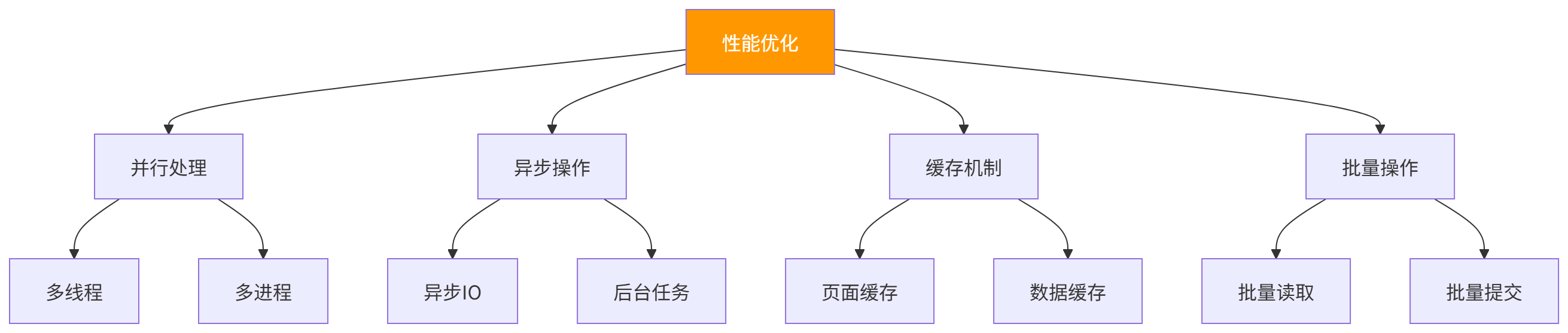 ### 9.2 并行处理代码示例 ``` from concurrent.futures import ThreadPoolExecutor class ParallelDataEntry: def __init__(self, config): self.config = config self.max_workers = config.get('max_workers', 5) def process_record(self, record): filler = FormFiller() try: filler.init(headless=True) filler.login( self.config['login']['url'], self.config['login']['username'], self.config['login']['password'] ) filler.page.goto(self.config['form_url']) filler.fill_form(record) if filler.submit(): return {'record': record, 'success': True} else: return {'record': record, 'success': False, 'message': 'Submit failed'} except Exception as e: return {'record': record, 'success': False, 'message': str(e)} finally: filler.close() def run(self, records): results = [] with ThreadPoolExecutor(max_workers=self.max_workers) as executor: futures = [executor.submit(self.process_record, record) for record in records] for future in futures: results.append(future.result()) success_count = sum(1 for r in results if r['success']) return { 'total': len(results), 'success': success_count, 'fail': len(results) - success_count, 'results': results } ``` ## 十、常见问题 ### 10.1 表单元素定位失败 **现象**:无法找到表单元素 **解决方案**: |方案|说明| | --- | --- | |使用多种定位方式|尝试ID、Name、XPath等多种方式| |等待元素加载|添加等待时间| |动态定位|使用相对定位| ### 10.2 数据验证失败 **现象**:数据验证不通过 **解决方案**: |方案|说明| | --- | --- | |检查验证规则|检查验证规则配置| |数据预处理|提前清洗数据| |错误日志|查看错误日志| ### 10.3 提交超时 **现象**:表单提交超时 **解决方案**: |方案|说明| | --- | --- | |增加超时时间|增加等待时间| |优化网络|检查网络连接| |异步提交|使用异步提交方式| ### 10.4 页面结构变化 **现象**:页面结构变化导致机器人失败 **解决方案**: |方案|说明| | --- | --- | |定期维护|定期检查页面结构| |动态定位|使用动态定位策略| |多选择器|使用多个选择器|