首页 文章 精选 留言 我的

精选列表

搜索[app开发],共10000篇文章
优秀的个人博客,低调大师

APP登陆页面适配

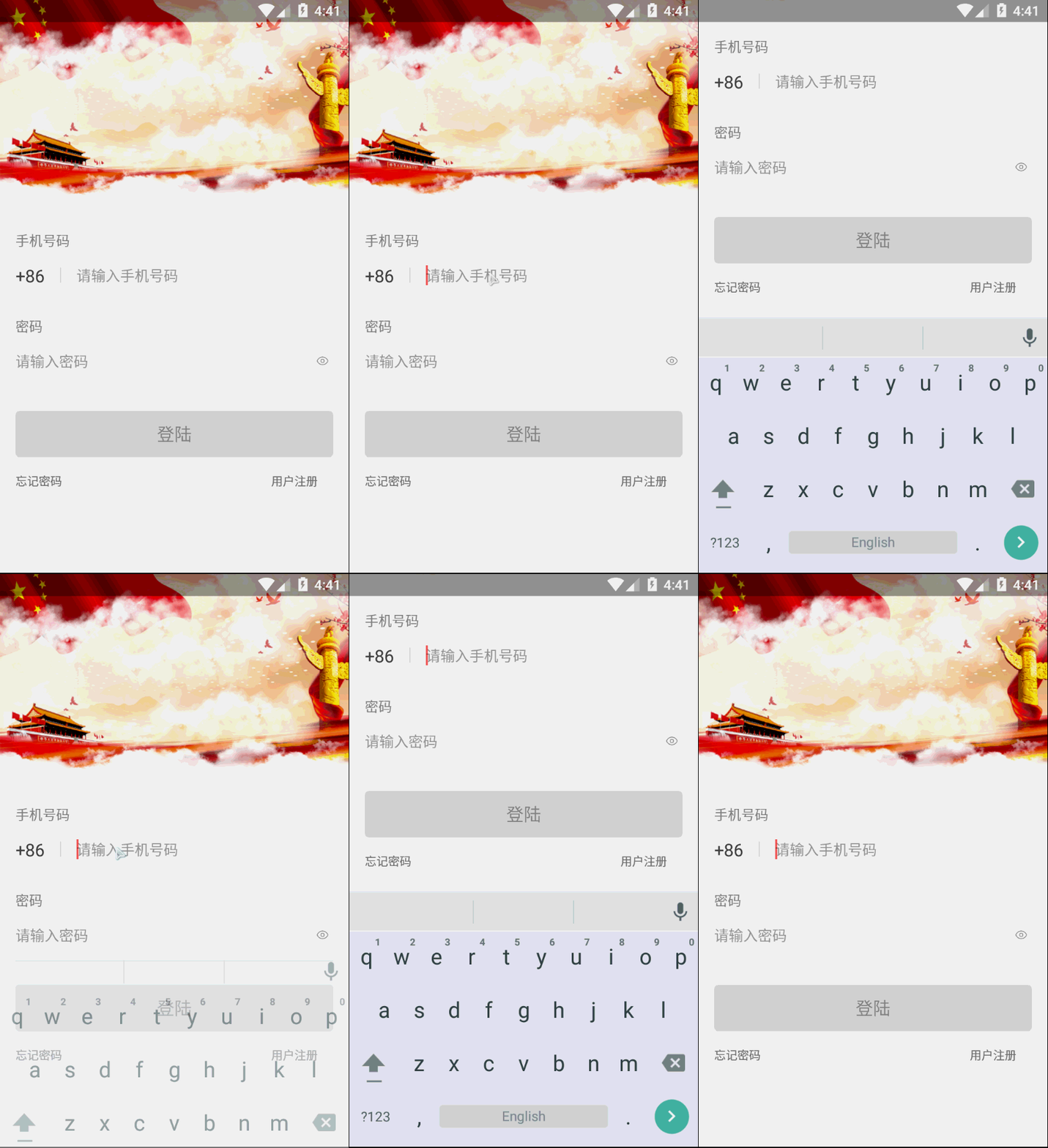
先看效果图。 登陆首页效果图 原理 为RootView增加监听事件,然后进行滚动 至于该滚动多少,这是需要自己慢慢进行计算。 xml <LinearLayout android:id="@+id/llLogin" android:layout_width="match_parent" android:layout_height="match_parent" android:background="@color/white" android:orientation="vertical"> <!--你的布局--> </LinearLayout> 代码 /** * 1、大于屏幕整体高度的1/3:键盘显示 获取Scroll的窗体坐标 * 算出main需要滚动的高度,使scroll显示。 * 2、小于屏幕整体高度的1/3:键盘隐藏 * * @param rootView 根布局 */ private fun addLayoutListener(rootView: View) { rootView.viewTreeObserver.addOnGlobalLayoutListener { val rect = Rect() rootView.getWindowVisibleDisplayFrame(rect) val screenHeight = rootView.rootView.height val mainInvisibleHeight = rootView.rootView.height - rect.bottom if (mainInvisibleHeight > screenHeight / 4) { rootView.scrollTo(0, DensityUtils.dp2px(mActivity, 200f/*需要滚动到图片目标高度*/)) } else { rootView.scrollTo(0, 0) } } }

优秀的个人博客,低调大师

Can't run app with devtools and java 9

Exception in thread "main" java.lang.ClassCastException: java.base/jdk.internal.loader.ClassLoaders$AppClassLoader cannot be cast to java.base/java.net.URLClassLoader at org.springframework.boot.devtools.restart.DefaultRestartInitializer.getUrls(DefaultRestartInitializer.java:93) at org.springframework.boot.devtools.restart.DefaultRestartInitializer.getInitialUrls(DefaultRestartInitializer.java:56) at org.springframework.boot.devtools.restart.Restarter.<init>(Restarter.java:139) at org.springframework.boot.devtools.restart.Restarter.initialize(Restarter.java:539) at org.springframework.boot.devtools.restart.RestartApplicationListener.onApplicationStartedEvent(RestartApplicationListener.java:68) at org.springframework.boot.devtools.restart.RestartApplicationListener.onApplicationEvent(RestartApplicationListener.java:45) at org.springframework.context.event.SimpleApplicationEventMulticaster.invokeListener(SimpleApplicationEventMulticaster.java:167) at org.springframework.context.event.SimpleApplicationEventMulticaster.multicastEvent(SimpleApplicationEventMulticaster.java:139) at org.springframework.context.event.SimpleApplicationEventMulticaster.multicastEvent(SimpleApplicationEventMulticaster.java:122) at org.springframework.boot.context.event.EventPublishingRunListener.started(EventPublishingRunListener.java:67) at org.springframework.boot.SpringApplicationRunListeners.started(SpringApplicationRunListeners.java:48) at org.springframework.boot.SpringApplication.run(SpringApplication.java:305) at org.springframework.boot.SpringApplication.run(SpringApplication.java:1187) at org.springframework.boot.SpringApplication.run(SpringApplication.java:1176) at com.alibaba.microtek.Application.main(Application.java:17) https://github.com/spring-projects/spring-boot/issues/7565

优秀的个人博客,低调大师

用loadrunner代理录制手机APP脚本

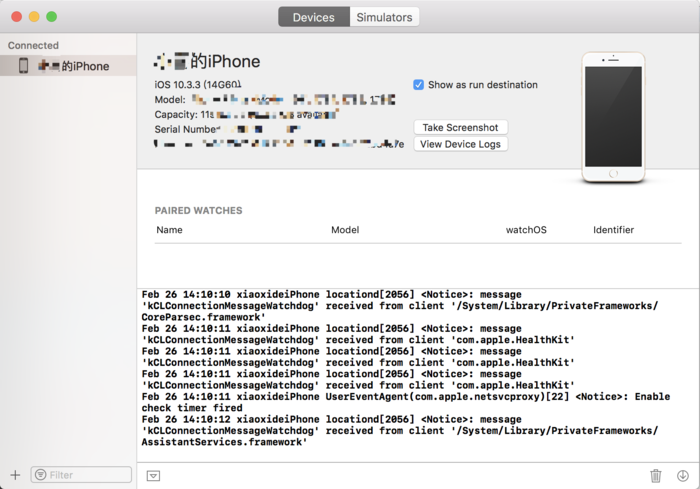
利用loadrunner代理方式录制手机(iPhone、android)应用程序HTTP脚本 1.利用笔记本网卡或者类似360随身wifi,在安装loadrunner的电脑上共享网络,在手机上连接共享的wifi。 2.配置手机wifi连接的HTTP代理地址和端口,代理地址(服务器)为电脑的ip地址,端口可以写1-65535,建议使用不常用的端口,如:9898。 3.打开loadrunner脚本编辑器,选择录制协议为HTTP协议,同时设置录制模式为代理,端口填写手机上设置的端口,如图1。图是采用loadrunner12进行设置,loadrunner11同样可以,在录制选项卡里设置监控端口。 4.点击录制,然后在手机上打开需要录制的应用程序,操作需要录制的业务,当需要结束时,点击结束录制。 5.至此,通过loadrunner代理方式就将手机上的应用程序的脚本就录制下来了。 本文转自 昊洋教育 51CTO博客,原文链接:http://blog.51cto.com/zdytesting/1733661,如需转载请自行联系原作者

资源下载

更多资源
Mario

Mario

马里奥是站在游戏界顶峰的超人气多面角色。马里奥靠吃蘑菇成长,特征是大鼻子、头戴帽子、身穿背带裤,还留着胡子。与他的双胞胎兄弟路易基一起,长年担任任天堂的招牌角色。

腾讯云软件源

腾讯云软件源

为解决软件依赖安装时官方源访问速度慢的问题,腾讯云为一些软件搭建了缓存服务。您可以通过使用腾讯云软件源站来提升依赖包的安装速度。为了方便用户自由搭建服务架构,目前腾讯云软件源站支持公网访问和内网访问。

Rocky Linux

Rocky Linux

Rocky Linux(中文名:洛基)是由Gregory Kurtzer于2020年12月发起的企业级Linux发行版,作为CentOS稳定版停止维护后与RHEL(Red Hat Enterprise Linux)完全兼容的开源替代方案,由社区拥有并管理,支持x86_64、aarch64等架构。其通过重新编译RHEL源代码提供长期稳定性,采用模块化包装和SELinux安全架构,默认包含GNOME桌面环境及XFS文件系统,支持十年生命周期更新。

Sublime Text

Sublime Text

Sublime Text具有漂亮的用户界面和强大的功能,例如代码缩略图,Python的插件,代码段等。还可自定义键绑定,菜单和工具栏。Sublime Text 的主要功能包括:拼写检查,书签,完整的 Python API , Goto 功能,即时项目切换,多选择,多窗口等等。Sublime Text 是一个跨平台的编辑器,同时支持Windows、Linux、Mac OS X等操作系统。


用户登录
用户注册
修改密码
忘记密码