首页 文章 精选 留言 我的

精选列表

搜索[高DPI],共10000篇文章
优秀的个人博客,低调大师

阿里云推PostgreSQL 10 高可用版

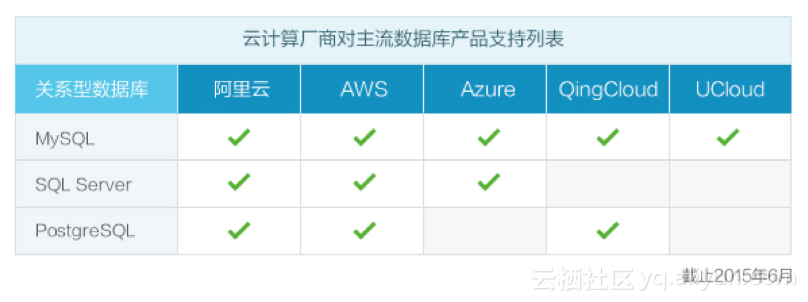
2015年,阿里云宣布正式推出RDS for PostgreSQL服务,届时,阿里云成为国内首家同时支持MySQL、SQL Server 和PostgreSQL关系型数据库的云计算服务商。 用户在云上就能享受PostgreSQL引擎带来的对SQL标准和NoSQL的高度兼容、强大的处理复杂查询能力、以及丰富的插件支持等特性,同时还能大幅节省运维成本和硬件投入。 转眼到现在,已经是阿里云支持 PostgreSQL的第四年。 阿里云云数据库RDS for PostgreSQL成为了一款兼具轻松处理空间信息、强大NoSQL兼容、支持全文搜索、支持OSS云存储扩展、支持数据仓库数据共享等诸多功能于一身的实用数据库,无论是在OSS存储空间扩展以节省存储成本,还是整合JSON、GIS、IP网络类型处理的IoT业务上都有不俗的表现。 近日,阿里云重磅发布

优秀的个人博客,低调大师

原来Java大数据才是真正的高富帅!

大数据时代,中国IT环境也将面临重新洗牌,不仅仅是企业,更是程序员们转型可遇而不可求的机遇。 国内大多数大型互联网公司的程序员被称作研发工程师,但实际上国内几乎没有研发项目,只能叫做开发。开发程序员的工作大多是重复性劳动,容易产生疲惫感,薪资在工作2-5年内就达到了一个峰值,再要提升就比较困难,这样就导致了很多程序员最终转行做了其他行业。 JAVA的精密,强大,拥有其它语言不可替代的性能和可维护性,早已经是成为最受欢迎的编程语言之一,很多人想进入IT行业,首选的第一门语言就是JAVA。但是,在未来10年肯定是大数据的天下,人工智能的爆发,将会有大量企业会进入大数据领域,而从JAVA程序员转JAVA大数据就会有天然的优势,因为目前大数据的架构基本都是用JAVA语言完成,未来10年,JAVA大数据的需求量会越来越大。 现在学习JAVA的小伙

优秀的个人博客,低调大师

使用阿里云容器服务部署高可用eureka

之前在网上搜了很久,基本上都是自己维护的swarm集群,并不是使用的阿里云的容器服务功能,所以基本都不能使用,下面是我最终可用的配置,但是无法使用阿里云的蓝绿发布来发布eureka,不过这东西大多也都是人工维护 eureka配置 server: port: 8082 eureka: server: enable-self-preservation: false eviction-interval-timer-in-ms: 4000 client: service-url: defaultZone: ${ADDITIONAL_EUREKA_SERVER} instance: lease-expiration-duration-in-seconds: 5 lease-renewal-interval-in-seconds: 5 spring: application: name: eureka-server 容器服务编排模板 由于容器集群内可能有多台机器,所以部署的eureka不能确定在哪台机器而且不能准确获得ip,使用阿里云容器服务的关键字hostname来设定地址,这样docker会根据这个获取地址传入项目中 eureka1: image: registry-vpc.cn-beijing.aliyuncs.com/wzm/spring-cloud-netfilx-eureka-demo:20171231191741 hostname: eureka1 ports: - "8082:8082" environment: - ADDITIONAL_EUREKA_SERVER=http://eureka2:8082/eureka/ eureka2: image: registry-vpc.cn-beijing.aliyuncs.com/wzm/spring-cloud-netfilx-eureka-demo:20171231191741 hostname: eureka2 ports: - "8082:8082" environment: - ADDITIONAL_EUREKA_SERVER=http://eureka1:8082/eureka/ 源码地址 这个项目内的docker-compose.yml就是给容器服务的编排模板,自己维护的docker不一定能使用 https://github.com/EndOfMaster/spring-cloud-demo/tree/master/spring-cloud-netflix-eureka-server-docker

优秀的个人博客,低调大师

mysql高可用方案之主主架构(master-master)

mysql的主从是将主服务器操作记录写入二进制日志文件,然后通过mysql dump线程将日志传到从服务器中继日志中,从服务器在中继日志读取信息并执行.mysql主主架构原理和主从差不多,只是两台服务器都要开启二进制日志文件,并互相传送给对方读取日志中的内容,使数据同步.两台服务器可以同时读也可以同时写,但不能解决单点故障. 环境规划: 主机名:tong2 IP:192.168.1.248 主机名:tong3 IP:192.168.1.249 数据库:mysql-5.6.21 1.配置服务器网络环境 tong2节点: [root@tong2 ~]# ifconfig eth0 eth0 Link encap:Ethernet HWaddr 10:78:D2:C7:17:E8 inet addr:192.168.1.248 Bcast:192.168.1.255 Mask:255.255.255.0 inet6 addr: fe80::1278:d2ff:fec7:17e8/64 Scope:Link UP BROADCAST RUNNING MULTICAST MTU:1500 Metric:1 RX packets:3118346 errors:0 dropped:0 overruns:0 frame:0 TX packets:16271 errors:0 dropped:0 overruns:0 carrier:0 collisions:0 txqueuelen:1000 RX bytes:201242719 (191.9 MiB) TX bytes:1754452 (1.6 MiB) [root@tong2 ~]# vim /etc/hosts 192.168.1.248 tong2 192.168.1.249 tong3 [root@tong2 ~]# tong3节点: [root@tong3 ~]# ifconfig eth0 eth0 Link encap:Ethernet HWaddr 10:78:D2:C8:F7:50 inet addr:192.168.1.249 Bcast:192.168.1.255 Mask:255.255.255.0 inet6 addr: fe80::1278:d2ff:fec8:f750/64 Scope:Link UP BROADCAST RUNNING MULTICAST MTU:1500 Metric:1 RX packets:5055594 errors:0 dropped:0 overruns:0 frame:0 TX packets:96641 errors:0 dropped:0 overruns:0 carrier:0 collisions:0 txqueuelen:1000 RX bytes:580382285 (553.4 MiB) TX bytes:7055569 (6.7 MiB) [root@tong3 ~]# vim /etc/hosts 192.168.1.248 tong2 192.168.1.249 tong3 [root@tong3 ~]# 2.下载安装mysql-5.6.21软件 tong2节点和tong3节点: http://mirrors.sohu.com/mysql/MySQL-5.6/ --下载关于mysql的软件 [root@tong2 ~]# rpm -ivh MySQL-* --安装所有的mysql软件包 3.修改配置文件 tong2节点: [root@tong2 ~]# vim /usr/my.cnf --在配置文件中添加如下内容 server_id = 10 --服务器的id号 log-bin=mysql-bin --二进制日志文件 log-bin-index=mysql-bin-index --索引文件 relay-log=relay-bin --中继日志文件 relay-log-index=relay-bin-index --中继索引文件 replicate-do-db=tong--要同步的数据库 auto_increment_offset=1 --设置服务器交叉读写数据 auto_increment_increment=2 [root@tong2 ~]# tong3节点: [root@tong3 ~]# vim /usr/my.cnf server_id = 20 log-bin=mysql-bin log-bin-index=mysql-bin-index relay-log=relay-bin relay-log-index=relay-bin-index replicate-do-db=tong auto_increment_offset=2 auto_increment_increment=2 [root@tong3 ~]# 3.登陆数据库并创建用户 tong2节点: [root@tong2 ~]# /etc/init.d/mysql restart --重启服务 Shutting down MySQL.. SUCCESS! Starting MySQL. SUCCESS! [root@tong2 ~]# netstat -antup | grep 3306 tcp 0 0 :::3306 :::* LISTEN 8508/mysqld [root@tong2 ~]# mysql -u root -p Enter password: Welcome to the MySQL monitor. Commands end with ; or \g. Your MySQL connection id is 5 Server version: 5.6.21 MySQL Community Server (GPL) Copyright (c) 2000, 2014, Oracle and/or its affiliates. All rights reserved. Oracle is a registered trademark of Oracle Corporation and/or its affiliates. Other names may be trademarks of their respective owners. Type 'help;' or '\h' for help. Type '\c' to clear the current input statement. mysql> create database tong; --创建要同步的数据库 Query OK, 1 row affected (0.00 sec) mysql> grant replication slave,replication client on *.* to'tong2'@'192.168.1.249'identified by 'system'; --创建复制用户 Query OK, 0 rows affected (0.00 sec) mysql> flush tables; Query OK, 0 rows affected (0.00 sec) mysql> tong3节点: [root@tong3 ~]# /etc/init.d/mysql restart Shutting down MySQL.. SUCCESS! Starting MySQL. SUCCESS! [root@tong3 ~]# netstat -antup | grep 3306 tcp 0 0 :::3306 :::* LISTEN 3484/mysqld [root@tong3 ~]# mysql -u root -p Enter password: Welcome to the MySQL monitor. Commands end with ; or \g. Your MySQL connection id is 3 Server version: 5.6.21 MySQL Community Server (GPL) Copyright (c) 2000, 2014, Oracle and/or its affiliates. All rights reserved. Oracle is a registered trademark of Oracle Corporation and/or its affiliates. Other names may be trademarks of their respective owners. Type 'help;' or '\h' for help. Type '\c' to clear the current input statement. mysql> create database tong; Query OK, 1 row affected (0.00 sec) mysql> grant replication slave,replication client on *.* totong3@'192.168.1.248'identified by 'system'; Query OK, 0 rows affected (0.00 sec) mysql> flush tables; Query OK, 0 rows affected (0.00 sec) mysql> 4.iptable包过滤 tong2节点和tong3节点: [root@tong2 ~]# vim /etc/sysconfig/iptables -A INPUT -m state --state NEW -m tcp -p tcp -s 192.168.1.249--dport 3306 -j ACCEPT --添加规则,放行对mysql的通行 [root@tong2 ~]# /etc/init.d/iptables restart iptables: Setting chains to policy ACCEPT: filter [ OK ] iptables: Flushing firewall rules: [ OK ] iptables: Unloading modules: [ OK ] iptables: Applying firewall rules: [ OK ] [root@tong2 ~]# 5.查看各节点的二进制日志的位置 tong2节点: mysql> show master status; +------------------+----------+--------------+------------------+-------------------+ | File | Position | Binlog_Do_DB | Binlog_Ignore_DB | Executed_Gtid_Set | +------------------+----------+--------------+------------------+-------------------+ | mysql-bin.000001 | 120 | | | | +------------------+----------+--------------+------------------+-------------------+ 1 row in set (0.00 sec) mysql> tong3节点: mysql> show master status; +------------------+----------+--------------+------------------+-------------------+ | File | Position | Binlog_Do_DB | Binlog_Ignore_DB | Executed_Gtid_Set | +------------------+----------+--------------+------------------+-------------------+ | mysql-bin.000004 | 120 | | | | +------------------+----------+--------------+------------------+-------------------+ 1 row in set (0.00 sec) mysql> 6.服务器互相连接 tong2节点: [root@tong2 ~]# mysql -u root -p Enter password: Welcome to the MySQL monitor. Commands end with ; or \g. Your MySQL connection id is 2 Server version: 5.6.21-log MySQL Community Server (GPL) Copyright (c) 2000, 2014, Oracle and/or its affiliates. All rights reserved. Oracle is a registered trademark of Oracle Corporation and/or its affiliates. Other names may be trademarks of their respective owners. Type 'help;' or '\h' for help. Type '\c' to clear the current input statement. mysql> change master to master_host='192.168.1.249',master_user='tong3',master_password='system',master_port=3306,master_log_file='mysql-bin.000004',master_log_pos=120; Query OK, 0 rows affected, 2 warnings (0.43 sec) mysql> start slave; Query OK, 0 rows affected (0.03 sec) mysql> show slave status \G *************************** 1. row *************************** Slave_IO_State: Waiting for master to send event Master_Host: 192.168.1.249 Master_User: tong3 Master_Port: 3306 Connect_Retry: 60 Master_Log_File: mysql-bin.000004 Read_Master_Log_Pos: 120 Relay_Log_File: relay-bin.000002 Relay_Log_Pos: 283 Relay_Master_Log_File: mysql-bin.000004 Slave_IO_Running: Yes --io线程启动正常 Slave_SQL_Running: Yes--sql线程启动正常 Replicate_Do_DB: tong --要同步的数据库 Replicate_Ignore_DB: Replicate_Do_Table: Replicate_Ignore_Table: Replicate_Wild_Do_Table: Replicate_Wild_Ignore_Table: Last_Errno: 0 Last_Error: Skip_Counter: 0 Exec_Master_Log_Pos: 120 Relay_Log_Space: 450 Until_Condition: None Until_Log_File: Until_Log_Pos: 0 Master_SSL_Allowed: No Master_SSL_CA_File: Master_SSL_CA_Path: Master_SSL_Cert: Master_SSL_Cipher: Master_SSL_Key: Seconds_Behind_Master: 0 Master_SSL_Verify_Server_Cert: No Last_IO_Errno: 0 Last_IO_Error: Last_SQL_Errno: 0 Last_SQL_Error: Replicate_Ignore_Server_Ids: Master_Server_Id: 20 Master_UUID: 6009ee25-7f93-11e4-8817-1078d2c8f750 Master_Info_File: /var/lib/mysql/master.info SQL_Delay: 0 SQL_Remaining_Delay: NULL Slave_SQL_Running_State: Slave has read all relay log; waiting for the slave I/O thread to update it Master_Retry_Count: 86400 Master_Bind: Last_IO_Error_Timestamp: Last_SQL_Error_Timestamp: Master_SSL_Crl: Master_SSL_Crlpath: Retrieved_Gtid_Set: Executed_Gtid_Set: Auto_Position: 0 1 row in set (0.00 sec) mysql> tong3节点: [root@tong3 ~]# mysql -u root -p Enter password: Welcome to the MySQL monitor. Commands end with ; or \g. Your MySQL connection id is 2 Server version: 5.6.21-log MySQL Community Server (GPL) Copyright (c) 2000, 2014, Oracle and/or its affiliates. All rights reserved. Oracle is a registered trademark of Oracle Corporation and/or its affiliates. Other names may be trademarks of their respective owners. Type 'help;' or '\h' for help. Type '\c' to clear the current input statement. mysql> change master to master_host='192.168.1.248',master_user='tong2',master_password='system',master_port=3306,master_log_file='mysql-bin.000001',master_log_pos=120; Query OK, 0 rows affected, 2 warnings (0.43 sec) mysql> start slave; Query OK, 0 rows affected (0.06 sec) mysql> show slave status\G *************************** 1. row *************************** Slave_IO_State: Waiting for master to send event Master_Host: 192.168.1.248 Master_User: tong2 Master_Port: 3306 Connect_Retry: 60 Master_Log_File: mysql-bin.000001 Read_Master_Log_Pos: 120 Relay_Log_File: relay-bin.000002 Relay_Log_Pos: 283 Relay_Master_Log_File: mysql-bin.000001 Slave_IO_Running: Yes Slave_SQL_Running: Yes Replicate_Do_DB: tong Replicate_Ignore_DB: Replicate_Do_Table: Replicate_Ignore_Table: Replicate_Wild_Do_Table: Replicate_Wild_Ignore_Table: Last_Errno: 0 Last_Error: Skip_Counter: 0 Exec_Master_Log_Pos: 120 Relay_Log_Space: 450 Until_Condition: None Until_Log_File: Until_Log_Pos: 0 Master_SSL_Allowed: No Master_SSL_CA_File: Master_SSL_CA_Path: Master_SSL_Cert: Master_SSL_Cipher: Master_SSL_Key: Seconds_Behind_Master: 0 Master_SSL_Verify_Server_Cert: No Last_IO_Errno: 0 Last_IO_Error: Last_SQL_Errno: 0 Last_SQL_Error: Replicate_Ignore_Server_Ids: Master_Server_Id: 10 Master_UUID: 2cb52da5-759f-11d6-bc85-1078d2c717e8 Master_Info_File: /var/lib/mysql/master.info SQL_Delay: 0 SQL_Remaining_Delay: NULL Slave_SQL_Running_State: Slave has read all relay log; waiting for the slave I/O thread to update it Master_Retry_Count: 86400 Master_Bind: Last_IO_Error_Timestamp: Last_SQL_Error_Timestamp: Master_SSL_Crl: Master_SSL_Crlpath: Retrieved_Gtid_Set: Executed_Gtid_Set: Auto_Position: 0 1 row in set (0.00 sec) mysql> 7.测试服务是否正常 tong2节点: mysql> create table a (a int); Query OK, 0 rows affected (0.26 sec) mysql> insert into a values(1),(2),(3),(4); Query OK, 4 rows affected (0.03 sec) Records: 4 Duplicates: 0 Warnings: 0 mysql> select * from a; +------+ | a | +------+ | 1 | | 2 | | 3 | | 4 | +------+ 4 rows in set (0.00 sec) mysql> tong3节点: mysql> \u tong Reading table information for completion of table and column names You can turn off this feature to get a quicker startup with -A Database changed mysql> select * from a; +------+ | a | +------+ | 1 | | 2 | | 3 | | 4 | +------+ 4 rows in set (0.00 sec) mysql>create table a1 (a1 int); Query OK, 0 rows affected (0.27 sec) mysql> insert into a1 values(11),(12),(13),(14); Query OK, 4 rows affected (0.03 sec) Records: 4 Duplicates: 0 Warnings: 0 mysql> select * from a1; +------+ | a1 | +------+ | 11 | | 12 | | 13 | | 14 | +------+ 4 rows in set (0.00 sec) mysql> tong2节点: mysql> select * from a1; +------+ | a1 | +------+ | 11 | | 12 | | 13 | | 14 | +------+ 4 rows in set (0.00 sec) mysql> 本文转自 z597011036 51CTO博客,原文链接:http://blog.51cto.com/tongcheng/1588375,如需转载请自行联系原作者

优秀的个人博客,低调大师

mysql高可用方案之主从架构(master-slave)

mysql主从在目前企业中很常见的方案之一,主是将DML,DDL,DML语句用mysql dump进程将二进制日志记录,从是用thread_io线程读取主上的制日志存放中继日志中,再用thread_sql线程读取中继日志将数据写入到数据库,实现数据同步. mysqldba技术群 378190849 武汉-linux运维群 236415619 架构规划: tong1:192.168.1.247 tong2:192.168.1.248 1.配置网络 tong1节点: [root@tong1 ~]# hostname tong1 [root@tong1 ~]# cat /etc/hosts 192.168.1.247 tong1 192.168.1.248 tong2 [root@tong1 ~]# tong2节点: [root@tong2 ~]# hostname tong2 [root@tong2 ~]# cat /etc/hosts 192.168.1.247 tong1 192.168.1.248 tong2 [root@tong2 ~]# 2.下载安装mysql数据库 在两个节点安装mysql数据库 [root@tong1 ~]# wgethttp://mirrors.sohu.com/mysql/MySQL-5.6/mysql-5.6.23-linux-glibc2.5-x86_64.tar.gz [root@tong1 ~]# tar xvf mysql-5.6.23-linux-glibc2.5-x86_64.tar.gz -C /usr/local/ [root@tong1 ~]# cd /usr/local/ [root@tong1 ~]# mv mysql-5.6.23-linux-glibc2.5-x86_64/ mysql-5.6.23 [root@tong1 ~]# cd mysql-5.6.23/ [root@tong1 ~]# ./scripts/mysql_install_db --user=mysql --group=mysql --basedir=/usr/local/mysql-5.6.23 --datadir=/usr/local/mysql-5.6.23/data [root@tong1 ~]# cp -a my.cnf /etc/ [root@tong1 ~]# cp -a support-files/mysql.server /etc/init.d/mysqld [root@tong1 ~]# chkconfig --add mysqld [root@tong1 ~]# chkconfig mysqld on [root@tong1 ~]# vim /etc/my.cnf basedir = /usr/local/mysql-5.6.23 datadir = /usr/local/mysql-5.6.23/data port = 3306 server_id = 20 socket = /tmp/mysql.sock [root@tong1 ~]# pkill mysqld [root@tong1 ~]# /etc/init.d/mysqld restart [root@tong1 ~]# /usr/local/mysql-5.6.23/bin/mysqladmin -u root password 'system' [root@tong1 ~]# /usr/local/mysql-5.6.23/bin/mysql -u root -p --输入密码system Enter password: Welcome to the MySQL monitor. Commands end with ; or \g. Your MySQL connection id is 5 Server version: 5.6.23 MySQL Community Server (GPL) Copyright (c) 2000, 2015, Oracle and/or its affiliates. All rights reserved. Oracle is a registered trademark of Oracle Corporation and/or its affiliates. Other names may be trademarks of their respective owners. Type 'help;' or '\h' for help. Type '\c' to clear the current input statement. mysql> exit Bye [root@tong1 ~]# 3.在主库上开启二进制日志和防火墙 tong1节点: [root@tong1 ~]# vim /etc/my.cnf basedir = /usr/local/mysql-5.6.23 datadir = /usr/local/mysql-5.6.23/data port = 3306 server_id = 20 socket = /tmp/mysql.sock log-bin=mysql-bin log-bin-index=mysql-bin-index [root@tong1 ~]# vim /etc/sysconfig/iptables -A INPUT -m state --state NEW -m tcp -p tcp -s 192.168.1.248 --dport 3306 -j ACCEPT [root@tong1 ~]# /etc/init.d/iptables restart iptables: Setting chains to policy ACCEPT: filter [ OK ] iptables: Flushing firewall rules: [ OK ] iptables: Unloading modules: [ OK ] iptables: Applying firewall rules: [ OK ] [root@tong1 ~]# /etc/init.d/mysqld restart Shutting down MySQL.. SUCCESS! Starting MySQL. SUCCESS! [root@tong1 ~]# /usr/local/mysql-5.6.23/bin/mysql -u root -p Enter password: Welcome to the MySQL monitor. Commands end with ; or \g. Your MySQL connection id is 1 Server version: 5.6.23 MySQL Community Server (GPL) Copyright (c) 2000, 2015, Oracle and/or its affiliates. All rights reserved. Oracle is a registered trademark of Oracle Corporation and/or its affiliates. Other names may be trademarks of their respective owners. Type 'help;' or '\h' for help. Type '\c' to clear the current input statement. mysql> grant replication slave ,replication client on *.* to repl_user@'192.168.1.248' identified by 'system!#%246'; Query OK, 0 rows affected (0.00 sec) mysql> flush privileges; Query OK, 0 rows affected (0.00 sec) mysql> create database tong; Query OK, 1 row affected (0.00 sec) mysql> show master status ; +------------------+----------+--------------+------------------+-------------------+ | File | Position | Binlog_Do_DB | Binlog_Ignore_DB | Executed_Gtid_Set | +------------------+----------+--------------+------------------+-------------------+ | mysql-bin.000001 | 528 | | | | +------------------+----------+--------------+------------------+-------------------+ 1 row in set (0.00 sec) mysql> 4.在从库上配置复制主库的数据 [root@tong2 mysql-5.6.23]# vim /etc/my.cnf basedir = /usr/local/mysql-5.6.23 datadir = /usr/local/mysql-5.6.23/data port = 3306 server_id = 10 socket = /tmp/mysql.sockreplicate-do-db=tong replicate-ignore-db=mysql [root@tong2 mysql-5.6.23]# /etc/init.d/mysqld restart Shutting down MySQL.. SUCCESS! Starting MySQL. SUCCESS! [root@tong2 mysql-5.6.23]# /usr/local/mysql-5.6.23/bin/mysql -u root -p Enter password: Welcome to the MySQL monitor. Commands end with ; or \g. Your MySQL connection id is 1 Server version: 5.6.23 MySQL Community Server (GPL) Copyright (c) 2000, 2015, Oracle and/or its affiliates. All rights reserved. Oracle is a registered trademark of Oracle Corporation and/or its affiliates. Other names may be trademarks of their respective owners. Type 'help;' or '\h' for help. Type '\c' to clear the current input statement. mysql> create database tong; Query OK, 1 row affected (0.00 sec) mysql> change master to master_host='192.168.1.247',master_user='repl_user',master_password='system!#%246',master_port=3306,master_log_file='mysql-bin.000001',master_log_pos=528; Query OK, 0 rows affected, 2 warnings (0.43 sec) mysql> start slave; Query OK, 0 rows affected (0.03 sec) mysql> show slave status \G *************************** 1. row *************************** Slave_IO_State: Waiting for master to send event Master_Host: 192.168.1.247 Master_User: repl_user Master_Port: 3306 Connect_Retry: 60 Master_Log_File: mysql-bin.000001 Read_Master_Log_Pos: 528 Relay_Log_File: tong2-relay-bin.000002 Relay_Log_Pos: 283 Relay_Master_Log_File: mysql-bin.000001 Slave_IO_Running: Yes Slave_SQL_Running: Yes Replicate_Do_DB: tong Replicate_Ignore_DB: mysql Replicate_Do_Table: Replicate_Ignore_Table: Replicate_Wild_Do_Table: Replicate_Wild_Ignore_Table: Last_Errno: 0 Last_Error: Skip_Counter: 0 Exec_Master_Log_Pos: 528 Relay_Log_Space: 456 Until_Condition: None Until_Log_File: Until_Log_Pos: 0 Master_SSL_Allowed: No Master_SSL_CA_File: Master_SSL_CA_Path: Master_SSL_Cert: Master_SSL_Cipher: Master_SSL_Key: Seconds_Behind_Master: 0 Master_SSL_Verify_Server_Cert: No Last_IO_Errno: 0 Last_IO_Error: Last_SQL_Errno: 0 Last_SQL_Error: Replicate_Ignore_Server_Ids: Master_Server_Id: 20 Master_UUID: 3de2c8c6-ed4c-11e4-9392-1078d2c78303 Master_Info_File: /usr/local/mysql-5.6.23/data/master.info SQL_Delay: 0 SQL_Remaining_Delay: NULL Slave_SQL_Running_State: Slave has read all relay log; waiting for the slave I/O thread to update it Master_Retry_Count: 86400 Master_Bind: Last_IO_Error_Timestamp: Last_SQL_Error_Timestamp: Master_SSL_Crl: Master_SSL_Crlpath: Retrieved_Gtid_Set: Executed_Gtid_Set: Auto_Position: 0 1 row in set (0.00 sec) mysql> 5.验证主从同步 tong1主库: [root@tong1 mysql-5.6.23]# /usr/local/mysql-5.6.23/bin/mysql -u root -p Enter password: Welcome to the MySQL monitor. Commands end with ; or \g. Your MySQL connection id is 1 Server version: 5.6.23 MySQL Community Server (GPL) Copyright (c) 2000, 2015, Oracle and/or its affiliates. All rights reserved. Oracle is a registered trademark of Oracle Corporation and/or its affiliates. Other names may be trademarks of their respective owners. Type 'help;' or '\h' for help. Type '\c' to clear the current input statement. mysql> \u tong Database changed mysql> create table t (a int); Query OK, 0 rows affected (0.29 sec) mysql> insert into t values(1),(2),(3); Query OK, 3 rows affected (0.03 sec) Records: 3 Duplicates: 0 Warnings: 0 mysql> select * from t; +------+ | a | +------+ | 1 | | 2 | | 3 | +------+ 3 rows in set (0.00 sec) mysql> tong2从库验证数据: [root@tong2 mysql-5.6.23]# /usr/local/mysql-5.6.23/bin/mysql -u root -p Enter password: Welcome to the MySQL monitor. Commands end with ; or \g. Your MySQL connection id is 1 Server version: 5.6.23 MySQL Community Server (GPL) Copyright (c) 2000, 2015, Oracle and/or its affiliates. All rights reserved. Oracle is a registered trademark of Oracle Corporation and/or its affiliates. Other names may be trademarks of their respective owners. Type 'help;' or '\h' for help. Type '\c' to clear the current input statement. mysql> \u tong mysql> select * from t; +------+ | a | +------+ | 1 | | 2 | | 3 | +------+ 3 rows in set (0.00 sec) mysql> 本文转自 z597011036 51CTO博客,原文链接:http://blog.51cto.com/tongcheng/1340214,如需转载请自行联系原作者

资源下载

更多资源
Nacos

Nacos

Nacos /nɑ:kəʊs/ 是 Dynamic Naming and Configuration Service 的首字母简称,一个易于构建 AI Agent 应用的动态服务发现、配置管理和AI智能体管理平台。Nacos 致力于帮助您发现、配置和管理微服务及AI智能体应用。Nacos 提供了一组简单易用的特性集,帮助您快速实现动态服务发现、服务配置、服务元数据、流量管理。Nacos 帮助您更敏捷和容易地构建、交付和管理微服务平台。

Spring

Spring

Spring框架(Spring Framework)是由Rod Johnson于2002年提出的开源Java企业级应用框架,旨在通过使用JavaBean替代传统EJB实现方式降低企业级编程开发的复杂性。该框架基于简单性、可测试性和松耦合性设计理念,提供核心容器、应用上下文、数据访问集成等模块,支持整合Hibernate、Struts等第三方框架,其适用范围不仅限于服务器端开发,绝大多数Java应用均可从中受益。

Sublime Text

Sublime Text

Sublime Text具有漂亮的用户界面和强大的功能,例如代码缩略图,Python的插件,代码段等。还可自定义键绑定,菜单和工具栏。Sublime Text 的主要功能包括:拼写检查,书签,完整的 Python API , Goto 功能,即时项目切换,多选择,多窗口等等。Sublime Text 是一个跨平台的编辑器,同时支持Windows、Linux、Mac OS X等操作系统。

WebStorm

WebStorm

WebStorm 是jetbrains公司旗下一款JavaScript 开发工具。目前已经被广大中国JS开发者誉为“Web前端开发神器”、“最强大的HTML5编辑器”、“最智能的JavaScript IDE”等。与IntelliJ IDEA同源,继承了IntelliJ IDEA强大的JS部分的功能。

用户登录
用户注册