首页 文章 精选 留言 我的

精选列表

搜索[学习],共10000篇文章
优秀的个人博客,低调大师

Python零基础学习笔记(四十一)—— 面向对象编程思想

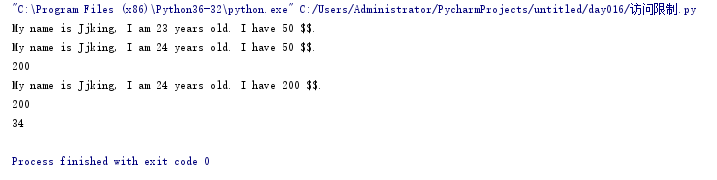
面向对象三大特点: 封装、继承、多态 封装: 在python中,封装就是将有相同属性和功能的事物归纳好之后放在同一个类(class)中 优点:简化代码、便于日后修改和维护 下面定义一个人类作为例子: 里面包含了对象的初始化(构造函数),变量的访问限制(共有变量和私有变量) class Person(object): def __init__(self, name, age, money, height): self.__name__ = name #特殊变量,可以直接访问 self.age = age #普通变量 self.__money = money #私有变量,不能直接访问 self._height = height #可以直接访问,但是请视为私有变量,尽量不要直接访问 def show(self): print("My name is %s, I am %d years old. I have %d $$."%(self.__name__, self.age, self.__money)) def setMoney(self, money): if money < 0: pass else: self.__money = money def getMoney(self): return self.money per = Person("Jjking", 23, 50, 60) per.show() per.money = 200 per.age = 24 per.show() per.__money = 200 print(per.__money) per.setMoney(200) per.show() print(per.getMoney()) #动态数据语言的体现,在执行过程中可以添加属性 per.a = 34 print(per.a) 执行结果: 继承: 子类继承父类的属性,父类有的功能和属性(私有除外),子类都可以用 下面是例子: 因为父类是Animal类,定义了eat的行为,子类是Cat类继承了Animal的eat的行为,所以在创建一个cat的对象的时候,这个对象就直接有了cat的行为,因此执行结果就是小白eat class Animal(object): def __init__(self, namne): self.name = namne def eat(self): print(self.name + "eat") class Cat(Animal): def __init__(self, name): Animal.__init__(self, name) cat = Cat("小白") cat.eat() #执行结果 小白eat 多态: 用一个例子来理解一下多态,就是有继承,有函数重写,父类引用指向子类对象 #人类 class Person(object): def __init__(self, name, gender): self.name = name self.gender = gender def whoAmI(self): return 'I am a Person, my name is %s' % self.name #学生类 class Student(Person): def __init__(self, name, gender, score): super(Student, self).__init__(name, gender) self.score = score def whoAmI(self): return 'I am a Student, my name is %s' % self.name #老师类 class Teacher(Person): def __init__(self, name, gender, course): super(Teacher, self).__init__(name, gender) self.course = course def whoAmI(self): return 'I am a Teacher, my name is %s' % self.name def who_am_i(x): print(x.whoAmI()) p = Person('Tim', 'Male') s = Student('Bob', 'Male', 88) t = Teacher('Alice', 'Female', 'English') who_am_i(p) who_am_i(s) who_am_i(t)

优秀的个人博客,低调大师

Python零基础学习笔记(十二)—— 字符串及其常用方法

''' 什么是字符串 字符串就是以单引号或双引号括起来的任意文本 ''' #创建字符串 str1 = "My name is jjking" str2 = "I am a Little White" ''' 字符串运算 ''' #字符串连接 str3 = "My name is " str4 = "jjking. " str5 = str3 + str4 print("str5 = ",str5) #输入重复字符串 str6 = str5 * 3 print(str6) #访问字符转中的某一个字符,通过索引下标查找字符,从0开始 str7 = "My name is jjking" print(str7[0]) print(str7[1]) print(str7[2]) print(str7[3]) #第 0 个为 M, 第1个为 y, 第 2 个是空格没打印出来,以此类推... #截取字符串中的一部分 str8 = "My name is jjking" str9 = str8[0:7] #[包含,不包含] str10 = str8[:7] #默认为0开始 str11 = str8[4:] #默认截取到最后 print(str9) print(str10) print(str11) #成员运算符测试jjking是否在str8 的字符串中 if "jjking" in str8: print("jjking 在 str8中出现了") print("name" in str8) #输出格式化 num = 1 str12 = "My name is jjking." f = 1.23 print("num = ", num, "str12 =", str12, "f =", f ) #使用%s %d %f 占位符 print("num = %d, str = %s, f = %f" % (num, str12, f)) #%3.f 表示保留小数点后3位,四舍五入法 print("f = %.3f"% f) ''' 转义字符 \ \n 输出 换行 \\ 输出 \ \" 输出 " \t 制表符 ''' print("num = %d\nstr = %s\nf = %f" % (num, str12, f)) print("num = %d\n\"str = %s\"\nf = %f\\" % (num, str12, f)) print("one\tsecond") print("\\\t\\") # r 字符串中有好多字符需要转移时使用,python允许使用 r 表示内部字符串默认不转义 # windows系统下的路径打印常用 print(r"\\\t\\") print(r"C:\Users\Administrator\PycharmProjects\untitled\day003") #按照格式输出 print('''--------------- first second Third ''') str12 = "My name is jjking." #eval(str) #功能:将字符串str当成有效的表达式来求值并返回计算结果 num1 = eval("123") print(num1) print(type(num1)) print(eval("+123")) print(eval("-123")) print(eval("12+3")) print(eval("12-3")) #len(str) #功能:返回字符串的长度 print(len("My name is jjking!")) print(len(str12)) #lower() 转换字符串中的大写字母为小写字母 print(str12.lower()) #upper() 转换字符串中的小写字母为大写字母 print(str12.upper()) #swapcase() 大小写互换 print(str12.swapcase()) #capitalize() 首字母大写 print(str12.capitalize()) #title() 单词的首字母大写 print(str12.title()) #center(width, fillchar) 返回指定宽度的居中的字符串用后面的字符填充 print(str12.center(30,"#")) #ljust(width[, fillchar]) 返回指定宽度的左对齐的字符串用后面的字符填充 print(str12.ljust(30,"*")) #rjust(width[, fillchar]) 返回指定宽度的右对齐的字符串用后面的字符填充 print(str12.rjust(30,"*")) #zfill(width) 返回指定宽度右对齐前面用 0 填充的字符串 print(str12.zfill(30)) #count([str[, start][, end]) 返回字符串中str出现的次数,可以指定一个范围,默认从头到尾 print(str12.count("is")) #find(str[, start][, end]) # 从左向右检测str字符串是否包含在字符串中,可以指定范围,默认从头到尾得到的是第一次出现的开始下标,没有返回-1 print(str12.find("is")) #rfind(str[, start][, end]) # 从右向左检测str字符串是否包含在字符串中,可以指定范围,默认从头到尾得到的是第一次出现的开始下标,没有返回-1 print(str12.rfind("is")) #index(str,start=0, end=len(str)) 和find()一样,但在str不存在的时候会报异常 print(str12.index("is")) #rindex(str,start=0, end=len(str)) 和rfind()一样,但在str不存在的时候会报异常 print(str12.rindex("is")) #lstrip() 截掉字符串左侧指定的字符,要从头开始,默认为空格 print(str12.lstrip("My")) #lstrip() 截掉字符串右侧制定的字符,,要从最后面开始,默认为空格 print(str12.rstrip("jjking.")) #split("", a) 以“ ”中的内容为分隔符截取字符串,a默认为1 print(str12.split(" ")) #splitlines([keepends]) 按照# ('\r', '\r\n', '\n')分隔 stra = (''' My name is jjking. I am a boy! ''') print(stra.splitlines()) #join(seq) 以一个特定的字符串分隔符,将seq中的所有元素组合成一个字符串 strjo =["a", "s", "s"] str_join = "##".join(strjo) print(str_join) #max() 返回字符串中ascii码值最大的 print(max(str12)) #min() 返回字符串中ascii码值最小的 print("$" + min(str12) + "$") #replace(oldstr, newstr, count) 默认全部替换,如果指定了count数量,那么只替换前count个 str_replace = str12.replace("is", "isn't", 1) print(str_replace) #创建一个字符串映射表 str_maketrans = str12.maketrans("is", "nt") # i->n s->t str13 = "P is is kjs is;" str_translate = str13.translate(str_maketrans) print(str_translate) #startswith(str, start = 0, end = len(str)) #在给定的范围内判断是否以给定的字符串开头的,如果没有给定范围,默认整个字符串 print(str12.startswith("is" )) #endwith(str, start = 0, end = len(str)) #在给定的范围内判断是否以给定的字符串结尾的,如果没有给定范围,默认整个字符串 print(str12.endswith("is" )) #编码 #encode(encoding="utf-8", error="strict") print(str12.encode()) data = str12.encode("utf-8", "ignore") #解码 注意:要和编码使用的码制一致 python3之后没有decode()了 str_encode = data.decode("utf-8","ignore") print("###",str_encode, "###") print(type(str_encode)) #isalpha() #如果字符串中至少有一个字符且所有字符都是字母返回True,否则返回False print(str12.isalpha()) #isalnum() #如果字符串中至少有一个字符且所有字符都是字母或数字返回True,否则返回False print(str12.isalnum()) #isupper() #如果字符串中至少有一个英文字符且所有字符都是大写字母或数字或特殊字符返回True,否则返回False str_upper = "ACSD" print(str_upper.isupper()) print("ASD1".isupper()) print("ASD1#".isupper()) #islower() #如果字符串中至少有一个英文字符且所有字符都是小写字母或数字或特殊字符返回True,否则返回False str_upper = "acs" print(str_upper.islower()) print("asd1".islower()) print("asd1#".islower()) #istitle() #如果字符串是标题化的返回True,否则返回False print("My name".istitle()) #错的 print("My Name".istitle()) #对的 #isdigit() #如果字符串只包含数字字符返回True,否则返回False print("123".isdigit()) print("ade".isdigit()) #错的 #isnumeric() #如果字符串只包含数字返回True,否则返回False print("123".isnumeric()) print("ade".isnumeric()) #错的 #isdecimal() #如果字符串只包含十进制字符返回True,否则返回False print("123".isdecimal()) print("ade".isdecimal()) #错的 #isspace() #如果字符串中只包含空格则返回True,否则返回False print(" ".isspace()) print("\t".isspace()) print("\r".isspace()) print("\n".isspace()) #都是对的 执行结果: C:\Users\Administrator\AppData\Local\Programs\Python\Python37-32\python.exe C:/Users/Administrator/PycharmProjects/untitled/day003/String.py str5 = My name is jjking. My name is jjking. My name is jjking. My name is jjking. M y n My name My name ame is jjking jjking 在 str8中出现了 True num = 1 str12 = My name is jjking. f = 1.23 num = 1, str = My name is jjking., f = 1.230000 f = 1.230 num = 1 str = My name is jjking. f = 1.230000 num = 1 "str = My name is jjking." f = 1.230000\ one second \ \ \\\t\\ C:\Users\Administrator\PycharmProjects\untitled\day003 --------------- first second Third 123 <class 'int'> 123 -123 15 9 18 18 my name is jjking. MY NAME IS JJKING. mY NAME IS JJKING. My name is jjking. My Name Is Jjking. ######My name is jjking.###### My name is jjking.************ ************My name is jjking. 000000000000My name is jjking. 1 8 8 8 8 name is jjking. My name is ['My', 'name', 'is', 'jjking.'] ['', 'My name is jjking.', 'I am a boy!'] a##s##s y $ $ My name isn't jjking. P nt nt kjt nt; False False b'My name is jjking.' ### My name is jjking. ### <class 'str'> False False True True True True True True False True True False True False True False True True True True Process finished with exit code 0


优秀的个人博客,低调大师

SpringBoot中oauth2.0学习之服务端配置快速上手

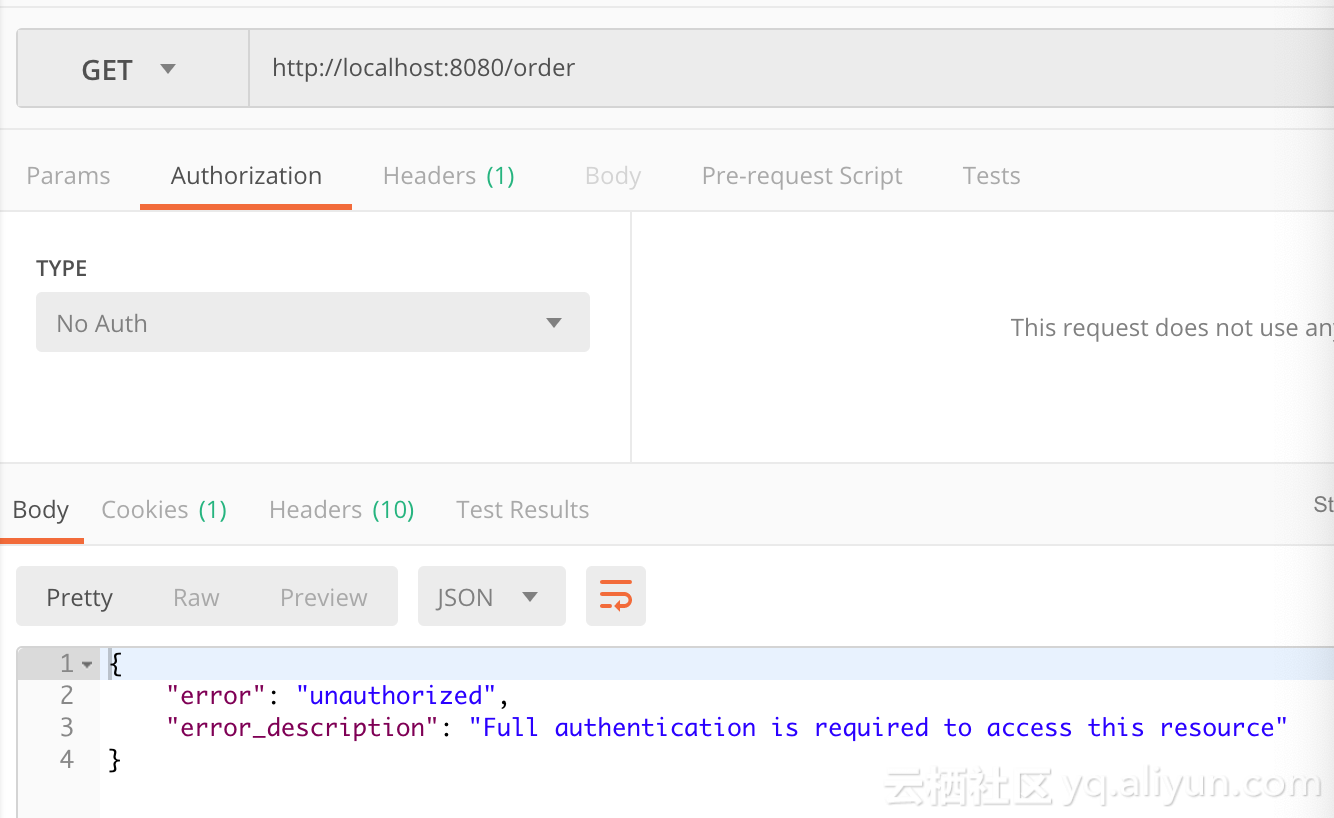
现在第三方登录的例子数见不鲜。其实在这种示例当中,oauth2.0是使用比较多的一种授权登录的标准。oauth2.0也是从oauth1.0升级过来的。那么关于oauth2.0相关的概念及其原理,大家可以参考这篇文章,这篇文章中会有更详细的解释,下来我们直接进入正题。 1.1、gradle依赖 compile('org.springframework.cloud:spring-cloud-starter-oauth2') compile('org.springframework.cloud:spring-cloud-starter-security') 在这里我直接引入的是spring-cloud的依赖项,这种依赖的jar包更全面一些,这里面的核心基础还是spring-security。这里SpringBoot的版本为2.0.6.REALEASE 1.2、@EnableAuthorizationServer 在这里我着重强调一下这个注解:@EnableAuthorizationServer,这个注解源代码如下: @Target(ElementType.TYPE) @Retention(RetentionPolicy.RUNTIME) @Documented @Import({AuthorizationServerEndpointsConfiguration.class, AuthorizationServerSecurityConfiguration.class}) public @interface EnableAuthorizationServer { } 这个注解主要是导入两个配置类,分别是: AuthorizationServerEndpointsConfiguration,这个配置类主要配置授权端点,获取token的端点。大家就把对应的端点想象成controller即可,在这个controller下开放了若干个@RequestMapping,比如常见的有:/oauth/authorize(授权路径),/oauth/token(获取token)等 AuthorizationServerSecurityConfiguration,主要是做spring-security的安全配置,我们可以看一下相关代码: public class AuthorizationServerSecurityConfiguration extends WebSecurityConfigurerAdapter { @Autowired private List<AuthorizationServerConfigurer> configurers = Collections.emptyList(); @Autowired private ClientDetailsService clientDetailsService; @Autowired private AuthorizationServerEndpointsConfiguration endpoints; @Autowired public void configure(ClientDetailsServiceConfigurer clientDetails) throws Exception { for (AuthorizationServerConfigurer configurer : configurers) { configurer.configure(clientDetails); } } @Override protected void configure(AuthenticationManagerBuilder auth) throws Exception { // Over-riding to make sure this.disableLocalConfigureAuthenticationBldr = false // This will ensure that when this configurer builds the AuthenticationManager it will not attempt // to find another 'Global' AuthenticationManager in the ApplicationContext (if available), // and set that as the parent of this 'Local' AuthenticationManager. // This AuthenticationManager should only be wired up with an AuthenticationProvider // composed of the ClientDetailsService (wired in this configuration) for authenticating 'clients' only. } @Override protected void configure(HttpSecurity http) throws Exception { //....省略部分代码 String tokenEndpointPath = handlerMapping.getServletPath("/oauth/token"); String tokenKeyPath = handlerMapping.getServletPath("/oauth/token_key"); String checkTokenPath = handlerMapping.getServletPath("/oauth/check_token"); if (!endpoints.getEndpointsConfigurer().isUserDetailsServiceOverride()) { UserDetailsService userDetailsService = http.getSharedObject(UserDetailsService.class); endpoints.getEndpointsConfigurer().userDetailsService(userDetailsService); } // @formatter:off //上述节点的请求需要授权验证 http .authorizeRequests() .antMatchers(tokenEndpointPath).fullyAuthenticated() .antMatchers(tokenKeyPath).access(configurer.getTokenKeyAccess()) .antMatchers(checkTokenPath).access(configurer.getCheckTokenAccess()) .and() .requestMatchers() .antMatchers(tokenEndpointPath, tokenKeyPath, checkTokenPath) .and() .sessionManagement().sessionCreationPolicy(SessionCreationPolicy.NEVER); // @formatter:on http.setSharedObject(ClientDetailsService.class, clientDetailsService); } protected void configure(AuthorizationServerSecurityConfigurer oauthServer) throws Exception { for (AuthorizationServerConfigurer configurer : configurers) { configurer.configure(oauthServer); } } } 1.2.1、AuthorizationServerConfigurer 这个接口是认证授权配置的核心接口,不过既然是SpringBoot我们就先来看看它怎么帮我们装配的,我们可以在org.springframework.boot.autoconfigure.security.oauth2.authserver这个包下面找到对应配置的Bean: @Configuration @ConditionalOnClass(EnableAuthorizationServer.class) @ConditionalOnMissingBean(AuthorizationServerConfigurer.class) @ConditionalOnBean(AuthorizationServerEndpointsConfiguration.class) @EnableConfigurationProperties(AuthorizationServerProperties.class) public class OAuth2AuthorizationServerConfiguration extends AuthorizationServerConfigurerAdapter { //.... @Override public void configure(ClientDetailsServiceConfigurer clients) throws Exception { //默认基于内存创建ClientDetails ClientDetailsServiceBuilder<InMemoryClientDetailsServiceBuilder>.ClientBuilder builder = clients .inMemory().withClient(this.details.getClientId()); builder.secret(this.details.getClientSecret()) .resourceIds(this.details.getResourceIds().toArray(new String[0])) .authorizedGrantTypes( this.details.getAuthorizedGrantTypes().toArray(new String[0])) .authorities( AuthorityUtils.authorityListToSet(this.details.getAuthorities()) .toArray(new String[0])) .scopes(this.details.getScope().toArray(new String[0])); if (this.details.getAutoApproveScopes() != null) { builder.autoApprove( this.details.getAutoApproveScopes().toArray(new String[0])); } if (this.details.getAccessTokenValiditySeconds() != null) { builder.accessTokenValiditySeconds( this.details.getAccessTokenValiditySeconds()); } if (this.details.getRefreshTokenValiditySeconds() != null) { builder.refreshTokenValiditySeconds( this.details.getRefreshTokenValiditySeconds()); } if (this.details.getRegisteredRedirectUri() != null) { builder.redirectUris( this.details.getRegisteredRedirectUri().toArray(new String[0])); } } @Override public void configure(AuthorizationServerEndpointsConfigurer endpoints) throws Exception { if (this.tokenConverter != null) { endpoints.accessTokenConverter(this.tokenConverter); } if (this.tokenStore != null) { endpoints.tokenStore(this.tokenStore); } if (this.details.getAuthorizedGrantTypes().contains("password")) { endpoints.authenticationManager(this.authenticationManager); } } @Override public void configure(AuthorizationServerSecurityConfigurer security) throws Exception { security.passwordEncoder(NoOpPasswordEncoder.getInstance()); if (this.properties.getCheckTokenAccess() != null) { security.checkTokenAccess(this.properties.getCheckTokenAccess()); } if (this.properties.getTokenKeyAccess() != null) { security.tokenKeyAccess(this.properties.getTokenKeyAccess()); } if (this.properties.getRealm() != null) { security.realm(this.properties.getRealm()); } } @Configuration @ConditionalOnMissingBean(BaseClientDetails.class) protected static class BaseClientDetailsConfiguration { private final OAuth2ClientProperties client; protected BaseClientDetailsConfiguration(OAuth2ClientProperties client) { this.client = client; } /** 由此可知它会寻找security.oauth2.client的配置 */ @Bean @ConfigurationProperties(prefix = "security.oauth2.client") public BaseClientDetails oauth2ClientDetails() { BaseClientDetails details = new BaseClientDetails(); if (this.client.getClientId() == null) { this.client.setClientId(UUID.randomUUID().toString()); } details.setClientId(this.client.getClientId()); details.setClientSecret(this.client.getClientSecret()); details.setAuthorizedGrantTypes(Arrays.asList("authorization_code", "password", "client_credentials", "implicit", "refresh_token")); details.setAuthorities( AuthorityUtils.commaSeparatedStringToAuthorityList("ROLE_USER")); details.setRegisteredRedirectUri(Collections.<String>emptySet()); return details; } } } 如果没有用spring-boot的用户,可以也可以参考上述的配置方法,自行配置 1.3、application.yml的配置 根据上述代码我们可以知道,springboot通过外部化配置的security.oauth2.client的前缀来配置客户端。那么因此我们不妨在外部化配置文件里做如下配置: server: port: 8080 security: oauth2: client: client-id: root client-secret: root scope: - email - username - face spring: security: user: name: root password: root roles: ADMIN 这里先做最基本的配置,配置client-id,client-secret,scope。特别注意oauth2.0一定要先经过springsecurity的auth认证,因此需要在这里配置一个内存用户名与密码为root与root 1.4、配置资源服务器 通过资源服务器来保护我们指定的资源,必须在获取授权认证的时候才能访问。在SpringBoot当中,我们可以通过@EnableResourceServer注解来开启此功能。该注解定义如下: @Target(ElementType.TYPE) @Retention(RetentionPolicy.RUNTIME) @Documented @Import(ResourceServerConfiguration.class) public @interface EnableResourceServer { } 我们可以看到这个注解导入了默认的资源配置信息:ResourceServerConfiguration,它的源代码如下: @Configuration public class ResourceServerConfiguration extends WebSecurityConfigurerAdapter implements Ordered { //.... @Override protected void configure(HttpSecurity http) throws Exception { ResourceServerSecurityConfigurer resources = new ResourceServerSecurityConfigurer(); ResourceServerTokenServices services = resolveTokenServices(); if (services != null) { resources.tokenServices(services); } else { if (tokenStore != null) { resources.tokenStore(tokenStore); } else if (endpoints != null) { resources.tokenStore(endpoints.getEndpointsConfigurer().getTokenStore()); } } if (eventPublisher != null) { resources.eventPublisher(eventPublisher); } //配置资源 for (ResourceServerConfigurer configurer : configurers) { configurer.configure(resources); } // @formatter:off http.authenticationProvider(new AnonymousAuthenticationProvider("default")) // N.B. exceptionHandling is duplicated in resources.configure() so that // it works .exceptionHandling() .accessDeniedHandler(resources.getAccessDeniedHandler()).and() .sessionManagement() .sessionCreationPolicy(SessionCreationPolicy.STATELESS).and() .csrf().disable(); // @formatter:on http.apply(resources); if (endpoints != null) { // Assume we are in an Authorization Server http.requestMatcher(new NotOAuthRequestMatcher(endpoints.oauth2EndpointHandlerMapping())); } for (ResourceServerConfigurer configurer : configurers) { // Delegates can add authorizeRequests() here configurer.configure(http); } //如果没有任何配置资源,则所有请求保护 if (configurers.isEmpty()) { // Add anyRequest() last as a fall back. Spring Security would // replace an existing anyRequest() matcher with this one, so to // avoid that we only add it if the user hasn't configured anything. http.authorizeRequests().anyRequest().authenticated(); } } //.... } 在这里主要是配置资源服务器的配置,我们可以得到如下几点信息: 资源配置的核心ResourceServerConfigurer,在这里如果没有任何配置,则所有请求都要进行token认证 TokenStore 主要定义了对token的增删改查操作,用于持久化token ResourceServerTokenServices 资源服务的service(服务层),这里主要还是根据token来拿到OAuth2Authentication与OAuth2AccessToken 1.5、完整示例 1.5.1、资源认证配置 @Configuration @EnableResourceServer public class ResourceConfigure extends ResourceServerConfigurerAdapter { @Override public void configure(HttpSecurity http) throws Exception { http.csrf().disable().sessionManagement().sessionCreationPolicy(SessionCreationPolicy.IF_REQUIRED) .and().authorizeRequests().antMatchers("/free/**").permitAll().and() .authorizeRequests().anyRequest().authenticated() .and().formLogin().permitAll();//必须认证过后才可以访问 } } 在这里如果以/free/**请求路径的,都允许直接访问。否则,都必须携带access_token才能访问。 1.5.2 、授权认证配置 @Configuration public class WebSecurityConfig extends WebSecurityConfigurerAdapter { @Override protected void configure(HttpSecurity http) throws Exception { http.csrf().disable().requestMatchers().anyRequest().and().authorizeRequests() .antMatchers("/oauth/*").authenticated().and().formLogin().permitAll(); } } 根据上文所述,AuthorizationServerEndpoint与TokenEndpoint会开放/oauth/authorize与/oauth/token端点,因此我们必须保证访问端点进行授权认证前,通过springsecurity的用户认证,因此在这里配置了/oauth/* 1.5.3、启动类 @SpringBootApplication @EnableAuthorizationServer @Controller public class AuthorizationServer { @GetMapping("/order") public ResponseEntity<String> order() { ResponseEntity<String> responseEntity = new ResponseEntity("order", HttpStatus.OK); return responseEntity; } @GetMapping("/free/test") public ResponseEntity<String> test() { ResponseEntity<String> responseEntity = new ResponseEntity("free", HttpStatus.OK); return responseEntity; } public static void main(String[] args) { SpringApplication.run(AuthorizationServer.class, args); } } 1.5.4、访问请求 首先我们通过postman 访问http://localhost:8080/order会得到如下界面: 此时我们明显可以看到对应的资源需要携带有效的token才可以访问,那么我们此时要在postman的Authorization进行oauth2.0配置认证。截图如下: 在这里点击Get New Access Token 来从认证服务器获取token,点击后配置如下: ` scope配置对应application.yml中的配置信息,这里面可以放置用户的属性信息,比如说昵称 头像 电话等等 State代表状态码,设置一个State标志 回调地址这里必须配置,通过这个地址当同意授权后会返回一个认证的code给我们,我们根据这个code请求token 认证地址与获取token的地址请填写,相关Endpoint生成的地址 当经过一连串认证后,我们即可拿到token: 当我们获取到最新的token以后,我们即可访问到对应的请求资源:

优秀的个人博客,低调大师

【NLP学习笔记】(三)gensim使用之相似性查询(Similarity Queries)

相似性查询(Similarity Queries) 本文主要翻译自https://radimrehurek.com/gensim/tut3.html在之前的教程语料和向量空间和主题和转换中,我们学会了如何在向量空间模型中表示语料和如何在不同的向量空间之间转换。实际工作中,这样做的一个最常见的目的是比较两个文档之间的相似性或比较某一个文档与其它文档的相似性(比如用户查询已经索引的文档中的某一个文档) 加载字典和语料 与上一章相同,首先加载第一章中保存的字典和语料。 from gensim import corpora, models, similarities import os if(os.path.exists('./gensim_out/deerwester.dict')): dictionary = corpora.Dictionary.load('./gensim_out/deerwester.dict') corpus = corpora.MmCorpus('./gensim_out/deerwester.mm') print("使用之前已经存储的字典和语料向量") else: print("请先通过第一章生成deerwester.dict和deerwester.mm") 第一步 定义模型LSI,并将语料corpus转换为索引 lsi = models.LsiModel(corpus, id2word=dictionary, num_topics=2) index = similarities.MatrixSimilarity(lsi[corpus]) index.save('./gensim_out/deerwester.index') #保存训练后的index index = similarities.MatrixSimilarity.load('./gensim_out/deerwester.index')#从已保存的文件中加载index。 第二步 假设我们要查询新文本 'human computer interaction'。我们期望得出与新文本最相思的三个文本。 doc = 'human computer interaction' vec_bow = dictionary.doc2bow(doc.lower().split()) vec_lsi = lsi[vec_bow] print(vec_lsi) 第三步 比较新文本vec_lsi与语料库的相似性 sims = index[vec_lsi] print(list(enumerate(sims))) #打印结果(document_number, document_similarity) 2-tuples 上面结果为:[(0, 0.99809301), (1, 0.93748635), (2, 0.99844527), (3, 0.9865886), (4, 0.90755945),(5, -0.12416792), (6, -0.1063926), (7, -0.098794639), (8, 0.05004178)] (0, 0.99809301)的意思是第0篇文章与新文档的相似性为 0.99809301 将上面结果按相似性降序排列 sims = sorted(enumerate(sims), key = lambda item : -item[1]) print(sims) 结果: [(2, 0.99844527), # The EPS user interface management system(0, 0.99809301), # Human machine interface for lab abc computer applications(3, 0.9865886), # System and human system engineering testing of EPS(1, 0.93748635), # A survey of user opinion of computer system response time(4, 0.90755945), # Relation of user perceived response time to error measurement(8, 0.050041795), # Graph minors A survey(7, -0.098794639), # Graph minors IV Widths of trees and well quasi ordering(6, -0.1063926), # The intersection graph of paths in trees(5, -0.12416792)] # The generation of random binary unordered trees 可以看出与文档“human computer interface”最相似的三篇文章分别是第2篇、第0篇、第三篇。

优秀的个人博客,低调大师

通过一个例子学习Kubernetes里的PersistentVolumeClaim的用法

Kubernetes的pod本身是无状态的(stateless),生命周期通常比较短,只要出现了异常,Kubernetes就会自动创建一个新的Pod来代替它。 而容器产生的数据,会随着Pod消亡而自动消失。 为了实现Pod内数据的存储管理,Kubernetes引入了两个API资源:Persistent Volume(持久卷,以下简称PV)和Persistent Volume Claim(持久卷申请,以下简称PVC)。 PV是Kubernetes集群中的一种网络存储实现,跟Node一样,也是属于集群的资源。 PV跟Docker里的Volume(卷)类似,不过会有独立于Pod的生命周期。 使用kubectl get pv查看列表: 而PVC是用户的一个请求,跟Pod类似。Pod消费Node的资源,PVC消费PV的资源。 Pod 能够申请特定的资源(

优秀的个人博客,低调大师

安卓开发学习笔记(一):如何用Android Stuidio导出apk文件?

一,首先,我们在菜单栏上找到这一栏: 然后点击build,再点击generate apk,然后出现以下界面: 由于之前我们并没有进行apk文件的生成,因此需要这个apk key做一个验证,以防您的app上线之后被别人盗用,同时证明自己对这个app的拥有权。key store path就是您app key所储存的位置,这个位置是可以自己随便填的,想让自己的app ke放在哪里就放在哪里。ley store password,是你自己设定的密码,由于个人习惯我把key store pass word 和 key password 都设成了一样的。这样的话就可以方便自己下次再进行密码的输入了。二, 后面的password和前面填写的一样,certificate自己按照真实情况填写就可以了,以免引起不必要的纠纷。默认的选项则不改变。三, 最后点击v1,或者v2,v1是自己的测试版本,v2是官方版本的签名,再点击finish,就可以在你所创建的app项目的build文件条目下面生成的apk了吗,传递至您的手机就可以进行运行试试了。

资源下载

更多资源
Mario

Mario

马里奥是站在游戏界顶峰的超人气多面角色。马里奥靠吃蘑菇成长,特征是大鼻子、头戴帽子、身穿背带裤,还留着胡子。与他的双胞胎兄弟路易基一起,长年担任任天堂的招牌角色。

Spring

Spring

Spring框架(Spring Framework)是由Rod Johnson于2002年提出的开源Java企业级应用框架,旨在通过使用JavaBean替代传统EJB实现方式降低企业级编程开发的复杂性。该框架基于简单性、可测试性和松耦合性设计理念,提供核心容器、应用上下文、数据访问集成等模块,支持整合Hibernate、Struts等第三方框架,其适用范围不仅限于服务器端开发,绝大多数Java应用均可从中受益。

Rocky Linux

Rocky Linux

Rocky Linux(中文名:洛基)是由Gregory Kurtzer于2020年12月发起的企业级Linux发行版,作为CentOS稳定版停止维护后与RHEL(Red Hat Enterprise Linux)完全兼容的开源替代方案,由社区拥有并管理,支持x86_64、aarch64等架构。其通过重新编译RHEL源代码提供长期稳定性,采用模块化包装和SELinux安全架构,默认包含GNOME桌面环境及XFS文件系统,支持十年生命周期更新。

Sublime Text

Sublime Text

Sublime Text具有漂亮的用户界面和强大的功能,例如代码缩略图,Python的插件,代码段等。还可自定义键绑定,菜单和工具栏。Sublime Text 的主要功能包括:拼写检查,书签,完整的 Python API , Goto 功能,即时项目切换,多选择,多窗口等等。Sublime Text 是一个跨平台的编辑器,同时支持Windows、Linux、Mac OS X等操作系统。

用户登录
用户注册