python爬取电影和美食数据实战
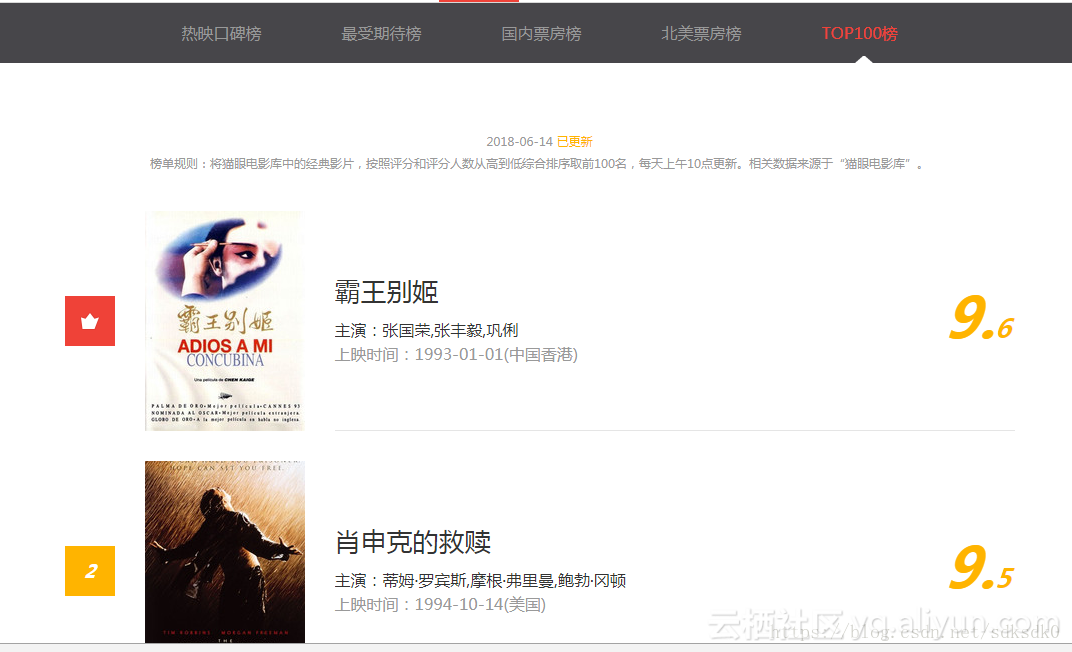
本文使用的是requests+正则来匹配网页内容,对于数据量较多的采用了多线程抓取的方法,共3个案例,分别是抓取猫眼电影TOP100榜单和淘票票正在热映的电影信息、以及美团的美食数据。这几个案例采用的方法大同小异。 1、首先选择想要爬取的网站 2、确定要用的模块,requests,json,re三个模块,如果想加快爬取速度可以加一个Pool 3、 网页请求,先得到整个页面,需要加一个headers来进行请求,否则会被网站拦截 4、格式化整个页面,通过patter的正则来匹配,找出我们需要的内容, 5、 获取数据,findall,然后通过yield将数据返回,yield 是一个类似 return 的关键字,迭代一次遇到yield时就返回yield后面(右边)的值 6、遍历获取到的数据 7、保存到相应的文档中 8、关闭文档, 9、提示数据保存成功。 一、爬取猫眼电影Top100榜单的数据 importrequests frommultiprocessing importPool fromrequests.exceptions importRequestException importre importjson def get_one_page(url): try: headers = { "user-agent": 'Mozilla/5.0 (Windows NT 10.0; WOW64) AppleWebKit/537.36 (KHTML, like Gecko) Chrome/62.0.3202.94 Safari/537.36'} 11response = requests.get(url , headers=headers) ifresponse.status_code == 200: returnresponse.text return None exceptRequestException: return None def parse_one_page(html): pattern = re.compile( '<dd>.*?board-index.*?>(\d+)</i>.*?data-src="(.*?)".*?name"><a'+ '.*?>(.*?)</a>.*?star">(.*?)</p>.*?releasetime">(.*?)</p>'+ '.*?integer">(.*?)</i>.*?fraction">(.*?)</i>.*?</dd>' ,re.S) items =re.findall(pattern ,html) foritem initems: yield{ 'index':item[ 0] , 'image':item[ 1] , 'title':item[ 2] , 'actor':item[ 3].strip()[ 3:] , 'time': item[ 4].strip()[ 5:] , 'score': item[ 5] + item[ 6] } def write_to_file(content): with open( 'result.txt' , 'a' , encoding= 'utf-8') asf: f.write(json.dumps(content , ensure_ascii= False) + ' \n ') f.close() def main(offset): url = 'http://maoyan.com/board/4?offset='+ str(offset) html = get_one_page(url) foritem inparse_one_page(html): #print(item)write_to_file(item) if__name__ == '__main__': #for i in range(10): # main(i*10)pool = Pool() pool.map(main ,[i* 10 fori in range( 10)]) 结果:将爬取的数据存放到文本文件中, 因为我这边采用的是线程池爬取的,所以有时候是不按顺序进行存储的,如果采用非多线程方式,就会按照顺序进行存储。 二、爬取淘票票正在热映的电影 可以看到网页结构如下,我这边使用了正则匹配的方法进行查找: 代码如下: importrequests fromrequests.exceptions importRequestException importre importjson def get_one_page(url): try: headers={ "user-agent": 'Mozilla/5.0(WindowsNT10.0;WOW64)AppleWebKit/537.36(KHTML,likeGecko)Chrome/62.0.3202.94Safari/537.36'} 11 response=requests.get(url , headers=headers) ifresponse.status_code== 200: returnresponse.text returnNone exceptRequestException: returnNone def parse_one_page(html): pattern=re.compile( '<divclass="movie-card-poster">.*?data-src="(.*?)".*?<spanclass="bt-l">(.*?)</span>.*?<spanclass="bt-r">(.*?)</span>.*?<divclass="movie-card-list">.*?<span>(.*?)</span>' + '.*?<span>(.*?)</span>.*?<span>(.*?)</span>.*?<span>(.*?)</span>.*?<span>(.*?)</span>.*?<span>(.*?)</span>' ,re.S) items=re.findall(pattern ,html) foritem initems: yield{ 'image':item[ 0] , 'title':item[ 1] , 'score':item[ 2] , 'director':item[ 3].strip()[ 3:] , 'actor':item[ 4].strip()[ 3:] , 'type':item[ 5].strip()[ 3:] , 'area':item[ 6].strip()[ 3:] , 'language':item[ 7].strip()[ 3:] , 'time':item[ 8].strip()[ 3:] } def write_to_file(content): with open( 'movie-hot.txt' , 'a' , encoding= 'utf-8') asf: f.write(json.dumps(content , ensure_ascii= False)+ ' \n ') f.close() def main(): url= 'https://www.taopiaopiao.com/showList.htm' html=get_one_page(url) foritem inparse_one_page(html): print(item) write_to_file(item) if__name__== '__main__': main() 结果: 三、爬取美团(深圳)美食店铺信息,评分大于4.0分的店铺 做为一名吃货,想知道我所在是城市的美食店,所以爬取评分较高的店铺信息: 美团的这个网页的不同之处在于,全部是通过js渲染生成的,所以我这边是拿到页面后,在js里面查找到的数据,然后用正则来匹配。 importrequests frommultiprocessing importPool fromrequests.exceptions importRequestException importre importjson """ author 朱培 title 爬取美团(深圳)美食店铺信息,评分大于4.0分的店铺 """ def get_one_page(url): try: headers={ "user-agent": 'Mozilla/5.0(WindowsNT10.0;WOW64)AppleWebKit/537.36(KHTML,likeGecko)Chrome/62.0.3202.94Safari/537.36'} response=requests.get(url , headers=headers) ifresponse.status_code== 200: returnresponse.text returnNone exceptRequestException: returnNone def parse_one_page(html): pattern=re.compile( '"poiId":(.*?),"frontImg":"(.*?)","title":"(.*?)","avgScore":(.*?),"allCommentNum":(.*?)' + ',"address":"(.*?)","avgPrice":(.*?),' ,re.S) items=re.findall(pattern ,html) foritem initems: if float(item[ 3])>= 4.0: yield{ 'poiId':item[ 0] , 'frontImg':item[ 1] , 'title':item[ 2] , 'avgScore':item[ 3] , 'allCommentNum':item[ 4] , 'address':item[ 5] , 'avgPrice':item[ 6] } def write_to_file(content): with open( 'food-meituan.txt' , 'a' , encoding= 'utf-8') asf: f.write(json.dumps(content , ensure_ascii= False)+ ' \n ') f.close() def main(n): url= 'http://sz.meituan.com/meishi/pn'+ str(n)+ '/' html=get_one_page(url) foritem inparse_one_page(html): print(item) write_to_file(item) if__name__== '__main__': #foriinrange(32): # main(i) pool=Pool() pool.map(main ,[ 1 fori in range( 32)]) 结果如下: 对于后期,可以选择把这个数据落库,常用的可以放在mongodb或者mysql数据库中进行存储。