iOS开发-iOS8地理位置定位
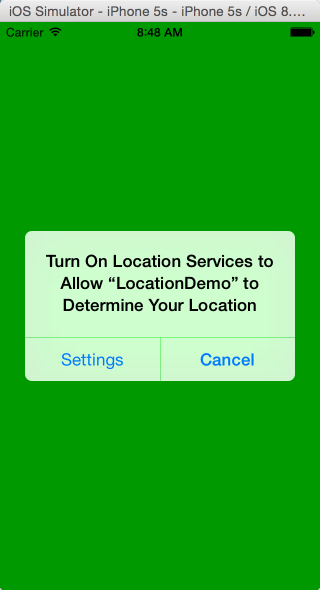
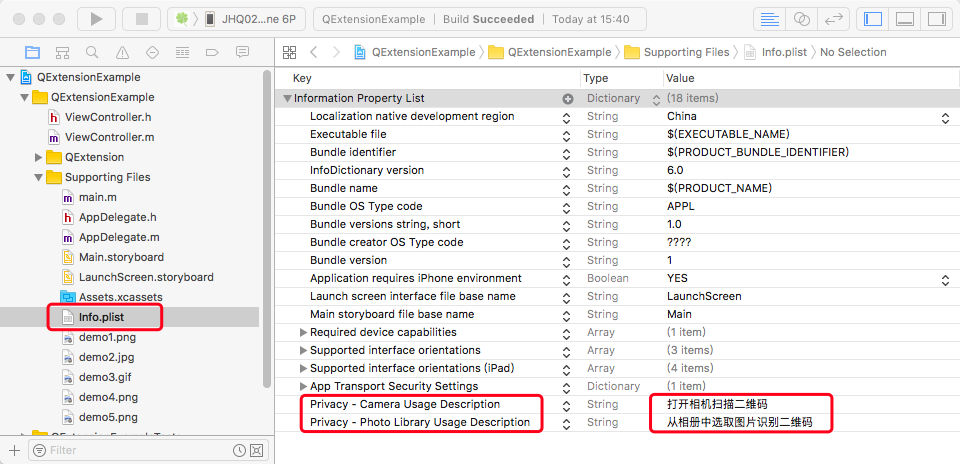
现在的App基本上都有定位功能,旅游网站根据定位推荐旅游景点,新闻App通过地理位置推荐当地新闻,社交类的App通过位置交友,iOS中实现以上功能需要一个核心的框架CoreLocation,框架提供了一些服务可以获取和定位用户当前的位置。服务会通过一种低功耗的方式通知用户地理位置的变化,iOS中三种地位方式,Wifi定位(通过查询一个Wifi路由器的地理位置的信息),蜂窝基站定位(通过移动运用商基站定位)和GPS卫星定位(准确度最高,耗电量最大)。 1.新建一个iOS项目,在ViewController中导入核心框架(#import<CoreLocation/CoreLocation.h>); 2.定义一个CLLocationManager变量,实现CLLocationManagerDelegate协议,CLLocationManager负责具体的实现; ViewController.h中代码: 1 2 3 4 5 6 7 8 #import <UIKit/UIKit.h> #import <CoreLocation/CoreLocation.h> @interface ViewController : UIViewController<CLLocationManagerDelegate> { CLLocationManager *mylocationManager; } @end ViewDidLoad方法中代码: 1 2 3 4 5 6 7 8 9 10 11 12 13 14 15 16 17 18 19 20 21 self .view.backgroundColor=[UIColor greenColor]; if ( nil == mylocationManager) mylocationManager = [[CLLocationManager alloc] init]; mylocationManager.delegate = self ; //设置定位的精度 mylocationManager.desiredAccuracy = kCLLocationAccuracyKilometer; //设置定位服务更新频率 mylocationManager.distanceFilter = 500; if ([[[UIDevice currentDevice] systemVersion] doubleValue]>=8.0) { [mylocationManager requestWhenInUseAuthorization]; // 前台定位 NSLog (@ "当前的版本是%f" ,[[[UIDevice currentDevice] systemVersion] doubleValue]); //[mylocationManager requestAlwaysAuthorization];// 前后台同时定位 } [mylocationManager startUpdatingLocation]; 效果图如下: 3.如果不能弹出以上信息,你需要在Info.plist文件中设置一下,加入一个NSLocationWhenInUseUsageDescription(前台获取GPS定位),NSLocationAlwaysUsageDescription(前后台获取GPS定位),Value可以为空; 4.常用方法调用: 大多数协议中都会包含一个处理失败的方法,CoreLocationDelegate中的didFailWithError: 1 2 3 -( void )locationManager:(CLLocationManager *)manager didFailWithError:( NSError *)error{ NSLog (@ "FlyElephant-http://www.cnblogs.com/xiaofeixiang" ); } 获取变化的之后地理位置didUpdateLocations,locations是按时间先后顺序的集合: 1 2 3 4 5 6 7 8 9 //地理定位完成之后的一个数组 -( void )locationManager:(CLLocationManager *)manager didUpdateLocations:( NSArray *)locations{ //获取最新的位置 CLLocation * currentLocation = [locations lastObject]; CLLocationDegrees latitude=currentLocation.coordinate.latitude; CLLocationDegrees longitude=currentLocation.coordinate.longitude; NSLog (@ "didUpdateLocations当前位置的纬度:%.2f--经度%.2f" ,latitude,longitude); } 获取地理位置变化的起始点和终点,didUpdateToLocation: 1 2 3 4 5 6 7 - ( void )locationManager:(CLLocationManager *)manager didUpdateToLocation:(CLLocation *)newLocation fromLocation:(CLLocation *)oldLocation{ CLLocationDegrees latitude=newLocation.coordinate.latitude; CLLocationDegrees longitude=oldLocation.coordinate.longitude; NSLog (@ "didUpdateToLocation当前位置的纬度:%.2f--经度%.2f" ,latitude,longitude); } 本文转自Fly_Elephant博客园博客,原文链接:http://www.cnblogs.com/xiaofeixiang/p/4339013.html,如需转载请自行联系原作者