代码处理iOS的横竖屏旋转
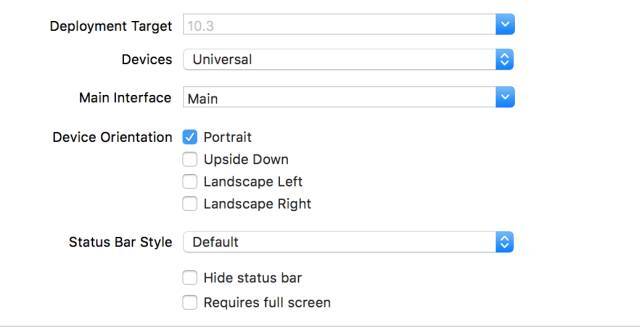
一、监听屏幕旋转方向 在处理iOS横竖屏时,经常会和UIDeviceOrientation、UIInterfaceOrientation和UIInterfaceOrientationMask这三个枚举类型打交道,它们从不同角度描述了屏幕旋转方向。 1、UIDeviceOrientation:设备方向 iOS的设备方向是通过iOS的加速计来获取的。 1)iOS定义了以下七种设备方向 typedefNS_ENUM(NSInteger,UIDeviceOrientation){ UIDeviceOrientationUnknown,//未知方向,可能是设备(屏幕)斜置 UIDeviceOrientationPortrait,//设备(屏幕)直立 UIDeviceOrientationPortraitUpsideDown,//设备(屏幕)直立,上下顛倒 UIDeviceOrientationLandscapeLeft,//设备(屏幕)向左横置 UIDeviceOrientationLandscapeRight,//设备(屏幕)向右橫置 UIDeviceOrientationFaceUp,//设备(屏幕)朝上平躺 UIDeviceOrientationFaceDown//设备(屏幕)朝下平躺 }; 说明:UIDeviceOrientation参考home键方向,如:home方向在右,设备(屏幕)方向向左(UIDeviceOrientationLandscapeLeft) 2)读取设备方向 UIDevice单例代表当前的设备。从这个单例中可以获得的信息设备,如设备方向orientation。 UIDeviceOrientationdeviceOrientation=[UIDevicecurrentDevice].orientation; 3)监听、处理和移除 设备方向改变的通知 当设备方向变化时候,发出UIDeviceOrientationDidChangeNotification通知;注册监听该通知,可以针对不同的设备方向处理视图展示。 //开启和监听设备旋转的通知(不开启的话,设备方向一直是UIInterfaceOrientationUnknown) if(![UIDevicecurrentDevice].generatesDeviceOrientationNotifications){ [[UIDevicecurrentDevice]beginGeneratingDeviceOrientationNotifications]; } [[NSNotificationCenterdefaultCenter]addObserver:selfselector:@selector(handleDeviceOrientationChange:) name:UIDeviceOrientationDidChangeNotificationobject:nil]; //设备方向改变的处理 -(void)handleDeviceOrientationChange:(NSNotification*)notification{ UIDeviceOrientationdeviceOrientation=[UIDevicecurrentDevice].orientation; switch(ddeviceOrientation){ caseUIDeviceOrientationFaceUp: NSLog(@"屏幕朝上平躺"); break; caseUIDeviceOrientationFaceDown: NSLog(@"屏幕朝下平躺"); break; caseUIDeviceOrientationUnknown: NSLog(@"未知方向"); break; caseUIDeviceOrientationLandscapeLeft: NSLog(@"屏幕向左横置"); break; caseUIDeviceOrientationLandscapeRight: NSLog(@"屏幕向右橫置"); break; caseUIDeviceOrientationPortrait: NSLog(@"屏幕直立"); break; caseUIDeviceOrientationPortraitUpsideDown: NSLog(@"屏幕直立,上下顛倒"); break; default: NSLog(@"无法辨识"); break; } } //最后在dealloc中移除通知和结束设备旋转的通知 -(void)dealloc{ //... [[NSNotificationCenterdefaultCenter]removeObserver:self]; [[UIDevicecurrentDevice]endGeneratingDeviceOrientationNotifications]; 说明:手机锁定竖屏后,UIDeviceOrientationDidChangeNotification通知就失效了。 2、UIInterfaceOrientation:界面方向 界面方向是反应iOS中界面的方向,它和Home按钮的方向是一致的。 1)iOS定义了以下五种界面方向 typedefNS_ENUM(NSInteger,UIInterfaceOrientation){ UIInterfaceOrientationUnknown=UIDeviceOrientationUnknown,//未知方向 UIInterfaceOrientationPortrait=UIDeviceOrientationPortrait,//界面直立 UIInterfaceOrientationPortraitUpsideDown=UIDeviceOrientationPortraitUpsideDown,//界面直立,上下颠倒 UIInterfaceOrientationLandscapeLeft=UIDeviceOrientationLandscapeRight,//界面朝左 UIInterfaceOrientationLandscapeRight=UIDeviceOrientationLandscapeLeft//界面朝右 }__TVOS_PROHIBITED; 说明:从定义可知,界面方向和设别方向有对应关系,如界面的竖直方向就是 设备的竖直方向:UIInterfaceOrientationUnknown = UIDeviceOrientationUnknown 2)读取界面方向 UIInterfaceOrientation和状态栏有关,通过UIApplication的单例调用statusBarOrientation来获取 UIInterfaceOrientationinterfaceOrientation=[[UIApplicationsharedApplication]statusBarOrientation]; 3)监听、处理和移除 界面方向改变的通知 当界面方向变化时候,先后发出UIApplicationWillChangeStatusBarOrientationNotification和UIApplicationDidChangeStatusBarOrientationNotification通知;注册监听这两个通知,可以针对不同的界面方向处理视图展示。 //以监听UIApplicationDidChangeStatusBarOrientationNotification通知为例 [[NSNotificationCenterdefaultCenter]addObserver:selfselector:@selector(handleStatusBarOrientationChange:) name:UIApplicationDidChangeStatusBarOrientationNotificationobject:nil]; //界面方向改变的处理 -(void)handleStatusBarOrientationChange:(NSNotification*)notification{ UIInterfaceOrientationinterfaceOrientation=[[UIApplicationsharedApplication]statusBarOrientation]; switch(interfaceOrientation){ caseUIInterfaceOrientationUnknown: NSLog(@"未知方向"); break; caseUIInterfaceOrientationPortrait: NSLog(@"界面直立"); break; caseUIInterfaceOrientationPortraitUpsideDown: NSLog(@"界面直立,上下颠倒"); break; caseUIInterfaceOrientationLandscapeLeft: NSLog(@"界面朝左"); break; caseUIInterfaceOrientationLandscapeRight: NSLog(@"界面朝右"); break; default: break; } } //最后在dealloc中移除通知 -(void)dealloc{ //... [[NSNotificationCenterdefaultCenter]removeObserver:self]; [[UIDevicecurrentDevice]endGeneratingDeviceOrientationNotifications]; } 说明:手机锁定竖屏后,UIApplicationWillChangeStatusBarOrientationNotification和UIApplicationDidChangeStatusBarOrientationNotification通知也失效了。 3、UIInterfaceOrientationMask UIInterfaceOrientationMask是为了集成多种UIInterfaceOrientation而定义的类型,和ViewController相关,一共有7种 1)iOS中的UIInterfaceOrientationMask定义 typedefNS_OPTIONS(NSUInteger,UIInterfaceOrientationMask){ UIInterfaceOrientationMaskPortrait=(1<<UIInterfaceOrientationPortrait), UIInterfaceOrientationMaskLandscapeLeft=(1<<UIInterfaceOrientationLandscapeLeft), UIInterfaceOrientationMaskLandscapeRight=(1<<UIInterfaceOrientationLandscapeRight), UIInterfaceOrientationMaskPortraitUpsideDown=(1<<UIInterfaceOrientationPortraitUpsideDown), UIInterfaceOrientationMaskLandscape=(UIInterfaceOrientationMaskLandscapeLeft|UIInterfaceOrientationMaskLandscapeRight), UIInterfaceOrientationMaskAll=(UIInterfaceOrientationMaskPortrait|UIInterfaceOrientationMaskLandscapeLeft|UIInterfaceOrientationMaskLandscapeRight|UIInterfaceOrientationMaskPortraitUpsideDown), UIInterfaceOrientationMaskAllButUpsideDown=(UIInterfaceOrientationMaskPortrait|UIInterfaceOrientationMaskLandscapeLeft|UIInterfaceOrientationMaskLandscapeRight), }__TVOS_PROHIBITED; 2)UIInterfaceOrientationMask的使用 在ViewController可以重写- (UIInterfaceOrientationMask)supportedInterfaceOrientations方法返回类型,来决定UIViewController可以支持哪些界面方向。 //支持界面直立 -(UIInterfaceOrientationMask)supportedInterfaceOrientations{ returnUIInterfaceOrientationMaskPortrait; } 总结:UIDeviceOrientation(设备方向)和UIInterfaceOrientation(屏幕方向)是两个不同的概念。前者代表了设备的一种状态,而后者是屏幕为了应对不同的设备状态,做出的用户界面上的响应。在iOS设备旋转时,由UIKit接收到旋转事件,然后通过AppDelegate通知当前程序的UIWindow对象,UIWindow对象通知它的rootViewController,如果该rootViewController支持旋转后的屏幕方向,完成旋转,否则不旋转;弹出的ViewController也是如此处理。 二、视图控制器中旋转方向的设置 0、关于禁止横屏的操作(不建议) 比较常规的方法有两种。 方法1:在项目的General–>Deployment Info–>Device Orientation中,只勾选Portrait(竖屏) 勾选Portrait.png 方法2:Device Orientation默认设置,在Appdelegate中实现supportedInterfaceOrientationsForWindow:只返回UIInterfaceOrientationMaskPortraitt(竖屏) -(NSUInteger)application:(UIApplication*)applicationsupportedInterfaceOrientationsForWindow:(UIWindow*)window{ returnUIInterfaceOrientationMaskPortrait; } 说明:极少的APP中所有界面都是竖屏的,因为总会有界面需要支持横屏,如视频播放页。所以不建议设置禁止APP页面横屏。 下面介绍如何让项目中的 视图控制器中旋转方向的设置 1、APP支持多个方向 APP支持多个方向.png 说明:如此,APP支持横屏和竖屏了,但是具体视图控制器支持的页面方向还需要进一步处理。由于不支持竖屏颠倒(Upside Down),即使设备上下颠倒,通过API也不会获得设备、屏幕上下颠倒方向的。 2、支持ViewController屏幕方向设置 1)关键函数 视图控制器支持的界面方向主要由以下三个函数控制 //是否自动旋转,返回YES可以自动旋转,返回NO禁止旋转 -(BOOL)shouldAutorotateNS_AVAILABLE_IOS(6_0)__TVOS_PROHIBITED; //返回支持的方向 -(UIInterfaceOrientationMask)supportedInterfaceOrientationsNS_AVAILABLE_IOS(6_0)__TVOS_PROHIBITED; //由模态推出的视图控制器优先支持的屏幕方向 -(UIInterfaceOrientation)preferredInterfaceOrientationForPresentationNS_AVAILABLE_IOS(6_0)__TVOS_PROHIBITED; 2) QSBaseViewController设置 //QSBaseViewController.h @interfaceQSBaseController:UIViewController @end //QSBaseViewController.m @implementationQSBaseController //#pragmamark-控制屏幕旋转方法 //是否自动旋转,返回YES可以自动旋转,返回NO禁止旋转 -(BOOL)shouldAutorotate{ returnNO; } //返回支持的方向 -(UIInterfaceOrientationMask)supportedInterfaceOrientations{ returnUIInterfaceOrientationMaskPortrait; } //由模态推出的视图控制器优先支持的屏幕方向 -(UIInterfaceOrientation)preferredInterfaceOrientationForPresentation{ returnUIInterfaceOrientationPortrait; } @end 说明1:QSBaseViewController默认不支持旋转,只支持 界面竖直方向,项目中的Controller都继承自QSBaseViewController,可以通过重写这三个方法来让Controller支持除竖屏之外的方向或旋转。 3) 在QSNavigationController设置 目标:通过QSNavigationController来push视图控制器时,把支持屏幕旋转的设置交给最新push进来([self.viewControllers lastObject])的viewController来设置。 //QSNavigationController.h @interfaceQSNavigationController:UINavigationController @end //QSNavigationController.m @implementationQSNavigationController #pragmamark-控制屏幕旋转方法 -(BOOL)shouldAutorotate{ return[[self.viewControllerslastObject]shouldAutorotate]; } -(UIInterfaceOrientationMask)supportedInterfaceOrientations{ return[[self.viewControllerslastObject]supportedInterfaceOrientations]; } -(UIInterfaceOrientation)preferredInterfaceOrientationForPresentation{ return[[self.viewControllerslastObject]preferredInterfaceOrientationForPresentation]; } @end 4) 在QSTabBarController设置 目标:TabBarController通常作为整个程序的rootViewController,UITabBar上面显示的每一个Tab都对应着一个ViewController;每点击一个Tab,出现的ViewController(self.selectedViewController)对屏幕旋转和支持方向的设置 交给其自身去控制。 //QSTabBarController.h @interfaceQSTabBarController:UITabBarController @end //QSTabBarController.m @implementationQSTabBarController #pragmamark-控制屏幕旋转方法 -(BOOL)shouldAutorotate{ return[self.selectedViewControllershouldAutorotate]; } -(UIInterfaceOrientationMask)supportedInterfaceOrientations{ return[self.selectedViewControllersupportedInterfaceOrientations]; } -(UIInterfaceOrientation)preferredInterfaceOrientationForPresentation{ return[self.selectedViewControllerpreferredInterfaceOrientationForPresentation]; } @end 三、屏幕旋转方向下的视图处理 1、屏幕旋转时,建议监听UIApplicationDidChangeStatusBarOrientationNotification 原因1:supportedInterfaceOrientations方法中最终返回的是 多个界面方向。 原因2(最重要的原因):我们真正要处理的是页面方向发生旋转UI的变化。而在设备的物理方向发生旋转的时候,如果此时当前控制器的页面并没有旋转,我们这时改变UI布局,可能就发生问题了。 2、屏幕的宽高处理 1)在iOS 8之后,当屏幕旋转的时候,[[UIScreen mainScreen] bounds]也发生了改变。如横屏时候的屏幕宽度 其实是竖屏的时候屏幕的高度。 2)我们处理视图布局时候,如果使用到屏幕的宽高,不要直接使用SCREEN_HEIGHT和SCREEN_WIDTH,而使用SCREEN_MIN和SCREEN_MAX #defineSCREEN_HEIGHTCGRectGetHeight([[UIScreenmainScreen]bounds]) #defineSCREEN_WIDTHCGRectGetWidth([[UIScreenmainScreen]bounds]) #defineSCREEN_MINMIN(SCREEN_HEIGHT,SCREEN_WIDTH) #defineSCREEN_MAXMAX(SCREEN_HEIGHT,SCREEN_WIDTH) 说明:竖屏时候,宽是SCREEN_MIN,高是SCREEN_MAX;横屏时候,宽是SCREEN_MAX,高是SCREEN_MIN。 3、屏幕旋转下处理Demo //监听UIApplicationDidChangeStatusBarOrientationNotification的处理 -(void)handleStatusBarOrientationChange:(NSNotification*)notification{ UIInterfaceOrientationinterfaceOrientation=[[UIApplicationsharedApplication]statusBarOrientation]; BOOLisLandscape=NO; switch(interfaceOrientation){ caseUIInterfaceOrientationUnknown: NSLog(@"未知方向"); break; caseUIInterfaceOrientationPortrait: caseUIInterfaceOrientationPortraitUpsideDown: isLandscape=NO; break; caseUIInterfaceOrientationLandscapeLeft: caseUIInterfaceOrientationLandscapeRight: isLandscape=YES; break; default: break; } if(isLandscape){ self.tableView.frame=CGRectMake(0,0,SCREEN_MAX,SCREEN_MIN-44); }else{ self.tableView.frame=CGRectMake(0,0,SCREEN_MIN,SCREEN_MAX-64); } [self.tableViewreloadData]; } 说明:当然也可以选择使用Masonry这样优秀的AutoLayout布局第三方库来处理,storyBoard来布局次之。 4、屏幕旋转下处理Demo效果图 竖屏下效果.png 横屏下效果.png 5、屏幕旋转处理的建议 1)旋转前后,view当前显示的位置尽量不变 2)旋转过程中,暂时界面操作的响应 3)视图中有tableview的话,旋转后,强制 [tableview reloadData],保证在方向变化以后,新的row能够充满全屏。 四、强制横屏 APP中某些页面,如视频播放页,一出现就要求横屏。这些横屏页面或模态弹出、或push进来。 1、模态弹出ViewController情况下 强制横屏的设置 //QSShow3Controller.m -(BOOL)shouldAutorotate{ returnNO; } -(UIInterfaceOrientationMask)supportedInterfaceOrientations{ returnUIInterfaceOrientationMaskLandscapeRight; } -(UIInterfaceOrientation)preferredInterfaceOrientationForPresentation{ returnUIInterfaceOrientationLandscapeRight; } //模态弹出 QSShow3Controller*vc=[[QSShow3Controlleralloc]init]; [selfpresentViewController:vcanimated:YEScompletion:nil]; 说明:这种情况比较简单处理。 2、push推入ViewController情况下 强制横屏的设置 //QSShow4Controller.m -(void)viewWillAppear:(BOOL)animated{ [superviewWillAppear:animated]; [selfsetInterfaceOrientation:UIInterfaceOrientationLandscapeRight]; } //强制转屏(这个方法最好放在BaseVController中) -(void)setInterfaceOrientation:(UIInterfaceOrientation)orientation{ if([[UIDevicecurrentDevice]respondsToSelector:@selector(setOrientation:)]){ SELselector=NSSelectorFromString(@"setOrientation:"); NSInvocation*invocation=[NSInvocationinvocationWithMethodSignature:[UIDeviceinstanceMethodSignatureForSelector:selector]]; [invocationsetSelector:selector]; [invocationsetTarget:[UIDevicecurrentDevice]]; //从2开始是因为前两个参数已经被selector和target占用 [invocationsetArgument:&orientationatIndex:2]; [invocationinvoke]; } } //必须返回YES -(BOOL)shouldAutorotate{ returnYES; } -(UIInterfaceOrientationMask)supportedInterfaceOrientations{ returnUIInterfaceOrientationMaskLandscapeRight; } //Push推入 QSShow4Controller*vc=[[QSShow4Controlleralloc]init]; [self.navigationControllerpushViewController:vcanimated:YES]; 说明:苹果不允许直接调用setOrientation方法,否则有被拒的风险;使用NSInvocation对象给[UIDevice currentDevice]发消息,强制改变设备方向,使其页面方向对应改变,这是苹果允许的。 五、其他 1、 APP启动时,手机横屏下,首页UI(该页面只支持竖屏)出错(add by 2017/6/20) //设置设置状态栏竖屏 [[UIApplicationsharedApplication]setStatusBarOrientation:UIInterfaceOrientationPortrait]; 本文作者:佚名 来源:51CTO