vn.py快速入门7 - 历史数据回测优化
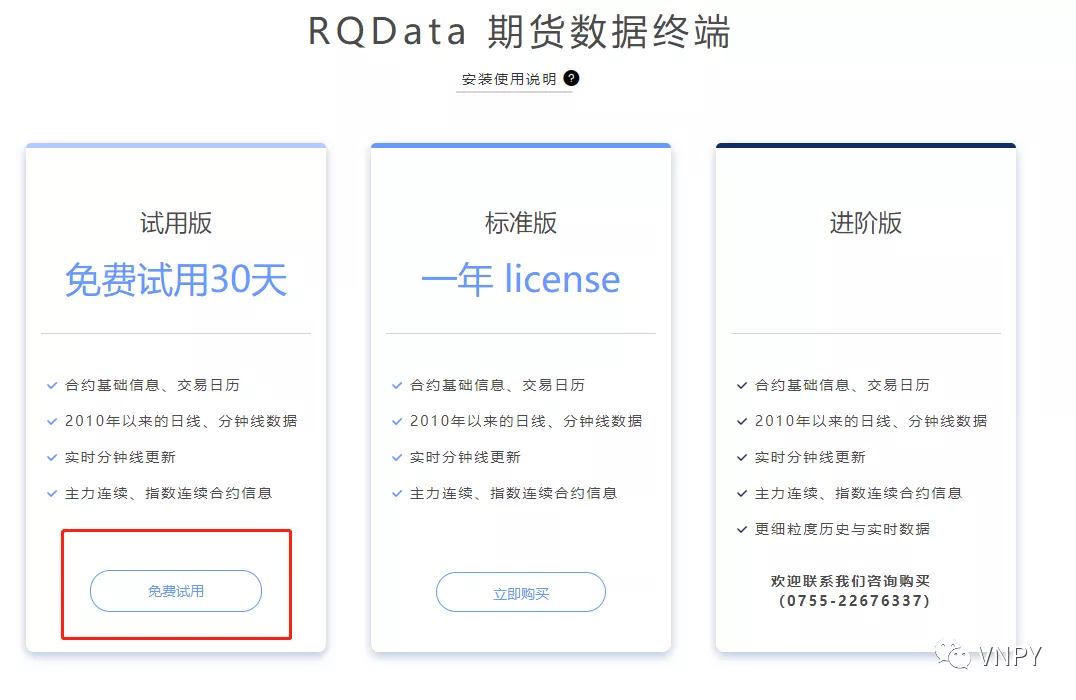
策略已经写好了,下一步就是历史回测:把历史上的价格数据(K线或者Tick),推送给策略去运行交易逻辑,并把策略产生的交易记录下来,最后分析这些回测的交易记录,从而来判断该策略的潜在盈利能力。 在开始之前,先来讲几个量化策略研究中(不管是否用vn.py),需要记住的几条重要原则: 所有量化程序的回测功能,永远都只能尽量接近实盘交易中的各项细节,而无法做到100%一样,关键点在于误差的大小(是否能容忍); 回测效果好的策略,并不能代表实盘交易就一定盈利,可能存在交易成本误差、参数过度拟合、逻辑有未来函数或者市场特征变化(Regime Switch)等原因; 回测效果烂的策略,实盘交易基本可以保证会更烂,绝对不要有侥幸心理。 准备历史数据 要跑历史数据回测,第一步自然就是要先准备好历史数据。这里我们以国内期货数据为例,使用米筐的RQData来下载获取。 RQData目前提供30天的免费试用权限,网站申请非常方便。前往RQData主页 找到上图中的“免费试用”按钮,点击进去后: 根据自己的实际情况填写相应的注册信息,邀请码点击那个白色小问号图标,可以看到没有邀请码情况下的默认输入值(当前是ClOR,注意l是小写的L,而不是大写的i),点击“登录并申请”按钮后,会看到登录框: 选择“验证码登录”,输入手机号验证码后点击“确认登录”按钮,回到上一步的界面,但注意此时底部按钮显示的文字已变为“立即申请试用”: 点击上述按钮后完成试用申请,注意此时有可能出现验证码超时或者其他的错误信息,根据提示重新填写再点击按钮即可。申请成功后会自动弹出开始下载[make.bat]文件(该文件中即包含了申请的试用账号和密码),以及[RQDATA使用说明.pdf]。 使用VS Code打开make.bat文件: 记住其中的name(用户名)以及password(密码),注意密码是一串长达344个字符的密钥,上图中仅截取了很短一部分(别想偷懒,哈哈)。 然后运行VN Station,点击VN Trader Pro,在右侧的上层应用中加载CtaBacktester(CTA回测模块)后启动,在主界面顶部的菜单栏,找到“配置”按钮: 点击后打开VN Trader的全局配置对话框: 将之前已经准备好的RQData用户名和密码,分别填入到rqdata.username和rqdata.password两个字段中,然后点击“确定”按钮,弹出提示重启的对话框。 此时即可关闭VN Trader并重启,点击菜单栏“功能”->“CTA回测”,启动接下来我们要用到的CTA策略回测图形界面: 如果上一步的RQData账号密码配置正确,此时可以在中间底部的日志输出框中看到“RQData数据接口初始化成功”的信息。如果没有就说明配置有问题,回去重来吧。 窗口左上方的一系列编辑框和下拉框,用来控制和管理我们的回测功能。在本地代码编辑框中输入IF88.CFFEX,K线周期选择1m(即1分钟K线),然后选择要下载数据的开始日期和结束日期,点击“下载数据”按钮。 此时CtaBacktester模块就会自动从RQData服务器下载历史数据,并完成数据结构转化后插入到VN Trader的数据库中(默认使用SQLite,数据文件位于.vntrader目录下的database.db),下载完成后同样会在日志输出框中看到相应信息: 运行历史回测 有了历史数据后,我们就可以开始跑历史回测。在左上角的交易策略下拉框里,应该已经能找到上一篇教程我们编写的DemoStrategy,选中后开始配置回测参数。 注意这里我们使用的是中金所股指期货的IF合约,回测时的参数要设置为股指期货所对应的属性。手续费率编辑框中输入0.000025(万0.25),交易滑点输入0.2(即单边成交1跳的滑点成本),合约乘数为300(300元每点),价格跳动也是0.2(股指期货最小价格变动),回测资金我们使用100万。 点击“开始回测”按钮,弹出参数配置对话框: 这里显示的fast_window和slow_window就是之前我们添加到parameters列表中的参数名称,这里我们直接使用默认数值,点击“确定”按钮后,我们的回测引擎就会自动开始执行策略回测的整个流程:加载数据、数据回放、模拟撮合、计算每日盈亏、统计指标、以及最后画出图表: 不出之前的意料,双均线策略的效果差的一塌糊涂,右侧图表的4个子图中: 子图1:资金变化曲线,笔直向下说明稳定亏损 子图2:最大回撤曲线,越来越大说明策略亏损越来越多 子图3:每日盈亏统计,红绿分布平均,但绿色密度更大(亏损) 子图4:盈亏的概率分布图,尖峰在0轴左侧(中位数日期发生亏损) 然后在中间顶部的表格中,可以看到回测相关的一些统计数据: 这策略干了什么事情能亏这么多钱呢,总有很多人会抱着不信邪的态度,此时点击左侧的“成交记录”按钮,可以看到回测过程中的每一笔成交记录: 还不信邪,可以点击“委托记录”按钮查看这些成交具体是由哪些委托触发的: 可以通过“成交记录”中的每条成交对应的委托号,在“委托记录”中找到策略下出的委托。细心的人可能已经发现上面两张图中,某一笔委托的价格和其对应成交的价格并不一致,这是因为我们在策略下单时使用了超价5元(为了保证成交),而回测仿真撮合时则是取了T+1时刻的最优成交价(也是实盘中最可能拿到的价格)。 在“每日盈亏”窗口中,可以看到以逐日盯市规则(期货结算规则),将每日的持仓和成交映射到当日收盘价后的当日整体盈亏情况: 最后,如果还是觉得死活不相信双均线策略怎么可能这么差,点击“K线图表按钮”,可以看到整个回测数据对应的K线图表: 上图中的黄色向上箭头代表多头成交(buy/cover),蓝色向下箭头则代表了空头成交(sell/short),可以通过键盘和鼠标拖动和缩放图表,看到自己想要的部分。 到了这里,是不是已经有点相信了“双均线策略就是垃圾”的说法?实际上从公平角度讲,以上看到的回测信息,并不能充分证明双均线信号的无效性,如果我们: 将手续费和滑点都调为0,这样不考虑交易成本影响 然后在回测时缩小fast_window到3,增大slow_window到80,即让长周期均线变得更加平稳 出来的结果则变成了: 从这张图上看,在不考虑交易成本时,双均线的来回穿插作为一种信号,可能还是有一定的预测效果(尽管也好不到哪里去)。 策略参数优化 实盘用可能是没希望了,但不妨碍我们想来折腾一下,看看在股指1分钟数据上到底怎样的均线组合能起到最好的效果,毕竟之前的3和80两个参数纯粹只是拍脑袋的结果。 假设我们想要看看fast_window,从2到20(步进2),slow_window,从20到100(步进10),参数分别两两组合出来的回测效果,看看能不能找到更好的均线组合。 比较傻的方法就是人工操作,每次将两个参数输入到回测的参数对话框里,然后运行等结果,再把结果记录在Excel表格里最后用来做排序比较。但对于这种机械重复的劳动,电脑比起人的效率要高得多得多,在本质上我们就是分别遍历两个参数的各种可能排列组合,然后针对每组组合,跑完回测并记录其中的关键结果,也就是所谓的“参数优化”。 CtaBacktester模块已经内置了策略参数优化的功能,点击左侧下方的“参数优化”按钮: 在弹出的对话框中,我们把之前的参数想法输入进去: 目标函数就选择最简单的总收益率 fast_window,开始数值为2,结束数值为20,每次步进为2(即2、4、6、8、10...) slow_window,开始数值为20,结束数值为100,每次步进为10(即20、30、40、50、60...) 点击“多进程优化”,使用暴力穷举算法(Brute-Force Algorithm),同时运行多个并行的Python进程,充分利用CPU的核心数量来加快优化速度。 优化完成后,日志信息中会有相应的提示,同时左下角的“优化结果”按钮会亮起: 点击后看到每组参数组合,所对应的目标函数结果: 效果最好的是fast_window为18,slow_window为90,带入到策略回测中运行后: 参数优化大法好!!! 可能在前面铺垫了那么多的情况下(过度拟合风险、双均线信号普通、移除了滑点手续费),你不见得还会脑子里蹦出这么一句话,但不可否认参数优化后的效果提升非常明显。 在本篇教程的最后,希望提醒大家的是:尽管看起来一路点点鼠标就能搞出个漂亮的资金曲线了,但实际上量化策略回测和优化过程中充满了各种各样的地雷。 到目前为止我们所讲述的只是最最基础的操作方法,还远没有涉及到实践经验的内容,这块要么大家用自己的真金白银在交易中慢慢积累,另一个成本更低的选择当然就是关注我们后续的进阶教程了! 了解更多知识,请关注vn.py社区公众号。