Android第四期 - 单侧滑动效果
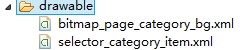
Android的设置或者登陆或者其他的一些主窗体要展示的功能需要用到sliding的效果,下面就叫大家怎么做。直接上代码!! MainActivity部分: 1 2 3 4 5 6 7 8 9 10 11 12 13 14 15 16 17 18 19 20 21 22 23 24 25 26 27 28 29 30 31 32 33 34 35 36 package net.ting.sliding; import android.app.Activity; import android.os.Bundle; import android.view.View; import android.view.View.OnClickListener; import android.widget.ImageView; public class MainActivity extends Activity implements OnClickListener{ private SlideMenuslideMenu; @Override protected void onCreate(BundlesavedInstanceState){ super .onCreate(savedInstanceState); setContentView(R.layout.activity_main); slideMenu=(SlideMenu)findViewById(R.id.slide_menu); ImageViewmenuImg=(ImageView)findViewById(R.id.title_bar_menu_btn); menuImg.setOnClickListener( this ); } @Override public void onClick(Viewv){ switch (v.getId()){ case R.id.title_bar_menu_btn: if (slideMenu.isMainScreenShowing()){ slideMenu.openMenu(); } else { slideMenu.closeMenu(); } break ; } } } SlideMenu部分: 1 2 3 4 5 6 7 8 9 10 11 12 13 14 15 16 17 18 19 20 21 22 23 24 25 26 27 28 29 30 31 32 33 34 35 36 37 38 39 40 41 42 43 44 45 46 47 48 49 50 51 52 53 54 55 56 57 58 59 60 61 62 63 64 65 66 67 68 69 70 71 72 73 74 75 76 77 78 79 80 81 82 83 84 85 86 87 88 89 90 91 92 93 94 95 96 97 98 99 100 101 102 103 104 105 106 107 108 109 110 111 112 113 114 115 116 117 118 119 120 121 122 123 124 125 126 127 128 129 130 131 132 133 134 135 136 137 138 139 140 141 142 143 144 145 146 147 148 149 150 151 152 153 154 155 156 157 158 159 160 161 162 163 164 165 166 167 168 169 170 171 172 173 174 175 176 177 178 179 180 181 182 183 184 185 186 187 188 189 190 191 192 193 194 195 196 197 198 199 200 201 202 203 204 205 206 207 208 209 210 211 212 213 214 215 216 217 218 219 220 221 222 223 224 225 226 227 228 229 230 231 232 233 234 235 236 237 238 239 240 241 242 243 244 245 246 247 248 249 250 251 252 253 254 255 256 257 258 259 260 261 262 263 264 265 266 267 268 269 270 271 272 273 274 275 276 277 278 279 280 281 282 283 284 285 286 287 288 289 290 291 292 293 294 295 296 297 298 299 300 301 302 303 304 305 306 307 308 309 310 311 312 313 314 315 316 317 318 319 320 321 322 323 324 325 326 327 328 329 330 331 332 333 334 335 336 337 338 339 340 341 342 343 344 345 346 347 348 349 350 351 352 353 354 355 356 357 358 359 360 361 362 package net.ting.sliding; import android.content.Context; import android.graphics.Canvas; import android.util.AttributeSet; import android.view.MotionEvent; import android.view.VelocityTracker; import android.view.View; import android.view.ViewConfiguration; import android.view.ViewGroup; import android.widget.Scroller; public class SlideMenu extends ViewGroup{ public static final int SCREEN_MENU= 0 ; public static final int SCREEN_MAIN= 1 ; private static final int SCREEN_INVALID=- 1 ; private int mCurrentScreen; private int mNextScreen=SCREEN_INVALID; private ScrollermScroller; private VelocityTrackermVelocityTracker; private int mTouchSlop; private float mLastMotionX; private float mLastMotionY; private final static int TOUCH_STATE_REST= 0 ; private final static int TOUCH_STATE_SCROLLING= 1 ; private static final int SNAP_VELOCITY= 1000 ; public int mTouchState=TOUCH_STATE_REST; private boolean mLocked; private boolean mAllowLongPress; public SlideMenu(Contextcontext){ this (context, null , 0 ); } public SlideMenu(Contextcontext,AttributeSetattrs){ this (context,attrs, 0 ); } public SlideMenu(Contextcontext,AttributeSetattrs, int defStyle){ super (context,attrs,defStyle); mScroller= new Scroller(getContext()); mCurrentScreen=SCREEN_MAIN; mTouchSlop=ViewConfiguration.get(getContext()).getScaledTouchSlop(); } @Override protected void onMeasure( int widthMeasureSpec, int heightMeasureSpec){ super .onMeasure(widthMeasureSpec,heightMeasureSpec); measureViews(widthMeasureSpec,heightMeasureSpec); } public void measureViews( int widthMeasureSpec, int heightMeasureSpec){ ViewmenuView=getChildAt( 0 ); menuView.measure(menuView.getLayoutParams().width+menuView.getLeft() +menuView.getRight(),heightMeasureSpec); ViewcontentView=getChildAt( 1 ); contentView.measure(widthMeasureSpec,heightMeasureSpec); } @Override protected void onLayout( boolean changed, int l, int t, int r, int b){ int childCount=getChildCount(); if (childCount!= 2 ){ throw new IllegalStateException( "ThechildCountofSlidingMenumustbe2" ); } ViewmenuView=getChildAt( 0 ); final int width=menuView.getMeasuredWidth(); menuView.layout(-width, 0 , 0 ,menuView.getMeasuredHeight()); ViewcontentView=getChildAt( 1 ); contentView.layout( 0 , 0 ,contentView.getMeasuredWidth(), contentView.getMeasuredHeight()); } @Override protected void onFinishInflate(){ super .onFinishInflate(); Viewchild; for ( int i= 0 ;i<getChildCount();i++){ child=getChildAt(i); child.setFocusable( true ); child.setClickable( true ); } } @Override public boolean onInterceptTouchEvent(MotionEventev){ if (mLocked){ return true ; } final int action=ev.getAction(); if ((action==MotionEvent.ACTION_MOVE) &&(mTouchState!=TOUCH_STATE_REST)){ return true ; } final float x=ev.getX(); final float y=ev.getY(); switch (action){ case MotionEvent.ACTION_MOVE: final int xDiff=( int )Math.abs(x-mLastMotionX); final int yDiff=( int )Math.abs(y-mLastMotionY); final int touchSlop=mTouchSlop; boolean xMoved=xDiff>touchSlop; boolean yMoved=yDiff>touchSlop; if (xMoved||yMoved){ if (xMoved&&(yDiff<xDiff)){ //ScrolliftheusermovedfarenoughalongtheXaxis mTouchState=TOUCH_STATE_SCROLLING; enableChildrenCache(); } //Eitherway,cancelanypendinglongpress if (mAllowLongPress){ mAllowLongPress= false ; //Trycancelingthelongpress.Itcouldalsohavebeen //scheduled //byadistantdescendant,sousethemAllowLongPressflag //toblock //everything final ViewcurrentScreen=getChildAt(mCurrentScreen); currentScreen.cancelLongPress(); } } break ; case MotionEvent.ACTION_DOWN: //Rememberlocationofdowntouch mLastMotionX=x; mLastMotionY=y; mAllowLongPress= true ; mTouchState=mScroller.isFinished()?TOUCH_STATE_REST :TOUCH_STATE_SCROLLING; break ; case MotionEvent.ACTION_CANCEL: case MotionEvent.ACTION_UP: //Releasethedrag clearChildrenCache(); mTouchState=TOUCH_STATE_REST; mAllowLongPress= false ; break ; } /* *Theonlytimewewanttointerceptmotioneventsisifweareinthe *dragmode. */ returnmTouchState!=TOUCH_STATE_REST; } voidenableChildrenCache(){ finalintcount=getChildCount(); for(inti=0;i<count;i++){ finalViewlayout=(View)getChildAt(i); layout.setDrawingCacheEnabled(true); } } voidclearChildrenCache(){ finalintcount=getChildCount(); for(inti=0;i<count;i++){ finalViewlayout=(View)getChildAt(i); layout.setDrawingCacheEnabled(false); } } @Override publicbooleanonTouchEvent(MotionEventev){ if(mLocked){ returntrue; } if(mVelocityTracker==null){ mVelocityTracker=VelocityTracker.obtain(); } mVelocityTracker.addMovement(ev); finalintaction=ev.getAction(); finalfloatx=ev.getX(); switch(action){ caseMotionEvent.ACTION_DOWN: /* *Ifbeingflingedandusertouches,stopthefling.isFinished *willbefalseifbeingflinged. */ if (!mScroller.isFinished()){ mScroller.abortAnimation(); } //Rememberwherethemotioneventstarted mLastMotionX=x; break ; case MotionEvent.ACTION_MOVE: if (mTouchState==TOUCH_STATE_SCROLLING){ //Scrolltofollowthemotionevent final int deltaX=( int )(mLastMotionX-x); mLastMotionX=x; if (deltaX< 0 ){ if (deltaX+getScrollX()>=-getChildAt( 0 ).getWidth()){ scrollBy(deltaX, 0 ); } } else if (deltaX> 0 ){ final int availableToScroll=getChildAt( getChildCount()- 1 ).getRight() -getScrollX()-getWidth(); if (availableToScroll> 0 ){ scrollBy(Math.min(availableToScroll,deltaX), 0 ); } } } break ; case MotionEvent.ACTION_UP: if (mTouchState==TOUCH_STATE_SCROLLING){ final VelocityTrackervelocityTracker=mVelocityTracker; velocityTracker.computeCurrentVelocity( 1000 ); int velocityX=( int )velocityTracker.getXVelocity(); if (velocityX>SNAP_VELOCITY&&mCurrentScreen==SCREEN_MAIN){ //Flinghardenoughtomoveleft snapToScreen(SCREEN_MENU); } else if (velocityX<-SNAP_VELOCITY &&mCurrentScreen==SCREEN_MENU){ //Flinghardenoughtomoveright snapToScreen(SCREEN_MAIN); } else { snapToDestination(); } if (mVelocityTracker!= null ){ mVelocityTracker.recycle(); mVelocityTracker= null ; } } mTouchState=TOUCH_STATE_REST; break ; case MotionEvent.ACTION_CANCEL: mTouchState=TOUCH_STATE_REST; } return true ; } @Override public void computeScroll(){ if (mScroller.computeScrollOffset()){ scrollTo(mScroller.getCurrX(),mScroller.getCurrY()); } else if (mNextScreen!=SCREEN_INVALID){ mCurrentScreen=Math.max( 0 , Math.min(mNextScreen,getChildCount()- 1 )); mNextScreen=SCREEN_INVALID; clearChildrenCache(); } } @Override public void scrollTo( int x, int y){ super .scrollTo(x,y); postInvalidate(); } @Override protected void dispatchDraw(Canvascanvas){ final int scrollX=getScrollX(); super .dispatchDraw(canvas); canvas.translate(scrollX, 0 ); } @Override public boolean dispatchUnhandledMove(Viewfocused, int direction){ if (direction==View.FOCUS_LEFT){ if (getCurrentScreen()> 0 ){ snapToScreen(getCurrentScreen()- 1 ); return true ; } } else if (direction==View.FOCUS_RIGHT){ if (getCurrentScreen()<getChildCount()- 1 ){ snapToScreen(getCurrentScreen()+ 1 ); return true ; } } return super .dispatchUnhandledMove(focused,direction); } protected void snapToScreen( int whichScreen){ enableChildrenCache(); whichScreen=Math.max( 0 ,Math.min(whichScreen,getChildCount()- 1 )); boolean changingScreens=whichScreen!=mCurrentScreen; mNextScreen=whichScreen; ViewfocusedChild=getFocusedChild(); if (focusedChild!= null &&changingScreens &&focusedChild==getChildAt(mCurrentScreen)){ focusedChild.clearFocus(); } final int newX=(whichScreen- 1 )*getChildAt( 0 ).getWidth(); final int delta=newX-getScrollX(); mScroller.startScroll(getScrollX(), 0 ,delta, 0 ,Math.abs(delta)* 2 ); invalidate(); } protected void snapToDestination(){ if (getScrollX()== 0 ){ return ; } final int screenWidth=getChildAt( 0 ).getWidth(); final int whichScreen=(screenWidth+getScrollX()+(screenWidth/ 2 )) /screenWidth; snapToScreen(whichScreen); } public int getCurrentScreen(){ return mCurrentScreen; } public boolean isMainScreenShowing(){ return mCurrentScreen==SCREEN_MAIN; } public void openMenu(){ mCurrentScreen=SCREEN_MENU; snapToScreen(mCurrentScreen); } public void closeMenu(){ mCurrentScreen=SCREEN_MAIN; snapToScreen(mCurrentScreen); } public void unlock(){ mLocked= false ; } public void lock(){ mLocked= true ; } } activity_main.xml部分: 1 2 3 4 5 6 7 8 9 10 11 12 13 14 15 16 17 18 19 20 21 22 23 24 25 26 27 28 29 < RelativeLayout xmlns:android = "http://schemas.android.com/apk/res/android" android:layout_width = "match_parent" android:layout_height = "match_parent" > < net.ting.sliding.SlideMenu android:id = "@+id/slide_menu" android:layout_width = "fill_parent" android:layout_height = "fill_parent" > < include layout = "@layout/layout_menu" /> < RelativeLayout android:layout_width = "fill_parent" android:layout_height = "fill_parent" android:background = "@color/color_2" android:orientation = "vertical" > < include layout = "@layout/layout_title_bar" /> < TextView android:layout_width = "wrap_content" android:layout_height = "wrap_content" android:layout_centerInParent = "true" android:text = "HelloWorld" android:textSize = "22sp" /> </ RelativeLayout > </ net.ting.sliding.SlideMenu > </ RelativeLayout > layout_menu.xml部分: 1 2 3 4 5 6 7 8 9 10 11 12 13 14 15 16 17 18 19 20 21 22 23 24 25 26 27 28 29 30 31 32 33 34 35 36 37 38 39 40 41 42 43 44 45 46 47 48 49 50 51 52 53 54 55 56 57 58 59 60 61 62 63 64 65 66 67 68 69 70 71 72 73 74 75 76 <? xml version = "1.0" encoding = "utf-8" ?> < LinearLayout xmlns:android = "http://schemas.android.com/apk/res/android" android:layout_width = "240dip" android:layout_height = "fill_parent" android:background = "@drawable/bitmap_book_read_chapterlist_repeat" android:orientation = "vertical" > < TextView android:layout_width = "240dip" android:layout_height = "28.0dip" android:background = "#ff313131" android:gravity = "center_vertical" android:paddingLeft = "15.0dip" android:text = "分类" android:textColor = "#ff959595" android:textSize = "14.0sp" /> < TextView android:layout_width = "240dip" android:layout_height = "50.0dip" android:background = "@drawable/selector_category_item" android:clickable = "true" android:drawableLeft = "@drawable/ic_category_mark" android:drawablePadding = "1.0dip" android:gravity = "center_vertical" android:paddingLeft = "15.0dip" android:paddingRight = "10.0dip" android:text = "侧边栏选项-1" android:textColor = "#ff959595" android:textSize = "16.0sp" /> < View android:layout_width = "240dip" android:layout_height = "2.0dip" android:background = "@drawable/ic_shelf_category_divider" /> < TextView android:layout_width = "240dip" android:layout_height = "50.0dip" android:background = "@drawable/selector_category_item" android:clickable = "true" android:drawableLeft = "@drawable/ic_category_mark" android:drawablePadding = "1.0dip" android:gravity = "center_vertical" android:paddingLeft = "15.0dip" android:paddingRight = "10.0dip" android:text = "侧边栏选项-2" android:textColor = "#ff959595" android:textSize = "16.0sp" /> < View android:layout_width = "240dip" android:layout_height = "2.0dip" android:background = "@drawable/ic_shelf_category_divider" /> < TextView android:layout_width = "240dip" android:layout_height = "50.0dip" android:background = "@drawable/selector_category_item" android:clickable = "true" android:drawableLeft = "@drawable/ic_category_mark" android:drawablePadding = "1.0dip" android:gravity = "center_vertical" android:paddingLeft = "15.0dip" android:paddingRight = "10.0dip" android:text = "侧边栏选项-3" android:textColor = "#ff959595" android:textSize = "16.0sp" /> < View android:layout_width = "240dip" android:layout_height = "2.0dip" android:background = "@drawable/ic_shelf_category_divider" /> </ LinearLayout > layout_title_bar.xml部分: 1 2 3 4 5 6 7 8 9 10 11 12 13 14 15 16 17 18 19 20 21 22 23 24 25 26 27 28 29 30 31 32 33 34 35 36 37 38 39 <? xml version = "1.0" encoding = "utf-8" ?> < RelativeLayout xmlns:android = "http://schemas.android.com/apk/res/android" android:layout_width = "fill_parent" android:layout_height = "45.0dip" android:background = "@drawable/bg_title_bar" android:gravity = "center_vertical" > < ImageView android:id = "@+id/title_bar_menu_btn" android:layout_width = "wrap_content" android:layout_height = "wrap_content" android:layout_centerVertical = "true" android:layout_marginLeft = "3.0dip" android:layout_marginRight = "3.0dip" android:layout_marginTop = "3.0dip" android:gravity = "center" android:src = "@drawable/ic_top_bar_category" /> < ImageView android:layout_width = "wrap_content" android:layout_height = "fill_parent" android:layout_toRightOf = "@id/title_bar_menu_btn" android:background = "@drawable/ic_top_divider" /> < TextView android:id = "@+id/title_bar_name" android:layout_width = "wrap_content" android:layout_height = "wrap_content" android:layout_centerInParent = "true" android:ellipsize = "end" android:gravity = "center" android:paddingLeft = "75.0dip" android:paddingRight = "75.0dip" android:singleLine = "true" android:text = "Title" android:textColor = "#ffffff" android:textSize = "22sp" /> </ RelativeLayout > 按钮效果布局部分: 1 2 3 4 5 6 7 8 9 10 11 12 13 14 15 16 17 18 19 20 bitmap_page_category_bg.xml: <? xml version = "1.0" encoding = "utf-8" ?> < bitmap android:src = "@drawable/ic_item_normal_bg" android:tileMode = "repeat" xmlns:android = "http://schemas.android.com/apk/res/android" /> selector_category_item.xml <? xml version = "1.0" encoding = "utf-8" ?> < selector xmlns:android = "http://schemas.android.com/apk/res/android" > < item android:state_pressed = "true" android:drawable = "@drawable/ic_item_selected_bg" /> < item android:state_focused = "true" android:drawable = "@drawable/ic_item_selected_bg" /> < item android:drawable = "@drawable/ic_item_normal_bg" /> </ selector > 附效果图: 附件:http://down.51cto.com/data/2364559 本文转自 吴雨声 51CTO博客,原文链接:http://blog.51cto.com/liangxiao/1429339,如需转载请自行联系原作者