GraphQL前后端落地入门尝试总结
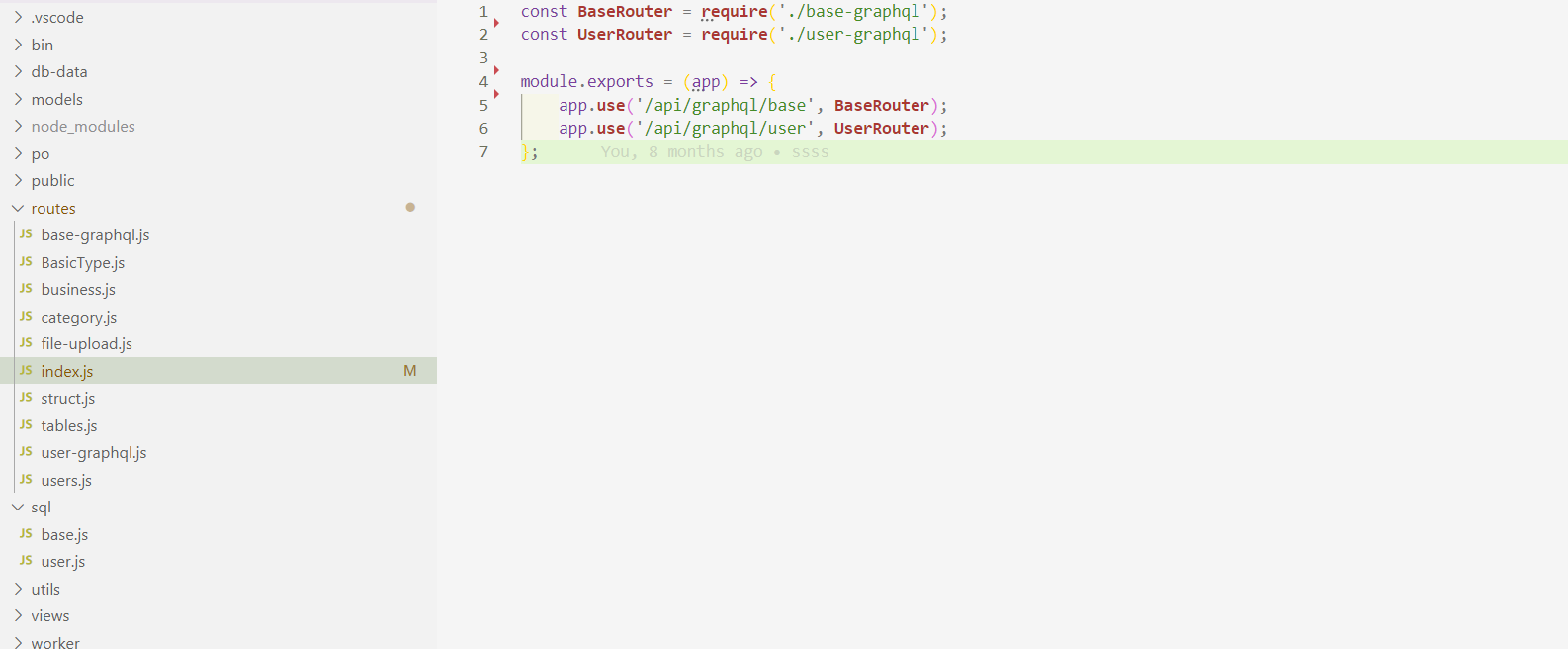
前言:首先要明白的是GraphQL是用来干嘛的也就是是解决什么问题的,其实就是解决传输数据的可定制化,减少后端api的开发量。举个例子:比如你获取一个用户列表,后端开发了一个叫getUserList接口,参数是parentId,返回的数据结构是这样的:[ { name, id , logo , address } ],后来又有个业务只要数据结构是这样的就可以了:[ { name} ],这个时候要么后端重新开发一个接口,要么就是直接用getUserList,但是造成了数据浪费和网络传输成本浪费,为了解决这个问题GraphQL就被Facebook创造了出来,即能复用getUserList也不造成各种浪费。 后端(使用的是nodejs,express) 1、安装依赖:npm install express-graphql -S ; npm install graphql -S ; 2、单独个目录做route接口,index.js统一导出,方便以后代码膨胀进行分块,如图 3、开始写具体的业务代码,拿我的base-graphql.js举例 // 也可以在不使用 GraphQL Schema Language 的情况下实现相同的 API: const { graphqlHTTP } = require('express-graphql'); const graphql = require('graphql'); const { createBaseDb, createUserDb } = require('../utils/db-util'); //创建db对象 const DBBase = createBaseDb(); // 定义 数据库对应的User类型 const UserType = new graphql.GraphQLObjectType({ name: 'User', fields: { id: { type: graphql.GraphQLInt }, version: { type: graphql.GraphQLInt }, create_date: { type: graphql.GraphQLString }, update_date: { type: graphql.GraphQLString }, update_user: { type: graphql.GraphQLInt }, name: { type: graphql.GraphQLString }, email: { type: graphql.GraphQLString }, server: { type: graphql.GraphQLString }, username: { type: graphql.GraphQLString }, password: { type: graphql.GraphQLString }, } }); const UsersType = new graphql.GraphQLList(UserType); // 定义查询对象类型,对应post查询传参: query:{user(id:"a"){id,name,age},hello(name:"charming")} const QueryType = new graphql.GraphQLObjectType({ name: 'Query', fields: { queryUser: { description: 'query user', //resolve返回的数据类型 type: UserType, // `args` 描述了 `user` 查询接受的参数 args: { id: { type: graphql.GraphQLString, } }, resolve(parentValue, args, request) { //查一个表的所有数据 let data = new Promise((resolve, reject) => { DBBase.all("select * from user", (err, res) => { if (err) { reject(err) } else { resolve(res[0]) } }) }); return data; } }, queryUsers: { description: 'query users', //resolve返回的数据类型 type: UsersType, // `args` 描述了 `user` 查询接受的参数 args: { id: { type: graphql.GraphQLString, } }, resolve(parentValue, args, request) { //查一个表的所有数据 let data = new Promise((resolve, reject) => { DBBase.all("select * from user", (err, res) => { if (err) { reject(err) } else { resolve(res) } }) }); return data; } }, //可以定义多个 hello: { description: 'a hello world demo', type: graphql.GraphQLString, args: { name: { // 这里定义参数,包括参数类型和默认值 type: graphql.GraphQLString, defaultValue: 'Brian' } }, resolve(parentValue, args, request) { // 这里演示如何获取参数,以及处理 return 'hello world ' + args.name + '!'; } } } }); // ====================================下面时修改数据================================= // 输入参数类型 const UserInputType = new graphql.GraphQLInputObjectType({ name: 'UserInput', fields: () => ({ name: { type: graphql.GraphQLString }, email: { type: graphql.GraphQLString }, username: { type: graphql.GraphQLString }, password: { type: graphql.GraphQLString }, }) }); const MutationType = new graphql.GraphQLObjectType({ name: 'Mutation', fields: { addUser: { //参数样式 mutation {addUser(one:{id:"s",name:"alice",age:12,male:false}){id,name,age}} type: graphql.GraphQLString, // `args` 描述了 `user` 查询接受的参数 args: { one: { type: UserInputType } }, resolve(parentValue, args, request) { let sqlStr = `insert into user (create_date,version,name,email,username,password) values ( '${new Date().toISOString()}', 0, '${args.one.name}', '${args.one.email}', '${args.one.username}', '${args.one.password}' )`; return new Promise((resolve, reject) => { DBBase.run('BEGIN TRANSACTION;'); DBBase.run(sqlStr, async (err, res) => { console.log("insert user ", err, res); if (err) { DBBase.run("ROLLBACK;"); reject(err) } else { //添加成功后,创建对应的用户数据库 try { await createUserDb(args.one.email); DBBase.run('COMMIT TRANSACTION;'); resolve(res) } catch (error) { console.log(error); DBBase.run("ROLLBACK;"); reject(err) } } }); }); } }, } }); const schema = new graphql.GraphQLSchema({ query: QueryType, mutation: MutationType }); module.exports = graphqlHTTP({ schema: schema, graphiql: true /* true代表需要调试 */ }) 上面注释写的也比较清楚,简单说下, 这里它提供了GraphQLObjectType来定义对象数据类型的描述,如果是数组必须使用GraphQLList再进行构建,然后你就可以用你构建的来声明你要返回的类型,但是参数类型不能使用这个,必须是GraphQLInputObjectType这种input相关的来构建。 还有resolve方法里是需要你直接return结果的,db的操作其实都是异步的,所以需要你用promise来解决 这个问题,当你的业务涉及事务等比较多db操作是async/await可能更方便,其他的用法就看官方文档吧,这里就不展开了。 例子中 我按功能来划分了模块,我综合思考了,还是觉得这样的普适性和开发难度是最好,对于一些复杂的大型项目肯定还是需要进行调整的。 好了到这里,你就可以直接用postman看看效果了 记得参数那里不要是form-data,一定选的是GraphQL(这个我猜想就是form-data等这种现有的形式来做这个可能有点别扭,所以干脆另外定了一个格式),查询参数类似这样:query {queryUsers(id:"a"){id,name,email}},修改参数类似这样:mutation {addUser(one:{name:"jack",email:"jack@qq.com",username:"jack",password:"123456"})};不用postman也可以用自带的,直接访问https://localhost:3001就可以了 。 写到这里你可能会想到现有的类似axios这种的框架不能用了,对的,必须要换成apollo-client这种支持的。所以如果是成熟项目要替换成GraphQL还是需要成本的。