Python爬虫-小测验
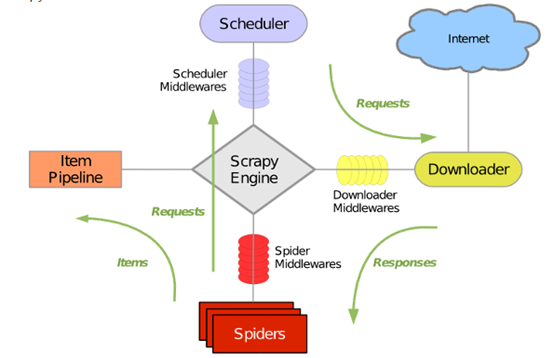
一、 使用scrapy.Selector或BeautifulSoup,实现以下需求(30分) (1)读取给定的dangdang.html页面内容,注:编码为gbk(5分) (2)获取页面中所有图书的名称,价格,作者,出版社及图书图片的url地址(20分) (3)将获取的信息保存至文件(excel、csv、json、txt格式均可)(5分) 网页文件dangdang.html文件下载链接: https://pan.baidu.com/s/1awbG5zqOMdnWzXee7TZm6A 密码: 3urs 1.1使用BeautifulSoup解决 from bs4 import BeautifulSoup as bs import pandas as pd def cssFind(book,cssSelector,nth=1): if len(book.select(cssSelector)) >= nth: return book.select(cssSelector)[nth-1].text.strip() else: return '' if __name__ == "__main__": with open("dangdang.html",encoding='gbk') as file: html = file.read() soup = bs(html,'lxml') book_list = soup.select("div ul.bigimg li") result_list = [] for book in book_list: item = {} item['name'] = book.select("a.pic")[0]['title'] item['now_price'] = cssFind(book,"span.search_now_price") item['pre_price'] = cssFind(book,"span.search_pre_price") item['author'] = book.select("p.search_book_author a")[0]['title'] item['publisher'] = book.select("p.search_book_author span a")[-1].text item['detailUrl'] = book.select("p.name a")[0]['href'] item['imageUrl'] = book.select("a.pic img")[0]['src'] if item['imageUrl'] == "images/model/guan/url_none.png": item['imageUrl'] = book.select("a.pic img")[0]['data-original'] result_list.append(item) df = pd.DataFrame(result_list,columns=result_list[0].keys()) df.to_excel("当当图书信息.xlsx") 1.2使用scrapy.selector解决 from scrapy.selector import Selector import pandas as pd if __name__ == "__main__": with open("dangdang.html",encoding='gbk') as file: response = Selector(text=file.read()) book_list = response.xpath("//ul[@class='bigimg']/li") result_list = [] for book in book_list: item = {} item['name'] = book.xpath("a[@class='pic']/@title").extract_first() item['now_price'] = book.xpath(".//span[@class='search_now_price']/text()").extract_first() item['pre_price'] = book.xpath(".//span[@class='search_pre_price']/text()").extract_first() item['author'] = book.xpath("p[@class='search_book_author']//a/@title").extract_first() item['publisher'] = book.xpath("p[@class='search_book_author']//a/@title").extract()[-1] item['detailUrl'] = book.xpath(".//p[@class='name']/a/@href").extract_first() item['imageUrl'] = book.xpath("a[@class='pic']/img/@src").extract_first() if item['imageUrl'] == "images/model/guan/url_none.png": item['imageUrl'] = book.xpath("a[@class='pic']/img/@data-original").extract_first() result_list.append(item) df = pd.DataFrame(result_list,columns=result_list[0].keys()) df.to_excel("当当图书信息.xlsx") 二、 需求:抓取天猫三只松鼠旗舰店超级满减商品信息(55分) 网站地址如下https://sanzhisongshu.tmall.com/p/rd523844.htm?spm=a1z10.1-b-s.w5001-14855767631.8.19ad32fdW6UhfO&scene=taobao_shop 评分标准如下: 1、创建函数获取页面所有内容,代码无误(5分) 2、得到页面内容后解析信息,获取页面中图片链接,并将图片下载至本地photo文件夹。(10分) 3、获取页面中每个商品信息的商品名称、价格以及商品图片url信息(20分) 4、创建数据库product,及表格productinfo,包含(商品名称、价格及图片地址三个字段)(5分) 5、将第(3)步获取的结果写入数据库(10分) 6、代码规范,有注释(5分) import requests from bs4 import BeautifulSoup as bs import urllib import os import pymysql #获取实例化BeautifulSoup对象 def getSoup(url, encoding="gbk", **params): reponse = requests.get(url, **params) reponse.encoding = encoding soup = bs(reponse.text, 'lxml') return soup #下载单个图片函数 def downloadImage(imgUrl, imgName): imgDir = "photo" if not os.path.isdir(imgDir): os.mkdir(imgDir) imgPath = "%s/%s" %(imgDir,imgName) urllib.request.urlretrieve(imgUrl,imgPath) #下载所有图片函数 def downloadAllImages(soup): image_list = soup.select("img") count = 0 for image in image_list: try: srcStr = image['data-ks-lazyload'] imgFormat = srcStr[-3:] if imgFormat == 'gif': continue count += 1 imgName = "%d.%s" % (count, imgFormat) imgUrl = "http:" + srcStr downloadImage(imgUrl, imgName) except Exception as e: print(str(e)) #通过css选择器语法选择出标签 def cssFind(movie,cssSelector,nth=1): if len(movie.select(cssSelector)) >= nth: return movie.select(cssSelector)[nth-1].text.strip() else: return '' #获取数据库连接函数 def getConn(database ="product"): args = dict( host = 'localhost', user = 'root', passwd = '.... your password', charset = 'utf8', db = database ) return pymysql.connect(**args) if __name__ == "__main__": soup = getSoup("https://sanzhisongshu.tmall.com/p/rd523844.htm" \ "?spm=a1z10.1-b-s.w5001-14855767631.8.19ad32fdW6UhfO&scene=taobao_shop") #下载所有图片 downloadAllImages(soup) #获取数据库连接 conn = getConn() cursor = conn.cursor() #新建数据库中的表productinfo sql_list = [] sql_list.append("drop table if exists productinfo") sql_list.append("create table productinfo(name varchar(200)," \ "price varchar(20),imageUrl varchar(500))") for sql in sql_list: cursor.execute(sql) conn.commit() #获取商品信息并插入数据库 item_list = soup.select("div.item4line1 dl.item") for item in item_list: name = cssFind(item,"dd.detail a") price = cssFind(item,"dd.detail span.c-price") imageUrl = item.select("dt img")[0]['data-ks-lazyload'] insert_sql = 'insert into productinfo values("%s","%s","%s")' %(name,price,imageUrl) cursor.execute(insert_sql) conn.commit() 三、请以你的理解尽可能准确的描述出scrapy运行的原理图(15分) scrapy框架原理图.png 在实际编写代码的过程一种,一般按照下列顺序编写代码文件: 1.编写item.py文件;2.编写爬虫文件;3.编写pipelines.py文件;4.编写settings.py文件 在Scrapy框架理解上: 1.爬虫Spiders发送请求Requests给调度器Scheduler 2.调度器Scheduler发送下载网页的请求Requests给下载器Downloader 3.下载器Downloader获取网页相应response交给爬虫Spiders 4.爬虫Spiders对response进行解析形成Item 5.Item传送给管道,管道对数据进行相应处理,数据持久化。 6.Middelwares分为三种:调度中间件Scheduler middlewares、爬虫中间件spider Middlewares、下载中间件Download Middlewares。在编写scrapy-redis分布式爬虫时,redis就相当于调度中间件Scheduler middlewares;对爬虫进行伪装,设置用户代理User-agent和代理Ip,是在爬虫中间件spider Middlewares中进行设置,下载中间件Download Middlewares可以对下载进行相应设置。