首页 文章 精选 留言 我的

精选列表

搜索[python解释器],共10000篇文章
优秀的个人博客,低调大师

Android开发之GridView实现弹出式选择器

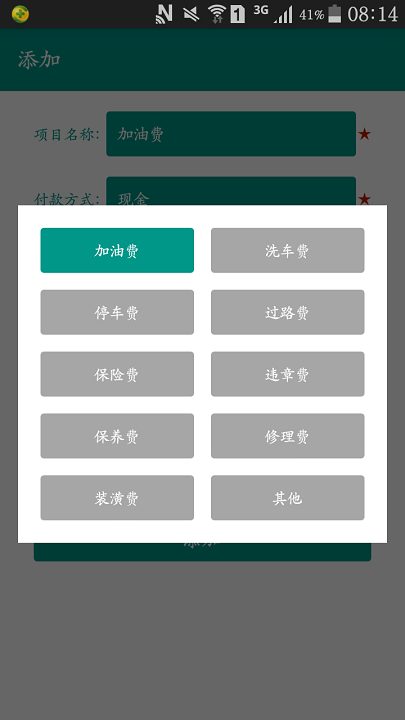
前段时间,写了一个小项目,里面有个界面如下图所示,之前的版本是用Spinner来做,觉得不够拉轰,所以采用GridView做了一个实现,效果还不错,Mark一下。 弹出单选GridView.png 一、点击那个底部的绿色按钮,弹出一个对话框,对话框里面的内容是一个单选的GridView,关键代码如下: //add_pay就是底部那个按钮 add_pay.setOnClickListener(new View.OnClickListener() { @Override public void onClick(View v) { AlertDialog alertDialog = new AlertDialog.Builder(AddActivity.this) .setView(getChoiceView(2)) .create(); alertDialog.show(); } }); 上面的重点是那个getChoiceView(2),因为我有好几个数据源,所以就用一个int类型参数的type来区分一下,不同的type取不同的数据源展示。 二、getChoiceView方法,主要是加载布局,初始化GridView,然后设置Adapter和点击事件,比较简单,关键代码如下: private View getChoiceView(final int type) { //R.layout.dialog_choice就是GridView所在的那个布局,下面有介绍 View view = LayoutInflater.from(AddActivity.this).inflate(R.layout.dialog_choice, null); GridView gv = (GridView) view.findViewById(R.id.gv); //GridView的数据源,直接从strings.xml中加载过来 List<String> data; //自定义适配器 final MyAdapter adapter; //判断类型,加载数据源设置Adapter if (type == 1) { data = Arrays.asList(getResources().getStringArray(R.array.event)); adapter = new MyAdapter(this, data); gv.setAdapter(adapter); //设置默认选中 adapter.changeState(eventSelected); } else { data = Arrays.asList(getResources().getStringArray(R.array.pay)); adapter = new MyAdapter(this, data); gv.setAdapter(adapter); adapter.changeState(paySelected); } //监听点击事件,点击以后,之前的选中应该变为未选中 gv.setOnItemClickListener(new AdapterView.OnItemClickListener() { @Override public void onItemClick(AdapterView<?> parent, View view, int position, long id) { if (type == 1) { eventSelected = position; //将选择的内容设置到底部的按钮上去 add_event.setText(eventArray.get(position).toString()); } else { paySelected = position; add_pay.setText(payArray.get(position).toString()); } alertDialog.dismiss(); adapter.changeState(position); } }); return view; } 三、dialog_choice 与 choice_item布局,非常简单 GridView所在的布局如下: <?xml version="1.0" encoding="utf-8"?> <LinearLayout xmlns:android="http://schemas.android.com/apk/res/android" android:layout_width="match_parent" android:layout_height="match_parent" android:background="@color/white" android:gravity="center" android:orientation="vertical"> <GridView android:id="@+id/gv_choice" android:layout_width="match_parent" android:layout_height="wrap_content" android:layout_margin="20dp" android:horizontalSpacing="15dp" android:listSelector="@color/transparent" android:numColumns="2" //2列 android:verticalSpacing="15dp"></GridView> </LinearLayout> GridView中每个item的布局如下: <?xml version="1.0" encoding="utf-8"?> <LinearLayout xmlns:android="http://schemas.android.com/apk/res/android" android:layout_width="match_parent" android:layout_height="match_parent" android:orientation="vertical"> <TextView android:id="@+id/tv_choice" android:layout_width="match_parent" android:layout_height="40dp" android:button="@null" android:gravity="center" android:paddingBottom="10dp" android:paddingTop="10dp" android:textColor="@color/white" /> </LinearLayout> 四、MyAdapter继承自BaseAdapter,关键是弄一个记录选中与否的ArrayList,默认初始化的时候都是未选中,然后设置一个方法能修改选中项,在getView中根据选中与否,来设置背景色 @Override public View getView(int position, View convertView, ViewGroup parent) { ViewHolder viewHolder = null; if (convertView == null) { viewHolder = new ViewHolder(); convertView = mInflater.inflate(R.layout.choice_item, null); viewHolder.title = (TextView) convertView.findViewById(R.id.tv_choice); convertView.setTag(viewHolder); } else { viewHolder = (ViewHolder) convertView.getTag(); } if (!"".equals(data.get(position))) { viewHolder.title.setText(data.get(position)); } if (list.get(position) == true) { viewHolder.title.setBackgroundDrawable(activity.getResources() .getDrawable(R.drawable.choice_item_bg_selected)); } else { viewHolder.title.setBackgroundDrawable(activity.getResources() .getDrawable(R.drawable.choice_item_bg_default)); } return convertView; } /** * 修改选中时的状态 * * @param position */ public void changeState(int position) { if (lastPosition != -1) { list.set(lastPosition, false);// 取消上一次的选中状态 } list.set(position, !list.get(position));// 设置这一次的选中状态 lastPosition = position; // 记录本次选中的位置 notifyDataSetChanged(); // 通知适配器进行更新 } 最终效果 演示.gif


优秀的个人博客,低调大师

阿里云服务器的坑=====部署EF+MVC

异常处理汇总 ~ 修正果带着你的Net飞奔吧!http://www.cnblogs.com/dunitian/p/4599258.html 先参考:http://www.cnblogs.com/dunitian/p/4981572.html 网站部署好后==>继续404 网站日记如下: 2015-11-19 23:51:52,119 [15] ERROR log - System.InvalidOperationException: 未找到具有固定名称“System.Data.SqlClient”的 ADO.NET 提供程序的实体框架提供程序。请确保在应用程序配置文件的“entityFramework”节中注册了该提供程序。有关详细信息,请参阅 http://go.microsoft.com/fwlink/?LinkId=260882。 在 System.Data.Entity.Infrastructure.DependencyResolution.DefaultProviderServicesResolver.GetService(Type type, Object key) 在 System.Data.Entity.Infrastructure.DependencyResolution.CachingDependencyResolver.<>c__DisplayClass1.<GetService>b__0(Tuple`2 k) 在 System.Collections.Concurrent.ConcurrentDictionary`2.GetOrAdd(TKey key, Func`2 valueFactory) 在 System.Data.Entity.Infrastructure.DependencyResolution.CachingDependencyResolver.GetService(Type type, Object key) 在 System.Data.Entity.Infrastructure.DependencyResolution.ResolverChain.<>c__DisplayClass3.<GetService>b__0(IDbDependencyResolver r) 在 System.Linq.Enumerable.WhereSelectArrayIterator`2.MoveNext() 在 System.Linq.Enumerable.FirstOrDefault[TSource](IEnumerable`1 source, Func`2 predicate) 在 System.Data.Entity.Infrastructure.DependencyResolution.ResolverChain.GetService(Type type, Object key) 在 System.Data.Entity.Infrastructure.DependencyResolution.RootDependencyResolver.GetService(Type type, Object key) 在 System.Data.Entity.Infrastructure.DependencyResolution.ResolverChain.<>c__DisplayClass3.<GetService>b__0(IDbDependencyResolver r) 在 System.Linq.Enumerable.WhereSelectArrayIterator`2.MoveNext() 在 System.Linq.Enumerable.FirstOrDefault[TSource](IEnumerable`1 source, Func`2 predicate) 在 System.Data.Entity.Infrastructure.DependencyResolution.ResolverChain.GetService(Type type, Object key) 在 System.Data.Entity.Infrastructure.DependencyResolution.CompositeResolver`2.GetService(Type type, Object key) 在 System.Data.Entity.Infrastructure.DependencyResolution.DbDependencyResolverExtensions.GetService[T](IDbDependencyResolver resolver, Object key) 在 System.Data.Entity.Utilities.DbProviderFactoryExtensions.GetProviderServices(DbProviderFactory factory) System.Data.SqlClient ==>去项目中找没看见,估计就是不完全支持ef,或者dal层有问题,后来看见dal层有个EntityFramework.SqlServer.dll 发布的bin里面并没有,于是copy了一个,就可以了。。。。。 这个是阿里云木有的一些dll ok了~ www.dkill.net

优秀的个人博客,低调大师

开发基于 Hbase的 应用 链接 Hbase 服务器 demo

一个网站的数据的增加是非常迅速的。。 要保存这些数据 在 mysql 数据库里面 是最好的办法。 如果这些数据 超过了一定的规模。比如 上 亿的历史数据。。查询起来可就比较麻烦了。。 而且如果要进行 统计分析。。分析用户的行为啥的。。还需要这些日志。 就连 用户的访问记录保留也是很有用的。。就像豆瓣的喜欢和垃圾桶功能也很重要。 通过这个就可以推算出你喜欢哪首歌曲。 别的就不废话了。相信你对大数据存储也很头疼。 下面介绍使用的技术。 首先你要有一个 hadoop的环境。 要使用 64bit的centos 6 使用cloudera 的hadoop 和hbase 通过 yum 一并安装了。 具体安装配置 已经是很简化的了。。最简单的了。。 http://toeo.iteye.com/blog/1243592 然后你需要知道 我们 链接 hbase 就像链接 jpa 一样的。有这样的框架。 总之吧 hbase 的字段 都映射成 POJO 是很好的事情。 使用datanucleus 进行封装对象: 地址:http://www.datanucleus.org/ 如果要是可以把程序调通。写 hbase 程序就像和 写 JPA的程序一样了。 开始创建工程: 从官网下载一个 demo http://sourceforge.net/projects/datanucleus/files/datanucleus-samples/ DataNucleus 最新版本是 3.0.4 同时DataNucleus 还支持其他 云数据的链接。比如 Google的 bigTable 。 大名鼎鼎的 google Appengine 也是使用 DataNucleus 中间件链接的。 所以不用怀疑可靠性。 首要要解决的就是jar包的依赖问题。 demo 里面居然把hbase 的groupId 写错了 应该是: <dependency> <groupId>org.apache.hbase</groupId> <artifactId>hbase</artifactId> <version>0.90.4</version> </dependency> 修修改改jar 总是是对了。。然后就是漫长的jar包下载。 要使用datanucleus 必须安装 eclipse 插件: 因为需要在编译的时候 自动 enhanced 当然你也可以 手动enhanced 比较麻烦 安装 eclipse 插件: http://www.datanucleus.org/downloads/eclipse-update/ 安装成功重启 启用enhanced 在 build 的时候 就可以看到enhanced 的过程了。。 enhanced 2 个 class。 如果不安装 则代码 运行不了: 报错: Persisting Account+Login Exception in thread "main" org.datanucleus.api.jdo.exceptions.ClassNotPersistenceCapableException: The class "org.datanucleus.samples.jdo.hbase.Account" is not persistable. This means that it either hasnt been enhanced, or that the enhanced version of the file is not in the CLASSPATH (or is hidden by an unenhanced version), or the Meta-Data/annotations for the class are not found. at org.datanucleus.api.jdo.NucleusJDOHelper.getJDOExceptionForNucleusException(NucleusJDOHelper.java:351) at org.datanucleus.api.jdo.JDOPersistenceManager.jdoMakePersistent(JDOPersistenceManager.java:745) at org.datanucleus.api.jdo.JDOPersistenceManager.makePersistent(JDOPersistenceManager.java:765) at org.datanucleus.samples.jdo.hbase.Main.main(Main.java:46) NestedThrowablesStackTrace: The class "org.datanucleus.samples.jdo.hbase.Account" is not persistable. This means that it either hasnt been enhanced, or that the enhanced version of the file is not in the CLASSPATH (or is hidden by an unenhanced version), or the Meta-Data/annotations for the class are not found. org.datanucleus.exceptions.ClassNotPersistableException: The class "org.datanucleus.samples.jdo.hbase.Account" is not persistable. This means that it either hasnt been enhanced, or that the enhanced version of the file is not in the CLASSPATH (or is hidden by an unenhanced version), or the Meta-Data/annotations for the class are not found. at org.datanucleus.ObjectManagerImpl.assertClassPersistable(ObjectManagerImpl.java:5330) at org.datanucleus.ObjectManagerImpl.persistObjectInternal(ObjectManagerImpl.java:1704) at org.datanucleus.ObjectManagerImpl.persistObjectWork(ObjectManagerImpl.java:1647) at org.datanucleus.ObjectManagerImpl.persistObject(ObjectManagerImpl.java:1512) at org.datanucleus.api.jdo.JDOPersistenceManager.jdoMakePersistent(JDOPersistenceManager.java:740) at org.datanucleus.api.jdo.JDOPersistenceManager.makePersistent(JDOPersistenceManager.java:765) at org.datanucleus.samples.jdo.hbase.Main.main(Main.java:46) 确认 hbase 已经启动:zookeeper 已经启动: 否则会报链接错误: 11/12/23 16:36:15 WARN zookeeper.ClientCnxn: Session 0x0 for server null, unexpected error, closing socket connection and attempting reconnect java.net.SocketException: Address family not supported by protocol family: connect at sun.nio.ch.Net.connect(Native Method) at sun.nio.ch.SocketChannelImpl.connect(Unknown Source) at org.apache.zookeeper.ClientCnxn$SendThread.startConnect(ClientCnxn.java:1050) at org.apache.zookeeper.ClientCnxn$SendThread.run(ClientCnxn.java:1077) 11/12/23 16:36:15 INFO zookeeper.ClientCnxn: Opening socket connection to server localhost/127.0.0.1:2181 11/12/23 16:36:16 WARN zookeeper.ClientCnxn: Session 0x0 for server null, unexpected error, closing socket connection and attempting reconnect java.net.ConnectException: Connection refused: no further information at sun.nio.ch.SocketChannelImpl.checkConnect(Native Method) 编译的时候添加 : <dependency> <groupId>org.datanucleus</groupId> <artifactId>datanucleus-enhancer</artifactId> <version>3.0.1</version> </dependency> 否则会报找不到 jar: java.lang.NoClassDefFoundError: org/datanucleus/enhancer/DataNucleusEnhancer 查看zookeeper 启动: 附件代码:暂时没有跑通。因为hbase 安装在虚拟机上面 以后陆续补上。也可能是hbase 没有配置对。

资源下载

更多资源
Mario

Mario

马里奥是站在游戏界顶峰的超人气多面角色。马里奥靠吃蘑菇成长,特征是大鼻子、头戴帽子、身穿背带裤,还留着胡子。与他的双胞胎兄弟路易基一起,长年担任任天堂的招牌角色。

腾讯云软件源

腾讯云软件源

为解决软件依赖安装时官方源访问速度慢的问题,腾讯云为一些软件搭建了缓存服务。您可以通过使用腾讯云软件源站来提升依赖包的安装速度。为了方便用户自由搭建服务架构,目前腾讯云软件源站支持公网访问和内网访问。

Rocky Linux

Rocky Linux

Rocky Linux(中文名:洛基)是由Gregory Kurtzer于2020年12月发起的企业级Linux发行版,作为CentOS稳定版停止维护后与RHEL(Red Hat Enterprise Linux)完全兼容的开源替代方案,由社区拥有并管理,支持x86_64、aarch64等架构。其通过重新编译RHEL源代码提供长期稳定性,采用模块化包装和SELinux安全架构,默认包含GNOME桌面环境及XFS文件系统,支持十年生命周期更新。

Sublime Text

Sublime Text

Sublime Text具有漂亮的用户界面和强大的功能,例如代码缩略图,Python的插件,代码段等。还可自定义键绑定,菜单和工具栏。Sublime Text 的主要功能包括:拼写检查,书签,完整的 Python API , Goto 功能,即时项目切换,多选择,多窗口等等。Sublime Text 是一个跨平台的编辑器,同时支持Windows、Linux、Mac OS X等操作系统。

用户登录
用户注册
修改密码
忘记密码