Android第六期 - ViewPage与菜单栏本地页面监听滑动效果
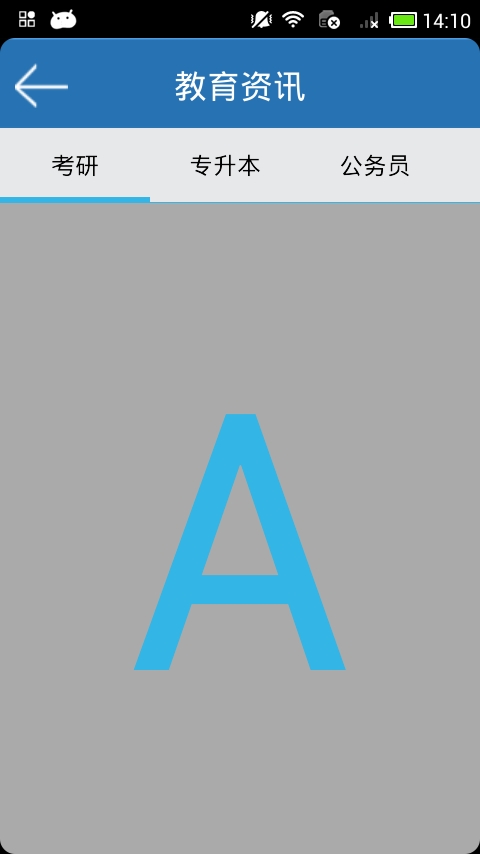
首先是JiaoyuzixunActivity.java代码部分: 1 2 3 4 5 6 7 8 9 10 11 12 13 14 15 16 17 18 19 20 21 22 23 24 25 26 27 28 29 30 31 32 33 34 35 36 37 38 39 40 41 42 43 44 45 46 47 48 49 50 51 52 53 54 55 56 57 58 59 60 61 62 63 64 65 66 67 68 69 70 71 72 73 74 75 76 77 78 79 80 81 82 83 84 85 86 87 88 89 90 91 92 93 94 95 96 97 98 99 100 101 102 103 104 105 106 107 108 109 110 111 112 113 114 115 116 117 118 119 120 121 122 123 124 125 126 127 128 129 130 131 132 133 134 135 136 137 138 139 140 141 142 143 144 145 146 147 148 149 150 151 152 153 154 155 156 157 158 159 160 161 162 163 164 165 166 167 168 169 170 171 172 173 174 175 176 177 178 179 180 181 182 183 184 185 186 187 188 189 190 191 192 193 194 195 196 197 198 199 200 201 202 203 204 205 206 207 208 209 210 211 212 213 214 215 216 217 218 219 220 221 222 223 224 225 226 227 228 229 230 231 232 233 234 235 236 237 238 239 240 241 242 243 244 245 246 247 248 249 250 251 252 253 254 255 256 257 258 259 260 261 262 263 264 265 266 267 268 269 270 271 272 273 274 275 276 277 278 279 280 281 282 283 284 285 286 287 288 289 290 291 292 293 294 295 296 297 298 299 300 301 302 303 304 305 306 307 308 309 310 311 312 313 314 315 316 317 318 319 320 321 322 323 324 325 326 327 328 329 330 331 332 333 334 335 336 337 338 339 340 341 342 343 344 345 346 347 348 349 350 351 352 353 354 355 356 357 358 359 360 361 362 363 364 365 366 367 368 369 370 371 372 373 374 375 376 377 378 379 380 381 382 383 384 385 386 387 388 389 390 391 392 393 394 395 396 397 398 399 400 401 402 403 404 405 package com.gaoxiaotong.ctone.jiaoyuzixun; import java.util.ArrayList; import java.util.HashMap; import java.util.Iterator; import java.util.List; import java.util.Map; import org.json.JSONArray; import org.json.JSONObject; import com.gaoxiaotong.ctone.entity.Jiaoyuzixun_ViewPage_Adapter; import com.gaoxiaotong.ctone.entity.jianzhizhaopinAdapter; import com.gaoxiaotong.ctone.jianzhizhaopin.JianzhizhaopinActivity; import com.gaoxiaotong.info.Webserinfo; import com.gaoxiaotongctone.MainActivity; import com.gaoxiaotongctone.R; import android.app.Activity; import android.app.ProgressDialog; import android.content.Intent; import android.os.AsyncTask; import android.os.Bundle; import android.os.Parcelable; import android.support.v4.view.PagerAdapter; import android.support.v4.view.ViewPager; import android.support.v4.view.ViewPager.OnPageChangeListener; import android.util.Log; import android.view.KeyEvent; import android.view.View; import android.view.ViewGroup.LayoutParams; import android.view.animation.AnimationSet; import android.view.animation.TranslateAnimation; import android.widget.AdapterViewFlipper; import android.widget.HorizontalScrollView; import android.widget.ImageView; import android.widget.LinearLayout; import android.widget.ListView; import android.widget.ProgressBar; import android.widget.RadioButton; import android.widget.RadioGroup; import android.widget.TextView; import android.widget.RadioGroup.OnCheckedChangeListener; /** *HorizontalScrollView和ViewPager联动效果上面为HorizontalScrollView,下面为ViewPager **/ public class JiaoyuzixunActivity extends Activity implements OnCheckedChangeListener{ private ProgressDialogdialog; private ProgressBarprogressBar; private HashMap<Integer,Integer>hMap; private int pageIndex; private boolean load_pagesize; private int thePage; /** *设置布局显示属性 */ private LayoutParamsmLayoutParams= new LinearLayout.LayoutParams( LinearLayout.LayoutParams.WRAP_CONTENT, LinearLayout.LayoutParams.WRAP_CONTENT); /** *设置布局显示目标最大化属性 */ private LayoutParamsFFlayoutParams= new LinearLayout.LayoutParams( LinearLayout.LayoutParams.MATCH_PARENT, LinearLayout.LayoutParams.MATCH_PARENT); private LinearLayoutloadingLayout; private TextViewtexview_back; private RadioGroupmRadioGroup; private RadioButtonmRadioButton1; private RadioButtonmRadioButton2; private RadioButtonmRadioButton3; private RadioButtonmRadioButton4; private RadioButtonmRadioButton5; private RadioButtonmRadioButton6; private ImageViewmImageView; private float mCurrentCheckedRadioLeft; //当前被选中的RadioButton距离左侧的距离 private HorizontalScrollViewmHorizontalScrollView; //上面的水平滚动控件 private ViewPagermViewPager; //下方的可横向拖动的控件 private ArrayList<View>mViews; //用来存放下方滚动的layout(layout_1,layout_2,layout_3) @Override public void onCreate(BundlesavedInstanceState){ super .onCreate(savedInstanceState); setContentView(R.layout.title_bar_education); iniController(); iniListener(); iniVariable(); mRadioButton1.setChecked( true ); mViewPager.setCurrentItem( 1 ); mCurrentCheckedRadioLeft=getCurrentCheckedRadioLeft(); //返回 texview_back.setOnClickListener( new View.OnClickListener(){ @Override public void onClick(Viewv){ //TODOAuto-generatedmethodstub Intentintent= new Intent(JiaoyuzixunActivity. this , MainActivity. class ); startActivity(intent); JiaoyuzixunActivity. this .finish(); } }); //绑定考研,专升本等等部分 } /** *AsyncTask异步加载部分操作 */ public class MyTaskJianzhi1 extends AsyncTask<String,Void,List<Map<String,Object>>>{ private ListViewlvCont; private jianzhizhaopinAdapteradapter; private int index; //判断适配器是否被置空部分 public MyTaskJianzhi1(ListViewlvCont,jianzhizhaopinAdapterjzzpAdapter){ super (); this .lvCont=lvCont; if (jzzpAdapter== null ){ adapter= new jianzhizhaopinAdapter(JiaoyuzixunActivity. this ); } else { adapter=jzzpAdapter; } } //下载提示框 @Override protected void onPreExecute(){ //TODOAuto-generatedmethodstub super .onPreExecute(); dialog= new ProgressDialog(JiaoyuzixunActivity. this ); dialog.setTitle( "提示" ); dialog.setMessage( "正在下载,请稍后...." ); dialog.show(); } //操作结束部分 @Override protected void onPostExecute(List<Map<String,Object>>result){ //TODOAuto-generatedmethodstub super .onPostExecute(result); //绑定考研,专升本部分 Stringaa= "" ; try { if (thePage== 1 ){ adapter.setData(result); lvCont.setAdapter(adapter); } if (result.size()== 0 ){ loadingLayout.setVisibility(View.GONE); } adapter.notifyDataSetChanged(); } catch (Exceptione){ //TODO:handleexception e.getMessage(); e.printStackTrace(); } dialog.dismiss(); } //获取数据操作部分 @Override protected List<Map<String,Object>>doInBackground(String...params){ //TODOAuto-generatedmethodstub List<Map<String,Object>>list= new ArrayList<Map<String,Object>>(); //链接网络,获取json,解析数据 try { WebserinfowsWebserinfo= new Webserinfo(); JSONArraydata= new JSONArray(); if (pageIndex== 0 ){ data=wsWebserinfo.jobsByType( "" +Webserinfo.pageSize, "2" , "" +thePage); } else if (pageIndex== 1 ){ data=wsWebserinfo.jobsByType( "" +Webserinfo.pageSize, "1" , "" +thePage); } else if (pageIndex== 2 ){ data=wsWebserinfo.jobsByType( "" +Webserinfo.pageSize, "3" , "" +thePage); } if (data.length()< 10 ){ load_pagesize= false ; } for ( int i= 0 ;i<data.length();i++){ JSONObjectjsonObj=data.getJSONObject(i); HashMap<String,Object>map= new HashMap<String,Object>(); //迭代输出json的key作为map的key Iterator<String>iterator=jsonObj.keys(); while (iterator.hasNext()){ Stringkey=iterator.next(); Objectvalue=jsonObj.get(key); map.put(key,value); } if (thePage> 1 ){ adapter.addItem(map); } list.add(map); } } catch (Exceptione){ //TODO:handleexception } return list; } } private void iniVariable(){ //TODOAuto-generatedmethodstub mViews= new ArrayList<View>(); mViews.add(getLayoutInflater().inflate(R.layout.layout_0, null )); mViews.add(getLayoutInflater().inflate(R.layout.layout_1, null )); mViews.add(getLayoutInflater().inflate(R.layout.layout_2, null )); mViews.add(getLayoutInflater().inflate(R.layout.layout_3, null )); mViews.add(getLayoutInflater().inflate(R.layout.layout_4, null )); mViews.add(getLayoutInflater().inflate(R.layout.layout_5, null )); mViews.add(getLayoutInflater().inflate(R.layout.layout_6, null )); mViews.add(getLayoutInflater().inflate(R.layout.layout_0, null )); mViewPager.setAdapter( new Jiaoyuzixun_ViewPage_Adapter(mViews)); //设置ViewPager的适配器 } /** *RadioGroup点击CheckedChanged监听 */ @Override public void onCheckedChanged(RadioGroupgroup, int checkedId){ AnimationSet_AnimationSet= new AnimationSet( true ); TranslateAnimation_TranslateAnimation; Log.i( "zj" , "checkedid=" +checkedId); if (checkedId==R.id.btn1){ _TranslateAnimation= new TranslateAnimation( mCurrentCheckedRadioLeft,getResources().getDimension( R.dimen.rdo1),0f,0f); _AnimationSet.addAnimation(_TranslateAnimation); _AnimationSet.setFillBefore( false ); _AnimationSet.setFillAfter( true ); _AnimationSet.setDuration( 100 ); mImageView.startAnimation(_AnimationSet); //开始上面蓝色横条图片的动画切换 //mImageView.setLayoutParams(_LayoutParams1); mViewPager.setCurrentItem( 1 ); //让下方ViewPager跟随上面的HorizontalScrollView切换 } else if (checkedId==R.id.btn2){ _TranslateAnimation= new TranslateAnimation( mCurrentCheckedRadioLeft,getResources().getDimension( R.dimen.rdo2),0f,0f); _AnimationSet.addAnimation(_TranslateAnimation); _AnimationSet.setFillBefore( false ); _AnimationSet.setFillAfter( true ); _AnimationSet.setDuration( 100 ); mImageView.startAnimation(_AnimationSet); mViewPager.setCurrentItem( 2 ); } else if (checkedId==R.id.btn3){ _TranslateAnimation= new TranslateAnimation( mCurrentCheckedRadioLeft,getResources().getDimension( R.dimen.rdo3),0f,0f); _AnimationSet.addAnimation(_TranslateAnimation); _AnimationSet.setFillBefore( false ); _AnimationSet.setFillAfter( true ); _AnimationSet.setDuration( 100 ); mImageView.startAnimation(_AnimationSet); mViewPager.setCurrentItem( 3 ); } else if (checkedId==R.id.btn4){ _TranslateAnimation= new TranslateAnimation( mCurrentCheckedRadioLeft,getResources().getDimension( R.dimen.rdo4),0f,0f); _AnimationSet.addAnimation(_TranslateAnimation); _AnimationSet.setFillBefore( false ); _AnimationSet.setFillAfter( true ); _AnimationSet.setDuration( 100 ); mImageView.startAnimation(_AnimationSet); mViewPager.setCurrentItem( 4 ); } else if (checkedId==R.id.btn5){ _TranslateAnimation= new TranslateAnimation( mCurrentCheckedRadioLeft,getResources().getDimension( R.dimen.rdo5),0f,0f); _AnimationSet.addAnimation(_TranslateAnimation); _AnimationSet.setFillBefore( false ); _AnimationSet.setFillAfter( true ); _AnimationSet.setDuration( 100 ); mImageView.startAnimation(_AnimationSet); mViewPager.setCurrentItem( 5 ); } else if (checkedId==R.id.btn6){ _TranslateAnimation= new TranslateAnimation( mCurrentCheckedRadioLeft,getResources().getDimension( R.dimen.rdo6),0f,0f); _AnimationSet.addAnimation(_TranslateAnimation); _AnimationSet.setFillBefore( false ); _AnimationSet.setFillAfter( true ); _AnimationSet.setDuration( 100 ); mImageView.startAnimation(_AnimationSet); mViewPager.setCurrentItem( 6 ); } mCurrentCheckedRadioLeft=getCurrentCheckedRadioLeft(); //更新当前蓝色横条距离左边的距离 mHorizontalScrollView.smoothScrollTo(( int )mCurrentCheckedRadioLeft -( int )getResources().getDimension(R.dimen.rdo2), 0 ); } /** *获得当前被选中的RadioButton距离左侧的距离 */ private float getCurrentCheckedRadioLeft(){ //TODOAuto-generatedmethodstub if (mRadioButton1.isChecked()){ return getResources().getDimension(R.dimen.rdo1); } else if (mRadioButton2.isChecked()){ return getResources().getDimension(R.dimen.rdo2); } else if (mRadioButton3.isChecked()){ return getResources().getDimension(R.dimen.rdo3); } else if (mRadioButton4.isChecked()){ return getResources().getDimension(R.dimen.rdo4); } else if (mRadioButton5.isChecked()){ return getResources().getDimension(R.dimen.rdo5); } else if (mRadioButton6.isChecked()){ return getResources().getDimension(R.dimen.rdo6); } return 0f; } /** *监听部分操作 */ private void iniListener(){ //TODOAuto-generatedmethodstub mRadioGroup.setOnCheckedChangeListener( this ); mViewPager.setOnPageChangeListener( new MyPagerOnPageChangeListener()); } private void iniController(){ //TODOAuto-generatedmethodstub mRadioGroup=(RadioGroup)findViewById(R.id.radioGroup); mRadioButton1=(RadioButton)findViewById(R.id.btn1); mRadioButton2=(RadioButton)findViewById(R.id.btn2); mRadioButton3=(RadioButton)findViewById(R.id.btn3); mRadioButton4=(RadioButton)findViewById(R.id.btn4); mRadioButton5=(RadioButton)findViewById(R.id.btn5); mRadioButton6=(RadioButton)findViewById(R.id.btn6); mImageView=(ImageView)findViewById(R.id.img1); texview_back=(TextView)findViewById(R.id.back_activity_button); mHorizontalScrollView=(HorizontalScrollView)findViewById(R.id.horizontalScrollView); mViewPager=(ViewPager)findViewById(R.id.pager); } /** *ViewPager的PageChangeListener(页面改变的监听器) */ private class MyPagerOnPageChangeListener implements OnPageChangeListener{ @Override public void onPageScrollStateChanged( int arg0){ //TODOAuto-generatedmethodstub } @Override public void onPageScrolled( int arg0, float arg1, int arg2){ //TODOAuto-generatedmethodstub } /** *滑动ViewPager的时候,让上方的HorizontalScrollView自动切换 */ @Override public void onPageSelected( int position){ //TODOAuto-generatedmethodstub if (position== 0 ){ mViewPager.setCurrentItem( 1 ); } else if (position== 1 ){ mRadioButton1.performClick(); } else if (position== 2 ){ mRadioButton2.performClick(); } else if (position== 3 ){ mRadioButton3.performClick(); } else if (position== 4 ){ mRadioButton4.performClick(); } else if (position== 5 ){ mRadioButton5.performClick(); } else if (position== 6 ){ mRadioButton6.performClick(); } else if (position== 7 ){ mViewPager.setCurrentItem( 6 ); } } } //back键 @Override public boolean onKeyDown( int keyCode,KeyEventevent){ //TODOAuto-generatedmethodstub if (keyCode==KeyEvent.KEYCODE_BACK&&event.getRepeatCount()== 0 ){ Intentintent= new Intent(); intent.setClass(JiaoyuzixunActivity. this ,MainActivity. class ); JiaoyuzixunActivity. this .startActivity(intent); JiaoyuzixunActivity. this .finish(); } else { return false ; } return super .onKeyDown(keyCode,event); } } dimens.xml部分,控制菜单栏显示条目效果: 1 2 3 4 5 6 7 8 9 10 11 < resources > < dimen name = "padding_small" >8dp</ dimen > < dimen name = "padding_medium" >8dp</ dimen > < dimen name = "padding_large" >16dp</ dimen > < dimen name = "rdo1" >0dp</ dimen > < dimen name = "rdo2" >100dp</ dimen > < dimen name = "rdo3" >200dp</ dimen > < dimen name = "rdo4" >300dp</ dimen > < dimen name = "rdo5" >400dp</ dimen > < dimen name = "rdo6" >500dp</ dimen > </ resources > 过度页面layout_0.xml部分: 1 2 3 4 5 6 7 8 <? xml version = "1.0" encoding = "utf-8" ?> < LinearLayout xmlns:android = "http://schemas.android.com/apk/res/android" android:orientation = "vertical" android:layout_width = "match_parent" android:layout_height = "match_parent" android:background = "@android:color/darker_gray" > </ LinearLayout > 显示页面其中一个样式layout_1.xml部分: 1 2 3 4 5 6 7 8 9 10 11 12 13 14 15 16 17 <? xml version = "1.0" encoding = "utf-8" ?> < LinearLayout xmlns:android = "http://schemas.android.com/apk/res/android" android:layout_width = "match_parent" android:layout_height = "match_parent" android:background = "@android:color/darker_gray" android:orientation = "vertical" > < TextView android:id = "@+id/textView_showMessages" android:layout_width = "fill_parent" android:layout_height = "fill_parent" android:gravity = "center" android:text = "A" android:textColor = "#33b5e5" android:textSize = "240sp" /> </ LinearLayout > 效果图: 本文转自 吴雨声 51CTO博客,原文链接:http://blog.51cto.com/liangxiao/1432413,如需转载请自行联系原作者