首页 文章 精选 留言 我的

精选列表

搜索[springboot],共4570篇文章
优秀的个人博客,低调大师

精通SpringBoot——第十三篇:整合Mybatis多数据源

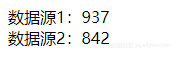
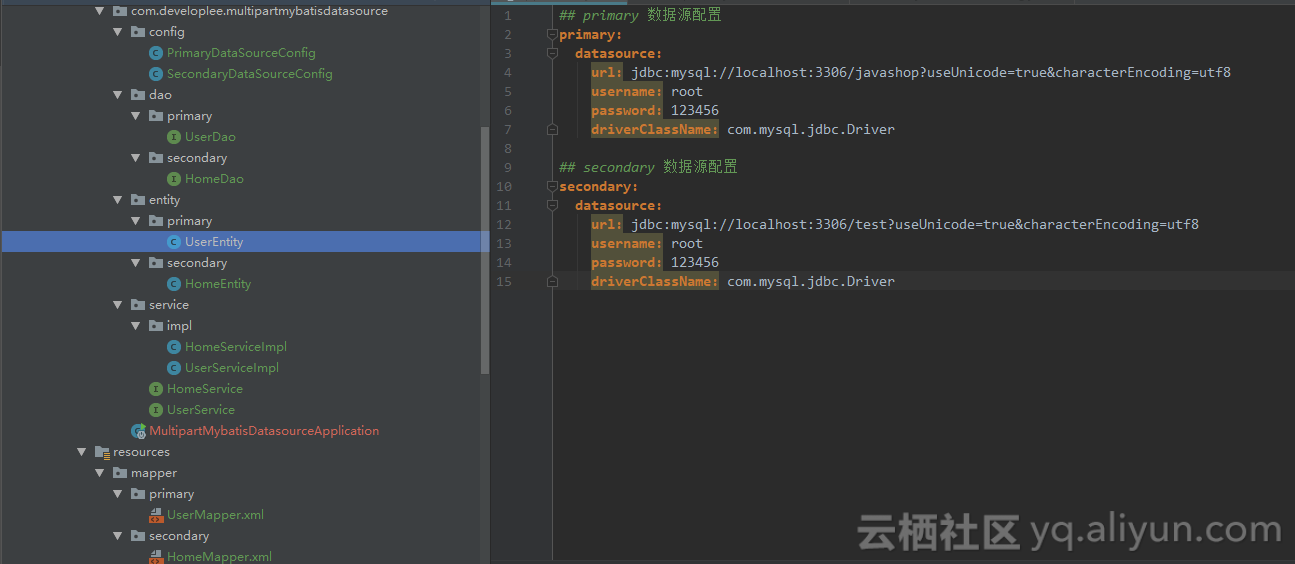
久违了,最近度过了一段倦怠期,这段时间干什么都没有动力,拖延症复发。好在我回来了.... ——From me .进入今天的主题——在Spring Boot 项目中整合mybatis多数据源,其实很简单,其实并不难。整体项目结构以及数据源配置application.yml: 看代码吧. 第一个数据源配置(作为主数据源) /** * @author Lensen * @desc * @since 2018/9/19 10:22 */ @Configuration @MapperScan(basePackages = PrimaryDataSourceConfig.PACKAGE, sqlSessionFactoryRef = "primarySqlSessionFactory") public class PrimaryDataSourceConfig { static final String PACKAGE = "com.developlee.multipartmybatisdatasource.dao.primary"; static final String MAPPER_LOCATION = "classpath:mapper/primary/*.xml"; @Value("${primary.datasource.url}") private String url; @Value("${primary.datasource.username}") private String user; @Value("${primary.datasource.password}") private String password; @Value("${primary.datasource.driverClassName}") private String driverClass; @Bean(name = "primaryDataSource") @Primary public DataSource primaryDataSource() { DruidDataSource dataSource = new DruidDataSource(); dataSource.setDriverClassName(driverClass); dataSource.setUrl(url); dataSource.setUsername(user); dataSource.setPassword(password); return dataSource; } @Bean(name = "primaryTransactionManager") @Primary public DataSourceTransactionManager primaryTransactionManager() { return new DataSourceTransactionManager(primaryDataSource()); } @Bean(name = "primarySqlSessionFactory") @Primary public SqlSessionFactory primarySqlSessionFactory(@Qualifier("primaryDataSource") DataSource primaryDataSource) throws Exception { final SqlSessionFactoryBean sessionFactory = new SqlSessionFactoryBean(); sessionFactory.setDataSource(primaryDataSource); sessionFactory.setMapperLocations(new PathMatchingResourcePatternResolver() .getResources(PrimaryDataSourceConfig.MAPPER_LOCATION)); return sessionFactory.getObject(); } } 第二个数据源配置 /** * @author Lensen * @desc * @since 2018/9/19 10:22 */ @Configuration @MapperScan(basePackages = SecondaryDataSourceConfig.PACKAGE, sqlSessionFactoryRef = "secondarySqlSessionFactory") public class SecondaryDataSourceConfig { static final String PACKAGE = "com.developlee.multipartmybatisdatasource.dao.secondary"; static final String MAPPER_LOCATION = "classpath:mapper/secondary/*.xml"; @Value("${secondary.datasource.url}") private String url; @Value("${secondary.datasource.username}") private String user; @Value("${secondary.datasource.password}") private String password; @Value("${secondary.datasource.driverClassName}") private String driverClass; @Bean(name = "secondaryDataSource") public DataSource secondaryDataSource() { DruidDataSource dataSource = new DruidDataSource(); dataSource.setDriverClassName(driverClass); dataSource.setUrl(url); dataSource.setUsername(user); dataSource.setPassword(password); return dataSource; } @Bean(name = "secondaryTransactionManager") public DataSourceTransactionManager secondaryTransactionManager() { return new DataSourceTransactionManager(secondaryDataSource()); } @Bean(name = "secondarySqlSessionFactory") public SqlSessionFactory secondarySqlSessionFactory(@Qualifier("secondaryDataSource") DataSource secondaryDataSource) throws Exception { final SqlSessionFactoryBean sessionFactory = new SqlSessionFactoryBean(); sessionFactory.setDataSource(secondaryDataSource); sessionFactory.setMapperLocations(new PathMatchingResourcePatternResolver() .getResources(SecondaryDataSourceConfig.MAPPER_LOCATION)); return sessionFactory.getObject(); } } 其他业务逻辑代码就不贴了,代码可在我的github上找到。文章末尾有地址。 application.yml ## primary 数据源配置 primary: datasource: url: jdbc:mysql://localhost:3306/javashop?useUnicode=true&characterEncoding=utf8 username: root password: 123456 driverClassName: com.mysql.jdbc.Driver ## secondary 数据源配置 secondary: datasource: url: jdbc:mysql://localhost:3306/test?useUnicode=true&characterEncoding=utf8 username: root password: 123456 driverClassName: com.mysql.jdbc.Driver pom.xml <dependency> <groupId>org.springframework.boot</groupId> <artifactId>spring-boot-starter-web</artifactId> </dependency> <dependency> <groupId>org.mybatis.spring.boot</groupId> <artifactId>mybatis-spring-boot-starter</artifactId> <version>1.3.2</version> </dependency> <dependency> <groupId>mysql</groupId> <artifactId>mysql-connector-java</artifactId> <scope>runtime</scope> </dependency> <dependency> <groupId>org.projectlombok</groupId> <artifactId>lombok</artifactId> <optional>true</optional> </dependency> <!-- https://mvnrepository.com/artifact/com.alibaba/druid-spring-boot-starter --> <dependency> <groupId>com.alibaba</groupId> <artifactId>druid-spring-boot-starter</artifactId> <version>1.1.10</version> </dependency> 测试: @RunWith(SpringRunner.class) @SpringBootTest public class MultipartMybatisDatasourceApplicationTests { @Autowired UserServiceImpl userService; @Autowired HomeServiceImpl homeService; @Test public void contextLoads() { UserEntity userEntity = new UserEntity(); userEntity.setId(1L); userEntity.setName("Lensen"); userEntity.setMobile("13738718660"); HomeEntity homeEntity = new HomeEntity(); homeEntity.setId(1L); homeEntity.setUserId(1L); homeEntity.setCity("杭州"); homeEntity.setTown("西湖区"); userService.saveUser(userEntity); homeService.saveHome(homeEntity); userService.getUserById(1L); homeService.getHomeByUserId(1L); } } 代码可以在我的github.com中找到。 That's All。 关注我的公众号,也不一定会更新文章。hahah~~

优秀的个人博客,低调大师

SpringBoot实战(十)之使用Spring Boot Actuator构建RESTful Web服务

一、导入依赖 <?xml version="1.0" encoding="UTF-8"?> <project xmlns="http://maven.apache.org/POM/4.0.0" xmlns:xsi="http://www.w3.org/2001/XMLSchema-instance" xsi:schemaLocation="http://maven.apache.org/POM/4.0.0 http://maven.apache.org/xsd/maven-4.0.0.xsd"> <modelVersion>4.0.0</modelVersion> <groupId>org.springframework</groupId> <artifactId>gs-actuator-service</artifactId> <version>0.1.0</version> <parent> <groupId>org.springframework.boot</groupId> <artifactId>spring-boot-starter-parent</artifactId> <version>1.5.8.RELEASE</version> </parent> <dependencies> <dependency> <groupId>org.springframework.boot</groupId> <artifactId>spring-boot-starter-web</artifactId> </dependency> <dependency> <groupId>org.springframework.boot</groupId> <artifactId>spring-boot-starter-actuator</artifactId> </dependency> <dependency> <groupId>org.springframework.boot</groupId> <artifactId>spring-boot-starter-test</artifactId> <scope>test</scope> </dependency> </dependencies> <properties> <java.version>1.8</java.version> </properties> <build> <plugins> <plugin> <groupId>org.springframework.boot</groupId> <artifactId>spring-boot-maven-plugin</artifactId> </plugin> </plugins> </build> </project> 二、构建实体 package hello; public class Greeting { private final long id; private final String content; public Greeting(long id, String content) { this.id = id; this.content = content; } public long getId() { return id; } public String getContent() { return content; } } 三、编写Controller package hello; import java.util.concurrent.atomic.AtomicLong; import org.springframework.stereotype.Controller; import org.springframework.web.bind.annotation.GetMapping; import org.springframework.web.bind.annotation.RequestParam; import org.springframework.web.bind.annotation.ResponseBody; @Controller public class HelloWorldController { private static final String template = "Hello, %s!"; private final AtomicLong counter = new AtomicLong(); @GetMapping("/hello-world") @ResponseBody public Greeting sayHello(@RequestParam(name="name", required=false, defaultValue="Stranger") String name) { return new Greeting(counter.incrementAndGet(), String.format(template, name)); } } 四、编写配置文件 server.port: 9000 management.server.port: 9001 management.server.address: 127.0.0.1 五、编写启动类 package hello; import org.springframework.boot.SpringApplication; import org.springframework.boot.autoconfigure.SpringBootApplication; /** * 使用Spring Boot Actuator构建RESTful Web服务 * */ @SpringBootApplication public class HelloWorldApplication { public static void main(String[] args) { SpringApplication.run(HelloWorldApplication.class, args); } } 六、编写测试类 /* * Copyright 2012-2014 the original author or authors. * * Licensed under the Apache License, Version 2.0 (the "License"); * you may not use this file except in compliance with the License. * You may obtain a copy of the License at * * http://www.apache.org/licenses/LICENSE-2.0 * * Unless required by applicable law or agreed to in writing, software * distributed under the License is distributed on an "AS IS" BASIS, * WITHOUT WARRANTIES OR CONDITIONS OF ANY KIND, either express or implied. * See the License for the specific language governing permissions and * limitations under the License. */ package hello; import java.util.Map; import org.junit.Test; import org.junit.runner.RunWith; import org.springframework.beans.factory.annotation.Autowired; import org.springframework.beans.factory.annotation.Value; import org.springframework.boot.test.context.SpringBootTest; import org.springframework.boot.test.web.client.TestRestTemplate; import org.springframework.http.HttpStatus; import org.springframework.http.ResponseEntity; import org.springframework.test.context.TestPropertySource; import org.springframework.test.context.junit4.SpringRunner; import static org.assertj.core.api.BDDAssertions.then; /** * Basic integration tests for service demo application. * * @author Dave Syer */ @RunWith(SpringRunner.class) @SpringBootTest(webEnvironment = SpringBootTest.WebEnvironment.RANDOM_PORT) @TestPropertySource(properties = {"management.port=0"}) public class HelloWorldApplicationTests { @org.springframework.boot.context.embedded.LocalServerPort private int port; @Value("${local.management.port}") private int mgt; @Autowired private TestRestTemplate testRestTemplate; @Test public void shouldReturn200WhenSendingRequestToController() throws Exception { @SuppressWarnings("rawtypes") ResponseEntity<Map> entity = this.testRestTemplate.getForEntity( "http://localhost:" + this.port + "/hello-world", Map.class); then(entity.getStatusCode()).isEqualTo(HttpStatus.OK); } @Test public void shouldReturn200WhenSendingRequestToManagementEndpoint() throws Exception { @SuppressWarnings("rawtypes") ResponseEntity<Map> entity = this.testRestTemplate.getForEntity( "http://localhost:" + this.mgt + "/actuator/info", Map.class); then(entity.getStatusCode()).isEqualTo(HttpStatus.OK); } }

资源下载

更多资源
Mario

Mario

马里奥是站在游戏界顶峰的超人气多面角色。马里奥靠吃蘑菇成长,特征是大鼻子、头戴帽子、身穿背带裤,还留着胡子。与他的双胞胎兄弟路易基一起,长年担任任天堂的招牌角色。

Nacos

Nacos

Nacos /nɑ:kəʊs/ 是 Dynamic Naming and Configuration Service 的首字母简称,一个易于构建 AI Agent 应用的动态服务发现、配置管理和AI智能体管理平台。Nacos 致力于帮助您发现、配置和管理微服务及AI智能体应用。Nacos 提供了一组简单易用的特性集,帮助您快速实现动态服务发现、服务配置、服务元数据、流量管理。Nacos 帮助您更敏捷和容易地构建、交付和管理微服务平台。

优质分享App

优质分享App

近一个月的开发和优化,本站点的第一个app全新上线。该app采用极致压缩,本体才4.36MB。系统里面做了大量数据访问、缓存优化。方便用户在手机上查看文章。后续会推出HarmonyOS的适配版本。

Sublime Text

Sublime Text

Sublime Text具有漂亮的用户界面和强大的功能,例如代码缩略图,Python的插件,代码段等。还可自定义键绑定,菜单和工具栏。Sublime Text 的主要功能包括:拼写检查,书签,完整的 Python API , Goto 功能,即时项目切换,多选择,多窗口等等。Sublime Text 是一个跨平台的编辑器,同时支持Windows、Linux、Mac OS X等操作系统。

用户登录
用户注册