首页 文章 精选 留言 我的

精选列表

搜索[学习],共10000篇文章
优秀的个人博客,低调大师

Spark Streaming实时流处理学习——分布式日志收集框架Flume

2. 分布式日志收集框架Flume 2.1 业务现状分析 如上图,大量的系统和各种服务的日志数据持续生成。用户有了很好的商业创意想要充分利用这些系统日志信息。比如用户行为分析,轨迹跟踪等等。如何将日志上传到Hadoop集群上?对比方案存在什么问题,以及有什么优势? 方案1: 容错,负载均衡,高延时等问题如何消除? 方案2: Flume框架 2.2 Flume概述 flume官网 http://flume.apache.orgFlume is a distributed, reliable, and available service for efficiently collecting(收集), aggregating(聚合), and moving(移动)large amounts of log data. It has a simple and flexible architecture based on streaming data flows. It is robust and fault tolerant with tunable reliability mechanisms and many failover and recovery mechanisms. It uses a simple extensible data model that allows for online analytic application. Flume是有Cloudera提供的一个分布式、高可靠、高可用的服务,用于分布式的海量日志的高效收集、聚合、移动的系统Flume的设计目标 可靠性 扩展性 管理性(agent有效的管理者) 业界同类产品对比 Flume(*): Cloudera/Apache Java Scribe: Facebook C/C++ 不再维护 Chukwa:Yahoo/Apache Java 不再维护 Fluentd:Ruby Logstash(*):ELK(ElasticSearch,Kibana) Flume发展史 Cloudera 0.9.2 Flume-OG flume-728 Flume-NG => Apache 2012.7 1.0 2015.5 1.6 (* +) ~ 1.8 2.3 Flume架构及核心组件 Source(收集) Channel(聚合) Sink(输出) multi-agent flow In order to flow the data across multiple agents or hops, the sink of the previous agent and source of the current hop need to be avro type with the sink pointing to the hostname (or IP address) and port of the source.A very common scenario in log collection is a large number of log producing clients sending data to a few consumer agents that are attached to the storage subsystem. For example, logs collected from hundreds of web servers sent to a dozen of agents that write to HDFS cluster. This can be achieved in Flume by configuring a number of first tier agents with an avro sink, all pointing to an avro source of single agent (Again you could use the thrift sources/sinks/clients in such a scenario). This source on the second tier agent consolidates the received events into a single channel which is consumed by a sink to its final destination. Multiplexing the flow Flume supports multiplexing the event flow to one or more destinations. This is achieved by defining a flow multiplexer that can replicate or selectively route an event to one or more channels.The above example shows a source from agent “foo” fanning out the flow to three different channels. This fan out can be replicating or multiplexing. In case of replicating flow, each event is sent to all three channels. For the multiplexing case, an event is delivered to a subset of available channels when an event’s attribute matches a preconfigured value. For example, if an event attribute called “txnType” is set to “customer”, then it should go to channel1 and channel3, if it’s “vendor” then it should go to channel2, otherwise channel3. The mapping can be set in the agent’s configuration file. 2.4 Flume环境部署 前置条件 Java Runtime Environment - Java 1.8 or later Memory - Sufficient memory for configurations used by sources, channels or sinks Disk Space - Sufficient disk space for configurations used by channels or sinks Directory Permissions - Read/Write permissions for directories used by agent 安装JDK 下载JDK包 解压JDK包 tar -zxvf jdk-8u162-linux-x64.tar.gz [install dir] * 配置JAVA环境变量: 修改系统配置文件 /etc/profile 或者 ~/.bash_profile export JAVA_HOME=[jdk install dir] export PATH = $JAVA_HOME/bin:$PATH 执行指令 source /etc/profile 或者 source ~/.bash_profile 使得配置生效。 执行指令 java -version 检测环境配置是否生效。 安装Flume 下载Flume包 wget http://www.apache.org/dist/flume/1.7.0/apache-flume-1.7.0-bin.tar.gz 解压Flume包 tar -zxvf apache-flume-1.7.0-bin.tar.gz -C [install dir] 配置Flume环境变量 vim /etc/profile 或者 vim ~/.bash_profile export FLUME_HOME=[flume install dir] export PATH = $FLUME_HOME/bin:$PATH 执行指令 source /etc/profile 或者 source ~/.bash_profile 使得配置生效。 修改flume-env.sh脚本文件 export JAVA_HOME=[jdk install dir] 执行指令 flume-ng version 检测安装情况 2.5 Flume实战 需求1:从指定的网络端口采集数据输出到控制台 使用Flume的关键就是写配置文件 配置source 配置Channel 配置Sink 把以上三个组件链接起来 a1: agent名称r1: source的名称k1: sink的名称c1: channel的名称 单一节点 Flume 配置 # example.conf: A single-node Flume configuration # Name the components on this agent a1.sources = r1 a1.sinks = k1 a1.channels = c1 # Describe/configure the source a1.sources.r1.type = netcat a1.sources.r1.bind = localhost a1.sources.r1.port = 44444 # Describe the sink a1.sinks.k1.type = logger # Use a channel which buffers events in memory a1.channels.c1.type = memory a1.channels.c1.capacity = 1000 a1.channels.c1.transactionCapacity = 100 # Bind the source and sink to the channel a1.sources.r1.channels = c1 a1.sinks.k1.channel = c1 启动Flume agent flume-ng agent \ --name a1 \ --conf $FLUME_HOME/conf \ --conf-file $FLUME_HOME/conf/example.conf \ -Dflume.root.logger=INFO,console 使用telnet或者nc进行测试 telnet [hostname] [port] 或者 nc [hostname] [port] Event = 可选的headers + byte array Event: { headers:{} body: 74 68 69 73 20 69 73 20 61 20 74 65 73 74 20 70 this is a test p } 需求2:监控一个文件实时采集新增的数据输出到控制台技术(Agent)选型:exec source + memory channel + logger sink # example.conf: A single-node Flume configuration # Name the components on this agent a1.sources = r1 a1.sinks = k1 a1.channels = c1 # Describe/configure the source a1.sources.r1.type = exec a1.sources.r1.command = tail -f /root/data/data.log a1.sources.r1.shell = /bin/bash -c # Describe the sink a1.sinks.k1.type = logger # Use a channel which buffers events in memory a1.channels.c1.type = memory a1.channels.c1.capacity = 1000 a1.channels.c1.transactionCapacity = 100 # Bind the source and sink to the channel a1.sources.r1.channels = c1 a1.sinks.k1.channel = c1 启动Flume agent flume-ng agent \ --name a1 \ --conf $FLUME_HOME/conf \ --conf-file $FLUME_HOME/conf/example.conf \ -Dflume.root.logger=INFO,console 修改data.log文件,监测是否数据是否输出到控制台 echo hello >> data.log echo world >> data.log echo welcome >> data.log 控制台输出 2018-09-02 03:55:00,672 (SinkRunner-PollingRunner-DefaultSinkProcessor) [INFO - org.apache.flume.sink.LoggerSink.process(LoggerSink.java:95)] Event: { headers:{} body: 68 65 6C 6C 6F hello } 2018-09-02 03:55:06,748 (SinkRunner-PollingRunner-DefaultSinkProcessor) [INFO - org.apache.flume.sink.LoggerSink.process(LoggerSink.java:95)] Event: { headers:{} body: 77 6F 72 6C 64 world } 2018-09-02 03:55:22,280 (SinkRunner-PollingRunner-DefaultSinkProcessor) [INFO - org.apache.flume.sink.LoggerSink.process(LoggerSink.java:95)] Event: { headers:{} body: 77 65 6C 63 6F 6D 65 welcome } 至此,需求2成功实现。 需求3(*):将A服务器上的日志实时采集到B服务器上(重点掌握)技术(Agent)选型: exec source + memory channel + avro sink avro source + memory channel + logger sink # exec-memory-avro.conf: A single-node Flume configuration # Name the components on this agent exec-memory-avro.sources = exec-source exec-memory-avro.sinks = avro-sink exec-memory-avro.channels = memory-channel # Describe/configure the source exec-memory-avro.sources.exec-source.type = exec exec-memory-avro.sources.exec-source.command = tail -f /root/data/data.log exec-memory-avro.sources.exec-source.shell = /bin/bash -c # Describe the sink exec-memory-avro.sinks.avro-sink.type = avro exec-memory-avro.sinks.avro-sink.hostname = c7-master exec-memory-avro.sinks.avro-sink.port = 44444 # Use a channel which buffers events in memory exec-memory-avro.channels.memory-channel.type = memory exec-memory-avro.channels.memory-channel.capacity = 1000 exec-memory-avro.channels.memory-channel.transactionCapacity = 100 # Bind the source and sink to the channel exec-memory-avro.sources.exec-source.channels = memory-channel exec-memory-avro.sinks.avro-sink.channel = memory-channel # avro-memory-logger.conf: A single-node Flume configuration # Name the components on this agent avro-memory-logger.sources = avro-source avro-memory-logger.sinks = logger-sink avro-memory-logger.channels = memory-channel # Describe/configure the source avro-memory-logger.sources.avro-source.type = avro avro-memory-logger.sources.avro-source.bind = c7-master avro-memory-logger.sources.avro-source.port = 44444 # Describe the sink avro-memory-logger.sinks.logger-sink.type = logger # Use a channel which buffers events in memory avro-memory-logger.channels.memory-channel.type = memory avro-memory-logger.channels.memory-channel.capacity = 1000 avro-memory-logger.channels.memory-channel.transactionCapacity = 100 # Bind the source and sink to the channel avro-memory-logger.sources.avro-source.channels = memory-channel avro-memory-logger.sinks.logger-sink.channel = memory-channel 优先启动 avro-memory-logger agent flume-ng agent \ --name avro-memory-logger \ --conf $FLUME_HOME/conf \ --conf-file $FLUME_HOME/conf/avro-memory-logger.conf \ -Dflume.root.logger=INFO,console 再启动 exec-memory-avro agent flume-ng agent \ --name exec-memory-avro \ --conf $FLUME_HOME/conf \ --conf-file $FLUME_HOME/conf/exec-memory-avro.conf \ -Dflume.root.logger=INFO,console 日志收集过程:1)机器A上监控一个文件,当我们访问主站时会有用户行为日志记录到access.log中2)avro sink把新产生的日志输出到对应的avro source指定的hostname:port主机上。3)通过avro source对应的agent将我们的日志输出到控制台。

优秀的个人博客,低调大师

深入学习Java虚拟机——虚拟机内存区域与内存溢出异常

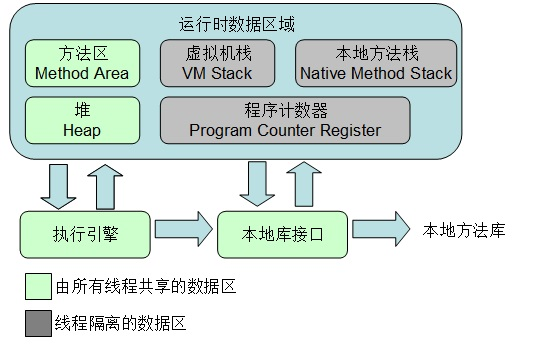
1. 运行时数据区域 1.1 程序计数器 1. 程序计数器是一段较小的内存空间,可以看作为当前线程所执行字节码的行号指示器。通过改变这个计数器的值来选取下一条字节码指令,分支、循环、跳转、异常处理、线程恢复等基础功能都需要该计数器。 2. 每条线程都会有一个独立的程序计数器,各线程间程序计数器互不影响,独立存储,所以这个内存区域是线程私有的。 3. 如果线程正在执行的是一个Java方法,那么计数器记录的是正在执行的虚拟机字节码指令的地址,如果执行的是本地(Native)方法,则这个计数器值为空,此内存区域是唯一一个在Java虚拟机中没有OutOfMemoryError情况的区域。 1.2虚拟机栈 1. 首先,虚拟机栈是线程私有的,它的生命周期与线程相同。虚拟机栈描述的是Java方法的执行模型:每个方法在执行的同时都会创建一个栈桢,用于存储局部变量表,操作数栈,动态链接,方法出口等信息。每一个方法从调用直至执行完成,就对应着一个栈桢从入栈到出栈的过程。 2. 局部变量表存放了编译器可知的各种基本数据类型(boolean,byte,char,short,int,long,float,double)、对象引用类型和returnAddress类型(指向一条字节码指令的地址)。且局部变量表的内存空间会在编译期完成分配,方法运行期间不会改变局部变量表的大小。 3. 异常状况: (1)如果线程请求的栈深度大于虚拟机所允许的深度,则将抛出StackOverflowError异常。 (2)如果虚拟机栈可以动态扩展,而扩展时无法申请的足够的内存,就会抛出OutOfMemoryError异常。 1.3 本地方法栈 1. 本地方法栈与虚拟机栈类似,但虚拟机栈是为虚拟机执行Java方法服务的,而本地方法栈是为虚拟机使用的本地方法服务。 2. 同样的,该内存区域也会有StackOverflowError异常和OutOfMemoryError异常。 1.4 Java堆 1.Java堆是被所有线程共享的内存区域,在虚拟机启动时创建。此区域只用来存储对象实例,几乎所有的对象都会在这里被创建(并不是所有的对象都在堆中创建)。 2. Java堆是垃圾收集器管理的主要区域。从内存回收角度看,垃圾收集器主要采用分代收集算法,所以还可以将Java堆分为新生代和老年代,进一步细分为Eden区,From Survivor区和To Survivor区。从内存分配的角度看,线程共享的Java堆中可能划分出多个线程私有的分配缓冲区。 进行这些划分的目的都是为了更快更好的回收内存或者分配内存。 3. 可能发生的异常:Java堆可能会处于物理上内存空间不连续的内存空间中,但逻辑上必须是连续的。其空间大小可以通过-Xmx和-Xms来控制,可以实现为固定大小,也可以为可扩展大小。当没有足够的内存空间完成分配并且堆无法扩展时,就会抛出OutOfMemoryError异常。 1.5 方法区 1.方法区是线程共享的内存区域,它用于存储虚拟机加载的类信息、常量、静态变量、即时编译器编译后的代码等数据,方法区属于堆的一个逻辑部分,但它却仍然要与Java堆区分开。 2. 方法区与堆类似,不需要连续的内存空间、内存空间大小可以固定或者可扩展,还可以选择不实现垃圾收集。在方法区,很少出现垃圾收集,这个区域的内存回收主要针对常量池的回收以及对类型的卸载。 3. 当方法区无法满足内存分配需求时,就会抛出OutOfMemoryError异常。 4. 运行时常量池:该区域是方法区的一部分,Class文件中除了有类似的版本、字段、方法、接口等描述信息外,还有一项信息是常量池,用于存放编译器生成的各种字面量和符号引用,这部分内容将在类被加载后进入方法区的运行时常量池中存放。运行时常量池相对于Class文件常量池的一个重要特征是具备动态性,即运行期间也可能将新的常量放入运行时常量池,比如String类中的intern()方法。 1.6 直接内存 1.直接内存并不是虚拟机运行时数据区的一部分,也不是Java虚拟机规范中定义的内存区域。 2.应用:在jdk1.4以后加入了NIO类,引入了一种基于通道与缓冲区的新IO方式,它使用Native函数库直接分配堆外内存,然后通过一个存储在Java堆中DirectByteBuffrer对象作为这块内存的引用进行直接操作,避免了在Java堆与Native堆之间来回复制数据,显著提高了性能。由于分配的是Native内存空间,所以大小不会受到Java堆大小的限制,但是肯定会受到本机总内存的限制。在通过设置虚拟机参数来设置堆等区域的内存空间时,忽略直接内存大小就有可能导致各个内存区域总和大于物理内存限制,从而导致动态扩展时出现OutOfMemoryError异常。 2. Java虚拟机对象 2.1 对象的创建 1. 创建过程(一般对象,即不包括数组和Class对象): (1)加载对象类:当虚拟机运行一条new指令时,首先检查这个指令的参数(也就是new后面的类名)是否能在常量池中定位到一个类的符号引用,并且检查这个类是否已被加载、解析和初始化过。如果没有,那就必须进行相应的类加载过程(该过程在后面会详细分析)。 (2)分配对象所需内存空间: 在类加载完成后即可确定对象所需的内存空间大小,给对象分配内存空间就是把一块确定大小的内存从Java堆中划分出来。分配方式主要取决于虚拟机所采用的GC是否带有压缩整理功能。 有压缩整理功能的GC会把Java堆分成两部分,一部分是被占用的,一部分是空闲的,通过一个指针作为分界的指示器,分配内存是只需要把指针向空闲区移动即可;不带压缩整理功能的GC会导致Java堆处于一种空闲与占用交错的内存空间,这时虚拟机就必须维护一个列表,记录堆中可用的内存空间,分配时只需要找到一个足够大小的空间划分给对象即可。 但是,在并发情况下,以上两种方式也并不安全,比如,正在给对象A分配空间时,指针还未修改,对象B又占用了该指针来分配空间。所以,虚拟机采用了CAS加上失败重试的方式保证更新操作的原子性;另一种方式是把内存分配动作按照线程划分在不同的空间中进行,即每个线程在堆中先分配一小块内存,称为本地线程分配缓冲(TLAB),那个线程要分配内存,就在那个线程的TLAB上分配,当使用完TLAB并分配新的TLAB时,才需要同步锁定,虚拟机使用TLAB可通过 -XX:+/-UseTLAB参数来设定。 (3)内存空间初始化:内存空间分配后,虚拟机需要将分配到的内存空间都初始化为零值(不包括对象头),如果使用TLAB,这一过程也会提前至TLAB分配时执行。该过程保证了对象即使不赋予初始值额可以使用,能访问到的字段的数据类型均为所对应的零值。 (4)设置对象信息:例如这个对象是哪个类的实例,如何找到类的元数据信息,对象的哈希码,对象的GC分带年龄等信息。这些信息存放在对象的对象头中,根据虚拟机当前运行状态的不同,是否启用偏向锁等。 (5)对象数据初始化:以上步骤完成后,对象已经创建成功,但此时对象内所有字段为零或null,此时便进行对象数据初始化,创造程序员所需要的对象。 2.2 对象的内存布局 虚拟机中,对象在内存中存储的布局可以分为3块区域:对象头,实例数据,对齐填充。 1. 对象头:包括两部分信息,第一部分用于存储对象自身的运行时数据,如哈希码,GC分代年龄,锁状态标志,线程持有的锁,偏向线程ID,偏向时间戳等,这部分数据被称为“Mark Word”,这部分数据长度在32或64位的虚拟机中分别为32bit或64bit。对象需要存储的运行时数据很多,超出32或64bit所能记录的限度,但对象头信息是与对象自身定义的数据无关的额外存储成本,Mark Word被设计为一个非固定的数据结构以便在极小的空间内存储尽量多的信息,例如在32位的HotSpot虚拟机中,如果对象处于未被锁定的状态下,则Mark Word的32bit空间中,25bit用于存储对象哈希值,4bit用于存储对象分带年龄,2bit用于存储锁标志位,1bit固定为0,其他状态下的存储内容如下 存储内容 标志位 状态 对象哈希码、对象分代年龄、 01 未锁定 指向锁记录的指针 00 轻量级锁定 指向重量级锁的指针 10 重量级锁定 空 11 GC标记 偏向线程id、偏向时间戳、对象分代年龄 01 可偏向 对象头的另一部分数据是类型指针,即对象指向他的类元数据的指针,虚拟机通过该指针确定对象所属的类,但并不是所有的虚拟机实现都必须在对象数据上保留类型指针,也就是说查找对象的元数据信息并不一定要经过对象本身。对于数组对象,对象头中还必须友谊路爱用于记录数组长度的数据。 2.实例数据:这里是对象真正存储的有效信息,包括各个字段的内容,无论是当前类的还是父类的。 3.对齐填充:这一部分并不是必要存在的,也没有特殊含义,仅仅是为了使对象的大小必须是8字节的整数倍,如果对象的大小不足,则会进行填充补全。 2.3 对象的访问定位 创建对象是为了使用对象,在Java程序中,通过栈上的对象引用来操作堆上的对象,那么这个引用通过何种方式去定位和访问堆中的对象的具体位置?具体实现取决于虚拟机实现,主要有两种方法,使用句柄和直接指针。 1.使用句柄访问:Java堆中划分一块内存作为句柄池,reference(引用)中存储的就是句柄池中存储的对象的句柄地址,而句柄包含了对象的实例数据与类型数据各自的具体地址信息。 2.使用直接指针访问:reference(引用)中存储的就是对象地址 这两种访问方式各有优势,使用句柄访问的好处是引用中存储的是稳定的句柄地址,对象被移动时只会改变句柄中的示例数据指针,而引用本身不需要修改。而使用直接指针访问方式的最大好处是速度更快,大部分虚拟机都会采用这种方式。

优秀的个人博客,低调大师

(11)学习笔记 ) ASP.NET CORE微服务 Micro-Service ---- Thrift高效通讯 (完结)

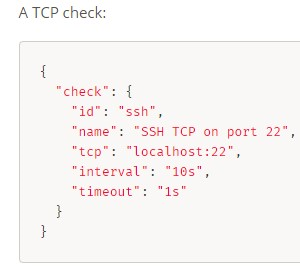
一、 什么是 RPC Restful 采用 Http 进行通讯,优点是开放、标准、简单、兼容性升级容易; 缺点是性能略低。在 QPS 高或者对响应时间要求苛刻的服务上,可以用 RPC(Remote Procedure Call),RPC 由于采用二进制传输、TCP 通讯,所以通常性能更好。 .Net Core 下的 RPC(远程方法调用)框架有 gRPC、Thrift 等,都支持主流的编程语言。 RPC 虽然效率略高,但是耦合性强,如果兼容性处理不好的话,一旦服务器端接口升级,客户端就要更新,即使是增加一个参数,而 rest 则比较灵活。 最佳实践:对内一些性能要求高的场合用 RPC,对内其他场合以及对外用 Rest。比如 web 服务器和视频转码服务器之间通讯可以用 restful 就够了,转账接口用 RPC 性能会更高一些。 二、 Thrift 基本使用 参考资料:https://www.cnblogs.com/focus-lei/p/8889389.html 1、 下载thrift http://thrift.apache.org/ 把thrift-***.exe解压到磁盘,改名为thrift.exe(用起来方便一些) 2、 编写一个UserService.thrift文件(IDL) namespace csharp RuPeng.ThriftTest1.Contract service UserService{ SaveResult Save(1:User user) User Get(1:i32 id) list<User> GetAll() } enum SaveResult { SUCCESS = 0, FAILED = 1, } struct User { 1: required i64 Id; 2: required string Name; 3: required i32 Age; 4: optional bool IsVIP; 5: optional string Remark; } service定义的是服务类,enum 是枚举,struct是传入或者传出的复杂数据类型(支持对象级联)。 语法规范http://thrift.apache.org/docs/idl 根据thrift语法生成C#代码 cmd -> thrift.exe -gen csharp UserService.thrift 创建一个类库项目 ThriftTest1.Contract,作为客户端和服务器之间的共用协议,把上一步生成的代码放进项目。 项目nuget安装apache-thrift-netcore: Install-Package apache-thrift-netcore 3、 创建服务器端项目 ThriftTest1.Server,建一个控制台项目(放到 web 项目中或者在 Linux中用守护进程运行起来(SuperVisor等,类似Windows下的“Windows服务”)也可以)。 ThriftTest1.Server项目引用ThriftTest1.Contract 创建项目:ApplicationExtenssion.cs 编写实现类UserServiceImpl.cs public class UserServiceImpl : UserService.Iface { public User Get(int id) { User u = new User(); u.Id = id; u.Name = "用户" + id; u.Age = 6; return u; } public List<User> GetAll() { List<User> list = new List<User>(); list.Add(new User { Id = 1, Name = "yzk", Age = 18, Remark = "hello" }); list.Add(new User { Id = 2, Name = "rupeng", Age = 6 }); return list; } public SaveResult Save(User user) { Console.WriteLine($"保存用户,{user.Id}"); return SaveResult.SUCCESS; } } 修改Program下的Main函数 启动服务器端 TServerTransport transport = new TServerSocket(8800);//监听8800端口 var processor = new RuPeng.ThriftTest1.Contract.UserService.Processor(new UserServiceImpl());//设置实现类 TServer server = new TThreadPoolServer(processor, transport); server.Serve(); 监听8800端口 4、创建客户端项目也引用ThriftTest1.Contract项目 调用方法 using (TTransport transport = new TSocket("localhost", 8800)) using (TProtocol protocol = new TBinaryProtocol(transport)) using (var clientUser = new UserService.Client(protocol)) { transport.Open(); User u = clientUser.Get(1); Console.WriteLine($"{u.Id},{u.Name}"); } 三、一个服务器中放多个服务 0.9.1之前只支持一个服务器一个服务,这也是建议的做法。之后支持多路服务在thrift中增加一个服务 修改UserService.thrift文件 添加以下内容 然后重新生成替换 service CalcService{ i32 Add(1:i32 i1,2:i32 i2) } 服务器: 1.创建CalcServiceImpl文件实现CalcService服务 2.修改Main方法如下: TServerTransport transport = new TServerSocket(8800); var processorUserService = new RuPeng.ThriftTest1.Contract.UserService.Processor(new UserServiceImpl()) var processorCalcService = new RuPeng.ThriftTest1.Contract.CalcService.Processor(new CalcServiceImpl()); var processorMulti = new TMultiplexedProcessor(); processorMulti.RegisterProcessor("userService", processorUserService); processorMulti.RegisterProcessor("calcService", processorCalcService); TServer server = new TThreadPoolServer(processorMulti, transport); server.Serve(); 客户端: using (TTransport transport = new TSocket("localhost", 8800)) using (TProtocol protocol = new TBinaryProtocol(transport)) using (var protocolUserService = new TMultiplexedProtocol(protocol, "userService")) using (var clientUser = new UserService.Client(protocolUserService)) using (var protocolCalcService = new TMultiplexedProtocol(protocol,"calcService")) using (var clientCalc = new CalcService.Client(protocolCalcService)) { transport.Open(); User u = clientUser.Get(1); Console.WriteLine($"{u.Id},{u.Name}"); Console.WriteLine(clientCalc.Add(1, 2)); } https://www.cnblogs.com/focus-lei/p/8889389.html (*)新版:thrift.exe -gen netcore UserService.thrift(支持.net Core) 貌似支持还不完善(http://www.cnblogs.com/zhaiyf/p/8351361.html )还不能用,编译也有问题,值得期待的是:支持异步。 四、Java 等其他语言的融入 和使用Restful做服务一样,Java也可以调用、也可以做Thrift服务,演示一下java调用c#写的Thrift服务的例子 Java编译器版本需要>=1.6 Maven添加组件包的支持(thrift maven版本一定要和生成代码的thrift的版本一致): <dependency> <groupId>org.apache.thrift</groupId> <artifactId>libthrift</artifactId> <version>0.11.0</version> </dependency> <dependency> <groupId>org.slf4j</groupId> <artifactId>slf4j-log4j12</artifactId> <version>1.7.5</version> </dependency> 在thrift的IDL文件中加入一行(各个语言的namespace等参数可以共存) 修改UserService.thrift文件 添加以下代码就可以控制生成的java类的报名,最好按照java的命名规范来。 namespace java com.rupeng.thriftTest1.contract 产生java代码 thrift.exe -gen java UserService.thrift Java代码: import org.apache.thrift.protocol.TBinaryProtocol; import org.apache.thrift.protocol.TProtocol; import org.apache.thrift.transport.TSocket; import org.apache.thrift.transport.TTransport; public class Main { public static void main(String[] args) throws Exception { System.out.println("客户端启动...."); TTransport transport = new TSocket("localhost", 8800, 30000); TProtocol protocol = new TBinaryProtocol(transport); UserService.Client client = new UserService.Client(protocol); transport.open(); User result = client.Get(1); System.out.println(result.getAge()+result.getName()+result.getRemark()); }} 也可以用Java写服务器,C#调用。当然别的语言也可以。 接口设计原则“API design is like sex: Make one mistake and support it for the rest of your life” 五、 Thrift+Consul 服务发现 注册和发现和Rest方式没有什么区别。 consul支持tcp健康监测:https://www.consul.io/docs/agent/checks.html 因为 Thrift 一般不对外,所以一般不涉及和 API 网关结合的问题 gRPC 的优势:支持异步;支持 Http2。没有Thrift性能高 总结 回顾一下我们学到的微服务:服务治理和服务发现、熔断降级、API 网关。 不是所有项目都适合微服务架构,互联网项目及结构复杂的企业信息系统才可以考虑微服务架构。 设计微服务架构,模块拆分的原则:可以独立运行,尽量服务间不要依赖,即使依赖层级也不要太深,不要想着还要 join。按业务划分、按模块划分。 扩展知识: 1、 分布式跟踪、日志服务、监控等对微服务来说非常重要 2、 gRPC 另外一个 RPC 框架,gRPC 的.Net Core 支持异步。百度“.net core grpc” https://www.jianshu.com/p/f5e1c002047a 3、 https://github.com/neuecc/MagicOnion 可以参考下这位日本 mvp 写的 grpc 封装,不需要定义接口文件。 4、 nanofabric https://github.com/geffzhang/NanoFabric简单分析 5、 Surging https://github.com/dotnetcore/surging 6、 service fabric https://azure.microsoft.com/zh-cn/documentation/learning-paths/service-fabric/ 7、 Spring Cloud 入门视频:http://www.rupeng.com/Courses/Chapter/755 8、 steeltoe http://steeltoe.io/ 参 考 文 章 https://mp.weixin.qq.com/s/g9w-qgT2YHyDX8OE5q-OHQ 9、 限流算法 https://mp.weixin.qq.com/s/bck0Q2lDj_J9pLhFEhqm9w 10、https://github.com/PolicyServer/PolicyServer.Local 认证 + 授权 是两个服务, identityserver 解决了认证 ,PolicyServer 解决授权 11、Using Polly with HttpClient factory from ASPNET Core 2.1 https://github.com/App-vNext/Polly/wiki/Polly-and-HttpClientFactory 12、CSharpKit 微服务工具包 http://www.csharpkit.com/ 现在的努力只是为了更好的将来,将来你一定不会后悔你现在的努力。一起加油吧!!! C#/.NetCore技术交流群:608188505欢迎加群交流 如果您认为这篇文章还不错或者有所收获,您可以点击右下角的【推荐】按钮精神支持,因为这种支持是我继续写作,分享的最大动力!

优秀的个人博客,低调大师

(10)学习笔记 ) ASP.NET CORE微服务 Micro-Service ---- Ocelot+Identity Server

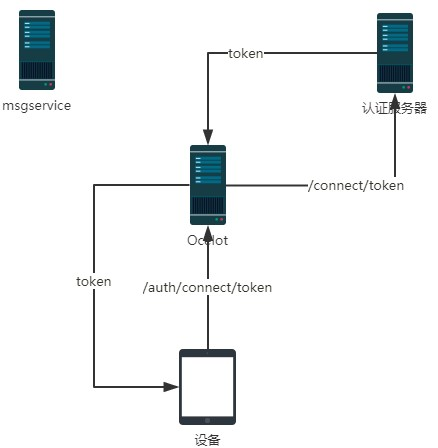
用 JWT 机制实现验证的原理如下图: 认证服务器负责颁发 Token(相当于 JWT 值)和校验 Token 的合法性。 一、 相关概念 API 资源(API Resource):微博服务器接口、斗鱼弹幕服务器接口、斗鱼直播接口就是API 资源。 客户端(Client):Client 就是官方微博 android 客户端、官方微博 ios 客户端、第三方微博客户端、微博助手等。 身份资源(Identity Resource):就是用户。 一个用户可能使用多个客户端访问服务器;一个客户端也可能服务多个用户。封禁了一个客户端,所有用户都不能使用这个这个客户端访问服务器,但是可以使用其他客户端访问;封禁了一个用户,这个用户在所有设备上都不能访问,但是不影响其他用户。 二、 搭建 identity server 认证服务器 新建一个空的 web 项目 ID4.IdServer Nuget - 》 Install-Package IdentityServer4 首先编写一个提供应用列表、账号列表的 Config 类 using IdentityServer4.Models; using System.Collections.Generic; namespace ID4.IdServer { public class Config { /// <summary> /// 返回应用列表 /// </summary> /// <returns></returns> public static IEnumerable<ApiResource> GetApiResources() { List<ApiResource> resources = new List<ApiResource>(); //ApiResource第一个参数是应用的名字,第二个参数是描述 resources.Add(new ApiResource("MsgAPI", "消息服务API")); resources.Add(new ApiResource("ProductAPI", "产品API")); return resources; } /// <summary> /// 返回账号列表 /// </summary> /// <returns></returns> public static IEnumerable<Client> GetClients() { List<Client> clients = new List<Client>(); clients.Add(new Client { ClientId = "clientPC1",//API账号、客户端Id AllowedGrantTypes = GrantTypes.ClientCredentials, ClientSecrets = { new Secret("123321".Sha256())//秘钥 }, AllowedScopes = { "MsgAPI", "ProductAPI" }//这个账号支持访问哪些应用 }); return clients; } } } 如果允许在数据库中配置账号等信息,那么可以从数据库中读取然后返回这些内容。疑问待解。 修改Startup.cs public void ConfigureServices(IServiceCollection services) { services.AddIdentityServer() .AddDeveloperSigningCredential() .AddInMemoryApiResources(Config.GetApiResources()) .AddInMemoryClients(Config.GetClients()); } public void Configure(IApplicationBuilder app, IHostingEnvironment env) { app.UseIdentityServer(); } 然后在 9500 端口启动 在 postman 里发出请求,获取 token http://localhost:9500/connect/token,发 Post 请求,表单请求内容(注意不是报文头): client_id=clientPC1 client_secret=123321 grant_type=client_credentials 把返回的 access_token 留下来后面用(注意有有效期)。 注意,其实不应该让客户端直接去申请 token,这只是咱演示,后面讲解正确做法。 三、搭建 Ocelot 服务器项目 空 Web 项目,项目名 ID4.Ocelot1 nuget 安装 IdentityServer4、Ocelot 编写配置文件 Ocelot.json(注意设置【如果较新则】) { "ReRoutes": [ { "DownstreamPathTemplate": "/api/{url}", "DownstreamScheme": "http", "UpstreamPathTemplate": "/MsgService/{url}", "UpstreamHttpMethod": ["Get", "Post"], "ServiceName": "MsgService", "LoadBalancerOptions": { "Type": "RoundRobin" }, "UseServiceDiscovery": true, "AuthenticationOptions": { "AuthenticationProviderKey": "MsgKey", "AllowedScopes": [] } }, { "DownstreamPathTemplate": "/api/{url}", "DownstreamScheme": "http", "UpstreamPathTemplate": "/ProductService/{url}", "UpstreamHttpMethod": ["Get", "Post"], "ServiceName": "ProductService", "LoadBalancerOptions": { "Type": "RoundRobin" }, "UseServiceDiscovery": true, "AuthenticationOptions": { "AuthenticationProviderKey": "ProductKey", "AllowedScopes": [] } } ], "GlobalConfiguration": { "ServiceDiscoveryProvider": { "Host": "localhost", "Port": 8500 } } } 把/MsgService 访问的都转给消息后端服务器(使用Consul进行服务发现)。也可以把Identity Server配置到Ocelot,但是我们不做,后边会讲为什么不放。 Program.cs 的 CreateWebHostBuilder 中加载 Ocelot.json .ConfigureAppConfiguration((hostingContext, builder) => { builder.AddJsonFile("Ocelot.json",false, true); }) 修改 Startup.cs 让 Ocelot 能够访问 Identity Server 进行 Token 的验证 using System; using IdentityServer4.AccessTokenValidation; using Microsoft.AspNetCore.Builder; using Microsoft.AspNetCore.Hosting; using Microsoft.Extensions.DependencyInjection; using Ocelot.DependencyInjection; using Ocelot.Middleware; namespace ID4.Ocelot1 { public class Startup { public void ConfigureServices(IServiceCollection services) { //指定Identity Server的信息 Action<IdentityServerAuthenticationOptions> isaOptMsg = o => { o.Authority = "http://localhost:9500"; o.ApiName = "MsgAPI";//要连接的应用的名字 o.RequireHttpsMetadata = false; o.SupportedTokens = SupportedTokens.Both; o.ApiSecret = "123321";//秘钥 }; Action<IdentityServerAuthenticationOptions> isaOptProduct = o => { o.Authority = "http://localhost:9500"; o.ApiName = "ProductAPI";//要连接的应用的名字 o.RequireHttpsMetadata = false; o.SupportedTokens = SupportedTokens.Both; o.ApiSecret = "123321";//秘钥 }; services.AddAuthentication() //对配置文件中使用ChatKey配置了AuthenticationProviderKey=MsgKey //的路由规则使用如下的验证方式 .AddIdentityServerAuthentication("MsgKey", isaOptMsg).AddIdentityServerAuthentication("ProductKey", isaOptProduct); services.AddOcelot(); } // This method gets called by the runtime. Use this method to configure the HTTP request pipeline. public void Configure(IApplicationBuilder app, IHostingEnvironment env) { if (env.IsDevelopment()) { app.UseDeveloperExceptionPage(); } app.UseOcelot().Wait(); } } } 很显然我们可以让不同的服务采用不同的Identity Server。 启动 Ocelot 服务器,然后向 ocelot 请求/MsgService/SMS/Send_MI(报文体还是要传 json 数据),在请求头(不是报文体)里加上: Authorization="Bearer "+上面 identityserver 返回的 accesstoken 如果返回 401,那就是认证错误。 Ocelot 会把 Authorization 值传递给后端服务器,这样在后端服务器可以用 IJwtDecoder 的这个不传递 key 的重载方法 IDictionary<string, object> DecodeToObject(string token),就可以在不验证的情况下获取 client_id 等信息。 也可以把 Identity Server 通过 Consul 进行服务治理。 Ocelot+Identity Server 实现了接口的权限验证,各个业务系统不需要再去做验证。 四、不能让客户端请求 token 上面是让客户端去请求 token,如果项目中这么搞的话,就把 client_id 特别是 secret 泄露给普通用户的。 正确的做法应该是,开发一个 token 服务,由这个服务来向 identity Server 请求 token,客户端向 token 服务发请求,把 client_id、secret 藏到这个 token 服务器上。当然这个服务器也要经过 Ocelot 转发。 五、用户名密码登录 如果 Api 和用户名、密码无关(比如系统内部之间 API 的调用),那么上面那样做就可以了,但是有时候需要用户身份验证的(比如 Android 客户端)。也就是在请求 token 的时候还要验证用户名密码,在服务中还可以获取登录用户信息。 修改的地方: 1、 ID4.IdServer 项目中增加类 ProfileService.cs using IdentityServer4.Models; using IdentityServer4.Services; using System.Linq; using System.Threading.Tasks; namespace ID4.IdServer { public class ProfileService : IProfileService { public async Task GetProfileDataAsync(ProfileDataRequestContext context) { var claims = context.Subject.Claims.ToList(); context.IssuedClaims = claims.ToList(); } public async Task IsActiveAsync(IsActiveContext context) { context.IsActive = true; } } } 增加类 ResourceOwnerPasswordValidator.cs using IdentityServer4.Models; using IdentityServer4.Validation; using System.Security.Claims; using System.Threading.Tasks; namespace ID4.IdServer { public class ResourceOwnerPasswordValidator : IResourceOwnerPasswordValidator { public async Task ValidateAsync(ResourceOwnerPasswordValidationContext context) { //根据context.UserName和context.Password与数据库的数据做校验,判断是否合法 if (context.UserName == "yzk" && context.Password == "123") { context.Result = new GrantValidationResult( subject: context.UserName, authenticationMethod: "custom", claims: new Claim[] { new Claim("Name", context.UserName), new Claim("UserId", "111"), new Claim("RealName", "名字"), new Claim("Email", "qq@qq.com") }); } else { //验证失败 context.Result = new GrantValidationResult(TokenRequestErrors.InvalidGrant, "invalid custom credential"); } } } } 当然这里的用户名密码是写死的,可以在项目中连接自己的用户数据库进行验证。claims 中可以放入多组用户的信息,这些信息都可以在业务系统中获取到。 Config.cs 修改一下,主要是把GetClients中的AllowedGrantTypes属性值改为GrantTypes.ResourceOwnerPassword, 并且在AllowedScopes中加入 IdentityServerConstants.StandardScopes.OpenId, //必须要添加,否则报forbidden错误 IdentityServerConstants.StandardScopes.Profile 修改后的 Config.cs using System.Collections.Generic; using IdentityServer4; using IdentityServer4.Models; namespace ID4.IdServer { public class Config { /// <summary> /// 返回应用列表 /// </summary> /// <returns></returns> public static IEnumerable<ApiResource> GetApiResources() { List<ApiResource> resources = new List<ApiResource>(); //ApiResource第一个参数是应用的名字,第二个参数是描述 resources.Add(new ApiResource("MsgAPI", "消息服务API")); resources.Add(new ApiResource("ProductAPI", "产品API")); return resources; } /// <summary> /// 返回客户端账号列表 /// </summary> /// <returns></returns> public static IEnumerable<Client> GetClients() { List<Client> clients = new List<Client>(); clients.Add(new Client { ClientId = "clientPC1",//API账号、客户端Id AllowedGrantTypes = GrantTypes.ResourceOwnerPassword, ClientSecrets = { new Secret("123321".Sha256())//秘钥 }, AllowedScopes = { "MsgAPI","ProductAPI",IdentityServerConstants.StandardScopes.OpenId, //必须要添加,否则报forbidden错误 IdentityServerConstants.StandardScopes.Profile }//这个账号支持访问哪些应用 }); return clients; } } } Startup.cs 的 ConfigureServices 修改为 public void ConfigureServices(IServiceCollection services) { var idResources = new List<IdentityResource> { new IdentityResources.OpenId(), //必须要添加,否则报无效的 scope 错误 new IdentityResources.Profile() }; services.AddIdentityServer() .AddDeveloperSigningCredential() .AddInMemoryIdentityResources(idResources) .AddInMemoryApiResources(Config.GetApiResources()) .AddInMemoryClients(Config.GetClients())// .AddResourceOwnerValidator<ResourceOwnerPasswordValidator>() .AddProfileService<ProfileService>(); } 主要是增加了 AddInMemoryIdentityResources 、 AddResourceOwnerValidator 、AddProfileService 2、 修改业务系统 以 MsgService 为例 Nuget -> Install-Package IdentityServer4.AccessTokenValidation 然后 Startup.cs 的 ConfigureServices 中增加 services.AddAuthentication("Bearer") .AddIdentityServerAuthentication(options => { options.Authority = "http://localhost:9500";//identity server 地址 options.RequireHttpsMetadata = false; }); Startup.cs 的 Configure 中增加 app.UseAuthentication(); 3、 请求 token 把报文头中的 grant_type 值改为 password,报文头增加 username、password 为用户名、密码。 像之前一样用返回的 access_token传递给请求的Authorization 中,在业务系统的 User中就可以获取到 ResourceOwnerPasswordValidator 中为用户设置的 claims 等信息了。 public void Send_MI(dynamic model) { string name = this.User.Identity.Name;//读取的就是"Name"这个特殊的 Claims 的值 string userId = this.User.FindFirst("UserId").Value; string realName = this.User.FindFirst("RealName").Value; string email = this.User.FindFirst("Email").Value; Console.WriteLine($"name={name},userId={userId},realName={realName},email={email}"); Console.WriteLine($"通过小米短信接口向{model.phoneNum}发送短信{model.msg}"); } 4、 独立登录服务器解决上面提到的“不能让客户端接触到 client_id、secret 的问题” 开发一个服务应用 LoginService public class RequestTokenParam { public string username { get; set; } public string password { get; set; } } using System.Collections.Generic; using System.Net.Http; using System.Threading.Tasks; using Microsoft.AspNetCore.Mvc; namespace LoginService.Controllers { [Route("api/[controller]")] [ApiController] public class LoginController : ControllerBase { [HttpPost] public async Task<ActionResult> RequestToken(RequestTokenParam model) { Dictionary<string, string> dict = new Dictionary<string, string>(); dict["client_id"] = "clientPC1"; dict["client_secret"] = "123321"; dict["grant_type"] = "password"; dict["username"] = model.username; dict["password"] = model.password; //由登录服务器向IdentityServer发请求获取Token using (HttpClient http = new HttpClient()) using (var content = new FormUrlEncodedContent(dict)) { var msg = await http.PostAsync("http://localhost:9500/connect/token", content); string result = await msg.Content.ReadAsStringAsync(); return Content(result, "application/json"); } } } } 这样客户端只要向 LoginService 的 /api/Login/ 发请求带上 json 报文体 {username:"yzk",password:"123"}即可。客户端就不知道 client_secret 这些机密信息了。 把 LoginService 配置到 Ocelot 中。 参考文章:https://www.cnblogs.com/jaycewu/p/7791102.html 注:此文章是我看杨中科老师的.Net Core微服务第二版和.Net Core微服务第二版课件整理出来的 现在的努力只是为了更好的将来,将来你一定不会后悔你现在的努力。一起加油吧!!! C#/.NetCore技术交流群:608188505欢迎加群交流 如果您认为这篇文章还不错或者有所收获,您可以点击右下角的【推荐】按钮精神支持,因为这种支持是我继续写作,分享的最大动力!

优秀的个人博客,低调大师

(8)学习笔记 ) ASP.NET CORE微服务 Micro-Service ---- Ocelot网关(Api GateWay)

说到现在现有微服务的几点不足: 1) 对于在微服务体系中、和 Consul 通讯的微服务来讲,使用服务名即可访问。但是对于手 机、web 端等外部访问者仍然需要和 N 多服务器交互,需要记忆他们的服务器地址、端 口号等。一旦内部发生修改,很麻烦,而且有时候内部服务器是不希望外界直接访问的。 2) 各个业务系统的人无法自由的维护自己负责的服务器; 3) 现有的微服务都是“我家大门常打开”,没有做权限校验。如果把权限校验代码写到每 个微服务上,那么开发工作量太大。 4) 很难做限流、收费等。 ocelot 中文文档:https://blog.csdn.net/sD7O95O/article/details/79623654 资料:http://www.csharpkit.com/apigateway.html 官网:https://github.com/ThreeMammals/Ocelot 腾讯.Net 大队长“张善友”是项目主力开发人员之一。 一、 Ocelot 基本配置 Ocelot 就是一个提供了请求路由、安全验证等功能的 API 网关微服务。 建一个空的 asp.net core 项目。 Install-Package Ocelot 项目根目录下创建 configuration.json ReRoutes 下就是多个路由规则 { "ReRoutes": [ { "DownstreamPathTemplate": "/api/{url}", "DownstreamScheme": "http", "DownstreamHostAndPorts": [ { "Host": "localhost", "Port": 5001 } ], "UpstreamPathTemplate": "/MsgService/{url}", "UpstreamHttpMethod": [ "Get", "Post" ] }, { "DownstreamPathTemplate": "/api/{url}", "DownstreamScheme": "http", "DownstreamHostAndPorts": [ { "Host": "localhost", "Port": 5003 } ], "UpstreamPathTemplate": "/ProductService/{url}", "UpstreamHttpMethod": [ "Get", "Post" ] } ] } Program.cs的CreateWebHostBuilder中 //在原基础上添加上这俩行//只是监听这个端口 你自己配置也可以.UseUrls("http://127.0.0.1:8888").ConfigureAppConfiguration((hostingContext, builder) => { builder.AddJsonFile("configuration.json", false, true); }) 在ConfigureAppConfiguration 中AddJsonFile是解析json配置文件的方法。 为了确保直接在bin 下直接dotnet运行的时候能找到配置文件,所以要在vs中把配置文件的【复制到输出目录】设置为【如 果如果较新则复制】。 Startup.cs中 通过构造函数注入一个 private IConfiguration Configuration; public void ConfigureServices(IServiceCollection services) { services.AddOcelot(Configuration); } public void Configure(IApplicationBuilder app, IHostingEnvironment env) { if (env.IsDevelopment()) { app.UseDeveloperExceptionPage(); } app.UseOcelot().Wait();//不要忘了写Wait } 这样当访问http://127.0.0.1:8888/MsgService/Send?msg=aaa的时候就会访问 http://127.0.0.1:5002/api/email/Send?msg=aaa configuration.json中UpstreamHttpMethod表示对什么样的请求类型做转发。 二、 Ocelot+Consul 上面的配置还是把服务的ip地址写死了,Ocelot可以和Consul通讯,通过服务名字来配置。 只要改配置文件即可 { "ReRoutes": [ { "DownstreamPathTemplate": "/api/{url}", "DownstreamScheme": "http", "UpstreamPathTemplate": "/MsgService/{url}", "UpstreamHttpMethod": [ "Get", "Post" ], "ServiceName": "MsgService", //服务名字 "LoadBalancerOptions": { "Type": "RoundRobin" //指定一个负载均衡算法: LeastConnection 最少的连接 RoundRobin 轮训 }, "UseServiceDiscovery": true //使用服务发现 } ], "GlobalConfiguration": { //全局配置 "ServiceDiscoveryProvider": { //连接这台Consul服务器 "Host": "localhost", "Port": 8500 } } } 有多个服务就 ReRoutes 下面配置多组即可 访问 http://localhost:8888/MsgService/SMS/Send_MI 即可,请求报文体 {phoneNum:"110",msg:"aaaaaaaaaaaaa"}。 表示只要是/MsgService/开头的都会转给后端的服务名为" MsgService "的一台服务器,转发的路径是"/api/{url}"。 LoadBalancerOptions 中"LeastConnection"表示负载均衡算法是“选择当前最少连接数的服务器”,如果改为 RoundRobin 就是“轮询”。 ServiceDiscoveryProvider 是 Consul 服务器的配置。 Ocelot 因为是流量中枢,也是可以做集群的。 (*) 也 支 持 Eureka 进 行 服 务 的 注 册 、 查 找 (http://ocelot.readthedocs.io/en/latest/features/servicediscovery.html),也支持访问 Service Fabric 中的服务(http://ocelot.readthedocs.io/en/latest/features/servicefabric.html)。 三、Ocelot 其他功能简单介绍 1、 限流: 文档:http://ocelot.readthedocs.io/en/latest/features/ratelimiting.html 需要和 Identity Server 一起使用,其他的限速是针对 clientId 限速,而不是针对 ip 限速。比如我调用微博的api开发了一个如鹏版新浪微博,我的 clientid 是 rpwb,然后限制了 1 秒钟只能调用 1000 次,那么所有用如鹏版微博这个 app 的所有用户加在一起,在一秒钟之内,不能累计超过 1000 次。目前开放式 api 的限流都是这个套路。 如果要做针对 ip 的限速等,要自己在 Ocelot 前面架设 Nginx 来实现。 2、 请求缓存 http://ocelot.readthedocs.io/en/latest/features/caching.html 只支持 get,只要 url 不变,就会缓存。 3、 QOS(熔断器) http://ocelot.readthedocs.io/en/latest/features/qualityofservice.html 注:此文章是我看杨中科老师的.Net Core微服务第二版和.Net Core微服务第二版课件整理出来的 现在的努力只是为了更好的将来,将来你一定不会后悔你现在的努力。一起加油吧!!! C#/.NetCore技术交流群:608188505欢迎加群交流 如果您认为这篇文章还不错或者有所收获,您可以点击右下角的【推荐】按钮精神支持,因为这种支持是我继续写作,分享的最大动力!

资源下载

更多资源
Mario

Mario

马里奥是站在游戏界顶峰的超人气多面角色。马里奥靠吃蘑菇成长,特征是大鼻子、头戴帽子、身穿背带裤,还留着胡子。与他的双胞胎兄弟路易基一起,长年担任任天堂的招牌角色。

Nacos

Nacos

Nacos /nɑ:kəʊs/ 是 Dynamic Naming and Configuration Service 的首字母简称,一个易于构建 AI Agent 应用的动态服务发现、配置管理和AI智能体管理平台。Nacos 致力于帮助您发现、配置和管理微服务及AI智能体应用。Nacos 提供了一组简单易用的特性集,帮助您快速实现动态服务发现、服务配置、服务元数据、流量管理。Nacos 帮助您更敏捷和容易地构建、交付和管理微服务平台。

Spring

Spring

Spring框架(Spring Framework)是由Rod Johnson于2002年提出的开源Java企业级应用框架,旨在通过使用JavaBean替代传统EJB实现方式降低企业级编程开发的复杂性。该框架基于简单性、可测试性和松耦合性设计理念,提供核心容器、应用上下文、数据访问集成等模块,支持整合Hibernate、Struts等第三方框架,其适用范围不仅限于服务器端开发,绝大多数Java应用均可从中受益。

Rocky Linux

Rocky Linux

Rocky Linux(中文名:洛基)是由Gregory Kurtzer于2020年12月发起的企业级Linux发行版,作为CentOS稳定版停止维护后与RHEL(Red Hat Enterprise Linux)完全兼容的开源替代方案,由社区拥有并管理,支持x86_64、aarch64等架构。其通过重新编译RHEL源代码提供长期稳定性,采用模块化包装和SELinux安全架构,默认包含GNOME桌面环境及XFS文件系统,支持十年生命周期更新。

用户登录
用户注册