首页 文章 精选 留言 我的

精选列表

搜索[编写],共10005篇文章
优秀的个人博客,低调大师

编写脚本实用工具

1、查看哪个文件占用最大 查看前十名磁盘空间用户,到第11行,sed会删除列表的剩余部分,然后给列表中每行一个行号。要让行号和磁盘空间文本 位于同一行,用N命令将文本行合并在一行。然后用gawk命令清理,在行号后,加一个冒号(:),还给每行文本的输出行中的每个字段放了一个制表符。这样就生成了一个格式精致的前十名 磁盘空间用户列表了 1 2 3 4 5 6 7 8 9 10 11 [root@digitcube-test1qingyun]#du-Sh/home/*|sort-rn|sed '{11,$D;=}' |sed 'N;s/\n//' |gawk '{print$1":""\t"$2"\t"$3"\n"}' 1 :1020K/home/nexus/sonatype-work/nexus/storage/central/org/springframework/spring-context/ 2.5 . 6 2 :1020K/home/nexus/sonatype-work/nexus/storage/central/ant/ant/ 1.6 . 5 3 :1012K/home/nexus/sonatype-work/nexus/storage/central/org/springframework/spring-beans/ 2.5 . 6 4 :1012K/home/maven/.m2/repository/org/xerial/snappy/snappy-java/ 1.0 . 4.1 5 :1008K/home/home/hadoop/jstorm/dc_topology/tmp/org/apache/hadoop/hdfs/server/namenode 6 :1008K/home/home/hadoop/hadoop- 1.0 . 4 /docs/api/org/apache/hadoop/mapreduce 7 :1008K/home/hadoop/sam/datatask/doubixiyou_1290 8 :1008K/home/hadoop/hadoop- 1.0 . 4 /docs/api/org/apache/hadoop/mapreduce 9 :1004K/home/home/hadoop/jstorm/dc_topology/tmp/kafka/log 10 :1000K/home/maven/.m2/repository/org/xerial/snappy/snappy-java/ 1.0 . 3.2 2、创造加了日期的前十名磁盘空间用户报告的脚本 1 <br> 1 2 3 4 5 6 7 8 9 10 11 12 13 14 15 16 17 18 19 20 21 22 23 24 25 26 [root@digitcube-test1tmp] #vimfile_siz.sh #!/bin/bash #Big_User-findbigdiskspaceusersinvariousdirecotries #ParametersforScript # CHECK_DIRECTORIES= "/var/log/home" #direcotriestocheck # ######################MainScript########################### # DATE=` date +%m%d%y` #Dateforreportfile exec >space_file_$DATA.rpt # # echo "TopTenDiskSpaceUsage" #Reportheaderforwholereport echo "for$CHECK_DIRECTORIESDirecotries" # for DIR_CHECK in $CHECK_DIRECTORIES #looptodudirectories do echo "" echo "The$DID_CHECKDirectory:" #Titleheaderforeachdirecotry # #Createalistingoftoptendiskspaceusers du -S$DIR_CHECK2> /dev/null | sort -rn| sed '{11,$D;=}' | sed 'N;s/\n//' | gawk '{printf$1":""\t"$2"\t"$3"\n"}' # done exec > /tmp/test .txt 2、创建按日期归档的脚本 归档文件,让脚本读取file_to_backup里面每个目录或文件,用到一个简单read命令,来读取该文件中的每一条记录。 exec<$CONFIG_FILE read FILE_NAME 为归档配置文件以及从file_to_backup读取每条记录都用了变量.只要read命令在配置文件中发现还有记录要读,它就会在?变量中返回一退出状态码0表示成功,以while循环的测试条件来读取file_to_backup的所有记录 while [ $? -eq 0 ] do .... read FILE_NAME done 一旦read命令到了末尾,返回一个非0状态码,脚本会退出while循环 1 2 3 4 5 [root@digitcube-test1tmp]#cat/home/qingyun/file_to_backup /home/qingyun/test1 /home/qingyun/test2 /home/qingyun/test3 /home/qingyun/love 1 2 3 4 5 6 7 8 9 10 11 12 13 14 15 16 17 18 19 20 21 22 23 24 25 26 27 28 29 30 31 32 33 34 35 36 37 38 39 40 41 42 43 44 45 46 47 48 49 50 51 52 53 54 55 56 57 [root@digitcube-test1tmp]#vimDaily_Archive.sh # #SetConfigurationandDestinationFile # CONFIG_FILE=/home/qingyun/file_to_backup DESTINATION=/home/qingyun/$FILE # ##############MainScript###################### # #CheckBackupConfigfileexists # if [-f$CONFIG_FILE]#Makesuretheconfigfilestillexits then echo else echo echo "$CONFIG_FILEdoesnotexist" echo "BackupnotcompletedduetomisstingConfigurationfile" echo exit fi # #Buildthenameofallthefilestobackup # FILE_NO= 1 #Startonline 1 ofConfigFile exec<$CONFIG_FILE#RedirectStdInputtonameofConfigFile # readFILE_NAME#Read1strecord # while [$?-eq 0 ]#Createlistoffilestobackup do #Makesurethefileordirectoryexists if [-f$FILE_NAME] then #Iffileexists.additsnametothelist echo$FILE_NAME FILE_LIST= "$FILE_LIST$FILE_NAME" else #Iffiledoesn'texist.issuewarning echo echo "$FILE_NAME,doesnotexist" echo "Obviously,Iwillnotincludeiinthisarchive" echo "Itislistedonline$FILE_NOoftheconfigfile." echo "Continuingtobuildarchivelist...." echo fi # FILE_NO=$[$FILE_NO+ 1 ]#IncreaseLine/Filenumberbyon readFILE_NAME#Readnextrecord done ############################################################ # #BackupthefilesandCompressArchive # tar-czf$DESTINATION$FILE_LIST 2 >/dev/ null 按小时归档的脚本 归档目录包含了跟一年中的各个月份对应的目录,将月的序号作为目录名。而每月的目录中又包含跟一个月中的各天对应的目录(用天序号来作为目录)。这样只用给每个归档文件加时间戳然后将它他们放到跟日和月份对应的目录就行了。 1 2 3 4 5 6 7 8 9 10 11 12 13 14 15 16 17 18 19 20 21 22 23 24 25 26 27 28 29 30 31 32 33 34 35 36 37 38 39 40 41 42 43 44 45 46 47 48 49 50 51 52 53 54 55 56 57 58 59 60 61 62 63 64 65 66 67 68 69 70 71 72 73 74 75 76 77 78 [root@digitcube-test1tmp]#vimHourly_Archive.sh #!/bin/bash # #Hourly_Archive-Everyhourcreateanarhive ############################################## # #SetConfigureationFile # CONFIG_FILE=/home/qingyun/hourly/file_to_backup # #SetBaseArchiveDestinationLocation # BASEDEST=/home/qingyun/hourly # #GatherCurrentDay.Month&Time # DAY=`date+%d` MONTH=`date+%m` TIME=`date+%k%M` # #CreateArchiveDestinationDirectory # mkdir-p$BASEDEST/$MONTH/$DAY DESTINATION=$BASEDEST/$MONTH/$DAY/archive.$TIME.tar.gz # #BuildArchvieDestinationfileName # ###############MAINScript##################################### #CheckBackupConfigfileexists # if [-f$CONFIG_FILE]#Makesuretheconfigfilestillexits then echo else echo echo "$CONFIG_FILEdoesnotexist" echo "BackupnotcompletedduetomisstingConfigurationfile" echo exit fi # #Buildthenameofallthefilestobackup # FILE_NO= 1 #Startonline 1 ofConfigFile exec<$CONFIG_FILE#RedirectStdInputtonameofConfigFile # readFILE_NAME#Read1strecord # while [$?-eq 0 ]#Createlistoffilestobackup do #Makesurethefileordirectoryexists if [-f$FILE_NAME] then #Iffileexists.additsnametothelist echo$FILE_NAME FILE_LIST= "$FILE_LIST$FILE_NAME" else #Iffiledoesn'texist.issuewarning echo echo "$FILE_NAME,doesnotexist" echo "Obviously,Iwillnotincludeiinthisarchive" echo "Itislistedonline$FILE_NOoftheconfigfile." echo "Continuingtobuildarchivelist...." echo fi # FILE_NO=$[$FILE_NO+ 1 ]#IncreaseLine/Filenumberbyon readFILE_NAME#Readnextrecord done ############################################################ # #BackupthefilesandCompressArchive # tar-czf$DESTINATION$FILE_LIST 2 >/dev/ null 3、管理用户账号 脚本进入删除用户4个步聚: 1、获得并确认用户账户名, 2、查找和终止用户的进程, 3、创建一份属于该用户账号的所有文件报告, 4、最终删除用户账号 用到判断参数 -z:字符长度0,为真 -n:字符长度非0,为真 unset:删除变量和函数 1 2 3 4 5 6 7 8 9 10 11 12 13 14 15 16 17 18 19 20 21 22 23 24 25 26 27 28 29 30 31 32 33 34 35 36 37 38 39 40 41 42 43 44 45 46 47 48 49 50 51 52 53 54 55 56 57 58 59 60 61 62 63 64 65 66 67 68 69 70 71 72 73 74 75 76 77 78 79 80 81 82 83 84 85 86 87 88 89 90 91 92 93 94 95 96 97 98 99 100 101 102 103 104 105 106 107 108 109 110 111 112 113 114 115 116 117 118 119 120 121 122 123 124 125 126 127 128 129 130 131 132 133 134 135 136 137 138 139 140 141 142 143 144 145 146 147 148 149 150 151 152 153 154 155 156 157 158 159 160 161 162 163 164 165 166 167 168 169 170 171 172 173 174 175 176 177 178 179 180 181 182 183 184 185 186 187 188 189 190 191 192 193 194 195 196 197 198 199 200 201 202 203 204 205 206 207 208 209 210 211 212 213 214 215 216 217 218 219 220 221 222 223 224 225 226 227 228 229 230 231 232 233 234 235 236 237 238 239 [root@logicservertmp]#vimDelte_user.sh #!/bin/bash # #Delte_User-Automatesthe 4 steptoremoveanaccount # #DefinFunctions # ########################################################## function get_answer{ unsetANSWER ASK_COUNT= 0 # while [-z "$ANSWER" ]# while noanwser is given.keeipasking do ASK_COUNT=$[$ASK_COUNT+ 1 ] # case $ASK_COUNT in #Ifusergivesnoanswer in timeallotted 2 ) echo echo "Pleaseanswerthequestion" echo ;; 3 ) echo echo "Onelasttry.....pleaseanswerthequestion." echo ;; 4 ) echo echo "Sinceyourefusetoanswerthequestion.." echo "exitingprogram." # exit ;; esac # echo # if [-n "$LINE2" ] then#print 2 lines echo$LINE1 echo-e$LINE2 "\c" else echo-e$LINE1 "\c" fi # #Allow 60 secondtoanswerbefortime-out read-t 60 ANSWER done #Doalittel var iableclean-up unsetLINE1 unsetLINE2 # }#Endofget_answer function # ##################################################################### function process_answer{ # case $ANSWER in y|Y|YES|yes|Yes|yEs|yeS|YEs|yES) #Ifuseranswer "yes" . do noting ;; *) #Ifuseransweranythingbut "yes" .exitscript echo echo$EXIT_LINE1 echo$EXIT_LINE2 echo exit ;; esac # #Doalittle var iableclean-up # unsetEXIT_LINE1 unsetEXIT_LINE2 # }#Endofprocess_answerfuntion # ################################################################### #EndofFunctionDefinitions # ######################MianScript################################# #GetnameofUserAccounttocheck # echo "Step$1-DeterminUserAccountnametoDelete" echo LINE1= "pleaseentertheusernameoftheuser" LINE2= "Accountyouwishtodeletefromsystem:" get_answer USER_ACCOUNT=$ANSWER # #Doublecheck with scriptuserthat this is thecoreectUserAccount # LINE1= "Is$USER_ACCOUNTtheuseraccount" LINE2= "Youwishtodeletefromthesystem?[y/n]" get_answer # #Callprocess_answerfuntion: #Ifuseransweranythingbut "yes" .exitscript # EXIT_LINE1= "Becausetheaccount,$USER_ACCOUNT,isnot" EXIT_LINE2= "Theoneyouwishtodelete.weareleavingthescript..." process_answer # ############################################################################ # USER_ACCOUNT_RECORD=$(cat/etc/passwd|grep-w$USER_ACCOUNT) # if [$?-eq 1 ]#Iftheaccount is notfound.exitscript then echo echo "Account,$USER_ACCOUNT.notfound" echo "Leavingthescript..." echo exit fi # echo "Ifoundthisrecord:" echo$USER_ACCOUNT_RECORD echo # LINE1= "IsthisthecorrectUserAccount?[y/n]" get_answer # # #Callprocess_answer function : #Ifuseranswersanythingbut "yes" ,exitscript # EXIT_LINE1= "Becausetheaccount,$USER_ACCOUNT,isnot" EXIT_LINE2= "Theoneyouwishtodelete.weareleavingthescript...." process_answer # ##################################################################### #Search for anyrunningprocessesthatbelongtotheUserAccount # echo echo "Step#2-Findprocessonsystembelogingtouseraccount" echo echo "$USER_ACCOUNThasthefollowingprocessrunning:" echo # ps-u$USER_ACCOUNT#Listuserprocessesrunning. case $? in 1 )#Noprocessesrunning for this UserAccount # echo "Therearenoprocessesforthisaccountcurrentlyrunning." echo ;; 0 )#Processesrunning for this UserAccount. #AskScriptUser if wantsustokilltheprocesses. # unsetANSWER LINE1= "Wouldyoulikemetokillmeprocess(es)?[y/n]" get_answer # case $ANSWER in y|Y|YES|yes|Yes|yEs|yeS|YEs|yES)#Ifuseranswers "yes" #KillUserAccountprocesses. # echo # #Clean-uptempfileuponsignals trap "rm$USER_ACCOUNT_Running_Process.rpt" SIGTERMSIGINTSIGQUIT # #Listuserprocessesrunning ps-u$USER_ACCOUNT>$USER_ACCOUNT_Running_Process.rpt # exec<$USER_ACCOUNT_Running_Process.rpt#MakereportStdInput readUSER_PROCESS_REC#Firstrecordwillbeblank readUSER_PROCESS_REC # while [$?-eq 0 ] do #obtainPID USER_PID=`echo$USER_PROCESS_REC|cut-d "" -f1` kill- 9 $USER_PID echo "Killedprocess$USER_PID" readUSER_PROCESS_REC done # echo rm$USER_ACCOUNT_Running_Process.rpt#Removetempreport. ;; *)#Ifuseransweranythingbut "yes" , do notkill echo echo "Willnotkilltheprocess(es)" echo ;; esac ;; esac ########################################################################## #CreateareportofallfilesownedbyUserAccount # echo echo "Step#3-Findfilesonsystembelongingtouseraccount" echo echo "Creatingareportofallfilesownedby$USER_ACCOUNT." echo echo "Itisrecommendedthatyoubackup/archivethesefiles." echo "andthendooneoftwothings;" echo "1)Deletethefiles" echo "2)Changethefiles'ownershiptoacurrentuseraccount." echo echo "Pleasewait.Thismaytakeawhile...." echo echo "Pleasewait.Thismaytakeawhile...." # REPORT_DATE=`date+%y%m%d` REPORT_FILE=$USER_ACCOUNT "_files_" $REPORT_DATE ".RPT" # find/-user$USER_ACCOUNT>$REPORT_FILE 2 >/dev/ null # echo echo "Reportiscommlete." echo "Nameofreport:$REPORT_FILE" echo "Locationofreport:`pwd`" echo ############################################ #RemoveUserAccount echo echo "Step#4-Removeuseraccount" echo # LINE1= "Doyouwishtoremove$USER_ACCOUNTaccountfromsystem?[y/n]" get_answer # #Callprocess_answer function : # if useransweranythinbut "yes" .exitscript # EXIT_LINE1= "Sinceyoudonotwishtoremovetheuseraccount." EXIT_LINE2= "$USER_ACCOUNTatthistime.exitingthescript..." process_answer # userdel$USER_ACCOUNT# delete useraccount echo echo "Useraccount.$USER_ACCOUNT.hasbeenremoved" echo 本文转自 zouqingyun 51CTO博客,原文链接:http://blog.51cto.com/zouqingyun/1696340,如需转载请自行联系原作者

优秀的个人博客,低调大师

基于android的主题插件编写

前一段,写了一个主题插件,刚接到这个任务时,根本不知道从哪下手,于是就上网搜了一些资料,下面来讲一下我是怎么做这个主题插件的。 首先,我们需要引入一个插件包。这个架包是从网上下的,该作者的博客地址:http://hangxin1940.cnblogs.com/。这个架包封装了查找插件的功能,查找插件功能的功能等等,不需要我们自己在写,很方便。大家可以看看。 其次,我们要对自己的主程序的AndroidManifest.xml进行修改. <manifestxmlns:android="http://schemas.android.com/apk/res/android" package="你的app包名" android:sharedUserId="你自己设的" android:versionCode="1" android:versionName="1.0"> 这里的package和sharedUserId都是必须写的。写package方便我们在主程序中获取插件的Context对象,去引用插件的内部资源。而sharedUserId的值必须和主程序一致,可以保证我们的插件和主程序共享一个进程,消除权限堡垒,方便我们共享两个程序之间的资源。 接下来,我们需要在主程序中写查找插件的代码 //首先,就是查找插件 PluginSearchpsearch =newPluginSearch(); List<Plugin>plugins = psearch.getPlugins(context); //然后将插件再组装一下 PluginBuilderpbuilder =newPluginBuilder(context); plugins= pbuilder.buildPluginsDescrition(plugins); //显示出所有插件 flateUI(plugins); then,我们要显示插件皮肤,并调用插件中写的方法(即实现的功能) for(finalPluginplug : plugins) { //加入插件 ThemePluginItemitem =newThemePluginItem(this); //获取插件的描述对象 PluginDescription<MainDescript> pdes =newPluginDescription<MainDescript>( MainDescript.class); MainDescriptdes; try{ des= pdes.getDescription(this, plug); //设置插件item的描述信息 Drawabled = plug.getContext().getResources() .getDrawable(des.getIconResId()); item.setDrawableTheme(d); }catch(java.lang.InstantiationException e1) { //TODOAuto-generated catch block e1.printStackTrace(); } //获得当前插件的功能 List<PluginFeature>features = plug.getFeatures(); //遍历功能 for(finalPluginFeature pf : features) { for(finalPluginFeatureMethod fm : pf.getMethods()) { //添加插件,并且设置执行事件 item.addPluginMethod(fm,newOnClickListener(){ @Override publicvoidonClick(View v) { PluginInvokepi =newPluginInvoke(getApplicationContext()); try{ try{ pi.invoke(plug,pf, fm); }catch(java.lang.InstantiationExceptione) { e.printStackTrace(); } //注意这个地方:我本想用反射在插件中调用主程序的方法,但是一直出错。 //并不是主程序的所有资源我们都可以调用的,比如说控件,我们是不可能使用其他应用程序的//插件的,所以一些功能还是要在主程序中写的 if(mIsUpdate){ setBabySkinIsupdate(); }else{ setBabySkin(); } alertDialog.dismiss(); }catch(SecurityException e) { //TODOAuto-generated catch block e.printStackTrace(); }catch(IllegalArgumentException e) { //TODOAuto-generated catch block e.printStackTrace(); }catch(NameNotFoundException e) { //TODOAuto-generated catch block e.printStackTrace(); }catch(ClassNotFoundException e) { //TODOAuto-generated catch block e.printStackTrace(); }catch(IllegalAccessException e) { //TODOAuto-generated catch block }catch(InstantiationException e) { //TODOAuto-generated catch block e.printStackTrace(); }catch(NoSuchMethodException e) { //TODOAuto-generated catch block e.printStackTrace(); }catch(InvocationTargetException e) { //TODOAuto-generated catch block e.printStackTrace(); } } }); } } //将插件加入到ui addThemeLayout.addView(item); } 主程序中还需要再写一个类,来调用执行插件的功能,这是ThemePluginItem类中执行插件方法的代码 publicvoidaddPluginMethod(PluginFeatureMethod method,OnClickListener ocl){ //这是调用插件方法的接口形式,可以是Button控件在主程序中显示,也可以是ImageView等其他控件。 ImageViewthemeImageView =newImageView(mContext); LinearLayout.LayoutParamslayoutParams =newLinearLayout.LayoutParams(75, 75); layoutParams.setMargins(7,5, 5, 5); themeImageView.setLayoutParams(layoutParams); //themeImageView.setImageResource(R.drawable.baby_info_pink); themeImageView.setImageDrawable(getDrawableTheme()); themeImageView.setAdjustViewBounds(false); themeImageView.setClickable(true); themeImageView.setScaleType(ScaleType.CENTER); //这是触发插件的功能 themeImageView.setOnClickListener(ocl); //我们要把插件放到主程序中显示 otherThemeLayout.addView(themeImageView); } 以上是主程序中查找插件并调用插件的过程,下面讲一下插件中的功能是怎么共享主程序的文件。 我们知道在写主题功能时,为了分清我们触发的是哪个皮肤,我们需要为每个皮肤进行编号,并把这些内容用Sharepreference方法存储到一个文件中,方便我们调用和使用,但是在插件中如何去共享并操作这份文件呢,android已经为我们提供这样一些参数 MODE_PRIVATE 0代表了该文件只为本程序所访问 MODE_WORLD_READABLE1代表了该文件可以被其他程序读取 MODE_WORLD_WRITEABLE 2代表了该文件可以被其他程序写 //首先,我们需要得到主程序的context对象 Contextc= context.createPackageContext(你要调用的项目的包名, Context.CONTEXT_INCLUDE_CODE|Context.CONTEXT_IGNORE_SECURITY); //这里面有两个参数,第一个是你的文件名,第二个:设置你的文件权限 SharedPreferencesmSharedPreferences = c.getSharedPreferences(你要调用的项目的包名, context.MODE_WORLD_READABLE|context.MODE_WORLD_WRITEABLE); EditormEditor = mSharedPreferences.edit(); //获取该文件的isupdate对应的值 booleanmIsUpdate= mSharedPreferences.getBoolean("isupdate",false); //在文件中写入自己想存入的值 mEditor.putInt(mBabyID+ "", mNewBabySkin); 这样我们就达到了共享文件的功能。 前面已经说明我们无法共享控件,所以设置主程序的皮肤还是要是要在主程序中设置。 在这个环节,最重要的就是获取插件的资源 //获取插件的Context对象 Context c=context.createPackageContext(你要调用的项目的包名, Context.CONTEXT_INCLUDE_CODE|Context.CONTEXT_IGNORE_SECURITY); //获取插件的资源resources对象,这样我们就可以获取插件中的资源 ResourcespluginResources = c.getResources(); //获取插件中的图片,这里千万不要以为只用获取插件图片的ID,就可以让主程序来引用,我们要知道每个应用程序都有一个R文件,这里面的数都是自动生成且唯一的,而且只包含本程序的资源,所以我们要用这种方法获得插件中的图片资源 babyYellowBg =pluginResources.getDrawable(pluginResources.getIdentifier("你的图片名称","drawable", 你要调用的项目的包名)); 在这里我们的主程序就可以直接引用了 scrollView.setBackgroundDrawable(babyYellowBg); 最后, 我需要告诉你大家,我们在主程序中引用插件中的资源或者插件引用主程序中的资源时,不能引用style.xml中的值,因为他属于多属性值,android还没有提供相应的方法来直接引用,如果哪位读者找到了读取插件style文件的方法,还望不吝赐教 本文转自HDDevTeam 51CTO博客,原文链接:http://blog.51cto.com/hddev/1217507,如需转载请自行联系原作者

优秀的个人博客,低调大师

MaxCompute中Struct复杂数据类型的UDF编写、兼容HIVE的GenericUDF编写

一、背景介绍:MaxCompute 2.0版本升级后,Java UDF支持的数据类型从原来的BIGINT、STRING、DOUBLE、BOOLEAN扩展了更多基本的数据类型,同时还扩展支持了ARRAY、MAP、STRUCT等复杂类型,以及Writable参数。Java UDF使用复杂数据类型的方法,STRUCT对应com.aliyun.odps.data.Struct。com.aliyun.odps.data.Struct从反射看不出Field Name和Field Type,所以需要用@Resolve注解来辅助。即如果需要在UDF中使用STRUCT,要求在UDF Class上也标注上@Resolve注解。但是当我们Struct类型中的field有很多字段的时候,这个时候需要我们去手动的添加@Resolve注解就不是那么的友好。针

优秀的个人博客,低调大师

Salvo —— Rust 编写的 Web 后端框架

Salvo 是一个极其简单易用却又功能强大的 Rust Web 后端框架. 目标是让 Rust 下的 Web 后端开发能像 Go 等其他语言里的一样简单. 源码地址: https://github.com/salvo-rs/salvo 🎯 功能特色 基于hyper, tokio 的异步 Web 后端框架; 支持 Websocket; 统一的中间件和句柄接口, 中间件系统支持在句柄之前或者之后运行; 简单易用的路由系统, 支持路由嵌套, 在任何嵌套层都可以添加中间件; 集成 multipart 表单处理, 处理上传文件变得非常简单; 支持从多个本地目录映射成一个虚拟目录提供服务. ⚡️ 快速开始 你可以查看实例代码, 或者访问网站. 创建一个全新的项目: cargo new hello_salvo --bin 添加依赖项到 Cargo.toml [dependencies] salvo = { version = "0.13", features = ["full"] } tokio = { version = "1.5", features = ["full"] } 在 main.rs 中创建一个简单的函数句柄, 命名为hello_world, 这个函数只是简单地打印文本 "Hello World". use salvo::prelude::*; #[fn_handler] async fn hello_world(_req: &mut Request, _depot: &mut Depot, res: &mut Response) { res.render_plain_text("Hello World"); } 对于 fn_handler, 可以根据需求和喜好有不同种写法. 可以将一些没有用到的参数省略掉, 比如这里的 _req, _depot. <pre> #[fn_handler] async fn hello_world(res: &mut Response) { res.render_plain_text("Hello World"); } </li> <li> 对于任何实现 Writer 的类型都是可以直接作为函数返回值. 比如, <code>&str</code> 实现了 <code>Writer</code>, 会直接按纯文本输出: <pre> #[fn_handler] async fn hello_world(res: &mut Response) -> &'static str { "Hello World" } </li> <li> 更常见的情况是, 我们需要通过返回一个 <code>Result<T, E></code> 来简化程序中的错误处理. 如果 <code>Result<T, E></code> 中 <code>T</code> 和 <code>E</code> 都实现 <code>Writer</code>, 则 <code>Result<T, E></code> 可以直接作为函数返回类型: <pre> #[fn_handler] async fn hello_world(res: &mut Response) -> Result<&'static str, ()> { Ok("Hello World") } </li> 在 main 函数中, 我们需要首先创建一个根路由, 然后创建一个 Server 并且调用它的 bind 函数: use salvo::prelude::*; #[fn_handler] async fn hello_world() -> &'static str { "Hello World" } #[tokio::main] async fn main() { let router = Router::new().get(hello_world); let server = Server::new(router); server.bind(([0, 0, 0, 0], 7878)).await; } 中间件 Salvo 中的中间件其实就是 Handler, 没有其他任何特别之处. 树状路由系统 正常情况下我们是这样写路由的: Router::with_path("articles").get(list_articles).post(create_article); Router::with_path("articles/") .get(show_article) .patch(edit_article) .delete(delete_article); 往往查看文章和文章列表是不需要用户登录的, 但是创建, 编辑, 删除文章等需要用户登录认证权限才可以. Salvo 中支持嵌套的路由系统可以很好地满足这种需求. 我们可以把不需要用户登录的路由写到一起: Router::with_path("articles") .get(list_articles) .push(Router::with_path("").get(show_article)); 然后把需要用户登录的路由写到一起, 并且使用相应的中间件验证用户是否登录: Router::with_path("articles") .before(auth_check) .post(list_articles) .push(Router::with_path("").patch(edit_article).delete(delete_article)); 虽然这两个路由都有这同样的 path("articles"), 然而它们依然可以被同时添加到同一个父路由, 所以最后的路由长成了这个样子: Router::new() .push( Router::with_path("articles") .get(list_articles) .push(Router::with_path("").get(show_article)), ) .push( Router::with_path("articles") .before(auth_check) .post(list_articles) .push(Router::with_path("").patch(edit_article).delete(delete_article)), ); 匹配了路径中的一个片段, 正常情况下文章的 id 只是一个数字, 这是我们可以使用正则表达式限制 id 的匹配规则, r"id:/\\d+/". 对于这种数字类型, 还有一种更简单的方法是使用 id:num, 具体写法为: , 匹配任意多个数字字符; , 只匹配固定特定数量的数字字符,这里的 10 代表匹配仅仅匹配 10 个数字字符; , 代表匹配 1 到 9 个数字字符; , 代表匹配 3 到 9 个数字字符; , 代表匹配 1 到 10 个数字字符; , 代表匹配 3 到 10 个数字字符; , 代表匹配至少 10 个数字字符. 还可以通过 <*> 或者 <**> 匹配所有剩余的路径片段. 为了代码易读性性强些, 也可以添加适合的名字, 让路径语义更清晰, 比如: <**file_path>. 允许组合使用多个表达式匹配同一个路径片段, 比如 /articles/article_id:num/. 文件上传 可以通过 Request 中的 get_file 异步获取上传的文件: #[fn_handler] async fn upload(req: &mut Request, res: &mut Response) { let file = req.get_file("file").await; if let Some(file) = file { let dest = format!("temp/{}", file.filename().unwrap_or_else(|| "file".into())); if let Err(e) = std::fs::copy(&file.path, Path::new(&dest)) { res.set_status_code(StatusCode::INTERNAL_SERVER_ERROR); } else { res.render_plain_text("Ok"); } } else { res.set_status_code(StatusCode::BAD_REQUEST); } } 多文件上传也是非常容易处理的: #[fn_handler] async fn upload(req: &mut Request, res: &mut Response) { let files = req.get_files("files").await; if let Some(files) = files { let mut msgs = Vec::with_capacity(files.len()); for file in files { let dest = format!("temp/{}", file.filename().unwrap_or_else(|| "file".into())); if let Err(e) = std::fs::copy(&file.path, Path::new(&dest)) { res.set_status_code(StatusCode::INTERNAL_SERVER_ERROR); res.render_plain_text(&format!("file not found in request: {}", e.to_string())); } else { msgs.push(dest); } } res.render_plain_text(&format!("Files uploaded:\\n\\n{}", msgs.join("\\n"))); } else { res.set_status_code(StatusCode::BAD_REQUEST); res.render_plain_text("file not found in request"); } } 更多示例 您可以从 examples 文件夹下查看更多示例代码: basic_auth.rs compression.rs custom_error_page.rs custom_filter.rs file_list.rs handle_error.rs proxy.rs remote_addr.rs routing.rs size_limiter.rs sse_chat.rs sse.rs tls.rs todos.rs unix_socket.rs ws_chat.rs ws.rs work_with_tower.rs 您可以通过以下命令运行这些示例: cargo run --example basic_auth 您可以使用任何你想运行的示例名称替代这里的 basic_auth. 这里有一个真实的项目使用了 Salvo:https://github.com/driftluo/myblog. 🚀 性能 Benchmark 测试结果可以从这里查看: https://web-frameworks-benchmark.netlify.app/result?l=rust https://www.techempower.com/benchmarks/#section=test&runid=1922b097-2d7f-413c-be21-9571c8302734&hw=ph&test=query&l=zik0zj-e6&a=2 ⚠️ 开源协议 Salvo 项目采用 MIT License (LICENSE-MIT or http://opensource.org/licenses/MIT)

优秀的个人博客,低调大师

编写令人愉悦的API接口(一)

引言 API接口是服务端与客户端沟通的桥梁.较好的API设计能减少客户端与服务端的联调时间,更加关注于自己本身代码的优化与业务层的逻辑. API设计知识点 API组成 良好的API接口应该从这下面几个方向进行优化 准确的API协议 准确的内容类型 统一的返回类型以及异常处理 良好的接口版本控制体系 API接口路径尽量简短统一 性能与安全 实践 API协议类型划分 GET : 从服务器上获取一个具体的资源或者一个资源列表。 POST : 在服务器上创建一个新的资源。 PUT : 以整体的方式更新服务器上的一个资源。 PATCH : 只更新服务器上一个资源的一个属性。 DELETE : 删除服务器上的一个资源。 HEAD : 获取一个资源的元数据,如数据的哈希值或最后的更新时间。 OPTIONS : 获取客户端能对资源操作的信息。 其中GET,POST,PUT,PATCH,DELETE这五种协议在日常CRUD开发中最为常用 以用户模块的业务场景分析 //获取用户列表(分页) @GetMapping(value = "user") public R selectList(UserSearch userSearch) { //userSearch 是一个搜索实体,里面有页码以及筛选条件属性 return ResultUtil.data(); } //获取单个用户信息 @GetMapping(value = "user/{id}") public R selectOne(@PathVariable("id") String id) { //获取用户信息,与分页接口相同采用GET协议,用path传值id,区别与分页的接口 return ResultUtil.data(); } //新增用户 @PostMapping public R add(@RequestBody User user) { //新增用户为新资源写入,采用POST接口,入参为用户的实体 return ResultUtil.data(); } //修改用户 @PutMapping("{id}") public R upp(@PathVariable("id") String id,@RequestBody User user) { //修改用户所有属性,采用PUT接口,入参为用户的实体,同时id通过path传值 return ResultUtil.data(); } //删除用户 @DeleteMapping("{id}") public R del(@PathVariable("id") String id) { //删除用户,采用DELETE协议,id通过path传值 return ResultUtil.data(); } //修改用户部分属性(这里举例修改用户姓名) @PatchMapping("user/userName/{id}") public R uppPart(@PathVariable("id") String id,@PartBody String userName) { //修改用户部分属性,采用PATCH协议,在基础路由user后面加入要修改的属性名,入参用自定义注解@PartBody,原理就是解析body里单个叫userName的值,也可用Map接收,用自定义注解只是为了后期好维护. return ResultUtil.data(); } 注:切记不要直接使用@RequestMapping()注解,不准确的接口协议定义会导致url重复,客户端也可以通过任意协议调用API接口,很不规范 内容类型(content-Type)规范 application/x-www-form-urlencoded 类型 代码实例 application/x-www-form-urlencoded form表单的默认传输格式,常会在后面跟上编码,即:application/x-www-form-urlencoded;charset=utf-8 此传输格式时,数据会以键值对的形式传输 当为GET请求时,浏览器用x-www-form-urlencoded的编码方式把form数据转换成一个字串(name1=value1&name2=value2...),然后把这个字串append到url后面,用?分割,加载这个新的url。需要对参数进行 urlencode 编码和序列化 当为POST请求时,浏览器把form数据封装到http body中,不可用@RequestBody注解修饰接收实体. multipart/form-data 类型 代码实例 multipart/form-data form表单的扩展传输格式 此传输格式时会把整个表单以控件为单位分割,并为每个部分加上Content-Disposition(form-data或者file),Content-Type(默认为text/plain),name(控件name)等信息,并加上分割符(boundary)。 当为GET请求时,入参对象或者单属性均可与传入的name键值对一一对应 当为POST请求时,浏览器把form数据封装到http body中,不可用@RequestBody注解修饰接收实体. application/json 类型 代码实例 application/json JSON传输,现在比较推荐的传输方式 此传输格式时,数据主体是序列化后的JSON字符串 当为GET请求时,?传参方式可传值,参数名为实体内的属性值,用@RequestBody注解修饰,可直接获取到参数名对应的入参 当为POST请求时候,入参封装在body中,用@RequestBody注解修饰接收实体 统一返回类 统一返回类是必须的.统一以后客户端就只需要一个公共解析类即可.对应的业务模型放在泛型result对象中,客户端就只需要用对应的解析器解析剩下的部分. 返回类R @Data public class R<T> implements Serializable private static final long serialVersionUID = 1L; //标识请求是否成功 private boolean success; //操作成功或者失败后,客户端的提示信息 private String message; //http状态码或者自定义的异常状态码 private Integer code; //当前请求的返回时间 private long timestamp = System.currentTimeMillis(); //返回给客户端的业务主体数据,可为列表或者单个对象 private T result; } 封装返回类工具类 ResultUtil 主要封装一些常用的成功,失败或者回参的静态方法,在控制层返回前端时,只需要返回 ResultUtil.xxx() 对应的方法即可 ResultUtil 代码实例 错误码及消息 ErrorCode 用枚举类型定义ErrorCode,在程序异常时可直接调用 error(Integer code, String msg) 返回给客户端对应的业务异常或者其他系统异常 ErrorCode 代码实例 统一异常处理 异常拦截类 GlobalExceptionHandler 定义 GlobalExceptionHandler 类,用@ControllerAdvice修饰,可实现统一的异常拦截,代码示例中拦截了常见的一些异常类型. //参照格式 //ExceptionHandler 指定需要拦截的异常类型 @ExceptionHandler(value = Exception.class) @ResponseBody //HttpServletRequest 可得到对应的请求参数,Exception 对象可得到对应的异常输出,可记录在日志中便于排查,再返回给客户端相对友好的提示 public R ExceptionHandler(HttpServletRequest req, Exception e) { log.error(String.format("Exception requestURI:%s", req.getRequestURI()), e); return ResultUtil.error(500, "服务器内部错误"); } GlobalExceptionHandler 代码实例 业务异常类 BusinessException 定义业务异常类是为了一些比较特殊的情况,此类继承RuntimeException,在复杂的业务中也可定义多个业务异常类型,业务中出现一些逻辑异常就可使用这个业务异常抛出,比如字效验密码错误或者某字段数值超出临界内等等情况.可与上面的ErrorCode类结合使用,定义code应该避免一些系统预设的 http状态码 BusinessException 代码实例 后记 本文主要介绍了API遵循Restful方式的设计方案,传输内容规范以及统一返回类和统一异常拦截.涉及到的代码已经更新到github上 easyDemo-validation 项目中,下一期的文章会给大家分享validation验证包的使用以及接口设计上统一规范的小技巧,欢迎大家start持续关注.


优秀的个人博客,低调大师

编写Visual Studio Code插件初尝试

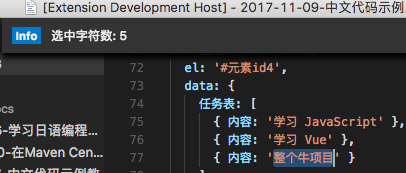
参考官方入门: Your First Visual Studio Code Extension - Hello World 源码在: program-in-chinese/vscode_helloWorld 创建插件过程中, 发现identifier和publisher name不允许中文命名(报错: invalid xxx): ? What type of extension do you want to create? New Extension (TypeScript) ? What's the name of your extension? 吃了么 ? What's the identifier of your extension? hello ? What's the description of your extension? 吃了么 ? What's your publisher name (more info: https://code.visualstudio.com/docs/tools/vscecli#_publishing-extensions)? nobody 运行一下Hello World命令, 没问题. 按入门教程替代extension.sayHello命令的内容, 实现显示选中文本长度的演示功能: var 编辑器 = vscode.window.activeTextEditor; if (!编辑器) { return; // 无打开的编辑器 } var 选中部分 = 编辑器.selection; var 文本 = 编辑器.document.getText(选中部分); // 显示信息框 vscode.window.showInformationMessage('选中字符数: ' + 文本.length); 运行Hello World结果: 顺便感受一下调试功能: 2017-12-04

优秀的个人博客,低调大师

更好的编写Python代码的方式

检查Tuple里的每个元素 假设有一个Tuple,里面包含了几个元素: p = (170, 0.1, 0.6) if p[1] >= 0.5: print u'好深的' if p[2] >= 0.5: print u'好亮啊' 这段代码本身没有任何问题,但是写的时候需要记住Tuple里每个元素都是什么,才能打印出对的描述。为了让代码更容易看懂: from collections import namedtuple Color = namedtuple('Color', ['hue', 'saturation', 'luminosity']) p = Color(170, 0.1, 0.6) if p['saturation'] >= 0.5: print u'好深的' if p['luminosity'] >= 0.5: print u'好亮啊' 计算列表里的重复元素 假设有一个叫做颜色的列表, 需要计算出这个列表里每个颜色的名字被重复了几次 colors = ['red', 'green', 'red', 'blue', 'green', 'red'] d = {} 一般书写方式: for color in colors: if color not in d: d[color] = 0 d[color] += 1 稍好一点的写法: for color in colors: d[color] = d.get(color, 0) + 1 最好的写法: from collections import defaultdict d = defaultdict(int) for color in colors: d[color] += 1 将一个字典里的内容归类 有一个列表,需要将列表中的内容根据长度归类 names = ['raymond', 'rachel', 'matthew', 'roger', 'bettry', 'melissa', 'judith', 'charlie'] 一般写法: d = {} for name in names: key = len(name) if key not in d: d[key] = [] d[key].append(name) 稍好一点的写法: for name in names: key = len(name) d.setdefault(key, []).append(name) 最好的写法: d = defaultdict(list) for name in names: key = len(name) d[key].append(name) 使用Keyword Argument tw('@obama', False, 20, True) 如果不看ts函数的内容的话,是无法理解这个函数是干什么用的,如果改写成这样呢: twitter_search('@obama', retweets=False, numtweets=20, popular=True) 同时更新多个变量 编程的时候经常会碰到这种情况,需要用一个临时的变量来存住一个数值,然后过一会再把这个数值取出来 t = y y = x + y x = t 最好的写法: x, y = y, x+y 所有等号右侧的数值都是旧的数值。这个写法的好处是不需要像原来那样担心每一行顺序的问题。 对序列起始位置做改动 当改动序列第一位的元素时,经常会引起程序速度变慢 names = ['raymond', 'rachel', 'matthew', 'roger', 'bettry', 'melissa', 'judith', 'charlie'] #以下任意操作都会很慢 del names[0] names.pop(0) names.insert(0, 'mark') 最好的方式: from collections import deque #将names变为可以在左右两端添加或删减的数据类型 names = deque(['raymond', 'rachel', 'matthew', 'roger', 'bettry', 'melissa', 'judith', 'charlie']) 引自:https://www.youtube.com/watch?v=OSGv2VnC0gohttps://www.youtube.com/watch?v=wf-BqAjZb8M

优秀的个人博客,低调大师

优雅的在终端中编写Python

前言 最早我也只是在服务器上编辑文件的时候用用vim来改改程序,并没有把vim当做自己的主力编辑器。但是偶然的一次机会需要改一个奇葩的输入文件的格式,用了下Vim的宏录制,尝到了甜头,于是后面就开始用Vim来写程序了,虽然使用初期有些阻力,但时间久了就会发现,双手再也不用离开键盘,即使使用sublime这样的编辑器我也要改成使用Vim模式,Vim真的能让自己一思维的速度编辑文本(对我来说就是写程序了)。 正好最近换了新的电脑,需要在新电脑上配置一下,就干脆把一些配置相关的东东记录下来吧,相关的配置文件我都放在了github(PytLab/dotfiles) 上并写了相应的安装和卸载脚本,给有需要的同学做个参考吧。 本文是有关配置的文章,并不对Vim的核心技巧进行说明,有需要的童鞋可以参考文档和相关书籍。这里主要配合tmux和vim可以更

资源下载

更多资源
Apache Tomcat

Apache Tomcat

Tomcat是Apache 软件基金会(Apache Software Foundation)的Jakarta 项目中的一个核心项目,由Apache、Sun 和其他一些公司及个人共同开发而成。因为Tomcat 技术先进、性能稳定,而且免费,因而深受Java 爱好者的喜爱并得到了部分软件开发商的认可,成为目前比较流行的Web 应用服务器。

Eclipse

Eclipse

Eclipse 是一个开放源代码的、基于Java的可扩展开发平台。就其本身而言,它只是一个框架和一组服务,用于通过插件组件构建开发环境。幸运的是,Eclipse 附带了一个标准的插件集,包括Java开发工具(Java Development Kit,JDK)。

JDK

JDK

JDK是 Java 语言的软件开发工具包,主要用于移动设备、嵌入式设备上的java应用程序。JDK是整个java开发的核心,它包含了JAVA的运行环境(JVM+Java系统类库)和JAVA工具。

Sublime Text

Sublime Text

Sublime Text具有漂亮的用户界面和强大的功能,例如代码缩略图,Python的插件,代码段等。还可自定义键绑定,菜单和工具栏。Sublime Text 的主要功能包括:拼写检查,书签,完整的 Python API , Goto 功能,即时项目切换,多选择,多窗口等等。Sublime Text 是一个跨平台的编辑器,同时支持Windows、Linux、Mac OS X等操作系统。