Android笔记:代码编写布局
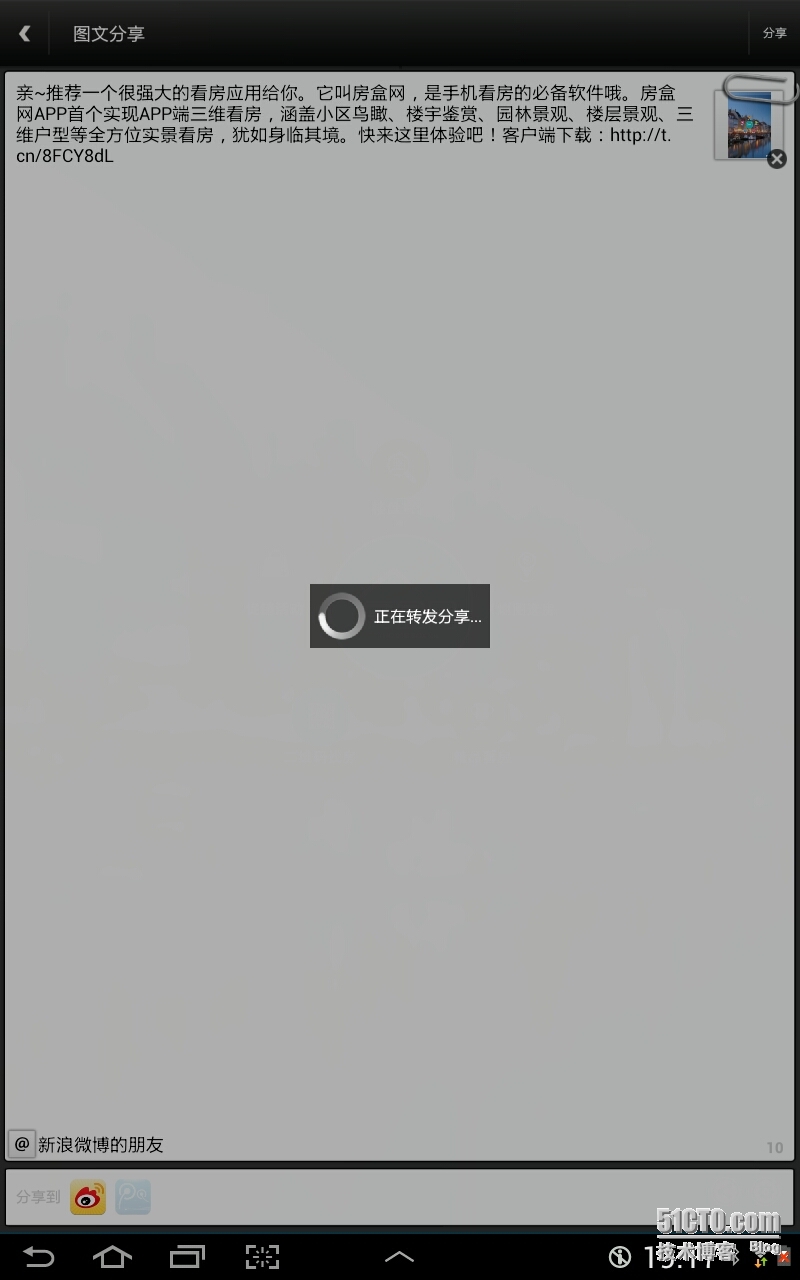
自己在shareSdk原有布局中添加一个加载过程的布局: 1 2 3 4 5 6 7 8 9 10 11 12 13 14 15 16 17 18 19 20 21 22 23 24 25 26 27 28 29 30 31 32 33 34 35 36 37 38 39 40 41 42 43 44 /** 新增:分享发送进度 **/ private void setLoadingUI() { // 页面父布局 pageLayout = new RelativeLayout(getContext()); pageLayout.setLayoutParams( new RelativeLayout.LayoutParams(LayoutParams.FILL_PARENT, LayoutParams.FILL_PARENT)); // 填充编辑页布局 RelativeLayout.LayoutParams llPageLp = new RelativeLayout.LayoutParams(LayoutParams.FILL_PARENT, LayoutParams.FILL_PARENT); llPage.setLayoutParams(llPageLp); pageLayout.addView(llPage); // 加载过程布局 loadReLayout = new RelativeLayout(getContext()); loadReLayout.setLayoutParams( new RelativeLayout.LayoutParams(LayoutParams.FILL_PARENT, LayoutParams.FILL_PARENT)); loadReLayout.setClickable( true ); loadReLayout.setBackgroundColor( 0x50000000 ); loadReLayout.setVisibility(View.GONE); pageLayout.addView(loadReLayout); // 加载过程中间布局 LinearLayout loadCenterLayout = new LinearLayout(getContext()); RelativeLayout.LayoutParams lcLp = new RelativeLayout.LayoutParams(LayoutParams.WRAP_CONTENT, LayoutParams.WRAP_CONTENT); lcLp.addRule(RelativeLayout.CENTER_IN_PARENT); loadCenterLayout.setPadding( 8 , 8 , 8 , 8 ); loadCenterLayout.setBackgroundColor( 0xa5000000 ); loadCenterLayout.setOrientation(LinearLayout.HORIZONTAL); loadReLayout.addView(loadCenterLayout, lcLp); // 进度条和加载中说明 ProgressBar pb = new ProgressBar(getContext()); pb.setLayoutParams( new LinearLayout.LayoutParams(LayoutParams.WRAP_CONTENT, LayoutParams.WRAP_CONTENT)); loadCenterLayout.addView(pb); TextView loadText = new TextView(getContext()); LayoutParams ltlp = new LinearLayout.LayoutParams(LayoutParams.WRAP_CONTENT, LayoutParams.WRAP_CONTENT); ltlp.setMargins( 8 , 0 , 0 , 0 ); ltlp.gravity = Gravity.CENTER_VERTICAL; loadText.setLayoutParams(ltlp); loadText.setText( "正在转发分享..." ); loadText.setTextSize( 16 ); loadText.setTextColor(Color.WHITE); loadCenterLayout.addView(loadText); } 原布局部分代码: 1 2 3 4 5 6 7 8 9 10 11 12 13 14 15 16 17 18 19 20 21 22 23 24 25 26 27 28 29 30 31 32 33 34 35 36 37 38 39 40 41 42 43 44 45 46 47 48 49 50 51 52 53 54 55 56 57 58 59 60 61 62 63 64 65 66 private void initPageView() { // 编辑页父布局 llPage = new LinearLayout(getContext()); llPage.setBackgroundColor( 0xff323232 ); llPage.setOrientation(LinearLayout.VERTICAL); // 新增:分享发送过程 setLoadingUI(); // 标题栏 llTitle = new TitleLayout(getContext()); llTitle.setBackgroundResource(R.drawable.title_back); llTitle.getBtnBack().setOnClickListener( this ); llTitle.getTvTitle().setText(R.string.multi_share); llTitle.getBtnRight().setVisibility(View.VISIBLE); llTitle.getBtnRight().setText(R.string.share); llTitle.getBtnRight().setOnClickListener( this ); llTitle.setLayoutParams( new LinearLayout.LayoutParams(LayoutParams.FILL_PARENT, LayoutParams.WRAP_CONTENT)); llPage.addView(llTitle); FrameLayout flPage = new FrameLayout(getContext()); LinearLayout.LayoutParams lpFl = new LinearLayout.LayoutParams(LayoutParams.FILL_PARENT, LayoutParams.WRAP_CONTENT); lpFl.weight = 1 ; flPage.setLayoutParams(lpFl); llPage.addView(flPage); // 页面主体 LinearLayout llBody = new LinearLayout(getContext()); llBody.setOrientation(LinearLayout.VERTICAL); FrameLayout.LayoutParams lpLl = new FrameLayout.LayoutParams(LayoutParams.FILL_PARENT, LayoutParams.FILL_PARENT); lpLl.gravity = Gravity.LEFT | Gravity.TOP; llBody.setLayoutParams(lpLl); flPage.addView(llBody); // 别针图片 ivPin = new ImageView(getContext()); ivPin.setImageResource(R.drawable.pin); int dp_80 = cn.sharesdk.framework.utils.R.dipToPx(getContext(), 80 ); int dp_36 = cn.sharesdk.framework.utils.R.dipToPx(getContext(), 36 ); FrameLayout.LayoutParams lpPin = new FrameLayout.LayoutParams(dp_80, dp_36); lpPin.topMargin = cn.sharesdk.framework.utils.R.dipToPx(getContext(), 6 ); lpPin.gravity = Gravity.RIGHT | Gravity.TOP; ivPin.setLayoutParams(lpPin); flPage.addView(ivPin); ImageView ivShadow = new ImageView(getContext()); ivShadow.setBackgroundResource(R.drawable.title_shadow); ivShadow.setImageResource(R.drawable.title_shadow); FrameLayout.LayoutParams lpSd = new FrameLayout.LayoutParams(LayoutParams.FILL_PARENT, LayoutParams.WRAP_CONTENT); ivShadow.setLayoutParams(lpSd); flPage.addView(ivShadow); LinearLayout llInput = new LinearLayout(getContext()); llInput.setMinimumHeight(cn.sharesdk.framework.utils.R.dipToPx(getContext(), 150 )); llInput.setBackgroundResource(R.drawable.edittext_back); LinearLayout.LayoutParams lpInput = new LinearLayout.LayoutParams(LayoutParams.FILL_PARENT, LayoutParams.WRAP_CONTENT); int dp_3 = cn.sharesdk.framework.utils.R.dipToPx(getContext(), 3 ); lpInput.setMargins(dp_3, dp_3, dp_3, dp_3); lpInput.weight = 1 ; llInput.setLayoutParams(lpInput); llBody.addView(llInput); //... } 效果图: 本文转自 glblong 51CTO博客,原文链接:http://blog.51cto.com/glblong/1370018,如需转载请自行联系原作者