首页 文章 精选 留言 我的

精选列表

搜索[源码分析],共10008篇文章
优秀的个人博客,低调大师

Erlang PoolBoy 源码分析

问题存疑: 1.如何释放使用过的进程,被再次利用 答:通过try after 的方式,try checkout锁定一个进程,after 用完之后释放被锁定的进程 2.如果出现初始进程不够了,如果处理 答:如果不够用,判定max_overflow参数,确定是否需要重新创建进程,或者将此使用者放入等待列表中,一旦有新释放的,就马上给他使用,受超时器的影响 3.创建新的进程,是如何释放的 答:如果此进程是弹性创建的,则直接释放此进程,如果是work中的进程,则释放使用权 4.如果达到最大的创建进程数,又是如何处理的 答:根据block参数确定,是否忽略或者加入等待列表中 5.如果创建的进程 答:poolboy_sup 通过sample_one_by_one参数形式,动态调用supervisor:start_child创建进程池中的进程 6.为什么需要将初始创建的进程和poolboy进程link起来,有何用意 答:这样就可以将所有的逻辑全部集中在poolboy进程,只是将poolboy_sup当作一个中间件来使用创建进程池中的进程 queue 队列 支持先进先出或者后进先出模式 基本思路 1.通过一个外部sup启动一个poolboy进程,poolboy进程再启动一个poolboy_sup进程 2.poolboy_sup 就是这个进程池,然后启动若干个进程,但是poolboy进程操纵poolboy_sup进程创建很多个进程,然后将这些进程全部保存在poolboy进程 poolboy进程并且与poolboy_sup进程创建的进程进行link 当外部进程需要进程时直接从poolboy进程入口,然后使用,并且poolboy进程还监控所有使用的外部进程 当外部进程down掉后,poolboy进行善后操作,每一个外部进程独享poolboy进程中的一个进程 通过try after 方法,先独享进程,用完后,再释放进程 link的还有一个操作,就是处理poolboy进程池中进程挂掉的情况,先关闭此进程,并进行善后操作,然后,重新启用一个新的进程,带起挂掉的进程 主要的接口就是checkout和checkin的两个接口创建 数据结构采用queue,有两种方式可选,fifo(先进先出),fofi(后进先出)的方式,遍历整个进程池 还采用了一种动态创建进程的机制,就是说,如果发现现有创建的进程不够用了,那就需要创建一个临时的进程,满足使用,当使用完之后,再释放此进程 如果在释放的时候,发现还有等待的进程,则继续使用释放的进程,进行执行 启动 1.创建两个数据结构,wait:queue:new 保存等待的进程吃中分配的进程,monitors=ets:new()创建一个监控使用进程池中进程的数据 2.创建poolboy_sup 监督进程,采用sample_one_by_one 启动,后面采用supervisor:start_child(Sup,Args)启动进程 3.设置启动参数: worker_module:启动进程池的进程模块名 size:进程池中常见size个进程 max_overflow:最多可以弹性创建进程的数量 starategy:lifo|fifo 后进先出|先进先出模式 (一版来说,进程池中的进程没有区别的) Block:true 允许进程获取等待 false 不允许进程获取等待,在checkout接口中设置 4.启动进程池进程 supervisor:start_child(Sup,Args)启动子进程,填充进程池 使用 调用poolboy:transaction(PoolName,Query) 工作机制: 1.首先调用checkout获取进程池中的一个进程,调用的是call同步的方法执行,并设置超时时间 2.使用完毕之后,调用checkin释放进程使用 3.如果出现进程池没有进程,就可以通过max_overflow参数配置,确认是否可以生成新的进程以供使用 4.如果没有,则可以通过Block参数,确认是否可以将当前请求放入waiting中,只要有进程释放,就将此进程返回 5.进程使用完毕,则释放此进程的使用权,清理监控数据列表,然后判定是否弹性创建,决定是否释放,如果有等待进程,则将此进程使用权转移使用 异常处理 1.使用进程挂掉:调用down的handle_info,清理监控列表和工作列表,以及等待列表 2.进程池中进程挂掉:删除监控,重新生成一个进程 执行函数 checkout 获取一个可用进程 checkin 释放一个使用进程 transaction 一个完整的获取和释放进程过程 可能的不足之处 短暂 I/O 任务(比如数据库访问)的大型 worker 池会因为太多迁入和迁出活动而拖垮单个 poolboy 管理器。 参考: Erlang 池管理 maestro Erlang:https://www.oschina.net/p/maestro-erlang

优秀的个人博客,低调大师

Etcd源码分析: 存储

存储数据结构 Etcd存储在集群搭建和使用篇有简介,总结起来有如下特点: 采用kv型数据存储,一般情况下比关系型数据库快。 支持动态存储(内存)以及静态存储(磁盘)。 分布式存储,可集成为多节点集群。 存储方式,采用类似目录结构。 1、只有叶子节点才能真正存储数据,相当于文件。 2、叶子节点的父节点一定是目录,目录不能存储数据。 叶子节点数据结构位于 /store/store.go type store struct { Root *node WatcherHub *watcherHub CurrentIndex uint64 Stats *Stats CurrentVersion int ttlKeyHeap *ttlKeyHeap // need to recovery manually worldLock sync.RWMutex // stop the world lock clock clockwork.Clock readonlySet types.Set } 其父节点数据结构位于/store/node.go type node struct { Path string CreatedIndex uint64 ModifiedIndex uint64 Parent *node `json:"-"` // should not encode this field! avoid circular dependency. ExpireTime time.Time Value string // for key-value pair Children map[string]*node // for directory // A reference to the store this node is attached to. store *store } 其中Path即为key WAL 内存中的数据格式 +-------------------------------+ | F | Pad | | +-----------+ Length | | | +-------------------------------+ | type | +-------------------------------+ | CRC | +-------------------------------+ | Data | +-------------------------------+ 字段名称 含义 占用大小 文本1 文本2 文本3 F 是否存在补齐数据 0:表示没有补齐字段 1:表示存在补齐字段 1bit Pad 表示补齐长度。在F为1时有效 7bit Length 表示数据有效负载长度,不包括F、Pad自身长度、补齐字段。 56bit Type 类型 int64,8字节,有符号 CRC 校验 uint32,4字节,无符号 Data 私有数据 WAL文件数据格式 当我们持久化到文件系统中,数据格式并不是上面介绍,而是grpc格式。 WAL文件以小端序方式存储 启动一个全新etcd,默认会在目录:/var/lib/etcd/default.etcd/member/wal/中生成一个.wal文件。 WAL的定义和创建 定义在wal.go中, WAL日志文件遵循一定的命名规则,由walName()实现,格式为"序号--raft日志索引.wal"。 // 根据seq和index产生wal文件名 func walName(seq, index uint64) string { return fmt.Sprintf("%016x-%016x.wal", seq, index) } WAL对外暴露的创建接口就是Create()函数 // Create creates a WAL ready for appending records. The given metadata is // recorded at the head of each WAL file, and can be retrieved(检索) with ReadAll. func Create(dirpath string, metadata []byte) (*WAL, error) { if Exist(dirpath) { return nil, os.ErrExist } // 先在.tmp临时文件上做修改,修改完之后可以直接执行rename,这样起到了原子修改文件的效果 tmpdirpath := filepath.Clean(dirpath) + ".tmp" if fileutil.Exist(tmpdirpath) { if err := os.RemoveAll(tmpdirpath); err != nil { return nil, err } } if err := fileutil.CreateDirAll(tmpdirpath); err != nil { return nil, err } // dir/filename ,filename从walName获取 seq-index.wal p := filepath.Join(tmpdirpath, walName(0, 0)) // 对文件上互斥锁 f, err := fileutil.LockFile(p, os.O_WRONLY|os.O_CREATE, fileutil.PrivateFileMode) if err != nil { return nil, err } // 定位到文件末尾 if _, err = f.Seek(0, io.SeekEnd); err != nil { return nil, err } // 预分配文件,大小为SegmentSizeBytes(64MB) if err = fileutil.Preallocate(f.File, SegmentSizeBytes, true); err != nil { return nil, err } // 新建WAL结构 w := &WAL{ dir: dirpath, metadata: metadata,// metadata 可为nil } // 在这个wal文件上创建一个encoder w.encoder, err = newFileEncoder(f.File, 0) if err != nil { return nil, err } // 把这个上了互斥锁的文件加入到locks数组中 w.locks = append(w.locks, f) if err = w.saveCrc(0); err != nil { return nil, err } // 将metadataType类型的record记录在wal的header处 if err = w.encoder.encode(&walpb.Record{Type: metadataType, Data: metadata}); err != nil { return nil, err } // 保存空的snapshot if err = w.SaveSnapshot(walpb.Snapshot{}); err != nil { return nil, err } // 重命名,之前以.tmp结尾的文件,初始化完成之后重命名,类似原子操作 if w, err = w.renameWal(tmpdirpath); err != nil { return nil, err } // directory was renamed; sync parent dir to persist rename pdir, perr := fileutil.OpenDir(filepath.Dir(w.dir)) if perr != nil { return nil, perr } // 将上述的所有文件操作进行同步 if perr = fileutil.Fsync(pdir); perr != nil { return nil, perr } // 关闭目录 if perr = pdir.Close(); err != nil { return nil, perr } return w, nil } 其中, SaveSnapshot()是做walpb.Snapshot持久化的, 里面的内容略过, 不过里面有一行代码if err := w.encoder.encode(rec)表示一条Record需要先把序列化后才能持久化,这个是通过encode()函数完成的(encoder.go) 一个Record被序列化之后(这里为JOSN格式),会以一个Frame的格式持久化。Frame首先是一个长度字段(encodeFrameSize()完成,在encoder.go文件),64bit,其中MSB表示这个Frame是否有padding字节,接下来才是真正的序列化后的数据 WAL存储 当raft模块收到一个proposal时就会调用Save方法完成(定义在wal.go)持久化 func (w *WAL) Save(st raftpb.HardState, ents []raftpb.Entry) error { w.mu.Lock() // 上锁 defer w.mu.Unlock() // short cut(捷径), do not call sync // IsEmptyHardState returns true if the given HardState is empty. if raft.IsEmptyHardState(st) && len(ents) == 0 { return nil } // 是否需要同步刷新磁盘 mustSync := raft.MustSync(st, w.state, len(ents)) // TODO(xiangli): no more reference operator // 保存所有日志项 for i := range ents { if err := w.saveEntry(&ents[i]); err != nil { return err } } // 持久化HardState, HardState表示服务器当前状态,定义在raft.pb.go,主要包含Term、Vote、Commit if err := w.saveState(&st); err != nil { return err } // 获取最后一个LockedFile的大小(已经使用的) curOff, err := w.tail().Seek(0, io.SeekCurrent) if err != nil { return err } // 如果小于64MB if curOff < SegmentSizeBytes { if mustSync { // 如果需要sync,就执行sync return w.sync() } return nil } // 否则执行切割(也就是说明,WAL文件是可以超过64MB的) return w.cut() } snapshot snapshot比wal大小要小5倍左右,只有CRC和Data两个字段 etcd中对raft snapshot的定义如下(在文件raft.pb.go): type Snapshot struct { Data []byte `protobuf:"bytes,1,opt,name=data" json:"data,omitempty"` Metadata SnapshotMetadata `protobuf:"bytes,2,opt,name=metadata" json:"metadata"` XXX_unrecognized []byte `json:"-"` } Metadata则是snaoshot的元信息 // snapshot的元数据 type SnapshotMetadata struct { // 最后一次的配置状态 ConfState ConfState `protobuf:"bytes,1,opt,name=conf_state,json=confState" json:"conf_state"` // 被快照取代的最后的条目在日志中的索引值(appliedIndex) Index uint64 `protobuf:"varint,2,opt,name=index" json:"index"` // 该条目的任期号 Term uint64 `protobuf:"varint,3,opt,name=term" json:"term"` XXX_unrecognized []byte `json:"-"` } snapshot持久化使用func (s *Snapshotter) SaveSnap(snapshot raftpb.Snapshot) 过程比较简单, 略去, 里面可以看到snapshot文件的命名规则 // 将raft snapshot序列化后持久化到磁盘 func (s *Snapshotter) save(snapshot *raftpb.Snapshot) error { // 产生snapshot的时间 start := time.Now() // snapshot的文件名Term-Index.snap fname := fmt.Sprintf("%016x-%016x%s", snapshot.Metadata.Term, snapshot.Metadata.Index, snapSuffix) 动态存储 +--------------------+ +--------------------+ | etcdserver/raft.go | | raft/storge.go | | +<-------->+ | | startNode() | | NewMemoryStorge() | +---------^----------+ +--------------------+ | | | +---------v----------+ +--------------------+ | rafe/node.go | | rafe/node.go | | +<-------->+ | | StartNode() | | newRaft() | +---------^----------+ +--------------------+ | | | +---------v----------+ | raft/node.go | | | | run() | +--------------------+ 首先调用NewMemoryStorage进行初始化,然后在newRaft()中生成raftLog对象并且调用InitialState()进行状态初始化,最后在node中run方法接收数据。


优秀的个人博客,低调大师

BroadcastReceiver的源码分析

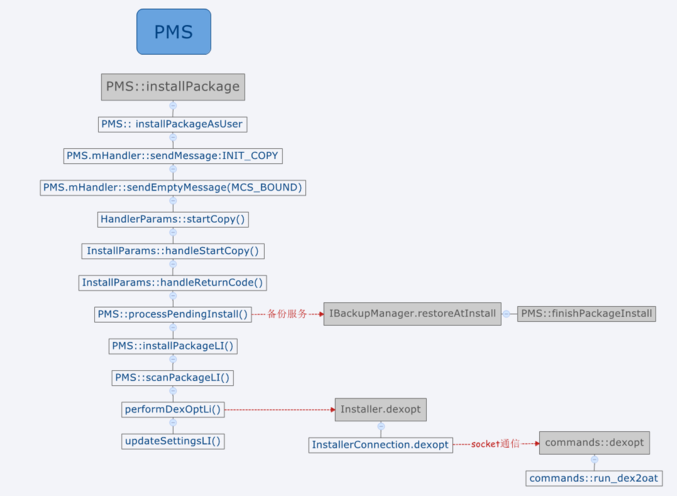
android提供了广播机制,通过BroadcastReceiver可以在不同的进程间传递消息。类似于观察者模式,A应用通过注册广播表示A对消息subject感兴趣,当B应用发出subject类型的消息的时候,A应用就能收到对应的消息。 android提供静态和动态两种方式进行消息注册,静态注册指的是在AndroidManifest.xml中进行注册,动态注册指的是在Activity通过registerReceiver的方式进行广播注册。 静态广播注册流程 静态广播注册指的是在AndroidManifest.xml注册Receiver,当Apk安装时会将静态注册的Receiver信息注册到PMS中,APK的安装流程(https://www.jianshu.com/p/953475cea991)如下: APK安装流程 其中installPackageLI完成了Apk的解析,生成了Package对象,scanPackageLi包括四大组件注册之类的操作。 PMS.scanPackageDirtyLI注册静态广播 解析到APK里的静态广播会注册到PMS的mReceivers对象中,mReceivers类型为ActivityIntentResolver。 动态广播注册流程 Activity通过registerReceiver方式进行广播注册,注册流程如下: registerReceiver流程 ContextImpl.registerReceiverInternal ContextImpl.registerReceiverInternal 该函数根据BroadcastReceiver对象生成IIntentReceiver对象,该对象和ApplicationThread的功能一样,试想一下,APP进程向AMS进程注册广播,当AMS收到广播向APP进程分发时需要用到Binder调用,IIntentReceiver就是进行跨进程调用的。 AMS.registerReceiver AMS将IIntentReceiver保存到mReisterdReceivers中,最终保存到mReceiverResolver.addFilter(bf);中。 sendBroadcast发送广播 sendBroascast流程 发送广播最终走到了AMS.broadcastIntentLocked,其中核心的代码如下所示: AMS.broadcastIntentLocked broadcastIntentLocked中receivers表示静态注册的广播,通过collectReceiverComponents从PMS那里获取;registerdReceivers表示动态注册的广播,从mReceiverResolver那里获取。在获取到要接受所有广播后,就调用如下函数进行广播分发。 广播分发 scheduleBroadcastsLocked开始进行广播发送 BroadcastQueue.scheduleBroadcastsLocked Handler消息最终调用了BroadcastQueue.processNextBroadcast,然后调用了performReceiveLocked, processNextBroadcast processNextBroadcast调用了performReceiverLocked performReceiverLocked performReceiverLocked继续调用IItentReceiver.performReceiver,该调用的Binder方式, IItentReceiver.performReceiver 最终调用了Args.run Args.run Args.run通过类加载器加载Receiver对象,并最终调用onReceive函数,至此,广播发送完成。

优秀的个人博客,低调大师

hbase snapshot源码分析

snapshot操作在硬盘上形式: /hbase/.snapshots /.tmp &lt;---- working directory /[snapshot name] &lt;----- completed snapshot 当snapshot完成时的形式展示: /hbase/.snapshots/[snapshot name] .snapshotinfo &lt;--- Description of the snapshot .tableinfo &lt;--- Copy of the tableinfo /.logs /[server_name] /... [log files] ... /[region name] &lt;---- All the region's information .regioninfo &lt;---- Copy of the HRegionInfo /[column family name] /[hfile name] &lt;--- name of the hfile in the real region ... ... snapshot基本步骤: 1.执行前会枷锁操作,不允许删除添加操作; 2.在hdfs在创建指定目录,写入相关的信息进去; 3.刷新memstore中的数据到hfile, 4.为hfile文件创建引用指针. 以下是大体的代码流程。 hbaseAdmin执行发起的snapshot: public void snapshot(final String snapshotName, final TableName tableName, SnapshotDescription.Type type) throws IOException, SnapshotCreationException, IllegalArgumentException { SnapshotDescription.Builder builder = SnapshotDescription.newBuilder(); builder.setTable(tableName.getNameAsString()); builder.setName(snapshotName); builder.setType(type); snapshot(builder.build()); } 执行快照并等待服务器完成该快照(阻止)。HBase实例一次只能有一个快照,或者结果可能是未定义(你可以告诉多个HBase集群同时快照,但只有一个在单个群集同时)。 public void snapshot(SnapshotDescription snapshot) throws IOException, SnapshotCreationException, IllegalArgumentException { // actually take the snapshot SnapshotResponse response = takeSnapshotAsync(snapshot); MasterRpcService:异步触发并完成一次snapshot: `master.snapshotManager.takeSnapshot(snapshot);` SnapshotManager类:完成一次snapshot需要根据表的状态:disabled或者enabled if (assignmentMgr.getTableStateManager().isTableState(snapshotTable, ZooKeeperProtos.Table.State.ENABLED)) { LOG.debug("Table enabled, starting distributed snapshot."); snapshotEnabledTable(snapshot); LOG.debug("Started snapshot: " + ClientSnapshotDescriptionUtils.toString(snapshot)); } // For disabled table, snapshot is created by the master else if (assignmentMgr.getTableStateManager().isTableState(snapshotTable, ZooKeeperProtos.Table.State.DISABLED)) { LOG.debug("Table is disabled, running snapshot entirely on master."); snapshotDisabledTable(snapshot); LOG.debug("Started snapshot: " + ClientSnapshotDescriptionUtils.toString(snapshot)); } private synchronized void snapshotEnabledTable(SnapshotDescription snapshot) throws HBaseSnapshotException { // setup the snapshot prepareToTakeSnapshot(snapshot); // Take the snapshot of the enabled table EnabledTableSnapshotHandler handler = new EnabledTableSnapshotHandler(snapshot, master, this); snapshotTable(snapshot, handler); } enabled状态下执行表的snapshot: // setup the snapshot 准备工作 prepareToTakeSnapshot(snapshot); // Take the snapshot of the enabled table EnabledTableSnapshotHandler handler = new EnabledTableSnapshotHandler(snapshot, master, this); 开始执行snapshot snapshotTable(snapshot, handler); } snapshot开始之前的设置准备:检查是否有一个在运行的snapshot工作以及还原snapshot工作的请求存在。# // make sure we aren't already running a snapshot if (isTakingSnapshot(snapshot)) { SnapshotSentinel handler = this.snapshotHandlers.get(snapshotTable); throw new SnapshotCreationException("Rejected taking " + ClientSnapshotDescriptionUtils.toString(snapshot) + " because we are already running another snapshot " + (handler != null ? ("on the same table " + ClientSnapshotDescriptionUtils.toString(handler.getSnapshot())) : "with the same name"), snapshot); } // make sure we aren't running a restore on the same table if (isRestoringTable(snapshotTable)) { SnapshotSentinel handler = restoreHandlers.get(snapshotTable); throw new SnapshotCreationException("Rejected taking " + ClientSnapshotDescriptionUtils.toString(snapshot) + " because we are already have a restore in progress on the same snapshot " + ClientSnapshotDescriptionUtils.toString(handler.getSnapshot()), snapshot); } try { // delete the working directory, since we aren't running the snapshot. Likely leftovers // from a failed attempt. fs.delete(workingDir, true); // recreate the working directory for the snapshot if (!fs.mkdirs(workingDir)) { throw new SnapshotCreationException("Couldn't create working directory (" + workingDir + ") for snapshot", snapshot); } 设置准备工作完成就开始进行snapshot用指定的handler进行snapshot工作: handler.prepare(); this.executorService.submit(handler); this.snapshotHandlers.put(TableName.valueOf(snapshot.getTable()), handler); ... TakeSnapshotHandler真正开始处理snapshot操作: 1.将snapshot描述信息写入.snapshotinfo目录 FsPermission perms = FSUtils.getFilePermissions(fs, fs.getConf(), HConstants.DATA_FILE_UMASK_KEY); Path snapshotInfo = new Path(workingDir, SnapshotDescriptionUtils.SNAPSHOTINFO_FILE); try { FSDataOutputStream out = FSUtils.create(fs, snapshotInfo, perms, true); try { snapshot.writeTo(out); } finally { out.close(); } } 2.复制表的信息: snapshotManifest.addTableDescriptor(this.htd); 3.获取hregionserver上的regions以及位置信息 ##: List<Pair<HRegionInfo, ServerName>> regionsAndLocations; if (TableName.META_TABLE_NAME.equals(snapshotTable)) { regionsAndLocations = new MetaTableLocator().getMetaRegionsAndLocations(server.getZooKeeper()); } else { regionsAndLocations = MetaTableAccessor.getTableRegionsAndLocations(server.getZooKeeper(), server.getConnection(), snapshotTable, false); } 4.开始执行snapshot操作,上面获取到的region信息及位置信息 // run the snapshot snapshotRegions(regionsAndLocations); 启动snapshot程序::: 在regionserver上开始snapshot // start the snapshot on the RS所有的snapshot操作的具体细节 Procedure proc = coordinator.startProcedure(this.monitor, this.snapshot.getName(), this.snapshot.toByteArray(), Lists.newArrayList(regionServers)); if (proc == null) { String msg = "Failed to submit distributed procedure for snapshot '" + snapshot.getName() + "'"; LOG.error(msg); throw new HBaseSnapshotException(msg); } 等待snapshot完成: proc.waitForCompleted(); 将下线的region作为disabled处理 // Take the offline regions as disabled for (Pair<HRegionInfo, ServerName> region : regions) { HRegionInfo regionInfo = region.getFirst(); if (regionInfo.isOffline() && (regionInfo.isSplit() || regionInfo.isSplitParent())) { LOG.info("Take disabled snapshot of offline region=" + regionInfo); snapshotDisabledRegion(regionInfo); } } 5.相关region信息以及servername,用来验证snapshot的有效性 // extract each pair to separate lists Set<String> serverNames = new HashSet<String>(); for (Pair<HRegionInfo, ServerName> p : regionsAndLocations) { if (p != null && p.getFirst() != null && p.getSecond() != null) { HRegionInfo hri = p.getFirst(); if (hri.isOffline() && (hri.isSplit() || hri.isSplitParent())) continue; serverNames.add(p.getSecond().toString()); } } 6.刷新内存状态,写snapshot-mnifest信息到目录 // flush the in-memory state, and write the single manifest status.setStatus("Consolidate snapshot: " + snapshot.getName()); snapshotManifest.consolidate(); 7.开始验证snapshot的有效性 // verify the snapshot is valid status.setStatus("Verifying snapshot: " + snapshot.getName()); verifier.verifySnapshot(this.workingDir, serverNames); 8.完成snapshot,转移目录等 // complete the snapshot, atomically moving from tmp to .snapshot dir. completeSnapshot(this.snapshotDir, this.workingDir, this.fs); msg = "Snapshot " + snapshot.getName() + " of table " + snapshotTable + " completed"; status.markComplete(msg); LOG.info(msg); metricsSnapshot.addSnapshot(status.getCompletionTimestamp() - status.getStartTime());

优秀的个人博客,低调大师

Spark 源码分析 -- Task

Task是介于DAGScheduler和TaskScheduler中间的接口 在DAGScheduler, 需要把DAG中的每个stage的每个partitions封装成task 最终把taskset提交给TaskScheduler /** * A task to execute on a worker node. */ private[spark] abstract class Task[T](val stageId: Int) extends Serializable { def run(attemptId: Long): T //Task的核心函数 def preferredLocations: Seq[TaskLocation] = Nil //Spark关注locality,可以选择该task运行的location var epoch: Long = -1 // Map output tracker epoch. Will be set by TaskScheduler. var metrics: Option[TaskMetrics] = None } TaskContext 用于记录TaskMetrics和在Task中用到的callback 比如对于HadoopRDD, task完成时需要close input stream package org.apache.spark class TaskContext( val stageId: Int, val splitId: Int, val attemptId: Long, val runningLocally: Boolean = false, val taskMetrics: TaskMetrics = TaskMetrics.empty() //TaskMetrics封装了task执行时一些指标和数据 ) extends Serializable { @transient val onCompleteCallbacks = new ArrayBuffer[() => Unit] // Add a callback function to be executed on task completion. An example use // is for HadoopRDD to register a callback to close the input stream. def addOnCompleteCallback(f: () => Unit) { onCompleteCallbacks += f } def executeOnCompleteCallbacks() { onCompleteCallbacks.foreach{_()} } } ResultTask 对应于Result Stage直接产生结果 package org.apache.spark.scheduler private[spark] class ResultTask[T, U]( stageId: Int, var rdd: RDD[T], var func: (TaskContext, Iterator[T]) => U, var partition: Int, @transient locs: Seq[TaskLocation], var outputId: Int) extends Task[U](stageId) with Externalizable { override def run(attemptId: Long): U = { // 对于resultTask, run就是返回执行的结果, 比如count值 val context = new TaskContext(stageId, partition, attemptId, runningLocally = false) metrics = Some(context.taskMetrics) try { func(context, rdd.iterator(split, context)) // 直接就是对RDD的iterator调用func, 比如count函数 } finally { context.executeOnCompleteCallbacks() } } } ShuffleMapTask 对应于ShuffleMap Stage, 产生的结果作为其他stage的输入 package org.apache.spark.scheduler private[spark] class ShuffleMapTask( stageId: Int, var rdd: RDD[_], var dep: ShuffleDependency[_,_], var partition: Int, @transient private var locs: Seq[TaskLocation]) extends Task[MapStatus](stageId) with Externalizable with Logging { override def run(attemptId: Long): MapStatus = { val numOutputSplits = dep.partitioner.numPartitions // 从ShuffleDependency的partitioner中获取到shuffle目标partition的个数 val taskContext = new TaskContext(stageId, partition, attemptId, runningLocally = false) metrics = Some(taskContext.taskMetrics) val blockManager = SparkEnv.get.blockManager // shuffle需要借助blockManager来完成 var shuffle: ShuffleBlocks = null var buckets: ShuffleWriterGroup = null try { // Obtain all the block writers for shuffle blocks. val ser = SparkEnv.get.serializerManager.get(dep.serializerClass) shuffle = blockManager.shuffleBlockManager.forShuffle(dep.shuffleId, numOutputSplits, ser) // 创建shuffleBlockManager, 参数是shuffleId和目标partitions数目 buckets = shuffle.acquireWriters(partition) // 生成shuffle目标buckets(对应于partition) // Write the map output to its associated buckets. for (elem <- rdd.iterator(split, taskContext)) { // 从RDD中取出每个elem数据 val pair = elem.asInstanceOf[Product2[Any, Any]] val bucketId = dep.partitioner.getPartition(pair._1) // 根据pair的key进行shuffle, 得到目标bucketid buckets.writers(bucketId).write(pair) // 将pair数据写入bucket } // Commit这些buckets到block, 其他的RDD会从通过shuffleid找到这些block, 并读取数据 // Commit the writes. Get the size of each bucket block (total block size). var totalBytes = 0L val compressedSizes: Array[Byte] = buckets.writers.map { writer: BlockObjectWriter => // 计算所有buckets写入文件data的size总和(压缩值) writer.commit() writer.close() val size = writer.size() totalBytes += size MapOutputTracker.compressSize(size) } // Update shuffle metrics. val shuffleMetrics = new ShuffleWriteMetrics shuffleMetrics.shuffleBytesWritten = totalBytes metrics.get.shuffleWriteMetrics = Some(shuffleMetrics) return new MapStatus(blockManager.blockManagerId, compressedSizes) // 返回值为MapStatus, 包含blockManagerId和写入的data size, 会被注册到MapOutputTracker } catch { case e: Exception => // If there is an exception from running the task, revert the partial writes // and throw the exception upstream to Spark. if (buckets != null) { buckets.writers.foreach(_.revertPartialWrites()) } throw e } finally { // Release the writers back to the shuffle block manager. if (shuffle != null && buckets != null) { shuffle.releaseWriters(buckets) } // Execute the callbacks on task completion. taskContext.executeOnCompleteCallbacks() } } TaskSet 用于封装一个stage的所有的tasks, 以提交给TaskScheduler package org.apache.spark.scheduler /** * A set of tasks submitted together to the low-level TaskScheduler, usually representing * missing partitions of a particular stage. */ private[spark] class TaskSet( val tasks: Array[Task[_]], val stageId: Int, val attempt: Int, val priority: Int, val properties: Properties) { val id: String = stageId + "." + attempt override def toString: String = "TaskSet " + id } 本文章摘自博客园,原文发布日期:2013-12-30

优秀的个人博客,低调大师

Spark 源码分析 -- Stage

理解stage, 关键就是理解Narrow Dependency和Wide Dependency, 可能还是觉得比较难理解 关键在于是否需要shuffle, 不需要shuffle是可以随意并发的, 所以stage的边界就是需要shuffle的地方, 如下图很清楚 并且Stage分为两种, shuffle map stage, in which case its tasks' results are input for another stage 其实就是,非最终stage, 后面还有其他的stage, 所以它的输出一定是需要shuffle并作为后续的输入result stage, in which case its tasks directly compute the action that initiated a job (e.g. count(), save(), etc) 最终的stage, 没有输出, 而是直接产生结果或存储 1 stage class 这个注释写的很清楚 可以看到stage的RDD参数只有一个RDD, final RDD, 而不是一系列的RDD 因为在一个stage中的所有RDD都是map, partition不会有任何改变, 只是在data依次执行不同的map function 所以对于task scheduler而言, 一个RDD的状况就可以代表这个stage /** * A stage is a set of independent tasks all computing the same function that need to run as part * of a Spark job, where all the tasks have the same shuffle dependencies. Each DAG of tasks run * by the scheduler is split up into stages at the boundaries where shuffle occurs, and then the * DAGScheduler runs these stages in topological order. * * Each Stage can either be a shuffle map stage, in which case its tasks' results are input for * another stage, or a result stage, in which case its tasks directly compute the action that * initiated a job (e.g. count(), save(), etc). For shuffle map stages, we also track the nodes * that each output partition is on. * * Each Stage also has a jobId, identifying the job that first submitted the stage. When FIFO * scheduling is used, this allows Stages from earlier jobs to be computed first or recovered * faster on failure. */ private[spark] class Stage( val id: Int, val rdd: RDD[_], // final RDD val shuffleDep: Option[ShuffleDependency[_,_]], // Output shuffle if stage is a map stage val parents: List[Stage], // 父stage val jobId: Int, callSite: Option[String]) extends Logging { val isShuffleMap = shuffleDep != None // 是否是shuffle map stage, 取决于是否有shuffleDep val numPartitions = rdd.partitions.size val outputLocs = Array.fill[List[MapStatus]](numPartitions)(Nil) // 用于buffer每个shuffle中每个maptask的MapStatus var numAvailableOutputs = 0 private var nextAttemptId = 0 def isAvailable: Boolean = { if (!isShuffleMap) { true } else { numAvailableOutputs == numPartitions } } } 2 newStage 如果是shuffle map stage, 需要在这里向mapOutputTracker注册shuffle /** * Create a Stage for the given RDD, either as a shuffle map stage (for a ShuffleDependency) or * as a result stage for the final RDD used directly in an action. The stage will also be * associated with the provided jobId. */ private def newStage( rdd: RDD[_], shuffleDep: Option[ShuffleDependency[_,_]], jobId: Int, callSite: Option[String] = None) : Stage = { if (shuffleDep != None) { // Kind of ugly: need to register RDDs with the cache and map output tracker here // since we can't do it in the RDD constructor because # of partitions is unknown logInfo("Registering RDD " + rdd.id + " (" + rdd.origin + ")") mapOutputTracker.registerShuffle(shuffleDep.get.shuffleId, rdd.partitions.size) } val id = nextStageId.getAndIncrement() val stage = new Stage(id, rdd, shuffleDep, getParentStages(rdd, jobId), jobId, callSite) stageIdToStage(id) = stage stageToInfos(stage) = StageInfo(stage) stage } 3 getMissingParentStages 可以根据final stage的deps找出所有的parent stage private def getMissingParentStages(stage: Stage): List[Stage] = { val missing = new HashSet[Stage] val visited = new HashSet[RDD[_]] def visit(rdd: RDD[_]) { if (!visited(rdd)) { visited += rdd if (getCacheLocs(rdd).contains(Nil)) { for (dep <- rdd.dependencies) { dep match { case shufDep: ShuffleDependency[_,_] => // 如果发现ShuffleDependency, 说明遇到新的stage val mapStage = getShuffleMapStage(shufDep, stage.jobId) // check shuffleToMapStage, 如果该stage已经被创建则直接返回, 否则newStage if (!mapStage.isAvailable) { missing += mapStage } case narrowDep: NarrowDependency[_] => // 对于NarrowDependency, 说明仍然在这个stage中 visit(narrowDep.rdd) } } } } } visit(stage.rdd) missing.toList } 本文章摘自博客园,原文发布日期:2013-12-26

资源下载

更多资源
腾讯云软件源

腾讯云软件源

为解决软件依赖安装时官方源访问速度慢的问题,腾讯云为一些软件搭建了缓存服务。您可以通过使用腾讯云软件源站来提升依赖包的安装速度。为了方便用户自由搭建服务架构,目前腾讯云软件源站支持公网访问和内网访问。

Spring

Spring

Spring框架(Spring Framework)是由Rod Johnson于2002年提出的开源Java企业级应用框架,旨在通过使用JavaBean替代传统EJB实现方式降低企业级编程开发的复杂性。该框架基于简单性、可测试性和松耦合性设计理念,提供核心容器、应用上下文、数据访问集成等模块,支持整合Hibernate、Struts等第三方框架,其适用范围不仅限于服务器端开发,绝大多数Java应用均可从中受益。

Rocky Linux

Rocky Linux

Rocky Linux(中文名:洛基)是由Gregory Kurtzer于2020年12月发起的企业级Linux发行版,作为CentOS稳定版停止维护后与RHEL(Red Hat Enterprise Linux)完全兼容的开源替代方案,由社区拥有并管理,支持x86_64、aarch64等架构。其通过重新编译RHEL源代码提供长期稳定性,采用模块化包装和SELinux安全架构,默认包含GNOME桌面环境及XFS文件系统,支持十年生命周期更新。

Sublime Text

Sublime Text

Sublime Text具有漂亮的用户界面和强大的功能,例如代码缩略图,Python的插件,代码段等。还可自定义键绑定,菜单和工具栏。Sublime Text 的主要功能包括:拼写检查,书签,完整的 Python API , Goto 功能,即时项目切换,多选择,多窗口等等。Sublime Text 是一个跨平台的编辑器,同时支持Windows、Linux、Mac OS X等操作系统。

用户登录
用户注册