首页 文章 精选 留言 我的

精选列表

搜索[源码分析],共10010篇文章
优秀的个人博客,低调大师

hbase region split源码分析

hbase region split : split执行调用流程: 1.HbaseAdmin发起split:### 2.RSRpcServices实现类执行split(Implements the regionserver RPC services.)### 3.CompactSplitThread类与SplitRequest类用来执行region切割:### 4.splitRequest执行doSplitting操作### 4.1初始化两个子region### 4.2执行切割#### 4.2.1:(创建子region。stepsBeforePONR函数)##### 4.2.2:子region执行:stepsAfterPONR函数执行(包含openDaughters函数):##### 4.2.3:HRegionServer添加子region到meta表,加入RegionServer##### 4.3等待region切分完成,修改meta表信息,报告master#### 1.HbaseAdmin发起split: public void split(final TableName tableName) throws IOException { split(tableName, null); } public void split(final ServerName sn, final HRegionInfo hri, byte[] splitPoint) throws IOException { if (hri.getStartKey() != null && splitPoint != null && Bytes.compareTo(hri.getStartKey(), splitPoint) == 0) { throw new IOException("should not give a splitkey which equals to startkey!"); } // TODO: There is no timeout on this controller. Set one! HBaseRpcController controller = rpcControllerFactory.newController(); controller.setPriority(hri.getTable()); // TODO: this does not do retries, it should. Set priority and timeout in controller AdminService.BlockingInterface admin = this.connection.getAdmin(sn); //hbase中split调用请求通过protobuf(AdminProtos)实现 ProtobufUtil.split(controller, admin, hri, splitPoint); 实现代码: try { admin.splitRegion(controller, request); } 2.RSRpcServices实现类执行split(Implements the regionserver RPC services.) 代码: try { checkOpen(); requestCount.increment(); Region region = getRegion(request.getRegion()); region.startRegionOperation(Operation.SPLIT_REGION); if (region.getRegionInfo().getReplicaId() != HRegionInfo.DEFAULT_REPLICA_ID) { throw new IOException("Can't split replicas directly. " + "Replicas are auto-split when their primary is split."); } LOG.info("Splitting " + region.getRegionInfo().getRegionNameAsString()); region.flush(true); byte[] splitPoint = null; if (request.hasSplitPoint()) { //确定切割点splitpoint splitPoint = request.getSplitPoint().toByteArray(); } ((HRegion)region).forceSplit(splitPoint); //请求region切割 regionServer.compactSplitThread.requestSplit(region, ((HRegion)region).checkSplit(), RpcServer.getRequestUser()); return SplitRegionResponse.newBuilder().build(); } 3.CompactSplitThread类与SplitRequest类用来执行region切割: 代码: try { this.splits.execute(new SplitRequest(r, midKey, this.server, user)); if (LOG.isDebugEnabled()) { LOG.debug("Split requested for " + r + ". " + this); } } try { //acquire a shared read lock on the table, so that table schema modifications //do not happen concurrently //获取table的读锁。。 tableLock = server.getTableLockManager().readLock(parent.getTableDesc().getTableName() , "SPLIT_REGION:" + parent.getRegionInfo().getRegionNameAsString()); try { tableLock.acquire(); } 4.splitRequest执行doSplitting操作 4.1### //初始化两个子region信息 this.hri_a = new HRegionInfo(hri.getTable(), startKey, this.splitrow, false, rid); this.hri_b = new HRegionInfo(hri.getTable(), this.splitrow, endKey, false, rid); 4.2### //执行切割 st.execute(this.server, this.server, user); 4.2.1:(创建子region。stepsBeforePONR函数)#### //创建两个子region PairOfSameType<Region> regions = createDaughters(server, services, user); 4.2.2:stepsAfterPONR函数执行(openDaughters):#### // 两个子region DaughterOpener线程 start DaughterOpener aOpener = new DaughterOpener(server, (HRegion)a); DaughterOpener bOpener = new DaughterOpener(server, (HRegion)b); //向hdfs上写入.regionInfo文件以便meta挂掉以便恢复 writeRegionInfoOnFilesystem(content, true); //初始化所有的hstore initializeStores(reporter, status); //LoadStoreFiles函数执行: if (files == null || files.size() == 0) { return new ArrayList<StoreFile>(); } // initialize the thread pool for opening store files in parallel.. ThreadPoolExecutor storeFileOpenerThreadPool = this.region.getStoreFileOpenAndCloseThreadPool("StoreFileOpenerThread-" + this.getColumnFamilyName()); CompletionService<StoreFile> completionService = new ExecutorCompletionService<StoreFile>(storeFileOpenerThreadPool); int totalValidStoreFile = 0; for (final StoreFileInfo storeFileInfo: files) { //HDFS上对应的路径和文件 completionService.submit(new Callable<StoreFile>() { @Override public StoreFile call() throws IOException { //每个文件创建一个StoreFile对象,对每个storefile对象会读取文件上的内容创建一个 HalfStoreFileReader读对象来操作该region的父region上的相应的文件,及该 region上目前存储的是引用文件,其指向的是其父region上的相应的文件,对该 region的所有读或写都将关联到父region上 StoreFile storeFile = createStoreFileAndReader(storeFileInfo); return storeFile; } }); totalValidStoreFile++; } //将子Region添加到rs的online region列表上,并添加到meta表上 { if (useZKForAssignment) { // add 2nd daughter first (see HBASE-4335) services.postOpenDeployTasks(b); } else if (!services.reportRegionStateTransition(TransitionCode.SPLIT, parent.getRegionInfo(), hri_a, hri_b)) { throw new IOException("Failed to report split region to master: " + parent.getRegionInfo().getShortNameToLog()); } // Should add it to OnlineRegions services.addToOnlineRegions(b); if (useZKForAssignment) { services.postOpenDeployTasks(a); } services.addToOnlineRegions(a); } 参考文章:http://blog.csdn.net/Pun_C/article/details/47173453

优秀的个人博客,低调大师

Storm-源码分析- metric

首先定义一系列metric相关的interface, IMetric, IReducer, ICombiner (backtype.storm.metric.api) 在task中, 创建一系列builtin-metrics, (backtype.storm.daemon.builtin-metrics), 并注册到topology context里面 task会不断的利用如spout-acked-tuple!的functions去更新这些builtin-metrics task会定期将builtin-metrics里面的统计数据通过METRICS-STREAM发送给metric-bolt (backtype.storm.metric.MetricsConsumerBolt, 该bolt会创建实现backtype.storm.metric.api.IMetricsConsumer的对象, 用于计算出metrics) 然后如何使用这些metrics? 由于这是builtin metrics, 是不会被外界使用的 如果处理这些metrics, 取决于_metricsConsumer.handleDataPoints, 这里的_metricsConsumer是通过topology's configuration配置的 比如backtype.storm.metric.LoggingMetricsConsumer, 如果使用这个consumer就会将metrics写入log中 1. backtype.storm.metric.api IMetric package backtype.storm.metric.api; public interface IMetric { public Object getValueAndReset(); ;;取得当前值并恢复初始状态 } CountMetric, 计数, reset时清零 AssignableMetric, 赋值, 不用reset MultiCountMetric, 使用hashmap记录多个count, reset时分别对每个count对象调用getValueAndReset public class CountMetric implements IMetric { long _value = 0; public CountMetric() { } public void incr() { _value++; } public void incrBy(long incrementBy) { _value += incrementBy; } public Object getValueAndReset() { long ret = _value; _value = 0; return ret; } } ICombiner public interface ICombiner<T> { public T identity(); public T combine(T a, T b); } CombinedMetric, 结合ICombiner和IMetric public class CombinedMetric implements IMetric { private final ICombiner _combiner; private Object _value; public CombinedMetric(ICombiner combiner) { _combiner = combiner; _value = _combiner.identity(); } public void update(Object value) { _value = _combiner.combine(_value, value); } public Object getValueAndReset() { Object ret = _value; _value = _combiner.identity(); return ret; } } IReducer publicinterfaceIReducer<T> { T init(); T reduce(T accumulator, Object input); Object extractResult(T accumulator); } 实现IReducer接口, 实现平均数Reducer, reduce里面累加和计数, extractResult里面acc/count求平均数 class MeanReducerState { public int count = 0; public double sum = 0.0; } public class MeanReducer implements IReducer<MeanReducerState> { public MeanReducerState init() { return new MeanReducerState(); } public MeanReducerState reduce(MeanReducerState acc, Object input) { acc.count++; if(input instanceof Double) { acc.sum += (Double)input; } else if(input instanceof Long) { acc.sum += ((Long)input).doubleValue(); } else if(input instanceof Integer) { acc.sum += ((Integer)input).doubleValue(); } else { throw new RuntimeException( "MeanReducer::reduce called with unsupported input type `" + input.getClass() + "`. Supported types are Double, Long, Integer."); } return acc; } public Object extractResult(MeanReducerState acc) { if(acc.count > 0) { return new Double(acc.sum / (double)acc.count); } else { return null; } } } ReducedMetric 结合IReducer和IMetric public class ReducedMetric implements IMetric { private final IReducer _reducer; private Object _accumulator; public ReducedMetric(IReducer reducer) { _reducer = reducer; _accumulator = _reducer.init(); } public void update(Object value) { _accumulator = _reducer.reduce(_accumulator, value); } public Object getValueAndReset() { Object ret = _reducer.extractResult(_accumulator); _accumulator = _reducer.init(); return ret; } } IMetricsConsumer 这个interface, 内嵌TaskInfo和DataPoint类 handleDataPoints, 添加逻辑以处理task对应的一系列DataPoint public interface IMetricsConsumer { public static class TaskInfo { public TaskInfo() {} public TaskInfo(String srcWorkerHost, int srcWorkerPort, String srcComponentId, int srcTaskId, long timestamp, int updateIntervalSecs) { this.srcWorkerHost = srcWorkerHost; this.srcWorkerPort = srcWorkerPort; this.srcComponentId = srcComponentId; this.srcTaskId = srcTaskId; this.timestamp = timestamp; this.updateIntervalSecs = updateIntervalSecs; } public String srcWorkerHost; public int srcWorkerPort; public String srcComponentId; public int srcTaskId; public long timestamp; public int updateIntervalSecs; } public static class DataPoint { public DataPoint() {} public DataPoint(String name, Object value) { this.name = name; this.value = value; } @Override public String toString() { return "[" + name + " = " + value + "]"; } public String name; public Object value; } void prepare(Map stormConf, Object registrationArgument, TopologyContext context, IErrorReporter errorReporter); void handleDataPoints(TaskInfo taskInfo, Collection<DataPoint> dataPoints); void cleanup(); } 2. backtype.storm.daemon.builtin-metrics 定义Spout和Bolt所需要的一些metric, 主要两个record, BuiltinSpoutMetrics和BuiltinBoltMetrics, [metric-name, metric-object]的hashmap (defrecord BuiltinSpoutMetrics [^MultiCountMetric ack-count ^MultiReducedMetric complete-latency ^MultiCountMetric fail-count ^MultiCountMetric emit-count ^MultiCountMetric transfer-count]) (defrecord BuiltinBoltMetrics [^MultiCountMetric ack-count ^MultiReducedMetric process-latency ^MultiCountMetric fail-count ^MultiCountMetric execute-count ^MultiReducedMetric execute-latency ^MultiCountMetric emit-count ^MultiCountMetric transfer-count]) (defn make-data [executor-type] (condp = executor-type :spout (BuiltinSpoutMetrics. (MultiCountMetric.) (MultiReducedMetric. (MeanReducer.)) (MultiCountMetric.) (MultiCountMetric.) (MultiCountMetric.)) :bolt (BuiltinBoltMetrics. (MultiCountMetric.) (MultiReducedMetric. (MeanReducer.)) (MultiCountMetric.) (MultiCountMetric.) (MultiReducedMetric. (MeanReducer.)) (MultiCountMetric.) (MultiCountMetric.)))) (defn register-all [builtin-metrics storm-conf topology-context] (doseq [[kw imetric] builtin-metrics] (.registerMetric topology-context (str "__" (name kw)) imetric (int (get storm-conf Config/TOPOLOGY_BUILTIN_METRICS_BUCKET_SIZE_SECS))))) 在mk-task-data的时候, 调用make-data来创建相应的metrics, :builtin-metrics (builtin-metrics/make-data (:type executor-data)) 并在executor的mk-threads中, 会将这些builtin-metrics注册到topologycontext中去, (builtin-metrics/register-all (:builtin-metrics task-data) storm-conf (:user-context task-data)) 上面完成的builtin-metrics的创建和注册, 接着定义了一系列用于更新metrics的functions, 以spout-acked-tuple!为例, 需要更新MultiCountMetric ack-count和MultiReducedMetric complete-latency .scope从MultiCountMetric取出某个CountMetric, 然后incrBy来将stats的rate增加到count上 (defn spout-acked-tuple! [^BuiltinSpoutMetrics m stats stream latency-ms] (-> m .ack-count (.scope stream) (.incrBy (stats-rate stats))) (-> m .complete-latency (.scope stream) (.update latency-ms))) 3. backtype.storm.metric MetricsConsumerBolt 创建实现IMetricsConsumer的对象, 并在execute里面调用handleDataPoints package backtype.storm.metric; public class MetricsConsumerBolt implements IBolt { IMetricsConsumer _metricsConsumer; String _consumerClassName; OutputCollector _collector; Object _registrationArgument; public MetricsConsumerBolt(String consumerClassName, Object registrationArgument) { _consumerClassName = consumerClassName; _registrationArgument = registrationArgument; } @Override public void prepare(Map stormConf, TopologyContext context, OutputCollector collector) { try { _metricsConsumer = (IMetricsConsumer)Class.forName(_consumerClassName).newInstance(); } catch (Exception e) { throw new RuntimeException("Could not instantiate a class listed in config under section " + Config.TOPOLOGY_METRICS_CONSUMER_REGISTER + " with fully qualified name " + _consumerClassName, e); } _metricsConsumer.prepare(stormConf, _registrationArgument, context, (IErrorReporter)collector); _collector = collector; } @Override public void execute(Tuple input) { _metricsConsumer.handleDataPoints((IMetricsConsumer.TaskInfo)input.getValue(0), (Collection)input.getValue(1)); _collector.ack(input); } @Override public void cleanup() { _metricsConsumer.cleanup(); } } SystemBolt SystemBolt, 根据comments里面说的, 每个worker都有一个, taskid=-1 定义些system相关的metric, 并注册到topologycontext里面 需要使用Java调用clojure, 所以需要import下面的package import clojure.lang.AFn; import clojure.lang.IFn; //funtion import clojure.lang.RT; //run-time 并且用到些用于监控memory和JVM的java package java.lang.management.MemoryUsage, 表示内存使用量快照的MemoryUsage对象 java.lang.management.GarbageCollectorMXBean, 用于Java虚拟机的垃圾回收的管理接口, 比如发生的回收的总次数, 和累计回收时间 java.lang.management.RuntimeMXBean, 用于Java 虚拟机的运行时系统的管理接口 这个bolt的特点是, 只有prepare实现了逻辑, 并且通过_prepareWasCalled保证prepare只被执行一次 prepare中的逻辑, 主要就是定义各种metric, 并且通过registerMetric注册到TopologyContext中 metic包含, JVM的运行时间, 开始时间, memory情况, 和每个GarbageCollector的情况 注册的这些system metrics也会一起被发送到MetricsConsumerBolt进行处理 这应该用spout实现, 为啥用bolt实现? // There is one task inside one executor for each worker of the topology. // TaskID is always -1, therefore you can only send-unanchored tuples to co-located SystemBolt. // This bolt was conceived to export worker stats via metrics api. public class SystemBolt implements IBolt { private static Logger LOG = LoggerFactory.getLogger(SystemBolt.class); private static boolean _prepareWasCalled = false; private static class MemoryUsageMetric implements IMetric { IFn _getUsage; public MemoryUsageMetric(IFn getUsage) { _getUsage = getUsage; } @Override public Object getValueAndReset() { MemoryUsage memUsage = (MemoryUsage)_getUsage.invoke(); HashMap m = new HashMap(); m.put("maxBytes", memUsage.getMax()); m.put("committedBytes", memUsage.getCommitted()); m.put("initBytes", memUsage.getInit()); m.put("usedBytes", memUsage.getUsed()); m.put("virtualFreeBytes", memUsage.getMax() - memUsage.getUsed()); m.put("unusedBytes", memUsage.getCommitted() - memUsage.getUsed()); return m; } } // canonically the metrics data exported is time bucketed when doing counts. // convert the absolute values here into time buckets. private static class GarbageCollectorMetric implements IMetric { GarbageCollectorMXBean _gcBean; Long _collectionCount; Long _collectionTime; public GarbageCollectorMetric(GarbageCollectorMXBean gcBean) { _gcBean = gcBean; } @Override public Object getValueAndReset() { Long collectionCountP = _gcBean.getCollectionCount(); Long collectionTimeP = _gcBean.getCollectionTime(); Map ret = null; if(_collectionCount!=null && _collectionTime!=null) { ret = new HashMap(); ret.put("count", collectionCountP - _collectionCount); ret.put("timeMs", collectionTimeP - _collectionTime); } _collectionCount = collectionCountP; _collectionTime = collectionTimeP; return ret; } } @Override public void prepare(final Map stormConf, TopologyContext context, OutputCollector collector) { if(_prepareWasCalled && stormConf.get(Config.STORM_CLUSTER_MODE) != "local") { throw new RuntimeException("A single worker should have 1 SystemBolt instance."); } _prepareWasCalled = true; int bucketSize = RT.intCast(stormConf.get(Config.TOPOLOGY_BUILTIN_METRICS_BUCKET_SIZE_SECS)); final RuntimeMXBean jvmRT = ManagementFactory.getRuntimeMXBean(); context.registerMetric("uptimeSecs", new IMetric() { @Override public Object getValueAndReset() { return jvmRT.getUptime()/1000.0; } }, bucketSize); context.registerMetric("startTimeSecs", new IMetric() { @Override public Object getValueAndReset() { return jvmRT.getStartTime()/1000.0; } }, bucketSize); context.registerMetric("newWorkerEvent", new IMetric() { boolean doEvent = true; @Override public Object getValueAndReset() { if (doEvent) { doEvent = false; return 1; } else return 0; } }, bucketSize); final MemoryMXBean jvmMemRT = ManagementFactory.getMemoryMXBean(); context.registerMetric("memory/heap", new MemoryUsageMetric(new AFn() { public Object invoke() { return jvmMemRT.getHeapMemoryUsage(); } }), bucketSize); context.registerMetric("memory/nonHeap", new MemoryUsageMetric(new AFn() { public Object invoke() { return jvmMemRT.getNonHeapMemoryUsage(); } }), bucketSize); for(GarbageCollectorMXBean b : ManagementFactory.getGarbageCollectorMXBeans()) { context.registerMetric("GC/" + b.getName().replaceAll("\\W", ""), new GarbageCollectorMetric(b), bucketSize); } } @Override public void execute(Tuple input) { throw new RuntimeException("Non-system tuples should never be sent to __system bolt."); } @Override public void cleanup() { } } 4. system-topology! 这里会动态的往topology里面, 加入metric-component (MetricsConsumerBolt) 和system-component (SystemBolt), 以及相应的steam信息 system-topology!会往topology加上些东西 1. acker, 后面再说 2. metric-bolt, input是所有component的tasks发来的METRICS-STREAM, 没有output 3. system-bolt, 没有input, output是两个TICK-STREAM 4. 给所有component, 增加额外的输出metrics-stream, system-stream (defn system-topology! [storm-conf ^StormTopology topology] (validate-basic! topology) (let [ret (.deepCopy topology)] (add-acker! storm-conf ret) (add-metric-components! storm-conf ret) (add-system-components! storm-conf ret) (add-metric-streams! ret) (add-system-streams! ret) (validate-structure! ret) ret )) 4.1 增加component 看下thrift中的定义, 往topology里面增加一个blot component, 其实就是往hashmap中增加一组[string, Bolt] 关键就是看看如何使用thrift/mk-bolt-spec*来创建blot spec struct StormTopology { 1: required map<string, SpoutSpec> spouts; 2: required map<string, Bolt> bolts; 3: required map<string, StateSpoutSpec> state_spouts; } struct Bolt { 1: required ComponentObject bolt_object; 2: required ComponentCommon common; } struct ComponentCommon { 1: required map<GlobalStreamId, Grouping> inputs; 2: required map<string, StreamInfo> streams; //key is stream id, outputs 3: optional i32 parallelism_hint; //how many threads across the cluster should be dedicated to this component 4: optional string json_conf; } struct StreamInfo { 1: required list<string> output_fields; 2: required bool direct; } (defn add-metric-components! [storm-conf ^StormTopology topology] (doseq [[comp-id bolt-spec] (metrics-consumer-bolt-specs storm-conf topology)] ;;从metrics-consumer-bolt-specs中可以看出该bolt会以METRICS-STREAM-ID为输入, 且没有输出 (.put_to_bolts topology comp-id bolt-spec))) (defn add-system-components! [conf ^StormTopology topology] (let [system-bolt-spec (thrift/mk-bolt-spec* {} ;;input为空, 没有输入 (SystemBolt.) ;;object {SYSTEM-TICK-STREAM-ID (thrift/output-fields ["rate_secs"]) METRICS-TICK-STREAM-ID (thrift/output-fields ["interval"])} ;;output, 定义两个output streams, 但代码中并没有emit :p 0 :conf {TOPOLOGY-TASKS 0})] (.put_to_bolts topology SYSTEM-COMPONENT-ID system-bolt-spec))) metric-components 首先, topology里面所有的component(包含system component), 都需要往metics-bolt发送统计数据, 所以component-ids-that-emit-metrics就是all-components-ids+SYSTEM-COMPONENT-ID 那么对于任意一个comp, 都会对metics-bolt产生如下输入, {[comp-id METRICS-STREAM-ID] :shuffle} (采用:suffle grouping方式) 然后, 用thrift/mk-bolt-spec*来定义创建bolt的fn, mk-bolt-spec 最后, 调用mk-bolt-spec来创建metics-bolt的spec, 参考上面的定义 关键就是, 创建MetricsConsumerBolt对象, 需要从storm-conf里面读出, MetricsConsumer的实现类和参数 这个bolt负责, 将从各个task接收到的数据, 调用handleDataPoints生成metircs, 参考前面的定义 (defn metrics-consumer-bolt-specs [storm-conf topology] (let [component-ids-that-emit-metrics (cons SYSTEM-COMPONENT-ID (keys (all-components topology))) inputs (->> (for [comp-id component-ids-that-emit-metrics] {[comp-id METRICS-STREAM-ID] :shuffle}) (into {})) mk-bolt-spec (fn [class arg p] (thrift/mk-bolt-spec* inputs ;;inputs集合 (backtype.storm.metric.MetricsConsumerBolt. class arg) ;;object {} ;;output为空 :p p :conf {TOPOLOGY-TASKS p}))] (map (fn [component-id register] [component-id (mk-bolt-spec (get register "class") (get register "argument") (or (get register "parallelism.hint") 1))]) (metrics-consumer-register-ids storm-conf) (get storm-conf TOPOLOGY-METRICS-CONSUMER-REGISTER)))) 4.2 增加stream 给每个component增加两个output stream METRICS-STREAM-ID, 发送给metric-blot, 数据结构为output-fields ["task-info" "data-points"] SYSTEM-STREAM-ID, ,数据结构为output-fields ["event"] (defn add-metric-streams! [^StormTopology topology] (doseq [[_ component] (all-components topology) :let [common (.get_common component)]] (.put_to_streams common METRICS-STREAM-ID (thrift/output-fields ["task-info" "data-points"])))) (defn add-system-streams! [^StormTopology topology] (doseq [[_ component] (all-components topology) :let [common (.get_common component)]] (.put_to_streams common SYSTEM-STREAM-ID (thrift/output-fields ["event"])))) 本文章摘自博客园,原文发布日期:2013-07-30


优秀的个人博客,低调大师

MapReduce源码分析之InputFormat

InputFormat描述了一个Map-Reduce作业中的输入规范。Map-Reduce框架依靠作业的InputFormat实现以下内容: 1、校验作业的输入规范; 2、分割输入文件(可能为多个),生成逻辑输入分片InputSplit(往往为多个),每个输入分片InputSplit接着被分配给单独的Mapper; 3、提供记录读取器RecordReader的实现,RecordReader被用于从逻辑输入分片InputSplit收集输入记录,这些输入记录会被交由Mapper处理。 基于文件的输入格式的默认行为,作为代表性的子类FileInputFormat,基于输入文件的总大小(单位byte)来切分成逻辑输入分片InputSplit。然而,输入文件的文件系统数据块大小,被用作输入分片大小的上界。输入分片大小的下界则可以在mapred-default.xml配置文件中通过参数mapreduce.input.fileinputformat.split.minsize来配置。 无疑,由于记录界限应该被遵守,基于输入大小的逻辑输入分片不满足很多应用。在这种情况下,应用不得不实现一个记录阅读器RecordReader,以便遵守记录边界,并提出一个面向记录的逻辑输入分片视图给单个任务。 InputFormat是一个抽象类,其中,实现分片的是getSplits()方法,其定义如下: public abstract List<InputSplit> getSplits(JobContext context ) throws IOException, InterruptedException; getSplits()方法为作业在逻辑上切分输入文件集合 。每个输入分片将会被分配给单个Mapper进行处理。注意,这个切分只是对输入进行逻辑上的切分,输入文件并不会在物理上被分割成块。比如,一个分片可能是<输入文件路径,起始位置,长度>元组。InputFormat也会创建记录阅读器RecordReader去读取这个输入分片InputSplit。 而提供记录阅读器的是createRecordReader()方法,其定义如下: public abstract RecordReader<K,V> createRecordReader(InputSplit split, TaskAttemptContext context ) throws IOException, InterruptedException; createRecordReader()方法为给定分片创建一个记录阅读器。在分片被使用之前,框架将调用RecordReader的initialize(InputSplit, TaskAttemptContext)方法完成初始化。它需要两个参数: 1、InputSplit split:需要被读入的分片; 2、TaskAttemptContext context:任务上下文,存储了任务的相关信息。

优秀的个人博客,低调大师

MapReudce源码分析之Mapper

Mapper是MapReduce编程模型中一个将输入的key/value对映射成一组中间key/value对的组件。Map是将输入记录转换成中间记录的单个任务。被转换的中间记录不需要与输入记录一样的类型。一个给定的输入对可能被映射成0个货多个输出对。Hadoop的MapReduce框架为作业中输入格式InputFormat产生的每个输入分片InputSplit产生一个Map任务。通过JobContext的getConfiguration()方法,Mapper的实现者可以获得任务的配置信息。MapReduce框架中Map部分首先会调用setup()方法,然后接着为输入分片的每个KeyValue对调用map()方法进行处理,最见后再调用cleanup()方法。所有给定输出key相关的中间值随后会被框架进行分组,继而被传递给Reducer以确定最终的输出。通过指定两个关键的RawComparator类,用户可以控制排序和分组。Mapper输出被每个Reducer分区。通过实现一个定值分区器Partitioner,用户可以控制哪些key和相关记录进入哪个Reducer。 Mapper的执行主流程在其run()方法内,代码如下: /** * Expert users can override this method for more complete control over the * execution of the Mapper. * 熟练或者老练的用户可以覆写该方法,以便更完整的控制Mapper的运行 * @param context * @throws IOException */ public void run(Context context) throws IOException, InterruptedException { // task开始运行时调用setup()方法进行初始化 setup(context); try { // 当context中仍有KeyValye对的话,一直循环 while (context.nextKeyValue()) { // 取出context中当前key、valye,连同context本身,调用map()方法处理 map(context.getCurrentKey(), context.getCurrentValue(), context); } } finally { // task结束运行时调用cleanup()方法进行清理 cleanup(context); } } run()方法执行的流程很简单,大体如下: 1、task开始运行时setup()初始化方法; 2、在try模块中,当context中仍有KeyValye对的话,一直循环: 取出context中当前key、valye,连同context本身,调用map()方法处理; 3、在finally模块中,task结束运行时调用cleanup()方法进行清理 。 是不是很简单,就像一个模板一样,按照setup()--map()--map()--......--map()--cleanup()的执行主线运行。而且,熟练或者老练的用户可以覆写该方法,以便更完整的控制Mapper的运行。 我们接下来再看下进行初始化的setup()方法和进行清理的cleanup()方法,代码如下: /** * Called once at the beginning of the task. * task开始运行时调用一次,做初始化工作 */ protected void setup(Context context ) throws IOException, InterruptedException { // NOTHING } /** * Called once at the end of the task. * task结束运行时调用一次,做清理工作 */ protected void cleanup(Context context ) throws IOException, InterruptedException { // NOTHING } 这两个函数分别在task开始运行或结束运行时调用一次,一遍完成初始化或清理工作,用户可覆写这两个方法,以便实现自己的初始化或清理逻辑,或者,干脆不用管,那么这两个方法是空方法,什么都不会做。 再来看下实现KeyValue对转换的核心功能map()方法,代码如下: /** * Called once for each key/value pair in the input split. Most applications * should override this, but the default is the identity function. * 针对输入分片split的每个key/value对都会调用一次。大多数应用程序应该覆写该方法,而默认实现是一个类似恒等式的功能,原样输出key、value */ @SuppressWarnings("unchecked") protected void map(KEYIN key, VALUEIN value, Context context) throws IOException, InterruptedException { context.write((KEYOUT) key, (VALUEOUT) value); } map()方法针对输入分片split的每个key/value对都会调用一次。大多数应用程序应该覆写该方法,而默认实现是一个类似恒等式的功能,原样输出key、value。 另外,Mapper中还有一个抽象内部类Context,它实现了MapContext接口,代表了Map任务运行时的上下文信息,我们后续再讲。

优秀的个人博客,低调大师

HBase源码分析之KeyValue

HBase内部,单元格Cell的实现为KeyValue,它是HBase某行数据的某个单元格在内存中的组织形式,由Key Length、Value Length、Key、Value四大部分组成。其中,Key又由Row Length、Row、Column Family Length、Column Family、Column Qualifier、Time Stamp、Key Type七部分组成。在HBase1.0.2版本中,它的结构如图: 从左到右,依次为: 1、Key Length:存储Key的长度,占4B; 2、Value Length:存储Value的长度,占4B; 3、Key:由Row Length、Row、Column Family Length、Column Family 3.1、Row Length:存储Row的长度,即rowkey的长度,占2B; 3.2、Row:存储Row实际内容,即Rowkey,其大小为Row Length; 3.3、Column Family Length:存储列簇Column Family的长度,占1B; 3.4、Column Family:存储Column Family实际内容,大小为Column Family Length; 3.5、Column Qualifier:存储Column Qualifier对应的数据,既然key中其他所有字段的大小都知道了,整个key的大小也知道了,那么这个Column Qualifier大小也是明确的了,无需再存储其length; 3.6、Time Stamp:存储时间戳Time Stamp,占8B; 3.7、Key Type:存储Key类型Key Type,占1B,Type分为Put、Delete、DeleteColumn、DeleteFamilyVersion、DeleteFamily等类型,标记这个KeyValue的类型; 4、Value:存储单元格Cell对应的实际的值Value。 下面,我们看下HBase中KeyValue是如何实现的。在KeyValue中,有三个十分重要的变量,如下: // KeyValue core instance fields. // KeyValyeh核心实例存储域 // KeyValue相关的不变byte[]数组,存储KeyValue实际内容 protected byte [] bytes = null; // an immutable byte array that contains the KV // KeyValue在数组bytes的起始位置 protected int offset = 0; // offset into bytes buffer KV starts at // KeyValue在数组bytes自起始位置offset后的长度 protected int length = 0; // length of the KV starting from offset. KeyValue内容是存储在byte[]数组bytes中的,它是一个不变的byte[]数组,而存储的起始位置与长度,则分别由offset和length标识。 下面,我们看下KeyValue中获取Key Length、Value Length、Row Length、Column Family、Value等等相关字段的方法,来验证下我们上面罗列出的KeyValue结构。 1、Key Length /** * @return Length of key portion. */ public int getKeyLength() { // 从KeyValue底层byte[]数组bytes中位置offset开始,获取一个int,也就是4B return Bytes.toInt(this.bytes, this.offset); } getKeyLength()方法用于获取KeyValue中Key长度Key Length,它从KeyValue底层byte[]数组bytes中位置offset开始,获取一个int,也就是4B,这也就验证了我们上面说的,KeyValue中第一个是Key Length,大小为4B。 2、Value Length /** * @return Value length */ @Override public int getValueLength() { // 从KeyValue底层byte[]数组bytes中offset+4开始,获取一个int,也就是4B // 也就是说,key length后紧跟着4B是value length int vlength = Bytes.toInt(this.bytes, this.offset + Bytes.SIZEOF_INT); return vlength; } getValueLength()方法用于获取KeyValue中Value长度Value Length,它从KeyValue底层byte[]数组bytes中offset+4开始,获取一个int,也就是4B,这也就验证了我们上面说的Key Length后紧跟着4B是Value Length。 3、Key起始位置 /** * @return Key offset in backing buffer.. */ public int getKeyOffset() { // ROW_OFFSET为key length、value length之后的位置 return this.offset + ROW_OFFSET; } ROW_OFFSET为Key Length、Value Length之后的位置,定义如下: // How far into the key the row starts at. First thing to read is the short // that says how long the row is. public static final int ROW_OFFSET = Bytes.SIZEOF_INT /*keylength*/ + Bytes.SIZEOF_INT /*valuelength*/; getKeyOffset()方法用于获取KeyValue中Key的起始位置,它的取值为整个KeyValue的起始位置offset加上ROW_OFFSET,而ROW_OFFSET为Key Length和Value Length所占大小,这也就验证了Key Length和Value Length之后就是Key。 4、Value起始位置 /** * @return the value offset */ @Override public int getValueOffset() { // Key的起始位置,再加上Key的长度,就是Value的起始位置 int voffset = getKeyOffset() + getKeyLength(); return voffset; } getValueOffset()方法用于获取KeyValue中Value的起始位置,它的值为通过getKeyOffset()方法获取的Key的起始位置,再加上通过getKeyLength()方法获取的Key的长度,这也就验证了KeyValue中继Key Length、Value Length、Key之后,就是Value。 5、Row Length /** * @return Row length */ @Override public short getRowLength() { // 从KeyValue底层byte[]数组bytes中key起始位置开始,获取一个short,也就是2B // getKeyOffset()起始时获取的key length加value length后的位置 // 也就是说,key length后紧跟着4B是value length,而value length后就是key的开始, // 而key前面的2B是row length return Bytes.toShort(this.bytes, getKeyOffset()); } getRowLength()方法用于获取KeyValue中Row长度Row Length,它从KeyValue底层byte[]数组bytes中key起始位置开始,获取一个short,也就是2B,这也就证明了Row Length是Key中第一个字段。 5、Row起始位置 /** * @return Row offset */ @Override public int getRowOffset() { // key的起始位置再加2B,即row length之后就是row return getKeyOffset() + Bytes.SIZEOF_SHORT; } getRowOffset()方法用于获取KeyValue中Row的起始位置,它的取值为Key的起始位置再加2B,即Row Length之后就是Row,与上面所讲一致! 6、Row /** * Primarily for use client-side. Returns the row of this KeyValue in a new * byte array.<p> * * If server-side, use {@link #getBuffer()} with appropriate offsets and * lengths instead. * @return Row in a new byte array. */ @Deprecated // use CellUtil.getRowArray() public byte [] getRow() { return CellUtil.cloneRow(this); } getRow()方法用于获取Row内容,它通过CellUtil的cloneRow()方法,传入本身KeyValue实例,返回一个byte[],而cloneRow()方法如下: public static byte[] cloneRow(Cell cell){ // output为一个大小为row length的byte[]数组 byte[] output = new byte[cell.getRowLength()]; // 将row从cell中copy至output copyRowTo(cell, output, 0); return output; } 可以看到,先构造一个Row Length大小的byte[]数组output,这也就意味着Row的大小是由之前的Row Length对应的值确定的。然后,调用copyRowTo()方法,将KeyValue中Row存储的内容拷贝至output数组并返回。而copyRowTo()方法,将cell(也就是KeyValue)中byte[]数组bytes,从Row的起始位置Row Offset处开始,拷贝到目标byte[]数组destination(也就是output),从0开始,拷贝数据的长度为Row Length,也就是会填满整个destination(output),代码如下: public static int copyRowTo(Cell cell, byte[] destination, int destinationOffset) { // 将cell中byte[]数组bytes,从row offset处开始,拷贝到目标byte[]数组destination,从0开始,拷贝数据的长度为row length, // 也就是会填满整个destination System.arraycopy(cell.getRowArray(), cell.getRowOffset(), destination, destinationOffset, cell.getRowLength()); // 返回数据拷贝的终止点 return destinationOffset + cell.getRowLength(); } 7、Family起始位置 /** * @return Family offset */ @Override public int getFamilyOffset() { return getFamilyOffset(getRowLength()); } /** * @return Family offset */ private int getFamilyOffset(int rlength) { // 获取family的起始位置:整个KeyValue起始位置offset + ROW_OFFSET(Key Length + Value Length) + 2B(Row Length) + 实际Row大小rlength + 1B(Family Length) return this.offset + ROW_OFFSET + Bytes.SIZEOF_SHORT + rlength + Bytes.SIZEOF_BYTE; } getFamilyOffset()方法用于获取KeyValue中Family的起始位置,它是整个KeyValue起始位置offset,加上ROW_OFFSET,也就是Key Length、Value Length所占大小,然后再加上Row Length所占大小2B,和通过getRowLength()方法获取的实际Row大小rlength,最后加上1B,即Family Length所占大小。这也就说明了,Key中ROw Length、Row之后就是Family Length和Family,而Family Length大小占1B。 8、Family Length /** * @return Family length */ @Override public byte getFamilyLength() { return getFamilyLength(getFamilyOffset()); } /** * @return Family length */ public byte getFamilyLength(int foffset) { // family起始位置减1,这个1B就是family length return this.bytes[foffset-1]; } getFamilyLength()方法用于获取KeyValue中Family长度Family Length,它是通过由getFamilyOffset()方法获取的Family位置减1来获取的,与上面得到的验证一致,Family前面1B就是Family Length。 9、Qualifier起始位置 /** * @return Qualifier offset */ @Override public int getQualifierOffset() { return getQualifierOffset(getFamilyOffset()); } /** * @return Qualifier offset */ private int getQualifierOffset(int foffset) { // Family起始位置加上Family长度Family Length return foffset + getFamilyLength(foffset); } getQualifierOffset()方法用于获取KeyValue中Qualifier的起始位置,它实际上是通过Family的起始位置再加上Family的长度Family Length,这也就说明了Family后就是Qualifier。 10、Qualifier长度 /** * @return Qualifier length */ @Override public int getQualifierLength() { return getQualifierLength(getRowLength(),getFamilyLength()); } /** * @return Qualifier length */ private int getQualifierLength(int rlength, int flength) { // Key长度减去Row长度、Family长度、Row Length长度、Family Length长度、Time Stamp长度、Key Type长度 return getKeyLength() - (int) getKeyDataStructureSize(rlength, flength, 0); } getQualifierLength()方法,用于获取KeyValue中Qualifier长度,KeyValue中并没有直接存储Qualifier长度,而是通过Key的总长度减去Key中除Qualifier外其它各部分长度来得到的,实际上是一个计算的过程,为Key长度减去Row长度、Family长度、Row Length长度、Family Length长度、Time Stamp长度、Key Type长度的和。 11、Timestamp起始位置 /** * @return Timestamp offset */ public int getTimestampOffset() { return getTimestampOffset(getKeyLength()); } /** * @param keylength Pass if you have it to save on a int creation. * @return Timestamp offset */ private int getTimestampOffset(final int keylength) { // Key的起始位置加上Key的长度,再减去Time Stamp和Key Type所占大小 return getKeyOffset() + keylength - TIMESTAMP_TYPE_SIZE; } getTimestampOffset()方法用于获取KeyValue中Time Stamp的起始位置,它是通过Key的起始位置加上Key的长度,再减去Time Stamp和Key Type所占大小来计算得到的。这意味着,在Key中,Time Stamp处于倒数第二个位置,也就是在Qualifier之后,在Key Type之前,而Key Type则居于最后。 12、获取TimeStamp /** * * @return Timestamp */ @Override public long getTimestamp() { return getTimestamp(getKeyLength()); } /** * @param keylength Pass if you have it to save on a int creation. * @return Timestamp */ long getTimestamp(final int keylength) { // 获取TimeStamp起始位置tsOffset int tsOffset = getTimestampOffset(keylength); // 从bytes中tsOffset位置开始读取一个Long,即8B return Bytes.toLong(this.bytes, tsOffset); } getTimestamp()方法是用来获取KeyValue中TimeStamp的,它先获取TimeStamp起始位置tsOffset,然后从bytes中tsOffset位置开始读取一个Long,即8B,这与上面提到的TimeStamp占8B是一致的。 13、获取Key Type /** * @return Type of this KeyValue. */ @Deprecated public byte getType() { return getTypeByte(); } /** * @return KeyValue.TYPE byte representation */ @Override public byte getTypeByte() { // 整个KeyValue的位置offset + Key长度 - 1 + Key Length所占长度和Value Length所占长度和 // 即Key Type位于整个Key的最后一个1B return this.bytes[this.offset + getKeyLength() - 1 + ROW_OFFSET]; } getType()和getTypeByte()方法用来获取KeyValue中Key Type值,它是通过在bytes中,从整个KeyValue的位置offset + Key长度 - 1 + Key Length所占长度和Value Length所占长度和位置处获取的一个Byte来得到的,即Key Type位于整个Key的最后一个1B,这与上面所述也是一致的。 14、获取Value值 /** * Returns value in a new byte array. * Primarily for use client-side. If server-side, use * {@link #getBuffer()} with appropriate offsets and lengths instead to * save on allocations. * @return Value in a new byte array. */ @Deprecated // use CellUtil.getValueArray() public byte [] getValue() { return CellUtil.cloneValue(this); } getValue()方法是用来从KeyValue中获取Value值得,它是整个Cell实际存储的内容,通过CellUtil的cloneValue()方法,传入KeyValue自身实力来获得。我们来看下这个cloneValue()方法: public static byte[] cloneValue(Cell cell){ // 创建Value Length大小的byte[]数组output byte[] output = new byte[cell.getValueLength()]; // 将cell中的value值copy至output copyValueTo(cell, output, 0); return output; } cloneValue()方法首先创建Value Length大小的byte[]数组output,然后调用copyValue()方法,将cell中的value值copy至output。而copyValue()方法很简单,从bytes数组的Value Offset处开始拷贝Value Length大小,至destination,代码如下: public static int copyValueTo(Cell cell, byte[] destination, int destinationOffset) { // 从bytes数组的Value Offset处开始拷贝Value Length大小,至destination System.arraycopy(cell.getValueArray(), cell.getValueOffset(), destination, destinationOffset, cell.getValueLength()); return destinationOffset + cell.getValueLength(); }

优秀的个人博客,低调大师

Giraph源码分析(六)——Edge 分析

1.在Vertex类中,顶点的存储方式采用邻接表形式。每个顶点有 VertexId、VertexValue、OutgoingEdges和Halt,boolean型的halt变量用于记录顶点的状态,false时表示active,true表示inactive状态。 片段代码如下。 2.org.apache.giraph.edge.Edge 接口,用于存储顶点的边,每条边包含targetVertexId和edgeValue两个属性。类关系图如下: Giraph默认使用DefaultEdge类存储边,该类中有两个变量: I targetVertexId和 E value,I为顶点ID的类型,E为边的类型。注意,DefaultEdge类同时继承ReusableEdge接口,在ReusableEdge类的定义中,有如下说明文字:A complete edge, the target vertex and the edge value. Can only be one edge with a destination vertex id per edge map. This edge can be reused, that is you can set it's target vertex ID and edge value. Note: this class is useful for certain optimizations, but it's not meant to be exposed to the user. Look at MutableEdge instead. 从上述说明文字可知,edge可以被重用,只需要修改targetVertexId和value的值就行。即每个Vertex若有多条出边,只会创建一个DefaultEdge对象来存储边。3.org.apache.giraph.edge.OutEdges 用于存储每个顶点的out-edges。从Vertex类的定义可知,顶点的每条边都被存储在OutEdges类型的edge对象中,OutEdges接口的关系图如下: Giraph默认的使用ByteArrayEdges,每个顶点的所有边都被存储在byte[ ]中。当顶点向它的出边发送消息时,需要遍历Vertex类中的edges对象。示例代码如下: 注意:由DefaultEdge的定义可知,遍历getEdges时,返回的Edge对象时同一个对象,只是该对象中值改变了。下面继续查看代码来证明此观点。查看ByteArrayEdges类的iterator()方法,如下: 返回的是内部类ByteArrayEdgeIterator对象,定义如下: 总结:当顶点的出度很大时,此优化甚好,能很好的节约内存。如UK-2005数据中,顶点的最大出度为 5213。假设顶点1的出度顶点有<2 , 0.4>,<3 , 7.8> ,<5 , 6.4> 。如下代码: 输出结果为:[ 2 ][ 3 , 3 ][ 5 , 5 , 5 ]并非是希望的 [ 2 , 3 , 5 ]

优秀的个人博客,低调大师

kaldi 源码分析(七) - HCLG 分析

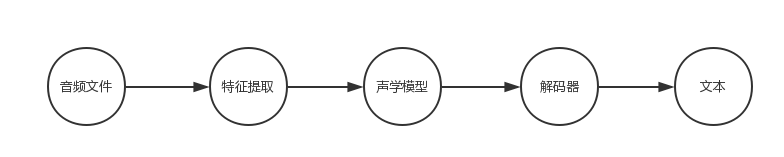
Kaldi 语音识别主流程: 语音识别过程 解码网络使用 HCLG.fst 的方式, 它由 4 个 fst 经过一系列算法组合而成。分别是 H.fst、C.fst、L.fst 和 G.fst 4 个 fst 文件: 1. G:语言模型,输入输出类型相同,实际是一个WFSA(acceptor接受机),为了方便与其它三个WFST进行操作,将其视为一个输入输出相同的WFST。 2. L:发音词典,输入:monophone,输出:词; 3. C:上下文相关,输入:triphone(上下文相关),输出:monophnoe; 4. H:HMM声学模型,输入:HMM transitions-ids (对 pdf-id 和 其它信息编码后的 id),输出:triphone。 通过如下组合方式来计算最终输出结果: HCLG = asl(min(rds(det(H' o min(det(C o min(det(Lo G)))))))) 上面的o表示组合,det表示确定化,min表示最小化,rds表示去除消岐符号,asl表示增加自环。 其训练顺序为 G -> L -> C -> H (因 G 语法模型基于统计生成,L 则是在 G 生成过程中使用的基础,而 C 则是基于 L 生成的 phone 上下文关系依据决策树生成的结果) 解码过程中使用 Lattice 来保存识别的候选序列,通过遍历得到得分最靠前的多条候选路径,即 N-best,即为输出文本。Lattice 本质是一个有向无环图( directed acyclic graph )。 图上的每个节点代表一个词的结束时间点,每条边代表一个可能的词,以及该词发生的声学得分和语言模型得分。 参考 语音识别中的lattice与confusion networkkaldi lattice

资源下载

更多资源
腾讯云软件源

腾讯云软件源

为解决软件依赖安装时官方源访问速度慢的问题,腾讯云为一些软件搭建了缓存服务。您可以通过使用腾讯云软件源站来提升依赖包的安装速度。为了方便用户自由搭建服务架构,目前腾讯云软件源站支持公网访问和内网访问。

Spring

Spring

Spring框架(Spring Framework)是由Rod Johnson于2002年提出的开源Java企业级应用框架,旨在通过使用JavaBean替代传统EJB实现方式降低企业级编程开发的复杂性。该框架基于简单性、可测试性和松耦合性设计理念,提供核心容器、应用上下文、数据访问集成等模块,支持整合Hibernate、Struts等第三方框架,其适用范围不仅限于服务器端开发,绝大多数Java应用均可从中受益。

Rocky Linux

Rocky Linux

Rocky Linux(中文名:洛基)是由Gregory Kurtzer于2020年12月发起的企业级Linux发行版,作为CentOS稳定版停止维护后与RHEL(Red Hat Enterprise Linux)完全兼容的开源替代方案,由社区拥有并管理,支持x86_64、aarch64等架构。其通过重新编译RHEL源代码提供长期稳定性,采用模块化包装和SELinux安全架构,默认包含GNOME桌面环境及XFS文件系统,支持十年生命周期更新。

Sublime Text

Sublime Text

Sublime Text具有漂亮的用户界面和强大的功能,例如代码缩略图,Python的插件,代码段等。还可自定义键绑定,菜单和工具栏。Sublime Text 的主要功能包括:拼写检查,书签,完整的 Python API , Goto 功能,即时项目切换,多选择,多窗口等等。Sublime Text 是一个跨平台的编辑器,同时支持Windows、Linux、Mac OS X等操作系统。

用户登录
用户注册