Android 底部导航栏添加消息数目提示
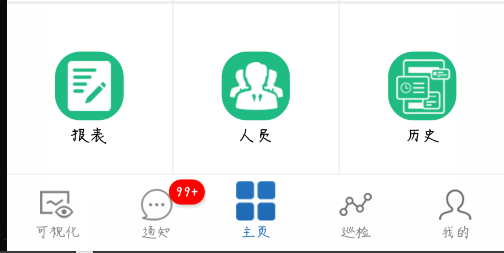
效果图 写一篇短小精悍,好用的知识积累吧。开发中时常会出现信息提醒,新内容提示等等一堆问题。其实就是在各种控件或者是item上面加“小圆点”。网上一搜一大堆。。。但是感觉说的好多。我们只需要基本功能2333. 下面介绍三种方式吧,但是大体套路相同。 一、解需求思路 在 RadioGroup 的 RadioButton 上面直接加小圆点,对于我来说实现有点困难,因为我下面还有文字。搞不好,文字就挤没了。 所有我现在在原有的 RadioGroup 上面加一层覆盖物,类似于 ui 常常接触的图层。 二、布局 就是在原有的 RadioGroup 上覆盖一层透明的 button 并且保证位置相同相同 <?xml version="1.0" encoding="utf-8"?> <RelativeLayout xmlns:android="http://schemas.android.com/apk/res/android" xmlns:tools="http://schemas.android.com/tools" android:layout_width="match_parent" android:layout_height="match_parent" android:background="@color/colorGrayBg" tools:context="cn.ln80.happybirdcloud119.activity.MainActivity"> <android.support.v4.view.ViewPager android:id="@+id/vp_main_page" android:layout_width="match_parent" android:layout_height="match_parent" android:layout_marginBottom="61dp" /> <!--底栏--> <RadioGroup android:id="@+id/rg_main_bottom" android:layout_width="match_parent" android:layout_height="@dimen/iconsize_60" android:layout_alignParentBottom="true" android:background="@android:color/white" android:orientation="horizontal"> <RadioButton android:id="@+id/rb_main_task" style="@style/BottomRadio" android:drawableTop="@drawable/bg_bottom_task" android:text="可视化" android:textColor="@drawable/txt_bottom_notify" /> <RadioButton android:id="@+id/rb_main_notify" style="@style/BottomRadio" android:layout_height="match_parent" android:drawableTop="@drawable/bg_bottom_notify" android:text="通知" android:textColor="@drawable/txt_bottom_notify" /> <RadioButton android:id="@+id/rb_main_home" style="@style/BottomRadio" android:layout_marginTop="@dimen/widget_margin_5" android:checked="true" android:drawableTop="@drawable/bg_bottom_home" android:text="主页" android:textColor="@drawable/txt_bottom_notify" /> <RadioButton android:id="@+id/rb_main_inspect" style="@style/BottomRadio" android:drawableTop="@drawable/bg_bottom_inspect" android:text="巡检" android:textColor="@drawable/txt_bottom_notify" /> <RadioButton android:id="@+id/rb_main_mine" style="@style/BottomRadio" android:drawableTop="@drawable/bg_bottom_mine" android:text="我的" android:textColor="@drawable/txt_bottom_notify" /> </RadioGroup> <LinearLayout android:layout_width="match_parent" android:layout_height="@dimen/iconsize_60" android:layout_alignParentBottom="true" android:orientation="horizontal"> <Button android:id="@+id/btn_main_task" android:layout_width="0dp" android:layout_height="match_parent" android:layout_weight="1" android:background="@null" /> <Button android:id="@+id/btn_main_notification" android:layout_width="0dp" android:layout_height="match_parent" android:layout_weight="1" android:background="@null" /> <Button android:id="@+id/btn_main_home" android:layout_width="0dp" android:layout_height="match_parent" android:layout_weight="1" android:background="@null" /> <Button android:id="@+id/btn_main_inspect" android:layout_width="0dp" android:layout_height="match_parent" android:layout_weight="1" android:background="@null" /> <Button android:id="@+id/btn_main_my" android:layout_width="0dp" android:layout_height="match_parent" android:layout_weight="1" android:background="@null" /> </LinearLayout> </RelativeLayout> 三、第一种方式 import android.content.Context; import android.graphics.Color; import android.graphics.Typeface; import android.graphics.drawable.ShapeDrawable; import android.graphics.drawable.shapes.RoundRectShape; import android.util.AttributeSet; import android.util.Log; import android.util.TypedValue; import android.view.Gravity; import android.view.View; import android.view.ViewGroup; import android.widget.FrameLayout; import android.widget.LinearLayout; import android.widget.TabWidget; /** * Content: * Actor:韩小呆 ヾ(゚▽゚)ノ * Time: 2018/8/6 17:47 * Update: * Time: */ public class BadgeView extends android.support.v7.widget.AppCompatTextView { private boolean mHideOnNull = true; public BadgeView(Context context) { this(context, null); } public BadgeView(Context context, AttributeSet attrs) { this(context, attrs, android.R.attr.textViewStyle); } public BadgeView(Context context, AttributeSet attrs, int defStyle) { super(context, attrs, defStyle); init(); } private void init() { if (!(getLayoutParams() instanceof LinearLayout.LayoutParams)) { LinearLayout.LayoutParams layoutParams = new LinearLayout.LayoutParams( android.view.ViewGroup.LayoutParams.WRAP_CONTENT, android.view.ViewGroup.LayoutParams.WRAP_CONTENT, Gravity.END | Gravity.TOP); setLayoutParams(layoutParams); } // set default font setTextColor(Color.WHITE); setTypeface(Typeface.DEFAULT_BOLD); setTextSize(TypedValue.COMPLEX_UNIT_SP, 11); setPadding(dip2Px(5), dip2Px(1), dip2Px(5), dip2Px(1)); // set default background setBackground(9, Color.parseColor("#d3321b")); setGravity(Gravity.CENTER); // default values setHideOnNull(true); setBadgeCount(0); } public void setBackground(int dipRadius, int badgeColor) { int radius = dip2Px(dipRadius); float[] radiusArray = new float[]{radius, radius, radius, radius, radius, radius, radius, radius}; RoundRectShape roundRect = new RoundRectShape(radiusArray, null, null); ShapeDrawable bgDrawable = new ShapeDrawable(roundRect); bgDrawable.getPaint().setColor(badgeColor); setBackground(bgDrawable); } /** * @return Returns true if view is hidden on badge value 0 or null; */ public boolean isHideOnNull() { return mHideOnNull; } /** * @param hideOnNull the hideOnNull to set */ public void setHideOnNull(boolean hideOnNull) { mHideOnNull = hideOnNull; setText(getText()); } /* * (non-Javadoc) * * @see android.widget.TextView#setText(java.lang.CharSequence, android.widget.TextView.BufferType) */ @Override public void setText(CharSequence text, BufferType type) { if (isHideOnNull() && (text == null || text.toString().equalsIgnoreCase("0"))) { setVisibility(View.GONE); } else { setVisibility(View.VISIBLE); } super.setText(text, type); } public void setBadgeCount(int count) { setText(String.valueOf(count)); } public Integer getBadgeCount() { if (getText() == null) { return null; } String text = getText().toString(); try { return Integer.parseInt(text); } catch (NumberFormatException e) { return null; } } public void setBadgeGravity(int gravity) { FrameLayout.LayoutParams params = (FrameLayout.LayoutParams) getLayoutParams(); params.gravity = gravity; setLayoutParams(params); } public int getBadgeGravity() { FrameLayout.LayoutParams params = (FrameLayout.LayoutParams) getLayoutParams(); return params.gravity; } public void setBadgeMargin(int dipMargin) { setBadgeMargin(dipMargin, dipMargin, dipMargin, dipMargin); } public void setBadgeMargin(int leftDipMargin, int topDipMargin, int rightDipMargin, int bottomDipMargin) { FrameLayout.LayoutParams params = (FrameLayout.LayoutParams) getLayoutParams(); params.leftMargin = dip2Px(leftDipMargin); params.topMargin = dip2Px(topDipMargin); params.rightMargin = dip2Px(rightDipMargin); params.bottomMargin = dip2Px(bottomDipMargin); setLayoutParams(params); } public int[] getBadgeMargin() { FrameLayout.LayoutParams params = (FrameLayout.LayoutParams) getLayoutParams(); return new int[]{params.leftMargin, params.topMargin, params.rightMargin, params.bottomMargin}; } public void incrementBadgeCount(int increment) { Integer count = getBadgeCount(); if (count == null) { setBadgeCount(increment); } else { setBadgeCount(increment + count); } } public void decrementBadgeCount(int decrement) { incrementBadgeCount(-decrement); } /* * Attach the BadgeView to the TabWidget * * @param target the TabWidget to attach the BadgeView * * @param tabIndex index of the tab */ public void setTargetView(TabWidget target, int tabIndex) { View tabView = target.getChildTabViewAt(tabIndex); setTargetView(tabView); } /* * Attach the BadgeView to the target view * * @param target the view to attach the BadgeView */ public void setTargetView(View target) { if (getParent() != null) { ((ViewGroup) getParent()).removeView(this); } if (target == null) { return; } if (target.getParent() instanceof FrameLayout) { ((FrameLayout) target.getParent()).addView(this); } else if (target.getParent() instanceof ViewGroup) { ViewGroup parentContainer = (ViewGroup) target.getParent(); int groupIndex = parentContainer.indexOfChild(target); parentContainer.removeView(target); FrameLayout badgeContainer = new FrameLayout(getContext()); ViewGroup.LayoutParams parentLayoutParams = target.getLayoutParams(); badgeContainer.setLayoutParams(parentLayoutParams); target.setLayoutParams(new ViewGroup.LayoutParams( ViewGroup.LayoutParams.MATCH_PARENT, ViewGroup.LayoutParams.MATCH_PARENT)); parentContainer.addView(badgeContainer, groupIndex, parentLayoutParams); badgeContainer.addView(target); badgeContainer.addView(this); } else if (target.getParent() == null) { Log.e(getClass().getSimpleName(), "ParentView is needed"); } } /* * converts dip to px */ private int dip2Px(float dip) { return (int) (dip * getContext().getResources().getDisplayMetrics().density + 0.5f); } } 将这个代码直接 C、V 到自己的 类内,然后在使用的地方直接填写如下代码: BadgeView badgeView = new BadgeView(this); badgeView.setTargetView(btnMainNotification); badgeView.setBadgeCount(12); badgeView.setBackground(20, getResources().getColor(R.color.colorRed)); 这个自定义的代码是一位外国大佬搞出来的,原版代码在这,欢迎查阅:BadgeView。 这里面的一些属性: //设置依附的控件 setTargetView(View) //设置显示的数字 setBadgeCount(int) //设置显示的位置 setBadgeGravity(Gravity) //设置背景色 setBackgroundColor() //设置背景图片 setBackgroundResource() //设置显示字体 比如说加粗、倾斜、啥的 setTypeface() //设置字体阴影 setShadowLayer() 四、第二种方式 引用这位大佬的依赖 :BadgeView ---> compile 'q.rorbin:badgeview:1.1.3' 代码代码中使用: new QBadgeView(this).bindTarget(btnMainNotification).setBadgeText("99+").setBadgeBackgroundColor(getResources().getColor(R.color.colorRed)); 可以返回一个 Badge 对象提高开发者操作。 一些常用属性 //设置Badge数字 setBadgeNumber(int i); //设置Badge文本 setBadgeText(String text); //设置文本字体大小 setBadgeTextSize(int size); // 设置文本颜色 setBadgeTextColor(); //设置是否显示精确模式数值 setExactMode(); //设置Badge相对于TargetView的位置 setBadgeGravity(); //设置外边距 setGravityOffset(); //设置内边距 setBadgePadding(); //设置背景色 setBadgeBackgroundColor(); //设置背景图片 setBadgeBackground(); //设置是否显示阴影 setShowShadow(); //打开拖拽消除模式并设置监听 setOnDragStateChangedListener(); //描边 stroke(); //隐藏Badge hide(); 官方的演示 五、最后一种实现方式 BGABadgeView-Android 六、总结 总体的实现思路就是,在底部导航栏覆盖一层透明的布局,然后在透明布局内的控件上面依赖(寄生)上小圆点。