首页 文章 精选 留言 我的

精选列表

搜索[节点类型],共10000篇文章
优秀的个人博客,低调大师

分布式缓存Redis Centos下单节点安装

摘要: Redis官网:http://redis.io 独立缓存服务器:IP:xxx.xxx.xxx.xxx 安装环境:CentOS 6.6 Redis 版本:redis-3.0 (因为 Redis3.0 在集群... 声明: 网上关于分布式缓存Redis的学习资料很多,大家可以去网上找些资料去学习。 另外 JEESZ框架面向企业的大型互联网分布式企业架构,分布式缓存是必不可少的,故这边总结了一些关于分布式缓存Redis的实战文章作为后期JEESZ分布式框架的教程,希望也可以帮助到大家,请勿吐槽。 Redis官网:http://redis.io 独立缓存服务器:IP:xxx.xxx.xxx.xxx 安装环境:CentOS 6.6 Redis 版本:redis-3.0 (因为 Redis3.0 在集群和性能提升方面的特性,rc 版为正式版的候选版,请在安装时去官网选用最新版) 用户:root 安装目录:/usr/local/redis 下面我们针对于Redis安装做下详细的记录: 编译和安装所需的包: yum install gcc tcl 提醒:下载 3.0 版 Redis(当前最新版 redis-3.0.0-rc5.tar.gz,请在安装时去官网选用最新版) cd /usr/local/src wgethttps://github.com/antirez/redis/archive/3.0.0-rc5.tar.gz 提醒:此路径可以通过官网去下载目录copy 创建安装目录: mkdir /usr/local/redis 解压: tar -zxvf 3.0.0-rc5.tar.gz mv redis-3.0.0-rc5 redis3.0 cd redis3.0 安装(使用 PREFIX 指定安装目录): make PREFIX=/usr/local/redis install 安装完成后,可以看到/usr/local/redis 目录下有一个 bin 目录,bin 目录里就是 redis 的命令脚本: redis-benchmark redis-check-aof redis-check-dump redis-cli redis-server 将 Redis 配置成服务: 按上面的操作步骤,Redis 的启动脚本为:/usr/local/src/redis3.0/utils/redis_init_script 将启动脚本复制到/etc/rc.d/init.d/目录下,并命名为 redis cp /usr/local/src/redis3.0/utils/redis_init_script /etc/rc.d/init.d/redis 编辑/etc/rc.d/init.d/redis,修改相应配置,使之能注册成为服务: vi /etc/rc.d/init.d/redis !/bin/sh Simple Redis init.d script conceived to work on Linux systems as it does use of the /proc filesystem. REDISPORT=6379 EXEC=/usr/local/bin/redis-server CLIEXEC=/usr/local/bin/redis-cli PIDFILE=/var/run/redis_${REDISPORT}.pid CONF="/etc/redis/${REDISPORT}.conf" case "$1" in start) if [ -f $PIDFILE ] then echo "$PIDFILE exists, process is already running or crashed" else echo "Starting Redis server..." $EXEC $CONF fi ;; stop) if [ ! -f $PIDFILE ] then echo "$PIDFILE does not exist, process is not running" else PID=$(cat $PIDFILE) echo "Stopping ..." $CLIEXEC -p $REDISPORT shutdown while [ -x /proc/${PID} ] do echo "Waiting for Redis to shutdown ..." sleep 1 done echo "Redis stopped" fi ;; *) echo "Please use start or stop as first argument" ;; esac 查看以上 redis 服务脚本,关注标为橙色的几个属性,做如下几个修改的准备: (1) 在脚本的第一行后面添加一行内容如下: chkconfig: 2345 80 90 提醒:如果不添加上面的内容,在注册服务时会提示:service redis does not support chkconfig (2) REDISPORT 端口保持 6379 不变;(特别注意:端口名将与下面的配置文件名有关) (3) EXEC=/usr/local/bin/redis-server 改为 EXEC=/usr/local/redis/bin/redis-server (4) CLIEXEC=/usr/local/bin/redis-cli 改为 CLIEXEC=/usr/local/redis/bin/redis-cli (5) 配置文件设置: 创建 redis 配置文件目录 mkdir /usr/local/redis/conf 复制 redis 配置文件/usr/local/src/redis3.0/redis.conf 到/usr/local/redis/conf 目录并按端口号重命名为6379.conf cp /usr/local/src/redis3.0/redis.conf /usr/local/redis/conf/6379.conf 做了以上准备后,再对 CONF 属性作如下调整: CONF="/etc/redis/${REDISPORT}.conf" 改为 CONF="/usr/local/redis/conf/${REDISPORT}.conf" (6) 更改 redis 开启的命令,以后台运行的方式执行: $EXEC $CONF & #“&”作用是将服务转到后面运行 修改后的/etc/rc.d/init.d/redis 服务脚本内容为: !/bin/sh chkconfig: 2345 80 90 Simple Redis init.d script conceived to work on Linux systems as it does use of the /proc filesystem. REDISPORT=6379 EXEC=/usr/local/redis/bin/redis-server CLIEXEC=/usr/local/redis/bin/redis-cli PIDFILE=/var/run/redis_${REDISPORT}.pid CONF="/usr/local/redis/conf/${REDISPORT}.conf" case "$1" in start) if [ -f $PIDFILE ] then echo "$PIDFILE exists, process is already running or crashed" else echo "Starting Redis server..." $EXEC $CONF & fi ;; stop) if [ ! -f $PIDFILE ] then echo "$PIDFILE does not exist, process is not running" else PID=$(cat $PIDFILE) echo "Stopping ..." $CLIEXEC -p $REDISPORT shutdown while [ -x /proc/${PID} ] do echo "Waiting for Redis to shutdown ..." sleep 1 done echo "Redis stopped" fi ;; *) echo "Please use start or stop as first argument" ;; esac 以上配置操作完成后,便可将 Redis 注册成为服务: chkconfig --add redis 防火墙中打开对应的端口 vi /etc/sysconfig/iptables 添加: -A INPUT -m state --state NEW -m tcp -p tcp --dport 6379 -j ACCEPT 重启防火墙: service iptables restart 修改 redis 配置文件设置: vi /usr/local/redis/conf/6379.conf 修改如下配置 daemonize no 改为 daemonize yes 备注:如果不改为yes,pid文件是不会生成,start、stop命令是不会生效的(依赖pid文件) pidfile /var/run/redis.pid 改为 pidfile /var/run/redis_6379.pid 启动 Redis 服务 service redis start 将 Redis 添加到环境变量中: vi /etc/profile 在最后添加以下内容: Redis env export PATH=$PATH:/usr/local/redis/bin 使配置生效: source /etc/profile 当前可以直接使用 redis-cli 等 redis 命令了: redis-cli 关闭 Redis 服务 service redis stop 提醒:默认情况下,Redis 开启安全认证,可以通过/usr/local/redis/conf/6379.conf 的 requirepass 指定一个 验证密码

优秀的个人博客,低调大师

openstack学习笔记六 多节点部署之keystone

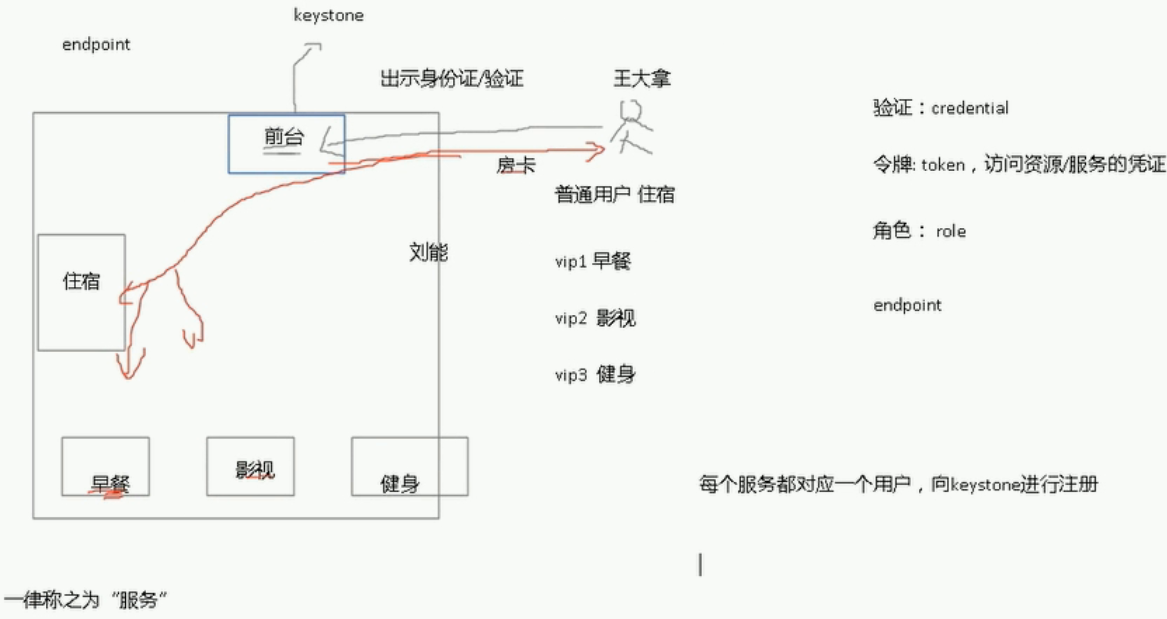
keystone 对用户进行验证,每个组件必须得实用一个用户向keystone进行注册,只有成功了,那么这个组件才能正常工作。所以当我们在创建其他组件的时候,也包括keystone本身,都得为这个组件创建一个用户名和密码 keystone也必须知道这些组件到底在什么地方,比如在那台主机上。 User 住宾馆的人 Credentials 开启房间的钥匙 Authentication 宾馆为了拒绝不必要的人进出宾馆,专门设置的机制,只有拥有钥匙的人才能进出 Token 也是一种钥匙,有点特别 Tenant 宾馆 Service 宾馆可以提供的服务类别,比如,饮食类,娱乐类 Endpoint 具体的一种服务,比如吃烧烤,打羽毛球 Role VIP 等级,VIP越高,享有越高的权限 1 2 3 4 5 6 7 8 9 10 11 12 13 14 15 16 17 [root@h1~] #sourcekeystonerc_admin [root@h1~(keystone_admin)] #keystoneendpoint-list +----------------------------------+-----------+-------------------------------------------------+-------------------------------------------------+--------------------------------------------+----------------------------------+ | id |region|publicurl|internalurl|adminurl|service_id| +----------------------------------+-----------+-------------------------------------------------+-------------------------------------------------+--------------------------------------------+----------------------------------+ |03bf88d48e2648149242a571684fbfce|RegionOne|http: //192 .168.1.201:9696|http: //192 .168.1.201:9696|http: //192 .168.1.201:9696|1100243c5a694bc5857218dd0543297b| |1b5ccdf306484fefadc63d1eeb20de5d|RegionOne|http: //127 .0.0.1:8774 /v3 |http: //127 .0.0.1:8774 /v3 |http: //127 .0.0.1:8774 /v3 |4bda82ded4db46f68428d4e00247c14c| |2408bc6cb5164053b86c0983fd39961a|RegionOne|http: //192 .168.1.201:8080 /v1/AUTH_ %(tenant_id)s|http: //192 .168.1.201:8080 /v1/AUTH_ %(tenant_id)s|http: //192 .168.1.201:8080|30c62c3c0797462a8bd4ff059a71296e| |432e655e85614a5eb69b7de5c5aacf34|RegionOne|http: //192 .168.1.201:8776 /v2/ %(tenant_id)s|http: //192 .168.1.201:8776 /v2/ %(tenant_id)s|http: //192 .168.1.201:8776 /v2/ %(tenant_id)s|5d60cb24769e403cb10bb70cb1077f2b| |4d5c1e505b30467c9966a5e5e93feef0|RegionOne|http: //192 .168.1.201:9292|http: //192 .168.1.201:9292|http: //192 .168.1.201:9292|87d30bb0dd8e44ccba00127f77831e9e| |8683d84884d74e7c8a73513260aec774|RegionOne|http: //192 .168.1.201:8080|http: //192 .168.1.201:8080|http: //192 .168.1.201:8080|e6ced100d94e4f3b86cccfc82e12b83a| |8fa0e177bac746f79e229f16954506fb|RegionOne|http: //192 .168.1.201:8776 /v1/ %(tenant_id)s|http: //192 .168.1.201:8776 /v1/ %(tenant_id)s|http: //192 .168.1.201:8776 /v1/ %(tenant_id)s|dc75a046272548db99e1cbbe93c2025c| |9006207b29a04700922ee55905a7f445|RegionOne|http: //192 .168.1.201:8774 /v2/ %(tenant_id)s|http: //192 .168.1.201:8774 /v2/ %(tenant_id)s|http: //192 .168.1.201:8774 /v2/ %(tenant_id)s|1c9e6e4d00824327bfe4e8e7175317e1| |a9ec253a705c4b3c9848b5bed32e9768|RegionOne|http: //192 .168.1.201:8773 /services/Cloud |http: //192 .168.1.201:8773 /services/Cloud |http: //192 .168.1.201:8773 /services/Admin |81bbcf83509a42e9a867914cde84e9d4| |bcab3bbc3281451494428315b24b0dba|RegionOne|http: //192 .168.1.201:8777|http: //192 .168.1.201:8777|http: //192 .168.1.201:8777|8f54fc4364de49efbeb72020bf2aa176| |e3d9a4fa64bd441ea3fe143b1d72b8a4|RegionOne|http: //192 .168.1.201:5000 /v2 .0|http: //192 .168.1.201:5000 /v2 .0|http: //192 .168.1.201:35357 /v2 .0|02ce8247c5924913a73422bcf5275c40| +----------------------------------+-----------+-------------------------------------------------+-------------------------------------------------+--------------------------------------------+----------------------------------+ 1 2 3 4 5 6 7 8 9 10 11 12 13 14 15 16 [root@h1~(keystone_admin)] #keystoneservice-list服务 +----------------------------------+------------+--------------+--------------------------------+ | id |name| type |description| +----------------------------------+------------+--------------+--------------------------------+ |8f54fc4364de49efbeb72020bf2aa176|ceilometer|metering|OpenstackMeteringService| |dc75a046272548db99e1cbbe93c2025c|cinder|volume|CinderService| |5d60cb24769e403cb10bb70cb1077f2b|cinderv2|volumev2|CinderServicev2| |87d30bb0dd8e44ccba00127f77831e9e|glance|image|OpenStackImageService| |02ce8247c5924913a73422bcf5275c40|keystone|identity|OpenStackIdentityService| |1100243c5a694bc5857218dd0543297b|neutron|network|NeutronNetworkingService| |1c9e6e4d00824327bfe4e8e7175317e1|nova|compute|OpenstackComputeService| |81bbcf83509a42e9a867914cde84e9d4|nova_ec2|ec2|EC2Service| |4bda82ded4db46f68428d4e00247c14c|novav3|computev3|OpenstackComputeServicev3| |30c62c3c0797462a8bd4ff059a71296e|swift|object-store|OpenstackObject-StoreService| |e6ced100d94e4f3b86cccfc82e12b83a|swift_s3|s3|OpenstackS3Service| +----------------------------------+------------+--------------+--------------------------------+ 1 2 3 4 5 6 7 8 9 [root@h1~(keystone_admin)] #keystonerole-list角色 +----------------------------------+---------------+ | id |name| +----------------------------------+---------------+ |7455105a501842e097e7825257eb5be4|ResellerAdmin| |5d2a5d2f80d442e09b9c3d514ded412e|SwiftOperator| |9fe2ff9ee4384b1894a90878d3e92bab|_member_| |794f590d02344bafb280f37ff29433ae|admin| +----------------------------------+---------------+ 1 2 3 4 5 6 7 8 [root@h1~(keystone_admin)] #keystonerole-create--nametest1 +----------+----------------------------------+ |Property|Value| +----------+----------------------------------+ | id |467d36315d9c4e529e9400c606f8d7a2| |name|test1| +----------+----------------------------------+ [root@h1~(keystone_admin)] #keystonerole-deletetest1 1 2 3 4 5 6 7 8 9 10 11 12 13 14 15 16 17 18 19 20 21 22 23 [root@h1~(keystone_admin)] #keystoneuser-list用户 +----------------------------------+------------+---------+----------------------+ | id |name|enabled|email| +----------------------------------+------------+---------+----------------------+ |1627cc3d61c04f9db9608e9703a01371|admin|True|root@localhost| |04247710cdf34914a7f5b315ab166731|ceilometer|True|ceilometer@localhost| |cb5e12e30a4a4c1dae57255c184b8b30|cinder|True|cinder@localhost| |632fb20205ea4c40988d7d65b2844ff6|glance|True|glance@localhost| |23c4fb48a5a247d68e50c6b74fb6f035|http|True|| |80069f5c8edc454b8038e7f116df4ff5|neutron|True|neutron@localhost| |adbcaaf58d09495988b57be8e82b4e6b|nova|True|nova@localhost| |4f488ff4859e4973afefea6e7872ed83|swift|True|swift@localhost| +----------------------------------+------------+---------+----------------------+ [root@h1~(keystone_admin)] #keystoneuser-create--namehequan--passhequan--emailhequan2011@sina.com +----------+----------------------------------+ |Property|Value| +----------+----------------------------------+ |email|hequan2011@sina.com| |enabled|True| | id |9d12907283b64b02a80f1e98074a9c84| |name|hequan| |username|hequan| +----------+----------------------------------+ 1 2 3 4 [root@h1~(keystone_admin)] #keystoneuser-gethequan##查看信息 [root@h1~(keystone_admin)] #keystoneuser-deletehequan [root@h1~(keystone_admin)] #keystoneuser-password-update--passhequan1hequan##密码更新 [root@h1~(keystone_admin)] #keystoneuser-role-add--userhequan--role_member_--tenant=http#划分角色和租户 1 2 3 4 5 6 7 8 [root@h1~(keystone_admin)] #keystonetenant-list租户 +----------------------------------+----------+---------+ | id |name|enabled| +----------------------------------+----------+---------+ |43986fb013804aa0a04ca277e4d0e69c|admin|True| |1af10fa8077e4b52b3427786bb15e968|http|True| |842da711a1b740ddbf006a9f0a7ee116|services|True| ##内置服务默认都属于services +----------------------------------+----------+---------+ 1 2 3 4 5 6 7 8 9 10 [root@h1~(keystone_admin)] #keystonetenant-create--name123###创建租户123 +-------------+----------------------------------+ |Property|Value| +-------------+----------------------------------+ |description|| |enabled|True| | id |c2a2e3aadf614bb08b1fc943157b668e| |name|123| +-------------+----------------------------------+ [root@h1~(keystone_admin)] #keystonetenant-delete123 配置安装keystone 首先创建数据库 使用token登陆keystone 创建服务 endpoint 创建用户 关闭token登陆,使用admin登陆 基本环境 1 2 3 4 5 6 7 192.168.1.204h4.hequan.comh4 ##keystone systemctlstopNetworkManager systemctldisableNetworkManager [root@h4~] #yuminstallcentos-release-openstack-liberty 1 2 3 4 5 6 7 8 9 [root@h4~] #yuminstallopenstack-keystoneopenstack-utilsopenstack-selinux-y [root@h4~] #openstack-db--init--servicekeystone--rootpw123456--passwordkeystone keystonedefaultDBisnotmysql.Wouldyouliketoresettomysqlnow?(y /n ):y mysql-serverisnotinstalled.Wouldyouliketo install itnow?(y /n ):y mysqldisnotrunning.Wouldyouliketostartitnow?(y /n ):y VerifiedconnectivitytoMySQL. Creating 'keystone' database. Initializingthekeystonedatabase,pleasewait... Complete! 1 2 3 4 5 6 7 8 9 10 11 12 13 14 15 16 17 18 19 20 [root@h4~] #mysql-uroot-p123456 MariaDB[(none)]>showdatabases; [root@h4keystone] #opensslrand-hex10 73fa731f6fa567630fdd [root@h4keystone] #pwd /etc/keystone [root@h4keystone] #vimkeystone.conf admin_token=73fa731f6fa567630fdd rabbit_host=localhost rabbit_port=5672 rabbit_hosts=$rabbit_host:$rabbit_port rabbit_use_ssl= false rabbit_userid=guest rabbit_password=guest rabbit_login_method=AMQPLAIN rabbit_virtual_host=/ connection=mysql: //keystone :keystone@192.168.1.204 /keystone ###用到上面写的用户名和密码 启动服务 1 2 3 4 5 6 [root@h4keystone] #systemctllist-unit-files|grepkeyston openstack-keystone.servicedisabled [root@h4keystone] #systemctlstartopenstack-keystone.service [root@h4keystone] #systemctlenableopenstack-keystone.service 现在没有用户,只有token 1 2 3 4 5 6 7 8 9 10 11 12 13 14 15 16 17 18 19 20 21 22 23 24 25 26 27 28 29 cat keystone_token ##创建文件 export SERVICE_TOKEN=73fa731f6fa567630fdd export SERVICE_ENDPOINT=http: //192 .168.1.204:35357/v2.0 export PS1= '[\u@\h\W(keystone_token)]\$' source keystone_token ps aux| grep keystone keystone33431.51.632184468704?Ss20:100:05 /usr/bin/python2 /usr/bin/keystone-all netstat -lntup| grep 35357 tcp000.0.0.0:353570.0.0.0:*LISTEN3343 /python2 keystoneservice-list [root@h4~] #keystoneservice-create--namekeystone--typeidentity--description="keystone" +-------------+----------------------------------+ |Property|Value| +-------------+----------------------------------+ |description|keystone| |enabled|True| | id |e0c6163cb7dd42098225f13a3fa4220e| |name|keystone| | type |identity| +-------------+----------------------------------+ 1 2 3 4 5 6 7 8 9 10 11 12 13 14 15 16 17 18 19 20 21 22 23 24 25 26 [root@h4~] #keystoneendpoint-create--service-ide0c6163cb7dd42098225f13a3fa4220e--publicurl''--internalurl''--adminurl'' 可以找一个模板去抄 [root@h1~(keystone_admin)] #keystoneendpoint-list +----------------------------------+-----------+-------------------------------------------------+-------------------------------------------------+--------------------------------------------+----------------------------------+ | id |region|publicurl|internalurl|adminurl|service_id| +----------------------------------+-----------+-------------------------------------------------+-------------------------------------------------+--------------------------------------------+----------------------------------+ |e3d9a4fa64bd441ea3fe143b1d72b8a4|RegionOne|http: //192 .168.1.201:5000 /v2 .0|http: //192 .168.1.201:5000 /v2 .0|http: //192 .168.1.201:35357 /v2 .0|02ce8247c5924913a73422bcf5275c40| [root@h1~(keystone_admin)] #keystoneservice-list |02ce8247c5924913a73422bcf5275c40|keystone|identity|OpenStackIdentityService| [root@h4~] #keystoneendpoint-create--service-ide0c6163cb7dd42098225f13a3fa4220e--publicurl'http://192.168.1.201:5000/v2.0'--internalurl''--adminurl''--publicurl'http://192.168.1.204:5000/v2.0'--internalurl'http://192.168.1.204:5000/v2.0'--adminurl'http://192.168.1.204:35357/v2.0' +-------------+----------------------------------+ |Property|Value| +-------------+----------------------------------+ |adminurl|http: //192 .168.1.204:35357 /v2 .0| | id |810e5faef22f44aebd17f55d1808e3c5| |internalurl|http: //192 .168.1.204:5000 /v2 .0| |publicurl|http: //192 .168.1.204:5000 /v2 .0| |region|regionOne| |service_id|e0c6163cb7dd42098225f13a3fa4220e| +-------------+----------------------------------+ 创建管理员 1 2 3 4 5 6 7 8 9 10 11 12 13 14 15 16 17 18 19 20 21 22 23 24 25 26 27 28 29 30 31 [root@h4~] #keystonetenant-create--nameadmin +-------------+----------------------------------+ |Property|Value| +-------------+----------------------------------+ |description|| |enabled|True| | id |3a331dd90062458b8fcc259ce84be0e5| |name|admin| +-------------+----------------------------------+ [root@h4~] #keystonerole-create--nameadmin +----------+----------------------------------+ |Property|Value| +----------+----------------------------------+ | id |c63ed09a433144108a23a592632e2e08| |name|admin| +----------+----------------------------------+ [root@h4~] #keystoneuser-create--nameadmin--pass123456 +----------+----------------------------------+ |Property|Value| +----------+----------------------------------+ |email|| |enabled|True| | id |172b6a61991e4fbeafe9039688eb2afc| |name|admin| |username|admin| +----------+----------------------------------+ [root@h4~] #keystoneuser-role-add--useradmin--tenantadmin--roleadmin 1 2 3 4 5 6 7 8 9 10 11 12 13 14 15 16 17 18 [root@h4~] #cpkeystone_tokenkeystone_token_admin [root@h4~(keystone_admin)] #catkeystone_token_admin unset SERVICE_TOKEN unset SERVICE_ENDPOINT export OS_TENANT_NAME=admin export OS_USERNAME=admin export OS_PASSWORD=123456 export OS_AUTH_URL=http: //192 .168.1.204:35357 /v2 .0 export PS1= '[\u@\h\W(keystone_admin)]\$' [root@h4~(keystone_admin)] #keystoneuser-list##可以看到就表示成功了 +----------------------------------+-------+---------+-------+ | id |name|enabled|email| +----------------------------------+-------+---------+-------+ |172b6a61991e4fbeafe9039688eb2afc|admin|True|| +----------------------------------+-------+---------+-------+ 关闭token验证 1 2 12 #admin_token=73fa731f6fa567630fdd 13 至此安装完成。 本文转自 295631788 51CTO博客,原文链接:http://blog.51cto.com/hequan/1796108,如需转载请自行联系原作者

资源下载

更多资源
Mario

Mario

马里奥是站在游戏界顶峰的超人气多面角色。马里奥靠吃蘑菇成长,特征是大鼻子、头戴帽子、身穿背带裤,还留着胡子。与他的双胞胎兄弟路易基一起,长年担任任天堂的招牌角色。

腾讯云软件源

腾讯云软件源

为解决软件依赖安装时官方源访问速度慢的问题,腾讯云为一些软件搭建了缓存服务。您可以通过使用腾讯云软件源站来提升依赖包的安装速度。为了方便用户自由搭建服务架构,目前腾讯云软件源站支持公网访问和内网访问。

Nacos

Nacos

Nacos /nɑ:kəʊs/ 是 Dynamic Naming and Configuration Service 的首字母简称,一个易于构建 AI Agent 应用的动态服务发现、配置管理和AI智能体管理平台。Nacos 致力于帮助您发现、配置和管理微服务及AI智能体应用。Nacos 提供了一组简单易用的特性集,帮助您快速实现动态服务发现、服务配置、服务元数据、流量管理。Nacos 帮助您更敏捷和容易地构建、交付和管理微服务平台。

Rocky Linux

Rocky Linux

Rocky Linux(中文名:洛基)是由Gregory Kurtzer于2020年12月发起的企业级Linux发行版,作为CentOS稳定版停止维护后与RHEL(Red Hat Enterprise Linux)完全兼容的开源替代方案,由社区拥有并管理,支持x86_64、aarch64等架构。其通过重新编译RHEL源代码提供长期稳定性,采用模块化包装和SELinux安全架构,默认包含GNOME桌面环境及XFS文件系统,支持十年生命周期更新。


用户登录
用户注册