首页 文章 精选 留言 我的

精选列表

搜索[服务器],共10000篇文章
优秀的个人博客,低调大师

linux服务器---百科mediawiki

Mediawiki Mediawiki是一个强大的维基软件,可以实现页面编辑、图像和多媒体管理。 1、下载mediawiki软件(“https://www.mediawiki.org/wiki/News”) 2、为mediawiki-1.22创建一个自己的数据库,我们起名为“mediawiki-1.22” 3、将mediawiki安装包解压到apache的网页根目录“/var/www/html/” [root@localhosthtml]# cp/wj/mediawiki-1.22.tar/var/www/html///拷贝压缩包 [root@localhosthtml]# tar–xvfmediawiki-1.22.tar//解压 [root@localhosthtml]# mvmediawiki-1.22mediawiki-1.22//重命令,这样方便从浏览器打开 4、安装。在浏览器输入地址“127.0.0.1/mediawiki”,开始安装 1)提示“localsetting.phpnotfound”,点击“setupthewiki” 2)选择语言 3)检测环境,如果有严重问题,那么需要提前解决。可以看到下图中,缺少pecl扩展。 4)设置数据库 5)设置管理员 6)安装完成。最后会生成一个“localsettings.php”这是mediawiki的配置文件,我们要将这个文件保存到mediawiki的工作目录 [root@localhost~]# cp/wj/LocalSettings.php/var/www/html/mediawiki/ 7)在浏览器输入“127.0.0.1/mediawiki”,就可以访问mediawiki主页

优秀的个人博客,低调大师

polysh 同时处理多台服务器

Polysh介绍 官方主页的介绍如下: Polysh is a tool to aggregate several remote shells into one. It is used to launch an interactive remote shell on many machines at once. It is written in Python and requires Python ≥ 2.4. 平时我们登录远程主机时,每登录一个远程主机均需要打开一个shell,然后在各个shell中与远程主机进行命令交互。Polysh的作用是允许你在一个shell中同时向多个远程主机发送命令,返回的结果在这个shell中显示。Polysh对于需要登录多个远程主机,并执行相同指令的情况,大大减少了我们的工作量。 Polysh安装 通过下载源代码的试安装,步骤如下: wget wget http://guichaz.free.fr/polysh/files/polysh-0.4.tar.gz tar -zxvf polysh-0.4.tar.gz cd polysh-0.4 su python setup.py install Xshell配置Xagent 打开文件-属性,选择SSH选项,选择”使用密码处理的Xagent(SSH代理)”。然后将Xshell重启。 Polysh使用 polysh 106.2.52.163 106.2.52.161 可以看到以下提示,说明同时登录上了两个远程主机 ready (2)> 执行命令 ready (2)> pwd 显示 106.2.52.163 : /home/lihao 106.2.52.161 : /home/lihao 说明pwd命令已经同时发往106.2.52.163,106.2.52.161,并得到其返回的结果。 Polysh指令 以冒号开头的指令不会发送到远程主机,polysh会执行以冒号开头的指令,例如 ready (2)> :help :add Add one or many remote shells. :chdir Change the current directory of polysh (not the remote shells). :disable Disable sending commands to remote shells. :enable Enable sending commands to remote shells. :export_vars Export some environment variables on enabled remote shells. :help List control commands or show their documentations. :hide_password Do not echo the next typed line. :list List remote shells and their states. :purge Delete disabled remote shells. :quit Quit polysh. :reconnect Try to reconnect to disconnected remote shells. :rename Rename all enabled remote shells with the argument. :replicate Copy a path from one remote shell to all others :reset_prompt Change the prompt to be recognized by polysh. :send_ctrl Send a control character to remote shells. :set_debug Enable or disable debugging output for remote shells. :set_log Duplicate every console I/O into the given local file. :show_read_buffer Print the data read by remote shells. :upload Upload the specified local path to enabled remote shells. 具体指令可以参考上述的说明。 Polysh源码 可以通过git获取polysh的源码 git clone git://repo.or.cz/polysh.git 参考资料 Polysh官方文档, http://guichaz.free.fr/polysh/ 运维工具-Polysh 入门, http://segmentfault.com/a/1190000000492374 --------------------- 本文来自 haozlee 的CSDN 博客 ,全文地址请点击:https://blog.csdn.net/lihao21/article/details/48319085?utm_source=copy

优秀的个人博客,低调大师

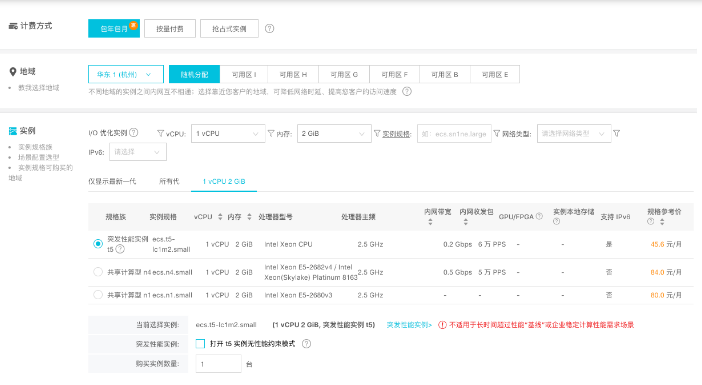
阿里云服务器ECS降价了!!

【阿里云】【ECS】【价格调整通知】 突发性实例特价,2核4G,3年仅需699:点我组队 调整时间:2018年6月4日 调整内容:阿里云中国站(www.aliyun.com)ECS部分产品将于2018年6月4日进行价格下调。 本次降价策略覆盖国内华北1、华北2、华北3、华北5、华东1、华东2、华南1七个地域。具体优惠详见下表。 领券地址:阿里云幸运券 规格 月价/小时价 目录价降幅 月价实际成交价降幅 ecs.sn1ne.large 24% 19.9% ecs.sn1ne.xlarge 24% 19.9% ecs.sn1ne.2xlarge 24% 19.9% ecs.sn1ne.3xlarge 24% 19.9% ecs.sn1ne.4xlarge 24% 19.9% ecs.sn1ne.6xlarge 24% 19.9% ecs.sn1ne.8xlarge 24% 19.9% ddh.sn1ne 24% 19.9% ddh.c5 24% 19.9% ecs.gn5-c4g1.xlarge 15% 10.5% ecs.gn5-c8g1.2xlarge 15% 10.5% ecs.gn5-c28g1.7xlarge 15% 10.5% ecs.gn5-c4g1.2xlarge 15% 10.5% ecs.gn5-c8g1.4xlarge 15% 10.5% ecs.gn5-c28g1.14xlarge 15% 10.5% ecs.gn5-c8g1.8xlarge 15% 10.5% ecs.gn5-c8g1.14xlarge 15% 10.5% ecs.c5.large 20% 15.9% ecs.c5.xlarge 20% 15.9% ecs.c5.2xlarge 20% 15.9% ecs.c5.3xlarge 20% 15.9% ecs.c5.4xlarge 20% 15.9% ecs.c5.6xlarge 20% 15.9% ecs.c5.8xlarge 20% 15.9% ecs.c5.16xlarge 20% 15.9% ecs.hfc5.large 10% 5.3% ecs.hfc5.xlarge 10% 5.3% ecs.hfc5.2xlarge 10% 5.3% ecs.hfc5.3xlarge 10% 5.3% ecs.hfc5.4xlarge 10% 5.3% ecs.hfc5.6xlarge 10% 5.3% ecs.hfc5.8xlarge 10% 5.3% ecs.hfg5.large 8% 3.5% ecs.hfg5.xlarge 8% 3.5% ecs.hfg5.2xlarge 8% 3.5% ecs.hfg5.3xlarge 8% 3.5% ecs.hfg5.4xlarge 8% 3.5% ecs.hfg5.6xlarge 8% 3.5% ecs.hfg5.8xlarge 8% 3.5% ecs.ebmhfg5.2xlarge 8% 3.5%

资源下载

更多资源
腾讯云软件源

腾讯云软件源

为解决软件依赖安装时官方源访问速度慢的问题,腾讯云为一些软件搭建了缓存服务。您可以通过使用腾讯云软件源站来提升依赖包的安装速度。为了方便用户自由搭建服务架构,目前腾讯云软件源站支持公网访问和内网访问。

Spring

Spring

Spring框架(Spring Framework)是由Rod Johnson于2002年提出的开源Java企业级应用框架,旨在通过使用JavaBean替代传统EJB实现方式降低企业级编程开发的复杂性。该框架基于简单性、可测试性和松耦合性设计理念,提供核心容器、应用上下文、数据访问集成等模块,支持整合Hibernate、Struts等第三方框架,其适用范围不仅限于服务器端开发,绝大多数Java应用均可从中受益。

Rocky Linux

Rocky Linux

Rocky Linux(中文名:洛基)是由Gregory Kurtzer于2020年12月发起的企业级Linux发行版,作为CentOS稳定版停止维护后与RHEL(Red Hat Enterprise Linux)完全兼容的开源替代方案,由社区拥有并管理,支持x86_64、aarch64等架构。其通过重新编译RHEL源代码提供长期稳定性,采用模块化包装和SELinux安全架构,默认包含GNOME桌面环境及XFS文件系统,支持十年生命周期更新。

Sublime Text

Sublime Text

Sublime Text具有漂亮的用户界面和强大的功能,例如代码缩略图,Python的插件,代码段等。还可自定义键绑定,菜单和工具栏。Sublime Text 的主要功能包括:拼写检查,书签,完整的 Python API , Goto 功能,即时项目切换,多选择,多窗口等等。Sublime Text 是一个跨平台的编辑器,同时支持Windows、Linux、Mac OS X等操作系统。

用户登录
用户注册