首页 文章 精选 留言 我的

精选列表

搜索[app安全],共10000篇文章
优秀的个人博客,低调大师

APP登陆页面适配

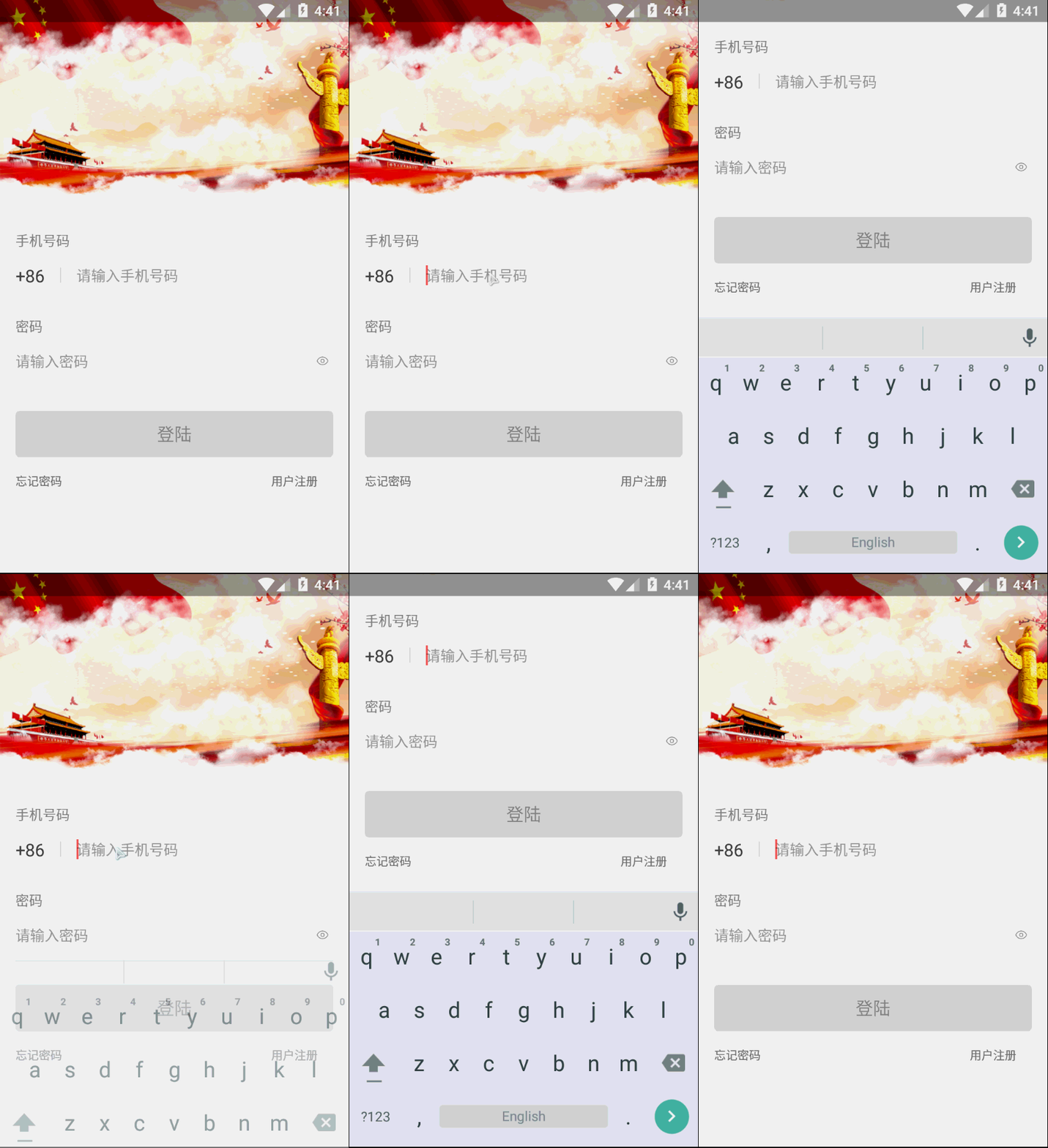
先看效果图。 登陆首页效果图 原理 为RootView增加监听事件,然后进行滚动 至于该滚动多少,这是需要自己慢慢进行计算。 xml <LinearLayout android:id="@+id/llLogin" android:layout_width="match_parent" android:layout_height="match_parent" android:background="@color/white" android:orientation="vertical"> <!--你的布局--> </LinearLayout> 代码 /** * 1、大于屏幕整体高度的1/3:键盘显示 获取Scroll的窗体坐标 * 算出main需要滚动的高度,使scroll显示。 * 2、小于屏幕整体高度的1/3:键盘隐藏 * * @param rootView 根布局 */ private fun addLayoutListener(rootView: View) { rootView.viewTreeObserver.addOnGlobalLayoutListener { val rect = Rect() rootView.getWindowVisibleDisplayFrame(rect) val screenHeight = rootView.rootView.height val mainInvisibleHeight = rootView.rootView.height - rect.bottom if (mainInvisibleHeight > screenHeight / 4) { rootView.scrollTo(0, DensityUtils.dp2px(mActivity, 200f/*需要滚动到图片目标高度*/)) } else { rootView.scrollTo(0, 0) } } }

优秀的个人博客,低调大师

Can't run app with devtools and java 9

Exception in thread "main" java.lang.ClassCastException: java.base/jdk.internal.loader.ClassLoaders$AppClassLoader cannot be cast to java.base/java.net.URLClassLoader at org.springframework.boot.devtools.restart.DefaultRestartInitializer.getUrls(DefaultRestartInitializer.java:93) at org.springframework.boot.devtools.restart.DefaultRestartInitializer.getInitialUrls(DefaultRestartInitializer.java:56) at org.springframework.boot.devtools.restart.Restarter.<init>(Restarter.java:139) at org.springframework.boot.devtools.restart.Restarter.initialize(Restarter.java:539) at org.springframework.boot.devtools.restart.RestartApplicationListener.onApplicationStartedEvent(RestartApplicationListener.java:68) at org.springframework.boot.devtools.restart.RestartApplicationListener.onApplicationEvent(RestartApplicationListener.java:45) at org.springframework.context.event.SimpleApplicationEventMulticaster.invokeListener(SimpleApplicationEventMulticaster.java:167) at org.springframework.context.event.SimpleApplicationEventMulticaster.multicastEvent(SimpleApplicationEventMulticaster.java:139) at org.springframework.context.event.SimpleApplicationEventMulticaster.multicastEvent(SimpleApplicationEventMulticaster.java:122) at org.springframework.boot.context.event.EventPublishingRunListener.started(EventPublishingRunListener.java:67) at org.springframework.boot.SpringApplicationRunListeners.started(SpringApplicationRunListeners.java:48) at org.springframework.boot.SpringApplication.run(SpringApplication.java:305) at org.springframework.boot.SpringApplication.run(SpringApplication.java:1187) at org.springframework.boot.SpringApplication.run(SpringApplication.java:1176) at com.alibaba.microtek.Application.main(Application.java:17) https://github.com/spring-projects/spring-boot/issues/7565

资源下载

更多资源
优质分享App

优质分享App

近一个月的开发和优化,本站点的第一个app全新上线。该app采用极致压缩,本体才4.36MB。系统里面做了大量数据访问、缓存优化。方便用户在手机上查看文章。后续会推出HarmonyOS的适配版本。

腾讯云软件源

腾讯云软件源

为解决软件依赖安装时官方源访问速度慢的问题,腾讯云为一些软件搭建了缓存服务。您可以通过使用腾讯云软件源站来提升依赖包的安装速度。为了方便用户自由搭建服务架构,目前腾讯云软件源站支持公网访问和内网访问。

Nacos

Nacos

Nacos /nɑ:kəʊs/ 是 Dynamic Naming and Configuration Service 的首字母简称,一个易于构建 AI Agent 应用的动态服务发现、配置管理和AI智能体管理平台。Nacos 致力于帮助您发现、配置和管理微服务及AI智能体应用。Nacos 提供了一组简单易用的特性集,帮助您快速实现动态服务发现、服务配置、服务元数据、流量管理。Nacos 帮助您更敏捷和容易地构建、交付和管理微服务平台。

Sublime Text

Sublime Text

Sublime Text具有漂亮的用户界面和强大的功能,例如代码缩略图,Python的插件,代码段等。还可自定义键绑定,菜单和工具栏。Sublime Text 的主要功能包括:拼写检查,书签,完整的 Python API , Goto 功能,即时项目切换,多选择,多窗口等等。Sublime Text 是一个跨平台的编辑器,同时支持Windows、Linux、Mac OS X等操作系统。


用户登录
用户注册
修改密码
忘记密码