首页 文章 精选 留言 我的

精选列表

搜索[学习],共10000篇文章
优秀的个人博客,低调大师

[Android学习笔记七] 设备管理服务示例开发

本文通过示例演示Android Device Policy管理的实现。 1.示例基本操作图 上图是本示例的主界面,通过应用程序来实现设备管理,本示例实现密码设置管理。 1.1 通过点击“启动设备管理器”按钮来激活设备管理 应用程序用通知设备管理启用,用户点击激活,应用程序具备设备管理能力。 1.2 通过点击“设置密码规则”按钮来设置锁屏密码的限制规则,要使用该策略需要在设备管理的使用策略列表中添加limit-password. 示例中调用了设置新密码的ACTION(DevicePolicyManager.ACTION_SET_NEW_PASSWORD),通过设置后,看以看到屏幕锁屏需要密码。 1.3 通过点击“修改密码”按钮则可以将文本框中的内容作为锁屏密码,该步骤可以通过程序完成。 调用DevicePolicyManager的重置密码方法(resetPassword),即可在应用程序中对锁屏密码进行重置。 2. 具体实现 实现上述整个示例需要: a.界面布局;实际应用中根据具体情况而定 b.DevicePolicyManager类的具体使用 c.DeviceAdminReceiver类的子类话,来实现具体广播事件的处理 d.AndroidManifest.xml文件中广播接收类的配置 c.应用程序中需要的设备管理策略列表 注:本示例代码使用了Butterknife框架。 2.1 示例程序界面(layout/activity_device_admin.xml) 1 2 3 4 5 6 7 8 9 10 11 12 13 14 15 16 17 18 19 20 21 22 23 24 25 26 27 28 29 30 31 <? xml version = "1.0" encoding = "utf-8" ?> < LinearLayout xmlns:android = "http://schemas.android.com/apk/res/android" android:layout_width = "match_parent" android:layout_height = "match_parent" android:background = "#f7f1f1" android:orientation = "vertical" android:padding = "15dp" > < LinearLayout android:layout_width = "match_parent" android:layout_height = "wrap_content" android:layout_gravity = "center_horizontal" android:orientation = "horizontal" > < EditText android:id = "@+id/pwd_editText" android:layout_width = "0dp" android:layout_height = "wrap_content" android:layout_margin = "10dp" android:layout_weight = "3" android:hint = "6位数字" android:textColor = "@android:color/black" /> < Button android:id = "@+id/modify_pwd_button" android:layout_width = "0dp" android:layout_height = "wrap_content" android:layout_margin = "10dp" android:layout_weight = "1.5" android:text = "修改密码" /> </ LinearLayout > < Button android:id = "@+id/pwd_rule_set_button" android:layout_width = "match_parent" android:layout_height = "wrap_content" android:text = "设置密码规则" /> < Button android:id = "@+id/device_admin_button" android:layout_width = "match_parent" android:layout_height = "wrap_content" android:text = "启用设备管理" /> </ LinearLayout > 2.2 Activity类和自定义的DeviceAdminReceiver类 1 2 3 4 5 6 7 8 9 10 11 12 13 14 15 16 17 18 19 20 21 22 23 24 25 26 27 28 29 30 31 32 33 34 35 36 37 38 39 40 41 42 43 44 45 46 47 48 49 50 51 52 53 54 55 56 57 58 59 60 61 62 63 64 65 66 67 68 69 70 71 72 73 74 75 76 77 78 79 80 81 82 83 84 85 86 87 88 89 90 91 92 93 94 95 96 97 98 99 100 101 102 103 104 105 106 107 108 109 110 111 112 113 114 115 package secondriver.sdk.activity; import android.app.Activity; import android.app.admin.DeviceAdminReceiver; import android.app.admin.DevicePolicyManager; import android.content.ComponentName; import android.content.Context; import android.content.Intent; import android.os.Bundle; import android.widget.Button; import android.widget.EditText; import android.widget.Toast; import butterknife.Bind; import butterknife.ButterKnife; import butterknife.OnClick; import secondriver.sdk.R; /** *Author:secondriver *Created:2015/11/27 */ public class DeviceAdminActivity extends Activity{ @Bind (R.id.pwd_editText) public EditTextpwdEditText; private DevicePolicyManagermDevicePolicyManager; @Override protected void onCreate(BundlesavedInstanceState){ super .onCreate(savedInstanceState); setContentView(R.layout.activity_device_admin); ButterKnife.bind( this ); mDevicePolicyManager=(DevicePolicyManager)getSystemService(DEVICE_POLICY_SERVICE); } //单击启用设备管理按钮 @OnClick (R.id.device_admin_button) public void onClickDeviceButton(Buttonbutton){ Intentintent= new Intent(DevicePolicyManager.ACTION_ADD_DEVICE_ADMIN); intent.putExtra(DevicePolicyManager.EXTRA_DEVICE_ADMIN, new ComponentName( this ,MyDeviceAdminReceiver. class )); intent.putExtra(DevicePolicyManager.EXTRA_ADD_EXPLANATION, "启动设备管理器" ); startActivityForResult(intent, 1 ); } //单击设置密码规则按钮 @OnClick (R.id.pwd_rule_set_button) public void onClickPwdRuleSetButton(Buttonbutton){ Intentintent= new Intent(DevicePolicyManager.ACTION_SET_NEW_PASSWORD); startActivityForResult(intent, 2 ); } //单击修改密码按钮 @OnClick (R.id.modify_pwd_button) public void onClickModifyPwdButton(Buttonbutton){ Stringpwd=pwdEditText.getText().toString(); ComponentNamereceiver= new ComponentName( this ,MyDeviceAdminReceiver. class ); boolean active=mDevicePolicyManager.isAdminActive(receiver); if (active){ boolean rs=mDevicePolicyManager.resetPassword(pwd,DevicePolicyManager.RESET_PASSWORD_REQUIRE_ENTRY); if (rs){ Toast.makeText( this , "密码修改成功" ,Toast.LENGTH_SHORT).show(); } else { Toast.makeText( this , "密码修改失败" ,Toast.LENGTH_SHORT).show(); } } else { Toast.makeText( this , "没有ActiveAdmin" ,Toast.LENGTH_SHORT).show(); } } @Override protected void onActivityResult( int requestCode, int resultCode,Intentdata){ switch (requestCode){ case 1 : if (resultCode==RESULT_OK){ Toast.makeText( this , "设备管理器开启成功" ,Toast.LENGTH_SHORT).show(); } else { Toast.makeText( this , "设备管理器开启失败" ,Toast.LENGTH_SHORT).show(); } break ; case 2 : if (resultCode==RESULT_OK){ Toast.makeText( this , "密码规则设置成功" ,Toast.LENGTH_SHORT).show(); } else { Toast.makeText( this , "密码规则设置失败" ,Toast.LENGTH_SHORT).show(); } break ; default : break ; } } //自定义的设备管理广播接收类,可以重写DeviceAdminReceiver中的方法,来实现具体功能 public static class MyDeviceAdminReceiver extends DeviceAdminReceiver{ /** *重写其中方法 *<p> *More */ @Override public void onDisabled(Contextcontext,Intentintent){ super .onDisabled(context,intent); //设备管理禁用 } @Override public void onEnabled(Contextcontext,Intentintent){ super .onEnabled(context,intent); //设备管理启用 } } } 2.3 配置设备管理接收者 1 2 3 4 5 6 7 8 9 < activity android:name = ".activity.DeviceAdminActivity" /> < receiver android:name = ".activity.DeviceAdminActivity$MyDeviceAdminReceiver" android:permission = "android.permission.BIND_DEVICE_ADMIN" > < meta-data android:name = "android.app.device_admin" android:resource = "@xml/device_admin" /> < intent-filter > < action android:name = "android.app.action.DEVICE_ADMIN_ENABLED" /> </ intent-filter > </ receiver > xml/device_admin内容: 1 2 3 4 5 6 7 8 9 10 11 12 13 14 15 16 17 18 19 20 21 <? xml version = "1.0" encoding = "utf-8" ?> < device-admin xmlns:android = "http://schemas.android.com/apk/res/android" > < uses-policies > <!--设置密码规则;控制屏幕锁的密码长度和允许的字符--> < limit-password /> <!--监视屏幕锁解锁尝试的次数;如果输入错误次数过多则锁定手机或者清除所有数据--> < watch-login /> <!--重置屏幕锁的密码;重新设置新的屏幕锁密码--> < reset-password /> <!--强制锁屏;控制屏幕锁屏的方式和时间--> < force-lock /> <!--擦除数据;恢复出厂设置清除说有数据--> < wipe-data /> <!--禁用相机;禁止使用所有设备摄像头--> < disable-camera /> <!--加密数据;对存储的应用数据进行加密--> < encrypted-storage /> <!--密码过期;强制用户更改屏幕锁密码的频率--> < expire-password /> </ uses-policies > </ device-admin > 示例生成apk,该应用具体了设备管理的功能。 本文转自 secondriver 51CTO博客,原文链接:http://blog.51cto.com/aiilive/1718579,如需转载请自行联系原作者

优秀的个人博客,低调大师

android学习记录(十三)Task 和 Activity 回退栈操作。

首先说一下Task是一个什么概念吧:Task是一个包括activity的列表。没 错。简单的说就是依照启动的先后来排队的一个队列。BackStack。就是回退栈的意思:那么有什么用?Back Stack是存储一个Task的实现方式,一个容器。它具有栈的特性:后进先出。 那么。根据什么来把activity指定给某个Task? ------默认情况下,依据activity的启动的顺序。增加A启动了B。那么B默认情况下就放到了 A的Task的BackStack里面啦。 当然,你也能够去改动这一个默认的行为。在以下的一些部分会讲述怎么去改动的啦。 须要注意的一点是:假如一个activity在一个新的task里启动且没有其它直接启动的方法(即不是Main,Launch的activity),然后按下Home键离开了该Task,然后通过启动图标来返回应用的话。是无法回到该activity的。 1.保存activity的属性和状态: 默认情况下,当activity脱离前台进入后台执行的时候,系统会自己主动保存它的配置信息,当用 户返回到activity的时候,能够自己主动的复原. 然而当过了比較长的一段时间后或者系统须要回收内存什么的,会清除掉它的配置信息,当 用户返回到该activity的时候会又一次的启动该activity. 那么这样的情况下假设要把曾经做的又一次再来一遍,这用户体验想想就认为不妥啊.那么我 们须要自己去保存和恢复activity的配置信息.then ,how? 实现onSaveInstanceState()方法,把所需的属性信息保存到bundle里. 在onCreate()方法里会有一个Bundle參数,假设不为空的话证明了之前是有一些信 信息是保存在这里的,我们就能够利用里面的信息去恢复用户原本处于的状态,这样子用户的体验是不是就好狠多啦?嘿嘿嘿嘿嘿 2.管理Task 如开头所说。我们能够改动系统的默认行为(即假设A启动了B。会把B放入A所在的Task和BackStack里)。那么,有两种方式能够做到: A.在startActivity(Intent intent)的intent中定义flag: intent.setFlags(flag); 系统会依据intent所定义的flag来对所被启动的activity来指定特定的Task。 B.在Manifest文件里该activity标签下的属性 taskAffinity launchMode allowTaskReparenting clearTaskOnLaunch alwaysRetainTaskState finishOnTaskLaunch 相同系统会依据属性里所定义的值来对被启动的activity进行指定task。 在这两种方式中,有一些效果是flag有而manifest文件没有的。相同也有一些效果 值是manifest文件有而flag所没有的。 当这两个值被同一时候设置的时候。flag的效果会覆盖launchMode所设置的效果。 以下,我们分别来对这两种不同方式的经常使用值来做简单的介绍。 一。定义启动activity的mode; 如果A>>B>>C A:定义manifest文件中launchMode属性: "standard"(默认值): 这是launchMode的默认值,假定C的launchMode为该值,若B启动C那么C也会放到B所属的Task里。C能够被初始化(即启动)多次,可属于不同的Task(即若与B不同Task的D启动了C,那么C新建一个实例放到D所在的Task里);一个Task里能够有多个C的实例(即若A>>B>>C>>A>>C,那么该任务的回退栈里有两个C的实例) "singleTop" 中文意思是:顶部唯一。假定C的launchMode的属性值为该值。 什么意思呢?就是说,在一个Task的顶部,仅仅能有一个C的实例,即若A>>B>>C然后在C里再次startActivityC,不会再创建一个C的实例,而是把该启动C的Intent传入到CActivity的onNewIntent()方法里。回退栈的结构依旧是:A>>B>>C而不是A>>B>>C>>C.这种话,就会出现一个随之产生的结果:不论什么时候C的实例都不会连续出现两次。相同与默认值类似,C也能够属于不同的Task(C无论任务是谁。它仅仅跟着动了它的activity在一起),单个Task里能够有多个C的实例。 (但不会出现连续) "singleTask" (中文:单个任务)假定activityC的launchMode值设置为该值。那么意味着不管何时C被启动,它都会在一个独立的Task里启动。 只是注意哦,独立的Task并非意味着新的Task。当C的独立的Task已经存在(即C被启动过)了,那么当再次调用C Activity的时候。就不会再创建了。而是把该Task移到前台来。(这也意味着,在同一时间。仅仅会有一个C的实例存在。) 注意:虽然C的Task并非与B的Task一致,但当用户按下backbutton的时候仍然能够回到B。 还有C的单独的Task里也能够有其它的Task,同一时候C并不一定要求是该任务的根activity。 "singleInstance". (中文:单例)假定C定义了该模式。 singleTask的mode也有单例效果,但该模式与singleTask不同的是,C所在的Task里仅仅能有它自己一个Activity,不会包括其它activity。(突然就想到:假设B启动了C。然后C启动了D,那么D是在还有一个新的Task里还是B所在的Task里呢?假设有人知道希望能够分享一下哈~) 这里有一个关于singleTask的图解嘿嘿,来自官方guide文档》》》》 图的下方有备注~自己琢磨琢磨吧。挺easy懂的了。 B.Intent的Flag属性 如果回退栈里有A>>B>>C (A启动B。B启动C): FLAG_ACTIVITY_NEW_TASK 效果与launchMode的singleTask属性一样。 当在C启动D的intent中定义了这个flag的时候。D会启动放置在一个新的Task里。即一个新的BackStack里。假设D已经被启动过一次然后到了后台执行(即A>>B>>C>>D>>E)再从E去启动D使用这一个flag的话,不会再次创建一个Task。而是把之前的D所在的Task恢复到前台,而D也会接收到一个Intent通过onNewIntent()方法。 @Override protectedvoid onNewIntent(Intent intent) { super.onNewIntent(intent); } FLAG_ACTIVITY_CLEAR_TOP 中文(清除activity的前方)如果C定义了该属性。 假设A>>B>>C>>D>>E。然后E启动activityC,那么并不会再创建一个C的实例,而是清除C前面的activity,恢复C的状态,显示C给用户看嘿嘿嘿,多霸气。 同一时候,manifest文件里launchMode并没有与之相应的属性值。 FLAG_ACTIVITY_SINGLE_TOP 与launchMode中的singleTop属性效果一样。 回退栈的清空 默认情况下,假设用户长时间不反悔该回退栈。那么因为种种原因(回收内存节省资源等等啦),会对该回退栈进行清空处理,仅仅留下一个最底部的activity留在栈内。所以当用户返回到这个Task时。仅仅会修复呈现栈最開始的一个activity。 相同,我们也能够对这样的默认的行为作出改动: alwaysRetainTaskState 当这个回退栈的根activity的该属性被设置为true时,那么不管用户隔了多长时间再回来,这个栈都不会被清除。 但要注意的是,必需要把该属性定义在回退栈的根activity才有效。 clearTaskOnLaunch 这个属性与alwaysRetainTaskState属性的效果刚好相反。 仅仅要用户一离开当前的Task。那么回退栈就会被清空仅仅留下根activity。 就算是刚离开又立即点击回来也是如此。相同该属性也必须定义在某个Task的根activity上才有效。 finishOnTaskLaunch 这个属性有点像clearTaskOnLaunch的属性效果,但与之不同的是它所作用的范围是单个activity(不论什么activity都行)而clearTaskOnLaunch的作用域是整个Task。被定义了该属性的activity会在用户离开所在Task之后被清除。(仅仅是清除Task里的这个activity。 taskAffinity属性及其用法 :这个。。感觉比較少用啊,。。(说实话就是我比較懒)假设想要了解一下的话自行查阅哈。 官方guide文档里的Taskand Back Stack里有的。 本文转自mfrbuaa博客园博客,原文链接:http://www.cnblogs.com/mfrbuaa/p/5370656.html,如需转载请自行联系原作者

优秀的个人博客,低调大师

【Android进阶学习】shape和selector的结合使用(转)

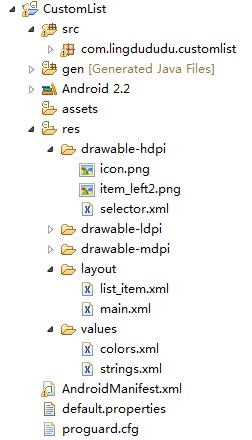
原创作品,允许转载,转载时请务必以超链接形式标明文章 原始出处、作者信息和本声明。否则将追究法律责任。 http://liangruijun.blog.51cto.com/3061169/732310 shape和selector是Android UI设计中经常用到的,比如我们要自定义一个圆角Button,点击Button有些效果的变化,就要用到shape和selector。可以这样说,shape和selector在美化控件中的作用是至关重要的。 1.Shape 简介 作用:XML中定义的几何形状 位置:res/drawable/文件的名称.xml 使用的方法: Java代码中:R.drawable.文件的名称 XML中:android:background="@drawable/文件的名称" 属性: <shape>android:shape=["rectangle" | "oval" | "line" | "ring"] 其中rectagle矩形,oval椭圆,line水平直线,ring环形 <shape>中子节点的常用属性: <gradient> 渐变 android:startColor 起始颜色 android:endColor 结束颜色 android:angle 渐变角度,0从上到下,90表示从左到右,数值为45的整数倍默认为0; android:type 渐变的样式 liner线性渐变 radial环形渐变 sweep <solid > 填充 android:color 填充的颜色 <stroke > 描边 android:width 描边的宽度 android:color 描边的颜色 android:dashWidth 表示'-'横线的宽度 android:dashGap 表示'-'横线之间的距离 <corners> 圆角 android:radius 圆角的半径 值越大角越圆 android:topRightRadius 右上圆角半径 android:bottomLeftRadius 右下圆角角半径 android:topLeftRadius 左上圆角半径 android:bottomRightRadius 左下圆角半径 2.Selector 简介 位置:res/drawable/文件的名称.xml 使用的方法: Java代码中:R.drawable.文件的名称 XML中:android:background="@drawable/文件的名称" <?xmlversion="1.0"encoding="utf-8"?> <selectorxmlns:android="http://schemas.android.com/apk/res/android"> <!--默认时的背景图片--> <itemandroid:drawable="@drawable/pic1"/> <!--没有焦点时的背景图片--> <item android:state_window_focused="false" android:drawable="@drawable/pic_blue" /> <!--非触摸模式下获得焦点并单击时的背景图片--> <item android:state_focused="true" android:state_pressed="true" android:drawable="@drawable/pic_red" /> <!--触摸模式下单击时的背景图片--> <item android:state_focused="false" android:state_pressed="true" android:drawable="@drawable/pic_pink" /> <!--选中时的图片背景--> <item android:state_selected="true" android:drawable="@drawable/pic_orange" /> <!--获得焦点时的图片背景--> <item android:state_focused="true" android:drawable="@drawable/pic_green" /> </selector> 第一个例子:圆角的Button http://liangruijun.blog.51cto.com/3061169/630051 第二个例子:shape+selector综合使用的例子 漂亮的ListView 先看看这个例子的结构: selector.xml <?xmlversion="1.0"encoding="utf-8"?> <selectorxmlns:android="http://schemas.android.com/apk/res/android"> <itemandroid:state_selected="true"> <shape> <gradientandroid:angle="270"android:endColor="#99BD4C" android:startColor="#A5D245"/> <sizeandroid:height="60dp"android:width="320dp"/> <cornersandroid:radius="8dp"/> </shape> </item> <itemandroid:state_pressed="true"> <shape> <gradientandroid:angle="270"android:endColor="#99BD4C" android:startColor="#A5D245"/> <sizeandroid:height="60dp"android:width="320dp"/> <cornersandroid:radius="8dp"/> </shape> </item> <item> <shape> <gradientandroid:angle="270"android:endColor="#A8C3B0" android:startColor="#C6CFCE"/> <sizeandroid:height="60dp"android:width="320dp"/> <cornersandroid:radius="8dp"/> </shape> </item> </selector> list_item.xml <?xmlversion="1.0"encoding="utf-8"?> <LinearLayoutxmlns:android="http://schemas.android.com/apk/res/android" android:orientation="horizontal" android:layout_width="fill_parent" android:layout_height="wrap_content" android:background="@drawable/selector" > <ImageView android:id="@+id/img" android:layout_width="wrap_content" android:layout_height="wrap_content" android:layout_gravity="center_vertical" android:layout_marginLeft="20dp" /> <TextView android:text="data" android:id="@+id/title" android:layout_width="fill_parent" android:layout_height="wrap_content" android:gravity="center_vertical" android:layout_marginLeft="20dp" android:layout_marginTop="20dp" android:textSize="14sp" android:textStyle="bold" android:textColor="@color/black" > </TextView> </LinearLayout> main.xml <?xmlversion="1.0"encoding="utf-8"?> <LinearLayoutxmlns:android="http://schemas.android.com/apk/res/android" android:orientation="vertical" android:layout_width="fill_parent" android:layout_height="wrap_content" android:background="#253853" > <ListView android:id="@+id/list" android:layout_width="match_parent" android:layout_height="match_parent" android:cacheColorHint="#00000000" android:divider="#2A4562" android:dividerHeight="3px" android:listSelector="#264365" android:drawSelectorOnTop="false" > </ListView> </LinearLayout> colors.xml <?xmlversion="1.0"encoding="utf-8"?> <resources> <colorname="white">#FFFFFFFF</color> <colorname="transparency">#00000000</color> <colorname="title_bg">#1C86EE</color> <colorname="end_color">#A0cfef83</color> <colorname="black">#464646</color> </resources> MainActivity.xml packagecom.lingdududu.customlist; importjava.util.ArrayList; importjava.util.HashMap; importxb.customlist.R; importandroid.R.array; importandroid.app.Activity; importandroid.os.Bundle; importandroid.widget.ArrayAdapter; importandroid.widget.ListView; importandroid.widget.SimpleAdapter; publicclassMainActivityextendsActivity{ ListViewlist; Stringdata[]=newString[]{ "China","UK","USA","Japan","German","Canada","ET","Narotu" }; /**Calledwhentheactivityisfirstcreated.*/ @Override publicvoidonCreate(BundlesavedInstanceState){ super.onCreate(savedInstanceState); setContentView(R.layout.main); list=(ListView)findViewById(R.id.list); SimpleAdapteradapter=newSimpleAdapter(this,getData(),R.layout.list_item, newString[]{"title","img"},newint[]{R.id.title,R.id.img}); list.setAdapter(adapter); } privateArrayList<HashMap<String,Object>>getData(){ ArrayList<HashMap<String,Object>>dlist=newArrayList<HashMap<String,Object>>(); for(inti=0;i<data.length;i++){ HashMap<String,Object>map=newHashMap<String,Object>(); map.put("title",data[i]); map.put("img",R.drawable.item_left2); dlist.add(map); } returndlist; } } 效果图: 上面的例子中用到很多关于颜色RGB的参数,对RGB不熟悉的,可以参照我博客的一篇文章 http://liangruijun.blog.51cto.com/3061169/629276 本文出自 “IT的点点滴滴” 博客,请务必保留此出处http://liangruijun.blog.51cto.com/3061169/732310 本文转自SharkBin博客园博客,原文链接:http://www.cnblogs.com/SharkBin/p/5437961.html,如需转载请自行联系原作者

优秀的个人博客,低调大师

Android开发学习笔记:Activity的生命周期浅析

1.Android系统中Activity作为Activity栈(Stack)被管理的,大家都知道栈的特点是先进后出,所以当前活动的Activity处于栈顶,之前非活动的Activity被压入栈底,等待是否可能被恢复为活动状态。 Android API中所提供的Activity生命周期图: 2.下面的整个Activity生命周期中的所有方法,我们可以根据程序的需要来覆盖相应的方法: publicclassActivityextendsApplicationContext{ //创建的时候调用 protectedvoidonCreate(BundlesavedInstanceState); //启动的时候调用 protectedvoidonStart(); //重新启动的时候调用 protectedvoidonRestart(); //恢复的时候调用 protectedvoidonResume(); //暂停的时候调用 protectedvoidonPause(); //停止的时候调用 protectedvoidonStop(); //销毁的时候调用 protectedvoidonDestroy(); } onCreate(Bundle savedInstanceState):创建activity时调用。设置在该方法中,还以Bundle的形式提供对以前储存的任何状态的访问! onStart():activity变为在屏幕上对用户可见时调用。 onResume():activity开始与用户交互时调用(无论是启动还是重新启动一个活动,该方法总是被调用的) onPause():activity被暂停或收回cpu和其他资源时调用,该方法用于保存活动状态的,也是保护现场,压栈。 onStop():activity被停止并转为不可见阶段及后续的生命周期事件时调用。 onRestart():重新启动activity时调用。该活动仍在栈中,而不是启动新的活动 onDestroy():activity被完全从系统内存中移除时调用 3.下面通过实例来测试Activity的生命周期中各个方法的调用情况,将Activity的所有方法都覆盖,主要用Log打印输出信息,并通过日志(LogCat)方式来观察运行结果。Log.v(String tag, String msg); //Verbose Log.d(String tag, String msg); //Debug Log.i(String tag, String msg); //Info Log.w(String tag, String msg); //Warning Log.e(String tag, String msg); //Error tag类似标签,可以是任意字符串,通常可以使用类名+方法名, 主要是用来在查看日志时提供一个筛选条件。 下面的实例是测试Activity的生命周期中各个方法的调用情况: MainActivity.java packagecom.android.TestAvtivity.activity; importandroid.app.Activity; importandroid.os.Bundle; importandroid.util.Log; importandroid.view.View; importandroid.view.View.OnClickListener; importandroid.widget.Button; publicclassMainActivityextendsActivity{ privateButtonbtn; privatestaticfinalStringTAG="MainActivity"; @Override publicvoidonCreate(BundlesavedInstanceState){ super.onCreate(savedInstanceState); setContentView(R.layout.main); //输出日志 Log.i(TAG,"MainActivityonCreate--->"); btn=(Button)findViewById(R.id.Button1); btn.setOnClickListener(newOnClickListener(){ @Override publicvoidonClick(Viewv){ //结束当前的Activity MainActivity.this.finish(); } }); } @Override //启动 protectedvoidonStart(){ super.onStart(); //输出日志信息 Log.i(TAG,"MainActivityonStart--->"); } @Override //重启 protectedvoidonRestart(){ super.onRestart(); //输出日志信息 Log.i(TAG,"MainActivityonRestart--->"); } @Override //恢复 protectedvoidonResume(){ super.onResume(); //输出日志信息 Log.i(TAG,"MainActivityonResume--->"); } @Override //暂停 protectedvoidonPause(){ super.onPause(); //输出日志信息 Log.i(TAG,"MainActivityonPause--->"); } @Override //停止 protectedvoidonStop(){ super.onStop(); //输出日志信息 Log.i(TAG,"MainActivityonStop--->"); } @Override //销毁 protectedvoidonDestroy(){ super.onDestroy(); //输出日志信息 Log.i(TAG,"MainActivityonDestroy--->"); } } main.xml <?xmlversion="1.0"encoding="utf-8"?> <LinearLayoutxmlns:android="http://schemas.android.com/apk/res/android" android:orientation="vertical" android:layout_width="fill_parent" android:layout_height="fill_parent" > <TextView android:id="@+id/TextView01" android:layout_width="wrap_content" android:layout_height="wrap_content" android:text="测试Activit生命周期" /> <Button android:id="@+id/Button1" android:layout_width="wrap_content" android:layout_height="wrap_content" android:text="关闭Activity" /> </LinearLayout> 效果图: ①当启动程序时,日志的输出结果如下图所示,程序执行了onCreate()->onStart()->onResume三个方法。输出如下: MainActivity onCreate---> MainActivity onStart---> MainActivity onResume---> 注意:这里我是在选择了绿色的“+”,这时出现了下图的界面,之后我就在Filter Name上写入Test,by Log Tag上写入MainActivity,按OK保存,这时就能在LogCat上面筛选我们想要看到的信息了。 ②当按(返回键)或者按钮时,日志的输出结果如下图所示,程序先后调用了onPause( )->onStop( )->onDestory( )三个方法。 ③当按(Home键)时,日志的输出结果如下图所示,程序先后调用了onPause( )->onStop( )这两个方法,这时候应用程序并没有销毁。 ④当再次启动程序时,日志的输出结果如下图所示,程序先后调用了onRestart( )->onStart( )->onResume( )三个方法。 本文转自 lingdududu 51CTO博客,原文链接: http://blog.51cto.com/liangruijun/636913

优秀的个人博客,低调大师

开源中国iOS客户端学习——(十)搜索功能

开源中国社区团队基于开源项目GitLab开发了一款和GitHub一样的在线代码托管平台 Git @ OSC。并且开源客户端的源码在GitHub上不做更新,迁移到Git @OSC上了,欲了解更多请访问Git @ OSC官网http://git.oschina.net 客户端源码下载地址:http://git.oschina.net/oschina/iphone-app 回归正题,今天分析的是开源中国iOS客户端搜索功能涉及道一些知识,XML解析和动态加载表视图单元格; 在软件首页右上角有一个搜索按钮,点击进入搜索界面,当搜索的内容很多时我们下拉点击 “下面20项。。。”可以在加载20项,这些数据如何填充到表视图之中? 负责搜索功能的是search下的searchView类,xib控件已经已经做好布局,首先说下SearchView.h文件属性成员代表的作用; 1 2 3 4 5 6 7 8 9 10 11 12 13 14 15 16 17 18 19 20 21 22 23 #import <UIKit/UIKit.h> #import "SearchResult.h" #import "MBProgressHUD.h" @interface SearchView : UIViewController<UITableViewDelegate,UITableViewDataSource,UISearchBarDelegate> { // 可变数组存放解析的数据 NSMutableArray * results; // 搜索的时候判断是否正在加载数据 BOOL isLoading; // 判断数据是否加载完毕 BOOL isLoadOver; // 记录表视图单元格应该加载数据总条数 int allCount; } @property (strong, nonatomic) IBOutlet UISegmentedControl *segmentSearch; @property (strong, nonatomic) IBOutlet UITableView *tableResult; @property (strong, nonatomic) IBOutlet UISearchBar *_searchBar; //根据搜索关键字在不同分类中进行搜索 - (IBAction)segementChanged:(id)sender; //搜索 -( void )doSearch; //清空上次搜索记录 -( void )clear; OK现在看看SearchView.m文件,如果搜索的内容不为空开始 dosearch方法,dosearch方法中使用了ASNetwork类库封装的post网络请求方法(关于AFNetwork post get请求方法请看http://blog.csdn.net/duxinfeng2010/article/details/8620901) 1 2 3 4 - ( void )postPath:(NSString *)path parameters:(NSDictionary *)parameters success:( void (^)(AFHTTPRequestOperation *operation, id responseObject))success failure:( void (^)(AFHTTPRequestOperation *operation, NSError *error))failure post请求无法获取它的url,但是可以取出请求成功返回来的数据,比如搜索iOS 返回的xml 1 2 3 4 5 6 7 8 9 10 11 12 13 14 15 16 17 18 19 20 21 22 23 24 25 26 27 28 29 30 31 32 33 34 35 36 37 38 39 40 41 42 43 44 45 46 47 48 49 50 51 52 53 54 55 56 57 58 59 60 61 62 63 64 65 66 67 68 69 70 71 72 73 74 75 76 77 78 79 80 81 82 83 84 85 86 87 88 89 90 91 92 93 94 95 96 97 98 99 100 101 102 103 104 105 106 107 108 109 110 111 112 113 114 115 116 117 118 119 120 121 122 123 124 125 126 127 128 129 130 131 132 133 134 135 136 137 138 139 140 141 142 143 144 145 146 147 148 149 150 151 152 153 154 155 156 157 158 159 160 161 162 163 164 165 166 167 168 169 170 171 172 173 <? xml version = "1.0" encoding = "UTF-8" ?> < oschina > < pagesize >20</ pagesize > < results > < result > < objid >18397</ objid > < type >software</ type > < title > <![CDATA[iOS应用开发模板 iOS Boilerplate]]> </ title > < url > <![CDATA[http://www.oschina.net/p/ios-boilerplate]]> </ url > < pubDate ></ pubDate > < author ></ author > </ result > < result > < objid >18977</ objid > < type >software</ type > < title > <![CDATA[ ios-static-libraries]]> </ title > < url > <![CDATA[http://www.oschina.net/p/ios-static-libraries]]> </ url > < pubDate ></ pubDate > < author ></ author > </ result > < result > < objid >23309</ objid > < type >software</ type > < title > <![CDATA[ 仿陌陌的ios客户端]]> </ title > < url > <![CDATA[http://www.oschina.net/p/momo-ios-app]]> </ url > < pubDate ></ pubDate > < author ></ author > </ result > < result > < objid >22121</ objid > < type >software</ type > < title > <![CDATA[iOS任务管理器 cheddar-ios]]> </ title > < url > <![CDATA[http://www.oschina.net/p/cheddar-ios]]> </ url > < pubDate ></ pubDate > < author ></ author > </ result > < result > < objid >22900</ objid > < type >software</ type > < title > <![CDATA[白宫网站 iOS 客户端 wh-app-ios]]> </ title > < url > <![CDATA[http://www.oschina.net/p/wh-app-ios]]> </ url > < pubDate ></ pubDate > < author ></ author > </ result > < result > < objid >17045</ objid > < type >software</ type > < title > <![CDATA[iPhone操作系统 iOS]]> </ title > < url > <![CDATA[http://www.oschina.net/p/ios]]> </ url > < pubDate ></ pubDate > < author ></ author > </ result > < result > < objid >25685</ objid > < type >software</ type > < title > <![CDATA[iOS 弹出菜单 MLPPopupMenu]]> </ title > < url > <![CDATA[http://www.oschina.net/p/mlppopupmenu]]> </ url > < pubDate ></ pubDate > < author ></ author > </ result > < result > < objid >22803</ objid > < type >software</ type > < title > <![CDATA[iOS日历控件 PMCalendar]]> </ title > < url > <![CDATA[http://www.oschina.net/p/pmcalendar]]> </ url > < pubDate ></ pubDate > < author ></ author > </ result > < result > < objid >24390</ objid > < type >software</ type > < title > <![CDATA[iOS 功能测试框架 calabash-ios]]> </ title > < url > <![CDATA[http://www.oschina.net/p/calabash-ios]]> </ url > < pubDate ></ pubDate > < author ></ author > </ result > < result > < objid >24665</ objid > < type >software</ type > < title > <![CDATA[ iOS-Tree-Component]]> </ title > < url > <![CDATA[http://www.oschina.net/p/ios-tree-component]]> </ url > < pubDate ></ pubDate > < author ></ author > </ result > < result > < objid >22217</ objid > < type >software</ type > < title > <![CDATA[ ios-calendar]]> </ title > < url > <![CDATA[http://www.oschina.net/p/ios-calendar]]> </ url > < pubDate ></ pubDate > < author ></ author > </ result > < result > < objid >22380</ objid > < type >software</ type > < title > <![CDATA[ PaperFold-for-iOS]]> </ title > < url > <![CDATA[http://www.oschina.net/p/paperfold-for-ios]]> </ url > < pubDate ></ pubDate > < author ></ author > </ result > < result > < objid >21763</ objid > < type >software</ type > < title > <![CDATA[ drupal-ios-sdk]]> </ title > < url > <![CDATA[http://www.oschina.net/p/drupal-ios-sdk]]> </ url > < pubDate ></ pubDate > < author ></ author > </ result > < result > < objid >19628</ objid > < type >software</ type > < title > <![CDATA[iOS开发基础工具包 BaseAppKit]]> </ title > < url > <![CDATA[http://www.oschina.net/p/baseappkit]]> </ url > < pubDate ></ pubDate > < author ></ author > </ result > < result > < objid >20637</ objid > < type >software</ type > < title > <![CDATA[iOS消息提醒库 TBHintView]]> </ title > < url > <![CDATA[http://www.oschina.net/p/tbhintview]]> </ url > < pubDate ></ pubDate > < author ></ author > </ result > < result > < objid >21246</ objid > < type >software</ type > < title > <![CDATA[iOS 弹出式菜单 MGTileMenu]]> </ title > < url > <![CDATA[http://www.oschina.net/p/mgtilemenu]]> </ url > < pubDate ></ pubDate > < author ></ author > </ result > < result > < objid >23498</ objid > < type >software</ type > < title > <![CDATA[iOS 的 Canvas 和 Audio 实现 Ejecta]]> </ title > < url > <![CDATA[http://www.oschina.net/p/ejecta]]> </ url > < pubDate ></ pubDate > < author ></ author > </ result > < result > < objid >23968</ objid > < type >software</ type > < title > <![CDATA[样式化 iOS 应用 NUI]]> </ title > < url > <![CDATA[http://www.oschina.net/p/nui]]> </ url > < pubDate ></ pubDate > < author ></ author > </ result > < result > < objid >20730</ objid > < type >software</ type > < title > <![CDATA[iOS/Android 矢量图形框架 TouchVG]]> </ title > < url > <![CDATA[http://www.oschina.net/p/touchvg]]> </ url > < pubDate ></ pubDate > < author ></ author > </ result > < result > < objid >22356</ objid > < type >software</ type > < title > <![CDATA[iOS日历控件 MACalendarUI]]> </ title > < url > <![CDATA[http://www.oschina.net/p/macalendarui]]> </ url > < pubDate ></ pubDate > < author ></ author > </ result > </ results > < notice > < atmeCount >0</ atmeCount > < msgCount >0</ msgCount > < reviewCount >0</ reviewCount > < newFansCount >0</ newFansCount > </ notice > </ oschina > <!-- Generated by OsChina.NET (init:0[ms],page:13[ms],ip:61.163.231.198) --> 要解析xm里数据必须熟悉xml文件各个节点之间关系 根节点oschina,它的子节点pagesize返回本次加载了几条数据,子节点results,results的子节点下20条result节点,我们主要获取result内容。然后就是最后面的子节点notice节点,存放用户的一些信息如动弹情况、收到消息、回复、粉丝;在post请求中用到了一个异常处理语句 @try @catch @finally @try{//执行的代码,其中可能有异常。一旦发现异常,则立即跳到catch执行。否则不会执行catch里面的内容}@catch{//除非try里面执行代码发生了异常,否则这里的代码不会执行}@finally{//不管什么情况都会执行,包括try catch 里面用了return ,可以理解为只要执行了try或者catch,就一定会执行 finally} 给dosearch添加了一些注释 1 2 3 4 5 6 7 8 9 10 11 12 13 14 15 16 17 18 19 20 21 22 23 24 25 26 27 28 29 30 31 32 33 34 35 36 37 38 39 40 41 42 43 44 45 46 47 48 49 50 51 52 53 54 55 56 57 58 59 60 61 62 63 64 65 66 67 68 69 70 71 72 73 74 75 76 77 78 79 80 81 82 83 84 85 86 87 88 89 90 91 92 93 94 95 96 97 98 99 100 101 102 103 104 105 106 107 108 109 110 111 112 113 114 115 116 -( void )doSearch { // 标记,表示正在加载数据中 isLoading = YES; NSString * catalog; // switch语句中根据Segment按钮集合中按钮索引,判断搜索哪一类内容,为下面的搜索API传参 switch (self.segmentSearch.selectedSegmentIndex) { case 0: catalog = @ "software" ; break ; case 1: catalog = @ "post" ; break ; case 2: catalog = @ "blog" ; break ; case 3: catalog = @ "news" ; break ; } //使用AFNetWork使用post方式从网络请求数据 [[AFOSCClient sharedClient] postPath:api_search_list parameters:[NSDictionary dictionaryWithObjectsAndKeys:_searchBar.text,@ "content" ,catalog,@ "catalog" ,[NSString stringWithFormat:@ "%d" , allCount/20],@ "pageIndex" ,@ "20" ,@ "pageSize" , nil] success:^(AFHTTPRequestOperation *operation, id responseObject) { // 取消searchBar的第一响应对象,键盘消失 [self._searchBar resignFirstResponder]; // 在没有内容之前tableView是没有任何内容的,所以隐藏掉 self.tableResult.hidden = NO; // 根据请求回来的数据判断当前用户释放登陆,需要获取用户一些信息 [Tool getOSCNotice2:operation.responseString]; // 上面属于请求数据是不回加载到视图控制器上,所以标记属性为NO isLoading = NO; // 再次从xml文件中请求数据,获取当前加载数据条数,数量 int count = [Tool isListOver2:operation.responseString]; allCount += count; // 将请求的xml内容给NSString对象 NSString *response = operation.responseString; NSLog(@ "response =%@" ,response); @ try { // 开始解析需要显示到表视图单元格对象中的数据 TBXML *xml = [[TBXML alloc] initWithXMLString:response error:nil]; TBXMLElement *root = xml.rootXMLElement; // 从次根节点获取根节点下内容 TBXMLElement *_results = [TBXML childElementNamed:@ "results" parentElement:root]; if (!_results) { isLoadOver = YES; [self.tableResult reloadData]; return ; } // 获取result节点下内容 TBXMLElement *first = [TBXML childElementNamed:@ "result" parentElement:_results]; if (!first) { isLoadOver = YES; [self.tableResult reloadData]; return ; } // 取出result节点下的节点 NSMutableArray * newResults = [[NSMutableArray alloc] initWithCapacity:20]; TBXMLElement *objid = [TBXML childElementNamed:@ "objid" parentElement:first]; TBXMLElement *type = [TBXML childElementNamed:@ "type" parentElement:first]; TBXMLElement *title = [TBXML childElementNamed:@ "title" parentElement:first]; TBXMLElement *url = [TBXML childElementNamed:@ "url" parentElement:first]; TBXMLElement *pubDate = [TBXML childElementNamed:@ "pubDate" parentElement:first]; NSString * pubDateStr = [TBXML textForElement:pubDate]; TBXMLElement *author = [TBXML childElementNamed:@ "author" parentElement:first]; // 取出节点中的值,赋给一个SearchResult对象属性 SearchResult * s = [[SearchResult alloc] initWithParameters:[[TBXML textForElement:objid] intValue] andType:[[TBXML textForElement:type] intValue] andTitle:[TBXML textForElement:title] andUrl:[TBXML textForElement:url] andPubDate:[pubDateStr isEqualToString:@ "" ] ? @ "" : [Tool intervalSinceNow:pubDateStr] andAuthor:[TBXML textForElement:author]]; // 将获取对象添加到可变数组 if (![Tool isRepeatSearch:results andResult:s]) { [newResults addObject:s]; } // 在循环之中 寻找下一个节点 直至找完 while (first) { first = [TBXML nextSiblingNamed:@ "result" searchFromElement:first]; if (first) { objid = [TBXML childElementNamed:@ "objid" parentElement:first]; type = [TBXML childElementNamed:@ "type" parentElement:first]; title = [TBXML childElementNamed:@ "title" parentElement:first]; url = [TBXML childElementNamed:@ "url" parentElement:first]; pubDate = [TBXML childElementNamed:@ "pubDate" parentElement:first]; author = [TBXML childElementNamed:@ "author" parentElement:first]; s = [[SearchResult alloc] initWithParameters:[[TBXML textForElement:objid] intValue] andType:[[TBXML textForElement:type] intValue] andTitle:[TBXML textForElement:title] andUrl:[TBXML textForElement:url] andPubDate:[Tool intervalSinceNow:[TBXML textForElement:pubDate]] andAuthor:[TBXML textForElement:author]]; // if (![Tool isRepeatSearch:results andResult:s]) { [newResults addObject:s]; } } // first = NULL 直接跳出 else { break ; } } // 如果搜索结果数据小雨20条,表示一个页面就可以加载完毕 if (newResults.count < 20) { isLoadOver = YES; } // 将解析数据添加道results之中 [results addObjectsFromArray:newResults]; // 刷新表示图内容 [self.tableResult reloadData]; } @ catch (NSException *exception) { [NdUncaughtExceptionHandler TakeException:exception]; } @finally { } // 请求失败 } failure:^(AFHTTPRequestOperation *operation, NSError *error) { [Tool ToastNotification:@ "网络连接故障" andView:self.view andLoading:NO andIsBottom:NO]; }]; // 刷新表视图单元内容 [self.tableResult reloadData]; } 在 [Tool getOSCNotice2:operation.responseString];解析的登陆用户一些信息 // Tool类中 1 2 3 4 5 6 7 8 9 10 11 12 13 14 15 16 17 18 19 20 21 22 23 24 25 26 27 + (OSCNotice *)getOSCNotice2:(NSString *)response { TBXML *xml = [[TBXML alloc] initWithXMLString:response error:nil]; TBXMLElement *root = xml.rootXMLElement; if (!root) { return nil; } TBXMLElement *notice = [TBXML childElementNamed:@ "notice" parentElement:root]; if (!notice) { [Config Instance].isLogin = NO; [[NSNotificationCenter defaultCenter] postNotificationName:@ "login" object:@ "0" ]; return nil; } else { [[NSNotificationCenter defaultCenter] postNotificationName:@ "login" object:@ "1" ]; [Config Instance].isLogin = YES; } TBXMLElement *atme = [TBXML childElementNamed:@ "atmeCount" parentElement:notice]; TBXMLElement *msg = [TBXML childElementNamed:@ "msgCount" parentElement:notice]; TBXMLElement *review = [TBXML childElementNamed:@ "reviewCount" parentElement:notice]; TBXMLElement *newFans = [TBXML childElementNamed:@ "newFansCount" parentElement:notice]; OSCNotice *oc = [[OSCNotice alloc] initWithParameters:[[TBXML textForElement:atme] intValue] andMsg:[[TBXML textForElement:msg] intValue] andReview:[[TBXML textForElement:review] intValue] andFans:[[TBXML textForElement:newFans] intValue]]; [[NSNotificationCenter defaultCenter] postNotificationName:Notification_NoticeUpdate object:oc]; return oc; } [Tool isListOver2:operation.responseString]; 用于也是解析数据,获取返回的数据条数,告诉table将要显示多少行cell,当把cell加载到最后的时候获取下面20项,或跟多,然后把这些数据存放道allcount里面,所以就有allCount += count Tool类中,解析返回一个数据 pagesize,显示多少行 1 2 3 4 5 6 7 8 + ( int )isListOver2:(NSString *)response { TBXML *xml = [[TBXML alloc] initWithXMLString:response error:nil]; TBXMLElement *root = xml.rootXMLElement; TBXMLElement *pageSize = [TBXML childElementNamed:@ "pagesize" parentElement:root]; int size = [[TBXML textForElement:pageSize] intValue]; return size; } 然后进入到try中又一次解析获取result里面数据,这里有请求了一次数据,有解析了一边,感觉这里处理的不是很好,同一个返回数据请求了三次,如果用户用的不是wifi就可能耗费流量浪费电量; 剩下的就是表示图加载数据了 1 2 3 4 5 6 7 8 9 10 11 12 13 14 15 16 17 18 19 20 21 22 23 24 25 26 27 28 29 30 31 32 33 34 35 36 37 38 39 40 41 42 43 44 45 46 47 48 49 50 51 52 53 54 55 56 57 58 59 60 61 62 63 64 65 66 67 68 69 70 71 72 73 74 75 76 77 78 79 80 81 82 83 84 -(NSInteger)tableView:(UITableView *)tableView numberOfRowsInSection:(NSInteger)section { // 如何加载完成,返回数据为空,返回1,这个单元格是显示一个提示,“查无结果” 如果返回不为空,返回results.count + 1 个显示结果,最后加 1 ,是显示加载数据超过20条的时候 点击 “下面20项”时加载更多数据 if (isLoadOver) { return results.count == 0 ? 1 : results.count; } else return results.count + 1; } //处理cell的行高 -(CGFloat)tableView:(UITableView *)tableView heightForRowAtIndexPath:(NSIndexPath *)indexPath { if (isLoadOver) { return results.count == 0 ? 62 : 50; } else { return indexPath.row < results.count ? 50 : 62; } } //处理tableView背景色 -( void )tableView:(UITableView *)tableView willDisplayCell:(UITableViewCell *)cell forRowAtIndexPath:(NSIndexPath *)indexPath { cell.backgroundColor = [Tool getCellBackgroundColor]; } //定制单元格的显示内容 -(UITableViewCell *)tableView:(UITableView *)tableView cellForRowAtIndexPath:(NSIndexPath *)indexPath { if (results.count > 0) { if (indexPath.row < results.count) { UITableViewCell * cell = [tableView dequeueReusableCellWithIdentifier:NormalCellIdentifier]; if (!cell) { cell = [[UITableViewCell alloc] initWithStyle:UITableViewCellStyleSubtitle reuseIdentifier:NormalCellIdentifier]; } SearchResult * s = [results objectAtIndex:indexPath.row]; cell.textLabel.font = [UIFont boldSystemFontOfSize:15.0]; cell.textLabel.text = s.title; if (self.segmentSearch.selectedSegmentIndex != 0) { cell.detailTextLabel.text = [NSString stringWithFormat:@ "%@ 发表于 %@" , s.author, s.pubDate]; } else { cell.detailTextLabel.text = @ "" ; } cell.accessoryType = UITableViewCellAccessoryDisclosureIndicator; return cell; } else { return [[DataSingleton Instance] getLoadMoreCell:tableView andIsLoadOver:isLoadOver andLoadOverString:@ "搜索完毕" andLoadingString:(isLoading ? loadingTip : loadNext20Tip) andIsLoading:isLoading]; } } // 如果搜索返回的数据为空 提示 查无结果 else { return [[DataSingleton Instance] getLoadMoreCell:tableView andIsLoadOver:isLoadOver andLoadOverString:@ "查无结果" andLoadingString:(isLoading ? loadingTip : loadNext20Tip) andIsLoading:isLoading]; } } //选中某一行的时候显示该条信息的详细内容 -( void )tableView:(UITableView *)tableView didSelectRowAtIndexPath:(NSIndexPath *)indexPath { [self._searchBar resignFirstResponder]; [tableView deselectRowAtIndexPath:indexPath animated:YES]; int row = indexPath.row; if (row >= results.count) { if (!isLoading && !isLoadOver) { [self performSelector:@selector(doSearch)]; } } else { SearchResult * s = [results objectAtIndex:row]; if (s) { [Tool analysis:s.url andNavController:self.navigationController]; NSLog(@ "------%@" ,s.url); } } } 打开某一条信息,并查看其详细信息调用 analysis: andNavController:,该方法里针对传入URL,如果是站外连接 比如某个软件官网,直接跳转到该软件的官网上,如果是开源中国社区站内连接,就可能需要加载一些这条信息的评论详情如果检测道用户登陆给予用户品论权限和分享功能;具体实现如下 1 2 3 4 5 6 7 8 9 10 11 12 13 14 15 16 17 18 19 20 21 22 23 24 25 26 27 28 29 30 31 32 33 34 35 36 37 38 39 40 41 42 43 44 45 46 47 48 49 50 51 52 53 54 55 56 57 58 59 60 61 62 63 64 65 66 67 68 69 70 71 72 73 74 75 76 77 78 79 80 81 82 83 84 85 86 87 88 89 90 91 92 93 94 95 96 97 98 99 100 101 102 103 104 105 106 107 108 109 110 111 112 113 114 115 116 117 118 119 120 121 + ( BOOL )analysis:(NSString *)url andNavController:(UINavigationController *)navController { NSString *search = @ "oschina.net" ; //判断是否包含 oschina.net 来确定是不是站内链接 NSRange rng = [url rangeOfString:search]; if (rng.length <= 0) { [[UIApplication sharedApplication] openURL:[NSURL URLWithString:url]]; return NO; } //站内链接 else { url = [url substringFromIndex:7]; NSString *prefix = [url substringToIndex:3]; //此情况为 博客,动弹,个人专页 if ([prefix isEqualToString:@ "my." ]) { NSArray *array = [url componentsSeparatedByString:@ "/" ]; //个人专页 用户名形式 if ([array count] <= 2) { [Tool pushUserDetailWithName:[array objectAtIndex:1] andNavController:navController]; return YES; } //个人专页 uid形式 else if ([array count] <= 3) { if ([[array objectAtIndex:1] isEqualToString:@ "u" ]) { [Tool pushUserDetail:[[array objectAtIndex:2] intValue] andNavController:navController]; return YES; } } else if ([array count] <= 4) { NSString *type = [array objectAtIndex:2]; if ([type isEqualToString:@ "blog" ]) { News *n = [[News alloc] init]; n.newsType = 3; n.attachment = [array objectAtIndex:3]; [Tool pushNewsDetail:n andNavController:navController andIsNextPage:NO]; return YES; } else if ([type isEqualToString:@ "tweet" ]){ Tweet *t = [[Tweet alloc] init]; t._id = [[array objectAtIndex:3] intValue]; [Tool pushTweetDetail:t andNavController:navController]; return YES; } } else if (array.count <= 5) { NSString *type = [array objectAtIndex:3]; if ([type isEqualToString:@ "blog" ]) { News *n = [[News alloc] init]; n.newsType = 3; n.attachment = [array objectAtIndex:4]; [Tool pushNewsDetail:n andNavController:navController andIsNextPage:NO]; return YES; } } } //此情况为 新闻,软件,问答 else if ([prefix isEqualToString:@ "www" ]) { NSArray *array = [url componentsSeparatedByString:@ "/" ]; int count = [array count]; if (count>=3) { NSString *type = [array objectAtIndex:1]; if ([type isEqualToString:@ "news" ]) { int newsid = [[array objectAtIndex:2] intValue]; News *n = [[News alloc] init]; n.newsType = 0; n._id = newsid; [Tool pushNewsDetail:n andNavController:navController andIsNextPage:YES]; return YES; } else if ([type isEqualToString:@ "p" ]){ News *n = [[News alloc] init]; n.newsType = 1; n.attachment = [array objectAtIndex:2]; [Tool pushNewsDetail:n andNavController:navController andIsNextPage:NO]; return YES; } else if ([type isEqualToString:@ "question" ]){ if (count == 3) { NSArray *array2 = [[array objectAtIndex:2] componentsSeparatedByString:@ "_" ]; if ([array2 count] >= 2) { int _id = [[array2 objectAtIndex:1] intValue]; Post *p = [[Post alloc] init]; p._id = _id; [Tool pushPostDetail:p andNavController:navController]; return YES; } } else if (count >= 4) { // NSString *tag = [array objectAtIndex:3]; NSString *tag = @ "" ; if (array.count == 4) { tag = [array objectAtIndex:3]; } else { for ( int i=3; i<count-1; i++) { tag = [NSString stringWithFormat:@ "%@/%@" , [array objectAtIndex:i],[array objectAtIndex:i+1]]; } } NSString *tag2 = [tag stringByReplacingPercentEscapesUsingEncoding:NSUTF8StringEncoding]; PostsView *pview = [PostsView new ]; pview.tag = tag; pview.navigationItem.title = [NSString stringWithFormat:@ "%@" , tag2]; [navController pushViewController:pview animated:YES]; return YES; } } } } // 根据一个URL打开一个网页 [[UIApplication sharedApplication] openURL:[NSURL URLWithString:[NSString stringWithFormat:@ "http://%@" , url]]]; return NO; } } 本文转自新风作浪 51CTO博客,原文链接:http://blog.51cto.com/duxinfeng/1205492,如需转载请自行联系原作者

优秀的个人博客,低调大师

Hadoop概念学习系列之Hadoop 是什么?(一)

Hadoop是Apache软件基金会旗下的一个开源分布式计算平台。以Hadoop分布式文件系统(Hadoop Distributed File System,HDFS)和(Google MapReduce的开源实现)为核心的Hadoop为用户提供了系统底层细节透明的分布式基础架构。HDFS的高容错性、高伸缩性等优点允许用户将Hadoop部署在低廉的硬件上,形成分布式系统;MapReduce分布式编程模型允许用户在不了解分布式系统底层细节的情况下并发并行应用程序。所以用户可以利用集群的Hadoop轻松地组织计算机资源,从而搭建自己的分布式计算平台,并且可以充分利用集群的计算和存储能力,完成海量数据的处理。 Hadoop是一个开源框架,可编写和运行分布式应用处理大规模数据。分布式计算是一个宽泛并且不断变化的领域。 Hadoop的优势在于: 1)方便:Hadoop运行在由一般商用机器构成的大型集群上,或者云计算服务上,比如EC2。 2)健壮:Hadoop致力于在一般商用硬件上运行,其架构假设硬件会频繁失效,Hadoop可以从容地处理大多数此类故障。 3)可扩展:Hadoop通过增加集群节点,可以线性地扩展以处理更大的数据集。 4)简单:Hadoop允许用户快速编写高效的并行代码。 Hadoop框架的核心是HDFS和MapReduce。其中 HDFS 是分布式文件系统,MapReduce 是分布式数据处理模型和执行环境。掌握了这两部分,也就掌握了Hadoop最核心的东西。 Hadoop是Doug Cutting基于Google公司的GFS和MapReduce思想不断完善的项目 —— Nutch中脱胎而出的,目前已经归于Apache。 本文转自大数据躺过的坑博客园博客,原文链接:http://www.cnblogs.com/zlslch/p/5058082.html,如需转载请自行联系原作者

优秀的个人博客,低调大师

Android开发学习笔记:Service的简介和启动方式

一.Service的简介 1.Service 介绍和作用 Service是Android系统中的四大组件之一,它是一种长生命周期的,没有可视化界面,运行于后台的一种服务程序。比如我们播放音乐的时候,有可能想边听音乐边干些其他事情,当退出播放音乐的应用,如果不用Service,我 们就听不到歌了,所以这时候就得用到Service了。 2. Service生命周期 Service的生命周期并不像Activity那么复杂,它只继承了onCreate(),onStart(),onDestroy()三个方法,当第一次启动Service时,先后调用了onCreate(),onStart()这两个方法,当停止Service时,则执行onDestroy()方法,这里需要注意的是,如果Service已经启动了,当我们再次启动Service时,不会在执行onCreate()方法,而是直接执行onStart()方法。 二.Service的启动方式 Service的有两种启动方式: Context.startService()和Context.bindService(),这两种方式对 Service生命周期的影响是不同的。 1.Context.startService()方式启动 ①Context.startService()方式的生命周期:启动时,startService –> onCreate() –> onStart() 停止时,stopService –> onDestroy() 如果调用者直接退出而没有停止Service,则Service 会一直在后台运行 Context.startService()方法启动服务,在服务未被创建时,系统会先调用服务的onCreate()方法,接着调用onStart()方法。如果调用startService()方法前服务已经被创建,多次调用startService()方法并不会导致多次创建服务,但会导致多次调用onStart()方法。采用startService()方法启动的服务,只能调用Context.stopService()方法结束服务,服务结束时会调用onDestroy()方法。 ②Context.startService()方式启动 Service的方法: 下面是具体例子: MainActivity.java packagecom.android.service.activity; importandroid.app.Activity; importandroid.content.Intent; importandroid.os.Bundle; importandroid.view.View; importandroid.view.View.OnClickListener; importandroid.widget.Button; publicclassMainActivityextendsActivity { privateButtonstartBtn; privateButtonstopBtn; @Override publicvoidonCreate(BundlesavedInstanceState) { super.onCreate(savedInstanceState); setContentView(R.layout.main); startBtn=(Button)findViewById(R.id.startBtn); stopBtn=(Button)findViewById(R.id.stopBtn); //添加监听器 startBtn.setOnClickListener(listener); stopBtn.setOnClickListener(listener); } //启动监听器 privateOnClickListenerlistener=newOnClickListener() { @Override publicvoidonClick(Viewv) { Intentintent=newIntent(MainActivity.this,ServiceDemo.class); switch(v.getId()) { caseR.id.startBtn: startService(intent); break; caseR.id.stopBtn: stopService(intent); break; default: break; } } }; } ServiceDemo.java packagecom.android.service.activity; importandroid.app.Service; importandroid.content.Intent; importandroid.os.IBinder; importandroid.util.Log; publicclassServiceDemoextendsService { privatestaticfinalStringTAG="Test"; @Override //Service时被调用 publicvoidonCreate() { Log.i(TAG,"ServiceonCreate--->"); super.onCreate(); } @Override //当调用者使用startService()方法启动Service时,该方法被调用 publicvoidonStart(Intentintent,intstartId) { Log.i(TAG,"ServiceonStart--->"); super.onStart(intent,startId); } @Override //当Service不在使用时调用 publicvoidonDestroy() { Log.i(TAG,"ServiceonDestroy--->"); super.onDestroy(); } @Override //当使用startService()方法启动Service时,方法体内只需写returnnull publicIBinderonBind(Intentintent) { returnnull; } } main.xml <?xmlversion="1.0"encoding="utf-8"?> <LinearLayoutxmlns:android="http://schemas.android.com/apk/res/android" android:orientation="vertical" android:layout_width="fill_parent" android:layout_height="fill_parent" > <Button android:id="@+id/startBtn" android:layout_width="match_parent" android:layout_height="wrap_content" android:text="启动Service" /> <Button android:id="@+id/stopBtn" android:layout_width="match_parent" android:layout_height="wrap_content" android:text="停止Service" /> </LinearLayout> 在AndroidManifest.xml文件中添加16~21行的声明 <?xmlversion="1.0"encoding="utf-8"?> <manifestxmlns:android="http://schemas.android.com/apk/res/android" package="com.android.service.activity" android:versionCode="1" android:versionName="1.0"> <uses-sdkandroid:minSdkVersion="10"/> <applicationandroid:icon="@drawable/icon"android:label="@string/app_name"> <activityandroid:name=".MainActivity" android:label="@string/app_name"> <intent-filter> <actionandroid:name="android.intent.action.MAIN"/> <categoryandroid:name="android.intent.category.LAUNCHER"/> </intent-filter> </activity> <serviceandroid:name=".ServiceDemo"> <intent-filter> <actionandroid:name="android.intent.action.MAIN"/> <categoryandroid:name="android.intent.category.LAUNCHER"/> </intent-filter> </service> </application> </manifest> 效果图: 当点击按钮时,先后执行了Service中onCreate()->onStart()这两个方法,LogCat显示如下: 当点击按钮时,Service则执行了onDestroy()方法,LogCat显示如下: 当点击或按钮,进入Settings(设置)->Applications(应用)->Running Services(正在运行的服务)看一下我们新启动了的服务,效果图如下: 2 .Context.bindService() 方式启动: ①Context.bindService()方式的生命周期:绑定时,bindService -> onCreate() –> onBind() 调用者退出了,即解绑定时,Srevice就会unbindService –>onUnbind() –> onDestory() 用Context.bindService()方法启动服务,在服务未被创建时,系统会先调用服务的onCreate()方法,接着调用onBind()方法。这个时候调用者和服务绑定在一起,调用者退出了,系统就会先调用服务的onUnbind()方法,接着调用onDestroy()方法。如果调用bindService()方法前服务已经被绑定,多次调用bindService()方法并不会导致多次创建服务及绑定(也就是说onCreate()和onBind()方法并不会被多次调用)。如果调用者希望与正在绑定的服务解除绑定,可以调用unbindService()方法,调用该方法也会导致系统调用服务的onUnbind()-->onDestroy()方法。 ②Context.bindService()方式启动 Service的方法: 绑定Service需要三个参数:bindService(intent, conn, Service.BIND_AUTO_CREATE); 第一个:Intent对象 第二个:ServiceConnection对象,创建该对象要实现它的onServiceConnected()和onServiceDisconnected()来判断连接成功或者是断开连接 第三个:如何创建Service,一般指定绑定的时候自动创建 下面是具体的例子: MainActivity.java packagecom.android.bindservice.activity; importandroid.app.Activity; importandroid.app.Service; importandroid.content.ComponentName; importandroid.content.Intent; importandroid.content.ServiceConnection; importandroid.os.Bundle; importandroid.os.IBinder; importandroid.util.Log; importandroid.view.View; importandroid.view.View.OnClickListener; importandroid.widget.Button; publicclassMainActivityextendsActivity{ //声明Button privateButtonstartBtn,stopBtn,bindBtn,unbindBtn; @Override publicvoidonCreate(BundlesavedInstanceState){ super.onCreate(savedInstanceState); //设置当前布局视图 setContentView(R.layout.main); //实例化Button startBtn=(Button)findViewById(R.id.startBtn1); stopBtn=(Button)findViewById(R.id.stopBtn2); bindBtn=(Button)findViewById(R.id.bindBtn3); unbindBtn=(Button)findViewById(R.id.unbindBtn4); //添加监听器 startBtn.setOnClickListener(startListener); stopBtn.setOnClickListener(stopListener); bindBtn.setOnClickListener(bindListener); unbindBtn.setOnClickListener(unBindListener); } //启动Service监听器 privateOnClickListenerstartListener=newOnClickListener(){ @Override publicvoidonClick(Viewv){ //创建Intent Intentintent=newIntent(); //设置Class属性 intent.setClass(MainActivity.this,BindService.class); //启动该Service startService(intent); } }; //停止Service监听器 privateOnClickListenerstopListener=newOnClickListener(){ @Override publicvoidonClick(Viewv){ //创建Intent Intentintent=newIntent(); //设置Class属性 intent.setClass(MainActivity.this,BindService.class); //启动该Service stopService(intent); } }; //连接对象 privateServiceConnectionconn=newServiceConnection(){ @Override publicvoidonServiceConnected(ComponentNamename,IBinderservice){ Log.i("Service","连接成功!"); } @Override publicvoidonServiceDisconnected(ComponentNamename){ Log.i("Service","断开连接!"); } }; //綁定Service监听器 privateOnClickListenerbindListener=newOnClickListener(){ @Override publicvoidonClick(Viewv){ //创建Intent Intentintent=newIntent(); //设置Class属性 intent.setClass(MainActivity.this,BindService.class); //绑定Service bindService(intent,conn,Service.BIND_AUTO_CREATE); } }; //解除绑定Service监听器 privateOnClickListenerunBindListener=newOnClickListener(){ @Override publicvoidonClick(Viewv){ //创建Intent Intentintent=newIntent(); //设置Class属性 intent.setClass(MainActivity.this,BindService.class); //解除绑定Service unbindService(conn); } }; } BindService.java packagecom.android.bindservice.activity; importandroid.app.Service; importandroid.content.Intent; importandroid.os.IBinder; importandroid.util.Log; publicclassBindServiceextendsService{ privatestaticfinalStringTAG="Test"; //返回null publicIBinderonBind(Intentintent){ Log.i(TAG,"ServiceonBind--->"); returnnull; } //Service创建时调用 publicvoidonCreate(){ Log.i(TAG,"ServiceonCreate--->"); } //当客户端调用startService()方法启动Service时,该方法被调用 publicvoidonStart(Intentintent,intstartId){ Log.i(TAG,"ServiceonStart--->"); } //当Service不再使用时调用 publicvoidonDestroy(){ Log.i(TAG,"ServiceonDestroy--->"); } //当解除绑定时调用 publicbooleanonUnbind(Intentintent){ Log.i(TAG,"ServiceonUnbind--->"); returnsuper.onUnbind(intent); } } main.xml <?xmlversion="1.0"encoding="utf-8"?> <LinearLayoutxmlns:android="http://schemas.android.com/apk/res/android" android:orientation="vertical" android:layout_width="fill_parent" android:layout_height="fill_parent" > <Button android:text="启动Service" android:id="@+id/startBtn1" android:layout_width="match_parent" android:layout_height="wrap_content" /> <Button android:text="停止Service" android:id="@+id/stopBtn2" android:layout_width="match_parent" android:layout_height="wrap_content" /> <Button android:text="绑定Service" android:id="@+id/bindBtn3" android:layout_width="match_parent" android:layout_height="wrap_content" /> <Button android:text="解除绑定" android:id="@+id/unbindBtn4" android:layout_width="match_parent" android:layout_height="wrap_content" /> </LinearLayout> 在AndroidManifest.xml文件中添加16~21行的声明 <?xmlversion="1.0"encoding="utf-8"?> <manifestxmlns:android="http://schemas.android.com/apk/res/android" package="com.android.bindservice.activity" android:versionCode="1" android:versionName="1.0"> <uses-sdkandroid:minSdkVersion="10"/> <applicationandroid:icon="@drawable/icon"android:label="@string/app_name"> <activityandroid:name=".MainActivity" android:label="@string/app_name"> <intent-filter> <actionandroid:name="android.intent.action.MAIN"/> <categoryandroid:name="android.intent.category.LAUNCHER"/> </intent-filter> </activity> <serviceandroid:name=".BindService"> <intent-filter> <actionandroid:name="android.intent.action.MAIN"/> <categoryandroid:name="android.intent.category.LAUNCHER"/> </intent-filter> </service> </application> </manifest> 效果图: 当点击按钮时,先后执行了Service中onCreate()->onStart()这两个方法,LogCat显示如下: 当点击按钮,则Service执行了onUnbind()方法,LogCat显示如下: 当点击按钮,则Service执行了onUnbind()方法,LogCat显示如下: 本文转自 lingdududu 51CTO博客,原文链接:http://blog.51cto.com/liangruijun/647804

优秀的个人博客,低调大师

Spark 概念学习系列之DAG的生成(十一)

DAG的生成 原始的RDD(s)通过一系列转换就形成了DAG。RDD之间的依赖关系,包含了RDD由哪些Parent RDD(s)转换而来和它依赖parent RDD(s)的哪些Partitions,是DAG的重要属性。借助这些依赖关系,DAG可以认为这些RDD之间形成了Lineage(血统)。借助Lineage,能保证一个RDD被计算前,它所依赖的parent RDD都已经完成了计算;同时也实现了RDD的容错性,即如果一个RDD的部分或者全部的计算结果丢失了,那么就需要重新计算这部分丢失的数据。 那么Spark是如何根据DAG来生成计算任务呢? 首先,根据依赖关系的不同将DAG划分为不同的阶段(Stage)。对于窄依赖,由于Partition依赖关系的确定性,Partition的转换处理就可以在同一个线程里完成,窄依赖被Spark划分到同一个执行阶段;对于宽依赖,由于Shuffle的存在,只能在parent RDD(s) Shuffle处理完成后,才能开始接下来的计算,因此宽依赖就是Spark划分Stage的依据,即Spark根据宽依赖将DAG划分为不同的Stage。 在一个Stage内部,每个Partition都会被分配一个计算任务(Task),这些Task是可以并行执行的。 Stage之间根据依赖关系变成了一个大粒度的DAG,这个DAG的执行顺序也是从前向后的。也就是说,Stage只有在它没有parent Stage或者parent Stage都已经执行完成后,才可以执行。 本文转自大数据躺过的坑博客园博客,原文链接:http://www.cnblogs.com/zlslch/p/5723768.html,如需转载请自行联系原作者

资源下载

更多资源
Mario

Mario

马里奥是站在游戏界顶峰的超人气多面角色。马里奥靠吃蘑菇成长,特征是大鼻子、头戴帽子、身穿背带裤,还留着胡子。与他的双胞胎兄弟路易基一起,长年担任任天堂的招牌角色。

Nacos

Nacos

Nacos /nɑ:kəʊs/ 是 Dynamic Naming and Configuration Service 的首字母简称,一个易于构建 AI Agent 应用的动态服务发现、配置管理和AI智能体管理平台。Nacos 致力于帮助您发现、配置和管理微服务及AI智能体应用。Nacos 提供了一组简单易用的特性集,帮助您快速实现动态服务发现、服务配置、服务元数据、流量管理。Nacos 帮助您更敏捷和容易地构建、交付和管理微服务平台。

Rocky Linux

Rocky Linux

Rocky Linux(中文名:洛基)是由Gregory Kurtzer于2020年12月发起的企业级Linux发行版,作为CentOS稳定版停止维护后与RHEL(Red Hat Enterprise Linux)完全兼容的开源替代方案,由社区拥有并管理,支持x86_64、aarch64等架构。其通过重新编译RHEL源代码提供长期稳定性,采用模块化包装和SELinux安全架构,默认包含GNOME桌面环境及XFS文件系统,支持十年生命周期更新。

Sublime Text

Sublime Text

Sublime Text具有漂亮的用户界面和强大的功能,例如代码缩略图,Python的插件,代码段等。还可自定义键绑定,菜单和工具栏。Sublime Text 的主要功能包括:拼写检查,书签,完整的 Python API , Goto 功能,即时项目切换,多选择,多窗口等等。Sublime Text 是一个跨平台的编辑器,同时支持Windows、Linux、Mac OS X等操作系统。

用户登录
用户注册