首页 文章 精选 留言 我的

精选列表

搜索[API集成],共10000篇文章
优秀的个人博客,低调大师

webflux提供响应式API,玩出不一样的花样

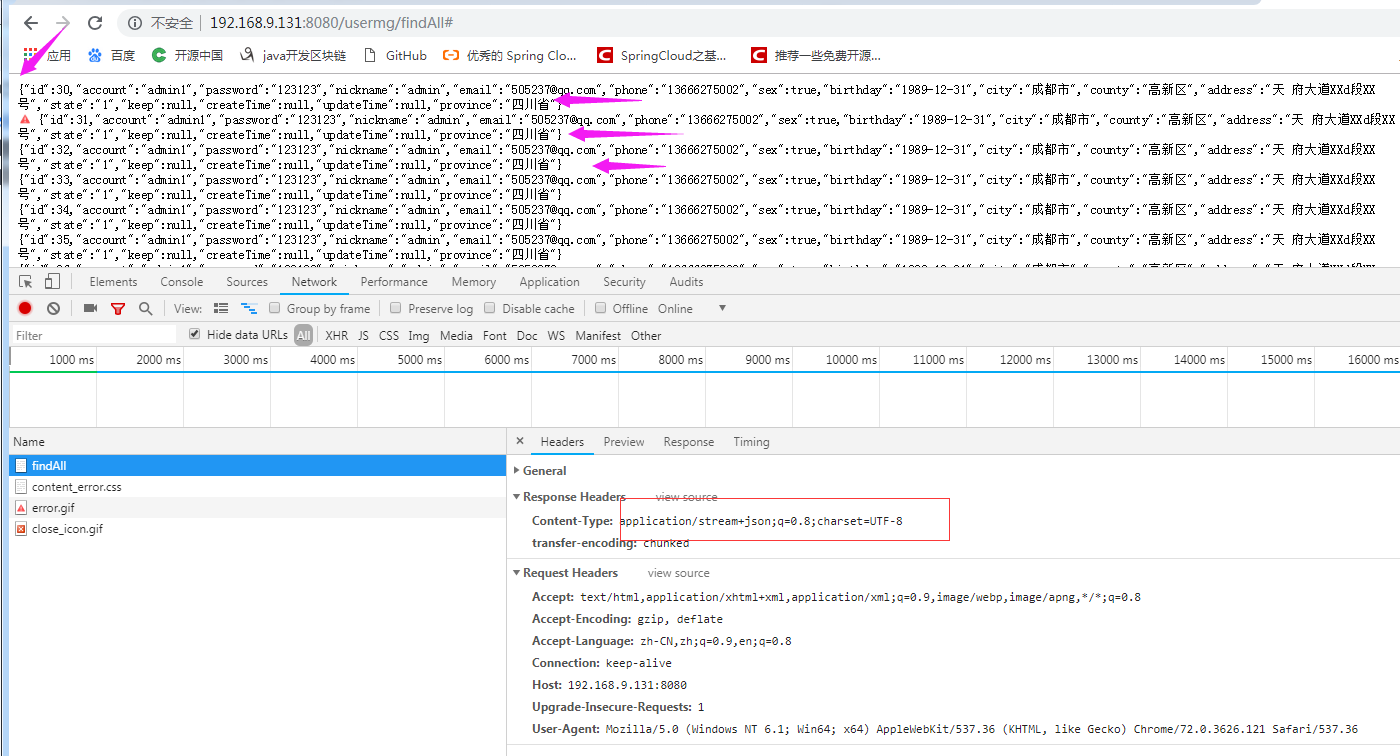
先说说什么是响应式 响应式编程或反应式编程(英语:Reactive programming)是一种面向数据流和变化传播的编程范式,直白的说就是:将变化的值通过数据流进行传播。 WebFlux又是什么呢 WebFlux 模块的名称是 spring-webflux,名称中的 Flux 来源于 Reactor 中的类 Flux。Spring webflux 有一个全新的非堵塞的函数式 Reactive Web 框架,可以用来构建异步的、非堵塞的、事件驱动的服务,在伸缩性方面表现非常好。 spring-webflux 模块。该模块包含对响应式 HTTP 和 WebSocket 客户端的支持,以及对 REST,HTML 和 WebSocket 交互等程序的支持。一般来说,Spring MVC 用于同步处理,Spring Webflux 用于异步处理。 Spring Boot Webflux 有两种编程模型实现,一种类似 Spring MVC 注解方式,另一种是基于 Reactor 的响应式方式。 实践走起 我在网找了下发现现在支持的DAL包有: spring-boot-starter-data-redis-reactive、spring-boot-starter-data-mongodb-reactive 也许还有别的,我本意是想要spring-boot-starter-data-mysql-reactive,然而并木有。那就说下上面2个包的实践把。 spring-boot-starter-data-redis-reactive 用到的包 <dependency> <groupId>org.springframework.boot</groupId> <artifactId>spring-boot-starter-webflux</artifactId> </dependency> <dependency> <groupId>org.springframework.boot</groupId> <artifactId>spring-boot-starter-data-redis-reactive</artifactId> </dependency> <dependency> <groupId>org.apache.commons</groupId> <artifactId>commons-pool2</artifactId> </dependency> <dependency> <groupId>org.springframework.boot</groupId> <artifactId>spring-boot-configuration-processor</artifactId> <optional>true</optional> </dependency> <dependency> <groupId>org.projectlombok</groupId> <artifactId>lombok</artifactId> <optional>true</optional> </dependency> <dependency> <groupId>com.github.flying-cattle</groupId> <artifactId>mybatis-dsc-generator</artifactId> <version>${mybatis-dsc-generator.version}</version> </dependency> <dependency> <groupId>com.alibaba</groupId> <artifactId>fastjson</artifactId> <version>${fastjson.version}</version> </dependency> YMl配置 server: port: 8080 spring: application: name: webFlux-test redis: host: 127.0.0.1 port: 6379 password: pwd2020 timeout: 5000 lettuce: pool: max-active: 200 max-idle: 20 min-idle: 5 max-wait: 1000 整合redis-reactive 虽然包是starter,但是还是要有自己的配置才能用不然报错如下: Description: Field redisTemplate in com.flying.cattle.wf.service.impl.RedisServiceImpl required a bean of type 'org.springframework.data.redis.core.ReactiveRedisTemplate' that could not be found. The injection point has the following annotations: - @org.springframework.beans.factory.annotation.Autowired(required=true) Action: Consider defining a bean of type 'org.springframework.data.redis.core.ReactiveRedisTemplate' in your configuration. 看了下官方文档需要加上如下: @Bean public ReactiveRedisTemplate<String, String> reactiveRedisTemplate(ReactiveRedisConnectionFactory factory) { ReactiveRedisTemplate<String, String> reactiveRedisTemplate = new ReactiveRedisTemplate<>(factory,RedisSerializationContext.string()); return reactiveRedisTemplate; } 发现了么是ReactiveRedisTemplate<String, String> 感觉就不很友好了,本来我是想声明成ReactiveRedisTemplate<String, Serializable>,搞古了一会儿木有搞定。有那个大佬有好的方案,望指点哈 Service代码: @Service public class RedisServiceImpl implements RedisService { @Autowired private ReactiveRedisTemplate<String, String> redisTemplate; @Override public Mono<String> getById(String key) { // TODO Auto-generated method stub ReactiveValueOperations<String, String> operations = redisTemplate.opsForValue(); return operations.get(key); } @Override public Mono<String> addUser(String key,User user) { // TODO Auto-generated method stub ReactiveValueOperations<String, String> operations = redisTemplate.opsForValue(); return operations.getAndSet(key, JSON.toJSONString(user)); } @Override public Mono<Boolean> deleteById(String key) { // TODO Auto-generated method stub ReactiveValueOperations<String, String> operations = redisTemplate.opsForValue(); return operations.delete(key); } @Override public Mono<String> updateById(String key,User user) { // TODO Auto-generated method stub ReactiveValueOperations<String, String> operations = redisTemplate.opsForValue(); return operations.getAndSet(key, JSON.toJSONString(user)); } @Override public Flux<String> findAll(String key) { // TODO Auto-generated method stub ReactiveListOperations<String, String> operations = redisTemplate.opsForList(); return operations.range(key, 0, -1); } @Override public Mono<Long> addlist(String key,List<String> list) { // TODO Auto-generated method stub ReactiveListOperations<String, String> operations = redisTemplate.opsForList(); return operations.leftPushAll(key, list); } @Override public Flux<String> findUsers(String key) { ReactiveValueOperations<String, String> operations = redisTemplate.opsForValue(); return redisTemplate.keys(key).flatMap(keyId ->operations.get(keyId)); } } Controller代码 @RestController @RequestMapping("/user") public class UserController { public final static String USER_KEY="user"; @Autowired private RedisService redisService; @Autowired private RedisGenerateId redisGenerateId; @GetMapping("/getId") public Long getUserId(){ return redisGenerateId.generate(USER_KEY); } public String getKey(Long id) { return USER_KEY+"_"+id; } @GetMapping("/getById/{id}") public Mono<String> getUserById(@PathVariable("id")Long id){ return redisService.getById(getKey(id)); } @GetMapping("/add") public Mono<String> add(User user){ user = new User(); user.setAccount("admin1"); user.setPassword("123123"); user.setNickname("admin"); user.setEmail("505237@qq.com"); user.setPhone("13666275002"); user.setSex(true); String bd="1990-01-01"; DateFormat fmt = new SimpleDateFormat("yyyy-MM-dd"); try { user.setBirthday(fmt.parse(bd)); } catch (ParseException e) { // TODO Auto-generated catch block e.printStackTrace(); } user.setProvince("四川省"); user.setCity("成都市"); user.setCounty("高新区"); user.setAddress("天 府大道XXd段XX号"); user.setState("1"); // 以上是模拟数据 ValidationResult vr=ValidationUtils.validateEntity(user); if (!vr.isHasErrors()) { user.setId(getUserId()); System.out.println(JSON.toJSONString(user)); return redisService.addUser(getKey(user.getId()),user); }else { return Mono.just(vr.getFirstErrors()); } } @GetMapping("/addlist") public Mono<Long> addlist(){ List<String> list=new ArrayList<String>(); User user = new User(); user.setAccount("admin1"); user.setPassword("123123"); user.setNickname("admin"); user.setEmail("505237@qq.com"); user.setPhone("13666275002"); user.setSex(true); user.setBirthday(new Date()); user.setProvince("四川省"); user.setCity("成都市"); user.setCounty("高新区"); user.setAddress("天 府大道XXd段XX号"); user.setState("1"); //添加第一条数据 Long id=redisGenerateId.generate("user"); user.setId(id); list.add(JSON.toJSONString(user)); //添加第二条数据 id=redisGenerateId.generate("user"); user.setId(id); list.add(JSON.toJSONString(user)); //添加第三条数据 id=redisGenerateId.generate("user"); user.setId(id); list.add(JSON.toJSONString(user)); return redisService.addlist("list", list); } /** * 这个就是流响应式的接口了,是一个一个的返回数据的,异步返回 * delayElements(Duration.ofSeconds(2))这个是不要的,只是方便看效果 * redis 直接就是一个一个返回,不需要produces,不知道为什么...还木有深究。 */ @GetMapping(value="/findAll",produces = MediaType.APPLICATION_STREAM_JSON_VALUE) public Flux<String> findAll(){ return redisService.findAll("list").delayElements(Duration.ofSeconds(2)); } @GetMapping("/getUsers") public Flux<String> findUsers() { // TODO Auto-generated method stub return redisService.findUsers(USER_KEY+"_"+"*").delayElements(Duration.ofSeconds(2)); } } 一个是差list数据类型,一个是匹配key查询的,都是一个一个返回的,实际开发中去掉.delayElements(Duration.ofSeconds(2))就好 整合mongodb-reactive 需要的包,只需要在redis的基础上下面的jar <dependency> <groupId>org.springframework.boot</groupId> <artifactId>spring-boot-starter-data-mongodb-reactive</artifactId> </dependency> MongoDB就很人性化了,感觉就很友好。而且是真的starter包,配置好数据库连接,就不需要其他配置了,直接可用 DAO import org.springframework.data.mongodb.repository.ReactiveMongoRepository; import com.flying.cattle.wf.entity.User; public interface UserRepository extends ReactiveMongoRepository<User, Long>{ } SERVICE(接口层我就不贴代码了) @Service public class MongoServiceImpl implements MongoService { @Autowired private UserRepository userRepository; @Override public Mono<User> getById(Long id) { // TODO Auto-generated method stub return userRepository.findById(id); } @Override public Mono<User> addUser(User user) { // TODO Auto-generated method stub return userRepository.save(user); } @Override public Mono<Boolean> deleteById(Long id) { // TODO Auto-generated method stub userRepository.deleteById(id); return Mono.create(userMonoSink -> userMonoSink.success()); } @Override public Mono<User> updateById(User user) { // TODO Auto-generated method stub return userRepository.save(user); } @Override public Flux<User> findAllUser() { // TODO Auto-generated method stub return userRepository.findAll(); } } CONTROLLER @RestController @RequestMapping("/usermg") public class UserMongoController { public final static String USER_KEY="user"; @Autowired private RedisGenerateId redisGenerateId; @Autowired private MongoService mongoService; @GetMapping("/getId") public Long getUserId(){ return redisGenerateId.generate(USER_KEY); } @GetMapping("/add") public Mono<User> add(User user) { user = new User(); user.setAccount("admin1"); user.setPassword("123123"); user.setNickname("admin"); user.setEmail("505237@qq.com"); user.setPhone("13666275002"); user.setSex(true); String bd = "1990-01-01"; DateFormat fmt = new SimpleDateFormat("yyyy-MM-dd"); try { user.setBirthday(fmt.parse(bd)); } catch (ParseException e) { // TODO Auto-generated catch block e.printStackTrace(); } user.setProvince("四川省"); user.setCity("成都市"); user.setCounty("高新区"); user.setAddress("天 府大道XXd段XX号"); user.setState("1"); // 以上是模拟数据 ValidationResult vr = ValidationUtils.validateEntity(user); if (!vr.isHasErrors()) { user.setId(getUserId()); System.out.println(JSON.toJSONString(user)); return mongoService.addUser(user); } else { System.err.println(vr.getFirstErrors()); } return null; } /** * 注意这里produces = MediaType.APPLICATION_STREAM_JSON_VALUE * 如果不是application/stream+json则调用端无法滚动得到结果,将一直阻塞等待数据流结束或超时。 */ @GetMapping(value="/findAll",produces = MediaType.APPLICATION_STREAM_JSON_VALUE) public Flux<User> findAll(){ return mongoService.findAllUser().delayElements(Duration.ofSeconds(1)); } } 代码就这些,大家要体验这个框架,建议还是用MongoDB把,毕竟redis主要是做缓存的。 给大家看下数据结构图 源码地址:https://gitee.com/flying-cattle/infrastructure/tree/master/webFluxTest

优秀的个人博客,低调大师

Spring Boot Security 整合 OAuth2 设计安全API接口服务

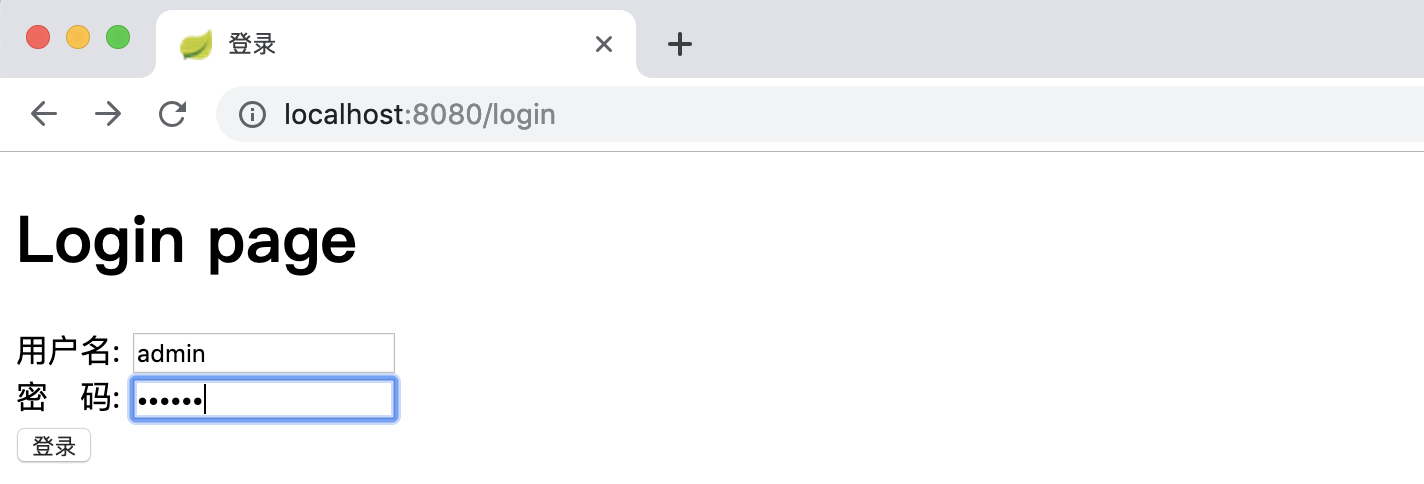
文章首发于公众号《程序员果果》地址:https://mp.weixin.qq.com/s/0PAUErDh0qmcR4SUsTn15Q 简介 OAuth是一个关于授权(authorization)的开放网络标准,在全世界得到广泛应用,目前的版本是2.0版。本文重点讲解Spring Boot项目对OAuth2进行的实现,如果你对OAuth2不是很了解,你可以先理解 OAuth 2.0 - 阮一峰,这是一篇对于oauth2很好的科普文章。 OAuth2概述 oauth2根据使用场景不同,分成了4种模式 授权码模式(authorization code) 简化模式(implicit) 密码模式(resource owner password credentials) 客户端模式(client credentials) 在项目中我们通常使用授权码模式,也是四种模式中最复杂的,通常网站中经常出现的微博,qq第三方登录,都会采用这个形式。 Oauth2授权主要由两部分组成: Authorization server:认证服务 Resource server:资源服务 在实际项目中以上两个服务可以在一个服务器上,也可以分开部署。下面结合spring boot来说明如何使用。 快速上手 之前的文章已经对 Spring Security 进行了讲解,这一节对涉及到 Spring Security 的配置不详细讲解。若不了解 Spring Security 先移步到 Spring Boot Security 详解。 建表 客户端信息可以存储在内存、redis和数据库。在实际项目中通常使用redis和数据库存储。本文采用数据库。Spring 0Auth2 己经设计好了数据库的表,且不可变。表及字段说明参照:Oauth2数据库表说明 。 创建0Auth2数据库的脚本如下: DROP TABLE IF EXISTS `clientdetails`; DROP TABLE IF EXISTS `oauth_access_token`; DROP TABLE IF EXISTS `oauth_approvals`; DROP TABLE IF EXISTS `oauth_client_details`; DROP TABLE IF EXISTS `oauth_client_token`; DROP TABLE IF EXISTS `oauth_refresh_token`; CREATE TABLE `clientdetails` ( `appId` varchar(128) NOT NULL, `resourceIds` varchar(256) DEFAULT NULL, `appSecret` varchar(256) DEFAULT NULL, `scope` varchar(256) DEFAULT NULL, `grantTypes` varchar(256) DEFAULT NULL, `redirectUrl` varchar(256) DEFAULT NULL, `authorities` varchar(256) DEFAULT NULL, `access_token_validity` int(11) DEFAULT NULL, `refresh_token_validity` int(11) DEFAULT NULL, `additionalInformation` varchar(4096) DEFAULT NULL, `autoApproveScopes` varchar(256) DEFAULT NULL, PRIMARY KEY (`appId`) ) ENGINE=InnoDB DEFAULT CHARSET=utf8; CREATE TABLE `oauth_access_token` ( `token_id` varchar(256) DEFAULT NULL, `token` blob, `authentication_id` varchar(128) NOT NULL, `user_name` varchar(256) DEFAULT NULL, `client_id` varchar(256) DEFAULT NULL, `authentication` blob, `refresh_token` varchar(256) DEFAULT NULL, PRIMARY KEY (`authentication_id`) ) ENGINE=InnoDB DEFAULT CHARSET=utf8; CREATE TABLE `oauth_approvals` ( `userId` varchar(256) DEFAULT NULL, `clientId` varchar(256) DEFAULT NULL, `scope` varchar(256) DEFAULT NULL, `status` varchar(10) DEFAULT NULL, `expiresAt` datetime DEFAULT NULL, `lastModifiedAt` datetime DEFAULT NULL ) ENGINE=InnoDB DEFAULT CHARSET=utf8; CREATE TABLE `oauth_client_details` ( `client_id` varchar(128) NOT NULL, `resource_ids` varchar(256) DEFAULT NULL, `client_secret` varchar(256) DEFAULT NULL, `scope` varchar(256) DEFAULT NULL, `authorized_grant_types` varchar(256) DEFAULT NULL, `web_server_redirect_uri` varchar(256) DEFAULT NULL, `authorities` varchar(256) DEFAULT NULL, `access_token_validity` int(11) DEFAULT NULL, `refresh_token_validity` int(11) DEFAULT NULL, `additional_information` varchar(4096) DEFAULT NULL, `autoapprove` varchar(256) DEFAULT NULL, PRIMARY KEY (`client_id`) ) ENGINE=InnoDB DEFAULT CHARSET=utf8; CREATE TABLE `oauth_client_token` ( `token_id` varchar(256) DEFAULT NULL, `token` blob, `authentication_id` varchar(128) NOT NULL, `user_name` varchar(256) DEFAULT NULL, `client_id` varchar(256) DEFAULT NULL, PRIMARY KEY (`authentication_id`) ) ENGINE=InnoDB DEFAULT CHARSET=utf8; DROP TABLE IF EXISTS `oauth_code`; CREATE TABLE `oauth_code` ( `code` varchar(256) DEFAULT NULL, `authentication` blob ) ENGINE=InnoDB DEFAULT CHARSET=utf8; CREATE TABLE `oauth_refresh_token` ( `token_id` varchar(256) DEFAULT NULL, `token` blob, `authentication` blob ) ENGINE=InnoDB DEFAULT CHARSET=utf8; 为了测试方便,我们先插入一条客户端信息。 INSERT INTO `oauth_client_details` VALUES ('dev', '', 'dev', 'app', 'password,client_credentials,authorization_code,refresh_token', 'http://www.baidu.com', '', 3600, 3600, '{\"country\":\"CN\",\"country_code\":\"086\"}', 'false'); 用户、权限、角色用到的表如下: DROP TABLE IF EXISTS `user`; DROP TABLE IF EXISTS `role`; DROP TABLE IF EXISTS `user_role`; DROP TABLE IF EXISTS `role_permission`; DROP TABLE IF EXISTS `permission`; CREATE TABLE `user` ( `id` bigint(11) NOT NULL AUTO_INCREMENT, `username` varchar(255) NOT NULL, `password` varchar(255) NOT NULL, PRIMARY KEY (`id`) ); CREATE TABLE `role` ( `id` bigint(11) NOT NULL AUTO_INCREMENT, `name` varchar(255) NOT NULL, PRIMARY KEY (`id`) ); CREATE TABLE `user_role` ( `user_id` bigint(11) NOT NULL, `role_id` bigint(11) NOT NULL ); CREATE TABLE `role_permission` ( `role_id` bigint(11) NOT NULL, `permission_id` bigint(11) NOT NULL ); CREATE TABLE `permission` ( `id` bigint(11) NOT NULL AUTO_INCREMENT, `url` varchar(255) NOT NULL, `name` varchar(255) NOT NULL, `description` varchar(255) NULL, `pid` bigint(11) NOT NULL, PRIMARY KEY (`id`) ); INSERT INTO user (id, username, password) VALUES (1,'user','e10adc3949ba59abbe56e057f20f883e'); INSERT INTO user (id, username , password) VALUES (2,'admin','e10adc3949ba59abbe56e057f20f883e'); INSERT INTO role (id, name) VALUES (1,'USER'); INSERT INTO role (id, name) VALUES (2,'ADMIN'); INSERT INTO permission (id, url, name, pid) VALUES (1,'/**','',0); INSERT INTO permission (id, url, name, pid) VALUES (2,'/**','',0); INSERT INTO user_role (user_id, role_id) VALUES (1, 1); INSERT INTO user_role (user_id, role_id) VALUES (2, 2); INSERT INTO role_permission (role_id, permission_id) VALUES (1, 1); INSERT INTO role_permission (role_id, permission_id) VALUES (2, 2); 项目结构 resources |____templates | |____login.html | |____application.yml java |____com | |____gf | | |____SpringbootSecurityApplication.java | | |____config | | | |____SecurityConfig.java | | | |____MyFilterSecurityInterceptor.java | | | |____MyInvocationSecurityMetadataSourceService.java | | | |____ResourceServerConfig.java | | | |____WebResponseExceptionTranslateConfig.java | | | |____AuthorizationServerConfiguration.java | | | |____MyAccessDecisionManager.java | | |____entity | | | |____User.java | | | |____RolePermisson.java | | | |____Role.java | | |____mapper | | | |____PermissionMapper.java | | | |____UserMapper.java | | | |____RoleMapper.java | | |____controller | | | |____HelloController.java | | | |____MainController.java | | |____service | | | |____MyUserDetailsService.java 关键代码 pom.xml <dependency> <groupId>org.springframework.boot</groupId> <artifactId>spring-boot-starter-security</artifactId> </dependency> <dependency> <groupId>org.springframework.boot</groupId> <artifactId>spring-boot-starter-thymeleaf</artifactId> </dependency> <dependency> <groupId>org.springframework.boot</groupId> <artifactId>spring-boot-starter-oauth2-client</artifactId> </dependency> <dependency> <groupId>org.springframework.boot</groupId> <artifactId>spring-boot-starter-oauth2-resource-server</artifactId> </dependency> <dependency> <groupId>org.springframework.security.oauth.boot</groupId> <artifactId>spring-security-oauth2-autoconfigure</artifactId> <version>2.1.3.RELEASE</version> </dependency> SecurityConfig 支持password模式要配置AuthenticationManager @Configuration @EnableWebSecurity public class SecurityConfig extends WebSecurityConfigurerAdapter { @Autowired private MyUserDetailsService userService; @Override protected void configure(AuthenticationManagerBuilder auth) throws Exception { //校验用户 auth.userDetailsService( userService ).passwordEncoder( new PasswordEncoder() { //对密码进行加密 @Override public String encode(CharSequence charSequence) { System.out.println(charSequence.toString()); return DigestUtils.md5DigestAsHex(charSequence.toString().getBytes()); } //对密码进行判断匹配 @Override public boolean matches(CharSequence charSequence, String s) { String encode = DigestUtils.md5DigestAsHex(charSequence.toString().getBytes()); boolean res = s.equals( encode ); return res; } } ); } @Override protected void configure(HttpSecurity http) throws Exception { http.csrf().disable(); http.requestMatchers() .antMatchers("/oauth/**","/login","/login-error") .and() .authorizeRequests() .antMatchers("/oauth/**").authenticated() .and() .formLogin().loginPage( "/login" ).failureUrl( "/login-error" ); } @Override @Bean public AuthenticationManager authenticationManagerBean() throws Exception{ return super.authenticationManager(); } @Bean public PasswordEncoder passwordEncoder() { return new PasswordEncoder() { @Override public String encode(CharSequence charSequence) { return charSequence.toString(); } @Override public boolean matches(CharSequence charSequence, String s) { return Objects.equals(charSequence.toString(),s); } }; } } AuthorizationServerConfiguration 认证服务器配置 /** * 认证服务器配置 */ @Configuration @EnableAuthorizationServer public class AuthorizationServerConfiguration extends AuthorizationServerConfigurerAdapter { /** * 注入权限验证控制器 来支持 password grant type */ @Autowired private AuthenticationManager authenticationManager; /** * 注入userDetailsService,开启refresh_token需要用到 */ @Autowired private MyUserDetailsService userDetailsService; /** * 数据源 */ @Autowired private DataSource dataSource; /** * 设置保存token的方式,一共有五种,这里采用数据库的方式 */ @Autowired private TokenStore tokenStore; @Autowired private WebResponseExceptionTranslator webResponseExceptionTranslator; @Bean public TokenStore tokenStore() { return new JdbcTokenStore( dataSource ); } @Override public void configure(AuthorizationServerSecurityConfigurer security) throws Exception { /** * 配置oauth2服务跨域 */ CorsConfigurationSource source = new CorsConfigurationSource() { @Override public CorsConfiguration getCorsConfiguration(HttpServletRequest request) { CorsConfiguration corsConfiguration = new CorsConfiguration(); corsConfiguration.addAllowedHeader("*"); corsConfiguration.addAllowedOrigin(request.getHeader( HttpHeaders.ORIGIN)); corsConfiguration.addAllowedMethod("*"); corsConfiguration.setAllowCredentials(true); corsConfiguration.setMaxAge(3600L); return corsConfiguration; } }; security.tokenKeyAccess("permitAll()") .checkTokenAccess("permitAll()") .allowFormAuthenticationForClients() .addTokenEndpointAuthenticationFilter(new CorsFilter(source)); } @Override public void configure(ClientDetailsServiceConfigurer clients) throws Exception { clients.jdbc(dataSource); } @Override public void configure(AuthorizationServerEndpointsConfigurer endpoints) throws Exception { //开启密码授权类型 endpoints.authenticationManager(authenticationManager); //配置token存储方式 endpoints.tokenStore(tokenStore); //自定义登录或者鉴权失败时的返回信息 endpoints.exceptionTranslator(webResponseExceptionTranslator); //要使用refresh_token的话,需要额外配置userDetailsService endpoints.userDetailsService( userDetailsService ); } } ResourceServerConfig 资源服务器配置 /** * 资源提供端的配置 */ @Configuration @EnableResourceServer public class ResourceServerConfig extends ResourceServerConfigurerAdapter { /** * 这里设置需要token验证的url * 这些url可以在WebSecurityConfigurerAdapter中排除掉, * 对于相同的url,如果二者都配置了验证 * 则优先进入ResourceServerConfigurerAdapter,进行token验证。而不会进行 * WebSecurityConfigurerAdapter 的 basic auth或表单认证。 */ @Override public void configure(HttpSecurity http) throws Exception { http.requestMatchers().antMatchers("/hi") .and() .authorizeRequests() .antMatchers("/hi").authenticated(); } } 关键代码就是这些,其他类代码参照后面提供的源码地址。 验证 密码授权模式 [ 密码模式需要参数:username , password , grant_type , client_id , client_secret ] 请求token curl -X POST -d "username=admin&password=123456&grant_type=password&client_id=dev&client_secret=dev" http://localhost:8080/oauth/token 返回 { "access_token": "d94ec0aa-47ee-4578-b4a0-8cf47f0e8639", "token_type": "bearer", "refresh_token": "23503bc7-4494-4795-a047-98db75053374", "expires_in": 3475, "scope": "app" } 不携带token访问资源, curl http://localhost:8080/hi\?name\=zhangsan 返回提示未授权 { "error": "unauthorized", "error_description": "Full authentication is required to access this resource" } 携带token访问资源 curl http://localhost:8080/hi\?name\=zhangsan\&access_token\=164471f7-6fc6-4890-b5d2-eb43bda3328a 返回正确 hi , zhangsan 刷新token curl -X POST -d 'grant_type=refresh_token&refresh_token=23503bc7-4494-4795-a047-98db75053374&client_id=dev&client_secret=dev' http://localhost:8080/oauth/token 返回 { "access_token": "ef53eb01-eb9b-46d8-bd58-7a0f9f44e30b", "token_type": "bearer", "refresh_token": "23503bc7-4494-4795-a047-98db75053374", "expires_in": 3599, "scope": "app" } 客户端授权模式 [ 客户端模式需要参数:grant_type , client_id , client_secret ] 请求token curl -X POST -d "grant_type=client_credentials&client_id=dev&client_secret=dev" http://localhost:8080/oauth/token 返回 { "access_token": "a7be47b3-9dc8-473e-967a-c7267682dc66", "token_type": "bearer", "expires_in": 3564, "scope": "app" } 授权码模式 获取code 浏览器中访问如下地址: http://localhost:8080/oauth/authorize?response_type=code&client_id=dev&redirect_uri=http://www.baidu.com 跳转到登录页面,输入账号和密码进行认证: 认证后会跳转到授权确认页面(oauth_client_details 表中 “autoapprove” 字段设置为true 时,不会出授权确认页面): 确认后,会跳转到百度,并且地址栏中会带上我们想得到的code参数: 通过code换token curl -X POST -d "grant_type=authorization_code&code=qS03iu&client_id=dev&client_secret=dev&redirect_uri=http://www.baidu.com" http://localhost:8080/oauth/token 返回 { "access_token": "90a246fa-a9ee-4117-8401-ca9c869c5be9", "token_type": "bearer", "refresh_token": "23503bc7-4494-4795-a047-98db75053374", "expires_in": 3319, "scope": "app" } 参考 https://segmentfault.com/a/1190000012260914 https://stackoverflow.com/questions/28537181/spring-security-oauth2-which-decides-security 源码 https://github.com/gf-huanchupk/SpringBootLearning/tree/master/springboot-security-oauth2

优秀的个人博客,低调大师

使用API/CLI对阿里云子账户做ACK(Kubernetes) RBAC授权

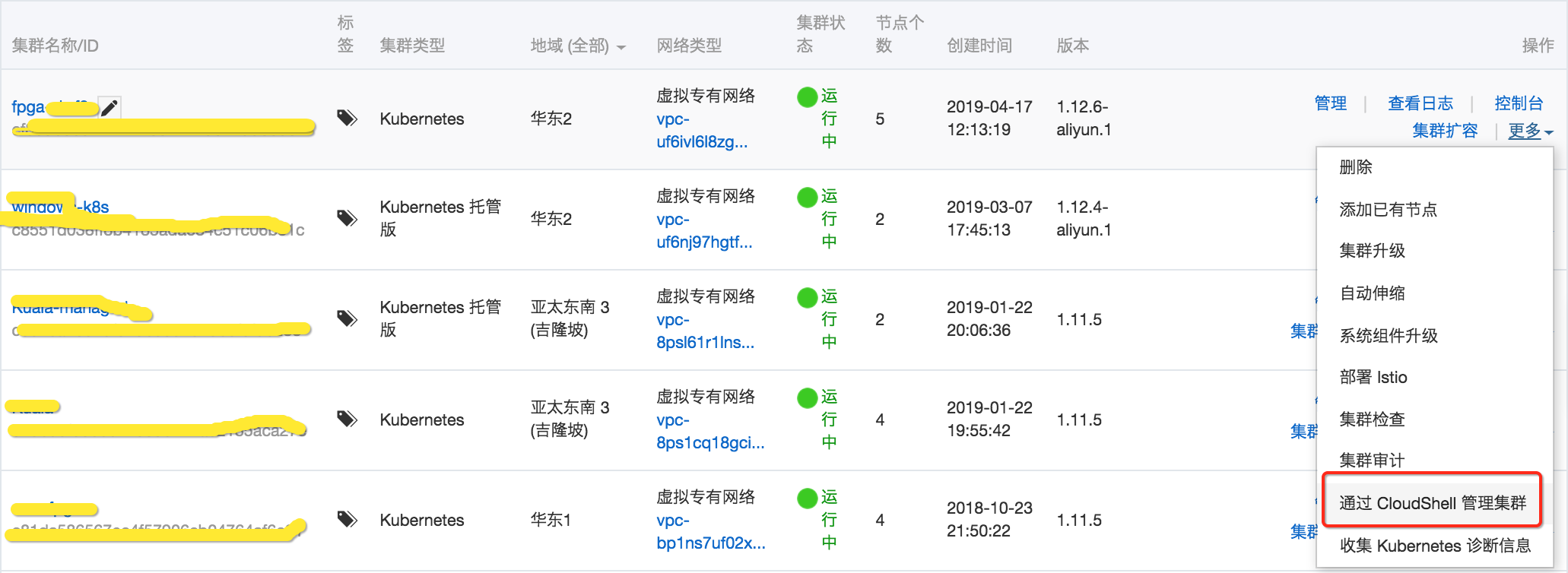
使用CloudShell 来一次完成ACK集群的RAM授权和RBAC授权 登录CloudShell获取一个配置完整集群管理命令行 授权 List existing users aliyun ram ListUsers | jq -r ".Users.User[].UserName" wget https://ack-downloads.oss-cn-hangzhou.aliyuncs.com/rbac/ack-grant-once -O ack-grant-once && chmod 755 ack-grant-once Grant permission once ./ack-grant-once <USER_NAME> <ROLE: one of custom:network-view, cs:ad

优秀的个人博客,低调大师

spring api接口返回数据优化 —— 只返回需要的字段数据

概述 spring/spring boot 返回的json数据,通常包含了对象所有的字段,有时候浪费流量。例如一个接口有10个字段,而前端只需要2个字段,都返回会浪费流量。解决方案:前端在header中传递需要包含或需要排除的字段;后端在返回数据前进行统一拦截,只返回需要的字段。具有有多种实现方式(这里只提供spring boot)。 首先约定返回的BaseResult对象格式如下,里面result属性就是实际各种数据对象。 { "ret":0, "msg":null, "result":{ "id":1, "name":"后摄像头53" }, "time":1540972430498 } 实现方式一:通过AOP controller来实现 aop实现步骤说明: 判断返回的是不是BaseResult对象 判断request header或params是否有x-include-fields、x-exclude-fields属性(有则取出来放入set中) 满足以上条件则对BaseResult.result 对象进行处理,用Map替换result对象,Map只返回需要的字段。如果是Array或Collection则每个Item替换成一个Map。 import com.cehome.cloudbox.common.object.BaseResult; import com.cehome.cloudbox.common.object.ItemsResult; import com.cehome.cloudbox.common.object.PageResult; import com.cehome.cloudbox.common.page.Page; import com.cehomex.spring.feign.FeignRequestHolder; import org.apache.commons.beanutils.PropertyUtils; import org.apache.commons.lang3.StringUtils; import org.aspectj.lang.ProceedingJoinPoint; import org.aspectj.lang.annotation.Around; import org.aspectj.lang.annotation.Aspect; import org.aspectj.lang.annotation.Pointcut; import org.slf4j.Logger; import org.slf4j.LoggerFactory; import org.springframework.web.context.request.RequestContextHolder; import org.springframework.web.context.request.ServletRequestAttributes; import javax.servlet.http.HttpServletRequest; import java.beans.PropertyDescriptor; import java.util.*; @Aspect public class ControllerAOP { private static String INCLUDE_FIELDS = "x-include-fields"; private static String EXCLUDE_FIELDS = "x-exclude-fields"; private static String P_INCLUDE_FIELDS = "x-include-fields"; private static String P_EXCLUDE_FIELDS = "x-exclude-fields"; private static final Logger logger = LoggerFactory.getLogger(ControllerAOP.class); @Pointcut("within(@org.springframework.stereotype.Controller *)") public void controller() { } @Pointcut("within(@org.springframework.web.bind.annotation.RestController *)") public void restController() { } @Around("(controller() || restController()) && execution(public * *(..))") public Object proceed(ProceedingJoinPoint joinPoint) throws Throwable { try { Object object=joinPoint.proceed(); ServletRequestAttributes requestAttributes = (ServletRequestAttributes) RequestContextHolder .getRequestAttributes(); if (requestAttributes != null) { HttpServletRequest request = requestAttributes.getRequest(); handleReturnValue(object,request); } return object; } finally { FeignRequestHolder.removeAll(); } } /** * 返回前端需要的字段 * @param o * @param request * @throws Exception */ public void handleReturnValue(Object o,HttpServletRequest request) throws Exception { if(!isSuccess(o)) return; //HttpServletRequest request = nativeWebRequest.getNativeRequest(HttpServletRequest.class); //HttpServletResponse response = nativeWebRequest.getNativeResponse(HttpServletResponse.class); String fields1 = StringUtils.trimToEmpty(request.getHeader(INCLUDE_FIELDS)); if(fields1.length()==0) fields1 = StringUtils.trimToEmpty(request.getParameter(P_INCLUDE_FIELDS)); String fields2 = StringUtils.trimToEmpty(request.getHeader(EXCLUDE_FIELDS)); if(fields2.length()==0) fields2 = StringUtils.trimToEmpty(request.getParameter(P_EXCLUDE_FIELDS)); if (fields1.length() > 0 || fields2.length() > 0) { Set<String> includes = fields1.length() == 0 ? new HashSet<>() : new HashSet<>(Arrays.asList(fields1.split(","))); Set<String> excludes = fields2.length() == 0 ? new HashSet<>() : new HashSet<>(Arrays.asList(fields2.split(","))); if (o instanceof BaseResult) { BaseResult result = (BaseResult) o; Object object = result.getResult(); result.setResult(convertResult(object, includes, excludes)); } else if (o instanceof ItemsResult) { ItemsResult result = (ItemsResult) o; Object object = result.getItems(); result.setItems(convertResult(object, includes, excludes)); } else if (o instanceof PageResult) { PageResult result = (PageResult) o; Object object = result.getPage(); if (object instanceof Page) { Page page=(Page) object; List datas = page.getDatas(); page.setDatas((List)convertResult(datas, includes, excludes)); } } } } private boolean isSuccess(Object object){ if(object==null) return false; if (object instanceof BaseResult) return ( (BaseResult) object).isSuccess(); if (object instanceof ItemsResult) return ( (ItemsResult) object).isSuccess(); if (object instanceof PageResult) return ( (PageResult) object).isSuccess(); return false; } /*private void handleObject(Object object, Set<String> includes, Set<String> excludes) throws Exception { PropertyDescriptor[] pds = PropertyUtils.getPropertyDescriptors(object); for (PropertyDescriptor pd : pds) { String name = pd.getName(); if (name.equals("class")) { continue; } if (excludes.contains(name) || !includes.contains(name)) { PropertyUtils.setProperty(object, name, null); } } }*/ /** * convert objects to maps * @param object * @param includes * @param excludes * @return * @throws Exception */ private Object convertResult(Object object, Set<String> includes, Set<String> excludes) throws Exception{ if (object instanceof Object[]) { Object[] objects = (Object[]) object; return convertArray(objects,includes,excludes); } else if (object instanceof Collection) { Collection collection = (Collection) object; return convertCollection(collection,includes,excludes); }else{ return convertObject(object,includes,excludes); } } private Collection<Map> convertCollection(Collection collection, Set<String> includes, Set<String> excludes) throws Exception{ Collection<Map> result=new ArrayList<>(); for (Object item : collection) { result.add(convertObject(item,includes,excludes)); } return result; } private Map[] convertArray(Object[] objects, Set<String> includes, Set<String> excludes) throws Exception{ Map[] result=new HashMap[objects.length]; for(int i=0;i<objects.length;i++){ result[i]=convertObject(objects[i],includes,excludes); } return result; } /** * convert object to map * @param object input * @param includes include props * @param excludes exclude props * @return * @throws Exception */ private Map convertObject(Object object, Set<String> includes, Set<String> excludes) throws Exception { Map<Object,Object> result=new HashMap<>(); if(!(object instanceof Map)) { PropertyDescriptor[] pds = PropertyUtils.getPropertyDescriptors(object); for (PropertyDescriptor pd : pds) { String name = pd.getName(); if (name.equals("class")) { continue; } if(!excludes.isEmpty() && excludes.contains(name)){ continue; } if(!includes.isEmpty() && !includes.contains(name)){ continue; } result.put(name,PropertyUtils.getProperty(object, name)); } }else { Map<Object,Object> map=(Map<Object,Object>) object; for(Map.Entry<Object,Object> entry :map.entrySet()){ String name= entry.getKey()==null?"":entry.getKey().toString(); if(!excludes.isEmpty() && excludes.contains(name)){ continue; } if(!includes.isEmpty() && !includes.contains(name)){ continue; } result.put(entry.getKey(),entry.getValue()); } } return result; } } 用Map替换的方式改变了原来的对象,还有一种效率更好的不改变对象的方式,就是把不需要返回的字段设为null,然后配置一个JSON处理bean,统一过滤null的字段。这种方式null的字段就不再返回前端,需要前端做些兼容。 @Bean @Primary @ConditionalOnMissingBean(ObjectMapper.class) public ObjectMapper jacksonObjectMapper(Jackson2ObjectMapperBuilder builder) { ObjectMapper objectMapper = builder.createXmlMapper(false).build(); objectMapper.setSerializationInclusion(JsonInclude.Include.NON_NULL); return objectMapper; } 实现方式二:自定义HttpMessageConverter来实现 spring boot缺省包含了好几个消息转换器,根据返回媒体类型进行匹配,第一个匹配上就忽略掉其它的了。MappingJackson2HttpMessageConverter 是其处理JSON的消息转换器。 所以,需要先删除缺省的MappingJackson2HttpMessageConverter 继承MappingJackson2HttpMessageConverter,实现自定义的消息转换。 import com.alibaba.fastjson.JSON; import com.alibaba.fastjson.JSONObject; import com.fasterxml.jackson.annotation.JsonInclude; import com.fasterxml.jackson.databind.MapperFeature; import com.fasterxml.jackson.databind.ObjectMapper; import com.fasterxml.jackson.databind.module.SimpleModule; import com.fasterxml.jackson.databind.ser.impl.SimpleBeanPropertyFilter; import com.fasterxml.jackson.databind.ser.impl.SimpleFilterProvider; import com.fasterxml.jackson.databind.ser.std.ToStringSerializer; import java.io.IOException; import java.lang.reflect.Type; import java.nio.charset.Charset; import java.util.ArrayList; import java.util.Iterator; import java.util.List; import org.springframework.context.annotation.Configuration; import org.springframework.http.HttpOutputMessage; import org.springframework.http.MediaType; import org.springframework.http.converter.HttpMessageConverter; import org.springframework.http.converter.HttpMessageNotWritableException; import org.springframework.http.converter.json.Jackson2ObjectMapperBuilder; import org.springframework.http.converter.json.MappingJackson2HttpMessageConverter; import org.springframework.http.converter.json.MappingJacksonValue; import org.springframework.web.bind.annotation.ControllerAdvice; import org.springframework.web.servlet.config.annotation.WebMvcConfigurerAdapter; @Configuration public class WebConfig extends WebMvcConfigurerAdapter { @Override public void extendMessageConverters(List<HttpMessageConverter<?>> converters) { //-- 移除缺省的JSON处理器 for (int i = converters.size() - 1; i >= 0; i--) { HttpMessageConverter<?> messageConverter = converters.get(i); if (messageConverter instanceof org.springframework.http.converter.json.MappingJackson2HttpMessageConverter) converters.remove(i); } // -- 添加自己得JSON处理器 MappingJackson2HttpMessageConverter c = new MappingJackson2HttpMessageConverter() { @Override protected void writeInternal(Object object, Type type, HttpOutputMessage outputMessage) throws IOException, HttpMessageNotWritableException { //-- 例子一: 转成fastjson对象,然后替换name字段 JSONObject json = (JSONObject) JSON.toJSON(object); json.getJSONObject("result").put("name", "coolma"); super.writeInternal(json, type, outputMessage); //-- 例子二: 用过滤器只保留name字段,其它字段不要。 //注意,例子二需要给BaseResult对象的result属性加上com.fasterxml.jackson.annotation.JsonFilter注解: // @JsonFilter("result") // private T result; MappingJacksonValue value = new MappingJacksonValue(object); value.setFilters(new SimpleFilterProvider().addFilter("result", SimpleBeanPropertyFilter.filterOutAllExcept("name"))); super.writeInternal(value, type, outputMessage); } }; c.setDefaultCharset(Charset.forName("UTF-8")); List<MediaType> mediaTypes = new ArrayList<>(); mediaTypes.add(MediaType.APPLICATION_JSON_UTF8); c.setSupportedMediaTypes(mediaTypes); converters.add(c); } }

资源下载

更多资源
Mario

Mario

马里奥是站在游戏界顶峰的超人气多面角色。马里奥靠吃蘑菇成长,特征是大鼻子、头戴帽子、身穿背带裤,还留着胡子。与他的双胞胎兄弟路易基一起,长年担任任天堂的招牌角色。

腾讯云软件源

腾讯云软件源

为解决软件依赖安装时官方源访问速度慢的问题,腾讯云为一些软件搭建了缓存服务。您可以通过使用腾讯云软件源站来提升依赖包的安装速度。为了方便用户自由搭建服务架构,目前腾讯云软件源站支持公网访问和内网访问。

Nacos

Nacos

Nacos /nɑ:kəʊs/ 是 Dynamic Naming and Configuration Service 的首字母简称,一个易于构建 AI Agent 应用的动态服务发现、配置管理和AI智能体管理平台。Nacos 致力于帮助您发现、配置和管理微服务及AI智能体应用。Nacos 提供了一组简单易用的特性集,帮助您快速实现动态服务发现、服务配置、服务元数据、流量管理。Nacos 帮助您更敏捷和容易地构建、交付和管理微服务平台。

WebStorm

WebStorm

WebStorm 是jetbrains公司旗下一款JavaScript 开发工具。目前已经被广大中国JS开发者誉为“Web前端开发神器”、“最强大的HTML5编辑器”、“最智能的JavaScript IDE”等。与IntelliJ IDEA同源,继承了IntelliJ IDEA强大的JS部分的功能。

用户登录
用户注册