首页 文章 精选 留言 我的

精选列表

搜索[API集成],共10000篇文章
优秀的个人博客,低调大师

Building a Keras + deep learning REST API(三部曲之一)

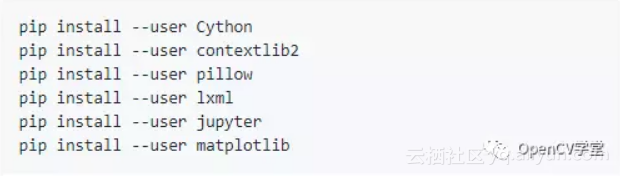
一、基本环境 $ pip install flask gevent requests pillow 其中 flask不需要解释 gevent 是用于自动切换进程的; pillow 是用来进行python下的图像处理的; requests 是用来进行python下request处理的。 二、核心代码解释 # import the necessary packages from keras.applications import ResNet50 from keras.preprocessing.image import img_to_array from keras.applications import imagenet_utils from PIL import Image import numpy as np import flask import io 引入所需的头文件。其中注意keras的几个类库是很有通用性的; # initialize our Flask application and the Keras model app = flask.Flask( __name__) model = None 类库的初始化 def load_model(): # load the pre-trained Keras model (here we are using a model # pre-trained on ImageNet and provided by Keras, but you can # substitute in your own networks just as easily) global model model = ResNet50( weights= "imagenet") 引入model模型,如果想引入自己的模型(CBIR)的话,就在这里引入。 def prepare_image( image, target): # if the image mode is not RGB, convert it if image.mode != "RGB": image = image.convert( "RGB") # resize the input image and preprocess it image = image.resize(target) image = img_to_array(image) image = np.expand_dims(image, axis= 0) image = imagenet_utils.preprocess_input(image) # return the processed image return image image的预处理,这里使用的是keras+PIL,和opencv之间的比较,需要有时间来做。 @app.route( "/predict", methods=[ "POST"]) def predict(): # initialize the data dictionary that will be returned from the # view data = { "success": False} # ensure an image was properly uploaded to our endpoint if flask.request.method == "POST": if flask.request.files.get( "image"): # read the image in PIL format image = flask.request.files[ "image"].read() image = Image.open(io.BytesIO(image)) # preprocess the image and prepare it for classification image = prepare_image(image, target=( 224, 224)) # classify the input image and then initialize the list # of predictions to return to the client preds = model.predict(image) results = imagenet_utils.decode_predictions(preds) data[ "predictions"] = [] # loop over the results and add them to the list of # returned predictions for (imagenetID, label, prob) in results[ 0]: r = { "label": label, "probability": float(prob)} data[ "predictions"].append(r) # indicate that the request was a success data[ "success"] = True # return the data dictionary as a JSON response return flask.jsonify(data) 虽然是核心部分,但是其实非常容易被复用。就是读取数据,然后进行处理的过程。 # if this is the main thread of execution first load the model and # then start the server if __name__ == "__main__": print(( "* Loading Keras model and Flask starting server..." "please wait until server has fully started")) load_model() app.run() 比不可少的main过程。缺少不可运行。 三、运行效果 使用VPS能够更快地得到效果,至少你不需要下载resnet*.h5,一个链路不是太好的大物件。 flask的运行效果,使用curl进行处理的效果 从结果上来看,curch排在了第2,而将这张图片识别为钟楼或者修道院、城堡,宫殿 ,似乎也没有什么不妥。 四、小结反思 真的仅仅是通过了几行代码,就实现了flask部署的核心问题。不过光是跑这个简单的过程,机器就已经发出巨大的热量了;另一方面,整个的结构是什么,也需要进一步去研究清楚才对。 来自为知笔记(Wiz) 目前方向:图像拼接融合、图像识别 联系方式:jsxyhelu@foxmail.com

优秀的个人博客,低调大师

Java高并发秒杀Api-业务分析与DAO层构建3

章节目录 mybatis与spring整合过程 spring-dao.xml 配置 junit4 单元测试 1.mybatis与spring整合过程 1.1 spring-dao.xml 配置 <?xml version="1.0" encoding="UTF-8"?> <beans xmlns="http://www.springframework.org/schema/beans" xmlns:xsi="http://www.w3.org/2001/XMLSchema-instance" xmlns:context="http://www.springframework.org/schema/context" xsi:schemaLocation="http://www.springframework.org/schema/beans http://www.springframework.org/schema/beans/spring-beans.xsd http://www.springframework.org/schema/context http://www.springframework.org/schema/context/spring-context.xsd"> <!--配置整合mybatis--> <!--1:配置数据库相关参数--> <!-- 1:配置数据库相关参数properties的属性:${url} --> <context:property-placeholder location="classpath:jdbc.properties"/> <!--2.数据库连接池配置--> <bean id="dataSource" class="com.mchange.v2.c3p0.ComboPooledDataSource"> <!-- 配置连接池属性--> <property name="driverClass" value="${driver}" /> <property name="jdbcUrl" value="${url}" /> <property name="user" value="${username}" /> <property name="password" value="${password}" /> <!-- c3p0连接池的私有属性--> <property name="maxPoolSize" value="30" /> <property name="minPoolSize" value="10" /> <!-- 关闭连接后不自动commit--> <property name="autoCommitOnClose" value="false" /> <!-- 获取连接超时时间 30个连接用完--> <property name="checkoutTimeout" value="1000" /> <!-- 当获取连接失败重试次数--> <property name="acquireRetryAttempts" value="2" /> </bean> <!-- 约定大于配置--> <!-- 3:配置SqlSessionFactory对象--> <bean id="sqlSessionFactory" class="org.mybatis.spring.SqlSessionFactoryBean"> <!-- 注入数据库连接池--> <property name="dataSource" ref="dataSource" /> <!-- 配置MyBatis全局配置文件:mybatis-config.xml--> <property name="configLocation" value="classpath:mybatis-config.xml" /> <!-- 扫描entity包 使用别名--> <property name="typeAliasesPackage" value="org.seckill.domain" /> <!-- 扫描sql配置文件;mapper需要的xml文件--> <property name="mapperLocations" value="classpath:mapper/*.xml" /> </bean> <!--配置扫描Dao接口包,动态实现Dao接口 mapper 代理,并注入到Spring容器中 MapperScannerConfigurer--> <bean class="org.mybatis.spring.mapper.MapperScannerConfigurer"> <!--注入sqlSessionFactory,懒加载,用到的时候才加载--> <property name="sqlSessionFactoryBeanName" value="sqlSessionFactory"></property> <!--给出扫描DAO接口包--> <property name="basePackage" value="org.seckill.dao"></property> </bean> </beans> 2.junit 单元测试 SecKillDaoTest.java - 测试秒杀 package org.seckill.dao; import org.junit.Test; import org.junit.runner.RunWith; import org.seckill.domain.SecKill; import org.springframework.beans.factory.annotation.Autowired; import org.springframework.test.context.ContextConfiguration; import org.springframework.test.context.junit4.SpringJUnit4ClassRunner; import java.util.Date; import java.util.List; /** * 配置spring 与 junit 启动时加载Spring IOC容器 * spring-test,junit整合 * 告诉junit Spring配置文件位置 */ @RunWith(SpringJUnit4ClassRunner.class) @ContextConfiguration({"classpath:spring/spring-dao.xml"}) public class SecKillDaoTest { //注入Dao类实现 @Autowired private SecKillDao secKillDao; @Test public void queryById() throws Exception { long id = 1000; SecKill secKill = secKillDao.queryById(id); System.out.println(secKill.getName()); System.out.println(secKill); /** * 1000元秒杀iphone x SecKill{seckillId=1000, name='1000元秒杀iphone x', stock=100, startTime=Fri May 04 00:00:00 CST 2018, endTime=Sat May 05 00:00:00 CST 2018, createTime=Sat May 05 00:05:03 CST 2018 } */ } /** * @throws Exception */ @Test public void queryAll() throws Exception { // queryAll(offset,limit)->queryAll(arg0,arg1) List<SecKill> secKillList = secKillDao.queryAll(0, 100); for (SecKill secKill : secKillList) { System.out.println(secKill); } /** * SecKill{seckillId=1000, name='1000元秒杀iphone x', stock=100, startTime=Fri May 04 00:00:00 CST 2018, endTime=Sat May 05 00:00:00 CST 2018, createTime=Sat May 05 00:05:03 CST 2018} SecKill{seckillId=1001, name='500元秒杀ipad x', stock=200, startTime=Fri May 04 00:00:00 CST 2018, endTime=Sat May 05 00:00:00 CST 2018, createTime=Sat May 05 00:05:03 CST 2018} SecKill{seckillId=1002, name='300元秒杀小米4', stock=300, startTime=Fri May 04 00:00:00 CST 2018, endTime=Sat May 05 00:00:00 CST 2018, createTime=Sat May 05 00:05:03 CST 2018} SecKill{seckillId=1003, name='200元秒杀小米note', stock=400, startTime=Fri May 04 00:00:00 CST 2018, endTime=Sat May 05 00:00:00 CST 2018, createTime=Sat May 05 00:05:03 CST 2018} */ } @Test public void reduceStock() throws Exception { Date killTime = new Date(); int updateCount = secKillDao.reduceStock(1000L, killTime); System.out.println(updateCount); } } 测试秒杀明细 package org.seckill.dao; import org.junit.Test; import org.junit.runner.RunWith; import org.seckill.domain.SuccessKilled; import org.springframework.beans.factory.annotation.Autowired; import org.springframework.test.context.ContextConfiguration; import org.springframework.test.context.junit4.SpringJUnit4ClassRunner; @RunWith(SpringJUnit4ClassRunner.class) @ContextConfiguration("classpath:spring/spring-dao.xml") public class SuccessKilledDaoTest { @Autowired private SuccessKilledDao successKilledDao; @Test public void insertSuccessKilled() throws Exception { int successCount = successKilledDao.insertSuccessKilled(1001L, "15300815999"); System.out.println("insertCount=" + successCount); } @Test public void queryByIdWithSecKill() throws Exception { //1个用户只能查询到属于自己的一个秒杀明细 long id = 1001L; String phone = "15300815999"; SuccessKilled successKilled = successKilledDao.queryByIdWithSecKill(id, phone); System.out.println(successKilled); } } 接下来是service 层的构建


优秀的个人博客,低调大师

Java高并发秒杀Api-业务分析与DAO层构建1

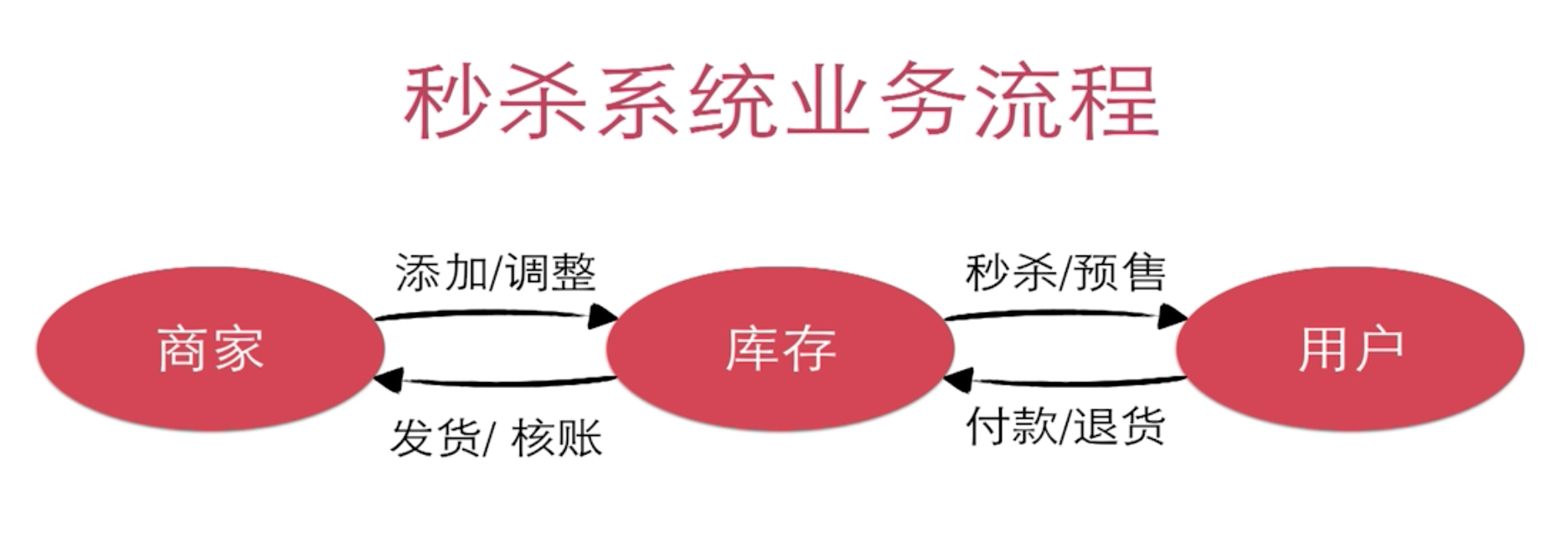
章节目录 1.为什么使用Spring+Spring MVC+Mybatis 2.秒杀业务特性 3.秒杀分析过程、优化思路 4.相关技术介绍 5.基于Maven创建项目 6.秒杀业务分析 7.秒杀事务的难点分析 8.实现秒杀的哪些功能 1.为什么使用Spring+Spring MVC+Mybatis 框架易于使用、轻量级 对业务代码侵入性低 成熟的社区与资料 2.秒杀业务特性 秒杀业务场景具有典型的"事务"特性 秒杀、红包类需求越来越常见,对竞争资源的访问 面试常问的问题 3.相关技术介绍 MySQL 表设计 SQL技巧 事务、行级锁 MyBatis DAO层设计与开发 MyBatis 合理使用 MyBatis 与 Spring整合 Spring Spring Ioc 整合Service Spring 声明式事务使用 Spring MVC Restful 接口设计与使用 框架运作流程 Controller 设计技巧 前端 交互设计 BootStrap Jquery 高并发 高并发点和高并发分析 优化思路并实现 4.基于Maven创建项目 1.maven命令创建web项目骨架 mvn archetype:generate -DgroupId=org.seckill -DartifactId=seckill - DarchetypeArtifactId=maven-archetype-webapp 5.秒杀业务分析 如下图所示: 秒杀业务系统流程分析 所以秒杀业务的核心是对库存的处理。 用户针对库存处理的业务分析用户的秒杀过程 需要减库存->记录购买明细->组成完整事务->数据持久化 如下图所示: 用户秒杀过程 用户购买行为 记录谁购买成功了->成功的时间及有效期->付款、发货信息 为什么需要事务 事务不完整导致的数据一致性问题 如上图所示 1.减了库存,但是没有用户的购买明细,那么就会出现50个商品,但是购买明 细小于50个,到时候发货会发现有些许商品滞留在仓库中,此种情况属于少卖 的情况。 2.记录了明细但是没有减库存,就会发现订单量比商品量要多,出现超卖的情 况,还有一种情况也会导致超卖,多个用户并发修改库存,加入库存量为1,这 个时候多个用户同时去减库存(经过库存量>0的验证),会导致库存为负数, 多个用户抢到同一个商品,这种情况下也会导致超卖发生。 数据落地方案 MySQL VS NoSQL NoSQL非关系型数据库在事务的支持上并没有关系型数据库可靠。 所以归根结底事务机制依然是目前最可靠的落地方案。 6.秒杀事务难点分析 6.1 难点问题-竞争 竞争问题-并发冲突修改 解决方案是采用数据库innodb引擎提供的 事务及 行级锁。 用户减库存的事务流程: begin; update 库存数量; insert 购买明细; commit; 行级锁 如下如所示: 行级锁 情景分析: 在事务执行过程中,mysql默认的repeateable read 隔离级别会在写操作发生的 行上加上行级锁(非记录加锁,而是在对应索引上加锁,上图中的update加锁 发生在id上),多个写请求并发更新同一行记录会产生如下问题: 因为行级锁在事务结束之后才能释放锁,可能会导致锁等待的发生。数据库吞吐率(事务处理能力)会降低。 所以秒杀的难点是什么?秒杀的难点是如何高效的处理竞争-如何在保证数据一致性的情况下高效的处理竞争 8.实现秒杀的哪些功能 1.秒杀接口暴露 浏览器插件获取秒杀接口,通过脚本去秒杀,保护秒杀接口的一种手段。 2.执行秒杀的操作 执行秒杀的业务逻辑 3.秒杀查询,商品详情页查询。 其实市面上最主要的几个秒杀思路是: 1.直接在数据库层面做秒杀 2.缓存中存储库存,用户秒杀请求是将缓存中库存与数据库中库存数据同时进行减库存的过程,保证数据一致性是一个难点。 3.缓存中存储有效的减库存操作,队列减库存的的请求依次顺序执行数据库减库存、生成订单明细事务(操作),如小米。

优秀的个人博客,低调大师

API开创基底细胞癌手术切缘采集,改善过度医疗现状

做为一个医学硕士,曾拥有8年临床医生工作经验,在医院工作时的一件小事让我想明白了一件事:医学应该是个信仰,不该是个职业。 医疗行业对人类这么重要,信息化却这么落后,自己恰好有这方面的能力,也有意愿去提供这样的技术支持。因此我也写了几篇论文,但在我看来没有实际行动的理论,不过就是一堆垃圾。 不经意间的一个机会,开始全心投入医疗技术的研发中,刚开始围绕全套的业务流程有手术预约、数据管理、术后随访,对接了HIS、PACS、LIS,当时医院是内外网分离的,针对多个院区,还做了内外网和异地办公室的数据互通。在当时最大的难点是安装部署,其他医院想使用却用不起来,从院内政策到人员的精力都限制了项目的实施。 其他医院根据业务和使用规模大多需要项目的部分功能,为此不得不将项目拆分,各个模块弹性组合,这样分散式的持续了一段时间,但使用中参与数据录入

资源下载

更多资源
Mario

Mario

马里奥是站在游戏界顶峰的超人气多面角色。马里奥靠吃蘑菇成长,特征是大鼻子、头戴帽子、身穿背带裤,还留着胡子。与他的双胞胎兄弟路易基一起,长年担任任天堂的招牌角色。

腾讯云软件源

腾讯云软件源

为解决软件依赖安装时官方源访问速度慢的问题,腾讯云为一些软件搭建了缓存服务。您可以通过使用腾讯云软件源站来提升依赖包的安装速度。为了方便用户自由搭建服务架构,目前腾讯云软件源站支持公网访问和内网访问。

Rocky Linux

Rocky Linux

Rocky Linux(中文名:洛基)是由Gregory Kurtzer于2020年12月发起的企业级Linux发行版,作为CentOS稳定版停止维护后与RHEL(Red Hat Enterprise Linux)完全兼容的开源替代方案,由社区拥有并管理,支持x86_64、aarch64等架构。其通过重新编译RHEL源代码提供长期稳定性,采用模块化包装和SELinux安全架构,默认包含GNOME桌面环境及XFS文件系统,支持十年生命周期更新。

Sublime Text

Sublime Text

Sublime Text具有漂亮的用户界面和强大的功能,例如代码缩略图,Python的插件,代码段等。还可自定义键绑定,菜单和工具栏。Sublime Text 的主要功能包括:拼写检查,书签,完整的 Python API , Goto 功能,即时项目切换,多选择,多窗口等等。Sublime Text 是一个跨平台的编辑器,同时支持Windows、Linux、Mac OS X等操作系统。

用户登录
用户注册