首页 文章 精选 留言 我的

精选列表

搜索[demo],共9479篇文章
优秀的个人博客,低调大师

PostgreSQL示例demo

驱动下载地址:https://pan.baidu.com/s/1eBRESdntbnZQoN-yxJgFDA 功能:建立连接,数据读取 package com.epoint.HadoopAPIDemo; import java.sql.Connection; import java.sql.DriverManager; import java.sql.ResultSet; import java.sql.Statement; public class PostgreSQLTest { // JDBC连接串 static String url = "jdbc:postgresql://192.168.186.14:5432/hive"; // PG用户名 static String usr = "hive"; // PG密码 static String psd = "h3cDataEngine"; public static void main(String args[]) { Connection conn = null; try { Class.forName("org.postgresql.Driver"); // 创建连接 conn = DriverManager.getConnection(url, usr, psd); Statement st = conn.createStatement(); // 查询TEST表内容 ResultSet rs = st.executeQuery("SELECT * FROM \"DBS\""); while (rs.next()) { System.out.print(rs.getString(1)); System.out.print(" "); System.out.println(rs.getString(2)); } rs.close(); st.close(); } catch (Exception e) { e.printStackTrace(); } finally { // 关闭连接 if (conn != null) { try { conn.close(); conn = null; } catch (Exception e) { e.printStackTrace(); } } } } }

优秀的个人博客,低调大师

ES TransportClient demo

import java.net.InetAddress; import java.net.UnknownHostException; import org.elasticsearch.action.bulk.BulkRequestBuilder; import org.elasticsearch.action.bulk.BulkResponse; import org.elasticsearch.action.index.IndexResponse; import org.elasticsearch.client.transport.TransportClient; import org.elasticsearch.common.settings.Settings; import org.elasticsearch.common.transport.InetSocketTransportAddress; import org.elasticsearch.transport.client.PreBuiltTransportClient; import java.lang.*; public class ESClientTest { public static void main(String[] args) throws UnknownHostException { Settings settings = Settings.builder().put("client.transport.sniff", true).build(); TransportClient transportClient = new PreBuiltTransportClient(settings) .addTransportAddress(new InetSocketTransportAddress(InetAddress.getByName("10.178.209.160"), 9300)); String json = "{" + "\"user\":\"kimchy\"," + "\"postDate\":\"2013-01-30\"," + "\"message\":\"trying out Elasticsearch\"" + "}"; /* * IndexResponse response = transportClient.prepareIndex("twitter", * "tweet").setSource(json).execute().actionGet(); * System.out.println(response.toString()); */ BulkRequestBuilder bulkRequest = transportClient.prepareBulk(); bulkRequest.add(transportClient.prepareIndex("twitter", "tweet", "1").setSource(json)); long t1 = System.currentTimeMillis(); BulkResponse response1 = bulkRequest.get(); System.out.println(System.currentTimeMillis() - t1); if (response1.hasFailures()) { System.err.println(response1.buildFailureMessage()); } else { System.out.println( "Bulk indexing succeeded." + response1.toString() + " time:" + response1.getTookInMillis()); } transportClient.close(); } } 本文转自张昺华-sky博客园博客,原文链接:http://www.cnblogs.com/bonelee/p/7994161.html,如需转载请自行联系原作者

优秀的个人博客,低调大师

keyboard键盘demo

main.xml <?xml version="1.0" encoding="utf-8"?> <LinearLayout xmlns:android="http://schemas.android.com/apk/res/android" android:layout_width="fill_parent" android:layout_height="fill_parent" android:orientation="vertical" > <EditText android:id="@+id/edit" android:layout_width="fill_parent" android:layout_height="wrap_content" /> <EditText android:id="@+id/edit1" android:layout_width="fill_parent" android:layout_height="wrap_content" android:password="true" /> <RelativeLayout android:layout_width="fill_parent" android:layout_height="wrap_content" > <android.inputmethodservice.KeyboardView android:id="@+id/keyboard_view" android:layout_width="fill_parent" android:layout_height="wrap_content" android:layout_alignParentBottom="true" android:focusable="true" android:focusableInTouchMode="true" android:background="@color/lightblack" android:keyBackground="@drawable/btn_keyboard_key" android:keyTextColor="@color/white" android:keyPreviewLayout="@layout/key_preview_layout" android:visibility="gone" /> </RelativeLayout> </LinearLayout> key_preview_layout.xml <?xml version="1.0" encoding="utf-8"?> <TextView xmlns:android="http://schemas.android.com/apk/res/android" android:layout_width="wrap_content" android:layout_height="wrap_content" android:textSize="40sp" android:textColor="@color/font_red" android:gravity="center" android:background="@color/blue"/> qwerty.xml <?xml version="1.0" encoding="UTF-8"?> <Keyboard android:keyWidth="10.000002%p" android:keyHeight="@dimen/key_height" android:horizontalGap="0.0px" android:verticalGap="0.0px" xmlns:android="http://schemas.android.com/apk/res/android"> <Row> <Key android:codes="113" android:keyEdgeFlags="left" android:keyLabel="q" /> <Key android:codes="119" android:keyLabel="w" /> <Key android:codes="101" android:keyLabel="e" /> <Key android:codes="114" android:keyLabel="r" /> <Key android:codes="116" android:keyLabel="t" /> <Key android:codes="121" android:keyLabel="y" /> <Key android:codes="117" android:keyLabel="u" /> <Key android:codes="105" android:keyLabel="i" /> <Key android:codes="111" android:keyLabel="o" /> <Key android:codes="112" android:keyEdgeFlags="right" android:keyLabel="p" /> </Row> <Row> <Key android:horizontalGap="4.999995%p" android:codes="97" android:keyEdgeFlags="left" android:keyLabel="a" /> <Key android:codes="115" android:keyLabel="s" /> <Key android:codes="100" android:keyLabel="d" /> <Key android:codes="102" android:keyLabel="f" /> <Key android:codes="103" android:keyLabel="g" /> <Key android:codes="104" android:keyLabel="h" /> <Key android:codes="106" android:keyLabel="j" /> <Key android:codes="107" android:keyLabel="k" /> <Key android:codes="108" android:keyEdgeFlags="right" android:keyLabel="l" /> </Row> <Row> <Key android:keyWidth="14.999998%p" android:codes="-1" android:keyEdgeFlags="left" android:isModifier="true" android:isSticky="true" android:keyIcon="@drawable/sym_keyboard_shift" /> <Key android:codes="122" android:keyLabel="z" /> <Key android:codes="120" android:keyLabel="x" /> <Key android:codes="99" android:keyLabel="c" /> <Key android:codes="118" android:keyLabel="v" /> <Key android:codes="98" android:keyLabel="b" /> <Key android:codes="110" android:keyLabel="n" /> <Key android:codes="109" android:keyLabel="m" /> <Key android:keyWidth="14.999998%p" android:codes="-5" android:keyEdgeFlags="right" android:isRepeatable="true" android:keyIcon="@drawable/sym_keyboard_delete" /> </Row> <Row android:rowEdgeFlags="bottom"> <Key android:keyWidth="20.000004%p" android:codes="-2" android:keyLabel="12#" /> <Key android:keyWidth="14.999998%p" android:codes="44" android:keyLabel="," /> <Key android:keyWidth="29.999996%p" android:codes="32" android:isRepeatable="true" android:keyIcon="@drawable/sym_keyboard_space" /> <Key android:keyWidth="14.999998%p" android:codes="46" android:keyLabel="." /> <Key android:keyWidth="20.000004%p" android:codes="-3" android:keyEdgeFlags="right" android:keyLabel="完成" /> </Row> </Keyboard> symbols.xml <?xml version="1.0" encoding="utf-8"?> <Keyboard xmlns:android="http://schemas.android.com/apk/res/android" android:keyWidth="25%p" android:horizontalGap="0px" android:verticalGap="0px" android:keyHeight="@dimen/key_height"> <Row> <Key android:codes="49" android:keyLabel="1" /> <Key android:codes="50" android:keyLabel="2" /> <Key android:codes="51" android:keyLabel="3" /> <Key android:codes="57419" android:keyEdgeFlags="right" android:keyIcon="@drawable/sym_keyboard_left" /> </Row> <Row> <Key android:codes="52" android:keyLabel="4" /> <Key android:codes="53" android:keyLabel="5" /> <Key android:codes="54" android:keyLabel="6" /> <Key android:codes="57421" android:keyEdgeFlags="right" android:keyIcon="@drawable/sym_keyboard_right" /> </Row> <Row> <Key android:codes="55" android:keyLabel="7" /> <Key android:codes="56" android:keyLabel="8" /> <Key android:codes="57" android:keyLabel="9" /> <Key android:codes="-3" android:keyHeight="100dip" android:keyEdgeFlags="right" android:isRepeatable="true" android:keyLabel="完成" /> </Row> <Row> <Key android:codes="-2" android:keyLabel="ABC" /> <Key android:codes="48" android:keyLabel="0" /> <Key android:codes="-5" android:keyIcon="@drawable/sym_keyboard_delete" /> </Row> </Keyboard> btn_keyboard_key.xml <?xml version="1.0" encoding="UTF-8"?> <selector xmlns:android="http://schemas.android.com/apk/res/android"> <item android:state_pressed="true" android:drawable="@drawable/normal_key_hl_bg" /> <item android:drawable="@drawable/normal_key_bg" /> </selector> KeydemoActivity package cn.key; import java.io.IOException; import org.xmlpull.v1.XmlPullParserException; import android.app.Activity; import android.content.Context; import android.os.Bundle; import android.text.InputType; import android.view.MotionEvent; import android.view.View; import android.view.View.OnTouchListener; import android.widget.EditText; public class KeydemoActivity extends Activity { private Context ctx; private Activity act; private EditText edit; private EditText edit1; @Override public void onCreate(Bundle savedInstanceState) { super.onCreate(savedInstanceState); setContentView(R.layout.main); ctx = this; act = this; edit = (EditText) this.findViewById(R.id.edit); edit.setInputType(InputType.TYPE_NULL); edit1 = (EditText) this.findViewById(R.id.edit1); edit.setOnTouchListener(new OnTouchListener() { @Override public boolean onTouch(View v, MotionEvent event) { new KeyboardUtil(act, ctx, edit).showKeyboard(); return false; } }); edit1.setOnTouchListener(new OnTouchListener() { @Override public boolean onTouch(View v, MotionEvent event) { int inputback = edit1.getInputType(); edit1.setInputType(InputType.TYPE_NULL); new KeyboardUtil(act, ctx, edit1).showKeyboard(); edit1.setInputType(inputback); return false; } }); } } KeyboardUtil package cn.key; import java.util.List; import android.app.Activity; import android.content.Context; import android.inputmethodservice.Keyboard; import android.inputmethodservice.KeyboardView; import android.inputmethodservice.Keyboard.Key; import android.inputmethodservice.KeyboardView.OnKeyboardActionListener; import android.text.Editable; import android.view.View; import android.widget.EditText; public class KeyboardUtil { private Context ctx; private Activity act; private KeyboardView keyboardView; private Keyboard k1;// 字母键盘 private Keyboard k2;// 数字键盘 public boolean isnun = false;// 是否数据键盘 public boolean isupper = false;// 是否大写 private EditText ed; public KeyboardUtil(Activity act, Context ctx, EditText edit) { this.act = act; this.ctx = ctx; this.ed = edit; k1 = new Keyboard(ctx, R.xml.qwerty); k2 = new Keyboard(ctx, R.xml.symbols); keyboardView = (KeyboardView) act.findViewById(R.id.keyboard_view); keyboardView.setKeyboard(k1); keyboardView.setEnabled(true); keyboardView.setPreviewEnabled(true); keyboardView.setOnKeyboardActionListener(listener); } private OnKeyboardActionListener listener = new OnKeyboardActionListener() { @Override public void swipeUp() { } @Override public void swipeRight() { } @Override public void swipeLeft() { } @Override public void swipeDown() { } @Override public void onText(CharSequence text) { } @Override public void onRelease(int primaryCode) { } @Override public void onPress(int primaryCode) { } @Override public void onKey(int primaryCode, int[] keyCodes) { Editable editable = ed.getText(); int start = ed.getSelectionStart(); if (primaryCode == Keyboard.KEYCODE_CANCEL) {// 完成 hideKeyboard(); } else if (primaryCode == Keyboard.KEYCODE_DELETE) {// 回退 if (editable != null && editable.length() > 0) { if (start > 0) { editable.delete(start - 1, start); } } } else if (primaryCode == Keyboard.KEYCODE_SHIFT) {// 大小写切换 changeKey(); keyboardView.setKeyboard(k1); } else if (primaryCode == Keyboard.KEYCODE_MODE_CHANGE) {// 数字键盘切换 if (isnun) { isnun = false; keyboardView.setKeyboard(k1); } else { isnun = true; keyboardView.setKeyboard(k2); } } else if (primaryCode == 57419) { // go left if (start > 0) { ed.setSelection(start - 1); } } else if (primaryCode == 57421) { // go right if (start < ed.length()) { ed.setSelection(start + 1); } } else { editable.insert(start, Character.toString((char) primaryCode)); } } }; /** * 键盘大小写切换 */ private void changeKey() { List<Key> keylist = k1.getKeys(); if (isupper) {//大写切换小写 isupper = false; for(Key key:keylist){ if (key.label!=null && isword(key.label.toString())) { key.label = key.label.toString().toLowerCase(); key.codes[0] = key.codes[0]+32; } } } else {//小写切换大写 isupper = true; for(Key key:keylist){ if (key.label!=null && isword(key.label.toString())) { key.label = key.label.toString().toUpperCase(); key.codes[0] = key.codes[0]-32; } } } } public void showKeyboard() { int visibility = keyboardView.getVisibility(); if (visibility == View.GONE || visibility == View.INVISIBLE) { keyboardView.setVisibility(View.VISIBLE); } } public void hideKeyboard() { int visibility = keyboardView.getVisibility(); if (visibility == View.VISIBLE) { keyboardView.setVisibility(View.INVISIBLE); } } private boolean isword(String str){ String wordstr = "abcdefghijklmnopqrstuvwxyz"; if (wordstr.indexOf(str.toLowerCase())>-1) { return true; } return false; } } 本文转自农夫山泉别墅博客园博客,原文链接:http://www.cnblogs.com/yaowen/p/5442315.html,如需转载请自行联系原作者

优秀的个人博客,低调大师

MPPDB的demo示例

下载驱动:https://pan.baidu.com/s/1sV4XZbbmYtC0pAO6tewMTg 功能:将mysql中的数据表结构,自动在MPPDB中按照MPPDB语法批量创建表。 package com.epoint.HadoopAPIDemo; import java.sql.Connection; import java.sql.DriverManager; import java.sql.PreparedStatement; import java.sql.ResultSet; import java.sql.ResultSetMetaData; import java.sql.SQLException; import java.sql.Statement; public class MPPTestCreateTable { private static String MYSQLUSERNAME = "root"; private static String MYSQLPASSWORD = "Gepoint"; private static String MYSQLDRIVER = "com.mysql.jdbc.Driver"; private static String MYSQLURL = "jdbc:mysql://100.2.5.221:3307/dep_fr_db"; private static String MYSQLDATABASE = "dep_fr_db"; private static String MPPDRIVER = "com.MPP.jdbc.Driver"; private static String MPPURL = "jdbc:MPP://100.2.5.1:5258/"; private static String MPPUSERNAME = "mpp"; private static String MPPPASSWORD = "h3c"; Connection mysqlconn = null; Statement mysqlpstm = null; ResultSet mysqlrs = null; Connection mppconn = null; Statement mppstm = null; ResultSet mpprs = null; String sql1 = " "; String sql2 = " "; String sql3 = " "; String sql4 = " "; String sql5 = " "; String sql6 = " "; public static void main(String[] args) throws Exception { MPPTestCreateTable aidth = new MPPTestCreateTable(); aidth.getMYSQLConnection(); aidth.MYSQLReleaseResource(); aidth.getMPPConnection(); aidth.MPPReleaseResource(); aidth.CreateMPPTable(); // aidth.ImportDataToMPP(); System.out.println("程序已经执行完毕!请去waterdrop验证结果吧!!"); } public void CreateMPPTable() { mysqlconn = getMYSQLConnection(); mppconn = getMPPConnection(); try { mppstm = mppconn.createStatement(); mysqlpstm = mysqlconn.createStatement(); int i = 0; String sql = "SELECT table_schema\r\n" + " ,table_name\r\n" + " ,(\r\n" + " CASE \r\n" + " WHEN ORDINAL_POSITION = mincol\r\n" + " AND ORDINAL_POSITION < maxcol\r\n" + " THEN CONCAT (\"create table \"\r\n" + " ,table_schema\r\n" + " ,\".\"\r\n" + " ,table_name\r\n" + " ,\"(`\"\r\n" + " ,column_name\r\n" + " ,\"` \"\r\n" + " ,COLUMN_TYPE\r\n" + " ,\",\"\r\n" + " )\r\n" + " WHEN ORDINAL_POSITION = mincol\r\n" + " AND ORDINAL_POSITION = maxcol\r\n" + " THEN CONCAT (\"create table \"\r\n" + " ,table_schema\r\n" + " ,\".\"\r\n" + " ,table_name\r\n" + " ,\"(`\"\r\n" + " ,column_name\r\n" + " ,\"` \"\r\n" + " ,COLUMN_TYPE\r\n" + " ,\");\"\r\n" + " )\r\n" + " WHEN ORDINAL_POSITION > mincol\r\n" + " AND ORDINAL_POSITION < maxcol\r\n" + " THEN CONCAT (\r\n" + " \"`\"\r\n" + " ,column_name\r\n" + " ,\"` \"\r\n" + " ,COLUMN_TYPE\r\n" + " ,\",\"\r\n" + " )\r\n" + " WHEN ORDINAL_POSITION = maxcol\r\n" + " THEN CONCAT (\r\n" + " \"`\"\r\n" + " ,column_name\r\n" + " ,\"` \"\r\n" + " ,COLUMN_TYPE\r\n" + " ,\");\"\r\n" + " )\r\n" + " END\r\n" + " ) AS statement\r\n" + " ,ORDINAL_POSITION\r\n" + " ,maxcol\r\n" + " ,mincol\r\n" + "FROM (\r\n" + " SELECT b.table_schema,b.table_name,b.ORDINAL_POSITION,b.column_name,\r\n" + " (case\r\n" + " when column_type = 'timestamp' then 'datetime'\r\n" + " when column_type = 'bit(1)' then 'int(1)'\r\n" + " else\r\n" + " column_type\r\n" + " end ) AS column_type\r\n" + " ,a.maxcol\r\n" + " ,a.mincol\r\n" + " FROM (\r\n" + " SELECT table_schema\r\n" + " ,table_name\r\n" + " ,max(ORDINAL_POSITION) maxcol\r\n" + " ,min(ORDINAL_POSITION) mincol\r\n" + " FROM information_schema.COLUMNS\r\n" + " GROUP BY table_schema\r\n" + " ,table_name\r\n" + " ) a\r\n" + " JOIN (\r\n" + " SELECT table_schema\r\n" + " ,table_name\r\n" + " ,ORDINAL_POSITION\r\n" + " ,column_name\r\n" + " ,COLUMN_TYPE\r\n" + " FROM information_schema.COLUMNS\r\n" + " ORDER BY table_schema\r\n" + " ,table_name\r\n" + " ,ORDINAL_POSITION ASC\r\n" + " ) b ON a.table_schema = b.table_schema\r\n" + " AND a.table_name = b.table_name\r\n" + " ) c\r\n" + "WHERE table_schema = '"+MYSQLDATABASE+"'"; mysqlrs = mysqlpstm.executeQuery(sql); while (mysqlrs.next()) { sql1 = mysqlrs.getString(3); sql2 = sql2 + sql1; } sql3 = "create database IF NOT EXISTS " + MYSQLDATABASE; mppstm.execute(sql3); System.out.println("-------------------建mpp表,表结构的语句为:" + sql2); String[] sqls=sql2.split(";"); for (String m : sqls) { mppstm.execute(m); } System.out.println("----------------------------------------建mpp表已结束!!!!!!!!!!!!!!!!!!!!!!!!!!!!!"); mppstm.close(); mysqlpstm.close(); } catch (SQLException e) { e.printStackTrace(); } finally { MYSQLReleaseResource(); MPPReleaseResource(); } } public void ImportDataToMPP() { mysqlconn = getMYSQLConnection(); mppconn = getMPPConnection(); String sql = "select table_name from user_tables where num_rows > 0 order by table_name asc"; int i = 0; try { mysqlpstm = mysqlconn.createStatement(); mysqlrs = mysqlpstm.executeQuery(sql); mppstm = mppconn.createStatement(); while (mysqlrs.next()) { i = i + 1; String table_name = mysqlrs.getString("table_name").replaceAll("\\$", ""); String sql7 = "insert into " + MYSQLDATABASE + "." + table_name + " select * from " + MYSQLDATABASE + "_ex." + table_name; System.out.println("现在插入第"+i+"个表:"+sql7); mppstm.execute(sql7); } } catch (SQLException e) { e.printStackTrace(); } finally { MYSQLReleaseResource(); MPPReleaseResource(); } } public Connection getMYSQLConnection() { try { Class.forName(MYSQLDRIVER); mysqlconn = DriverManager.getConnection(MYSQLURL, MYSQLUSERNAME, MYSQLPASSWORD); } catch (ClassNotFoundException e) { throw new RuntimeException("class not find !", e); } catch (SQLException e) { throw new RuntimeException("get connection error!", e); } return mysqlconn; } public void MYSQLReleaseResource() { if (mysqlrs != null) { try { mysqlrs.close(); } catch (SQLException e) { e.printStackTrace(); } } if (mysqlpstm != null) { try { mysqlpstm.close(); } catch (SQLException e) { e.printStackTrace(); } } if (mysqlconn != null) { try { mysqlconn.close(); } catch (SQLException e) { e.printStackTrace(); } } } public Connection getMPPConnection() { try { Class.forName(MPPDRIVER); mppconn = DriverManager.getConnection(MPPURL, MPPUSERNAME, MPPPASSWORD); } catch (ClassNotFoundException e) { throw new RuntimeException("class not find !", e); } catch (SQLException e) { throw new RuntimeException("get connection error!", e); } return mppconn; } public void MPPReleaseResource() { if (mpprs != null) { try { mpprs.close(); } catch (SQLException e) { e.printStackTrace(); } } if (mppstm != null) { try { mppstm.close(); } catch (SQLException e) { e.printStackTrace(); } } if (mppconn != null) { try { mppconn.close(); } catch (SQLException e) { e.printStackTrace(); } } } }


优秀的个人博客,低调大师

Android ExpandableListView实例Demo

前几篇文章介绍了Listview。但在实际开发中也常常会用到多层的Listview来展示数据,比方qq中的好友展示,所以这张来了解一下ExpandableListview。基本思想与Listview大致是同样的。所以用起来会比較方便。 实现效果图: 程序代码: 布局文件: activity_main.xml: <RelativeLayout xmlns:android="http://schemas.android.com/apk/res/android" xmlns:tools="http://schemas.android.com/tools" android:layout_width="match_parent" android:layout_height="match_parent" android:paddingBottom="@dimen/activity_vertical_margin" android:paddingLeft="@dimen/activity_horizontal_margin" android:paddingRight="@dimen/activity_horizontal_margin" android:paddingTop="@dimen/activity_vertical_margin" tools:context=".MainActivity" > <ExpandableListView android:id="@+id/expandableListView" android:layout_width="wrap_content" android:layout_height="wrap_content" > </ExpandableListView> </RelativeLayout> group和child共同使用的布局(当然也能够使用不同的布局来实现)。这的布局比較简单,仅仅有一个Textview: list_item: <RelativeLayout xmlns:android="http://schemas.android.com/apk/res/android" xmlns:tools="http://schemas.android.com/tools" android:layout_width="match_parent" android:layout_height="match_parent" android:paddingBottom="@dimen/activity_vertical_margin" android:paddingLeft="@dimen/activity_horizontal_margin" android:paddingRight="@dimen/activity_horizontal_margin" android:paddingTop="@dimen/activity_vertical_margin" tools:context=".MainActivity" > <TextView android:id="@+id/textView" android:layout_width="wrap_content" android:layout_height="wrap_content" /> </RelativeLayout> MainActivity: package com.listviewdemo_expandablelistview; import java.util.ArrayList; import java.util.List; import android.app.Activity; import android.os.Bundle; import android.widget.ExpandableListView; public class MainActivity extends Activity { private ExpandableListView listView; private List<String> group; private List<List<String>> child; private MyAdapter adapter; @Override protected void onCreate(Bundle savedInstanceState) { super.onCreate(savedInstanceState); setContentView(R.layout.activity_main); listView = (ExpandableListView) findViewById(R.id.expandableListView); /** * 初始化数据 */ initData(); adapter = new MyAdapter(this,group,child); listView.setAdapter(adapter); } private void initData() { group = new ArrayList<String>(); child = new ArrayList<List<String>>(); addInfo("北京",new String[]{"朝阳","海淀","东城区","西城区"}); addInfo("河北", new String[]{"邯郸","石家庄","邢台"}); addInfo("广东", new String[]{"广州","深圳","珠海"}); } /** * 加入数据信息 * @param g * @param c */ private void addInfo(String g,String[] c) { group.add(g); List<String> list = new ArrayList<String>(); for (int i = 0; i < c.length; i++) { list.add(c[i]); } child.add(list); } } MyAdapter: package com.listviewdemo_expandablelistview; import java.util.List; import android.content.Context; import android.view.LayoutInflater; import android.view.View; import android.view.ViewGroup; import android.widget.BaseExpandableListAdapter; import android.widget.TextView; /** * expandableListView适配器 * */ public class MyAdapter extends BaseExpandableListAdapter { private Context context; private List<String> group; private List<List<String>> child; public MyAdapter(Context context, List<String> group, List<List<String>> child) { this.context = context; this.group = group; this.child = child; } @Override public int getGroupCount() { return group.size(); } @Override public int getChildrenCount(int groupPosition) { return child.size(); } @Override public Object getGroup(int groupPosition) { return group.get(groupPosition); } @Override public Object getChild(int groupPosition, int childPosition) { return child.get(childPosition).get(childPosition); } @Override public long getGroupId(int groupPosition) { return groupPosition; } @Override public long getChildId(int groupPosition, int childPosition) { return childPosition; } @Override public boolean hasStableIds() { return false; } /** * 显示:group */ @Override public View getGroupView(int groupPosition, boolean isExpanded, View convertView, ViewGroup parent) { ViewHolder holder; if (convertView == null) { convertView = LayoutInflater.from(context).inflate( R.layout.list_item, null); holder = new ViewHolder(); holder.textView = (TextView) convertView .findViewById(R.id.textView); convertView.setTag(holder); } else { holder = (ViewHolder) convertView.getTag(); } holder.textView.setText(group.get(groupPosition)); holder.textView.setTextSize(25); holder.textView.setPadding(36, 10, 0, 10); return convertView; } /** * 显示:child */ @Override public View getChildView(int groupPosition, int childPosition, boolean isLastChild, View convertView, ViewGroup parent) { ViewHolder holder; if (convertView == null) { convertView = LayoutInflater.from(context).inflate( R.layout.list_item, null); holder = new ViewHolder(); holder.textView = (TextView) convertView .findViewById(R.id.textView); convertView.setTag(holder); } else { holder = (ViewHolder) convertView.getTag(); } holder.textView.setText(child.get(groupPosition).get(childPosition)); holder.textView.setTextSize(20); holder.textView.setPadding(72, 10, 0, 10); return convertView; } class ViewHolder { TextView textView; } @Override public boolean isChildSelectable(int groupPosition, int childPosition) { return false; } } 如今CSDN博客中增加链接须要审核后才干发表。所以须要源代码的能够到我上传的资源中查找。 本文转自mfrbuaa博客园博客,原文链接:http://www.cnblogs.com/mfrbuaa/p/5302755.html,如需转载请自行联系原作者

优秀的个人博客,低调大师

volley框架使用小Demo

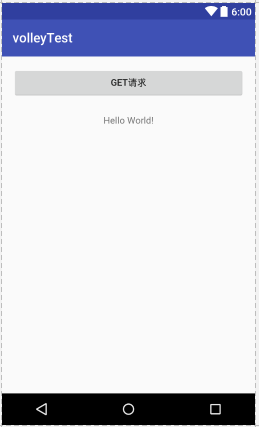
MainActivity public class MainActivity extends AppCompatActivity { private static final String URL = "https://www.baidu.com/"; private RequestQueue mQueue; // volley的请求队列 @BindView(R.id.volley_get) Button btn; TextView textView; @Override protected void onCreate(Bundle savedInstanceState) { super.onCreate(savedInstanceState); setContentView(R.layout.activity_main); mQueue = Volley.newRequestQueue(getApplicationContext()); ButterKnife.bind(this); } @OnClick({R.id.volley_get}) public void onClick(View v) { get(); } /** * 创建一个请求,这里我们做一个最简单的通过GET方式请求网页源码的操作。请求成功后打印结果。 */ private void get() { StringRequest request = new StringRequest(Request.Method.GET, URL, new Response.Listener<String>() { @Override public void onResponse(String arg0) { //Toast.makeText(getApplicationContext(), arg0, Toast.LENGTH_LONG).show(); textView = (TextView) findViewById(R.id.text); textView.setText(arg0.toString()); //Log.d("onResponse", arg0); } }, new Response.ErrorListener() { @Override public void onErrorResponse(VolleyError arg0) { //Toast.makeText(getApplicationContext(), arg0.toString(), Toast.LENGTH_LONG).show(); textView = (TextView) findViewById(R.id.text); textView.setText(arg0.toString()); } }); mQueue.add(request); } } activity_main.xml <?xml version="1.0" encoding="utf-8"?> <RelativeLayout xmlns:android="http://schemas.android.com/apk/res/android" xmlns:tools="http://schemas.android.com/tools" android:id="@+id/activity_main" android:layout_width="match_parent" android:layout_height="match_parent" android:paddingBottom="@dimen/activity_vertical_margin" android:paddingLeft="@dimen/activity_horizontal_margin" android:paddingRight="@dimen/activity_horizontal_margin" android:paddingTop="@dimen/activity_vertical_margin" tools:context="com.an.volleytest.MainActivity"> <Button android:id="@+id/volley_get" android:layout_width="match_parent" android:layout_height="wrap_content" android:text="get请求" android:layout_alignParentTop="true" android:layout_alignParentLeft="true" android:layout_alignParentStart="true" /> <TextView android:layout_width="wrap_content" android:layout_height="wrap_content" android:text="Hello World!" android:id="@+id/text" android:layout_marginTop="25dp" android:layout_below="@+id/volley_get" android:layout_centerHorizontal="true" /> </RelativeLayout> 捕获.PNG 点击按钮 hello world 替换为请求网址的html文件

优秀的个人博客,低调大师

HighLight.js 使用Demo

复制下面代码,保存为html,浏览器打开预览即可。 <!DOCTYPE html> <html> <head> <meta charset="utf-8"> </head> <body> <link href="http://cdn.bootcss.com/highlight.js/8.0/styles/monokai_sublime.min.css" rel="stylesheet"> <script src="http://cdn.bootcss.com/highlight.js/8.0/highlight.min.js"></script> <script >hljs.initHighlightingOnLoad();</script> <pre><code class="lang-java"> SuperCatch Crash!!! ====================Crash日志开始记录==================== Crash Time: 2017-12-20 06:08:51 Crash Thread: main Crash Digest: java.lang.IllegalStateException: Could not execute method for android:onClick Crash StackTrace: java.lang.IllegalStateException: Could not execute method for android:onClick at android.support.v7.app.AppCompatViewInflater$DeclaredOnClickListener.onClick(AppCompatViewInflater.java:293) at android.view.View.performClick(View.java:5646) at android.view.View$PerformClick.run(View.java:22459) at android.os.Handler.handleCallback(Handler.java:761) at android.os.Handler.dispatchMessage(Handler.java:98) at android.os.Looper.loop(Looper.java:156) at android.app.ActivityThread.main(ActivityThread.java:6523) at java.lang.reflect.Method.invoke(Native Method) at com.android.internal.os.ZygoteInit$MethodAndArgsCaller.run(ZygoteInit.java:942) at com.android.internal.os.ZygoteInit.main(ZygoteInit.java:832) Caused by: java.lang.reflect.InvocationTargetException at java.lang.reflect.Method.invoke(Native Method) at android.support.v7.app.AppCompatViewInflater$DeclaredOnClickListener.onClick(AppCompatViewInflater.java:288) ... 9 more Caused by: java.lang.NullPointerException: Wa Null Point Exception at me.chunsheng.supercatch.MainActivity.crashTest(MainActivity.java:19) ... 11 more ******Crash设备当前信息****** Device Name: HUAWEI EVA-AL00 Android Version: 7.0 Device System: EVA-AL00C00B398 Device Battery: 100 % Device Rooted: no Device Ram: 43.0% [2.00 GB] Device Disk: 73.0% [25.00 GB] App Verion: 1.0 Device Network: WIFI ====================Crash日志结束记录==================== </code></pre> </body> </html>

资源下载

更多资源
Mario

Mario

马里奥是站在游戏界顶峰的超人气多面角色。马里奥靠吃蘑菇成长,特征是大鼻子、头戴帽子、身穿背带裤,还留着胡子。与他的双胞胎兄弟路易基一起,长年担任任天堂的招牌角色。

腾讯云软件源

腾讯云软件源

为解决软件依赖安装时官方源访问速度慢的问题,腾讯云为一些软件搭建了缓存服务。您可以通过使用腾讯云软件源站来提升依赖包的安装速度。为了方便用户自由搭建服务架构,目前腾讯云软件源站支持公网访问和内网访问。

Nacos

Nacos

Nacos /nɑ:kəʊs/ 是 Dynamic Naming and Configuration Service 的首字母简称,一个易于构建 AI Agent 应用的动态服务发现、配置管理和AI智能体管理平台。Nacos 致力于帮助您发现、配置和管理微服务及AI智能体应用。Nacos 提供了一组简单易用的特性集,帮助您快速实现动态服务发现、服务配置、服务元数据、流量管理。Nacos 帮助您更敏捷和容易地构建、交付和管理微服务平台。

Sublime Text

Sublime Text

Sublime Text具有漂亮的用户界面和强大的功能,例如代码缩略图,Python的插件,代码段等。还可自定义键绑定,菜单和工具栏。Sublime Text 的主要功能包括:拼写检查,书签,完整的 Python API , Goto 功能,即时项目切换,多选择,多窗口等等。Sublime Text 是一个跨平台的编辑器,同时支持Windows、Linux、Mac OS X等操作系统。

用户登录
用户注册