Android登陆页面仿拉钩动效,你总会需要它!
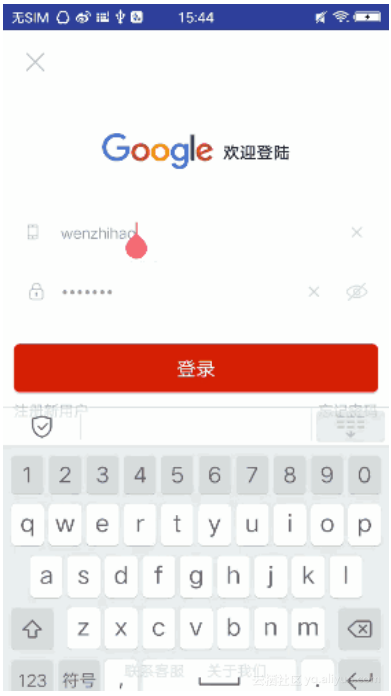
哈哈,看到这个标题是不是JH一紧,你可能会说我就没遇到过,但是现在没遇到不代表就遇不到,毕竟设计也是变幻莫测,只有你想不到的,没有你不能实现的,说的这么吊,到底是啥效果?没错就是一个小小的登录页面,大家都有拉勾app吧,看拉勾的登录页做的很是平滑动画,而且带动画效果,所以就有了类似拉勾登录效果,如图: 虽然是个简单的页面,但是涵盖的东西不算少啊,很纳闷为何谷歌一直不提供简单,方便,准确的键盘监听事件?惆怅啊,所以我们只能自己从侧面监听键盘事件了,我们可以监听最外层布局的变化来判断键盘是不是弹起了。闲话不多说,上车吧。 布局文件,大家都能看懂吧。 我们要想监听键盘事件,首先我们想得到的是键盘弹起的时候我们可以去搞点事情,键盘搜起的时候我们再去搞点事情,知道这些还不够,我们还要知道键盘弹起了多少,以及需要平移多少的距离。我们都知道我们的一个页面弹起键盘的时候这个页面的根布局会回调他的监听方法:addOnLayoutChangeListener( );当键盘弹起的时候,我们的布局是变化了,因此会执行这个回调方法,但是前提是必须设置我们的Activity的windowSoftInputMode属性为adjustResize。 我们想让布局整体平移的距离也就是弹起时候处于最底部的view距离顶部的高度减去我们键盘的高度。现在认为只要控件将Activity向上推的高度超过了1/3屏幕高,就认为软键盘弹起 scrollView.addOnLayoutChangeListener(newViewGroup.OnLayoutChangeListener(){ @Override publicvoidonLayoutChange(Viewv,intleft,inttop,intright,intbottom,intoldLeft,intoldTop,intoldRight,intoldBottom){ /*old是改变前的左上右下坐标点值,没有old的是改变后的左上右下坐标点值 现在认为只要控件将Activity向上推的高度超过了1/3屏幕高,就认为软键盘弹起*/ if(oldBottom!=0&&bottom!=0&&(oldBottom-bottom>keyHeight)){ Log.e("wenzhihao","up------>"+(oldBottom-bottom)); intdist=btn_login.getBottom()-bottom; if(dist>0){ ObjectAnimatormAnimatorTranslateY=ObjectAnimator.ofFloat(content,"translationY",0.0f,-dist); mAnimatorTranslateY.setDuration(300); mAnimatorTranslateY.setInterpolator(newLinearInterpolator()); mAnimatorTranslateY.start(); zoomIn(logo,dist); } service.setVisibility(View.INVISIBLE); }elseif(oldBottom!=0&&bottom!=0&&(bottom-oldBottom>keyHeight)){ Log.e("wenzhihao","down------>"+(bottom-oldBottom)); if((btn_login.getBottom()-oldBottom)>0){ ObjectAnimatormAnimatorTranslateY=ObjectAnimator.ofFloat(content,"translationY",content.getTranslationY(),0); mAnimatorTranslateY.setDuration(300); mAnimatorTranslateY.setInterpolator(newLinearInterpolator()); mAnimatorTranslateY.start(); //键盘收回后,logo恢复原来大小,位置同样回到初始位置 zoomOut(logo); } service.setVisibility(View.VISIBLE); } } }); /n_login是登录按钮 这样我们发现是可以实现效果了,但是我想全屏显示,懵比了,发现全屏的时候不回调这个方法了,怎么办?又是查资料一看原来这个也是一个bug,但是有解决方案,AndroidBug5497Workaround。也是谷歌提供的?直接拷贝过来,会发现其实他的作用就是让Activity最外层的根布局,当有布局变化时去响应这个变化mChildOfContent.getViewTreeObserver().addOnGlobalLayoutListener(); packagecom.wzh.study.login; importandroid.app.Activity; importandroid.graphics.Rect; importandroid.view.View; importandroid.view.ViewTreeObserver; importandroid.widget.FrameLayout; publicclassAndroidBug5497Workaround{ //Formoreinformation,seehttps://code.google.com/p/android/issues/detail?id=5497 //Tousethisclass,simplyinvokeassistActivity()onanActivitythatalreadyhasitscontentviewset. publicstaticvoidassistActivity(Activityactivity){ newAndroidBug5497Workaround(activity); } privateViewmChildOfContent; privateintusableHeightPrevious; privateFrameLayout.LayoutParamsframeLayoutParams; privateAndroidBug5497Workaround(Activityactivity){ FrameLayoutcontent=(FrameLayout)activity.findViewById(android.R.id.content); mChildOfContent=content.getChildAt(0); mChildOfContent.getViewTreeObserver().addOnGlobalLayoutListener(newViewTreeObserver.OnGlobalLayoutListener(){ publicvoidonGlobalLayout(){ possiblyResizeChildOfContent(); } }); frameLayoutParams=(FrameLayout.LayoutParams)mChildOfContent.getLayoutParams(); } privatevoidpossiblyResizeChildOfContent(){ intusableHeightNow=computeUsableHeight(); if(usableHeightNow!=usableHeightPrevious){ intusableHeightSansKeyboard=mChildOfContent.getRootView().getHeight(); intheightDifference=usableHeightSansKeyboard-usableHeightNow; if(heightDifference>(usableHeightSansKeyboard/4)){ //keyboardprobablyjustbecamevisible frameLayoutParams.height=usableHeightSansKeyboard-heightDifference; }else{ //keyboardprobablyjustbecamehidden frameLayoutParams.height=usableHeightSansKeyboard; } mChildOfContent.requestLayout(); usableHeightPrevious=usableHeightNow; } } privateintcomputeUsableHeight(){ Rectr=newRect(); mChildOfContent.getWindowVisibleDisplayFrame(r); return(r.bottom-r.top); } } 使用方式,如果我们设置了全屏,就去加载它,不设置不管: if(isFullScreen(this)){ AndroidBug5497Workaround.assistActivity(this); } ... publicbooleanisFullScreen(Activityactivity){ return(activity.getWindow().getAttributes().flags& WindowManager.LayoutParams.FLAG_FULLSCREEN)==WindowManager.LayoutParams.FLAG_FULLSCREEN; } 接下来就看具体动画事件了,键盘弹起来的时候整体向上平移,LOGO缩小,键盘收起的时候整体下移,并且LOGO恢复原来大小。这里用到的都是属性动画,只有属性动画我们才可以实现真正平移效果。 我看网上很多人使用addOnLayoutChangeListener()去监听键盘事件,但是这个方法回调的太频繁,比如本例特效,输入框后面有文字时候显示清除的图标,如果用这个方法那么也会执行一次,可能会影响你的动画,当然你也可以去记录第一次的高度让他不会走逻辑,但是我觉得也不是很靠谱,虽然我这个方法也不是很棒 ๑乛◡乛๑~。 最后贴上源码: 如果有什么问题欢迎指出,我将给出例子地址,包含另一种实现方式就是用scrollview滑动到最底部的方式来实现平移效果~ 作者:wenzhihao123 来源:51CTO