Qt编写地图综合应用4-仪表盘
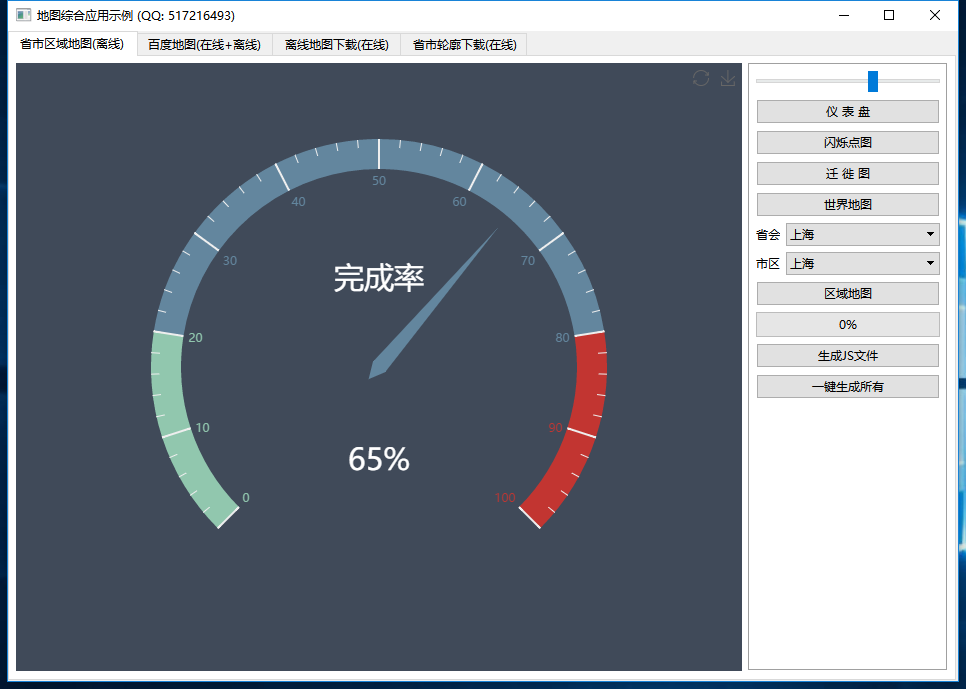
一、前言 仪表盘在很多汽车和物联网相关的系统中很常用,最直观的其实就是汽车仪表盘,这个以前主要是机械的仪表,现在逐步改成了智能的带屏带操作系统的仪表,这样美观性和拓展性功能性大大增强了,上了操作系统的话,除了基本的仪表指示以外,还可以听歌导航接电话等,这应该也是目前汽车领域发展的一个大趋势,Qt在这方面还单独搞了个3D studio设计的,可以让美工直接设计好效果图,设置一些动画效果之类的,可以说这些年Qt公司也在不断谋求新的发展,探索新的机遇,找到新的增长点和突破口。 用Qt开发仪表盘控件非常方便,无论是用widget的painter还是qml,尤其是qml,内置的那些动画效果非常适合做这类的应用,这次不讨论如何用qt开发仪表盘,而是直接用echart内置的仪表盘控件,做的也挺好的,不知道echart这么小的一个文件,还能有如此多的效果,连仪表盘都有,这个非常震惊,仪表盘的使用在官网非常详细,与Qt的结合难点可能就在如何交互,Qt中无论是webkit也还还是webengine,都提供了runJavaScript或者evaluateJavaScript函数类来执行js函数,只需要在html文件写好对应的js文件函数就可以直接触发执行,比如设置仪表盘的角度我这里写的是setGaugeValue(value),则只需要runJavaScript或者evaluateJavaScript参数传入 setGaugeValue(88)这个即可,只需要根据界面上的滚动条或者滑块的值动态改变setGaugeValue的参数即可。 二、功能特点 同时支持闪烁点图、迁徙图、区域地图、仪表盘等。 可以设置标题、提示信息、背景颜色、文字颜色、线条颜色、区域颜色等各种颜色。 可设置城市的名称、值、经纬度 集合。 可设置地图的放大倍数、是否允许鼠标滚轮缩放。 内置世界地图、全国地图、省份地图、地区地图,可以精确到县,所有地图全部离线使用。 内置了各省市json数据文件转js文件功能,如有数据更新自行转换即可,支持单个文件转换和一键转换所有文件。 内置了从json文件或者js文件获取该区域的所有名称和经纬度信息集合的功能,可以通过该方法获取到信息用来显示。 依赖浏览器组件显示地图,提供的demo支持webkit、webengine、ie 三种方式加载网页。 拓展性极强,可以依葫芦画瓢自行增加各种精美的echarts组件,做出牛逼的效果。 内置的仪表盘组件提供交互功能,demo演示中包含了对应的代码。 函数接口友好和统一,使用简单方便,就一个类。 支持任意Qt版本、任意系统、任意编译器。 三、体验地址 体验地址:https://pan.baidu.com/s/1uQsDQO5E5crUBN2J-nPeLQ 提取码:1jkp 文件名:bin_map.zip 国内站点:https://gitee.com/feiyangqingyun 国际站点:https://github.com/feiyangqingyun 个人主页:https://blog.csdn.net/feiyangqingyun 知乎主页:https://www.zhihu.com/people/feiyangqingyun/ 四、效果图 五、相关代码 QString Echarts::newChartGauge(const QString &title, int value) { QStringList body; body << QString(" var option = {"); body << QString(" backgroundColor: '%1',").arg(bgColor.name()); body << QString(" tooltip: {"); body << QString(" formatter: '{a} <br/>{b} : {c}%'"); body << QString(" },"); body << QString(" toolbox: {"); body << QString(" feature: {"); body << QString(" restore: {},"); body << QString(" saveAsImage: {}"); body << QString(" }"); body << QString(" },"); body << QString(" series: ["); body << QString(" {"); body << QString(" type: 'gauge',"); body << QString(" detail: {"); body << QString(" formatter: '{value}%',"); body << QString(" textStyle: {color: '%1', fontSize: 30},").arg(textColor.name()); body << QString(" },"); body << QString(" title: {"); body << QString(" textStyle: {color: '%1', fontSize: 30}").arg(textColor.name()); body << QString(" },"); body << QString(" data: [{name: '%1', value: value}]").arg(title); body << QString(" }"); body << QString(" ]"); body << QString(" };"); QString funName = QString("setGaugeValue(value)"); QString funInit = QString("setGaugeValue(%1)").arg(value); return newChart(body.join("\r\n "), funName, funInit); }