首页 文章 精选 留言 我的

精选列表

搜索[然之],共10000篇文章
优秀的个人博客,低调大师

07 - JavaSE之容器

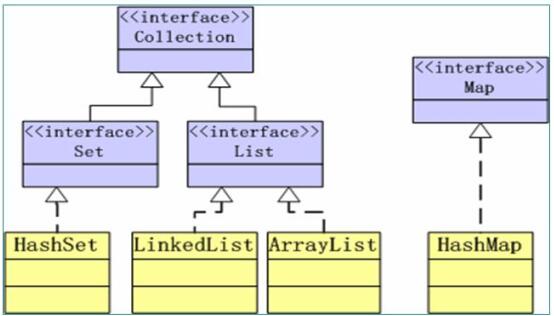
本章宗旨:1136 -- 1个图 1个类 3个知识点 6个接口 容器 J2SDK 所提供的容器 API 位于 java.util 包内。 容器 API 的类图如下: Collection 接口的子接口分为:Set接口(包含 HashSet类) + List接口(包含LinkedList 类和 ArrayLis t类) Map接口:包含HashMap类 Set接口和List接口定义了不同的数据存储方式: Set 中的数据对象没有顺序并且不可以重复。 List 中的数据对象有顺序并且可以重复。 Map接口定义了存储“键(key)——值(value)映射”的方法。 Collection接口 Collection接口中所定义的方法: int size() boolean isEmpty() void clear() boolean contains(Object element) boolean add(Object element) boolean remove(Object element) Iterator iterator() boolean containsALL(Collection c) boolean addALL(Collection c) boolean removeALL(Collection c) boolean retainALL(Collection c) Object[] toArray() 举例1: import java.util.*; public class Test { public static void main(String[] args) { Collection c = new ArrayList(); // 可以放入不同类型的对象 c.add("Hello"); c.add(new String("World")); c.add(new Integer(100)); System.out.println(c.size()); System.out.println(c); } } // 3 // [Hello, World, 100] 举例2: import java.util.*; public class Test { public static void main(String[] args) { Collection c = new HashSet(); c.add("Hello"); c.add(new String("World")); c.add(new Integer(100)); // 可以删除因为HashSet重写了equals方法。 c.remove("Hello"); c.remove(new Integer(100)); System.out.println(c.size()); System.out.println(c); } } // 1 // [100] 容器类对象在调用 remove,contains 等方法时需要比较对象是否相等,这会涉及到对象类型的 equals 方法和 hashcode 方法;对于自定义的类型,需要重写 equals 和 hashCode 方法以实现自定义的对象相等规则。 相等的对象应该具有相同的 hash codes,但是 hashCode 只在这个对象作为索引、键值的时候使用此方法,其他时候虽然不用,但是还是要重写此方法,至于重写此方法的具体实现可以随便写(比如我直接返回0也是可以的)。 Iterator 接口 所有实现了 Collection 接口的容器类都有一个 iterator 方法,这个方法返回一个实现了 Iterator 接口的对象。 这个 Iterator 对象称为迭代器,用以方便的实现对容器内的元素的遍历操作。 Iterator 接口定义了如下方法: boolean hasNext(); // 判断游标右边是否有元素 Object next(); // 返回游标右边的元素并移动游标到下一个位置 void remove(); // 删除游标左边的元素,在执行完next之后,该操作只能执行一次 举例1: import java.util.*; public class Test { public static void main(String[] args) { Collection c = new ArrayList(); c.add("Hello"); c.add(new String("World")); c.add(new Integer(100)); Iterator i = c.iterator(); while(i.hasNext()) { System.out.println(i.next()); } } } Iterator 对象的 remove 方法是在迭代过程中删除元素的唯一的安全方法。(不能使用 Collection 对象的 remove 方法,因为管家Iterator 对象在迭代过程中会将元素上锁,外人无法访问。) import java.util.*; public class Test { public static void main(String[] args) { Collection c = new ArrayList(); c.add("Hello"); c.add(new String("World")); c.add(new Integer(100)); Iterator i = c.iterator(); for(Iterator i = c.iterator(); i.hasNext(); ) { if(i.next().equals(100)) { i.remove(); } } System.out.println(c); // [Hello, World] } } 补充:JDK1.5 增强的 for 循环 增强的 for 循环对于遍历 array 或者 Collection 的时候相当简便。 import java.util.*; public class EnhancedFor { public static void main(String[] args) { int[] arr = {1, 2, 3, 4, 5}; for(int i : arr) { System.out.println(i); } Collection c = new ArrayList(); c.add(new String("aaa")); c.add(new String("bbb")); c.add(new String("ccc")); for(Object o : c) { System.out.println(o); } } } 增强型 for 循环的缺陷:(除了简单遍历外,不建议使用增强 for 循环) 对于数组:不能方便的访问下标值。 对于 Iterator ,不能方便的删除集合中特定的元素。 Set 接口 Set接口是 Collection 的子接口,Set 接口没有提供额外的方法,实现Set接口的容器类中的元素是没有顺序的,而且不可以重复。 Set容器可以与数学中的“集合”概念相对应。 JDK API中所提供的Set容器类有HashSet,TreeSet等。 举例1: public static void main(String[] args) { Set s = new HashSet(); s.add("hello"); s.add("world"); s.add("world"); // 相同的元素不会被加入,类似数学的集合概念 System.out.println(s); // [hello, world] } 举例2: public static void main(String[] args) { Set s1 = new HashSet(); Set s2 = new HashSet(); s1.add("a");s1.add("b");s1.add("c"); s2.add("d");s2.add("a");s2.add("b"); Set sn = new HashSet(s1); Set su = new HashSet(s1); sn.retainAll(s2); su.addAll(s2); System.out.println(sn); // [a, b] System.out.println(su); // [d, a, c, b] } List 接口 List接口是 Collection的 子接口,实现List接口的容器类中的元素是有顺序的,而且可以重复。 List容器中的元素都对应一个整数型的序号记载其在容器中的位置,可以根据序号存取容器中的元素。 JAVA SDK提供的List容器类有 ArrayList,LinkedList等。 Object get(int index) // 返回index位置的元素 // 返回值为Object,表示set替换掉的元素,返回出来 Object set(int index, Object element) void add(int index, Object element) Object remove(Object o) int indexOf(Object o) int lastIndexOf(Object o) 举例: List l1 = new LinkedList(); for(int i=0; i<6; i++) { li.add("a" + i); } // [a0, a1, a2, a3, a4, a5, a6] System.out.print((String)l1.get(2) + " "); // a2 System.out.println(li.indexOf("a3")); // 3 li.remove(1); System.out.println(l1); // [a0, a2, a3, a4, a5, a6] List 常用算法(Collections类) Collections类提供了一些静态方法实现了基于List容器的常用算法。 void sort(List) // 对List容器内的元素排序 void shuffle(List) // 对List容器内的元素进行随机排列 void reverse(List) // 对List容器内的元素进行逆序排列 void fill(List, Object) // 用特定的List元素列表填充整个List容器 void copy(List dest, List src) void binarySearch(List, Object) // 对于顺序的List容器,采用二分法查找指定对象 Comparable 接口 问题:上面的算法根据什么确定容器中对象的“大小”顺序? 其实,所有可以排序的类都实现了 java.lang.Comparable 接口,Comparable河口中只有一个方法: public int compareTo(Object obj); 该方法: 返回0表示: this == obj 返回正数表示:this > obj 返回负数表示:this < obj 实现 Comparable接口的类通过实现 compareTo 方法从而确定该类对象的排序方法。 ​ PS:我们可以看到 compareTo 方法的参数类型是 Object 类型的,意味着如果我只想比较两只猫的话,我扔一只狗也是可以的,这就没意义了,所以在之后的 JDK 里面,将 Object 类型统一改为 泛型,这样在传入的时候就统一了比较的对象。 改写 Name 类,让其实现 Comparable 接口: class Name implements comparable { //... public int compareTo(Object o) { Name n = new (Name)o; int lastCmp = lastName.compareTo(n.lastName); // 先比较姓氏大小 return (lastCmp != 0 ? lastCmp : firstName.compareTo(n.firstName)); // 再比较名字大小 } } 改写了 compareTo 方法,相当于改写了Collections类的排序算法,至于如何排序,由你决定! 如何选择数据结构? 衡量标准:读的效率和写的效率(如字符串逆序操作) Array 读快写慢(写的慢,需要另开辟数组) Linked 写快读慢(写的快,还需要改变指针指向) Hash 介于两者之间 Map接口 实现Map接口的类用来存储 “键值对” Map接口的实现类有 HashMap 和 TreeMap Map类中存储的键值对通过键来标识,所以键的值不能重复 Object put(Object key, Object value) // 返回值为 Object,是替换掉的 value Object get(Object key) Object remove(Object key) boolean containsKey(Object key) boolean containsValue(Object value) int size() boolean isEmpty() void putAll(Map m) void clear() 举例1: import java.util.*; public class Test { public static void main(String[] args) { Map m1 = new HashMap(); Map m2 = new HashMap(); m1.put("one", new Integer(1)); m1.put("two", new Integer(2)); m1.put("three", new Integer(3)); m2.put("A", new Integer(1)); m2.put("B", new Integer(2)); System.out.println(m1.size()); System.out.println(m1.containsKey("one")); System.out.println(m2.containsValue(new Integer(2))); if(m1.containsKey("two")) { int i = ((Integer) m1.get("two")).intValue(); System.out.println(i); } Map m3 = new HashMap(m1); m3.putAll(m2); System.out.println(m3); } } 举例2: import java.util.*; public class Test { private static final Integer ONE = new Integer(1); public static void main(String[] args) { Map m = new HashMap(); for(int i=0; i<args.length; i++) { Integer freq = (Integer) m.get(args[i]); m.put(args[i], freq == null ? ONE : new Integer(freq.intValue() + 1)); } System.out.println(m); } } // java Test 77 88 99 99 99 // {77=1, 88=1, 99=3} Auto-boxing/unboxing 在合适的时机自动打包/解包 自动将基础类型转换成对象 自动将对象转换成基础类型 import java.util.*; public class Test { private static final int ONE = 1; public static void main(String[] args) { Map m = new HashMap(); for(int i=0; i<args.length; i++) { int freq = ((Integer) m.get(args[i]) == null ? 0 : (Integer) m.get(args[i])); m.put(args[i], freq == 0 ? ONE : freq + 1); } System.out.println(m); } } 泛型 起因 JDK1.4之前类型不明确,装入集合的类型都被当做 Object 对待,从而失去了其本身的实际类型。 从集合中取出元素时需要转型,效率低,容易产生错误。 解决办法 在定义集合的时候定义集合中对象的类型 import java.util.*; public class Test { public static void main(String[] args) { Collection<String> c = new HashSet<String>(); c.add("aaa"); c.add("bbb"); c.add("ccc"); for(Iterator<String> i = c.iterator(); i.hasNext(); ) { System.out.println(i.next()); } } } // aaa ccc bbb 总结 1136:一个图,一个类,三个知识点,六个接口

优秀的个人博客,低调大师

05 - JavaSE之数组

一维数组 java中的数组是引用类型,分配在堆空间上。 一维数组的声明方式: java type var[]; type[] var; java中声明数组时不能指定其长度,如下,因为java中的数组是分配在堆空间的,需要new出来。 int[] a = new int[5]; 动态初始化 数组定义与为数组元素分配空间和赋值的操作分开进行。 int a[]; a = new int[3]; a[0] = 1; a[1] = 2; a[2] = 3; 静态初始化 在定义数组的时候就为数组元素分配空间并赋值。 int a[] = {1, 2, 3}; Date days[] = { new Date(1, 4, 2004); new Date(2, 4, 2004); new Date(3, 4, 2004); } 数组元素的默认初始化 数组是引用类型,他的元素相当于类的成员变量,因此数组分配空间后,每个元素也被按照成员变量的规则被隐式初始化了。 int a[] = new int[3]; Date days = new Date[3]; // 则a中元素值为0;days中的元素值为null 二维数组 java中多维数组的声明和初始化按照从多维到高维的顺序进行。 // 例如 int a[][] = new int [3][]; a[0] = new int[3]; a[1] = new int[4]; a[2] = new int[5]; // int t[][] = new int[][3]; // 错误 二维数组初始化 静态初始化 int A[][] = {{1,2}, {3,4}, {5,6,7}}; // 错误 int B[3][2] = {{1,2}, {3,4}, {5,6}}; // 错误 int B[][2] = {{1,2}, {3,4}, {5,6}}; // 错误 int B[3][] = {{1,2}, {3,4}, {5,6}}; 动态初始化 ```java int a[][] = new int[2][3]; // 或者 int b[][] = new int[2][]; b[0] = new int[3]; b[1] = new int[4]; ``` 数组的拷贝 使用 java.lang.System 类的静态方法 public static void arraycopy(Object src, int srcPos, Object dest, int destPos, int length) 可以用于数组 src 从第 srcPos 项元素开始的 length 个元素拷贝到目标数组dest 的从 destPos 项开始的 length 个位置。 如果源数据数目超过目标数组边界会抛出 IndexOutOfBoundsException 异常。 public class TestArrayCopy { public static void main(String args[]) { String[] s = {"Mircosoft","IBM","Sun","Oracle","Apple"}; String[] sBak = new String[6]; System.arraycopy(s,0,sBak,0,s.length); for(int i=0;i<sBak.length;i++){ System.out.print(sBak[i]+" "); } System.out.println(); int[][] intArray = {{1,2},{1,2,3},{3,4}}; int[][] intArrayBak = new int[3][]; System.arraycopy (intArray,0,intArrayBak,0,intArray.length); intArrayBak[2][1] = 100; for(int i = 0;i<intArray.length;i++){ for(int j =0;j<intArray[i].length;j++){ System.out.print(intArray[i][j]+" "); } System.out.println(); } } }

优秀的个人博客,低调大师

java之mail发送

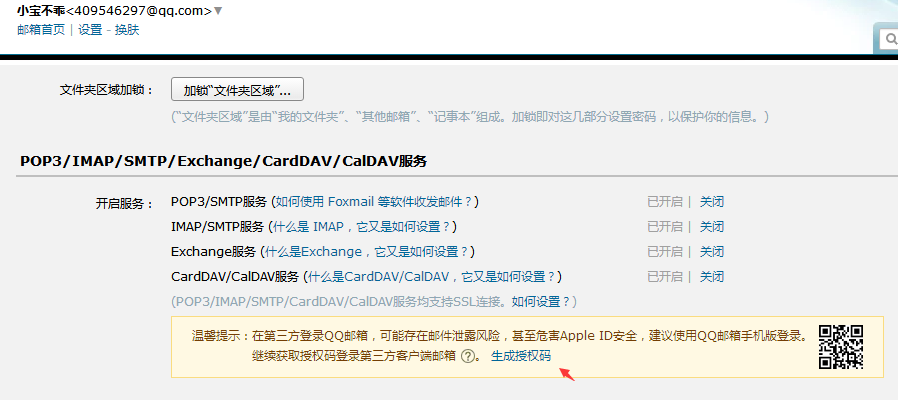
一、邮箱的应用在实际的Java开发过程中,也是非常常见的。我这里就是写了一个简单的邮箱发送功能。 二、邮箱的基本配置,使用的是JavaMailSender的提供的方式来实现邮件的发送 1)qq邮箱的配置(说明一点目前qq邮箱的配置方式都是采用ssl的方式来实现的,非ssl的方式没有测试成功) package com.troy.jpa.config; import org.springframework.context.annotation.Bean; import org.springframework.context.annotation.Configuration; import org.springframework.mail.javamail.JavaMailSender; import org.springframework.mail.javamail.JavaMailSenderImpl; import java.util.Properties; @Configuration public class MailConfiguration { @Bean public JavaMailSender javaMailSender() { //设置JavaMail的基本数据 JavaMailSenderImpl javaMailSender = new JavaMailSenderImpl(); //host官方查询 javaMailSender.setHost("smtp.qq.com"); //端口465ssl javaMailSender.setPort(465); //设置账户,密码 javaMailSender.setUsername("409546297@qq.com"); javaMailSender.setPassword("密码"); //认证数据配置,ssl方式需要加入认证方式 Properties properties = new Properties(); properties.setProperty("mail.host", "smtp.qq.com"); properties.setProperty("mail.transport.protocol", "smtp"); properties.setProperty("mail.smtp.auth", "true"); properties.setProperty("mail.smtp.socketFactory.class", "javax.net.ssl.SSLSocketFactory"); properties.setProperty("mail.smtp.port", "465"); properties.setProperty("mail.smtp.socketFactory.port", "465"); javaMailSender.setJavaMailProperties(properties); return javaMailSender; } } 注意:这里的密码不是我们一般登录的密码,而是授权码 2)163邮箱有2中配置方式 a、ssl的的连接方式 package com.troy.jpa.config; import org.springframework.context.annotation.Bean; import org.springframework.context.annotation.Configuration; import org.springframework.mail.javamail.JavaMailSender; import org.springframework.mail.javamail.JavaMailSenderImpl; import java.util.Properties; @Configuration public class MailConfiguration { @Bean public JavaMailSender javaMailSender() { JavaMailSenderImpl javaMailSender = new JavaMailSenderImpl(); javaMailSender.setHost("smtp.163.com"); javaMailSender.setPort(465); javaMailSender.setUsername("账号"); javaMailSender.setPassword("密码"); Properties properties = new Properties(); properties.setProperty("mail.host", "smtp.163.com"); properties.setProperty("mail.transport.protocol", "smtp"); properties.setProperty("mail.smtp.auth", "true"); properties.setProperty("mail.smtp.socketFactory.class", "javax.net.ssl.SSLSocketFactory"); properties.setProperty("mail.smtp.port", "465"); properties.setProperty("mail.smtp.socketFactory.port", "465"); javaMailSender.setJavaMailProperties(properties); return javaMailSender; } } b、非ssl的连接方式 package com.troy.jpa.config; import org.springframework.context.annotation.Bean; import org.springframework.context.annotation.Configuration; import org.springframework.mail.javamail.JavaMailSender; import org.springframework.mail.javamail.JavaMailSenderImpl; @Configuration public class MailConfiguration { @Bean public JavaMailSender javaMailSender() { JavaMailSenderImpl javaMailSender = new JavaMailSenderImpl(); javaMailSender.setHost("smtp.163.com"); javaMailSender.setPort(25); javaMailSender.setUsername("账号"); javaMailSender.setPassword("密码"); return javaMailSender; } } 3)这个是采用注解的方式,自己也可以采用xml的配置方式,自己随意 4)应用,邮件的发送 package com.troy.jpa.util; import org.springframework.context.support.ClassPathXmlApplicationContext; import org.springframework.mail.SimpleMailMessage; import org.springframework.mail.javamail.JavaMailSender; public class MailUtil { public static void main(String[] args) { sendMail("收件人邮箱","test","test"); } public static void sendMail(String mail, String title, String text) { //加载容器 ClassPathXmlApplicationContext context = new ClassPathXmlApplicationContext("classpath:spring/spring-mvc.xml"); //获取bean JavaMailSender javaMailSender = (JavaMailSender) context.getBean("javaMailSender"); //建立邮箱模板 SimpleMailMessage mailMessage = new SimpleMailMessage(); //设置发送人的账号 mailMessage.setFrom("发送人账号(和登录的账号一样)"); //设置接收人的账号 mailMessage.setTo(mail); //设置主题 mailMessage.setSubject(title); //设置内容 mailMessage.setText(text); //发送邮件 javaMailSender.send(mailMessage); } }

优秀的个人博客,低调大师

dubbo之基础应用

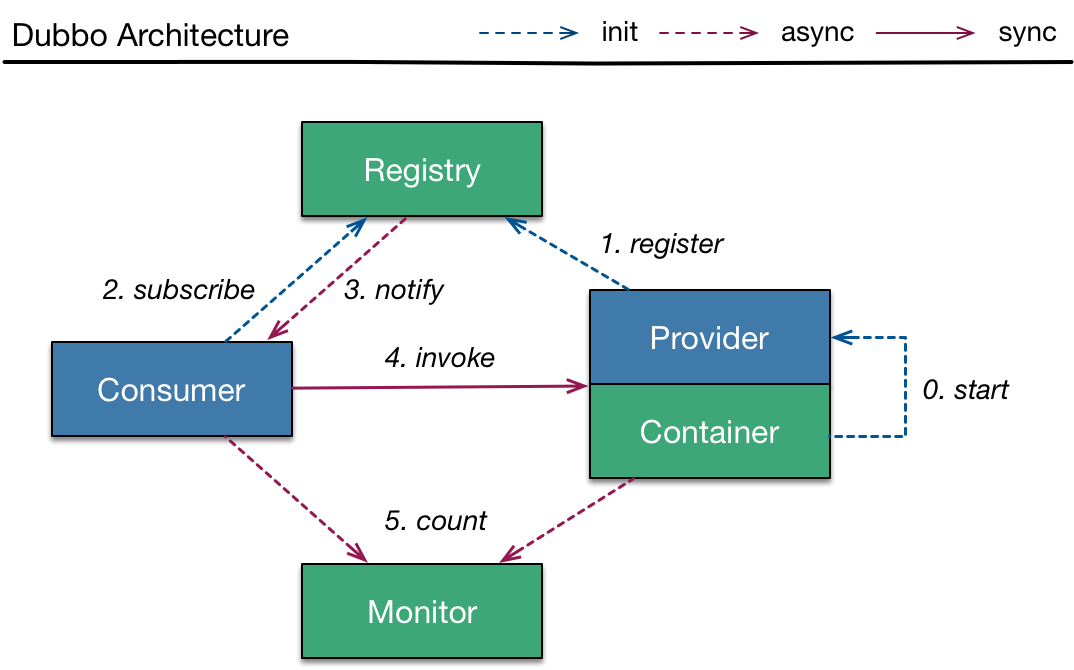
一、Dubbo是Alibaba开源的分布式服务框架,它最大的特点是按照分层的方式来架构,使用这种方式可以使各个层之间解耦合(或者最大限度地松耦合)。从服务模型的角度来看,Dubbo采用的是一种非常简单的模型,要么是提供方提供服务,要么是消费方消费服务,所以基于这一点可以抽象出服务提供方(Provider)和服务消费方(Consumer)两个角色。关于注册中心、协议支持、服务监控等内容,详见后面描述。 二、dubbo的基本原理(这个是用于dubbo的工作原理比较重要的一个环节) 这是图中的几个节点的意义 Provider:暴露服务的服务提供方,或者直白点说就是服务生产者 Consumer:调用远程服务的服务消费方,也就是服务消费者 Registry:服务注册与发现的注册中心 Monitor:统计服务的调用次数和调用时间的监控中心 Container:服务(生产者)运行容器 具体的调用步骤 0:服务容器负责启动、加载、运行服务提供者(生产者) 1:服务提供者(生产者)在启动时,向注册中心注册自己提供的服务 2:服务消费者在启动时,向注册中心订阅自己所需的服务 3:注册中心返回服务提供者地址列表给消费者,如果有变更,注册中细腻将基于长连接推送变更数据给消费者 4:服务消费者从服务生产者地址列表中,基于软负载均衡算法,选择一台提供者(生产者)进行调用,如果调用失败,再选另一台调用 5:服务消费者和提供者(生产者),在内存中累计调用次数和调用时间,定时每分钟发送一次统计数据到监控中心 三、下面我会通过一个例子来说明具体的实现过程,以及配置 1)说明:dubbo是用来做分布式工程而提出来的一个框架。相对于原来的单体工程来说,dubbo的灵活性,以及调整的方式都更加灵活。dubbo的方式是将service一下的单独提出来做成一个项目,也就是我们提到的SOA模式,面向服务的框架。在设计中,web端只看得到对应的接口,而不需要知道实现过程。具体的实现过程在另外一个项目实现。中间的通行通过zookeeper来实现传输。 2)我这里写了一个简单的例子来说明这个服务提供的过程,和相对应用独立使用的过程。(目录) 1、do-parent用来加载公用的jar包,没有实际代码 a、pom.xml <?xml version="1.0" encoding="UTF-8"?> <project xmlns="http://maven.apache.org/POM/4.0.0" xmlns:xsi="http://www.w3.org/2001/XMLSchema-instance" xsi:schemaLocation="http://maven.apache.org/POM/4.0.0 http://maven.apache.org/xsd/maven-4.0.0.xsd"> <modelVersion>4.0.0</modelVersion> <groupId>com.troy</groupId> <artifactId>do-parent</artifactId> <version>1.0-SNAPSHOT</version> <modules> <module>do-interface</module> <module>do-service</module> <module>do-web</module> </modules> <parent> <groupId>org.springframework.boot</groupId> <artifactId>spring-boot-starter-parent</artifactId> <version>1.5.9.RELEASE</version> </parent> <dependencies> <dependency> <groupId>org.springframework.boot</groupId> <artifactId>spring-boot-starter-web</artifactId> <version>1.5.9.RELEASE</version> </dependency> <dependency> <groupId>org.springframework.boot</groupId> <artifactId>spring-boot-starter-data-jpa</artifactId> <version>1.5.9.RELEASE</version> </dependency> <dependency> <groupId>com.alibaba</groupId> <artifactId>dubbo</artifactId> <version>2.5.7</version> </dependency> <dependency> <groupId>mysql</groupId> <artifactId>mysql-connector-java</artifactId> <version>5.1.9</version> </dependency> <dependency> <groupId>org.apache.zookeeper</groupId> <artifactId>zookeeper</artifactId> <version>3.4.9</version> </dependency> <dependency> <groupId>com.101tec</groupId> <artifactId>zkclient</artifactId> <version>0.10</version> </dependency> </dependencies> </project> 2、do-interface用来提供暴露的接口,提供给do-web和do-service。共同的调用方法 a、目录结构 b、User共同使用的实体类 package com.troy.domain; import javax.persistence.*; import java.io.Serializable; @Entity @Table(name = "USER") public class User implements Serializable{ @Id @GeneratedValue(strategy = GenerationType.AUTO) private Long id; private String name; private Integer age; public Long getId() { return id; } public void setId(Long id) { this.id = id; } public String getName() { return name; } public void setName(String name) { this.name = name; } public Integer getAge() { return age; } public void setAge(Integer age) { this.age = age; } } c、IUserService只用来提供接口,不做任何实现 package com.troy.service; import com.troy.domain.User; import java.util.List; public interface IUserService { public List<User> findAll(); } d、application-dao.yml的配置用来连接数据库,这个因为我用的是一套数据库,所以公用的数据库配置 spring: datasource: driver-class-name: com.mysql.jdbc.Driver url: jdbc:mysql://localhost:3306/model?useUnicode=true&amp;characterEncoding=UTF-8 password: root username: root 3、do-service用来提供具体的接口实现 a、目录结构 b、repository用来,设置基本的数据库访问层 package com.troy.repository; import org.springframework.data.jpa.repository.JpaSpecificationExecutor; import org.springframework.data.repository.NoRepositoryBean; import org.springframework.data.repository.PagingAndSortingRepository; import java.io.Serializable; @NoRepositoryBean public interface BaseRepository<T,I extends Serializable> extends PagingAndSortingRepository<T,I>,JpaSpecificationExecutor<T> { } package com.troy.repository; import com.troy.domain.User; public interface UserRepository extends BaseRepository<User,Long> { } c、service用来写具体的实现过程 package com.troy.service; import com.troy.domain.User; import com.troy.repository.UserRepository; import org.springframework.beans.factory.annotation.Autowired; import org.springframework.stereotype.Service; import javax.transaction.Transactional; import java.util.ArrayList; import java.util.Iterator; import java.util.List; @Service(value = "userService") @Transactional public class UserServiceImpl implements IUserService { @Autowired private UserRepository userRepository; public List<User> findAll() { List<User> users = new ArrayList<User>(); Iterator<User> iterator = this.userRepository.findAll().iterator(); while (iterator.hasNext()) { users.add(iterator.next()); } return users; } } d、config下面是进行相关的配置,对于服务提供者 package com.troy.config; import org.springframework.context.annotation.Configuration; import org.springframework.context.annotation.ImportResource; @Configuration @ImportResource("classpath:dubbo/*.xml") public class DubboProvider { } dubbo-provider.xml的具体配置 <?xml version="1.0" encoding="UTF-8"?> <beans xmlns="http://www.springframework.org/schema/beans" xmlns:xsi="http://www.w3.org/2001/XMLSchema-instance" xmlns:dubbo="http://code.alibabatech.com/schema/dubbo" xsi:schemaLocation="http://www.springframework.org/schema/beans http://www.springframework.org/schema/beans/spring-beans.xsd http://code.alibabatech.com/schema/dubbo http://code.alibabatech.com/schema/dubbo/dubbo.xsd"> <!-- 提供方应用信息,用于计算依赖关系 --> <dubbo:application name="dubbo-provider" /> <!-- 使用zookeeper注册中心暴露服务地址 --> <dubbo:registry protocol="zookeeper" address="192.168.5.10:2181" /> <!-- 用dubbo协议在20880端口暴露服务 --> <dubbo:protocol name="dubbo" port="20880" /> <!-- 用户服务接口 --> <dubbo:service interface="com.troy.service.IUserService" ref="userService" /> </beans> e、具体的启动过程 package com.troy; import org.springframework.boot.SpringApplication; import org.springframework.boot.autoconfigure.SpringBootApplication; import java.util.HashMap; import java.util.Map; @SpringBootApplication public class ApplicationService { public static void main(String[] args) { SpringApplication application = new SpringApplication(ApplicationService.class); Map<String,Object> map = new HashMap<String, Object>(); //这里的目的是加入相关配置 map.put("spring.profiles.default","service,dao"); application.setDefaultProperties(map); application.run(args); } } 4、do-web的目的是用来获取数据,提供数据,当然也可以用来具体页面的呈现 a、目录接口 b、web,具体的数据提供者 package com.troy.web; import com.troy.service.IUserService; import org.springframework.beans.factory.annotation.Autowired; import org.springframework.context.annotation.Scope; import org.springframework.web.bind.annotation.RequestMapping; import org.springframework.web.bind.annotation.RequestMethod; import org.springframework.web.bind.annotation.RestController; @RestController @RequestMapping("/api/user") @Scope("prototype") public class UserResource { @Autowired private IUserService userService; @RequestMapping(value = "/findAll") public Object findAll() { return this.userService.findAll(); } } c、config消费者配置 package com.troy.config; import org.springframework.context.annotation.Configuration; import org.springframework.context.annotation.ImportResource; @Configuration @ImportResource("classpath:dubbo/*.xml") public class DubboConsumer { } dubbo-consumer.xml <?xml version="1.0" encoding="UTF-8"?> <beans xmlns="http://www.springframework.org/schema/beans" xmlns:xsi="http://www.w3.org/2001/XMLSchema-instance" xmlns:dubbo="http://code.alibabatech.com/schema/dubbo" xsi:schemaLocation="http://www.springframework.org/schema/beans http://www.springframework.org/schema/beans/spring-beans.xsd http://code.alibabatech.com/schema/dubbo http://code.alibabatech.com/schema/dubbo/dubbo.xsd"> <!-- 消费方应用名,用于计算依赖关系,不是匹配条件,不要与提供方一样 --> <dubbo:application name="dubbo-consumer" /> <!-- 使用zookeeper注册中心暴露服务地址 --> <!-- 注册中心地址 --> <dubbo:registry protocol="zookeeper" address="192.168.5.10:2181" /> <!-- 用户服务接口 --> <dubbo:reference interface="com.troy.service.IUserService" id="userService" check="false" /> </beans> d、启动配置 package com.troy; import org.springframework.boot.SpringApplication; import org.springframework.boot.autoconfigure.SpringBootApplication; import java.util.HashMap; import java.util.Map; @SpringBootApplication public class Application { public static void main(String[] args) { SpringApplication application = new SpringApplication(Application.class); Map<String,Object> map = new HashMap<String, Object>(); map.put("spring.profiles.default","web,dao"); application.setDefaultProperties(map); application.run(args); } } 四、中间需要用到zookeeper,来做注册中心。 zookeeper的安装部署:http://www.cnblogs.com/ll409546297/p/7526953.html zookeeper的展示界面:http://www.cnblogs.com/ll409546297/p/7814564.html 五、dubbo的方式,目前各大网站上面应用的非常普遍。当然我这边只是做的一个例子用来,了解dubbo的分布式实现过程,和具体的应用方式。 代码层面存在不理想的地方,请见谅!!! 源码下载:https://pan.baidu.com/s/1c1SUnFa

优秀的个人博客,低调大师

SpringCloud之Zuul网关

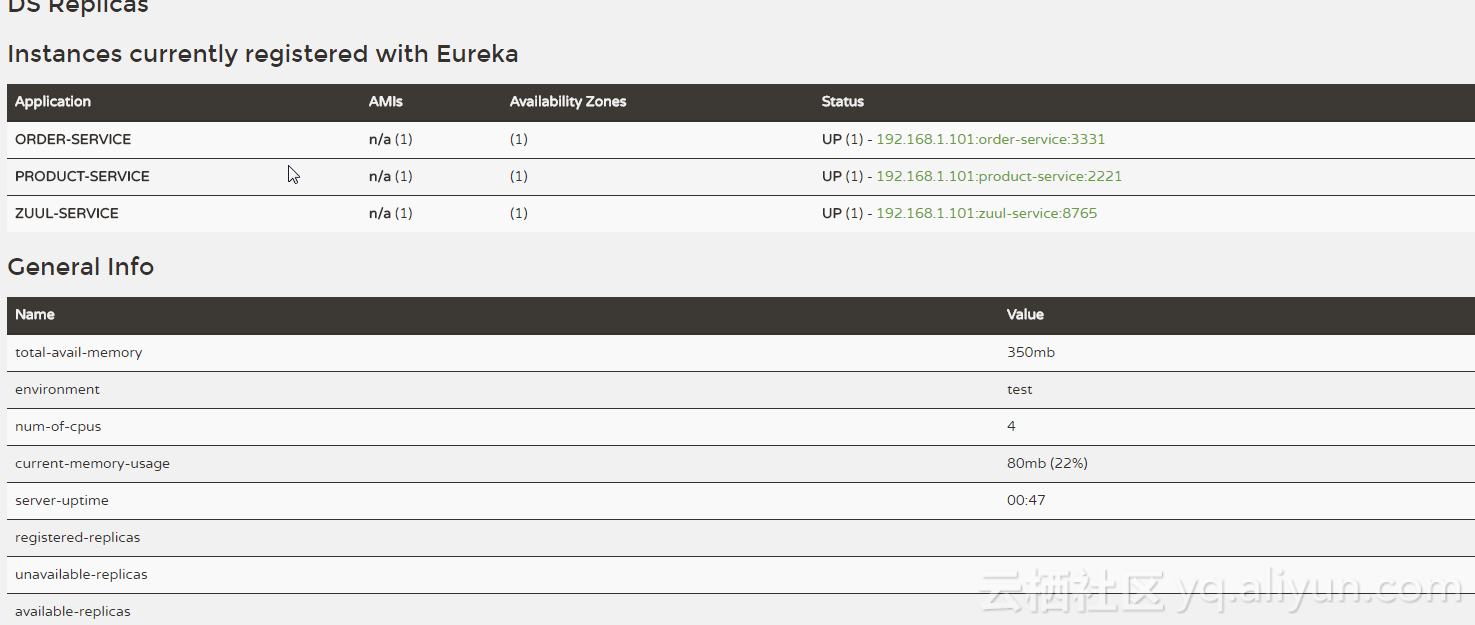
周末订了四本书, 将微服务,SPRINGCLOUD,架构师知识点重新整理一下。 zuul作为反向代码网关,总入口,可以串起很多知识的。 package MasterSpringBoot; import org.springframework.boot.SpringApplication; import org.springframework.boot.autoconfigure.SpringBootApplication; import org.springframework.cloud.client.discovery.EnableDiscoveryClient; import org.springframework.http.HttpStatus; import org.springframework.http.ResponseEntity; import org.springframework.web.bind.annotation.RequestMapping; import org.springframework.web.bind.annotation.RequestMethod; import org.springframework.web.bind.annotation.RestController; @SpringBootApplication @EnableDiscoveryClient @RestController public class ProductService1Application { public static void main(String[] args) { SpringApplication.run(ProductService1Application.class, args); } @RequestMapping(value="/hello", method=RequestMethod.GET) public ResponseEntity<String> hello() { return new ResponseEntity<>("hello product service1", HttpStatus.OK); } } spring.application.name=zuul-service server.port=8765 eureka.client.serviceUrl.defaultZone=http://localhost:8761/eureka/ zuul.routes.product-service.path=/product-service/** zuul.routes.product-service.serviceId=product-service zuul.routes.order-service.path=/order-service/** zuul.routes.order-service.serviceId=order-service

优秀的个人博客,低调大师

Android开发之WebView

感觉在显示信息时,用途还可以的。 只是不知和React Native的应用场合有何分别? package com.tw.flag.ch13_hellowebview; import android.support.v7.app.AppCompatActivity; import android.os.Bundle; import android.view.View; import android.webkit.WebChromeClient; import android.webkit.WebView; import android.webkit.WebViewClient; import android.widget.ProgressBar; public class MainActivity extends AppCompatActivity { WebView wv; ProgressBar pb; @Override protected void onCreate(Bundle savedInstanceState) { super.onCreate(savedInstanceState); setContentView(R.layout.activity_main); wv = (WebView) findViewById(R.id.wv); pb = (ProgressBar)findViewById(R.id.pb); wv.getSettings().setJavaScriptEnabled(true); wv.getSettings().setBuiltInZoomControls(true); wv.invokeZoomPicker(); wv.setWebViewClient(new WebViewClient()); wv.setWebChromeClient(new WebChromeClient(){ public void onProgressChanged(WebView view, int progress) { pb.setProgress(progress); pb.setVisibility(progress < 100 ? View.VISIBLE: View.GONE); } }); wv.loadUrl("https://m.jd.com"); } @Override public void onBackPressed() { if (wv.canGoBack()) { wv.goBack(); return; } super.onBackPressed(); } }

优秀的个人博客,低调大师

Elasticsearch之curl删除

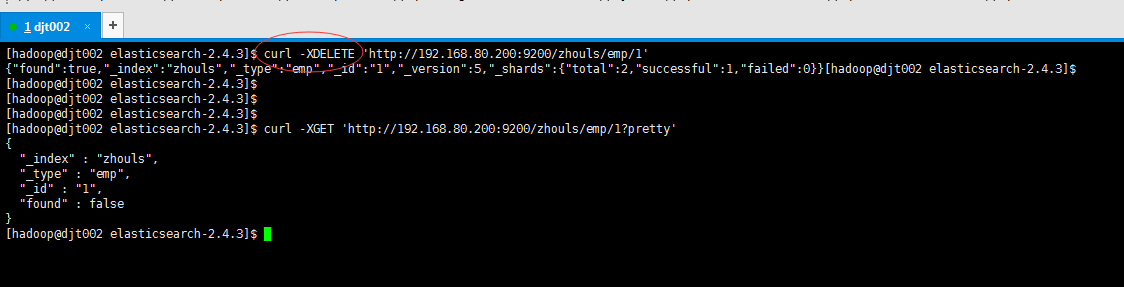
[hadoop@djt002 elasticsearch-2.4.3]$ curl-XDELETE'http://192.168.80.200:9200/zhouls/emp/1' {"found":true,"_index":"zhouls","_type":"emp","_id":"1","_version":5,"_shards":{"total":2,"successful":1,"failed":0}}[hadoop@djt002 elasticsearch-2.4.3]$ [hadoop@djt002 elasticsearch-2.4.3]$ [hadoop@djt002 elasticsearch-2.4.3]$ [hadoop@djt002 elasticsearch-2.4.3]$ [hadoop@djt002 elasticsearch-2.4.3]$ curl -XGET 'http://192.168.80.200:9200/zhouls/emp/1?pretty' { "_index" : "zhouls", "_type" : "emp", "_id" : "1", "found" : false } [hadoop@djt002 elasticsearch-2.4.3]$ [hadoop@djt002 elasticsearch-2.4.3]$ curl -XDELETE 'http://192.168.80.200:9200/zhouls/emp/1' {"found":false,"_index":"zhouls","_type":"emp","_id":"1","_version":1,"_shards":{"total":2,"successful":1,"failed":0}}[hadoop@djt002 elasticsearch-2.4.3]$ [hadoop@djt002 elasticsearch-2.4.3]$ [hadoop@djt002 elasticsearch-2.4.3]$ [hadoop@djt002 elasticsearch-2.4.3]$ curl -XDELETE 'http://192.168.80.200:9200/zhouls/emp/1' {"found":false,"_index":"zhouls","_type":"emp","_id":"1","_version":2,"_shards":{"total":2,"successful":1,"failed":0}}[hadoop@djt002 elasticsearch-2.4.3]$ es的机制,第一次删除之后,在60秒之后,执行删除命令,则version变为1,又开始增加了。(作为了解,不必感到惊讶) ES的删除操作补充知识 如果文档存在,es会返回200 ok的状态码,found属性值为true,_version属性的值+1。 如果文档不存在,es会返回404 Not Found的状态码,found属性值为false,但是_version属性的值依然会+1,这个就是内部管理的一部分,它保证了我们在多个节点间的不同操作的顺序都被正确标记了。 注意:删除一个文档也不会立即生效,它只是被标记成已删除。Elasticsearch将会在你之后添加更多索引的时候才会在后台进行删除内容的清理。 ES删除总结 ES的删除操作,也是不会立即生效,跟更新操作类似。只是会被标记为已删除状态,ES后期会自动删除。 好比,你删除的操作一步一步累积,当达到它上限时,等你删除几十条数据后,ES我一次性删除,这样可以节省磁盘IO。 这些简单的es删除操作,容易的就在生产环境里,手动输入。复杂的,用java代码去实现。 本文转自大数据躺过的坑博客园博客,原文链接:http://www.cnblogs.com/zlslch/p/6421648.html,如需转载请自行联系原作者

优秀的个人博客,低调大师

IOS进阶之WKWebView

前言 Xcode8发布以后,编译器开始不支持IOS7,所以很多应用在适配IOS10之后都不在适配IOS7了,其中包括了很多大公司,网易新闻,滴滴出行等。因此,我们公司的应用也打算淘汰IOS7。 支持到IOS8,第一个要改的自然是用WKWebView替换原来的UIWebView。WKWebView有很多明显优势: 更多的支持HTML5的特性 官方宣称的高达60fps的滚动刷新率以及内置手势 将UIWebViewDelegate与UIWebView拆分成了14类与3个协议,以前很多不方便实现的功能得以实现。文档 Safari相同的JavaScript引擎 占用更少的内存 UIWebView UIWebView WKWebView WKWebView 因此,使用WkWebview替换UIWebView还是很有必要的。 基本使用方法 WKWebView有两个delegate,WKUIDelegate和WKNavigationDelegate。WKNavigationDelegate主要处理一些跳转、加载处理操作,WKUIDelegate主要处理JS脚本,确认框,警告框等。因此WKNavigationDelegate更加常用。 比较常用的方法: #pragmamark-lifeCircle -(void)viewDidLoad{ [superviewDidLoad]; webView=[[WKWebViewalloc]init]; [self.viewaddSubview:webView]; [webViewmas_makeConstraints:^(MASConstraintMaker*make){ make.left.equalTo(self.view); make.right.equalTo(self.view); make.top.equalTo(self.view); make.bottom.equalTo(self.view); }]; webView.UIDelegate=self; webView.navigationDelegate=self; [webViewloadRequest:[NSURLRequestrequestWithURL:[NSURLURLWithString:@"http://www.baidu.com"]]]; }#pragmamark-WKNavigationDelegate//页面开始加载时调用 -(void)webView:(WKWebView*)webViewdidStartProvisionalNavigation:(WKNavigation*)navigation{ }//当内容开始返回时调用 -(void)webView:(WKWebView*)webViewdidCommitNavigation:(WKNavigation*)navigation{ }//页面加载完成之后调用 -(void)webView:(WKWebView*)webViewdidFinishNavigation:(WKNavigation*)navigation{ }//页面加载失败时调用 -(void)webView:(WKWebView*)webViewdidFailProvisionalNavigation:(WKNavigation*)navigation{ }//接收到服务器跳转请求之后调用 -(void)webView:(WKWebView*)webViewdidReceiveServerRedirectForProvisionalNavigation:(WKNavigation*)navigation{ }//在收到响应后,决定是否跳转 -(void)webView:(WKWebView*)webViewdecidePolicyForNavigationResponse:(WKNavigationResponse*)navigationResponsedecisionHandler:(void(^)(WKNavigationResponsePolicy))decisionHandler{NSLog(@"%@",navigationResponse.response.URL.absoluteString);//允许跳转 decisionHandler(WKNavigationResponsePolicyAllow);//不允许跳转//decisionHandler(WKNavigationResponsePolicyCancel); }//在发送请求之前,决定是否跳转 -(void)webView:(WKWebView*)webViewdecidePolicyForNavigationAction:(WKNavigationAction*)navigationActiondecisionHandler:(void(^)(WKNavigationActionPolicy))decisionHandler{NSLog(@"%@",navigationAction.request.URL.absoluteString);//允许跳转 decisionHandler(WKNavigationActionPolicyAllow);//不允许跳转//decisionHandler(WKNavigationActionPolicyCancel); }#pragmamark-WKUIDelegate//创建一个新的WebView -(WKWebView*)webView:(WKWebView*)webViewcreateWebViewWithConfiguration:(WKWebViewConfiguration*)configurationforNavigationAction:(WKNavigationAction*)navigationActionwindowFeatures:(WKWindowFeatures*)windowFeatures{return[[WKWebViewalloc]init]; }//输入框 -(void)webView:(WKWebView*)webViewrunJavaScriptTextInputPanelWithPrompt:(NSString*)promptdefaultText:(nullableNSString*)defaultTextinitiatedByFrame:(WKFrameInfo*)framecompletionHandler:(void(^)(NSString*__nullableresult))completionHandler{ completionHandler(@"http"); }//确认框 -(void)webView:(WKWebView*)webViewrunJavaScriptConfirmPanelWithMessage:(NSString*)messageinitiatedByFrame:(WKFrameInfo*)framecompletionHandler:(void(^)(BOOLresult))completionHandler{ completionHandler(YES); }//警告框 -(void)webView:(WKWebView*)webViewrunJavaScriptAlertPanelWithMessage:(NSString*)messageinitiatedByFrame:(WKFrameInfo*)framecompletionHandler:(void(^)(void))completionHandler{NSLog(@"%@",message); completionHandler(); } OC与JS交互 WKWebview提供了API实现js交互 不需要借助JavaScriptCore或者webJavaScriptBridge。使用WKUserContentController实现js native交互。简单的说就是先注册约定好的方法,然后再调用。 JS调用OC方法 oc代码(有误,内存不释放): @interfaceViewController()<WKUIDelegate,WKNavigationDelegate,WKScriptMessageHandler>{ WKWebView*webView; WKUserContentController*userContentController; }@end@implementationViewController#pragmamark-lifeCircle -(void)viewDidLoad{ [superviewDidLoad];//配置环境 WKWebViewConfiguration*configuration=[[WKWebViewConfigurationalloc]init]; userContentController=[[WKUserContentControlleralloc]init]; configuration.userContentController=userContentController; webView=[[WKWebViewalloc]initWithFrame:CGRectMake(0,0,100,100)configuration:configuration];//注册方法 [userContentControlleraddScriptMessageHandler:selfname:@"sayhello"];//注册一个name为sayhello的js方法 [self.viewaddSubview:webView]; [webViewmas_makeConstraints:^(MASConstraintMaker*make){ make.left.equalTo(self.view); make.right.equalTo(self.view); make.top.equalTo(self.view); make.bottom.equalTo(self.view); }]; webView.UIDelegate=self; webView.navigationDelegate=self; [webViewloadRequest:[NSURLRequestrequestWithURL:[NSURLURLWithString:@"http://www.test.com"]]]; } -(void)dealloc{//这里需要注意,前面增加过的方法一定要remove掉。 [userContentControllerremoveScriptMessageHandlerForName:@"sayhello"]; }#pragmamark-WKScriptMessageHandler -(void)userContentController:(WKUserContentController*)userContentControllerdidReceiveScriptMessage:(WKScriptMessage*)message{NSLog(@"name:%@\\\\nbody:%@\\\\nframeInfo:%@\\\\n",message.name,message.body,message.frameInfo); }@end 上面的OC代码如果认证测试一下就会发现dealloc并不会执行,这样肯定是不行的,会造成内存泄漏。原因是[userContentController addScriptMessageHandler:self name:@"sayhello"];这句代码造成无法释放内存。(ps:试了下用weak指针还是不能释放,不知道是什么原因。)因此还需要进一步改进,正确的写法是用一个新的controller来处理,新的controller再绕用delegate绕回来。 oc代码(正确写法): @interfaceViewController()<WKUIDelegate,WKNavigationDelegate,WKScriptMessageHandler>{ WKWebView*webView; WKUserContentController*userContentController; }@end@implementationViewController#pragmamark-lifeCircle -(void)viewDidLoad{ [superviewDidLoad];//配置环境 WKWebViewConfiguration*configuration=[[WKWebViewConfigurationalloc]init]; userContentController=[[WKUserContentControlleralloc]init]; configuration.userContentController=userContentController; webView=[[WKWebViewalloc]initWithFrame:CGRectMake(0,0,100,100)configuration:configuration];//注册方法 WKDelegateController*delegateController=[[WKDelegateControlleralloc]init]; delegateController.delegate=self; [userContentControlleraddScriptMessageHandler:delegateControllername:@"sayhello"]; [self.viewaddSubview:webView]; [webViewmas_makeConstraints:^(MASConstraintMaker*make){ make.left.equalTo(self.view); make.right.equalTo(self.view); make.top.equalTo(self.view); make.bottom.equalTo(self.view); }]; webView.UIDelegate=self; webView.navigationDelegate=self; [webViewloadRequest:[NSURLRequestrequestWithURL:[NSURLURLWithString:@"http://www.test.com"]]]; } -(void)dealloc{//这里需要注意,前面增加过的方法一定要remove掉。 [userContentControllerremoveScriptMessageHandlerForName:@"sayhello"]; }#pragmamark-WKScriptMessageHandler -(void)userContentController:(WKUserContentController*)userContentControllerdidReceiveScriptMessage:(WKScriptMessage*)message{NSLog(@"name:%@\\\\nbody:%@\\\\nframeInfo:%@\\\\n",message.name,message.body,message.frameInfo); }@end WKDelegateController代码: #import<UIKit/UIKit.h>#import<WebKit/WebKit.h>@protocolWKDelegate<NSObject> -(void)userContentController:(WKUserContentController*)userContentControllerdidReceiveScriptMessage:(WKScriptMessage*)message;@end@interfaceWKDelegateController:UIViewController<WKScriptMessageHandler>@property(weak,nonatomic)id<WKDelegate>delegate;@end .m代码: #import"WKDelegateController.h"@interfaceWKDelegateController()@end@implementationWKDelegateController -(void)viewDidLoad{ [superviewDidLoad]; } -(void)userContentController:(WKUserContentController*)userContentControllerdidReceiveScriptMessage:(WKScriptMessage*)message{if([self.delegaterespondsToSelector:@selector(userContentController:didReceiveScriptMessage:)]){ [self.delegateuserContentController:userContentControllerdidReceiveScriptMessage:message]; } }@end h5代码: <html><head><script>functionsay() {//前端需要用window.webkit.messageHandlers.注册的方法名.postMessage({body:传输的数据}来给native发送消息window.webkit.messageHandlers.sayhello.postMessage({body:'helloworld!'}); }</script></head><body><h1>helloworld</h1><buttononclick="say()">sayhello</button></body></html> 打印出的log: name:sayhello body:{ body="helloworld!"; } frameInfo:<WKFrameInfo:0x7f872060ce20;isMainFrame=YES;request=<NSMutableURLRequest:0x618000010a30>{URL:http://www.test.com/}> 注意点 addScriptMessageHandler要和removeScriptMessageHandlerForName配套出现,否则会造成内存泄漏。 h5只能传一个参数,如果需要多个参数就需要用字典或者json组装。 oc调用JS方法 代码如下: -(void)webView:(WKWebView*)tmpWebViewdidFinishNavigation:(WKNavigation*)navigation{//say()是JS方法名,completionHandler是异步回调block [webViewevaluateJavaScript:@"say()"completionHandler:^(id_Nullableresult,NSError*_Nullableerror){NSLog(@"%@",result); }]; } h5代码同上。 WebViewJavascriptBridge 一般来说,一个好的UI总有一个大神会开发出一个好的第三方封装框架。WebViewJavascriptBridge的作者也做了一套支持WKWebView与JS交互的第三方框架:WKWebViewJavascriptBridge。 cocoaPods:pod 'WebViewJavascriptBridge', '~> 5.0.5' github地址:https://github.com/marcuswestin/WebViewJavascriptBridge 主要方法如下: //初始化方法 +(instancetype)bridgeForWebView:(WKWebView*)webView; +(void)enableLogging;//注册函数名 -(void)registerHandler:(NSString*)handlerNamehandler:(WVJBHandler)handler;//调用函数名 -(void)callHandler:(NSString*)handlerName; -(void)callHandler:(NSString*)handlerNamedata:(id)data; -(void)callHandler:(NSString*)handlerNamedata:(id)dataresponseCallback:(WVJBResponseCallback)responseCallback;//重置 -(void)reset;//设置WKNavigationDelegate -(void)setWebViewDelegate:(id<WKNavigationDelegate>)webViewDelegate; 基本的实现方法和上面写的差不多,就是封装了一下,有兴趣的童鞋可以自己pod下来使用。 文/o翻滚的牛宝宝o(简书作者) 原文链接:http://www.jianshu.com/p/4fa8c4eb1316 著作权归作者所有,转载请联系作者获得授权,并标注“简书作者”。 我虐代码千百遍,代码待我如初恋! 本文转自ljianbing51CTO博客,原文链接: http://blog.51cto.com/ljianbing/1871797,如需转载请自行联系原作者

优秀的个人博客,低调大师

Android之Notification介绍

Notification就是在桌面的状态通知栏。这主要涉及三个主要类: Notification:设置通知的各个属性。 NotificationManager:负责发送通知和取消通知 Notification.Builder:Notification内之类,创建Notification对象。非常方便的控制所有的flags,同时构建Notification的风格。 主要作用: 1.创建一个状态条图标。 2.在扩展的状态条窗口中显示额外的信息(和启动一个Intent)。 3.闪灯或LED。 4.电话震动。 5.发出听得见的警告声(铃声,保存的声音文件)。 Notification是看不见的程序组件(Broadcast Receiver,Service和不活跃的Activity)警示用户有需要注意的事件发生的最好途径 下面主要介绍这三个类: 一、NotificationManager 这个类是这三个类中最简单的。主要负责将Notification在状态显示出来和取消。主要包括5个函数:voidcancel(int id),voidcancel(Stringtag, int id),voidcancelAll(),voidnotify(int id,Notificationnotification),notify(Stringtag, int id,Notificationnotification) 看看这五个函数就知道这个类的作用了。但是在初始化对象的时候要注意: NotificationManager nm = (NotificationManager) getSystemService(NOTIFICATION_SERVICE); 二、Notification 设置这个类主要是设置Notification的相关属性。初始化 Notification n = new Notification(); Notification里面有很多属性下面选择几个常用的介绍一下 icon这个是设置通知的图标。像QQ的小企鹅 sound这个是设置来通知时的提示音。 tickerText设置提示的文字。 vibrate来通知时振动。 when设置来通知时的时间 flag这个很有意思是设置通知在状态栏显示的方式。它的值可以设置为虾米这些值: FLAG_NO_CLEAR将flag设置为这个属性那么通知栏的那个清楚按钮就不会出现 FLAG_ONGOING_EVENT将flag设置为这个属性那么通知就会像QQ一样一直在状态栏显示 DEFAULT_ALL 将所有属性设置为默认 DEFAULT_SOUND 将提示声音设置为默认 DEFAULT_VIBRATE 将震动设置为默认 三、Notification.Builder 这个类一般用于管理Notification,动态的设置Notification的一些属性。即用set来设置。也没啥好说的。 转自http://blog.csdn.net/zqiang_55/article/details/7032025 StatusBarService: package com.example.androidstatusbarnotification; import android.app.IntentService; import android.app.Notification; import android.app.NotificationManager; import android.app.PendingIntent; import android.content.Intent; import android.util.Log; public class StatusBarService extends IntentService { private final static String TAG = "MainActivity"; public StatusBarService() { super("StatusBarService"); // TODO Auto-generated constructor stub } @Override protected void onHandleIntent(Intent intent) { Log.i(TAG, "开始下载"); showNotification(false); try { Thread.sleep(10000); showNotification(true); } catch (InterruptedException e) { // TODO Auto-generated catch block e.printStackTrace(); } Log.i(TAG, "下载完成"); } private void showNotification(boolean finish) { Notification notification = new Notification(); NotificationManager manager = (NotificationManager) getSystemService(NOTIFICATION_SERVICE); Intent intent = new Intent(this, MainActivity.class); PendingIntent conIntent = PendingIntent.getActivity(this, 0, intent, PendingIntent.FLAG_UPDATE_CURRENT); if (!finish) { notification.icon = R.drawable.ic_launcher; notification.tickerText = "开始下载"; notification.setLatestEventInfo(this, "下载", "正在下载中……", conIntent); } else { notification.icon = R.drawable.ic_launcher; notification.tickerText = "下载完成"; notification.setLatestEventInfo(this, "下载", "程序下载完毕", conIntent); } notification.defaults = Notification.DEFAULT_SOUND;// 添加声音提示 // 下边的两个方式可以添加音乐 // notification.sound = // Uri.parse("file:///sdcard/notification/ringer.mp3"); // notification.sound = // Uri.withAppendedPath(Audio.Media.INTERNAL_CONTENT_URI, "6"); // audioStreamType的值必须AudioManager中的值,代表着响铃的模式 notification.audioStreamType = android.media.AudioManager.ADJUST_LOWER; manager.notify(R.layout.activity_main, notification); } } 布局: <LinearLayout xmlns:android="http://schemas.android.com/apk/res/android" xmlns:tools="http://schemas.android.com/tools" android:layout_width="match_parent" android:layout_height="match_parent" android:orientation="vertical" tools:context=".MainActivity" > <TextView android:layout_width="wrap_content" android:layout_height="wrap_content" android:text="@string/hello_world" /> <Button android:id="@+id/btnStart" android:layout_width="wrap_content" android:layout_height="wrap_content" android:text="开始下载" /> </LinearLayout> MainActivity: package com.example.androidstatusbarnotification; import android.os.Bundle; import android.app.Activity; import android.app.NotificationManager; import android.content.Intent; import android.view.Menu; import android.view.View; import android.view.View.OnClickListener; import android.widget.Button; public class MainActivity extends Activity { private final static String TAG = "MainActivity"; private Button btnStart = null; @Override protected void onCreate(Bundle savedInstanceState) { super.onCreate(savedInstanceState); setContentView(R.layout.activity_main); btnStart = (Button) this.findViewById(R.id.btnStart); btnStart.setOnClickListener(new OnClickListener() { @Override public void onClick(View arg0) { Intent intent = new Intent(MainActivity.this, StatusBarService.class); startService(intent);//开始下载服务 } }); } /* (non-Javadoc) * @see android.app.Activity#onStart() */ @Override protected void onStart() { // TODO Auto-generated method stub super.onStart(); NotificationManager manager=(NotificationManager)getSystemService(NOTIFICATION_SERVICE); manager.cancel(R.layout.activity_main);//此处ID取页面的,进入页面后取消提示 } @Override public boolean onCreateOptionsMenu(Menu menu) { // Inflate the menu; this adds items to the action bar if it is present. getMenuInflater().inflate(R.menu.main, menu); return true; } } 本文转自欢醉博客园博客,原文链接http://www.cnblogs.com/zhangs1986/p/3603609.html如需转载请自行联系原作者 欢醉

优秀的个人博客,低调大师

iOS性能之WebP

当今互联网,无论网页还是APP,流量占用最大的,多数都是因为图片,越是良好的用户体验,对图片的依赖度越高。但是图片是一把双刃剑,带来了用户体验,吸引了用户注意,却影响了性能,因为网络请求时间会相对比较长。 图片分很多种,比较主流的就是:位图(BMP),jpg(JPEG,有损压缩格式),png(无损压缩格式)等,这三种,按照图片大小和清晰度来看,依次是:BMP > png > jpg。因为jpg是有损压缩格式,所以jpg图片相对最小。iOS普遍选择的是png来作为最优先选择的图片(苹果官方也是这样建议的)。 不过,有一种图片格式,在大小上比png小,图片质量上跟png差不多,就是WebP。 什么是WebP? 简单描述一下,WebP是google创造出的一种图片格式,图片的压缩和解码都由google提供的API完成(各种语言都有,不过目前好像没看到js可以解码WebP的),在无损压缩的情况下,比png要小28%左右。 现在已经被各大浏览器厂商兼容(如:Chrome,Firefox等),不过苹果的Safri还没有兼容这种格式,所以如果UIWebView里面含有WebP的图片的话,就会显示不出来(但是我们可以通过NSUrlProtocol来做处理)。如果要在APP中使用得话,我们需要引入SDWebImage这个第三方库。 SDWebImage使用WebP 这个第三方库封装得很好,使用起来与我们以前用他来加载网络图片方式一样,如下: [imageViewsd_setImageWithURL:[NSURLURLWithString:图片路径]placeholderImage:[UIImageimageNamed:@"默认图片"]completed:^(UIImage*image,NSError*error,SDImageCacheTypecacheType,NSURL*imageURL){}]; 不过,我们要深入看看他究竟是怎么实现的。 我们打开: SDWebImageDownloaderOperation 这个类继承了NSOperation,主要使用NSUrlSession来下载网络图片,我们来看他下载完成的委托方法: -(void)URLSession:(NSURLSession*)sessiontask:(NSURLSessionTask*)taskdidCompleteWithError:(NSError*)error 我们截取部分代码块来集中分析一下: UIImage*image=[UIImagesd_imageWithData:self.imageData]; 调试进去: UIImage*image; NSString*imageContentType=[NSDatasd_contentTypeForImageData:data];//根据数据流的前8位来判断图片类型 if([imageContentTypeisEqualToString:@"image/gif"]){ image=[UIImagesd_animatedGIFWithData:data]; }#ifdefSD_WEBPelseif([imageContentTypeisEqualToString:@"image/webp"]) { image=[UIImagesd_imageWithWebPData:data];//将WebP解码成相应的格式(可能是jpg,png等)}#endif else{ image=[[UIImagealloc]initWithData:data]; UIImageOrientationorientation=[selfsd_imageOrientationFromImageData:data];if(orientation!=UIImageOrientationUp){ image=[UIImageimageWithCGImage:image.CGImage scale:image.scale orientation:orientation]; } } 我们来说下sd_contentTypeForImageData 这个方法,如下: +(NSString*)sd_contentTypeForImageData:(NSData*)data{ uint8_tc; [datagetBytes:&clength:1];switch(c){case0xFF:return@"image/jpeg";case0x89:return@"image/png";case0x47:return@"image/gif";case0x49:case0x4D:return@"image/tiff";case0x52://RasRIFFforWEBP if([datalength]<12){returnnil; } NSString*testString=[[NSStringalloc]initWithData:[datasubdataWithRange:NSMakeRange(0,12)]encoding:NSASCIIStringEncoding];if([testStringhasPrefix:@"RIFF"]&&[testStringhasSuffix:@"WEBP"]){return@"image/webp"; }returnnil; }returnnil; } 里面的uint8_t就是取NSData的前8位,因为图片变换成NSData后,是使用得ASCII码来表示的,每种图片都含有固定的头信息块。 png是:89 50 4E 47 0D 0A 1A 0A bmp是:42 4D jpg是:FF D8 FF webp是:52 49 46 46 中间4个字符不定 57 45 42 50(翻译过来就是:RIFF 其他4个字符 WEBP) 这样来看,上面代码的含义就比较清楚了。 如果想深入了解一下图片格式及组成,这里有一篇不错的文章: http://blog.csdn.net/hherima/article/details/45846901 我们再来看看 sd_imageWithWebPData 这个方法 里面封装了将WebP解码成其他格式图片的过程。WebP是采用VP8的编码格式。有兴趣可以研究一下具体的算法实现过程,这里有几篇文章介绍WebP的压缩算法。 https://developers.google.com/speed/webp/docs/compression http://blog.csdn.net/leixiaohua1020/article/details/12760173 提醒 SDWebImage在对WebP做存储的时候,存的是未解码的NSData,而不是解码后的NSData,如下代码: SDWebImageManager里面的if(options&SDWebImageRefreshCached&&image&&!downloadedImage){//ImagerefreshhittheNSURLCachecache,donotcallthecompletionblock}elseif(downloadedImage&&(!downloadedImage.images||(options&SDWebImageTransformAnimatedImage))){ dispatch_async(dispatch_get_global_queue(DISPATCH_QUEUE_PRIORITY_HIGH,0),^{ UIImage*transformedImage=[selftransformDownloadedImage:downloadedImageimageData:datawithURL:url];//存储以前,是否要将nsdata转换为其他格式的图片对象 if(transformedImage&&finished){ BOOLimageWasTransformed=![transformedImageisEqual:downloadedImage]; [self.imageCachestoreImage:transformedImagerecalculateFromImage:imageWasTransformedimageData:(imageWasTransformed?nil:data)forKey:keytoDisk:cacheOnDisk]; } dispatch_main_sync_safe(^{if(strongOperation&&!strongOperation.isCancelled){ completedBlock(transformedImage,nil,SDImageCacheTypeNone,finished,url); } }); }); }else{if(downloadedImage&&finished){ [self.imageCachestoreImage:downloadedImagerecalculateFromImage:NOimageData:dataforKey:keytoDisk:cacheOnDisk];//WebP的存储走的是这一步} dispatch_main_sync_safe(^{if(strongOperation&&!strongOperation.isCancelled){ completedBlock(downloadedImage,nil,SDImageCacheTypeNone,finished,url); } }); } 里面提供了一个委托: UIImage*transformedImage=[selftransformDownloadedImage:downloadedImageimageData:datawithURL:url]; 也算是用心良苦,因为可能考虑到WebP的解码会耗费一些时间(测试下来发现,120k左右的WebP,解码会耗时30ms左右),所以提供一个委托,可以选择将WebP的NSData转换为png或者jpg之后,再存储到内存,再存储到磁盘。 不过,时间与空间就像鱼和熊掌,不可兼得,如果选择节省时间,就不可避免的要占用更大的空间。到底选时间还是选空间,仁者见仁智者见智吧。 WebP的劣势 把WebP说得这么天花乱坠,但是WebP也是有自己的劣势的: 压缩时间长,大概是png的8倍左右(不过一般都是在服务端压缩,客户端解码,所以服务端可以做个预压缩) 解码时间比png长,大概几十毫秒。WebP是节省了流量(图片小),增加了解码时间,换句话说就是:同样的图片,网络越快(图片更小的WebP就没有明显优势),图片越多(WebP要解码),WebP比png要慢。 UIWebView,WKWebView都不支持WebP。(UIWebView可以用NSUrlProtocol来解决,但是WKWebView还没有太完美的办法,谁知道的请告诉我下) 不支持流式解压缩(即图片加载的时候会由模糊慢慢变清晰的过程,WebP貌似不支持这种解压缩方式) 本文转自xsster51CTO博客,原文链接:http://blog.51cto.com/12945177/1929785 ,如需转载请自行联系原作者

优秀的个人博客,低调大师

Android之assets资源

assets目录下存放的原生资源文件,通过getAssets()方法获取. 使用: InputStreaminputStream;try{ inputStream=getAssets().open("data/chat.isp"); Stringjson=StringUtil.readTextFile(inputStream); JSONArrayarray=newJSONArray(json); backModelresult=null;for(inti=0;i<array.length();i++){ result=newbackModel(); result.setTime(array.getJSONObject(i).getString("time")); result.setContent(array.getJSONObject(i).getString("content")); backModels.add(result); } }catch(IOExceptione){ e.printStackTrace(); }catch(JSONExceptione){ e.printStackTrace(); } 其中数据存在于assets\data\chat.isp文件中: [{"time":"14:25:29","content":"在么?,","type":"1"},{"time":"14:26:18","content":"嗯,在的,","type":"2"}] 本文转自xmgdc51CTO博客,原文链接:http://blog.51cto.com/12953214/1941206 ,如需转载请自行联系原作者

优秀的个人博客,低调大师

openstack 之 重启平台

实际生产环境是juno版本,参考了官网的文档《openstack-ops-manual》,文档上是先servcie stop,后start,挺麻烦的,直接restart,整理后的重启命令如下: 1 servicerabbitmq-serverrestart OpenStack Identity: 1 serviceopenstack-keystonerestart OpenStack Image Service: 1 2 serviceopenstack-glance-apirestart serviceopenstack-glance-registryrestart OpenStack Compute: 1 2 3 4 5 6 #serviceopenstack-nova-apirestart #serviceopenstack-nova-schedulerrestart #serviceopenstack-nova-conductorrestart #serviceopenstack-nova-certrestart #serviceopenstack-nova-consoleauthrestart #serviceopenstack-nova-novncproxyrestart OpenStack Block Storage: 1 2 #serviceopenstack-cinder-apirestart #serviceopenstack-cinder-schedulerrestart Restart compute services: 1 2 3 #serviceopenstack-nova-computerestart #serviceopenstack-nova-networkrestart #serviceopenstack-nova-metadata-apirestart neutron部分参照下面列出的服务名: [root@node-9 ~]# chkconfig --list|grep neutron neutron-dhcp-agent0:off1:off2:on3:on4:on5:on6:off neutron-l3-agent0:off1:off2:on3:on4:on5:on6:off neutron-lbaas-agent0:off1:off2:off3:off4:off5:off6:off neutron-metadata-agent0:off1:off2:on3:on4:on5:on6:off neutron-openvswitch-agent0:off1:off2:on3:on4:on5:on6:off neutron-ovs-cleanup0:off1:off2:on3:on4:on5:on6:off neutron-server0:off1:off2:on3:on4:on5:on6:off 具体命令就是service + 上面的服务名 + restart ,这里就不重复了。 最后,可以通过下面的命令检查一下是不是有遗漏的服务没有重启,一般来说,上面的重启命令应该就足够了,有一些不是关键进程,可以不重启,具体需要看你的需求了。 [root@node-9 ~]# chkconfig --list|grep openstack openstack-cinder-api0:off1:off2:on3:on4:on5:on6:off openstack-cinder-backup0:off1:off2:off3:off4:off5:off6:off openstack-cinder-scheduler0:off1:off2:on3:on4:on5:on6:off openstack-cinder-volume0:off1:off2:off3:off4:off5:off6:off openstack-glance-api0:off1:off2:on3:on4:on5:on6:off openstack-glance-registry0:off1:off2:on3:on4:on5:on6:off openstack-glance-scrubber0:off1:off2:off3:off4:off5:off6:off openstack-heat-api0:off1:off2:on3:on4:on5:on6:off openstack-heat-api-cfn0:off1:off2:on3:on4:on5:on6:off openstack-heat-api-cloudwatch0:off1:off2:on3:on4:on5:on6:off openstack-heat-engine0:off1:off2:on3:on4:on5:on6:off openstack-keystone0:off1:off2:on3:on4:on5:on6:off openstack-nova-api0:off1:off2:on3:on4:on5:on6:off openstack-nova-cert0:off1:off2:on3:on4:on5:on6:off openstack-nova-conductor0:off1:off2:on3:on4:on5:on6:off openstack-nova-console0:off1:off2:off3:off4:off5:off6:off openstack-nova-consoleauth0:off1:off2:on3:on4:on5:on6:off openstack-nova-metadata-api0:off1:off2:off3:off4:off5:off6:off openstack-nova-novncproxy0:off1:off2:on3:on4:on5:on6:off openstack-nova-objectstore0:off1:off2:on3:on4:on5:on6:off openstack-nova-scheduler0:off1:off2:on3:on4:on5:on6:off openstack-nova-xvpvncproxy0:off1:off2:off3:off4:off5:off6:off 本文转自yuweibing51CTO博客,原文链接:http://blog.51cto.com/yuweibing/1656461,如需转载请自行联系原作者

优秀的个人博客,低调大师

Linux之find查找

查找的区别 grep 根据PATTERN逐行匹配目标文本,打印字串所在行至标准输出 find 根据查找条件在给定的路径下,查找文件名对应的文件 查找的分类 实时查找: find 根据用户给出的路径,在路径下查找 非实时查找:locate,whatis 依据事先构建的索引,在数据库中查找 手动更新数据库的命令: updatedb, makewhatis 查找的特性 find:实时。速度慢。精确匹配 locate: 非实时。速度快。模糊匹配 查找语法 1 2 3 4 5 2、获取帮助 #manfind或find--help 3、命令格式 find [OPTIONS...][给出路径][查找条件][处理动作] [给出路径]: 目录的路径,默认为当前工作目录。 [查找条件]: 指定查找的过滤条件:文件名、属主、属组、大小、权限、时间戳,默认为指定路径下的所有文件和目录 [处理动作]: 对查找的文件执行的操作,默认为标准输出 1 2 3 4 5 6 7 8 9 10 11 12 13 14 15 16 1、全默认时,当前工作目录下的所有文件及目录 #find . ./.font-unix ./.X1-lock .... 2、查找指定路径下的所有文件及目录 #find/etc ... /etc/openldap/schema/samba .schema /etc/services /etc/virc /etc/netconfig /etc/named .conf /etc/sudoers 一、处理动作 -ls 类似ls -l,对所有查找到的文件或目录执行 ls -l操作。 -delete 删除查找到的文件 -fls /PATH/TO/SOMEFILE查找到的文件的长格式信息保存至指定的文件中 执行命令的格式注释 {} 代表每个被操作的文件 \; 固定语法 -ok COMMAND {} \; 查找到的每个文件将交互式的执行由COMMAND指定的命令 -exec COMMAND {} \;查找到的每个文件直接执行由COMMAND指定的命令 注意:find 命令会将符合条件的内容,一次性传递给后面的命令,有些命令或许不支持过多的参数, 此时我们应该使用 1 2 3 4 5 6 7 8 9 10 11 12 13 14 15 16 17 18 19 20 21 22 23 24 25 26 27 28 29 30 31 32 33 34 35 36 37 find [OPTIONS...][给出路径][查找条件][处理动作]| xargs COMMAND xargs 命令总结: [root@izpo45bh60h6bsztmp] #typexargs xargs is /usr/bin/xargs [root@izpo45bh60h6bsztmp] #xargs--help Usage: xargs [OPTION]...COMMANDINITIAL-ARGS... 默认以空白字符构建单行,将多行转换为单行,或将单行转换为多行 -d,--delimiter=CHARACTER定义定界符 -EEND定义结束符 -n,--max-args=MAX-ARGS每行最大的参数 -IR将输入的每个数据赋值给R,可供R调用。R可为任意数 #cata.txt abc def gh i jk 1、将多行构建为单行 [root@izpo45bh60h6bsz~] #cata.txt|xargs abcdefghijk 2、-n选项 [root@izpo45bh60h6bsz~] #cata.txt|xargs-n4 abcd efgh ijk 3、-d选项 [root@izpo45bh60h6bsz~] #echo"howXareXyou?"|xargs-d'X' howareyou? [root@izpo45bh60h6bsz~] # 4、-IR选项 [root@izpo45bh60h6bsztmp] #echo"abcd"|xargs-IRechoR abcd [root@izpo45bh60h6bsztmp] #echo"abcd"|xargs-I{}echo{} abcd 1 2 为了避免系统的文件不被误操作, #cd/tmp -ls 类似ls -l,对所有查找到的文件或目录执行 ls -l操作。 1 2 3 4 5 6 7 8 9 10 11 12 13 14 15 16 17 18 19 20 21 1、当前工作目录下的所有文件或目录显示到标准输出,处理为类似以 ls 的长格式显示命令执行 #find-ls 8192014drwxrwxrwt8rootroot4096Jun1220:53. 8192054drwxrwxrwt2rootroot4096Feb2410:59./.font-unix 8192324-r--r--r--1rootroot11Jul312017./.X1-lock .... #ls-a-l-i以这种格式输出 819201drwxrwxrwt.8rootroot4096Jun1220:53. 2dr-xr-xr-x.26rootroot4096Jun1213:29.. 819205drwxrwxrwt.2rootroot4096Feb2410:59.font-unix 819212-rw-r--r--1rootroot358Jun1217:09fstab ... 2、指定目录下,以此格式输出 #find/etc-ls .... 5408064-rw-r--r--1rootroot1982Dec2201:00 /etc/virc 5414614-rw-r--r--1rootroot767May2221:40 /etc/netconfig 5416304-rw-r-----1rootnamed1715Jul102017 /etc/named .conf 5415884-r--r-----1rootroot3907Jun232017 /etc/sudoers -delete 删除查找到的文件 1 2 3 4 5 6 7 8 9 10 1、确认当前目录有哪些文件 #ls-a ....font-unixfstab.ICE-unix test .Test-unix.X11-unix.X1-lock.XIM-unix 2、默认路径为当前目录,操作为-delete #find-delete #echo$?#命令执行状态结果 0 3、显示当前目录的文件(./表示当前目录,../表示上一级目录 #find./ ./ #已经删除 -fls /PATH/TO/SOMEFILE查找到的文件的长格式信息保存至指定的文件中 1 2 3 4 5 6 7 8 9 10 11 12 13 14 15 16 17 18 19 20 1、准备文件 #install-m640/etc/{fstab,issue,ntp.conf,rc.d/init.d/functions,rc.d/rc.sysinit}/tmp 2、确保文件存在 #find-ls 8192014drwxrwxrwt2rootroot4096Jun1221:30. 8192054-rw-r-----1rootroot23Jun1221:30. /issue 8192064-rw-r-----1rootroot2439Jun1221:30. /ntp .conf 81921224-rw-r-----1rootroot20611Jun1221:30. /rc .sysinit 8192044-rw-r-----1rootroot358Jun1221:30. /fstab 81920716-rw-r-----1rootroot15131Jun1221:30. /functions 3、查找到的文件的长格式信息保存至指定的文件中 #find/tmp-fls/tmp/fls.out [root@izpo45bh60h6bsztmp] #cat/tmp/fls.out##由以上查找结果和下对比 8192014drwxrwxrwt2rootroot4096Jun1221:33 /tmp 8192054-rw-r-----1rootroot23Jun1221:30 /tmp/issue 8192064-rw-r-----1rootroot2439Jun1221:30 /tmp/ntp .conf 81921224-rw-r-----1rootroot20611Jun1221:30 /tmp/rc .sysinit 8192044-rw-r-----1rootroot358Jun1221:30 /tmp/fstab 8192170-rw-r--r--1rootroot0Jun1221:33 /tmp/fls .out 81920716-rw-r-----1rootroot15131Jun1221:30 /tmp/functions -ok COMMAND 查找到的每个文件将交互式的执行由COMMAND指定的命令 1 2 3 4 5 6 7 8 9 10 11 12 13 14 15 16 17 18 19 20 21 22 23 24 25 26 27 28 29 1、查找的文件 #find/tmp /tmp /tmp/issue /tmp/ntp .conf /tmp/rc .sysinit /tmp/fstab /tmp/fls .out /tmp/functions 2、交互式的执行命令 #find/tmp-okls-l{}\; < ls ... /tmp >?y total56 -rw-r--r--1rootroot554Jun1221:33fls.out -rw-r-----1rootroot358Jun1221:30fstab -rw-r-----1rootroot15131Jun1221:30functions -rw-r-----1rootroot23Jun1221:30issue -rw-r-----1rootroot2439Jun1221:30ntp.conf -rw-r-----1rootroot20611Jun1221:30rc.sysinit < ls ... /tmp/issue >?y -rw-r-----1rootroot23Jun1221:30 /tmp/issue < ls ... /tmp/ntp .conf>?y -rw-r-----1rootroot2439Jun1221:30 /tmp/ntp .conf < ls ... /tmp/rc .sysinit>?y -rw-r-----1rootroot20611Jun1221:30 /tmp/rc .sysinit < ls ... /tmp/fstab >?y -rw-r-----1rootroot358Jun1221:30 /tmp/fstab < ls ... /tmp/fls .out>?n < ls ... /tmp/functions >?n -exec COMMAND {} \;查找到的每个文件直接执行由COMMAND指定的命令 1 2 3 4 5 6 7 8 9 10 11 12 13 14 15 16 17 18 19 20 1、查找文件 #find/tmp-ls 8192014drwxrwxrwt2rootmyuser4096Jun1221:33 /tmp 8192054-rw-r-----1rootroot23Jun1221:30 /tmp/issue 8192064-rw-r-----1rootroot2439Jun1221:30 /tmp/ntp .conf 81921224-rw-r-----1rootroot20611Jun1221:30 /tmp/rc .sysinit 8192044-rw-r-----1rootroot358Jun1221:30 /tmp/fstab 8192174-rw-r--r--1rootroot554Jun1221:33 /tmp/fls .out 81920716-rw-r-----1rootroot15131Jun1221:30 /tmp/functions 2、修改属主 #useraddmyuser #find/tmp-execchownmyuser{}\; #find/tmp-ls 8192014drwxrwxrwt2myusermyuser4096Jun1221:33 /tmp 8192054-rw-r-----1myuserroot23Jun1221:30 /tmp/issue 8192064-rw-r-----1myuserroot2439Jun1221:30 /tmp/ntp .conf 81921224-rw-r-----1myuserroot20611Jun1221:30 /tmp/rc .sysinit 8192044-rw-r-----1myuserroot358Jun1221:30 /tmp/fstab 8192174-rw-r--r--1myuserroot554Jun1221:33 /tmp/fls .out 81920716-rw-r-----1myuserroot15131Jun1221:30 /tmp/functions 大量参数袭来,使用xargs命令 1 2 3 4 5 6 7 8 9 10 11 12 13 14 15 16 17 18 19 20 21 22 23 24 25 26 27 1、显示 [root@izpo45bh60h6bsztmp] #find/tmp|xargsls-l -rw-r--r--1myuserroot554Jun1221:33 /tmp/fls .out -rw-r-----1myuserroot358Jun1221:30 /tmp/fstab -rw-r-----1myuserroot15131Jun1221:30 /tmp/functions -rw-r-----1myuserroot23Jun1221:30 /tmp/issue -rw-r-----1myuserroot2439Jun1221:30 /tmp/ntp .conf -rw-r-----1myuserroot20611Jun1221:30 /tmp/rc .sysinit /tmp : total56 -rw-r--r--1myuserroot554Jun1221:33fls.out -rw-r-----1myuserroot358Jun1221:30fstab -rw-r-----1myuserroot15131Jun1221:30functions -rw-r-----1myuserroot23Jun1221:30issue -rw-r-----1myuserroot2439Jun1221:30ntp.conf -rw-r-----1myuserroot20611Jun1221:30rc.sysinit 2、改变属主 [root@izpo45bh60h6bsztmp] #find/tmp|xargs-I{}chownroot{} [root@izpo45bh60h6bsztmp] #ls-l total56 -rw-r--r--1rootroot554Jun1221:33fls.out -rw-r-----1rootroot358Jun1221:30fstab -rw-r-----1rootroot15131Jun1221:30functions -rw-r-----1rootroot23Jun1221:30issue -rw-r-----1rootroot2439Jun1221:30ntp.conf -rw-r-----1rootroot20611Jun1221:30rc.sysinit 二、查找条件 按文件名查找 -name "文件名称" 严格区分文件名大小写,文件名支持glob ? * [] [^] 字符集 -iname "文件名称" 查找时不区分大小写 -regex "PATTERN" 正则表达式 regular expression ,支持部分 -iregex"PATTERN" 正则表达式查找时不区分大小写 -name "文件名称" 严格区分文件名大小写,文件名支持glob通配符? * [] [^] 字符集 1 2 3 4 5 6 7 8 9 10 11 [root@izpo45bh60h6bsz~] #find/etc-name"passwd" /etc/pam .d /passwd /etc/passwd [root@izpo45bh60h6bsz~] #find/etc-name"*passwd" /etc/pam .d /passwd /etc/passwd /etc/security/opasswd [root@izpo45bh60h6bsz~] #find/etc-name"passwd*" /etc/passwd- /etc/pam .d /passwd /etc/passwd -iname "文件名称"文件名称中给出的字符不区分大小写,LInux文件名严格区分大小写 1 2 3 4 5 6 7 8 9 10 11 1、准备区分大小写的文件名称 [root@izpo45bh60h6bsz~] #touch/tmp/{file1,File1,FILE1} [root@izpo45bh60h6bsz~] #ls/tmp/{file1,File1,FILE1} /tmp/file1 /tmp/File1 /tmp/FILE1 2、文件名称中给出的字符不区分大小写 [root@izpo45bh60h6bsz~] #find/tmp-iname"file*"#不区分 /tmp/File1 /tmp/file1 /tmp/FILE1 [root@izpo45bh60h6bsz~] #find/tmp-name"file*" /tmp/file1 -regex "PATTERN" 正则表达式 regular expression . [] [^] * \+ \? \{m,n\} () 1 2 3 4 5 6 7 8 9 10 11 12 13 [root@izpo45bh60h6bsz~] #find/tmp-regex"[[:alnum:]]\+$"##没有匹配到,或许对正则表达式支持不太好。 [root@izpo45bh60h6bsz~] #echo$? 0 [root@izpo45bh60h6bsz~] # [root@izpo45bh60h6bsz~] #find/tmp-regex".*[Ff]..[eE]1" /tmp/File1 /tmp/file1 /tmp/FILE1 [root@izpo45bh60h6bsz~] #find/tmp-iregex".*file1"##忽略字字符大小写 /tmp/File1 /tmp/file1 /tmp/FILE1 属主和属组查找 -user USERNAME 查找属主为 指定用户的文件 -group GROUP 查找属组为 指定组的文件 -uid UID 查找属主为指定的UID文件 -gid GROUPID 查找属组为指定的GROUPID文件 -nouser 查找 没有属主的文件。只有id号,属于用户的文件,在用户被删除后,文件只有ID号 -nogroup 查找 没有属组的文件 -user USERNAME 查找属主为 指定用户的文件 1 2 3 4 5 6 7 8 9 10 11 12 1、将file1,File1,FILE1文件的属主改为myuser [root@izpo45bh60h6bsz~] #find/tmp-iname"file1"-execchownmyuser{}\; [root@izpo45bh60h6bsz~] #find/tmp-iname"file1"-ls 8192260-rw-r--r--1myuserroot0Jun1222:31 /tmp/File1 8192180-rw-r--r--1myuserroot0Jun1222:31 /tmp/file1 8192270-rw-r--r--1myuserroot0Jun1222:31 /tmp/FILE1 2、查找属主为Myser的文件 [root@izpo45bh60h6bsz~] #find/tmp-usermyuser /tmp/File1 /tmp/file1 /tmp/FILE1 -group GROUP 查找属组为 指定组的文件 1 2 3 4 5 6 7 8 9 10 11 12 13 14 15 16 17 18 19 20 21 22 1、准备 [root@izpo45bh60h6bsz~] #useraddcentos##添加centos用户 [root@izpo45bh60h6bsz~] #su-centos##切换至centos用户 [centos@izpo45bh60h6bsz~]$ cp /etc/fstab /tmp ##cp进程的属主为centos,创建的文件也属于centos [centos@izpo45bh60h6bsz~]$ cp /var/log/wtmp /tmp [centos@izpo45bh60h6bsz~]$ ls -l /tmp/wtmp /tmp/fstab -rw-r--r--1centoscentos358Jun1222:53 /tmp/fstab -rw-rw-r--1centoscentos13056Jun1222:54 /tmp/wtmp [centos@izpo45bh60h6bsz~]$ exit logout [root@izpo45bh60h6bsz~] # 2、修改属主为root [root@izpo45bh60h6bsz~] #find/tmp-groupcentos-execchownroot{}\; 3、查看 /tmp 之下的属组为centos的文件 [root@izpo45bh60h6bsz~] #find/tmp-groupcentos-ls 8192284-rw-r--r--1rootcentos358Jun1222:53 /tmp/fstab 81923216-rw-rw-r--1rootcentos13056Jun1222:54 /tmp/wtmp [root@izpo45bh60h6bsz~] #find/tmp-groupcentos-ls 8192284-rw-r--r--1centoscentos358Jun1222:53 /tmp/fstab 81923216-rw-rw-r--1centoscentos13056Jun1222:54 /tmp/wtmp -uid UID 查找属主为指定的UID文件 1 2 3 4 5 6 7 8 9 1、获取myuser的UID [root@izpo45bh60h6bsz~] #idmyuser uid=10003(myuser)gid=10009(myuser) groups =10009(myuser) 2、按此 id 查找文件 [root@izpo45bh60h6bsz~] #find/tmp-uid10003-ls 8192260-rw-r--r--1myuserroot0Jun1222:31 /tmp/File1 8192180-rw-r--r--1myuserroot0Jun1222:31 /tmp/file1 8192270-rw-r--r--1myuserroot0Jun1222:31 /tmp/FILE1 -gid GROUPID 查找属组为指定的GROUPID文件 1 2 3 4 5 6 7 8 1、获取centos用户的GID [root@izpo45bh60h6bsz~] #idcentos uid=10004(centos)gid=10010(centos) groups =10010(centos) 2、按组 id 查找 [root@izpo45bh60h6bsz~] #find/tmp-gid10010-ls 8192284-rw-r--r--1rootcentos358Jun1222:53 /tmp/fstab 81923216-rw-rw-r--1rootcentos13056Jun1222:54 /tmp/wtmp -nouser 查找 没有属主的文件。只有id号 1 2 3 4 5 6 7 8 9 10 11 12 13 14 15 16 17 18 19 20 1、查看属主不是root的文件 [root@izpo45bh60h6bsz~] #ls-l/tmp total76 -rw-r--r--1myuserroot0Jun1222:31file1 -rw-r--r--1myuserroot0Jun1222:31File1 -rw-r--r--1myuserroot0Jun1222:31FILE1 2、确认为myuser用户,删除用户生成没有属主的文件 [root@izpo45bh60h6bsz~] #userdel-rmyuser [root@izpo45bh60h6bsz~] #ls-l/tmp total76 -rw-r--r--110003root0Jun1222:31file1 -rw-r--r--110003root0Jun1222:31File1 -rw-r--r--110003root0Jun1222:31FILE1 3、查找 [root@izpo45bh60h6bsz~] #find/tmp-nouser-ls 8192260-rw-r--r--110003root0Jun1222:31 /tmp/File1 8192180-rw-r--r--110003root0Jun1222:31 /tmp/file1 8192270-rw-r--r--110003root0Jun1222:31 /tmp/FILE1 -nogroup 查找 没有属组的文件 1 2 3 4 5 6 7 8 9 10 11 12 13 14 15 16 1、查看属组不是root的文件 [root@izpo45bh60h6bsz~] #ls-l/tmp -rw-r--r--1rootcentos358Jun1222:53fstab -rw-rw-r--1rootcentos13056Jun1222:54wtmp 2、确认为myuser用户,删除用户生成没有属主的文件 [root@izpo45bh60h6bsz~] #userdel-rcentos [root@izpo45bh60h6bsz~] #ls-l/tmp -rw-r--r--1root10010358Jun1222:53fstab -rw-rw-r--1root1001013056Jun1222:54wtmp 3、查找 [root@izpo45bh60h6bsz~] #find/tmp-nogroup-ls 8192014drwxrwxrwt2root100094096Jun1222:54 /tmp 8192284-rw-r--r--1root10010358Jun1222:53 /tmp/fstab 81923216-rw-rw-r--1root1001013056Jun1222:54 /tmp/wtmp 根据文件类型查找 -type TYPE TYPE: f 普通文件 d 目录 文件 b 块设备文件 c 字符设备文件 l 符号链接文件 p 管道文件 s 套接字文件 1 2 3 4 5 6 7 8 9 10 11 12 13 14 15 16 17 18 19 20 21 22 23 24 25 26 27 28 29 30 31 32 33 34 35 36 37 38 39 40 41 42 43 44 45 46 1、查找 /etc/ 目录下为目录的文件 [root@izpo45bh60h6bsz~] #find/etc-typed ... /etc/python /etc/statetab .d /etc/openldap /etc/openldap/certs /etc/openldap/schema 2、查找/下为套接字的文件 [root@izpo45bh60h6bsz~] #find/-types-ls ... 67670srw-rw-rw-1rootroot0Jul312017 /run/systemd/journal/stdout 67510srwx------1rootroot0Jul312017 /run/systemd/cgroups-agent 67490srwxrwxrwx1rootroot0Jul312017 /run/systemd/notify 3、查找 /tmp 为普通文件的文件 [root@izpo45bh60h6bsz~] #find/tmp-typef-ls 8192174-rw-r--r--1rootroot554Jun1221:33 /tmp/fls .out.new.new 8192064-rw-r-----1rootroot2439Jun1221:30 /tmp/ntp .conf.new.new 8192260-rw-r--r--110003root0Jun1222:31 /tmp/File1 4、查找 /etc 为符号链接的文件 [root@izpo45bh60h6bsz~] #find/etc-typel-ls 5413720lrwxrwxrwx1rootroot10May1509:13 /etc/httpd/run -> /run/httpd 5408740lrwxrwxrwx1rootroot56Feb2410:59 /etc/favicon .png-> /usr/share/icons/hicolor/16x16/apps/fedora-logo-icon .png 5415310lrwxrwxrwx1rootroot35Jun1416:17 /etc/cifs-utils/idmap-plugin -> /etc/alternatives/cifs-idmap-plugin 5、查找/为管道的文件 [root@izpo45bh60h6bsz~] #find/-typep-ls 1120prw-------1rootroot0Jul3114:51 /var/lib/nfs/rpc_pipefs/gssd/clntXX/gssd 96140prw-------1rootroot0Jul3114:50 /run/dmeventd-client 96130prw-------1rootroot0Jul3114:50 /run/dmeventd-server 665180prw-------1rootroot0Jul3115:14 /run/systemd/ask-password-block/136 :0 6、查找 /dev 下为字符设备的文件 [root@izpo45bh60h6bsz~] #find/dev-typec-ls 47890crw-rw-rw-1rootroot1,5Jul3114:51 /dev/zero 47880crw-r-----1rootkmem1,4Jul3114:51 /dev/port 47870crw-rw-rw-1rootroot1,3Jul3114:51 /dev/null 47860crw-r-----1rootkmem1,1Jul3114:51 /dev/mem 230crw-------1rootroot10,63Jul3114:51 /dev/vga_arbiter 7、查找 /dev 下为块设备的文件 [root@izpo45bh60h6bsz~] #find/dev-typeb-ls 80670brw-rw----1rootdisk253,1Jul3114:51 /dev/vda1 80640brw-rw----1rootdisk253,0Jul3114:50 /dev/vda 80410brw-rw----1rootcdrom11,0Jul3114:51 /dev/sr0 组合条件 与 -a 或 -o 非 ! 或 -not 摩根定律 !A -a !B = !(A -o B) !A -o !B = !(A -a B) 1 2 3 4 5 6 7 8 9 10 11 12 13 14 15 16 17 18 19 20 21 22 23 24 25 26 27 28 29 30 31 32 33 34 35 36 37 38 39 40 41 42 43 44 45 46 47 48 49 50 51 52 53 1、没有属主或没有属组的文件 1) /tmp 下没有属主的文件 [root@izpo45bh60h6bsz~] #find/tmp-nouser-ls 8192260-rw-r--r--110003root0Jun1222:31 /tmp/File1 8192180-rw-r--r--110003root0Jun1222:31 /tmp/file1 8192270-rw-r--r--110003root0Jun1222:31 /tmp/FILE1 2)没有属组的文件 [root@izpo45bh60h6bsz~] #find/tmp-nogroup-ls 8192014drwxrwxrwt2root100094096Jun1222:54 /tmp 8192284-rw-r--r--1root10010358Jun1222:53 /tmp/fstab 81923216-rw-rw-r--1root1001013056Jun1222:54 /tmp/wtmp 3)组合 [root@izpo45bh60h6bsz~] #find/tmp-nogroup-o-nouser##正解 /tmp /tmp/File1 /tmp/file1 /tmp/fstab /tmp/wtmp /tmp/FILE1 [root@izpo45bh60h6bsz~] #find/tmp-nogroup-o-nouser-ls###有问题 8192260-rw-r--r--110003root0Jun1222:31 /tmp/File1 8192180-rw-r--r--110003root0Jun1222:31 /tmp/file1 8192270-rw-r--r--110003root0Jun1222:31 /tmp/FILE1 #############组合条件中,-ls仅显示靠近ls的条件所匹配的内容############# [root@izpo45bh60h6bsz~] #find/tmp\(-nogroup-o-nouser\)-ls##正解 8192014drwxrwxrwt2root100094096Jun1222:54 /tmp 8192260-rw-r--r--110003root0Jun1222:31 /tmp/File1 8192180-rw-r--r--110003root0Jun1222:31 /tmp/file1 8192284-rw-r--r--1root10010358Jun1222:53 /tmp/fstab 81923216-rw-rw-r--1root1001013056Jun1222:54 /tmp/wtmp 8192270-rw-r--r--110003root0Jun1222:31 /tmp/FILE1 ##\(\)仅为了方便显示 2)tmp下owner不是root且文件名不是fstab [root@izpo45bh60h6bsz~] #find/tmp-not-userroot-a-not-name"fstab" /tmp/File1 /tmp/file1 /tmp/FILE1 [root@izpo45bh60h6bsz~] #find/tmp\(-not-userroot-a-not-name"fstab"\)-ls 8192260-rw-r--r--110003root0Jun1222:31 /tmp/File1 8192180-rw-r--r--110003root0Jun1222:31 /tmp/file1 8192270-rw-r--r--110003root0Jun1222:31 /tmp/FILE1 root@izpo45bh60h6bsz~] #find/tmp-not\(-userroot-o-name"fstab"\)-ls 8192260-rw-r--r--110003root0Jun1222:31 /tmp/File1 8192180-rw-r--r--110003root0Jun1222:31 /tmp/file1 8192270-rw-r--r--110003root0Jun1222:31 /tmp/FILE1 ###由摩根定律变化 根据文件大小来查找 -size [+|-]#UNIT UNIT: K M G -size -#UNIT [0,#-1] -size #UNIT (#-1,#] -size +#UNIT (#,+oo] 1 2 3 4 5 6 7 8 9 10 11 12 13 14 15 16 17 18 19 20 21 22 23 24 25 26 27 28 29 1、文件大小等于3k的文件(2,3] [root@izpo45bh60h6bsz~] #find/var-size3k-execls-lh{}\; .... -rw-r--r--1rootroot2.9KJul242017 /var/lib/docker/volumes/1c198521fea9eb05afa8605bb9be3c5651a1be303d3b7d06f0a74302e5f2217a/_data/cphalcon/build/_resource/Phalcon/Build/Generator/Safe .php -rw-r--r--1rootroot2.2KJul242017 /var/lib/docker/volumes/1c198521fea9eb05afa8605bb9be3c5651a1be303d3b7d06f0a74302e5f2217a/_data/cphalcon/build/php7/64bits/build/mkdep . awk -rw-r--r--1rootroot2.2KJul242017 /var/lib/docker/volumes/1c198521fea9eb05afa8605bb9be3c5651a1be303d3b7d06f0a74302e5f2217a/_data/cphalcon/build/php7/64bits/config .h -rw-rw----11021053.0KJun511:01 /var/lib/docker/volumes/820559fb16372047d77b04198c7acb2558d28a2e5dba2a552fafe752c51e2657/_data/mysql/help_category .MYI -rw-rw----11021053.0KJun282017 /var/lib/docker/volumes/d5a21db1e5e6cc3156c1b65df2c02c2f621a04624dfbfe0b43f985a001a7621b/_data/mysql/help_category .MYI -rw-rw----11021053.0KJun282017 /var/lib/docker/volumes/78877a432184402ad398d087e11c60327518a8aa33837d2d33d5a65965b25e2a/_data/mysql/help_category .MYI -rw-rw-rw-1rootroot2.3KJul242017 /var/lib/docker/containers/1d72cfe7c1a3334018d24c835abba40a3304ea80c10b5f77870f9fea3d16235d/config .v2.json -rw-r--r--1rootroot2.2KJun142017 /var/lib/pcsd/pcs_users .conf ...... 2、文件大小小于3k的文件[0,2] [root@izpo45bh60h6bsz~] #find/var-size-3k-execls-lh{}\; 30873eee5c6a71770e65619fac9686fd3e434c63 /_data/vfs/dir/27fecbb711f7d6f520a4e32051645fe2b8aafb4406215e46d2b1c7cdadb8e597/etc/inittab -rw-r--r--1rootroot295Dec142015 /var/lib/docker/volumes/4e61477adc56ecfceb1f629130873eee5c6a71770e65619fac9686fd3e434c63/_data/vfs/dir/27fecbb711f7d6f520a4e32051645fe2b8aafb4406215e46d2b1c7cdadb8e597/etc/profile .d /color_prompt -rw-r--r--1rootroot42Dec142015 /var/lib/docker/volumes/4e61477adc56ecfceb1f629130873eee5c6a71770e65619fac9686fd3e434c63/_data/vfs/dir/27fecbb711f7d6f520a4e32051645fe2b8aafb4406215e46d2b1c7cdadb8e597/etc/hosts -rw-r--r--1rootroot10Dec142015 /var/lib/docker/volumes/4e61477adc56ecfceb1f629130873eee5c6a71770e65619fac9686fd3e434c63/_data/vfs/dir/27fecbb711f7d6f520a4e32051645fe2b8aafb4406215e46d2b1c7cdadb8e597/etc/hostname -rw-r--r--1rootroot65Dec162015 /var/lib/docker/volumes/4e61477adc56ecfceb1f629130873eee5c6a71770e65619fac9686fd3e434c63/_data/vfs/dir/27fecbb711f7d6f520a4e32051645fe2b8aafb4406215e46d2b1c7cdadb8e597/etc/securetty -rw-r--r--1rootroot1.2KJan142016 /var/lib/docker/volumes/4e61477adc56ecfceb1f629130873eee5c6a71770e65619fac9686fd3e434c63/_data/vfs/dir/27fecbb711f7d6f520a4e32051645fe2b8aafb4406215e46d2b1c7cdadb8e597/usr/share/ca-certificates/mozilla/Sonera_Class_2_Root_CA .crt -rw-r--r--1rootroot1.3KJan142016 /var/lib/docker/volumes/4e61477adc56ecfceb1f629130873eee5c6a71770e65619fac9686fd3e434c63/_data/vfs/dir/27fecbb711f7d6f520a4e32051645fe2b8aafb4406215e46d2b1c7cdadb8e597/usr/share/ca-certificates/mozilla/Deutsche_Tele 3、文件大小大于3k的文件(3,+oo) drwxr-xr-x2rootroot4.0KJun611:2202ae32a463293daba05d702b0c157beac3b62da3-samba-common-libs-4.4.4-14.el7_3-x86_64 drwxr-xr-x2rootroot4.0KJul31201707c18fc8a3449cf6abc357860ebcca7121ef410c-selinux-policy-3.13.1-102.el7_3.16-noarch drwxr-xr-x2rootroot4.0KMay1817:560c9550ff7f47e27a0bce727be65f5ecbccaffa37- screen -4.1.0-0.23.20120314git3c2946.el7_2-x86_64 drwxr-xr-x2rootroot4.0KFeb2403:0813fd3e30a775cdc312d449d9880a34d470a04f88-systemtap-runtime-3.0-7.el7-x86_64 drwxr-xr-x2rootroot4.0KJul31 根据时间戳 天 -atime [+|-]# 访问时间 -atime -3 [0,3) 距离现在小于3天 -atime 3 [3,4) 距离现在有3天 -atime +3 [4,+oo] 距离现在大于3天 -mtime [+|-]# 修改时间 -mtime -3 [0,3) 距离现在小于3天 -mtime 3 [3,4) 距离现在有3天 -mtime +3 [4,+oo] 距离现在大于3天 -ctime [+|-]# 改变时间 -ctime -3 [0,3) 距离现在小于3天 -ctime 3 [3,4) 距离现在有3天 -ctime +3 [4,+oo] 距离现在大于3天 分钟 -amin [+|-]# -mmin [+|-]# -cmin [+|-]# 1 2 3 4 5 6 7 8 9 10 11 12 13 14 15 16 17 18 19 20 21 22 23 24 25 26 27 28 29 30 31 32 33 34 35 36 37 38 1、准备3个文件 [root@izpo45bh60h6bsztmp] #touchabc [root@izpo45bh60h6bsztmp] #ll total0 -rw-r--r--1rootroot0Aug419:49a -rw-r--r--1rootroot0Aug419:49b -rw-r--r--1rootroot0Aug419:49c 2、修改a为距离现在有3天8 /1 19:00刚好3天,不满4天即可 [root@izpo45bh60h6bsztmp] #touch-a-t201708011700.00a [root@izpo45bh60h6bsztmp] #stata Access:2017-08-0117:00:00.000000000+0800 Modify:2017-08-0419:49:55.910297650+0800 Change:2017-08-0419:51:57.971293624+0800 3、修改b为距离现在小于3天,8 /1 19:00至今天 [root@izpo45bh60h6bsztmp] #touch-a-t201708012000.00c [root@izpo45bh60h6bsztmp] #statc Access:2017-08-0120:00:00.000000000+0800 Modify:2017-08-0419:49:55.910297650+0800 Change:2017-08-0419:52:40.346292227+0800 4、修改c为距离现在大于3天7 /31 19:00整,到过去 [root@izpo45bh60h6bsztmp] #touch-a-t201707311930.00b [root@izpo45bh60h6bsztmp] #statb Access:2017-07-3119:30:00.000000000+0800 Modify:2017-08-0419:49:55.910297650+0800 Change:2017-08-0419:57:06.459283447+0800 搜索 /tmp 下访问距离现在有3天 [root@izpo45bh60h6bsztmp] #find/tmp-atime3 /tmp/a 搜索 /tmp 下访问距离现在小于3天 [root@izpo45bh60h6bsztmp] #touch-a-t201708012000.00c [root@izpo45bh60h6bsztmp] #find/tmp-atime-3 /tmp/c 搜索 /tmp 下访问距离现在大于3天 [root@izpo45bh60h6bsztmp] #find/tmp-atime+3 /tmp/b 根据权限查找 -perm [/|-]MODE # find /etc -perm /MODE某类用户的某位权限匹配,即可 或关系 # fine /etc -perm -MODE权限至少为MODE权限 且关系 # find /etc -perm MODE权限必须为由MODE指定的权限 1、权限必须为由MODE指定的权限 1 2 3 4 5 [root@izpo45bh60h6bsztmp] #find/etc-perm000-ls 5416654----------1rootroot1399Jun1223:04 /etc/gshadow 5407194----------1rootroot2895Jun1223:04 /etc/shadow- 5417974----------1rootroot2866Jun1223:04 /etc/shadow 5407114----------1rootroot1410Jun1223:04 /etc/gshadow- 2、权限至少为MODE权限 1 2 3 4 5 6 7 8 9 10 11 12 [root@izpo45bh60h6bsztmp] #find/etc-perm-400-ls 540724660-rw-r--r--1rootroot670293Jun72013 /etc/services 5408064-rw-r--r--1rootroot1982Dec222016 /etc/virc 5414614-rw-r--r--1rootroot767May2221:40 /etc/netconfig 5416304-rw-r-----1rootnamed1715Jul1013:58 /etc/named .conf 5415884-r--r-----1rootroot3907Jun2303:42 /etc/sudoers #也就是属主的权限,至少有r权限.属组和其他用户的权限至少为0 [root@izpo45bh60h6bsztmp] #find/etc-perm-422-ls 5408740lrwxrwxrwx1rootroot56Feb2410:59 /etc/favicon .png-> /usr/share/icons/hicolor/16x16/apps/fedora-logo-icon .png 5415310lrwxrwxrwx1rootroot35Jun1416:17 /etc/cifs-utils/idmap-plugin -> /etc/alternatives/cifs-idmap-plugin #属主至少4,属组至少2,其他至少2 3、某类用户的某位权限匹配,即可 1 2 3 4 5 6 7 [root@izpo45bh60h6bsztmp] #find/etc-perm/422-ls 54148824-rw-r--r--1rootroot22900May2519:33 /etc/openldap/schema/samba .schema 540724660-rw-r--r--属主r或w匹配 5408064-rw-r--r--属主r或w匹配 5414614-rw-r--r--属主r或w匹配 5416304-rw-r-----属主r或w匹配 5415884-r--r-----属主r匹配 本文转自 lccnx 51CTO博客,原文链接:http://blog.51cto.com/sonlich/1953698,如需转载请自行联系原作者

优秀的个人博客,低调大师

Android之Button按钮

android中的按钮控件,直接继承了TextView.,在页面上的显示是一个矩形的图形。控件的基本属性: android:id=””:按钮的唯一标识。 android:layout_width=""和android:layout_height="":除了数值之外还有wrap_content(自适应),fill_parent(填充父控件)和match_parent(填充父控件)。 android:layout_toRightOf=""该控件在另一个控件的右边。 android:layout_toLeftOf=""该控件在另一个控件的左边。 android:layout_margin="40sp":是控件的四周都有设定指定的空间。 android:background:设置背景,可以是图片,也可以是纯颜色, android:layout_alignParentLeft="true":在父控件的左边, android:layout_alignParentXXXX="":指的是在父控件的哪个方位。 给按钮添加监听事件有以下方式。 方式一:在按钮的属性里,android:onClick=”onClick”:再在启动这个页面的activity中,创建onClick方法。要注意:方法的返回值必须是void,权限必须是public,方法名必须与android:onClick属性的值一致,必须也一定要有View类型的参数。 方式二:使用匿名内部类。在对应的Activity中获取按钮的对象,使用setOnClickListener方法,给按钮添加事件。 例如:Buttonbtn = (Button) findViewById(R.id.btn); btn.setOnClickListener(newOnClickListener() { @Override public void onClick(View v) { Toast.makeText(MainActivity.this,"按钮被点击了", Toast.LENGTH_LONG).show(); } }); 方式三:Activity实现android.view.View.OnClickListener接口,重写publicvoid onClick(View v)方法。再给按钮设置事件,在setOnClickListener传入this参数。 本文转自 墨宇hz 51CTO博客,原文链接:http://blog.51cto.com/zzhhz/1625917

优秀的个人博客,低调大师

Android之解析XML

1.XML:可扩展标记语言。 可扩展标记语言是一种很像超文本标记语言的标记语言。 它的设计宗旨是传输数据,而不是显示数据。 它的标记没有被预定义。需要自行定义标签。 它被设计为具有自我描述性。 是W3C的推荐标准。 2.Android解析XML的三种方式 (1).SAX解析 h t t p : / / w w w. c n b l og s . co m / z ha n g m i ao 1 4 / p /6 1 8 35 0 5 .h t m l (2).DOM解析 h tt p : / /w w w . cn b lo g s .c o m /z h an g m ia o 1 4 /p / 61 8 3 9 76 . h t ml (3).Pull解析 h t t p : / / w w w . c n b l o gs . c om / zh a ng mi a o1 4/ p /6 1 84 2 0 1. h t m l 3.解析技术总结 对于Android的移动设备而言,因为设备的资源比较宝贵,内存是有限的,所以我们需要选择合适的技术来解析XML,这样有利于提高访问的速度。 (1).DOM在处理XML文件时,将XML文件解析成树状结构并放入内存中进行处理,当XML比较小时,可以选择DOM,因为它简单、直观。 (2).SAX则是以事件作为解析XML文件的模式,它将XML文件转化为一系列的事件,由不同的事件处理器来决定如何处理。XML文件较大时,选择SAX技术是比较合理的。虽然代码量有些大,但它不需要讲所有的XML文件加载到内存中。这样对于有限的Android内存更有效,而且Android提供了一种传统的SAX使用方法以及一个便捷的SAX包装器。使用Android.util.xml类,会比使用SAX来的简单。 (3).XML Pull解析并未像SAX解析那样监听元素的结束,而是在开始处完成了大部分处理。这有利于提早读取XML文件,极大地减少解析时间,这种优化对于连接速度较慢的移动设备而言尤为重要。对于XML文档较大但只需要文档的一部分时,XML Pull解析器则是更为有效的方法。 本文转自lzwxx 51CTO博客,原文链接:http://blog.51cto.com/13064681/1944375

优秀的个人博客,低调大师

性能优化之NSDateFormatter

为什么要优化NSDateFormatter? 首先,过度的创建NSDateFormatter用于NSDate与NSString之间转换,会导致App卡顿,打开Profile工具查一下性能,你会发现这种操作占CPU比例是非常高的。据官方说法,创建NSDateFormatter代价是比较高的,如果你使用的非常频繁,那么建议你缓存起来,缓存NSDateFormatter一定能提高效率。 Creating a date formatter is not a cheap operation. If you are likely to use a formatter frequently, it is typically more efficient to cache a single instance than to create and dispose of multiple instances. One approach is to use a static variable 优化方式有哪些? a.延迟转换 即只有在UI需要使用转换结果时在进行转换。 b.Cache in Memory 根据NSDateFormatter线程安全性,不同的iOS系统版本内存缓存如下: prior to iOS 7 如果直接采用静态变量进行存储,那么可能就会存在线程安全问题,在iOS 7之前,NSDateFormatter是非线程安全的,因此可能就会有两条或以上的线程同时访问同一个日期格式化对象,从而导致App崩溃。 +(NSDateFormatter*)cachedDateFormatter{NSMutableDictionary*threadDictionary=[[NSThreadcurrentThread]threadDictionary];NSDateFormatter*dateFormatter=[threadDictionaryobjectForKey:@"cachedDateFormatter"]; if(!dateFormatter){ dateFormatter=[[NSDateFormatteralloc]init]; [dateFormattersetLocale:[NSLocalecurrentLocale]]; [dateFormattersetDateFormat:@"YYYY-MM-ddHH:mm:ss"]; [threadDictionarysetObject:dateFormatterforKey:@"cachedDateFormatter"]; } returndateFormatter; } iOS 7 or later 在iOS 7、macOS 10.9及以上系统版本,NSDateFormatter都是线程安全的,因此我们无需担心日期格式化对象在使用过程中被另外一条线程给修改,为了提高性能,我们还可以在上述代码块中进行简化(除去冗余部分)。 staticNSDateFormatter*cachedDateFormatter=nil; +(NSDateFormatter*)cachedDateFormatter{NSMutableDictionary//Ifthedateformattersaren'talreadysetup,createthemandcachethemforreuse.if(!dateFormatter){ dateFormatter=[[NSDateFormatteralloc]init]; [dateFormattersetLocale:[NSLocalecurrentLocale]]; [dateFormattersetDateFormat:@"YYYY-MM-ddHH:mm:ss"]; }returndateFormatter; } 如果缓存了日期格式化或者是其他依赖于current locale的对象,那么我们应该监听NSCurrentLocaleDidChangeNotification通知,当current locale变化时及时更新被缓存的日期格式化对象。 In theory you could use an auto-updating locale (autoupdatingCurrentLocale) to create a locale that automatically accounts for changes in the user’s locale settings. In practice this currently does not work with date formatters. Apple Threading Programming Guide c.利用标准C语言库 如果时间日期格式是固定的,我们可以采用C语言中的strptime函数,这样更加简单高效。 } 本文转自lzwxx 51CTO博客,原文链接: http://blog.51cto.com/13064681/1943390

优秀的个人博客,低调大师

Hive之 数据存储

首先,Hive 没有专门的数据存储格式,也没有为数据建立索引,用户可以非常自由的组织 Hive 中的表,只需要在创建表的时候告诉 Hive 数据中的列分隔符和行分隔符,Hive 就可以解析数据。 其次,Hive 中所有的数据都存储在 HDFS 中,Hive 中包含以下数据模型:Table,External Table,Partition,Bucket。 1)表table:一个表就是hdfs中的一个目录 2)区Partition:表内的一个区就是表的目录下的一个子目录 3)桶Bucket:如果有分区,那么桶就是区下的一个单位,如果表内没有区,那么桶直接就是表下的单位,桶一般是文件的形式。 Hive 中的 Table和数据库中的 Table 在概念上是类似的,每一个 Table 在 Hive 中都有一个相应的目录存储数据。例如,一个表 pvs,它在 HDFS 中的路径为:/wh/pvs,其中,wh 是在 hive-site.xml 中由 ${hive.metastore.warehouse.dir} 指定的数据仓库的目录,所有的 Table 数据(不包括 External Table)都保存在这个目录中。 Partition对应于数据库中的 Partition 列的密集索引,但是 Hive 中 Partition 的组织方式和数据库中的很不相同。在 Hive 中,表中的一个 Partition 对应于表下的一个目录,所有的 Partition 的数据都存储在对应的目录中。例如:pvs 表中包含 ds 和 city 两个 Partition,则对应于 ds = 20090801, ctry = US 的 HDFS 子目录为:/wh/pvs/ds=20090801/ctry=US;对应于 ds = 20090801, ctry = CA 的 HDFS 子目录为;/wh/pvs/ds=20090801/ctry=CA。表是否分区,如何添加分区,都可以通过Hive-QL语言完成。通过分区,即目录的存放形式,Hive可以比较容易地完成对分区条件的查询。 Buckets 对指定列计算 hash,根据 hash 值切分数据,目的是为了并行,每一个 Bucket 对应一个文件。将 user 列分散至 32 个 bucket,首先对 user 列的值计算 hash,对应 hash 值为 0 的 HDFS 目录为:/wh/pvs/ds=20090801/ctry=US/part-00000;hash 值为 20 的 HDFS 目录为:/wh/pvs/ds=20090801/ctry=US/part-00020 。桶是Hive的最终的存储形式。在创建表时,用户可以对桶和列进行详细地描述。 External Table 指向已经在 HDFS 中存在的数据,可以创建 Partition。它和 Table 在元数据的组织上是相同的,而实际数据的存储则有较大的差异。 Table 的创建过程和数据加载过程(这两个过程可以在同一个语句中完成),在加载数据的过程中,实际数据会被移动到数据仓库目录中;之后对数据对访问将会直接在数据仓库目录中完成。删除表时,表中的数据和元数据将会被同时删除。 External Table 只有一个过程,加载数据和创建表同时完成(CREATE EXTERNAL TABLE ……LOCATION),实际数据是存储在 LOCATION 后面指定的 HDFS 路径中,并不会移动到数据仓库目录中。当删除一个 External Table 时,仅删除 文章可以转载,必须以链接形式标明出处。 本文转自 张冲andy 博客园博客,原文链接: http://www.cnblogs.com/andy6/p/7544758.html ,如需转载请自行联系原作者

资源下载

更多资源
Nacos

Nacos

Nacos /nɑ:kəʊs/ 是 Dynamic Naming and Configuration Service 的首字母简称,一个易于构建 AI Agent 应用的动态服务发现、配置管理和AI智能体管理平台。Nacos 致力于帮助您发现、配置和管理微服务及AI智能体应用。Nacos 提供了一组简单易用的特性集,帮助您快速实现动态服务发现、服务配置、服务元数据、流量管理。Nacos 帮助您更敏捷和容易地构建、交付和管理微服务平台。

Spring

Spring

Spring框架(Spring Framework)是由Rod Johnson于2002年提出的开源Java企业级应用框架,旨在通过使用JavaBean替代传统EJB实现方式降低企业级编程开发的复杂性。该框架基于简单性、可测试性和松耦合性设计理念,提供核心容器、应用上下文、数据访问集成等模块,支持整合Hibernate、Struts等第三方框架,其适用范围不仅限于服务器端开发,绝大多数Java应用均可从中受益。

Sublime Text

Sublime Text

Sublime Text具有漂亮的用户界面和强大的功能,例如代码缩略图,Python的插件,代码段等。还可自定义键绑定,菜单和工具栏。Sublime Text 的主要功能包括:拼写检查,书签,完整的 Python API , Goto 功能,即时项目切换,多选择,多窗口等等。Sublime Text 是一个跨平台的编辑器,同时支持Windows、Linux、Mac OS X等操作系统。

WebStorm

WebStorm

WebStorm 是jetbrains公司旗下一款JavaScript 开发工具。目前已经被广大中国JS开发者誉为“Web前端开发神器”、“最强大的HTML5编辑器”、“最智能的JavaScript IDE”等。与IntelliJ IDEA同源,继承了IntelliJ IDEA强大的JS部分的功能。

用户登录
用户注册