20.1. Extension Example 创建一个扩展
下面我们开始分部讲解,首先创建一个扩展。 编辑的config.m4 去掉上面三行前的dnl,dnl表示注释 执行phpize 创建ini文件 确认扩展看装成功 创建php测试程序 输出结果 原文出处:Netkiller 系列 手札 本文作者:陈景峯 转载请与作者联系,同时请务必标明文章原始出处和作者信息及本声明。
一、Dubbo是Alibaba开源的分布式服务框架,它最大的特点是按照分层的方式来架构,使用这种方式可以使各个层之间解耦合(或者最大限度地松耦合)。从服务模型的角度来看,Dubbo采用的是一种非常简单的模型,要么是提供方提供服务,要么是消费方消费服务,所以基于这一点可以抽象出服务提供方(Provider)和服务消费方(Consumer)两个角色。关于注册中心、协议支持、服务监控等内容,详见后面描述。
二、dubbo的基本原理(这个是用于dubbo的工作原理比较重要的一个环节)
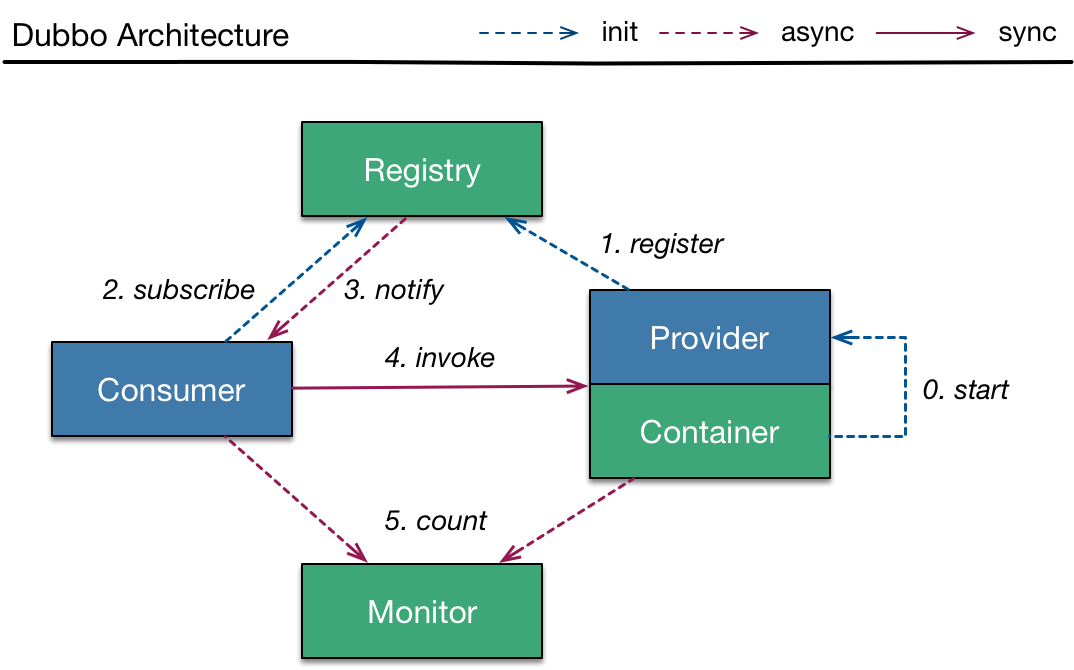
这是图中的几个节点的意义
具体的调用步骤
三、下面我会通过一个例子来说明具体的实现过程,以及配置
1)说明:dubbo是用来做分布式工程而提出来的一个框架。相对于原来的单体工程来说,dubbo的灵活性,以及调整的方式都更加灵活。dubbo的方式是将service一下的单独提出来做成一个项目,也就是我们提到的SOA模式,面向服务的框架。在设计中,web端只看得到对应的接口,而不需要知道实现过程。具体的实现过程在另外一个项目实现。中间的通行通过zookeeper来实现传输。
2)我这里写了一个简单的例子来说明这个服务提供的过程,和相对应用独立使用的过程。(目录)
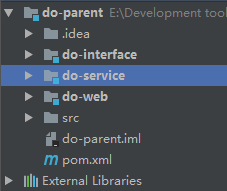
1、do-parent用来加载公用的jar包,没有实际代码
a、pom.xml
<?xml version="1.0" encoding="UTF-8"?>
<project xmlns="http://maven.apache.org/POM/4.0.0"
         xmlns:xsi="http://www.w3.org/2001/XMLSchema-instance"
         xsi:schemaLocation="http://maven.apache.org/POM/4.0.0 http://maven.apache.org/xsd/maven-4.0.0.xsd">
    <modelVersion>4.0.0</modelVersion>

    <groupId>com.troy</groupId>
    <artifactId>do-parent</artifactId>
    <version>1.0-SNAPSHOT</version>
    <modules>
        <module>do-interface</module>
        <module>do-service</module>
        <module>do-web</module>
    </modules>

    <parent>
        <groupId>org.springframework.boot</groupId>
        <artifactId>spring-boot-starter-parent</artifactId>
        <version>1.5.9.RELEASE</version>
    </parent>

    <dependencies>
        <dependency>
            <groupId>org.springframework.boot</groupId>
            <artifactId>spring-boot-starter-web</artifactId>
            <version>1.5.9.RELEASE</version>
        </dependency>
        <dependency>
            <groupId>org.springframework.boot</groupId>
            <artifactId>spring-boot-starter-data-jpa</artifactId>
            <version>1.5.9.RELEASE</version>
        </dependency>
        <dependency>
            <groupId>com.alibaba</groupId>
            <artifactId>dubbo</artifactId>
            <version>2.5.7</version>
        </dependency>
        <dependency>
            <groupId>mysql</groupId>
            <artifactId>mysql-connector-java</artifactId>
            <version>5.1.9</version>
        </dependency>
        <dependency>
            <groupId>org.apache.zookeeper</groupId>
            <artifactId>zookeeper</artifactId>
            <version>3.4.9</version>
        </dependency>
        <dependency>
            <groupId>com.101tec</groupId>
            <artifactId>zkclient</artifactId>
            <version>0.10</version>
        </dependency>
    </dependencies>

</project>
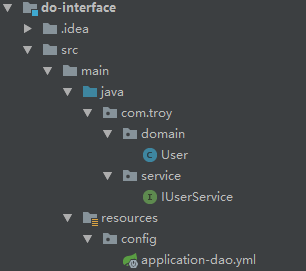
2、do-interface用来提供暴露的接口,提供给do-web和do-service。共同的调用方法
a、目录结构
b、User共同使用的实体类
package com.troy.domain;

import javax.persistence.*;
import java.io.Serializable;

@Entity
@Table(name = "USER")
public class User implements Serializable{

    @Id
    @GeneratedValue(strategy = GenerationType.AUTO)
    private Long id;
    private String name;
    private Integer age;

    public Long getId() {
        return id;
    }

    public void setId(Long id) {
        this.id = id;
    }

    public String getName() {
        return name;
    }

    public void setName(String name) {
        this.name = name;
    }

    public Integer getAge() {
        return age;
    }

    public void setAge(Integer age) {
        this.age = age;
    }
}
c、IUserService只用来提供接口,不做任何实现
package com.troy.service;

import com.troy.domain.User;

import java.util.List;

public interface IUserService {

    public List<User> findAll();
}
d、application-dao.yml的配置用来连接数据库,这个因为我用的是一套数据库,所以公用的数据库配置
spring:
  datasource:
    driver-class-name: com.mysql.jdbc.Driver
    url: jdbc:mysql://localhost:3306/model?useUnicode=true&characterEncoding=UTF-8
    password: root
    username: root
3、do-service用来提供具体的接口实现
a、目录结构

b、repository用来,设置基本的数据库访问层
package com.troy.repository;

import org.springframework.data.jpa.repository.JpaSpecificationExecutor;
import org.springframework.data.repository.NoRepositoryBean;
import org.springframework.data.repository.PagingAndSortingRepository;

import java.io.Serializable;

@NoRepositoryBean
public interface BaseRepository<T,I extends Serializable> extends PagingAndSortingRepository<T,I>,JpaSpecificationExecutor<T> {

}
package com.troy.repository;

import com.troy.domain.User;

public interface UserRepository extends BaseRepository<User,Long> {

}
c、service用来写具体的实现过程
package com.troy.service;

import com.troy.domain.User;
import com.troy.repository.UserRepository;
import org.springframework.beans.factory.annotation.Autowired;
import org.springframework.stereotype.Service;

import javax.transaction.Transactional;
import java.util.ArrayList;
import java.util.Iterator;
import java.util.List;

@Service(value = "userService")
@Transactional
public class UserServiceImpl implements IUserService {

    @Autowired
    private UserRepository userRepository;

    public List<User> findAll() {

        List<User> users = new ArrayList<User>();
        Iterator<User> iterator = this.userRepository.findAll().iterator();
        while (iterator.hasNext()) {
            users.add(iterator.next());
        }
        return users;
    }
}
d、config下面是进行相关的配置,对于服务提供者
package com.troy.config;

import org.springframework.context.annotation.Configuration;
import org.springframework.context.annotation.ImportResource;

@Configuration
@ImportResource("classpath:dubbo/*.xml")
public class DubboProvider {

}
dubbo-provider.xml的具体配置
<?xml version="1.0" encoding="UTF-8"?>
<beans xmlns="http://www.springframework.org/schema/beans"
    xmlns:xsi="http://www.w3.org/2001/XMLSchema-instance" xmlns:dubbo="http://code.alibabatech.com/schema/dubbo"
    xsi:schemaLocation="http://www.springframework.org/schema/beans
            http://www.springframework.org/schema/beans/spring-beans.xsd
            http://code.alibabatech.com/schema/dubbo
            http://code.alibabatech.com/schema/dubbo/dubbo.xsd">

    <!-- 提供方应用信息,用于计算依赖关系 -->
    <dubbo:application name="dubbo-provider" />

    <!-- 使用zookeeper注册中心暴露服务地址 -->
    <dubbo:registry protocol="zookeeper" address="192.168.5.10:2181" />

    <!-- 用dubbo协议在20880端口暴露服务 -->
    <dubbo:protocol name="dubbo" port="20880" />

    <!-- 用户服务接口 -->
    <dubbo:service interface="com.troy.service.IUserService" ref="userService" />

</beans>
e、具体的启动过程
package com.troy;

import org.springframework.boot.SpringApplication;
import org.springframework.boot.autoconfigure.SpringBootApplication;

import java.util.HashMap;
import java.util.Map;

@SpringBootApplication
public class ApplicationService {

    public static void main(String[] args) {
        SpringApplication application = new SpringApplication(ApplicationService.class);
        Map<String,Object> map = new HashMap<String, Object>();
        //这里的目的是加入相关配置
        map.put("spring.profiles.default","service,dao");
        application.setDefaultProperties(map);
        application.run(args);
    }
}
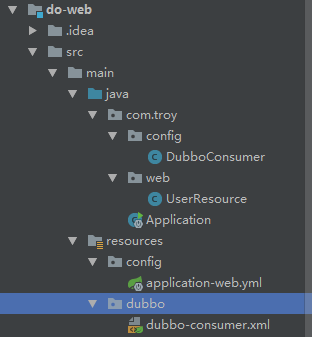
4、do-web的目的是用来获取数据,提供数据,当然也可以用来具体页面的呈现
a、目录接口
b、web,具体的数据提供者
package com.troy.web;

import com.troy.service.IUserService;
import org.springframework.beans.factory.annotation.Autowired;
import org.springframework.context.annotation.Scope;
import org.springframework.web.bind.annotation.RequestMapping;
import org.springframework.web.bind.annotation.RequestMethod;
import org.springframework.web.bind.annotation.RestController;

@RestController
@RequestMapping("/api/user")
@Scope("prototype")
public class UserResource {

    @Autowired
    private IUserService userService;

    @RequestMapping(value = "/findAll")
    public Object findAll() {
        return this.userService.findAll();
    }
}
c、config消费者配置
package com.troy.config;

import org.springframework.context.annotation.Configuration;
import org.springframework.context.annotation.ImportResource;

@Configuration
@ImportResource("classpath:dubbo/*.xml")
public class DubboConsumer {

}
dubbo-consumer.xml
<?xml version="1.0" encoding="UTF-8"?>
<beans xmlns="http://www.springframework.org/schema/beans" xmlns:xsi="http://www.w3.org/2001/XMLSchema-instance" xmlns:dubbo="http://code.alibabatech.com/schema/dubbo"
    xsi:schemaLocation="http://www.springframework.org/schema/beans
        http://www.springframework.org/schema/beans/spring-beans.xsd
        http://code.alibabatech.com/schema/dubbo
        http://code.alibabatech.com/schema/dubbo/dubbo.xsd">

    <!-- 消费方应用名,用于计算依赖关系,不是匹配条件,不要与提供方一样 -->
    <dubbo:application name="dubbo-consumer" />

    <!-- 使用zookeeper注册中心暴露服务地址 -->
    <!-- 注册中心地址 -->
    <dubbo:registry protocol="zookeeper" address="192.168.5.10:2181" />

    <!-- 用户服务接口 -->
    <dubbo:reference interface="com.troy.service.IUserService" id="userService" check="false" />


</beans>
d、启动配置
package com.troy;

import org.springframework.boot.SpringApplication;
import org.springframework.boot.autoconfigure.SpringBootApplication;

import java.util.HashMap;
import java.util.Map;

@SpringBootApplication
public class Application {

    public static void main(String[] args) {
        SpringApplication application = new SpringApplication(Application.class);
        Map<String,Object> map = new HashMap<String, Object>();
        map.put("spring.profiles.default","web,dao");
        application.setDefaultProperties(map);
        application.run(args);
    }
}
四、中间需要用到zookeeper,来做注册中心。
zookeeper的安装部署:http://www.cnblogs.com/ll409546297/p/7526953.html
zookeeper的展示界面:http://www.cnblogs.com/ll409546297/p/7814564.html
五、dubbo的方式,目前各大网站上面应用的非常普遍。当然我这边只是做的一个例子用来,了解dubbo的分布式实现过程,和具体的应用方式。
代码层面存在不理想的地方,请见谅!!!

微信关注我们
转载内容版权归作者及来源网站所有!
低调大师中文资讯倾力打造互联网数据资讯、行业资源、电子商务、移动互联网、网络营销平台。持续更新报道IT业界、互联网、市场资讯、驱动更新,是最及时权威的产业资讯及硬件资讯报道平台。
马里奥是站在游戏界顶峰的超人气多面角色。马里奥靠吃蘑菇成长,特征是大鼻子、头戴帽子、身穿背带裤,还留着胡子。与他的双胞胎兄弟路易基一起,长年担任任天堂的招牌角色。
Spring框架(Spring Framework)是由Rod Johnson于2002年提出的开源Java企业级应用框架,旨在通过使用JavaBean替代传统EJB实现方式降低企业级编程开发的复杂性。该框架基于简单性、可测试性和松耦合性设计理念,提供核心容器、应用上下文、数据访问集成等模块,支持整合Hibernate、Struts等第三方框架,其适用范围不仅限于服务器端开发,绝大多数Java应用均可从中受益。
Rocky Linux(中文名:洛基)是由Gregory Kurtzer于2020年12月发起的企业级Linux发行版,作为CentOS稳定版停止维护后与RHEL(Red Hat Enterprise Linux)完全兼容的开源替代方案,由社区拥有并管理,支持x86_64、aarch64等架构。其通过重新编译RHEL源代码提供长期稳定性,采用模块化包装和SELinux安全架构,默认包含GNOME桌面环境及XFS文件系统,支持十年生命周期更新。
Sublime Text具有漂亮的用户界面和强大的功能,例如代码缩略图,Python的插件,代码段等。还可自定义键绑定,菜单和工具栏。Sublime Text 的主要功能包括:拼写检查,书签,完整的 Python API , Goto 功能,即时项目切换,多选择,多窗口等等。Sublime Text 是一个跨平台的编辑器,同时支持Windows、Linux、Mac OS X等操作系统。
扫码在手机上查看文章
扫描二维码,手机阅读更方便




有任何问题或合作意向欢迎联系我们
Email: 99873273@qq.com
QQ: 99873273