首页 文章 精选 留言 我的

精选列表

搜索[布隆过滤器],共6712篇文章
优秀的个人博客,低调大师

easyhttp v1.1发布,新增异步并发请求

EasyHttp 是一个轻量级、语义化、对IDE友好的HTTP客户端,支持常见的HTTP请求、异步请求和并发请求,让你可以快速地使用 HTTP 请求与其他 Web 应用进行通信。 EasyHttp并不强制依赖于cURL,如果没有安装cURL,EasyHttp会自动选择使用PHP流处理,或者你也可以提供自己的发送HTTP请求的处理方式。 1、新增异步并发请求 use Gouguoyin\EasyHttp\Response; use Gouguoyin\EasyHttp\RequestException; $promises = [ Http::getAsync('http://easyhttp.gouguoyin.cn/api/sleep3.json'), Http::getAsync('http1://easyhttp.gouguoyin.cn/api/sleep1.json', ['name' => 'gouguoyin']), Http::postAsync('http://easyhttp.gouguoyin.cn/api/sleep2.json', ['name' => 'gouguoyin']), ]; Http::concurrency(10)->multiAsync($promises, function (Response $response, $index) { echo "发起第 $index 个异步请求,请求时长:" . $response->json()->second . '秒' . PHP_EOL; }, function (RequestException $e, $index) { echo "发起第 $index 个请求失败,失败原因:" . $e->getMessage() . PHP_EOL; }); //输出 发起第 1 个请求失败,失败原因:cURL error 1: Protocol "http1" not supported or disabled in libcurl (see https://curl.haxx.se/libcurl/c/libcurl-errors.html) 发起第 2 个异步请求,请求时长:2 秒 发起第 0 个异步请求,请求时长:3 秒 2、异步请求时如果没有请求参数可以省略 use Gouguoyin\EasyHttp\Response; use Gouguoyin\EasyHttp\RequestException; Http::getAsync('http://easyhttp.gouguoyin.cn/api/sleep3.json', ['token' => TOKEN], function (Response $response) { echo '异步请求成功,响应内容:' . $response->body() . PHP_EOL; }, function (RequestException $e) { echo '异步请求异常,错误码:' . $e->getCode() . ',错误信息:' . $e->getMessage() . PHP_EOL; }); echo json_encode(['code' => 200, 'msg' => '请求成功'], JSON_UNESCAPED_UNICODE) . PHP_EOL; //输出 {"code":200,"msg":"请求成功"} 异步请求成功,响应内容:{"code":200,"msg":"success","second":3} Http::getAsync('http1://easyhttp.gouguoyin.cn/api/sleep3.json', function (Response $response) { echo '异步请求成功,响应内容:' . $response->body() . PHP_EOL; }, function (RequestException $e) { echo '异步请求异常,错误信息:' . $e->getMessage() . PHP_EOL; }); echo json_encode(['code' => 200, 'msg' => '请求成功'], JSON_UNESCAPED_UNICODE) . PHP_EOL; //输出 {"code":200,"msg":"请求成功"} 异步请求异常,错误信息:cURL error 1: Protocol "http1" not supported or disabled in libcurl (see https://curl.haxx.se/libcurl/c/libcurl-errors.html) 3、新增withUA()方法 $response = Http::withUA('Mozilla/5.0 (Windows NT 10.0; Win64; x64) AppleWebKit/537.36 (KHTML, like Gecko) Chrome/60.0.3100.0 Safari/537.36')->post(...); 4、新增asMultipart()方法,attach()的别名 $response = Http::asMultipart( 'file_input_name', file_get_contents('photo1.jpg'), 'photo2.jpg' )->post('http://test.com/attachments'); $response = Http::asMultipart( 'file_input_name', fopen('photo1.jpg', 'r'), 'photo2.jpg' )->post(...); 5、get()、getAsync()方法支持带参数的url $response = Http::get('http://httpbin.org/get'); $response = Http::get('http://httpbin.org/get?name=gouguoyin'); $response = Http::get('http://httpbin.org/get?name=gouguoyin', ['age' => 18]);

优秀的个人博客,低调大师

Nacos 1.0.1发布,社区一起定义Nacos

Nacos 1.0.1是GA之后的第一个版本,除了修复1.0.0一些bug以外,还在社区反馈的基础上,吸收了大量的社区共建PR。这个版本中除了原有的贡献者外,新增了13名社区的贡献者,总计合入了43个PR。这一次,社区一起定义Nacos。或许你觉得Nacos很多槽点,或许你觉得Nacos应该支持某些牛逼的功能,此时请不要隐藏你的才华,贡献你在Nacos的第一PR吧。 Nacos 1.0.1主要新增特性介绍 服务发现SDK新增服务的运维接口 @chuntaojunNacos的服务模式是由服务-集群-实例组成的三层模型,和以往的Eureka、Consul等注册中心有所区别,这样虽然增加了对更多场景的支持,但是目前只能通过控制台去操作服务和集群的配置,包括创建、更新和删除服务。为了能让用户更加方便的使用Nacos的数据模型,我们在1.0.1版

优秀的个人博客,低调大师

【新功能发布】云监控主动报警1.0发布

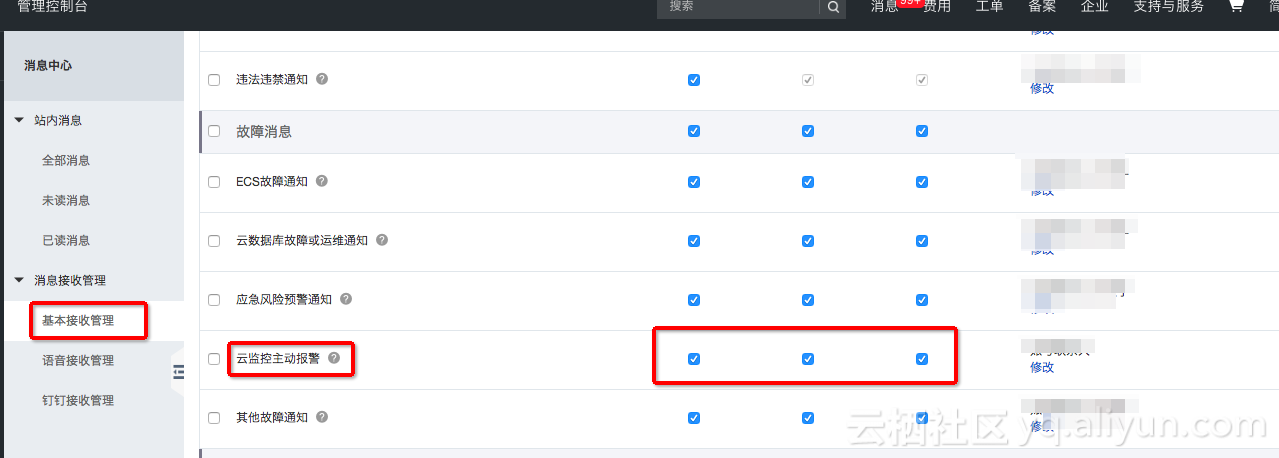
使用场景 为了避免由于未自主设置云监控报警,造成云产品关键监控指标异常无法及时知晓,导致影响服务正常运转的情况。云监控上线了主动报警功能。 旨在不进行您无需进行任何操作,主要云产品关键指标出现严重问题时,发送报警告知问题。如果您需要更细粒度的报警管理,请在云监控进行相关报警配置。 该功能不占用任何云监控相关的用量配额。 操作方法 订阅方法 通知默认开启,无需专门订阅 取消订阅 登录阿里云控制台,进入消息中心-基本接收管理页面 取消“故障消息”中的“云监控主动报警”勾选即可 报警范围 目前针对已经安装云监控插件,ECS 磁盘使用率达到100%的磁盘进行报警,陆续会上线更多关键指标的主动报警。 产品 监控项 主动报警策略 ECS 磁盘使用率 持续10分钟100%时发送报警,如果持续100%,则每24小时重复通知一次

优秀的个人博客,低调大师

[译]V8发布4.9版本

原文:V8 Release 4.9 作为发布流程的一部分,大约每隔6周,我们就会创建一个新的V8分支。每个版本都是在Chrome浏览器项目创建beta milestone分支前一刻从V8的master分支创建的。今天,我们很高兴宣布我们最新的分支4.9将处于beta阶段,直到它随Chrome 49稳定版本发布。V8 4.9版本带来一些对开发者的利好,所以我们想带你预览下几周后发布的这个版本的一些亮点。 常青浏览器项目一般每6周发布一次新版本,如Chrome,Edge,Firefox。V8的发布流程跟Chrome浏览器发布流程同步。 91% 的 ECMAScript 2015(ES6) 特性支持 在V8 4.9版本中,我们发布了有史以来最多的一批JavaScript ES2015 新特性,按照Kangax 兼容表(截止2016.1.26),

优秀的个人博客,低调大师

gRPC1.0发布,来自Google的RPC框架

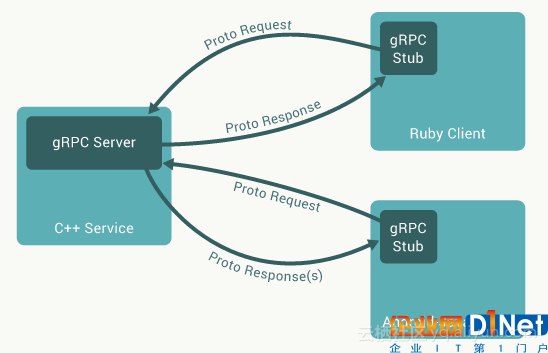
一直以来,构建一个高度可扩展且松耦合的系统是很困难的。来自Google的gRPC框架致力于解决这个领域问题。它自去年面世以来收到了社区的大量关注和使用。8月23日Google正式发布了gRPC的1.0版本,并可用于生产。在此次发布中增加了新版本对多语言的支持、API稳定性等,引起了社区广泛的关注。 gRPC是一个高性能、开源、通用的RPC框架,它基于Proto Buffers进行数据序列化,并将移动和HTTP/2作为设计的首要考虑因素。与单一RPC请求方式不同,gPRC使用HTTP/2提供客户和服务器间的单向或双向流,同时可以带来流量控制、头部压缩、单TCP连接上的多复用请求等特性。Google认为gRPC以“利用带宽和CPU效率、低延迟的方式来创建大规模分布式系统,可以应用在数据中心、移动应用程序、实时通信、物联网设备和API等,且有很好的表现。”而微服务是gRPC的主要目标。 gRPC最早源于被称为Stubby的Google内部项目,用于一些Google内部服务间的通信。18个月前Google开源了gRPC框架,希望借此gRPC能被更广泛地采纳,并在调用Google所提供的服务时、通过互联网与其它服务通信时或在自身产品内部应用gRPC。 gRPC是与平台无关的RPC系统。如下图所示,gRPC允许开发人员编写语言无关的服务定义,指定远程调用参数和返回类型。服务器端实现服务定义,并运行一个gRPC服务器来处理客户的调用;而客户端则部署支持客户端调用的服务器端实现存根。这些代码都可由gRPC基于服务定义和自选的开发语言在编译器的帮助下自动生成。这使得客户端应用程序可以像调用本地对象一样调用服务器端应用程序,从而帮助开发人员更容易地创建分布式应用程序和服务。 同时,gRPC也可以帮助处理高效的网络通信、认证和访问控制(如SSL/TLS和OAuth2方式的认证)、分布式跟踪等问题。gRPC与Proto Buffers一起可以帮助实现松耦合、工程化的速度、更高的可靠性以及操作的易用性。这也是在过去的15年中,Google内部采用Stubby和RPC框架解决的问题。Google声称期望通过将这一框架开源给社区,让更多的组织和社区收益。 自2015年至今,我们也看到gRPC项目在很多方面的改进。这次1.0版本中主要包括以下几点: 对多种语言绑定的支持,如C ++、Java、Go、Node、Ruby、Python和C#,并且可以跨Linux、Windows和Mac多种操作系统。 Objective-C和Android的Java库也在迁移到1.0版本,使移动应用能够更有效地连接到后端服务。 在安装方面,gRPC支持以CocoaPods、gem、Gradle、Maven、npm、NuGet、pecl、pip或Docker镜像等方式提供的二进制文件,这大大简化了安装过程。在1.0版本中,增加了绝大多数语言单行安装、向后兼容性等的支持。 gRPC1.0依赖于Protocol Buffers最新版本3.0。此外,gRPC1.0的核心协议和API在可用性、互操作性、性能等方面都有所提升。相对于文本格式而言,ProtoBuf方式可提供更优的性能。据Google工程师Kelsey Hightower介绍,ProtoBuf编码的消息比JSON格式消息的大小降低了一半,而序列化和反序列化所用的时间仅为后者的三分之一。为了显示各种gRPC实现的通信延迟情况对比,Google给出了在同一数据中心中不同虚拟机实例间的通信性能精要报告。对于单一的同步安全消息,报告显示作为基准的Netperf的延迟大约为100微秒,而C 、Java和C#语言实现的延迟大约在200到300微秒,Ruby、Python和Node.js语言实现的延迟分别在700微秒、900微秒和1,100微秒左右。 不得不说,gRPC1.0版本的发布标志着一个重要里程碑的诞生。与此同时,社区对于gRPC的兴趣迅速提升,同时随着像Netflix、CoreOS、 Square等公司和开源项目的使用,必然能够推动gRPC作为一个通用RPC框架的发展以及相关生态圈的成熟,从而使更多的组织和社区受益。 你可以在这里查阅1.0版本的更多发布细节。如果你感兴趣,不妨开始尝试gRPC并通过邮件列表来给予反馈。 本文转自d1net(转载)

优秀的个人博客,低调大师

Civil 3D 2012 SP 2.1发布了

这个SP适用于各种语言的版本,下载地址: http://usa.autodesk.com/adsk/servlet/ps/dl/item?siteID=123112&id=20310611&linkID=9240698 具体更新内容参考readme: The following issues have been resolved in AutoCAD Civil 3D 2012 Service Pack 2: Alignments Creating spiral curve using the Design Criteria: Tan-Tan with Curves no longer results in the application closing unexpectedly. Applying a Curve-Line-Curve transition to the end of a curve no longer results in the second curve doubling back on itself. An error is no longer generated when modifying a station equation with overlapping values. API AddPointGroup to Surface on .NET no longer generates an error. Aeccxuilandloader and AeccSvrLoader no longer generate errors when hovering over some Civil 3D entities with rollover tooltips are enabled. Catchments Creating a Catchment from Object with pickfirst turned on no longer causes the application to close unexpectedly. Cogo The COGO Editor now reports the correct traverse length when using 2 distance unknowns. The COGO Editor now retains entries in the description field. Corridor Design Using the Drive command on a Feature Line object no longer causes the application to close unexpectedly. An issue where a change to the Offset End Station resulted in an unusable drawing has been resolved. Switching between drawings while Station Tracker is enabled no longer causes the application to close unexpectedly. Corridor Volumes Volume calculations using sample lines and section views provide more consistent results. Cross Section Views Performance when using the Change Band Set selection tool in the Section View Group Properties dialog box has been improved. Opening a Civil 3D 2010 drawing containing the OverlayAndMill subassembly in Civil 3D 2012 no longer results in a display issue with the section views. Cross Sections The right side of a Sample Line is now visible to the Intersection or Apparent Intersection Osnap commands. Referenced Cross Section Labels whose placement has been modified no longer revert back to original their location after reloading the XREF. Data Exchange An imported Structure will now use the expected dimension rather than the dimension of the first Structure of the imported group. Feature Lines Stability when grip editing a Feature Line has been improved. Creating Feature Lines from objects when the objects are overlapping closed polylines no longer causes the application to close unexpectedly. General/Other The stability of the Audit command has been improved. A memory issue that prevented opening some drawings from previous releases has been resolved. An issue that caused an error when closing a drawing has been resolved. Renaming a layout while the Sheet Set Manager is open no longer displays an error message in the command line. The display of custom linetypes has been improved. Right-click menus from Prospector have been updated to resolve display issues. Grading An error while using the Grade to Surface command has been resolved. Saving a drawing after running the Automatically raise/lower to balance the volumes command no longer causes the application to close unexpectedly. Hydraflow Express and Hydraflow Storm Sewers The following issues related to Inlet calculations and reporting have been resolved: Inlet Calculations have been clarified to match HEC-22 requirements. Combination inlets in sag conditions now report expected depth and spread results. Slotted drains in sag condition no longer display the gutter spread and gutter depth values as bypass in reports. Slotted drains in sag condition now calculate expected depth and spread values while transitioning between weir and orifice flow. Open Area Design calculations are now less than or equal to the product of grate length and width. 3D images for Inlets without depression specified no longer depict a local depression. 3D images for Inlets with local depression now depict the correct grate slopes. Section images for on-grade inlets now depict the expected results for the entire spread. Inlet efficiency is now calculated as expected when the frontal flow width is less than the gutter width. Hydraflow Storm Sewers Storm Sewer calculations have been clarified to follow methodologies according the HEC-22. Storm Sewers using HDS-5 inlet control option now report expected results. The following issues related to Inlet calculations and reporting have been resolved: Inlets with no tributary area now report expected flow capture results. Gutter depth and spread no longer calculate as negative values. Inlet Section Views now correctly show the grate slope when there is local depression. Inlet Section View display shows spread correctly in 2D when depression is ignored. A column in Interactive Designer is now labeled "Local Depression" to be consistent with the data-entry field. Hydraflow Express Text in images exports clearly. Channel calculations for gutter channels now match the gutter calculations performed for Inlets. The following issues related to Inlet calculations and reporting have been resolved: Gutter depression values can now be set to zero. Manning roughness n-value default for gutter sections has been set to 0.016 for Inlet calculations. The following issues related to Culvert calculations and reporting have been resolved: Culvert calculations clarified to match HDS-5 requirements. The Manning roughness n-value list for Culverts now includes values up to 0.035 to match HDS-5. Circular culverts now report consistent tailwater results as expected across a flow range. Box culverts under outlet control now report expected headwater values. Horizontal elliptical pipes now report expected headwater values. Elliptical Culvert calculations now report expected headwater values above the crown of the pipe. Hydraflow Hydrographs Resizing column widths no longer revert to original size. Correct dates are now printed in report data. Hydrograph plots are now displayed correctly on computers running Windows XP 32-bit. Inquiry Switching between drawings with the Profile View inquiry, elevation & grade between two points command active no longer causes the application to close unexpectedly. Intersection An issue with Offset Profiles that resulted in unexpected results when creating an intersection has been resolved. Labels An issue where referenced Pipe Spanning labels list the incorrect distance after reopening a drawing has been resolved. Cogo Point labels in drawings from a previous release now retain rotation properties. An issue where referenced Pipe Network Labels in section view disappear after reopening a drawing has been resolved. LandXML Importing a Pipe Network with structures deselected no longer causes the application to close unexpectedly. Lines and Curves The Deflection-Distance transparent command now supports angles less the zero. Parcels An error when creating a parcel using the Slide Line Create command has been resolved. Pipe Networks Opening drawings with external references no longer causes the application to close unexpectedly. Selecting a pipe part while creating a Profile View no longer causes the application to close unexpectedly. Creating a Pipe Network while the Panorama is open with a deleted network no longer causes the application to close unexpectedly. Solid hatching now displays as expected on curved pipes. Solid hatching now displays as expected in Profile Views. Synchronizing a Pipe Network with a part swapped in the source drawing now changes updates the style as expected. Setting a template with custom optional Pipe Network parameters as the default template no longer returns an error message. Displaying large numbers of Pipe Network parts in Prospector is no longer causing slow performance issues. Issues recognizing the correct Manning roughness n-value for parts has been resolved. Issues setting and retaining a structure's On Grade / On Sag setting have been resolved. Pipe length data is now available in structure tables displaying connected pipes. Plans Production An issue where superimposed profiles are not transferred to view frames in a referenced drawing has been resolved. Points Moving a Point using Osnaps now changes the point elevation. Assigning user-defined properties to a Point Group from the summary tab no longer results in the application closing unexpectedly. Profile View Dragging a Profile Label to the end of a Split Profile View using Osnap no longer results in the application closing unexpectedly. Profiles Offset Profile geometry has been updated to provide better results when sampling and labeling. Project Management Drawings with circular dependencies now generate a prompt when being checked in. Quantity Takeoff A calculation error when using formulas has been corrected. Alignments can now be assigned as a pay item. The Pay Item and Pay Item Categorization files now default to the previously browsed path. Shortcuts Performance when opening a drawing containing references has been improved. Surface The Drape Image command no longer results in a reversed image when hardware acceleration is enabled. Creating a surface mask while in wireframe view style no longer results in the application closing unexpectedly. The accuracy when calculating surface volumes has been improved. An issue where adding a 3D polyline as a surface breakline causes the application closing unexpectedly has been resolved. Watershed analysis calculations are now launched when the Run Analysis button is selected. Survey Transformation Settings no longer change when migrating a previous release drawing. The following issues have been resolved in AutoCAD Civil 3D 2012 Service Pack 2.1: General/Other Drawing stability when closing drawings containing data references has been improved. An issue where alignments do not plot according to the STB plot style has been resolved. Hydraflow Storm Sewers An issue where running a default analysis with design mode in Hydraflow Storm Sewers causes the application to close unexpectedly has been resolved. Hydraflow Hydrographs The Hydrograph Types tab now displays the full list of hydrographs. Pipe Networks Referenced network section view labels for pipes and structures are no longer lost when exiting the application and reopening the drawing. Referenced pipe network styles retain changes as expected when the drawing is saved and re-open 作者: 峻祁连 邮箱:junqilian@163.com 出处: http://junqilian.cnblogs.com 转载请保留此信息。 本文转自峻祁连. Moving to Cloud/Mobile博客园博客,原文链接:http://www.cnblogs.com/junqilian/archive/2012/08/11/2633846.html ,如需转载请自行联系原作者

优秀的个人博客,低调大师

徐工阿里“云端”布棋局,打造中国工业的Predix

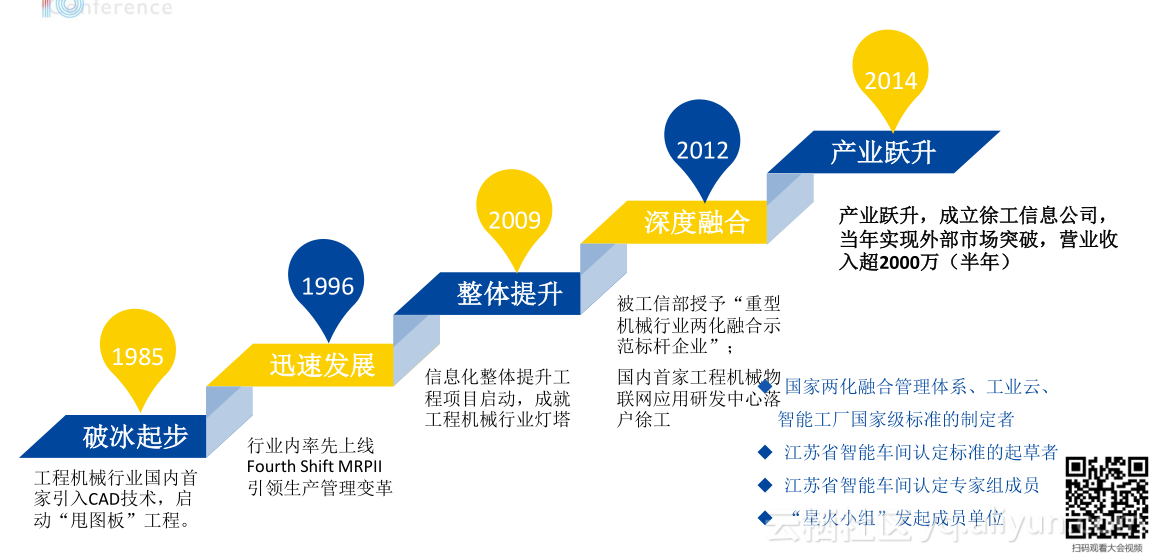
摘要:10月13日2016杭州云栖大会拉开帷幕,智能工业专场的徐工集团信息公司CEO张启亮带来了“徐工集团的工业大数据之路”的重要演讲。首先从信息化的发展历程开始讲起,进而谈及工业大数据平台,接着着重讲述了制造业大数据的流程再造,最后分享了徐工工业云平台。 以下内容根据演讲PPT及现场分享整理: 本文首先从信息化的发展历程开始讲起,进而谈及工业大数据平台,接着着重讲述了制造业大数据的流程再造,最后分享了徐工工业云平台。 以下为精彩内容整理: 徐工集团主要是做工程器械的企业,在中国工程机械行业连续27年第1位,中国机械工业百强企业第2位,世界工程机械行业第5位,中国500强企业第122位。 信息化发展历程 徐工的信息化发展从1985年开始,破冰起步——迅速发展——整体提升——深度融合——产业跃升。2014年7月,江苏徐工信息技术股份有限公司正式注册成立;2014年08月,入选国家首批两化融合管理体系贯标咨询服务机构;2015年10月,中德总理李克强、默克尔共同见证徐工集团与SAP签订战略合作协议;2015年12月,自主研发的物联网终端成功实现上线运行。2016年07月,自主研发的PI生产智能化信息终端及云平台填补了行业空白。 那么,工业大数据的数据源头怎样获取呢? 工业大数据—物联网 怎么让冰冷冷的机器开口说话,实现机器与机器之间的数据共享、机器与人之间的数据共享呢?这就需要打通工业互联网这个桥梁的瓶颈。 数据之源 工业领域的黑匣子安装在一些设备上后,就可以了解设备的状况,我们将行走在全球的设备形容为行走的机器人。黑匣子具备远程升级、休眠、盲区补偿等实用功能。 从徐工互联网智能信息服务平台可以看出,打开地图就能看到设备的分布情况,也可进行单车定位。目前,在这个平台上大约有十万台设备,每天要分析大量数据。 设备大数据 根据故障时的工况数据,对故障进行诊断分析;维护故障代码知识库,添加新的诊断意见。 生产作业实时数据监测,工作负载、风偏、水温、液压油位、作业风险预警;当车辆发生故障时,知道故障原因、找到故障解决方法,快速的反应,帮助用户解决问题,提高售后服务的质量。 我们对设备数据进行深度挖掘,根据设备的开工率,可以了解中国的每个省市区域经济热度,并且数据已经接入到国家统计局内。 而且,我们还可以为制定营销策略及市场战略提供必要的数据依据;可及时调派突发事件(如抢险救援)附近车辆。 徐工物联网的核心理念是围绕物联网全产业链,掌握核心技术,打造核心产品,提供优质服务。 平台产品着眼于全球物联网智能设备及各类传感器的信息接入、处理和应用,以Hadoop、Kafka、Storm等开源数据处理技术为基础,打造可容纳千万级传感器、终端的数据中心,针对不同类型设备、终端所采集、上传的数据进行分析、处理,为客户提供全方位的应用,包括云计算、第三方数据接入、第三方客户化应用、数据智能分析、数据诊断、资产管理、设备管理、设备预警、APM、模型分析、大数据应用等。 统一大数据平台 大数据瓶平台从底层到数据中心再到大数据分析,提供了一整套的解决方案。其中首要的底层设备,包括自主研发的M2M通信协议。 在物联网+大数据的Xrea模式下,我们针对不同客户提供了三种方案,具体为下: 私有云:大型企业。搭建在客户方,提供物联网私有云服务,提供包括终端接入、数据采集、数据存储、客户应用等服务。 混合云:中小型企业。终端接入、数据采集、数据存储等功能搭建在公司Xrea平台上,客户化应用搭建在客户方,通过接口进行数据交互。 公有云:小型企业。终端接入、数据采集、数据存储、客户应用等服务等服务均搭建在公司Xrea平台上对提供Saas 服务。 工业大数据—制造业 数控机器人、二维码扫描、积放链配送、AGV 小车、全触屏自主查询设备,徐工智能车间绝对可以颠覆多数人对车间的认知——整洁优美,没有想象中的嘈杂忙乱,也没有很多工人,生产却有条不紊。 整个过程智能控制层、传输层、执行层组成,通过边缘计算节点到数据分析模块进行数据交换。 通过感知的数据来影响我们的决策。 采用创新硬件及云端软件,便于快速部署与集成;实时数据流处理,事事尽在掌握;深度数据分析,挖掘规则,预测异常;基于数据进行决策,提升运营效率,降低成本。 通过智能终端将订单管理、生产派工等上传,让我们的生产可追溯。 技术的创新带来了产业的变革,我们可以看到整个制造业未来的方向在哪里。ICT技术(信息与通信技术“Information Communications Technology”),互联网技术和行业高度融合促使新产品的出现。此外,互联网的发展也深刻地影响了企业信息化的发展走向,移动办公的需求放大,软件供应商也随之推出了各自的解决方案。 大数据驱动制造业流程再造。传统的制造业会向制造业OT/IT融合车间的系统和设备的工业4.0的趋势迈进。 大数据驱动创新 大数据驱动企业创新发展,提供包含生产制造、资源计划、供应链管理、营销预测、策略分析、决策支持等服务。 利用Hadoop+Spark技术,实现云计算+云存储+云服务三位一体的创新性云服务模式; 通过大数据技术,实现工厂生产模式分析对比与大数据挖掘服务; 为企业客户提供订单生产流程透明展示,为生态客户提供资源在线展示。 徐工工业云平台 我们希望通过IaaS、PaaS、SaaS三层的转化,通过工业云把徐工资源向全球开放,打造中国工业的Predix。应用新一代的信息技术,搭建共享服务平台,将徐工工业业务中的同质模块,提取输出、互联共享搭建工业应用软件开发平台利用互联网推进传统制造业转型升级。 徐工携手阿里搭载互联网 “云” 平台,打造国际领先的工业互联网技术众筹模式,集聚全球智慧。

优秀的个人博客,低调大师

S4分布式流计算引擎

背景 最近花了点时间研究了下分布式计算这一块的内容。领导给的第一个任务,就是学习下S4和GridGain。花了几天的时间把s4的源码看了下,把自己的理解和学习的内容做一个记录。 下一篇会是GridGain的分享 学习 s4的论文:S4: Distributed Stream Computing Platform s4的官网:http://s4.io/ s4是什么? 1. s4的全称 : Simple Scalable Streaming System (简单的描述:分布式流计算系统) 2. 特点: distributed(分布式) scalable(扩展性) partially fault-toleran(部分容错性) pluggable (可插拔) 3. 产生的原因: Yahoo发起,主要用于解决"cost-per-click“广告,通过实时计算预测用户对广告的可能的点击行为。 不用hadoop的原因: hadoop主要解决batch处理,基于mapReduce对可控的数据的进行处理。而流计算是针对不可控的点击事件,对实时性有严格要求。 4. 适用的场景: 业务允许部分容错性。 (s4没有严格的failover机制,运行节点突然crash时,会导致当前节点中的数据丢失。后续的请求会failover到其他的节点上) S4的设计: 容器概念(http://docs.s4.io/manual/overview.html) PE : Processing Elements (处理节点) * emit one or more events which may be consumed by other PEs, * publish results, possibly to an external data store or consumer. Events : message (消息) * arbitrary Java Objects * passed between PEs. (send and receive) PEC : processing element container (处理节点容器) * invokes the appropriate PEs in the appropriate order node :a Processing Endpoint (机器节点) *a jvm instance * contains a PEC cluster:a groupnodes (节点集群) 说明: 一个cluster包含多个node 每个node包含一个PE Container 每个PE Container 包含多个PE 每个PE消费Events,生成新的Events并传递给下一个PE 总体结构图: PE Container/PE EventListenter Dispatcher, EventEmitter Communcation PE内部概念:(4个部分组成) its functionality as defined by a PE class and associated configuration, the named stream that it consumes, the keyed attribute in those events, and the value of the keyed attribute in events which it consumers PE类关系图: 说明: Persister : 每个PE对应一个Persister,s4中每个PE对应于一个key的value结果。每个value结构都将作为PE的一个instance FrequenceType : 每个PE会定期进行flush output输出,可选择的策略(定时,数量阀值) Clock : 每个PE的时间控制单元,有几种时间。(WallClock:基于系统时间处理, EventClock:基于event事件时间控制) 重点理解一下: Keyless PE概念和PE Prototype PE在底层实现了会以多实例存在。存储的key即为其keyed对应的value值,内部有个lookupTable概念。 针对Keyless PE,其对应的存储key即为"*",所以每次通过lookupTable.get(value)返回的即为同一个节点,单例化 针对prototype,其对应的存储就为其value,所以每次会根据当前keyed attribute确定返回的PE节点,基于这点可以实现PE节点数据的Join处理 EventListener/EventEmitter: 说明: 每个PE Container是一个EventProducer,使用CommLayerListener做为其事件处理器,处理EventWrapper反序列化。 每个PE包含一个Dispatcher,Dispatcher里包含了一个EventEmitter处理对应的EventWrapper对象的发送 底层实际通讯的类: SenderProcess/ListenerProcess Dispatcher类关系图: 说明: Partitioner, 每个dispatcher针对发送的目标cluster,会根据对应的key进行分区处理,路由到其中的node节点。(node节点的信息可以通过zookeeper进行动态管理) 考虑集群node节点的管理(node的新增 or 修改) 说明: ProcessMonitor 监控当前运行node节点的状态,有static/dymaic两种维护状态 TaskManager 创建node节点,主要是设置lock文件,有static/dymaic两种维护状态 运行(PE状态变化) S4缺点: S4产品还是一个半成品,整体代码结构组织和风格上还是比较乱的,选择使用时需谨慎。存在的一些问题: failover (运行node节点出现crash,当前node上的PE数据将无法实施failover) persist (目前支持方式过于简单,需要考虑网络持久化,类似于nfs,分布式文件系统等,配合failover机制) communication (只支持udp协议,数据传输可靠性上) load balancer (根据系统负载进行智能LB,目前暂时未看到相关实现。系统运行分为两种模式static or dymaic模式, static不存在智能调节LB处理) deploy (手工方式介入deploy,无法支持apps的zero deploy模式。系统分为cluster/node两概念,node对应于一计算节点实例,cluster为一组处理相同业务的计算节点)

资源下载

更多资源
腾讯云软件源

腾讯云软件源

为解决软件依赖安装时官方源访问速度慢的问题,腾讯云为一些软件搭建了缓存服务。您可以通过使用腾讯云软件源站来提升依赖包的安装速度。为了方便用户自由搭建服务架构,目前腾讯云软件源站支持公网访问和内网访问。

Nacos

Nacos

Nacos /nɑ:kəʊs/ 是 Dynamic Naming and Configuration Service 的首字母简称,一个易于构建 AI Agent 应用的动态服务发现、配置管理和AI智能体管理平台。Nacos 致力于帮助您发现、配置和管理微服务及AI智能体应用。Nacos 提供了一组简单易用的特性集,帮助您快速实现动态服务发现、服务配置、服务元数据、流量管理。Nacos 帮助您更敏捷和容易地构建、交付和管理微服务平台。

Rocky Linux

Rocky Linux

Rocky Linux(中文名:洛基)是由Gregory Kurtzer于2020年12月发起的企业级Linux发行版,作为CentOS稳定版停止维护后与RHEL(Red Hat Enterprise Linux)完全兼容的开源替代方案,由社区拥有并管理,支持x86_64、aarch64等架构。其通过重新编译RHEL源代码提供长期稳定性,采用模块化包装和SELinux安全架构,默认包含GNOME桌面环境及XFS文件系统,支持十年生命周期更新。

WebStorm

WebStorm

WebStorm 是jetbrains公司旗下一款JavaScript 开发工具。目前已经被广大中国JS开发者誉为“Web前端开发神器”、“最强大的HTML5编辑器”、“最智能的JavaScript IDE”等。与IntelliJ IDEA同源,继承了IntelliJ IDEA强大的JS部分的功能。

用户登录
用户注册