首页 文章 精选 留言 我的

精选列表

搜索[阿里云],共10000篇文章
优秀的个人博客,低调大师

阿里云aliyunlive视频直播,设置元素浮在视频上方

视频直播,视频是可以看到了。但是还需要其他的元素,比如聊天内容,小礼物效果,观看人员列表等等。怎样让其他的元素,浮在视频上方呢? 解决方案,通过打开一个frame层,设置body的背景为透明的。 新的frame层,会漂浮在视频上方,背景透明,可以不遮挡住视频。 这样,视频和其他元素就能够共同存在了。 需要两个页面,一个用于被视频依附,aliyunlive_play_con.html 一个用于存放其他的页面元素,比如聊天内容,小礼物效果,观看人员列表等等,aliyunlive_play_frm.html 在aliyunlive_play_con页面中开启视频,并开启frame。 apiready = function () { mediaPlayer(); // 开启视频直播 openFrmPro('aliyunlive_play_frm'); // 打开frame层 } function mediaPlayer() { mediaPlayer = api.require('aliyunLive'); mediaPlayer.init({ rect: { x: 0, y: 0, w: api.winWidth, h: api.winHeight }, accessKeyId : 'xxx', accessKeySecret : 'xxx', businessId : 'yunlutong', fixedOn:'aliyunlive_play_con', // 视频依附的页面 fixed:false }, function(ret, err) { prepareToPlay(); play(); addEventListener(); }); } 在frame层中的body添加透明属性,style="background: rgba(0, 0, 0, 0.1);" <!DOCTYPE html> <html lang="en"> <head> <meta charset="UTF-8"> <meta name="viewport" content="maximum-scale=1.0,minimum-scale=1.0,user-scalable=0,width=device-width,initial-scale=1.0"> <title>直播测试</title> <link rel="stylesheet" type="text/css" href="../../css/aui.2.0.css" /> <style> </style> </head> <body style="background: rgba(0, 0, 0, 0.1);"> <div style="font-size: 25px;text-align: center;margin-top: 20px;" onclick="alert('我是头部');">头部</div> <script type="text/javascript" src="../../script/api.js"></script> </body> </html> ok了~,内容就会浮在视频上方了。 本文转自TBHacker博客园博客,原文链接:http://www.cnblogs.com/jiqing9006/p/6612879.html,如需转载请自行联系原作者

优秀的个人博客,低调大师

阿里云ECS CentOS7.3 vsftpd 安装、配置、卸载

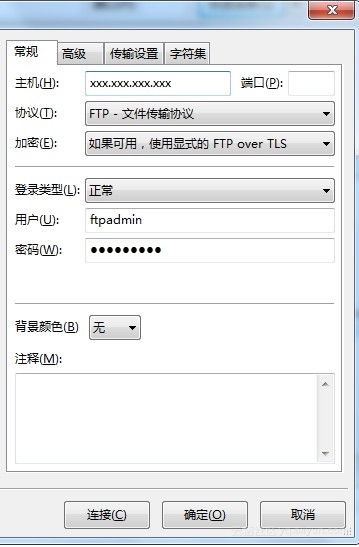
一、卸载 1、查看当前服务器中的vsftpd rpm -qa|grep vsftpd 例如结果为:vsftpd-2.2.2-13.el6_6.1.x86_64 2、执行卸载 rpm -e vsftpd-2.2.2-13.el6_6.1.x86_64 返回:卸载时自动备份vsftp的用户列表文件 warning: /etc/vsftpd/vsftpd.conf saved as /etc/vsftpd/vsftpd.conf.rpmsave warning: /etc/vsftpd/user_list saved as /etc/vsftpd/user_list.rpmsave 3、删除遗留的文件 rm -rf /etc/vsftpd 二、安装 yum -y install vsftpd 三、配置 1、修改配置文件,/etc/vsftpd/vsftpd.conf,可以整个覆盖 # Example config file /etc/vsftpd/vsftpd.conf # # The default compiled in settings are fairly paranoid. This sample file # loosens things up a bit, to make the ftp daemon more usable. # Please see vsftpd.conf.5 for all compiled in defaults. # # READ THIS: This example file is NOT an exhaustive list of vsftpd options. # Please read the vsftpd.conf.5 manual page to get a full idea of vsftpd's # capabilities. # # Allow anonymous FTP? (Beware - allowed by default if you comment this out). anonymous_enable=NO # # Uncomment this to allow local users to log in. # When SELinux is enforcing check for SE bool ftp_home_dir local_enable=YES # # Uncomment this to enable any form of FTP write command. write_enable=YES # allow_writeable_chroot=YES # # Default umask for local users is 077. You may wish to change this to 022, # if your users expect that (022 is used by most other ftpd's) local_umask=022 # # Uncomment this to allow the anonymous FTP user to upload files. This only # has an effect if the above global write enable is activated. Also, you will # obviously need to create a directory writable by the FTP user. # When SELinux is enforcing check for SE bool allow_ftpd_anon_write, allow_ftpd_full_access #anon_upload_enable=YES # # Uncomment this if you want the anonymous FTP user to be able to create # new directories. #anon_mkdir_write_enable=YES # # Activate directory messages - messages given to remote users when they # go into a certain directory. dirmessage_enable=YES # # Activate logging of uploads/downloads. xferlog_enable=YES # # Make sure PORT transfer connections originate from port 20 (ftp-data). connect_from_port_20=YES # # If you want, you can arrange for uploaded anonymous files to be owned by # a different user. Note! Using "root" for uploaded files is not # recommended! #chown_uploads=YES #chown_username=whoever # # You may override where the log file goes if you like. The default is shown # below. #xferlog_file=/var/log/xferlog # # If you want, you can have your log file in standard ftpd xferlog format. # Note that the default log file location is /var/log/xferlog in this case. xferlog_std_format=YES # # You may change the default value for timing out an idle session. idle_session_timeout=600 # # You may change the default value for timing out a data connection. data_connection_timeout=120 # # It is recommended that you define on your system a unique user which the # ftp server can use as a totally isolated and unprivileged user. #nopriv_user=ftpsecure # # Enable this and the server will recognise asynchronous ABOR requests. Not # recommended for security (the code is non-trivial). Not enabling it, # however, may confuse older FTP clients. #async_abor_enable=YES # # By default the server will pretend to allow ASCII mode but in fact ignore # the request. Turn on the below options to have the server actually do ASCII # mangling on files when in ASCII mode. # Beware that on some FTP servers, ASCII support allows a denial of service # attack (DoS) via the command "SIZE /big/file" in ASCII mode. vsftpd # predicted this attack and has always been safe, reporting the size of the # raw file. # ASCII mangling is a horrible feature of the protocol. ascii_upload_enable=YES ascii_download_enable=YES # # You may fully customise the login banner string: ftpd_banner=Welcome to blah FTP service. # # You may specify a file of disallowed anonymous e-mail addresses. Apparently # useful for combatting certain DoS attacks. #deny_email_enable=YES # (default follows) #banned_email_file=/etc/vsftpd/banned_emails # # You may specify an explicit list of local users to chroot() to their home # directory. If chroot_local_user is YES, then this list becomes a list of # users to NOT chroot(). # (Warning! chroot'ing can be very dangerous. If using chroot, make sure that # the user does not have write access to the top level directory within the # chroot) chroot_local_user=YES #chroot_list_enable=YES # (default follows) #chroot_list_file=/etc/vsftpd/chroot_list # # You may activate the "-R" option to the builtin ls. This is disabled by # default to avoid remote users being able to cause excessive I/O on large # sites. However, some broken FTP clients such as "ncftp" and "mirror" assume # the presence of the "-R" option, so there is a strong case for enabling it. ls_recurse_enable=YES # # When "listen" directive is enabled, vsftpd runs in standalone mode and # listens on IPv4 sockets. This directive cannot be used in conjunction # with the listen_ipv6 directive. listen=YES # # This directive enables listening on IPv6 sockets. By default, listening # on the IPv6 "any" address (::) will accept connections from both IPv6 # and IPv4 clients. It is not necessary to listen on *both* IPv4 and IPv6 # sockets. If you want that (perhaps because you want to listen on specific # addresses) then you must run two copies of vsftpd with two configuration # files. # Make sure, that one of the listen options is commented !! #listen_ipv6=YES pam_service_name=vsftpd userlist_enable=YES userlist_deny=NO #这个是ftp根目录,根据你自己的情况配置 local_root=/var/ftp tcp_wrappers=YES use_localtime=YES 2、增加FTP账户 useradd ftpadmin -s /sbin/nologin 给ftpadmin设置密码 passwd ftpadmin 输入两遍密码即可 2.1、如果出现useradd: user 'ftpadmin' already exists,说明用户已经存在,需要先删除,否则还可能登陆不了。 删除用户 userdel ftpadmin 查找遗留的文件和目录 find / -name ftpadmin 例如出来结果: /var/spool/mail/ftpadmin /home/ftpadmin 哪个要删,哪个不要删,看清楚目录再删除,谨慎使用删除命令,否则遗憾多久就不知道了 rm -rf /var/spool/mail/ftpadmin rm -rf /home/ftpadmin 3、修改/etc/vsftpd/user_list文件,最后一行添加刚才创建的用户名ftpadmin,也可以整个覆盖 # vsftpd userlist # If userlist_deny=NO, only allow users in this file # If userlist_deny=YES (default), never allow users in this file, and # do not even prompt for a password. # Note that the default vsftpd pam config also checks /etc/vsftpd/ftpusers # for users that are denied. root bin daemon adm lp sync shutdown halt mail news uucp operator games nobody #这个就是刚才创建的那个,根据你自己的情况来 ftpadmin 4、创建FTP根目录 mkdir /var/ftp 如果上述目录已经存在,只需要修改权限即可 chown -R ftpadmin /var/ftp chmod -R 755 /var/ftp 5、设置开机启动 chkconfig --level 35 vsftpd on 到此,安装配置完毕,重新启动vsftpd服务 service vsftpd restart 就可以使用FlashFXPE或者FileZilla登陆FTP了。 下面以FileZilla为例,看图片

优秀的个人博客,低调大师

阿里云服务器ECS添加数据盘

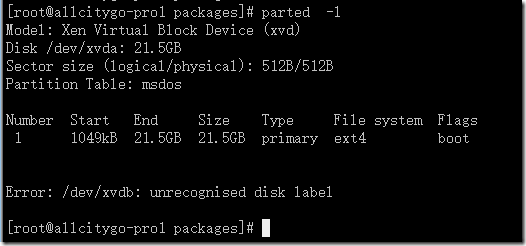
此文章不详细介绍各工具的使用方法。 具体使用到的工具有parted,mkfs.ext4,e2label,LVM管理 一、普通硬盘方式挂载数据盘 1、使用parted -l查看,发现硬盘。 2、使用parted工具对硬盘分区 查看命令具体用法: 创建分区表,格式为gpt 创建分区,发现不支持ext4格式,所以先不格式化 3、格式化分区成ext4格式 4、创建分区标签,挂载分区,添加永久生效 二、LVM方式挂载数据盘 1、创建PV 2、创建VG 3、创建LV 4、使用parted -l,查看分区 5、使用parted创建分区 5、格式化分区成ext4格式,创建分区标签,挂载分区 6、设置分区挂载永久生效 注:对于已经使用中的硬盘和分区,重建分区和格式化会清除数据 本文转自 ygqygq2 51CTO博客,原文链接:http://blog.51cto.com/ygqygq2/1717712,如需转载请自行联系原作者

资源下载

更多资源
Mario

Mario

马里奥是站在游戏界顶峰的超人气多面角色。马里奥靠吃蘑菇成长,特征是大鼻子、头戴帽子、身穿背带裤,还留着胡子。与他的双胞胎兄弟路易基一起,长年担任任天堂的招牌角色。

Nacos

Nacos

Nacos /nɑ:kəʊs/ 是 Dynamic Naming and Configuration Service 的首字母简称,一个易于构建 AI Agent 应用的动态服务发现、配置管理和AI智能体管理平台。Nacos 致力于帮助您发现、配置和管理微服务及AI智能体应用。Nacos 提供了一组简单易用的特性集,帮助您快速实现动态服务发现、服务配置、服务元数据、流量管理。Nacos 帮助您更敏捷和容易地构建、交付和管理微服务平台。

Sublime Text

Sublime Text

Sublime Text具有漂亮的用户界面和强大的功能,例如代码缩略图,Python的插件,代码段等。还可自定义键绑定,菜单和工具栏。Sublime Text 的主要功能包括:拼写检查,书签,完整的 Python API , Goto 功能,即时项目切换,多选择,多窗口等等。Sublime Text 是一个跨平台的编辑器,同时支持Windows、Linux、Mac OS X等操作系统。

WebStorm

WebStorm

WebStorm 是jetbrains公司旗下一款JavaScript 开发工具。目前已经被广大中国JS开发者誉为“Web前端开发神器”、“最强大的HTML5编辑器”、“最智能的JavaScript IDE”等。与IntelliJ IDEA同源,继承了IntelliJ IDEA强大的JS部分的功能。


用户登录
用户注册