首页 文章 精选 留言 我的

精选列表

搜索[工具库],共10000篇文章
优秀的个人博客,低调大师

Android数据安全permission

android是基于 linux的 操作系统,linux本身就提供了强大的安全机制。 1. 应用程序沙箱,将你的代码、数据与其他app隔离 2. 应用框架层提供了“鲁棒”的加密、权限以及安全的进程间通信机制 3. ASLR, NX, ProPolice, safe_iop, OpenBSD dlmalloc, OpenBSD calloc, and Linux mmap_min_addr 来处理共享内存的风险 这片 文章主要讲的是大家不要乱用这个权限相关的东西 使用权限: 如果你的应用程序可以不使用任何权限当然是最好的,曾经安装一个单机游戏,看到不需要任何权限的的时候就感觉很舒服。 举例:做应用过程中需要建立一个唯一标识。有很多种方法,主要是通过访问设备信息,有获得imei的 有获得wifi的mac地址的等等,这就需要程序中获得电话操作(imei)或者是wifi操作的权限。比如写了一个应用,当用户看到你需要访问电话的权限的时候就会感觉很奇怪了,我安装一个游戏为啥需啊哟电话的权限啊?其实只是为了获得一个唯一标识。 定义权限: private void insertGroup() { // Internal storage where the DexClassLoader writes the optimized dex file to. final File optimizedDexOutputPath = getDir("outdex", Context.MODE_PRIVATE); // Initialize the class loader with the secondary dex file. DexClassLoader cl = new DexClassLoader(dexInternalStoragePath.getAbsolutePath(), optimizedDexOutputPath.getAbsolutePath(), null, getClassLoader()); Class libProviderClazz = null; try { // Load the library class from the class loader. // 载入从网络上下载的类的全类名 libProviderClazz = cl.loadClass("com.kunpeng.pim.GroupDao"); // Cast the return object to the library interface so that the // caller can directly invoke methods in the interface. // Alternatively, the caller can invoke methods through reflection, // which is more verbose and slow. Class<?>[] argTypes = {Context.class}; Constructor<?> constructor = libProviderClazz.getConstructor(argTypes); IGroupDao lib = (IGroupDao) constructor.newInstance(this); // Display the toast! lib.addGroup(" test"); } catch (Exception exception) { // Handle exception gracefully here. exception.printStackTrace(); } 最新内容请见作者的GitHub页:http://qaseven.github.io/

优秀的个人博客,低调大师

docker私有搭建过程(Registry)

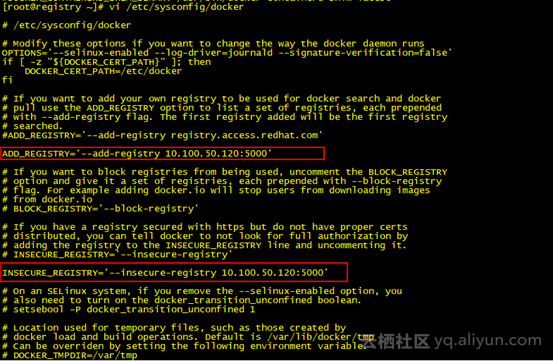
Registry实验环境:CentOS7Docker 1、安装并运行registry安装:[root@docker01 ~]# docker pull registryUsing default tag: latestTrying to pull repository docker.io/library/registry ... latest: Pulling from docker.io/library/registry79650cf9cc01: Pull complete 70ce42745103: Pull complete 77edd1a7fa4d: Pull complete 432773976ace: Pull complete 3234a47fe5a9: Pull complete Digest: sha256:a3551c422521617e86927c3ff57e05edf086f1648f4d8524633216ca363d06c2[root@docker01 ~]# docker imagesREPOSITORY TAG IMAGE ID CREATED SIZEdocker.io/busybox latest c30178c5239f 6 days ago 1.106 MBdocker.io/registry latest 9d0c4eabab4d 6 weeks ago 33.17 MB[root@docker01 ~]# 运行:[root@docker01 ~]# docker run -d -p 5000:5000 -v /mnt/date/registry:/var/lib/registry registry75841a99e1fc882617bc37d088a8c80abae225cfe2842110f2049600df560a47[root@docker01 ~]# -d后台运行-p指定端口-v把registry的镜像路径/var/lib/registry映射到本机的/mnt/date/registry 检查5000端口netstat -an | grep 5000[root@docker01 ~]# netstat -an | grep 5000tcp6 0 0 :::5000 :::* LISTEN [root@docker01 ~]# telnet 127.0.0.1 5000成功。[root@docker01 ~]# telnet 127.0.0.1 5000Trying 127.0.0.1...Connected to 127.0.0.1.Escape character is '^]'.qHTTP/1.1 400 Bad RequestContent-Type: text/plainConnection: close 400 Bad RequestConnection closed by foreign host.[root@docker01 ~]# 2、添加tag标记[root@registry ~]# docker tag busybox 10.100.50.120:5000/busybox[root@registry ~]# docker imagesREPOSITORY TAG IMAGE ID CREATED SIZE10.100.50.122:5000/busybox latest c30178c5239f 6 days ago 1.106 MBdocker.io/busybox latest c30178c5239f 6 days ago 1.106 MBdocker.io/registry latest 9d0c4eabab4d 6 weeks ago 33.17 MB[root@registry ~]# 3、上传镜像报错[root@registry xinetd.d]# docker push 10.100.50.120:5000/busyboxThe push refers to a repository [10.100.50.122:5000/busybox]Get https://10.100.50.120:5000/v1/_ping: http: server gave HTTP response to HTTPS client[root@registry xinetd.d]# 解决方案:修改/etc/sysconfig/docker文件,并重新启动docker服务。ADD_REGISTRY='--add-registry 10.100.50.120:5000'INSECURE_REGISTRY='--insecure-registry 10.100.50.120:5000' 4、上传镜像[root@registry ~]# docker push 10.100.50.120:5000/busyboxThe push refers to a repository [10.100.50.120:5000/busybox]3a1dff9afffd: Pushed latest: digest: sha256:be3c11fdba7cfe299214e46edc642e09514dbb9bbefcd0d3836c05a1e0cd0642 size: 527[root@registry ~]# 其他坑:坑1:IPV4 forwording报错,但是容器运行正常。[root@registry mnt]# docker run -d -p 5000:5000 -v /mnt/date/registry registryWARNING: IPv4 forwarding is disabled. Networking will not work.970e18480c47661fd2cffab9f7e0410989e62ed9d229333cb32e5727a2e88b3b[root@registry mnt]# 解决方案:在/etc/sysctl.conf文件中加入net.ipv4.ip_forward=1并重启网络服务。 修改后正常:[root@registry mnt]# docker run -d -p 5000:5000 -v /mnt/date/registry registryabbec57e5dca734689cfd953f27564156ec24e32ae6e532043309f0332653650[root@registry mnt]# docker psCONTAINER ID IMAGE COMMAND CREATED STATUS PORTS NAMESabbec57e5dca registry "/entrypoint.sh /etc/" 31 seconds ago Up 30 seconds 0.0.0.0:5000->5000/tcp compassionate_mclean[root@registry mnt]# 坑2:查看镜像存放位置显示404 page not found网上很多教程都是下面这个命令[root@docker01 ~]# curl http://10.100.50.122:5000/v2/search404 page not found通过docker search registry发现安装的是2.0版本。 V2的命令格式如下:[root@docker01 ~]# curl -X GET http://10.100.50.122:5000/v2/_catalog{"repositories":["busybox","centos"]}[root@docker01 ~]# 文档:http://www.jianshu.com/p/fc36368b5c44

优秀的个人博客,低调大师

hadoop开发webhdfs使用介绍

Hadoop1.0版本已经提供了对Web方式访问的全面支持,包括读写和文件管理,用户可以使用curl模拟Http消息进行测试,下面是WebHDFS提供的操作列表功能清单: HTTP GET• OPEN (see FileSystem.open)• GETFILESTATUS (see FileSystem.getFileStatus)• LISTSTATUS (see FileSystem.listStatus)• GETCONTENTSUMMARY (see FileSystem.getContentSummary)• GETFILECHECKSUM (see FileSystem.getFileChecksum)• GETHOMEDIRECTORY (see FileSystem.getHomeDirectory)• GETDELEGATIONTOKEN (see FileSystem.getDelegationToken)• HTTP PUT• CREATE (see FileSystem.create)• MKDIRS (see FileSystem.mkdirs)• RENAME (see FileSystem.rename)• SETREPLICATION (see FileSystem.setReplication)• SETOWNER (see FileSystem.setOwner)• SETPERMISSION (see FileSystem.setPermission)• SETTIMES (see FileSystem.setTimes)• RENEWDELEGATIONTOKEN (see DistributedFileSystem.renewDelegationToken)• CANCELDELEGATIONTOKEN (see DistributedFileSystem.cancelDelegationToken)• HTTP POST• APPEND (see FileSystem.append) 这里需要特别注意的是hadoop配置参数中界定了是否支持身份认证,并设定了默认的用户名webuser,用户可以自行修改是否启用和更改默认的用户,如果不作处理,有时候会出现,用户权限不够,无法执行某些操作的问题。 作者:张子良 出处:http://www.cnblogs.com/hadoopdev 本文版权归作者所有,欢迎转载,但未经作者同意必须保留此段声明,且在文章页面明显位置给出原文连接,否则保留追究法律责任的权利。

资源下载

更多资源
Nacos

Nacos

Nacos /nɑ:kəʊs/ 是 Dynamic Naming and Configuration Service 的首字母简称,一个易于构建 AI Agent 应用的动态服务发现、配置管理和AI智能体管理平台。Nacos 致力于帮助您发现、配置和管理微服务及AI智能体应用。Nacos 提供了一组简单易用的特性集,帮助您快速实现动态服务发现、服务配置、服务元数据、流量管理。Nacos 帮助您更敏捷和容易地构建、交付和管理微服务平台。

Spring

Spring

Spring框架(Spring Framework)是由Rod Johnson于2002年提出的开源Java企业级应用框架,旨在通过使用JavaBean替代传统EJB实现方式降低企业级编程开发的复杂性。该框架基于简单性、可测试性和松耦合性设计理念,提供核心容器、应用上下文、数据访问集成等模块,支持整合Hibernate、Struts等第三方框架,其适用范围不仅限于服务器端开发,绝大多数Java应用均可从中受益。

Sublime Text

Sublime Text

Sublime Text具有漂亮的用户界面和强大的功能,例如代码缩略图,Python的插件,代码段等。还可自定义键绑定,菜单和工具栏。Sublime Text 的主要功能包括:拼写检查,书签,完整的 Python API , Goto 功能,即时项目切换,多选择,多窗口等等。Sublime Text 是一个跨平台的编辑器,同时支持Windows、Linux、Mac OS X等操作系统。

WebStorm

WebStorm

WebStorm 是jetbrains公司旗下一款JavaScript 开发工具。目前已经被广大中国JS开发者誉为“Web前端开发神器”、“最强大的HTML5编辑器”、“最智能的JavaScript IDE”等。与IntelliJ IDEA同源,继承了IntelliJ IDEA强大的JS部分的功能。

用户登录
用户注册