KingShard MySQL中间件快速入门
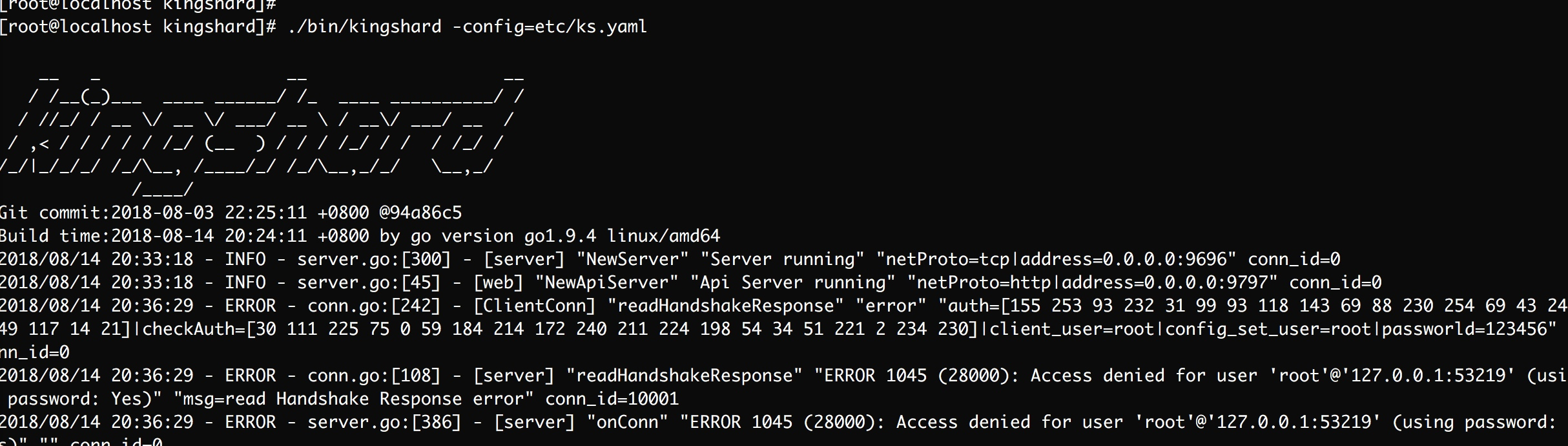
kingshard 是一个由Go开发高性能MySQL Proxy项目. 功能简介: 读写分离 分库分表 数据库扩容 具体功能查看官方文档,这次主要是自己动手搭建基于Kingshard的MySQL集群。 环境 Docker Go CentOS 7 过程 安装Go语言 yum install golang -y 安装Kingshard git clone https://github.com/flike/kingshard.git src/github.com/flike/kingshard cd src/github.com/flike/kingshard source ./dev.sh make 至此已经算安装了Kingshard,其配置文件等会再做修改 拉取MysqL镜像,并启动两台MySQL实例 docker pull mysql:5.6 docker run --name mysql1 -d -p3307:3306 -e MYSQL_ROOT_PASSWORD=123456 mysql:5.6 docker run --name mysql2 -d -p3308:3306 -e MYSQL_ROOT_PASSWORD=123456 mysql:5.6 初始化两台MySQL数据库,创建测试所需的表 这个语句比较枯燥,粘贴就好了 create database kingshard; use kingshard; CREATE TABLE `test_shard_hash_0000` ( `id` bigint(64) unsigned NOT NULL, `str` varchar(256) DEFAULT NULL, `f` double DEFAULT NULL, `e` enum('test1','test2') DEFAULT NULL, `u` tinyint(3) unsigned DEFAULT NULL, `i` tinyint(4) DEFAULT NULL, PRIMARY KEY (`id`) ) ENGINE=InnoDB DEFAULT CHARSET=utf8; CREATE TABLE `test_shard_hash_0001` ( `id` bigint(64) unsigned NOT NULL, `str` varchar(256) DEFAULT NULL, `f` double DEFAULT NULL, `e` enum('test1','test2') DEFAULT NULL, `u` tinyint(3) unsigned DEFAULT NULL, `i` tinyint(4) DEFAULT NULL, PRIMARY KEY (`id`) ) ENGINE=InnoDB DEFAULT CHARSET=utf8; CREATE TABLE `test_shard_hash_0002` ( `id` bigint(64) unsigned NOT NULL, `str` varchar(256) DEFAULT NULL, `f` double DEFAULT NULL, `e` enum('test1','test2') DEFAULT NULL, `u` tinyint(3) unsigned DEFAULT NULL, `i` tinyint(4) DEFAULT NULL, PRIMARY KEY (`id`) ) ENGINE=InnoDB DEFAULT CHARSET=utf8; CREATE TABLE `test_shard_hash_0003` ( `id` bigint(64) unsigned NOT NULL, `str` varchar(256) DEFAULT NULL, `f` double DEFAULT NULL, `e` enum('test1','test2') DEFAULT NULL, `u` tinyint(3) unsigned DEFAULT NULL, `i` tinyint(4) DEFAULT NULL, PRIMARY KEY (`id`) ) ENGINE=InnoDB DEFAULT CHARSET=utf8; CREATE TABLE `test_shard_hash_0004` ( `id` bigint(64) unsigned NOT NULL, `str` varchar(256) DEFAULT NULL, `f` double DEFAULT NULL, `e` enum('test1','test2') DEFAULT NULL, `u` tinyint(3) unsigned DEFAULT NULL, `i` tinyint(4) DEFAULT NULL, PRIMARY KEY (`id`) ) ENGINE=InnoDB DEFAULT CHARSET=utf8; CREATE TABLE `test_shard_hash_0005` ( `id` bigint(64) unsigned NOT NULL, `str` varchar(256) DEFAULT NULL, `f` double DEFAULT NULL, `e` enum('test1','test2') DEFAULT NULL, `u` tinyint(3) unsigned DEFAULT NULL, `i` tinyint(4) DEFAULT NULL, PRIMARY KEY (`id`) ) ENGINE=InnoDB DEFAULT CHARSET=utf8; CREATE TABLE `test_shard_hash_0006` ( `id` bigint(64) unsigned NOT NULL, `str` varchar(256) DEFAULT NULL, `f` double DEFAULT NULL, `e` enum('test1','test2') DEFAULT NULL, `u` tinyint(3) unsigned DEFAULT NULL, `i` tinyint(4) DEFAULT NULL, PRIMARY KEY (`id`) ) ENGINE=InnoDB DEFAULT CHARSET=utf8; CREATE TABLE `test_shard_hash_0007` ( `id` bigint(64) unsigned NOT NULL, `str` varchar(256) DEFAULT NULL, `f` double DEFAULT NULL, `e` enum('test1','test2') DEFAULT NULL, `u` tinyint(3) unsigned DEFAULT NULL, `i` tinyint(4) DEFAULT NULL, PRIMARY KEY (`id`) ) ENGINE=InnoDB DEFAULT CHARSET=utf8; 配置Kingshard的配置文件,这次只配置Kingshard的hash shard功能 # server listen addr addr : 0.0.0.0:9696 user_list: - user : root password : 123456 web_addr : 0.0.0.0:9797 web_user : admin web_password : admin # log level[debug|info|warn|error],default error log_level : debug # if set log_sql(on|off) off,the sql log will not output log_sql: on nodes : - name : node1 max_conns_limit : 32 user : root password : 123456 master : 127.0.0.1:3307 down_after_noalive : 32 - name : node2 max_conns_limit : 32 user : root password : 123456 master : 127.0.0.1:3308 down_after_noalive: 32 # schema defines sharding rules, the db is the sharding table database. schema_list : - user: root nodes: [node1,node2] default: node1 shard: - db : kingshard table: test_shard_hash key: id nodes: [node1, node2] type: hash locations: [4,4] 启动Kingshard ./bin/kingshard -config=etc/ks.yaml image.png 连接Kingshard,测试操作 mysql -h127.0.0.1 -P9696 -p -c 执行相关的SQL语句 insert into test_shard_hash(id,str,f,e,u,i) values(15,"flike",3.14,'test2',2,3); insert into test_shard_hash(id,str,f,e,u,i) values(7,"chen",2.1,'test1',32,3); insert into test_shard_hash(id,str,f,e,u,i) values(17,"github",2.5,'test1',32,3); insert into test_shard_hash(id,str,f,e,u,i) values(18,"kingshard",7.3,'test1',32,3); select * from test_shard_hash where id < 18; select * from test_shard_hash where id = 18; /*node2*/show tables; image.png 在控制台我们都可以看到对应的输出信息 问题 ks.yml文件中配置的userList都要被使用才行 如果想让非本机访问,ks.yml需要开启一些白名单 mysql命令行中的-c功能启用注释 最后 绝知此事要躬行,学东西不能光看,亲自动手才知道问题所在。有助于自己更好的理解 参考 Kingshard文档