首页 文章 精选 留言 我的

精选列表

搜索[高性能全文搜索引擎],共10000篇文章
优秀的个人博客,低调大师

Inferno 9.0.4 发布,类 React 的高性能用户界面库

Inferno 9.0.4现已发布。Inferno 是一个类似 React 的 JavaScript 库,用于构建现代用户界面。Inferno项目的主要目标是为 Web 应用程序提供最快的运行时性能,它擅长渲染实时数据视图或大型 DOM 树。 具体更新内容如下: 去重 isValidElement 实用函数实现#1682 chore:移除单一依赖项 fs-extra#1687 解决 renderToString renders truthy checked from falsy defaultChecked#1686 修复:编辑后 DOM 值错误,已提交补丁(#1683)#1684 为InfernoKeyedNode添加了辅助类型#1680 更新说明:https://github.com/infernojs/inferno/releases/tag/v9.0.4

优秀的个人博客,低调大师

beecp-4.0.6 发布,一款高性能连接池

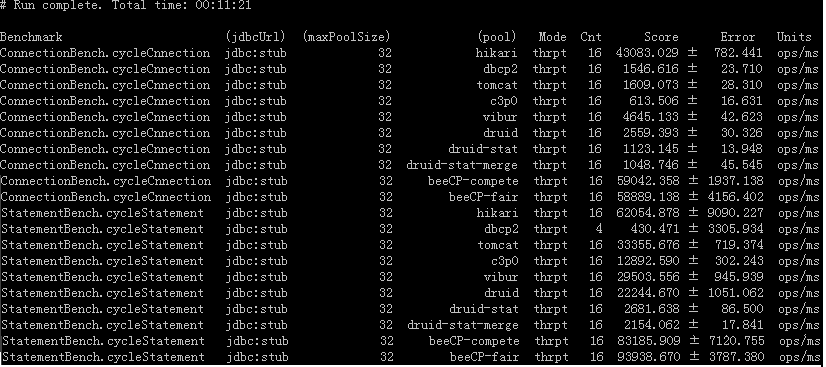
介绍 beecp 是一款轻量级 JDBC 连接池,具有性能高,代码优,稳定性好特点。 本次更新 1:修复连接池初始化,设置 Connection 默认值时,出现 Null point Exception 的问题 2:修复连接池初始化,设置 Connection 的默认值,未打印出运行时日志的问题 3:局部优化 GetConnection 方法中的程序片段,少量提升性能 Maven 坐标 <dependency> <groupId>com.github.chris2018998</groupId> <artifactId>beecp</artifactId> <version>4.0.6</version> </dependency> <dependency> <groupId>com.github.chris2018998</groupId> <artifactId>beecp-spring-boot-starter</artifactId> <version>1.8.7</version> </dependency> 项目地址 https://github.com/Chris2018998/beecphttps://github.com/Chris2018998/beecp-starter https://gitee.com/Chris2018998/BeeCPhttps://gitee.com/Chris2018998/BeeCP-Starter 性能测试(Connection cycle) PC: Win11,32G 内存,I7-14650HX (24 核)POOL: 初始数:24,最大数:24

优秀的个人博客,低调大师

大语言模型推理提速,TensorRT-LLM 高性能推理实践

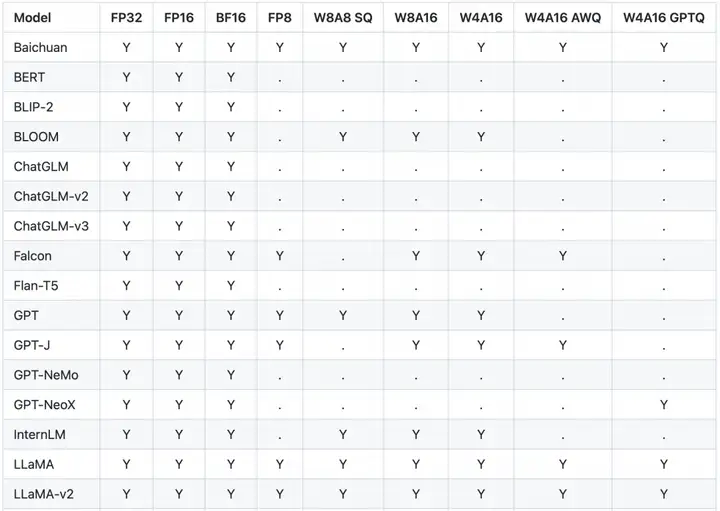
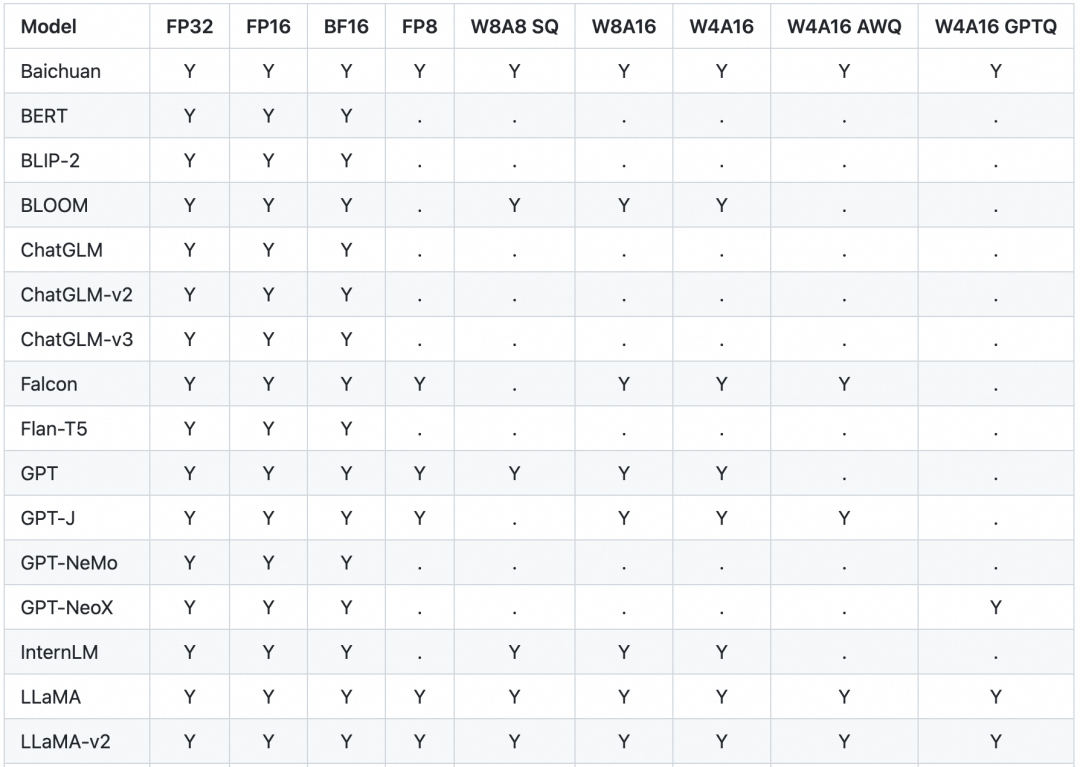
1.TensorRT-LLM 如何提升 LLM 模型推理效率 大型语言模型(Large language models,LLM)是基于大量数据进行预训练的超大型深度学习模型。底层转换器是一组神经网络,这些神经网络由具有 self-attention 的编码器和解码器组成。编码器和解码器从一系列文本中提取含义,并理解其中的单词和短语之间的关系。 当前 LLM 模型推理的主要瓶颈是 GPU 显存资源不足。因此,各类加速框架主要集中于降低 GPU 显存峰值和提高 GPU 使用率两大目标。 TensorRT-LLM[1]是 NVIDIA 推出的大语言模型(LLM)推理优化框架。它提供了一组 Python API 用于定义 LLMs,并且使用最新的优化技术将 LLM 模型转换为 TensorRT Engines,推理时直接使用优化后的 TensorRT Engines。 TensorRT-LLM 主要利用以下四项优化技术提升 LLM 模型推理效率。 1.1 量化 模型量化技术是通过降低原始模型的精度来减少模型推理时的 GPU 显存使用。 TensorRT 支持多种模型的多种精度,以下列举了部分主流模型支持的量化精度。 W8A8 SQ 使用了 SmoothQuant 技术[2],在不降低模型推理准确率的前提下,将模型权重和激活层都降低为 INT8 精度,显著减少了 GPU 显存消耗。 W4A16/W8A16 是指模型权重为 INT4 或者 INT8,激活层为 FP16 精度。 W4A16 AWQ 以及 W4A16 GPTQ 分别实现了 AWQ[3]和 GPTQ[4]两篇论文中提到的量化方法。模型权重为 INT4,激活层为 FP16 精度。 1.2 In-Flight Batching 传统的 Batching 技术为 Static Batching 的,需要等 Batching 中所有序列推理完成后才能进行下一次批次。下图为一个输出最大 Token 为 8,Batch size 为 4 的推理过程,使用 Static Batching 技术。S3 序列在 T5 时刻就已经完成推理,但是需要等到 S2 序列在 T8 时刻推理完成后才会处理下一个 sequence,存在明显的资源浪费。 In-Flight Batching 又名 Continuous Batching 或 iteration-level batching,该技术可以提升推理吞吐率,降低推理时延。Continuous Batching 处理过程如下,当 S3 序列处理完成后插入一个新序列 S5 进行处理,提升资源利用率。详情可参考论文 Orca: A Distributed Serving System for Transformer-Based Generative Models[5]。 1.3 Attention Attention 机制用于从序列中提取关键/重要信息,在情感识别、翻译、问答等任务中起着至关重要的作用。Attention 机制按照演进顺序可以分为 MHA(Multi-head Attention)、MQA(Multi-query Attention)[6]以及 GQA(Group-query Attention)[7]机制。MQA 和 GQA 都是 MHA 的变种。 MHA 是标准的多头注意力机制,每个 query 存储一份 KV,因此需要使用较多的显存。MQA 所有 query 共享一份 KV,推理时容易丢失一些细节信息。GQA 将 query 进行分组,组内共享一份 KV,可以有效避免 MHA 和 MQA 的问题。 TensorRT-LLM 支持 MHA、MQA 及 GQA 方式,可以在 tensorrt_llm.functional.gpt_attention 查看具体实现。 1.4 Graph Rewriting TensorRT-LLM 在将 LLM 模型编译为 TensorRT Engines 时会对神经网络进行优化,提升执行效率。 2.基于阿里云容器服务 ACK 的实战体验 2.1 云原生 AI 套件 云原生 AI 套件是阿里云容器服务 ACK 提供的云原生 AI 技术和产品方案,帮助企业更快、更高效地落地云原生 AI 系统。 本文将介绍如何基于阿里云容器服务 ACK 云原生 AI 套件,利用 TensorRT-LLM 优化 LLM 模型推理。 2.2 环境配置 1. 参考文档安装云原生 AI 套件[8]。 2. 登陆容器服务管理控制台[9],在左侧导航栏选择集群 > 应用 > 云原生 AI 套件。等待开发控制台准备就绪后,单击开发控制台。 3. 在开发控制台左侧,选择Notebook,在 Notebook 页面右上角,单击创建 Notebook创建新的 Notebook 环境。Notebook 资源需要 CPU:12C,内存:40G,GPU 显存:24GB。(节点对应规格为 ecs.gn7i-c16g1.4xlarge[10]) 2.3 准备 TensorRT-LLM 环境 1. 构建 Notebook 所需镜像。 FROM docker.io/nvidia/cuda:12.2.2-cudnn8-runtime-ubuntu22.04 ENV DEBIAN_FRONTEND=noninteractive RUN apt-get update && apt-get upgrade -y && \ apt-get install -y --no-install-recommends \ libgl1 libglib2.0-0 wget git curl vim \ python3.10 python3-pip python3-dev build-essential \ openmpi-bin libopenmpi-dev jupyter-notebook jupyter RUN pip3 install tensorrt_llm -U --extra-index-url https://pypi.nvidia.com RUN pip3 install --upgrade jinja2==3.0.3 pynvml>=11.5.0 RUN rm -rf /var/cache/apt/ && apt-get clean && rm -rf /var/lib/apt/lists/* /tmp/* /var/tmp/* && \ rm -rf /root/.cache/pip/ && rm -rf /*.whl WORKDIR /root RUN git clone https://github.com/NVIDIA/TensorRT-LLM.git --branch v0.7.1 ENTRYPOINT ["sh","-c","jupyter notebook --allow-root --notebook-dir=/root --port=8888 --ip=0.0.0.0 --ServerApp.token=''"] 2. 下载模型,本文以 Baichuan2-7B-Base 为例。 a.确认 tensorrt_llm 安装成功 ! python3 -c "import tensorrt_llm; print(tensorrt_llm.__version__)" # 0.7.1 b.安装 baichuan 依赖 ! cd /root/TensorRT-LLM/examples/baichuan !pip3 install -r requirements.txt c.下载 Baichuan2-7B-Chat 模型 !yum install git-lfs !GIT_LFS_SKIP_SMUDGE=1 git clone https://www.modelscope.cn/baichuan-inc/Baichuan2-7B-Chat.git !cd Baichuan2-7B-Chat/ !git lfs pull d.将模型编译为 TensorRT Engines,权重指定为 INT8。模型转换约 5 分钟。 ! cd /root/TensorRT-LLM/examples/baichuan # Build the Baichuan V2 7B model using a single GPU and apply INT8 weight-only quantization. ! python3 build.py --model_version v2_7b \ --model_dir ./Baichuan2-7B-Chat \ --dtype float16 \ --use_gemm_plugin float16 \ --use_gpt_attention_plugin float16 \ --use_weight_only \ --output_dir ./tmp/baichuan_v2_7b/trt_engines/int8_weight_only/1-gpu/ e.使用构建好的 tensort engines 进行推理 # With INT8 weight-only quantization inference ! python3 ../run.py --input_text "世界上第二高的山峰是哪座?" \ --max_output_len=50 \ --tokenizer_dir=./Baichuan2-7B-Chat \ --engine_dir=./tmp/baichuan_v2_7b/trt_engines/int8_weight_only/1-gpu/ 预期输出: Input [Text 0]: "世界上第二高的山峰是哪座?" Output [Text 0 Beam 0]: "世界上第二高的山峰是喀喇昆仑山脉的乔戈里峰(K2),海拔高度为8611米。" 2.4 性能测试 1. 使用 TensorRT-LLM 自带的 benchmark。 向 _allowed_configs dict 中添加 baichuan2_7b_chat 配置,代码可参考链接[11]。 注:0.7.1 版本 benchmark 还未支持 baichuan2 模型,因此需要手动修改下 allowed_configs 配置。 ! cd /root/TensorRT-LLM/benchmarks/python ! vim allowed_configs.py # "baichuan2_7b_chat": ModelConfig(name="baichuan2_7b_chat", family="baichuan_7b", benchmark_type="gpt", build_config=BuildConfig( num_layers=32, num_heads=32, hidden_size=4096, vocab_size=125696, hidden_act='silu', n_positions=4096, inter_size=11008, max_batch_size=128, max_input_len=512, max_output_len=200, builder_opt=None, )), 运行 benchmark: ! python3 benchmark.py \ -m baichuan2_7b_chat \ --mode plugin \ --engine_dir /root/TensorRT-LLM/examples/baichuan/tmp/baichuan_v2_7b/trt_engines/int8_weight_only/1-gpu \ --batch_size 1 \ --input_output_len "32,50;128,50" # batch_size 并发度 # input_output_len 输入输出的长度,多个测试用例用分号分隔 Expected outputs: [BENCHMARK] model_name baichuan2_7b_chat world_size 1 num_heads 32 num_kv_heads 32 num_layers 32 hidden_size 4096 vocab_size 125696 precision float16 batch_size 1 input_length 32 output_length 50 gpu_peak_mem(gb) 8.682 build_time(s) 0 tokens_per_sec 60.95 percentile95(ms) 821.977 percentile99(ms) 822.093 latency(ms) 820.348 compute_cap sm86 generation_time(ms) 798.45 total_generated_tokens 49.0 generation_tokens_per_second 61.369 [BENCHMARK] model_name baichuan2_7b_chat world_size 1 num_heads 32 num_kv_heads 32 num_layers 32 hidden_size 4096 vocab_size 125696 precision float16 batch_size 1 input_length 128 output_length 50 gpu_peak_mem(gb) 8.721 build_time(s) 0 tokens_per_sec 59.53 percentile95(ms) 841.708 percentile99(ms) 842.755 latency(ms) 839.852 compute_cap sm86 generation_time(ms) 806.571 total_generated_tokens 49.0 generation_tokens_per_second 60.751 2. 对比 INT8 量化模型与原始模型性能。 原始模型执行命令: def normal_inference(): from transformers import AutoModelForCausalLM, AutoTokenizer from transformers.generation.utils import GenerationConfig tokenizer = AutoTokenizer.from_pretrained(model_path, use_fast=False, trust_remote_code=True) model = AutoModelForCausalLM.from_pretrained(model_path, device_map="auto", torch_dtype=torch.bfloat16, trust_remote_code=True) model.generation_config = GenerationConfig.from_pretrained(model_path) messages = [] messages.append({"role": "user", "content": prompt}) response = model.chat(tokenizer, messages) print(response) INT8 量化模型命令: def tensorrt_llm_inference(): from subprocess import Popen, PIPE script = f'''python3 /root/TensorRT-LLM/examples/run.py --input_text \"{prompt}\" \ --max_output_len=50 \ --tokenizer_dir=/root/TensorRT-LLM/examples/baichuan/Baichuan2-7B-Chat \ --engine_dir=/root/TensorRT-LLM/examples/baichuan/tmp/baichuan_v2_7b/trt_engines/int8_weight_only/1-gpu/''' p = Popen(['sh', '-c', script], stdout=PIPE, stderr=PIPE) output, err = p.communicate() if p.returncode != 0: print(f"tensorrt_llm_inference() error:{err}") return print(output) TensorRT-LLM 加速方案在采用 INT8 模型量化的情况下,相比于默认的 Baichuan2-7B-Chat 模型,显存峰值降低了43.8%,时延降低了61.1%。 3.相关资料 [1]参考文献 [2]SmoothQuant技术 [3]AWQ [4]GPTQ [5]Orca: A Distributed Serving System for Transformer-Based Generative Models [6]MQA(Multi-query Attention) [7]GQA(Group-query Attention) [8]安装云原生AI套件 [9]容器服务管理控制台 [10]ecs.gn7i-c16g1.4xlarge [11]https://github.com/NVIDIA/TensorRT-LLM/blob/12e82e30b0e64b0f7ada0dc5993edd3b05385964/benchmarks/python/allowed_configs.py#L940TensorRT-LLM [12]参考资料 原文链接 本文为阿里云原创内容,未经允许不得转载。

优秀的个人博客,低调大师

大语言模型推理提速:TensorRT-LLM 高性能推理实践

作者:顾静 TensorRT-LLM 如何提升LLM 模型推理效率 大型语言模型(Large language models,LLM)是基于大量数据进行预训练的超大型深度学习模型。底层转换器是一组神经网络,这些神经网络由具有 self-attention 的编码器和解码器组成。编码器和解码器从一系列文本中提取含义,并理解其中的单词和短语之间的关系。 当前 LLM 模型推理的主要瓶颈是 GPU 显存资源不足。因此,各类加速框架主要集中于降低 GPU 显存峰值和提高 GPU 使用率两大目标。 TensorRT-LLM [ 1] 是 NVIDIA 推出的大语言模型(LLM)推理优化框架。它提供了一组 Python API 用于定义 LLMs,并且使用最新的优化技术将 LLM 模型转换为 TensorRT Engines,推理时直接使用优化后的 TensorRT Engines。 TensorRT-LLM 主要利用以下四项优化技术提升 LLM 模型推理效率。 1. 量化 模型量化技术是通过降低原始模型的精度来减少模型推理时的 GPU 显存使用。TensorRT 支持多种模型的多种精度,以下列举了部分主流模型支持的量化精度。 W8A8 SQ 使用了 SmoothQuant 技术 [ 2] ,在不降低模型推理准确率的前提下,将模型权重和激活层都降低为 INT8 精度,显著减少了 GPU 显存消耗。 W4A16/W8A16 是指模型权重为 INT4 或者 INT8,激活层为 FP16 精度。 W4A16 AWQ 以及 W4A16 GPTQ 分别实现了 AWQ [ 3] 和 GPTQ [ 4] 两篇论文中提到的量化方法。模型权重为 INT4,激活层为 FP16 精度。 2. In-Flight Batching 传统的 Batching 技术为 Static Batching 的,需要等 Batching 中所有序列推理完成后才能进行下一次批次。下图为一个输出最大 Token 为 8,Batch size 为 4 的推理过程,使用 Static Batching 技术。S3 序列在 T5 时刻就已经完成推理,但是需要等到 S2 序列在 T8 时刻推理完成后才会处理下一个 sequence,存在明显的资源浪费。 In-Flight Batching 又名 Continuous Batching 或 iteration-level batching,该技术可以提升推理吞吐率,降低推理时延。Continuous Batching 处理过程如下,当 S3 序列处理完成后插入一个新序列 S5 进行处理,提升资源利用率。详情可参考论文Orca: A Distributed Serving System for Transformer-Based Generative Models [ 5] 。 3. Attention Attention 机制用于从序列中提取关键/重要信息,在情感识别、翻译、问答等任务中起着至关重要的作用。Attention 机制按照演进顺序可以分为 MHA(Multi-head Attention)、MQA(Multi-query Attention) [ 6] 以及GQA(Group-query Attention) [ 7] 机制。MQA 和 GQA 都是 MHA 的变种。 MHA 是标准的多头注意力机制,每个 query 存储一份 KV,因此需要使用较多的显存。MQA 所有 query 共享一份 KV,推理时容易丢失一些细节信息。GQA 将 query 进行分组,组内共享一份 KV,可以有效避免 MHA 和 MQA 的问题。 TensorRT-LLM 支持 MHA、MQA 及 GQA 方式,可以在 tensorrt_llm.functional.gpt_attention 查看具体实现。 4. Graph Rewriting TensorRT-LLM 在将 LLM 模型编译为 TensorRT Engines 时会对神经网络进行优化,提升执行效率。 基于阿里云容器服务 ACK 的实战体验 云原生 AI 套件 云原生 AI 套件是阿里云容器服务 ACK 提供的云原生 AI 技术和产品方案,帮助企业更快、更高效地落地云原生 AI 系统。 本文将介绍如何基于阿里云容器服务 ACK 云原生 AI 套件,利用 TensorRT-LLM 优化 LLM 模型推理。 环境配置 参考文档安装云原生 AI 套件 [ 8] 。 登陆容器服务管理控制台 [ 9] ,在左侧导航栏选择集群 > 应用 > 云原生 AI 套件。等待开发控制台准备就绪后,单击开发控制台。 在开发控制台左侧,选择Notebook,在 Notebook 页面右上角,单击创建 Notebook 创建新的 Notebook 环境。Notebook 资源需要 CPU:12C,内存:40G,GPU 显存:24GB。(节点对应规格为ecs.gn7i-c16g1.4xlarge [ 10] ) 准备 TensorRT-LLM 环境 构建 Notebook 所需镜像。 FROM docker.io/nvidia/cuda:12.2.2-cudnn8-runtime-ubuntu22.04 ENV DEBIAN_FRONTEND=noninteractive RUN apt-get update && apt-get upgrade -y && \ apt-get install -y --no-install-recommends \ libgl1 libglib2.0-0 wget git curl vim \ python3.10 python3-pip python3-dev build-essential \ openmpi-bin libopenmpi-dev jupyter-notebook jupyter RUN pip3 install tensorrt_llm -U --extra-index-url https://pypi.nvidia.com RUN pip3 install --upgrade jinja2==3.0.3 pynvml>=11.5.0 RUN rm -rf /var/cache/apt/ && apt-get clean && rm -rf /var/lib/apt/lists/* /tmp/* /var/tmp/* && \ rm -rf /root/.cache/pip/ && rm -rf /*.whl WORKDIR /root RUN git clone https://github.com/NVIDIA/TensorRT-LLM.git --branch v0.7.1 ENTRYPOINT ["sh","-c","jupyter notebook --allow-root --notebook-dir=/root --port=8888 --ip=0.0.0.0 --ServerApp.token=''"] 下载模型,本文以 Baichuan2-7B-Base 为例。 a.确认 tensorrt_llm 安装成功 ! python3 -c "import tensorrt_llm; print(tensorrt_llm.__version__)" # 0.7.1 b.安装 baichuan 依赖 ! cd /root/TensorRT-LLM/examples/baichuan !pip3 install -r requirements.txt c.下载 Baichuan2-7B-Chat 模型 !yum install git-lfs !GIT_LFS_SKIP_SMUDGE=1 git clone https://www.modelscope.cn/baichuan-inc/Baichuan2-7B-Chat.git !cd Baichuan2-7B-Chat/ !git lfs pull d.将模型编译为 TensorRT Engines,权重指定为 INT8。模型转换约 5 分钟。 ! cd /root/TensorRT-LLM/examples/baichuan # Build the Baichuan V2 7B model using a single GPU and apply INT8 weight-only quantization. ! python3 build.py --model_version v2_7b \ --model_dir ./Baichuan2-7B-Chat \ --dtype float16 \ --use_gemm_plugin float16 \ --use_gpt_attention_plugin float16 \ --use_weight_only \ --output_dir ./tmp/baichuan_v2_7b/trt_engines/int8_weight_only/1-gpu/ e.使用构建好的 tensort engines 进行推理 # With INT8 weight-only quantization inference ! python3 ../run.py --input_text "世界上第二高的山峰是哪座?" \ --max_output_len=50 \ --tokenizer_dir=./Baichuan2-7B-Chat \ --engine_dir=./tmp/baichuan_v2_7b/trt_engines/int8_weight_only/1-gpu/ 预期输出: Input [Text 0]: "世界上第二高的山峰是哪座?" Output [Text 0 Beam 0]: "世界上第二高的山峰是喀喇昆仑山脉的乔戈里峰(K2),海拔高度为8611米。" 性能测试 使用 TensorRT-LLM 自带的 benchmark。 向 _allowed_configs dict 中添加 baichuan2_7b_chat 配置,代码可参考链接 [1****1] 。 🔔 注:0.7.1 版本 benchmark 还未支持 baichuan2 模型,因此需要手动修改下 allowed_configs 配置。 ! cd /root/TensorRT-LLM/benchmarks/python ! vim allowed_configs.py # "baichuan2_7b_chat": ModelConfig(name="baichuan2_7b_chat", family="baichuan_7b", benchmark_type="gpt", build_config=BuildConfig( num_layers=32, num_heads=32, hidden_size=4096, vocab_size=125696, hidden_act='silu', n_positions=4096, inter_size=11008, max_batch_size=128, max_input_len=512, max_output_len=200, builder_opt=None, )), 运行 benchmark: ! python3 benchmark.py \ -m baichuan2_7b_chat \ --mode plugin \ --engine_dir /root/TensorRT-LLM/examples/baichuan/tmp/baichuan_v2_7b/trt_engines/int8_weight_only/1-gpu \ --batch_size 1 \ --input_output_len "32,50;128,50" # batch_size 并发度 # input_output_len 输入输出的长度,多个测试用例用分号分隔 Expected outputs: [BENCHMARK] model_name baichuan2_7b_chat world_size 1 num_heads 32 num_kv_heads 32 num_layers 32 hidden_size 4096 vocab_size 125696 precision float16 batch_size 1 input_length 32 output_length 50 gpu_peak_mem(gb) 8.682 build_time(s) 0 tokens_per_sec 60.95 percentile95(ms) 821.977 percentile99(ms) 822.093 latency(ms) 820.348 compute_cap sm86 generation_time(ms) 798.45 total_generated_tokens 49.0 generation_tokens_per_second 61.369 [BENCHMARK] model_name baichuan2_7b_chat world_size 1 num_heads 32 num_kv_heads 32 num_layers 32 hidden_size 4096 vocab_size 125696 precision float16 batch_size 1 input_length 128 output_length 50 gpu_peak_mem(gb) 8.721 build_time(s) 0 tokens_per_sec 59.53 percentile95(ms) 841.708 percentile99(ms) 842.755 latency(ms) 839.852 compute_cap sm86 generation_time(ms) 806.571 total_generated_tokens 49.0 generation_tokens_per_second 60.751 对比 INT8 量化模型与原始模型性能。 原始模型执行命令: def normal_inference(): from transformers import AutoModelForCausalLM, AutoTokenizer from transformers.generation.utils import GenerationConfig tokenizer = AutoTokenizer.from_pretrained(model_path, use_fast=False, trust_remote_code=True) model = AutoModelForCausalLM.from_pretrained(model_path, device_map="auto", torch_dtype=torch.bfloat16, trust_remote_code=True) model.generation_config = GenerationConfig.from_pretrained(model_path) messages = [] messages.append({"role": "user", "content": prompt}) response = model.chat(tokenizer, messages) print(response) INT8 量化模型命令: def tensorrt_llm_inference(): from subprocess import Popen, PIPE script = f'''python3 /root/TensorRT-LLM/examples/run.py --input_text \"{prompt}\" \ --max_output_len=50 \ --tokenizer_dir=/root/TensorRT-LLM/examples/baichuan/Baichuan2-7B-Chat \ --engine_dir=/root/TensorRT-LLM/examples/baichuan/tmp/baichuan_v2_7b/trt_engines/int8_weight_only/1-gpu/''' p = Popen(['sh', '-c', script], stdout=PIPE, stderr=PIPE) output, err = p.communicate() if p.returncode != 0: print(f"tensorrt_llm_inference() error:{err}") return print(output) TensorRT-LLM 加速方案在采用 INT8 模型量化的情况下,相比于默认的 Baichuan2-7B-Chat 模型,显存峰值降低了*43.8% *,时延降低了61.1%。 参考文献: https://nvidia.github.io/TensorRT-LLM/architecture.html https://www.anyscale.com/blog/continuous-batching-llm-inference 相关链接: [1]TensorRT-LLM https://github.com/NVIDIA/TensorRT-LLM [2]SmoothQuant技术 https://arxiv.org/abs/2211.10438 [3]AWQ https://arxiv.org/abs/2306.00978 [4]GPTQ https://arxiv.org/abs/2210.17323 [5]Orca: A Distributed Serving System for Transformer-Based Generative Models https://help.aliyun.com/zh/eventbridge/user-guide/transform/?spm=a2c4g.11186623.0.0.501b5750w5RP1Q [6]MQA(Multi-query Attention) https://arxiv.org/abs/1911.02150 [7]GQA(Group-query Attention) https://arxiv.org/abs/2307.09288 [8]安装云原生AI套件 https://help.aliyun.com/zh/ack/cloud-native-ai-suite/user-guide/deploy-the-cloud-native-ai-suite?spm=a2c4g.11186623.0.0.7e223d92U1aVNf [9]容器服务管理控制台 https://account.aliyun.com/login/login.htm?oauth_callback=https%3A%2F%2Fcs.console.aliyun.com%2F [10]ecs.gn7i-c16g1.4xlarge https://help.aliyun.com/zh/ecs/user-guide/overview-of-instance-families#gn7i [11]链接 https://github.com/NVIDIA/TensorRT-LLM/blob/12e82e30b0e64b0f7ada0dc5993edd3b05385964/benchmarks/python/allowed_configs.py#L940

优秀的个人博客,低调大师

Taro:高性能小程序的最佳实践 | 京东云技术团队

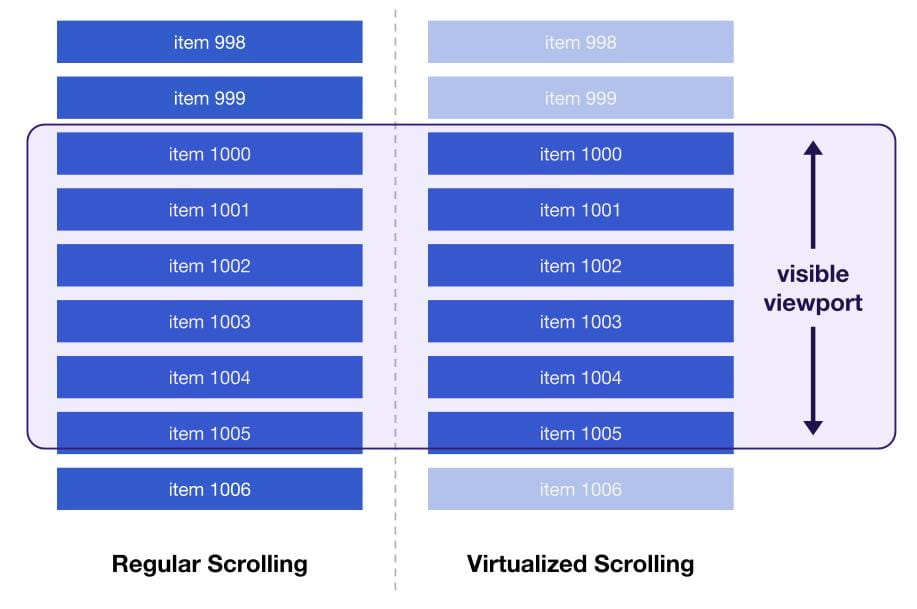
前言 作为一个开放式的跨端跨框架解决方案,Taro 在大量的小程序和 H5 应用中得到了广泛应用。我们经常收到开发者的反馈,例如“渲染速度较慢”、“滑动不够流畅”、“性能与原生应用相比有差距” 等。这表明性能问题一直是困扰开发者的一个重要问题。 熟悉 Taro 的开发者应该知道,相比于 Taro 1/2,Taro 3 是一个更加注重运行时而轻量化编译时的框架。它的优势在于提供了更高效的代码编写方式,并拥有更丰富的生态系统。然而,这也意味着在性能方面可能会有一些损耗。 但是,使用 Taro 3 并不意味着我们必须牺牲应用的性能。事实上,Taro 已经提供了一系列的性能优化方法,并且不断探索更加极致的优化方案。 本文将为大家提供一些小程序开发的最佳实践,帮助大家最大程度地提升小程序应用的性能表现。 一、如何提升初次渲染性能 如果初次渲染的数据量非常大,可能会导致页面在加载过程中出现一段时间的白屏。为了解决这个问题,Taro 提供了预渲染功能(Prerender)。 使用 Prerender 非常简单,只需在项目根目录下的 config 文件夹中找到 index.js/dev.js/prod.js 三者中的任意一个项目配置文件,并根据项目情况进行修改。在编译时,Taro CLI 会根据你的配置自动启动预渲染功能。 const config = { ... mini: { prerender: { match: 'pages/shop/**', // 所有以 `pages/shop/` 开头的页面都参与 prerender include: ['pages/any/way/index'], // `pages/any/way/index` 也会参与 prerender exclude: ['pages/shop/index/index'] // `pages/shop/index/index` 不用参与 prerender } } }; module.exports = config 更详细说明请参考官方文档: https://taro-docs.jd.com/docs/prerender  二、如何提升更新性能 由于 Taro 使用小程序的 template 进行渲染,这会引发一个问题:所有的 setData 更新都需要由页面对象调用。当页面结构较为复杂时,更新的性能可能会下降。 当层级过深时,setData 的数据结构如下: page.setData({ 'root.cn.[0].cn.[0].cn.[0].cn.[0].markers': [], }) 期望的 setData 数据结构: component.setData({ 'cn.[0].cn.[0].markers': [], }) 目前有两种方法可以实现上述结构,以实现局部更新的效果,从而提升更新性能: 1. 全局配置项 baseLevel 对于不支持模板递归的小程序(例如微信、QQ、京东小程序等),当 DOM 层级达到一定数量后,Taro 会利用原生自定义组件来辅助递归渲染。简单来说,当 DOM 结构超过 N 层时,Taro 将使用原生自定义组件进行渲染(可以通过修改配置项 baseLevel 来调整 N 的值,建议设置为 8 或 4)。 需要注意的是,由于这是全局设置,可能会带来一些问题,例如: 在跨原生自定义组件时,flex 布局会失效(这是影响最大的问题); 在 SelectorQuery.select 方法中,跨自定义组件的后代选择器写法需要增加 >>>:.the-ancestor >>> .the-descendant。 2. 使用 CustomWrapper 组件 CustomWrapper 组件的作用是创建一个原生自定义组件,用于调用后代节点的 setData 方法,以实现局部更新的效果。 我们可以使用它来包裹那些遇到更新性能问题的模块,例如: import { View, Text } from '@tarojs/components' export default function () { return ( <View className="index"> <Text>Demo</Text> <CustomWrapper> <GoodsList /> </CustomWrapper> </View> ) } 三、如何提升长列表性能 长列表是常见的组件,当生成或加载的数据量非常大时,可能会导致严重的性能问题,尤其在低端机上可能会出现明显的卡顿现象。 为了解决长列表的问题,Taro 提供了 VirtualList 组件和 VirtualWaterfall 组件。它们的原理是只渲染当前可见区域(Visible Viewport)的视图,非可见区域的视图在用户滚动到可见区域时再进行渲染,以提高长列表滚动的流畅性。 1. VirtualList 组件(虚拟列表) 以 React Like 框架使用为例,可以直接引入组件: import VirtualList from '@tarojs/components/virtual-list' 一个最简单的长列表组件如下所示: function buildData(offset = 0) { return Array(100) .fill(0) .map((_, i) => i + offset) } const Row = React.memo(({ id, index, data }) => { return ( <View id={id} className={index % 2 ? 'ListItemOdd' : 'ListItemEven'}> Row {index} : {data[index]} </View> ) }) export default class Index extends Component { state = { data: buildData(0), } render() { const { data } = this.state const dataLen = data.length return ( <VirtualList height={800} /* 列表的高度 */ width="100%" /* 列表的宽度 */ item={Row} /* 列表单项组件,这里只能传入一个组件 */ itemData={data} /* 渲染列表的数据 */ itemCount={dataLen} /* 渲染列表的长度 */ itemSize={100} /* 列表单项的高度 */ /> ) } } 更多详情可以参考官方文档: https://taro-docs.jd.com/docs/virtual-list  2. VirtualWaterfall 组件(虚拟瀑布流) 以 React Like 框架使用为例,可以直接引入组件: import { VirtualWaterfall } from `@tarojs/components-advanced` 一个最简单的长列表组件如下所示: function buildData(offset = 0) { return Array(100) .fill(0) .map((_, i) => i + offset) } const Row = React.memo(({ id, index, data }) => { return ( <View id={id} className={index % 2 ? 'ListItemOdd' : 'ListItemEven'}> Row {index} : {data[index]} </View> ) }) export default class Index extends Component { state = { data: buildData(0), } render() { const { data } = this.state const dataLen = data.length return ( <VirtualWaterfall height={800} /* 列表的高度 */ width="100%" /* 列表的宽度 */ item={Row} /* 列表单项组件,这里只能传入一个组件 */ itemData={data} /* 渲染列表的数据 */ itemCount={dataLen} /* 渲染列表的长度 */ itemSize={100} /* 列表单项的高度 */ /> ) } } 更多详情可以参考官方文档: https://taro-docs.jd.com/docs/virtual-waterfall  四、如何避免 setData 数据量较大 众所周知,对小程序性能的影响较大的主要有两个因素,即 setData 的数据量和单位时间内调用 setData 函数的次数。在 Taro 中,会对 setData 进行批量更新操作,因此通常只需要关注 setData 的数据量大小。下面通过几个例子来说明如何避免数据量过大的问题: 例子 1:删除楼层节点要谨慎处理 目前 Taro 在处理节点删除方面存在一些缺陷。假设存在以下代码写法: <View> <!-- 轮播 --> <Slider /> <!-- 商品组 --> <Goods /> <!-- 模态弹窗 --> {isShowModal && <Modal />} </View> 当 isShowModal 从 true 变为 false 时,模态弹窗会消失。此时,Modal 组件的兄弟节点都会被更新,setData 的数据是 Slider + Goods 组件的 DOM 节点信息。 一般情况下,这不会对性能产生太大影响。然而,如果待删除节点的兄弟节点的 DOM 结构非常复杂,比如一个个楼层组件,删除操作的副作用会导致 setData 的数据量变大,从而影响性能。 为了解决这个问题,可以通过隔离删除操作来进行优化。 <View> <!-- 轮播 --> <Slider /> <!-- 商品组 --> <Goods /> <!-- 模态弹窗 --> <View> {isShowModal && <Modal />} </View> </View> 例子 2:基础组件的属性要保持引用 当基础组件(例如 View、Input 等)的属性值为非基本类型时,假设存在以下代码写法: <Map latitude={22.53332} longitude={113.93041} markers={[ { latitude: 22.53332, longitude: 113.93041, }, ]} /> 每次渲染时,React 会对基础组件的属性进行浅比较。如果发现 markers 的引用不同,就会触发组件属性的更新。这最终导致了 setData 操作的频繁执行和数据量的增加。 为了解决这个问题,可以使用状态(state)或闭包等方法来保持对象的引用,从而避免不必要的更新。 <Map latitude={22.53332} longitude={113.93041} markers={this.state.markers} /> 五、更多最佳实践 1. 阻止滚动穿透 在小程序开发中,当存在滑动蒙层、弹窗等覆盖式元素时,滑动事件会冒泡到页面上,导致页面元素也会跟着滑动。通常我们会通过设置 catchTouchMove 来阻止事件冒泡。 然而,由于 Taro3 事件机制的限制,小程序事件都是以 bind 的形式进行绑定。因此,与 Taro1/2 不同,调用 e.stopPropagation() 并不能阻止滚动事件的穿透。 解决办法 1:使用样式(推荐) 可以为需要禁用滚动的组件编写以下样式: { overflow:hidden; height: 100vh; } 解决办法 2:使用 catchMove 对于极个别的组件,比如 Map 组件,即使使用样式固定宽高也无法阻止滚动,因为这些组件本身具有滚动的功能。因此,第一种方法无法处理冒泡到 Map 组件上的滚动事件。 在这种情况下,可以为 View 组件添加 catchMove 属性: // 这个 View 组件会绑定 catchtouchmove 事件而不是 bindtouchmove <View catchMove /> 2. 跳转预加载 在小程序中,当调用 Taro.navigateTo 等跳转类 API 后,新页面的 onLoad 事件会有一定的延时。因此,为了提高用户体验,可以将一些操作(如网络请求)提前到调用跳转 API 之前执行。 对于熟悉 Taro 的开发者来说,可能会记得在 Taro 1/2 中有一个名为 componentWillPreload 的钩子函数。然而,在 Taro 3 中,这个钩子函数已经被移除了。不过,开发者可以使用 Taro.preload() 方法来实现跳转预加载的效果: // pages/index.js Taro.preload(fetchSomething()) Taro.navigateTo({ url: '/pages/detail' }) // pages/detail.js console.log(getCurrentInstance().preloadData) 3. 建议把 Taro.getCurrentInstance() 的结果保存下来 在开发过程中,我们经常会使用 Taro.getCurrentInstance() 方法来获取小程序的 app、page 对象以及路由参数等数据。然而,频繁地调用该方法可能会导致一些问题。 因此,建议将 Taro.getCurrentInstance() 的结果保存在组件中,并在需要时直接使用,以避免频繁调用该方法。这样可以提高代码的执行效率和性能。 class Index extends React.Component { inst = Taro.getCurrentInstance() componentDidMount() { console.log(this.inst) } } 六、预告:小程序编译模式(CompileMode) Taro 一直追求并不断突破性能的极限,除了以上提供的最佳实践,我们即将推出小程序编译模式(CompileMode)。 什么是 CompileMode? 前面已经说过,Taro3 是一种重运行时的框架,当节点数量增加到一定程度时,渲染性能会显著下降。 因此,为了解决这个问题,Taro 引入了 CompileMode 编译模式。 CompileMode 在编译阶段对开发者的代码进行扫描,将 JSX 和 Vue template 代码提前编译为相应的小程序模板代码。这样可以减少小程序渲染层虚拟 DOM 树节点的数量,从而提高渲染性能。 通过使用 CompileMode,可以有效减少小程序的渲染负担,提升应用的性能表现。 如何使用? 开发者只需为小程序的基础组件添加 compileMode 属性,该组件及其子组件将会被编译为独立的小程序模板。 function GoodsItem () { return ( <View compileMode> ... </View> ) } 目前第一阶段的开发工作已经完成,我们即将发布 Beta 版本,欢迎大家关注! 想提前了解的可以查看 RFC 文档: https://github.com/NervJS/taro-rfcs/blob/feat/compile-mode/rfcs/0000-compile-mode.md 结尾 通过采用 Taro 的最佳实践,我们相信您的小程序应用性能一定会有显著的提升。未来,我们将持续探索更多优化方案,覆盖更广泛的应用场景,为开发者提供更高效、更优秀的开发体验。 如果您在项目中有任何经验总结或思考,欢迎向我们投稿并进行交流,让我们一起分享给更多开发者,非常感谢您的支持! 作者:京东零售 利齐诺 来源:京东云开发者社区 转载请注明来源

资源下载

更多资源
Nacos

Nacos

Nacos /nɑ:kəʊs/ 是 Dynamic Naming and Configuration Service 的首字母简称,一个易于构建 AI Agent 应用的动态服务发现、配置管理和AI智能体管理平台。Nacos 致力于帮助您发现、配置和管理微服务及AI智能体应用。Nacos 提供了一组简单易用的特性集,帮助您快速实现动态服务发现、服务配置、服务元数据、流量管理。Nacos 帮助您更敏捷和容易地构建、交付和管理微服务平台。

Spring

Spring

Spring框架(Spring Framework)是由Rod Johnson于2002年提出的开源Java企业级应用框架,旨在通过使用JavaBean替代传统EJB实现方式降低企业级编程开发的复杂性。该框架基于简单性、可测试性和松耦合性设计理念,提供核心容器、应用上下文、数据访问集成等模块,支持整合Hibernate、Struts等第三方框架,其适用范围不仅限于服务器端开发,绝大多数Java应用均可从中受益。

Rocky Linux

Rocky Linux

Rocky Linux(中文名:洛基)是由Gregory Kurtzer于2020年12月发起的企业级Linux发行版,作为CentOS稳定版停止维护后与RHEL(Red Hat Enterprise Linux)完全兼容的开源替代方案,由社区拥有并管理,支持x86_64、aarch64等架构。其通过重新编译RHEL源代码提供长期稳定性,采用模块化包装和SELinux安全架构,默认包含GNOME桌面环境及XFS文件系统,支持十年生命周期更新。

WebStorm

WebStorm

WebStorm 是jetbrains公司旗下一款JavaScript 开发工具。目前已经被广大中国JS开发者誉为“Web前端开发神器”、“最强大的HTML5编辑器”、“最智能的JavaScript IDE”等。与IntelliJ IDEA同源,继承了IntelliJ IDEA强大的JS部分的功能。

用户登录
用户注册