iOS开发-音乐播放(AVAudioPlayer)
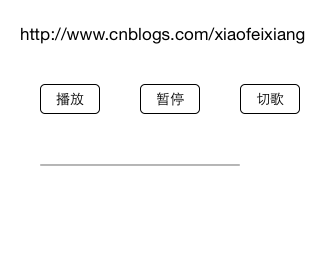
现在的手机的基本上没有人不停音乐的,我们无法想象在一个没有声音的世界里我们会过的怎么样,国内现在的主流的主流网易云音乐,QQ音乐,酷狗,虾米,天天基本上霸占了所有的用户群体,不过并没有妨碍大家对音乐的追求,乐流算是突围成功了,据说卖给QQ啦,有兴趣的可以看下。我们做不了那么高大上的就先做个简单的,最核心的就是播放,暂停,切歌,其他的基本上围绕这个修修补补锦上添花的,比如说歌曲名称,专辑,谁听了这首歌。。。铺垫的多了,直接看效果吧,三个按钮一个进度条: 初始化按钮: 1 2 3 4 5 6 7 8 9 10 11 12 13 14 15 16 17 18 19 20 21 22 23 24 25 26 27 28 29 30 31 32 self .playButton=[[UIButton alloc]initWithFrame:CGRectMake(40, 100, 60, 30)]; [ self .playButton setTitle:@ "播放" forState:UIControlStateNormal]; [ self .playButton setTitleColor:[UIColor blackColor] forState:UIControlStateNormal]; [ self .playButton.titleLabel setFont:[UIFont systemFontOfSize:14]]; self .playButton.layer.borderColor=[UIColor blackColor].CGColor; self .playButton.layer.borderWidth=1.0; self .playButton.layer.cornerRadius=5.0; [ self .playButton addTarget: self action: @selector (playMusic:) forControlEvents:UIControlEventTouchUpInside]; [ self .view addSubview: self .playButton]; self .pauseButton=[[UIButton alloc]initWithFrame:CGRectMake(140, 100, 60, 30)]; [ self .pauseButton setTitle:@ "暂停" forState:UIControlStateNormal]; [ self .pauseButton setTitleColor:[UIColor blackColor] forState:UIControlStateNormal]; [ self .pauseButton.titleLabel setFont:[UIFont systemFontOfSize:14]]; self .pauseButton.layer.borderColor=[UIColor blackColor].CGColor; self .pauseButton.layer.borderWidth=1.0; self .pauseButton.layer.cornerRadius=5.0; [ self .pauseButton addTarget: self action: @selector (pauseMusic:) forControlEvents:UIControlEventTouchUpInside]; [ self .view addSubview: self .pauseButton]; self .switchButton=[[UIButton alloc]initWithFrame:CGRectMake(240, 100, 60, 30)]; [ self .switchButton setTitle:@ "切歌" forState:UIControlStateNormal]; [ self .switchButton setTitleColor:[UIColor blackColor] forState:UIControlStateNormal]; [ self .switchButton.titleLabel setFont:[UIFont systemFontOfSize:14]]; self .switchButton.layer.borderColor=[UIColor blackColor].CGColor; self .switchButton.layer.borderWidth=1.0; self .switchButton.layer.cornerRadius=5.0; [ self .switchButton addTarget: self action: @selector (switchMusic:) forControlEvents:UIControlEventTouchUpInside]; [ self .view addSubview: self .switchButton]; 初始化进度条: 1 2 self .progressView=[[UIProgressView alloc]initWithFrame:CGRectMake(40, 180, 200, 50)]; [ self .view addSubview: self .progressView]; AVAudioPlayer可以看成一个简易播放器,支持多种音频格式,能够进行进度、音量、播放速度等控制,已经满足了基本需求,接下来是播放音乐的代码: 1 2 3 4 5 6 if ( self .audioPlayer.isPlaying) { [ self .audioPlayer pause]; } else { [ self loadMusicByAsset:[[AVURLAsset alloc] initWithURL:[[ NSBundle mainBundle] URLForResource:@ "我最亲爱的" withExtension:@ "mp3" ] options: nil ]]; [ self .audioPlayer play]; } 实例化AVAudioPlayer: 1 2 3 4 5 6 7 8 9 10 11 12 13 14 15 -( void )loadMusicByAsset:(AVURLAsset*)avUrlAsset { if ([[ NSFileManager defaultManager] fileExistsAtPath:avUrlAsset.URL.path]){ NSError *error= nil ; self .audioPlayer= [[AVAudioPlayer alloc] initWithContentsOfURL:avUrlAsset.URL error:&error]; self .audioPlayer.delegate= self ; //准备buffer,减少播放延时的时间 [ self .audioPlayer prepareToPlay]; [ self .audioPlayer setVolume:1]; //设置音量大小 self .audioPlayer.numberOfLoops =0; //设置播放次数,0为播放一次,负数为循环播放 if (error) { NSLog (@ "初始化错误:%@" ,error.localizedDescription); } } } 上面是通过AVURLAsset实例化的,还可以直接通过名称实例化: 1 2 3 4 5 6 7 8 9 10 11 12 13 14 15 16 17 -( void )loadMusic:( NSString *)name { NSString *musicFilePath = [[ NSBundle mainBundle] pathForResource:name ofType:@ "mp3" ]; //创建音乐文件路径 if ([[ NSFileManager defaultManager] fileExistsAtPath:musicFilePath]){ NSURL *musicURL = [[ NSURL alloc] initFileURLWithPath:musicFilePath]; NSError *error= nil ; self .audioPlayer= [[AVAudioPlayer alloc] initWithContentsOfURL:musicURL error:&error]; self .audioPlayer.delegate= self ; //准备buffer,减少播放延时的时间 [ self .audioPlayer prepareToPlay]; [ self .audioPlayer setVolume:1]; //设置音量大小 self .audioPlayer.numberOfLoops =0; //设置播放次数,0为播放一次,负数为循环播放 if (error) { NSLog (@ "初始化错误:%@" ,error.localizedDescription); } } } 暂停音乐,这里为了方便单独写了一个按钮,大多数情况下,播放是暂停都是同一个按钮,仅供参考: 1 2 3 4 5 -( void )pauseMusic:(UIButton *)sender{ if ( self .audioPlayer.isPlaying) { [ self .audioPlayer pause]; } } 切歌就是通常大家点的上一曲下一曲,很好理解: 1 2 3 4 5 -( void )switchMusic:(UIButton *)sender{ [ self .audioPlayer stop]; [ self loadMusicByAsset:[[AVURLAsset alloc] initWithURL:[[ NSBundle mainBundle] URLForResource:@ "我需要一美元" withExtension:@ "mp3" ] options: nil ]]; [ self .audioPlayer play]; } 通过timer实时更新进度条: 1 2 3 self .timer = [ NSTimer scheduledTimerWithTimeInterval:0.1 target: self selector: @selector (changeProgress) userInfo: nil repeats: YES ]; 进度更新: 1 2 3 4 5 -( void )changeProgress{ if ( self .audioPlayer.isPlaying) { self .progressView.progress = self .audioPlayer.currentTime/ self .audioPlayer.duration; } } 效果如下: 音乐播放完成之后可以在AVAudioPlayerDelegate的代理方法里面根据业务场景执行自己安排: 1 2 3 4 5 6 7 -( void )audioPlayerDidFinishPlaying:(AVAudioPlayer *)player successfully:( BOOL )flag{ // [self.timer invalidate];直接销毁,之后不可用,慎重考虑 // [self.timer setFireDate:[NSDate date]]; //继续 // [self.timer setFireDate:[NSDate distantPast]];//开启 [ self .timer setFireDate:[ NSDate distantFuture]]; //暂停 } 本文转自Fly_Elephant博客园博客,原文链接:http://www.cnblogs.com/xiaofeixiang/p/4540286.html,如需转载请自行联系原作者