iOS: iOS各种设备信息获取
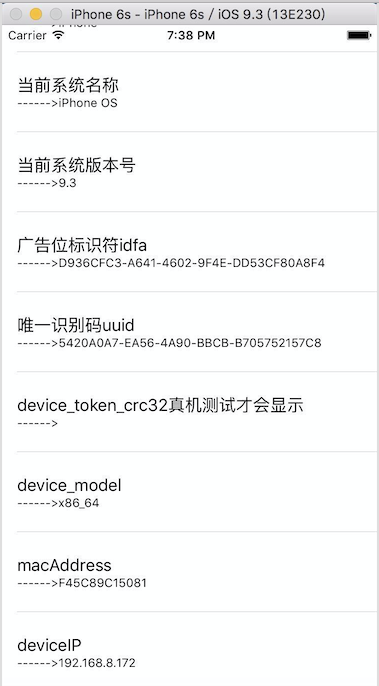
Author:si1ence Link:http://www.jianshu.com/p/b23016bb97af 为了统计用户信息、下发广告,服务器端往往需要手机用户设备及app的各种信息,下面讲述一下各种信息的获取方式: 点击下载以上展示效果的GitHub源码 一行代码就搞定的统一来! // 这个方法后面会列出来 NSString *deviceName = [self getDeviceName]; NSLog(@"设备型号-->%@", deviceName); NSString *iPhoneName = [UIDevice currentDevice].name; NSLog(@"iPhone名称-->%@", iPhoneName); NSString *appVerion = [[[NSBundle mainBundle] infoDictionary] objectForKey:@"CFBundleShortVersionString"]; NSLog(@"app版本号-->%@", appVerion); CGFloat batteryLevel = [[UIDevice currentDevice] batteryLevel]; NSLog(@"电池电量-->%f", batteryLevel); NSString *localizedModel = [UIDevice currentDevice].localizedModel; NSLog(@"localizedModel-->%@", localizedModel); NSString *systemName = [UIDevice currentDevice].systemName; NSLog(@"当前系统名称-->%@", systemName); NSString *systemVersion = [UIDevice currentDevice].systemVersion; NSLog(@"当前系统版本号-->%@", systemVersion); struct utsname systemInfo; uname(&systemInfo); NSString *device_model = [NSString stringWithCString:systemInfo.machine encoding:NSUTF8StringEncoding]; NSLog(@"device_model-->%@", device_model); // 这个方法后面会单独列出 NSString *macAddress = [self getMacAddress]; NSLog(@"macAddress-->%@", macAddress); // 这个方法后面会单独列出 NSString *deviceIP = [self getDeviceIPAddresses]; NSLog(@"deviceIP-->%@", deviceIP); 广告位标识符:在同一个设备上的所有App都会取到相同的值,是苹果专门给各广告提供商用来追踪用户而设的,用户可以在 设置|隐私|广告追踪里重置此id的值,或限制此id的使用,故此id有可能会取不到值,但好在Apple默认是允许追踪的,而且一般用户都不知道有这么个设置,所以基本上用来监测推广效果 //广告标识 NSString *idfa = [[[ASIdentifierManager sharedManager] advertisingIdentifier] UUIDString]; NSLog(@"广告位标识符idfa-->%@", idfa); UUID是Universally Unique Identifier的缩写,中文意思是通用唯一识别码。它是让分布式系统中的所有元素,都能有唯一的辨识资讯,而不需要透过中央控制端来做辨识资讯的指 定。这样,每个人都可以建立不与其它人冲突的 UUID。在此情况下,就不需考虑数据库建立时的名称重复问题。苹果公司建议使用UUID为应用生成唯一标识字符串。 //UUID NSString *uuid = [[[UIDevice currentDevice] identifierForVendor] UUIDString]; NSLog(@"唯一识别码uuid-->%@", uuid); 获取设备型号 // 获取设备型号然后手动转化为对应名称 - (NSString *)getDeviceName { // 需要#import "sys/utsname.h" #warning 题主呕心沥血总结!!最全面!亲测!全网独此一份!! struct utsname systemInfo; uname(&systemInfo); NSString *deviceString = [NSString stringWithCString:systemInfo.machine encoding:NSUTF8StringEncoding]; if ([deviceString isEqualToString:@"iPhone3,1"]) return @"iPhone 4"; if ([deviceString isEqualToString:@"iPhone3,2"]) return @"iPhone 4"; if ([deviceString isEqualToString:@"iPhone3,3"]) return @"iPhone 4"; if ([deviceString isEqualToString:@"iPhone4,1"]) return @"iPhone 4S"; if ([deviceString isEqualToString:@"iPhone5,1"]) return @"iPhone 5"; if ([deviceString isEqualToString:@"iPhone5,2"]) return @"iPhone 5 (GSM+CDMA)"; if ([deviceString isEqualToString:@"iPhone5,3"]) return @"iPhone 5c (GSM)"; if ([deviceString isEqualToString:@"iPhone5,4"]) return @"iPhone 5c (GSM+CDMA)"; if ([deviceString isEqualToString:@"iPhone6,1"]) return @"iPhone 5s (GSM)"; if ([deviceString isEqualToString:@"iPhone6,2"]) return @"iPhone 5s (GSM+CDMA)"; if ([deviceString isEqualToString:@"iPhone7,1"]) return @"iPhone 6 Plus"; if ([deviceString isEqualToString:@"iPhone7,2"]) return @"iPhone 6"; if ([deviceString isEqualToString:@"iPhone8,1"]) return @"iPhone 6s"; if ([deviceString isEqualToString:@"iPhone8,2"]) return @"iPhone 6s Plus"; if ([deviceString isEqualToString:@"iPhone8,4"]) return @"iPhone SE"; if ([deviceString isEqualToString:@"iPod1,1"]) return @"iPod Touch 1G"; if ([deviceString isEqualToString:@"iPod2,1"]) return @"iPod Touch 2G"; if ([deviceString isEqualToString:@"iPod3,1"]) return @"iPod Touch 3G"; if ([deviceString isEqualToString:@"iPod4,1"]) return @"iPod Touch 4G"; if ([deviceString isEqualToString:@"iPod5,1"]) return @"iPod Touch (5 Gen)"; if ([deviceString isEqualToString:@"iPad1,1"]) return @"iPad"; if ([deviceString isEqualToString:@"iPad1,2"]) return @"iPad 3G"; if ([deviceString isEqualToString:@"iPad2,1"]) return @"iPad 2 (WiFi)"; if ([deviceString isEqualToString:@"iPad2,2"]) return @"iPad 2"; if ([deviceString isEqualToString:@"iPad2,3"]) return @"iPad 2 (CDMA)"; if ([deviceString isEqualToString:@"iPad2,4"]) return @"iPad 2"; if ([deviceString isEqualToString:@"iPad2,5"]) return @"iPad Mini (WiFi)"; if ([deviceString isEqualToString:@"iPad2,6"]) return @"iPad Mini"; if ([deviceString isEqualToString:@"iPad2,7"]) return @"iPad Mini (GSM+CDMA)"; if ([deviceString isEqualToString:@"iPad3,1"]) return @"iPad 3 (WiFi)"; if ([deviceString isEqualToString:@"iPad3,2"]) return @"iPad 3 (GSM+CDMA)"; if ([deviceString isEqualToString:@"iPad3,3"]) return @"iPad 3"; if ([deviceString isEqualToString:@"iPad3,4"]) return @"iPad 4 (WiFi)"; if ([deviceString isEqualToString:@"iPad3,5"]) return @"iPad 4"; if ([deviceString isEqualToString:@"iPad3,6"]) return @"iPad 4 (GSM+CDMA)"; if ([deviceString isEqualToString:@"iPad4,1"]) return @"iPad Air (WiFi)"; if ([deviceString isEqualToString:@"iPad4,2"]) return @"iPad Air (Cellular)"; if ([deviceString isEqualToString:@"iPad4,4"]) return @"iPad Mini 2 (WiFi)"; if ([deviceString isEqualToString:@"iPad4,5"]) return @"iPad Mini 2 (Cellular)"; if ([deviceString isEqualToString:@"iPad4,6"]) return @"iPad Mini 2"; if ([deviceString isEqualToString:@"iPad4,7"]) return @"iPad Mini 3"; if ([deviceString isEqualToString:@"iPad4,8"]) return @"iPad Mini 3"; if ([deviceString isEqualToString:@"iPad4,9"]) return @"iPad Mini 3"; if ([deviceString isEqualToString:@"iPad5,1"]) return @"iPad Mini 4 (WiFi)"; if ([deviceString isEqualToString:@"iPad5,2"]) return @"iPad Mini 4 (LTE)"; if ([deviceString isEqualToString:@"iPad5,3"]) return @"iPad Air 2"; if ([deviceString isEqualToString:@"iPad5,4"]) return @"iPad Air 2"; if ([deviceString isEqualToString:@"iPad6,3"]) return @"iPad Pro 9.7"; if ([deviceString isEqualToString:@"iPad6,4"]) return @"iPad Pro 9.7"; if ([deviceString isEqualToString:@"iPad6,7"]) return @"iPad Pro 12.9"; if ([deviceString isEqualToString:@"iPad6,8"]) return @"iPad Pro 12.9"; if ([deviceString isEqualToString:@"i386"]) return @"Simulator"; if ([deviceString isEqualToString:@"x86_64"]) return @"Simulator"; return deviceString; } mac 地址 - (NSString *)getMacAddress { int mib[6]; size_t len; char *buf; unsigned char *ptr; struct if_msghdr *ifm; struct sockaddr_dl *sdl; mib[0] = CTL_NET; mib[1] = AF_ROUTE; mib[2] = 0; mib[3] = AF_LINK; mib[4] = NET_RT_IFLIST; if ((mib[5] = if_nametoindex("en0")) == 0) { printf("Error: if_nametoindex error/n"); return NULL; } if (sysctl(mib, 6, NULL, &len, NULL, 0) < 0) { printf("Error: sysctl, take 1/n"); return NULL; } if ((buf = malloc(len)) == NULL) { printf("Could not allocate memory. error!/n"); return NULL; } if (sysctl(mib, 6, buf, &len, NULL, 0) < 0) { printf("Error: sysctl, take 2"); return NULL; } ifm = (struct if_msghdr *)buf; sdl = (struct sockaddr_dl *)(ifm + 1); ptr = (unsigned char *)LLADDR(sdl); NSString *outstring = [NSString stringWithFormat:@"%02x%02x%02x%02x%02x%02x", *ptr, *(ptr+1), *(ptr+2), *(ptr+3), *(ptr+4), *(ptr+5)]; free(buf); return [outstring uppercaseString]; } IP地址 - (NSString *)getDeviceIPAddresses { int sockfd = socket(AF_INET, SOCK_DGRAM, 0); NSMutableArray *ips = [NSMutableArray array]; int BUFFERSIZE = 4096; struct ifconf ifc; char buffer[BUFFERSIZE], *ptr, lastname[IFNAMSIZ], *cptr; struct ifreq *ifr, ifrcopy; ifc.ifc_len = BUFFERSIZE; ifc.ifc_buf = buffer; if (ioctl(sockfd, SIOCGIFCONF, &ifc) >= 0){ for (ptr = buffer; ptr < buffer + ifc.ifc_len; ){ ifr = (struct ifreq *)ptr; int len = sizeof(struct sockaddr); if (ifr->ifr_addr.sa_len > len) { len = ifr->ifr_addr.sa_len; } ptr += sizeof(ifr->ifr_name) + len; if (ifr->ifr_addr.sa_family != AF_INET) continue; if ((cptr = (char *)strchr(ifr->ifr_name, ':')) != NULL) *cptr = 0; if (strncmp(lastname, ifr->ifr_name, IFNAMSIZ) == 0) continue; memcpy(lastname, ifr->ifr_name, IFNAMSIZ); ifrcopy = *ifr; ioctl(sockfd, SIOCGIFFLAGS, &ifrcopy); if ((ifrcopy.ifr_flags & IFF_UP) == 0) continue; NSString *ip = [NSString stringWithFormat:@"%s", inet_ntoa(((struct sockaddr_in *)&ifr->ifr_addr)->sin_addr)]; [ips addObject:ip]; } } close(sockfd); NSString *deviceIP = @""; for (int i=0; i < ips.count; i++) { if (ips.count > 0) { deviceIP = [NSString stringWithFormat:@"%@",ips.lastObject]; } } return deviceIP; } 程序猿神奇的手,每时每刻,这双手都在改变着世界的交互方式! 本文转自当天真遇到现实博客园博客,原文链接:http://www.cnblogs.com/XYQ-208910/p/5672577.html ,如需转载请自行联系原作者