CentOS7上配置ELK
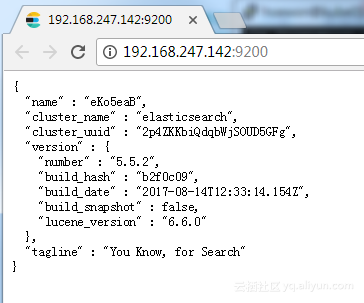
一、Elasticsearch 1,从Elastic下载包到本地后解压缩。 2,Elasticsearch不让从root用户启动,所以需要单独建个用户 1 2 useradd elastic chown -Relastic:elasticelasticsearch-5.3.0 3,允许外网访问,修改conf里elasticsearch.yml,解注释: 1 network.host:0.0.0.0 4,启动elasticsearch 1 2 su elastic shelasticsearch-5.3.0 /bin/elasticsearch -d 5,验证,浏览器访问服务器9200端口,应看到类似: 1 2 3 4 5 6 7 8 9 10 11 12 13 { "name":"ufJRIlo", "cluster_name":"elasticsearch", "cluster_uuid":"_na_", "version":{ "number":"5.3.0", "build_hash":"3adb13b", "build_date":"2017-03-23T03:31:50.652Z", "build_snapshot":false, "lucene_version":"6.4.1" }, "tagline":"YouKnow,forSearch" } 二、LogStash 1,从elastic官网下包到本地解压。 2,创建配置文件logstash.conf 1 2 3 4 5 6 7 8 9 10 11 12 13 14 15 16 17 18 19 20 21 22 23 24 25 26 27 28 29 30 31 32 33 34 35 36 37 38 39 40 41 42 43 44 45 46 input{ file{ path=>[ "/tmp/*.log" , "/root/zhoulei/new/loginserver/logs/packages/*ACCOUNT.log" ] exclude=>[ "*DEBUG.log" , "*INFO.log" , "*ERROR.log" ] start_position=> "beginning" } } filter{ grok{ match=>{ "message" => "%{DATA:logTime}\|%{DATA:gameId}\|%{DATA:serverId}\|%{DATA:version}\|%{DATA:logType}\|%{DATA:behavior}\|%{DATA:channelId}\|%{DATA:clientVersion}\|%{DATA:platform}\|%{DATA:accountId}\|%{DATA:accountName}\|%{DATA:roleId}\|%{DATA:roleName}\|%{DATA:etc}\|*" } } date{ match=>[ "logTime" , "yyyy-MM-ddHH:mm:ss.SSS" ] target=> "@timestamp" locale=> "en" remove_field=>[ "logTime" ] } if ([logType]== "SERVER" ){ mutate{ split=>[ "message" , "|" ] add_field=>{ "online" => "%{[message][22]}" "onlineMax" => "%{[message][23]}" } remove_field=>[ "onlineNum" ] remove_field=>[ "maxNum" ] } mutate{ convert=>{ "online" => "integer" } convert=>{ "onlineMax" => "integer" } } } } output{ elasticsearch{ hosts=>[ "127.0.0.1:9200" ] } } 3,创建服务启动后台运行脚本 1 2 3 #!/bin/bash nohup . /logstash -flogstash.conf> nohup .out& 三、Kibana 1,下载安装包,可以下windows版,解压。 2,编辑conf里kibana.yml,设置elasticsearch服务url 1 elasticsearch.url: "http://127.0.0.1:9200/" 3,验证服务,浏览器访问kibana所在机器的5601端口,可以看到Kibana页面。 本文转自 zl1030 51CTO博客,原文链接:http://blog.51cto.com/zl1030/1919697