首页 文章 精选 留言 我的

精选列表

搜索[鸿蒙实践],共10000篇文章
优秀的个人博客,低调大师

PostgreSQL jsonpath使用实践

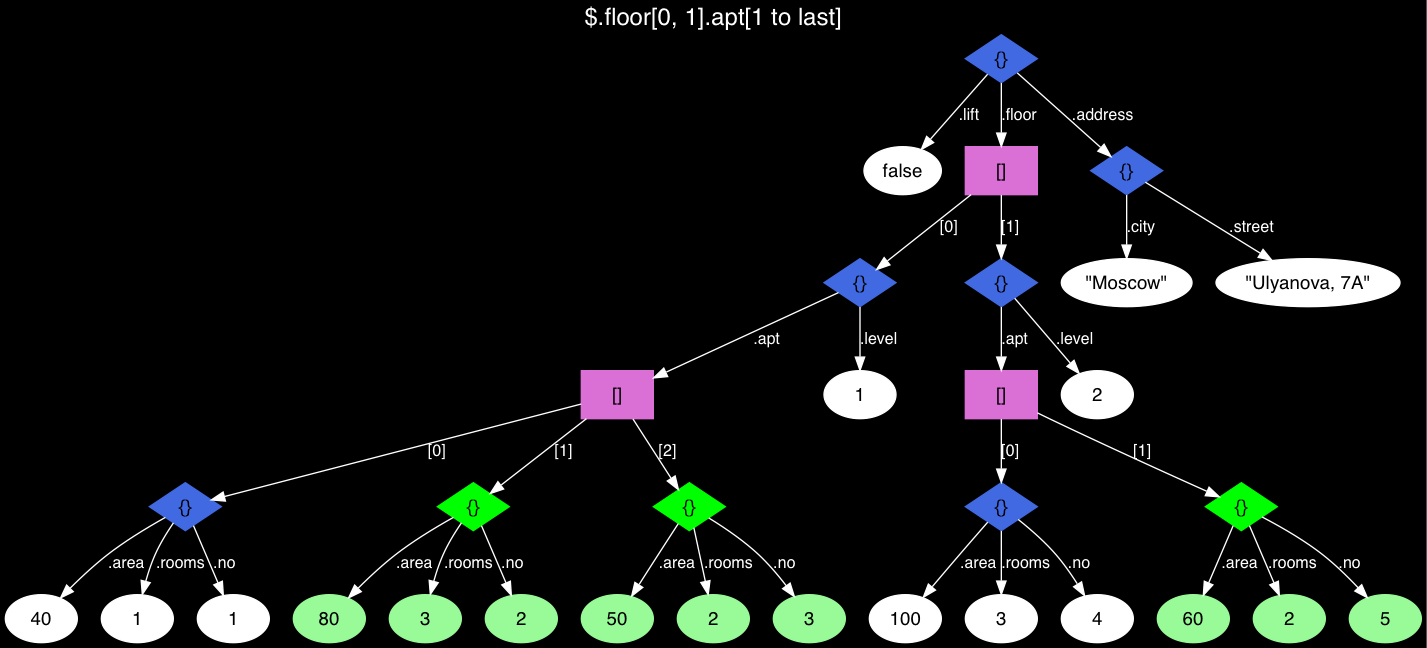
jsonpath是用来解析json数据的工具,类似于xpath,jsonpath可以解析十分复杂的json数据。 PostgreSQL json发展历史: PostgreSQL从9.2开始就支持json数据类型,但是由于解析json数据的性能很差,导致并不受大家青睐,而是选择使用nosql数据库代替。于是从pg9.4开始支持了jsonb数据类型,相较于json类型,jsonb由于并不需要每次使用时都去进行解析,因此性能提升很多,都是还支持索引查询等。 而从pg12开始对于json的支持更加强大:sql 2016的sql/json标准有15条, PG 12 实现了14条, 远远超过oracle(18c 11/15), mysql(8.0.4 5/15), sqlserver(2017 2/15)最新版本。 同时在pg12中引入了jsonpath类型,以及一系列相关的函数,使得json数据的查询性能更进一步,功能也愈发强大。 JSONPATH语法: JSONpath 函数表达式语法如下: 点号 . 表示引用 Json 数据的元素 方括号 [] 表示引用数组元素 Json 数据中的数组元素下标从0开始 JSONpath中的变量如下: $ 符号表示要查询的Json文本的变量 $varname 表示指定变量 @ 指在 filter 表达式中表示当前路径元素的变量 JSONPATH使用举例: 简单查询: bill@bill=>SELECT jsonb_path_query_array('[1,2,3,4,5]', '$[*] ? (@ > 3)'); jsonb_path_query_array ------------------------ [4, 5] (1 row) 创建测试表: CREATE TABLE house(js jsonb); INSERT INTO house VALUES ('{ 'address': { 'city':'Moscow', 'street': 'Ulyanova, 7A' }, 'lift': false, 'floor': [ { 'level': 1, 'apt': [ {'no': 1, 'area': 40, 'rooms': 1}, {'no': 2, 'area': 80, 'rooms': 3}, {'no': 3, 'area': 50, 'rooms': 2} ] }, { 'level': 2, 'apt': [ {'no': 4, 'area': 100, 'rooms': 3}, {'no': 5, 'area': 60, 'rooms': 2} ] } ] }'); 查询: bill@bill=>select jsonb_pretty(js) from house ; jsonb_pretty ---------------------------------- { + 'lift': false, + 'floor': [ + { + 'apt': [ + { + 'no': 1, + 'area': 40, + 'rooms': 1 + }, + { + 'no': 2, + 'area': 80, + 'rooms': 3 + }, + { + 'no': 3, + 'area': 50, + 'rooms': 2 + } + ], + 'level': 1 + }, + { + 'apt': [ + { + 'no': 4, + 'area': 100,+ 'rooms': 3 + }, + { + 'no': 5, + 'area': 60, + 'rooms': 2 + } + ], + 'level': 2 + } + ], + 'address': { + 'city': 'Moscow', + 'street': 'Ulyanova, 7A'+ } + } (1 row) 该数据的层次结构如下图: 看上去该数据层次挺复杂的,但是实际中可能数据层次远比这个复杂的多,那么我们看看如何使用jsonpath来进行查询的: bill@bill=>SELECT jsonb_path_query_array(js, '$.floor[0, 1].apt[1 to last]') FROM house; jsonb_path_query_array ----------------------------------------------------------------------------------------------------------- [{'no': 2, 'area': 80, 'rooms': 3}, {'no': 3, 'area': 50, 'rooms': 2}, {'no': 5, 'area': 60, 'rooms': 2}] (1 row) 而如果不用jsonpath的话,我们可能需要这么写: bill@bill=>SELECT jsonb_agg(apt) FROM ( bill(# SELECT apt->generate_series(1, jsonb_array_length(apt) - 1) FROM ( bill(# SELECT js->'floor'->unnest(array[0, 1])->'apt' FROM house bill(# ) apts(apt) bill(# ) apts(apt); jsonb_agg ----------------------------------------------------------------------------------------------------------- [{'no': 2, 'area': 80, 'rooms': 3}, {'no': 3, 'area': 50, 'rooms': 2}, {'no': 5, 'area': 60, 'rooms': 2}] (1 row) 相比之下,使用jsonpath相关的函数查询简便太多了。 又比如,我们需要判断json数据中是否包含某个值,可以这样: bill@bill=>SELECT jsonb_path_exists(js, '$.** ? (@ == 'Moscow')') FROM house; jsonb_path_exists ------------------- t (1 row) 而如果不使用jsonpath呢? bill@bill=>WITH RECURSIVE t(value) AS ( bill(# SELECT * FROM house UNION ALL ( bill(# SELECT COALESCE(kv.value, e.value) AS value bill(# FROM t bill(# LEFT JOIN LATERAL jsonb_each ( bill(# CASE WHEN jsonb_typeof(t.value) = 'object' THEN t.value bill(# ELSE NULL END bill(# ) kv ON true bill(# LEFT JOIN LATERAL jsonb_array_elements ( bill(# CASE WHEN jsonb_typeof(t.value) = 'array' THEN t.value bill(# ELSE NULL END bill(# ) e ON true bill(# WHERE kv.value IS NOT NULL OR e.value IS NOT NULL bill(# ) bill(# ) SELECT EXISTS (SELECT 1 FROM t WHERE value = ''Moscow''); exists -------- t (1 row) 那么如何使用jsonpath进行数据过滤呢?已上面这张表为例,我们查询apt.no大于3的数据: bill@bill=>SELECT jsonb_path_query(js, '$.floor.apt.no ? (@>3)') FROM house; jsonb_path_query ------------------ 4 5 (2 rows) 同样,jsonpath也支持索引的使用: bill@bill=>CREATE INDEX ON house USING gin (js); CREATE INDEX bill@bill=>SET ENABLE_SEQSCAN TO OFF; SET bill@bill=>EXPLAIN (COSTS OFF) SELECT * FROM house bill-# WHERE js @? '$.floor[*].apt[*] ? (@.rooms == 3)'; QUERY PLAN -------------------------------------------------------------------------------- Bitmap Heap Scan on house Recheck Cond: (js @? '$.'floor'[*].'apt'[*]?(@.'rooms' == 3)'::jsonpath) -> Bitmap Index Scan on house_js_idx Index Cond: (js @? '$.'floor'[*].'apt'[*]?(@.'rooms' == 3)'::jsonpath) (4 rows) 除此之外,jsonpath支持了20多种相关的函数,是不是十分强大,赶快用起来吧! postgres=# \df *.*json*path* List of functions Schema | Name | Result data type | Argument data types | Type ------------+------------------------------+------------------+------------------------------------------------------------------------------------------ -+------ pg_catalog | gin_consistent_jsonb_path | boolean | internal, smallint, jsonb, integer, internal, internal, internal, internal | func pg_catalog | gin_extract_jsonb_path | internal | jsonb, internal, internal | func pg_catalog | gin_extract_jsonb_query_path | internal | jsonb, internal, smallint, internal, internal, internal, internal | func pg_catalog | gin_triconsistent_jsonb_path | 'char' | internal, smallint, jsonb, integer, internal, internal, internal | func pg_catalog | json_extract_path | json | from_json json, VARIADIC path_elems text[] | func pg_catalog | json_extract_path_text | text | from_json json, VARIADIC path_elems text[] | func pg_catalog | jsonb_delete_path | jsonb | jsonb, text[] | func pg_catalog | jsonb_extract_path | jsonb | from_json jsonb, VARIADIC path_elems text[] | func pg_catalog | jsonb_extract_path_text | text | from_json jsonb, VARIADIC path_elems text[] | func pg_catalog | jsonb_path_exists | boolean | target jsonb, path jsonpath, vars jsonb DEFAULT '{}'::jsonb, silent boolean DEFAULT false | func pg_catalog | jsonb_path_exists_opr | boolean | jsonb, jsonpath | func pg_catalog | jsonb_path_exists_tz | boolean | target jsonb, path jsonpath, vars jsonb DEFAULT '{}'::jsonb, silent boolean DEFAULT false | func pg_catalog | jsonb_path_match | boolean | target jsonb, path jsonpath, vars jsonb DEFAULT '{}'::jsonb, silent boolean DEFAULT false | func pg_catalog | jsonb_path_match_opr | boolean | jsonb, jsonpath | func pg_catalog | jsonb_path_match_tz | boolean | target jsonb, path jsonpath, vars jsonb DEFAULT '{}'::jsonb, silent boolean DEFAULT false | func pg_catalog | jsonb_path_query | SETOF jsonb | target jsonb, path jsonpath, vars jsonb DEFAULT '{}'::jsonb, silent boolean DEFAULT false | func pg_catalog | jsonb_path_query_array | jsonb | target jsonb, path jsonpath, vars jsonb DEFAULT '{}'::jsonb, silent boolean DEFAULT false | func pg_catalog | jsonb_path_query_array_tz | jsonb | target jsonb, path jsonpath, vars jsonb DEFAULT '{}'::jsonb, silent boolean DEFAULT false | func pg_catalog | jsonb_path_query_first | jsonb | target jsonb, path jsonpath, vars jsonb DEFAULT '{}'::jsonb, silent boolean DEFAULT false | func pg_catalog | jsonb_path_query_first_tz | jsonb | target jsonb, path jsonpath, vars jsonb DEFAULT '{}'::jsonb, silent boolean DEFAULT false | func pg_catalog | jsonb_path_query_tz | SETOF jsonb | target jsonb, path jsonpath, vars jsonb DEFAULT '{}'::jsonb, silent boolean DEFAULT false | func pg_catalog | jsonpath_in | jsonpath | cstring | func pg_catalog | jsonpath_out | cstring | jsonpath | func pg_catalog | jsonpath_recv | jsonpath | internal | func pg_catalog | jsonpath_send | bytea | jsonpath | func (25 rows) 参考链接: https://github.com/digoal/blog/blob/master/202010/20201013_01.md http://www.postgres.cn/docs/12/functions-json.html http://www.postgres.cn/docs/12/datatype-json.html#DATATYPE-JSONPATH

优秀的个人博客,低调大师

spring cloud gateway实践

一、前言 gateway是spring cloud全家桶的一员,主要用作微服务的网关,是spring官方基于spring5.0,spring boot 2.0和project reactor等技术开发的网关服务,旨在为微服务提供一种简单有效的统一api路由管理方式,基于filter链的方式提供了网关的基本功能如安全、监控、埋点、限流等。 项目地址:https://spring.io/projects/spring-cloud-gateway 二、使用 1、依赖 spring cloud已集成gateway,只需要引入spring cloud的父pom,就能直接使用。 <dependencyManagement> <dependencies> <

优秀的个人博客,低调大师

React Native 分包实践

1. 实现思路 1. RN从本地中读取bundle文件进行显示 2. 将JS文件进行分包打包 3. Native实现页面跳转,每个包跳转都为一个新的Activity 4. 进行bundle文件基础包与功能包的拆分,使用Google的diff_match_patch算法生成差异文件 5. 网络下载差异文件进行合并 6. 展示新页面 2. 操作步骤 Android 1. 修改MainApplication 2. 修改MainActivity 3. 创建LocalReactActivityDelegate 4. 打第一bundle react-native bundle --platform android --dev false --entry-file index.js --bundle-output bundle/index.android.bundle --assets-dest bundle/assets/ 5. 打第二个bundle react-native bundle --platform android --dev false --entry-file src/indexNet.js --bundle-output bundle/index1.android.bundle --assets-dest bundle/assets/ 其中indexNet.js是新页面的入口文件 6. 使用google-diff-match-patch进行差异比对 3. 本地加载实现 1). 修改MainApplication public class MainApplication extends Application { private static MainApplication sInstance; /** * 获取当前对象 */ public static MainApplication getInstance() { return sInstance; } @Override public void onCreate() { super.onCreate(); sInstance = this; SoLoader.init(this, /* native exopackage */ false); } } 这里主要是将Application中实现的接口取消,转由MainActivity中提供. 2). 修改MainActivity public class MainActivity extends ReactActivity { /** * Returns the name of the main component registered from JavaScript. * This is used to schedule rendering of the component. */ @Override protected String getMainComponentName() { return "Unpacking"; } @Override protected ReactActivityDelegate createReactActivityDelegate() { return new LocalReactActivityDelegate(this, getMainComponentName()); } } 这里实现ReactActivity中的createReactActivityDelegate方法,自定义代理设置 3). LocalReactActivityDelegate代理代码 /** * 本地ReactActivity代理 */ class LocalReactActivityDelegate(activity: Activity, @Nullable mainComponentName: String) : ReactActivityDelegate(activity, mainComponentName) { private val mReactNativeHost: ReactNativeHost = object : ReactNativeHost(MainApplication.getInstance()) { /** * 返回ReactPackage对象 */ override fun getPackages(): MutableList<ReactPackage> = Arrays.asList( MainReactPackage(), CustomPackage() ) /** * 是否为开发 */ override fun getUseDeveloperSupport(): Boolean = BuildConfig.DEBUG /** * 返回JSBundle文件路径 */ override fun getJSBundleFile(): String? = "${Environment.getExternalStorageDirectory()}/bundle/index.android.bundle" } /** * 返回ReactNativeHost对象 */ override fun getReactNativeHost(): ReactNativeHost = mReactNativeHost } 4). Native实现页面跳转 I. 创建CustomPackage /** * 自定义ReactPackage */ class CustomPackage : ReactPackage { /** * 创建本地模块 */ override fun createNativeModules(reactContext: ReactApplicationContext?): MutableList<NativeModule> = Arrays.asList(PageModule(reactContext)) /** * 创建视图管理者 */ override fun createViewManagers(reactContext: ReactApplicationContext?): MutableList<ViewManager<View, ReactShadowNode<*>>> = Collections.emptyList() } 5). 创建PageMoudle /** * 页面管理模块 */ @ReactModule(name = "PageModule") class PageModule(reactContext: ReactApplicationContext?) : ReactContextBaseJavaModule(reactContext) { override fun getName(): String = "PageModule" /** * 开启网络上的模块页面 */ @ReactMethod fun startNetActivity() { val intent = Intent(currentActivity, NetActivity::class.java) currentActivity?.startActivity(intent) } } 6). NetActivity页面 /** * 新页面 */ class NetActivity : ReactActivity() { override fun getMainComponentName(): String? { return "NetActivity" } override fun createReactActivityDelegate(): ReactActivityDelegate = object: ReactActivityDelegate(this, mainComponentName) { override fun getReactNativeHost(): ReactNativeHost = object : ReactNativeHost(MainApplication.getInstance()) { override fun getPackages(): MutableList<ReactPackage> = Arrays.asList(MainReactPackage()) override fun getUseDeveloperSupport(): Boolean = BuildConfig.DEBUG override fun getJSBundleFile(): String? = "${Environment.getExternalStorageDirectory()}/bundle/index1.android.bundle" } } } 7). RN中使用 修改App.js文件 /** * Sample React Native App * https://github.com/facebook/react-native * * @format * @flow */ import React, {Component} from 'react'; import {Platform, StyleSheet, Text, View, NativeModules, TouchableOpacity} from 'react-native'; const PageModule = NativeModules.PageModule; const instructions = Platform.select({ ios: 'Press Cmd+R to reload,\n' + 'Cmd+D or shake for dev menu', android: 'Double tap R on your keyboard to reload,\n' + 'Shake or press menu button for dev menu', }); type Props = {}; export default class App extends Component<Props> { startPage() { PageModule.startNetActivity() } render() { return ( <View style={styles.container}> <Text style={styles.welcome}>Welcome to React Native!</Text> <Text style={styles.instructions}>To get started, edit App.js</Text> <Text style={styles.instructions}>{instructions}</Text> <TouchableOpacity onPress={() => this.startPage()} > <Text style={styles.instructions}>开启新页面</Text> </TouchableOpacity> </View> ); } } const styles = StyleSheet.create({ container: { flex: 1, justifyContent: 'center', alignItems: 'center', backgroundColor: '#F5FCFF', }, welcome: { fontSize: 20, textAlign: 'center', margin: 10, }, instructions: { textAlign: 'center', color: '#333333', marginBottom: 5, }, }); 8). 执行打包 react-native bundle --platform android --dev false --entry-file index.js --bundle-output bundle/index.android.bundle --assets-dest bundle/assets/ --platform: 平台 --dev: 是否为开发模式 --entry-file: 入口文件 --bundle-output: bundle输出路径,这里注意bundle文件夹必须存在 --assets-dest: 资源文件存放路径 9). 测试 I. 生成之后将bundle文件夹拷贝至sdcard下 II. 如果想要在调试时可用,务必修改android/app/build.gradle文件,将bundleInDebug设置为false, 设置为false之后即不将bundle文件打包进app project.ext.react = [ entryFile : "index.js", bundleInDebug: false ] III. 运行 注:此时无法开启新的页面,因为新页面的js文件不存在 4. 开启新页面 1). RN中创建入口文件indexNet.js /** @format */ import {AppRegistry} from 'react-native'; import NetJs from './NetJs'; import {name as appName} from './NetActivity'; AppRegistry.registerComponent(appName, () => NetJs); 2). RN中创建NetActivity.json文件 { "name": "NetActivity", "displayName": "NetActivity" } 注:此处的name和displayName应当与NetActivity.kt中的getMainComponentName方法返回的一致。 3). NetJs.js文件内容 import React, {PureComponent} from 'react'; import { StyleSheet, Text, View } from 'react-native'; /** * @FileName: NetJs * @Author: mazaiting * @Date: 2018/10/9 * @Description: */ class NetJs extends PureComponent { render() { return ( <View style={styles.container}> <Text>Welcome mazaiting!</Text> </View> ) } } /** * 样式属性 */ const styles = StyleSheet.create({ container: { backgroundColor: '#DDD' } }); /** * 导出当前Module */ module.exports = NetJs; 4). 打包 react-native bundle --platform android --dev false --entry-file src/indexNet.js --bundle-output bundle/index1.android.bundle --assets-dest bundle/assets/ 5). 拷贝文件 将bundle文件夹直接拷贝到sdcard目录下,此时再重新运行APP, 即可成功显示页面。 6). 带来的问题 初始包太大,每个包都讲RN基础内容打包,此时应该比较差异,进行差异化分解。 5. 差异化 1). diff-match-patch主页 2). 测试页面 3). 依赖 implementation 'google-diff-match-patch:google-diff-match-patch:0.1' 4). 代码使用 const val FILE1 = "index.android" const val FILE2 = "index1.android" const val FILE3 = "$FILE2-$FILE1.patch" const val FILE_DIR = "E:\\android\\React-Native-Study\\Unpacking\\bundle\\" const val SUFFIX = ".bundle" object Patch { @JvmStatic fun main(args: Array<String>) { val file1 = "$FILE_DIR$FILE1$SUFFIX" val file2 = "$FILE_DIR$FILE2$SUFFIX" val file3 = "$FILE_DIR$FILE3" val patch = productPatch(file1, file2) productFile(file1, file3, patch) } /** * 生成文件 * @param fileOri 源文件 * @param fileDest 目标文件 * @param patchString 差异字符串 */ private fun productFile(fileOri: String, fileDest: String, patchString: String?) { // 创建对象 val patch = diff_match_patch() // 读取文件 val file1 = readFile(fileOri) // 获取补丁内容 val patchText = patch.patch_fromText(patchString) // 应用补丁 val patchApply = patch.patch_apply(LinkedList(patchText), file1) println("===============================================") println("结果:" + patchApply[0]) // 写入文件内容 writeResult(fileDest, patchApply[0].toString()) println("===============================================") // 获取执行结果数组,true为成功,false为失败 val patchResult: BooleanArray = patchApply[1] as BooleanArray val result = StringBuilder() patchResult.forEach { result.append("$it ") } println("result: $result") } /** * 写入文件 * @param fileDest 目标文件 * @param string 文件内容 */ private fun writeResult(fileDest: String, string: String) { // Read a file from disk and return the text contents. val output = FileWriter(fileDest) val writer = BufferedWriter(output) try { writer.write(string) } finally { writer.close() output.close() } } /** * 生成差异patch * @param fileOri 源文件 * @param fileDest 目标文件 * @return 差异字符串 */ private fun productPatch(fileOri: String, fileDest: String): String? { // 创建对象 val diff = diff_match_patch() // 读取基础文件内容 val file1 = readFile(fileOri) // 读取目标文件内容 val file2 = readFile(fileDest) // 进行差异化 val diffString = diff.diff_main(file1, file2, true) // 数组长度大于2执行 if (diffString.size > 2) { diff.diff_cleanupSemantic(diffString) } println(diffString) println("===============================================") // 生成patch内容 val patchString = diff.patch_make(file1, diffString) println(patchString) println("===============================================") // 将patch内容转为字符串 val patchText = diff.patch_toText(patchString) println(patchText) return patchText } /** * 读取文件 * @param filename 文件名 * @return 文件内容 */ @Throws(IOException::class) private fun readFile(filename: String): String { // Read a file from disk and return the text contents. val sb = StringBuilder() val input = FileReader(filename) val bufRead = BufferedReader(input) try { var line = bufRead.readLine() while (line != null) { sb.append(line).append('\n') line = bufRead.readLine() } } finally { bufRead.close() input.close() } return sb.toString() } } 6. [代码下载] (https://gitee.com/mazaiting/React-Native-Study/tree/master/Unpacking)

优秀的个人博客,低调大师

Go HttpServer 最佳实践

这是 Cloudflare 的 Filippo Valsorda 2006年发表在Gopher Academy的一篇文章, 虽然过去两年了,但是依然很有意义。 先前 crypto/tls 太慢而net/http也很年轻, 所以对于Go web server来说, 通常我们明智的做法把它放在反向代理的后面, 如nginx等,现在不需要了。 在Cloudflare我们最近试验了直接暴漏纯Go的服务作为主机。 Go 1.8的net/http 和 crypto/tls 提供了稳定的、高性能并且灵活的功能。 然后,需要做一些调优的工作,本文我们将展示怎么去调优和使web服务器更稳定。 crypto/tls 2016年了,你不会再运行一个不加密的HTTP Server,所以你需要crypto/tls。好消息使这个库已经非常快了(我们的测试),目前他的安

优秀的个人博客,低调大师

EdgeX Foundry 实践篇

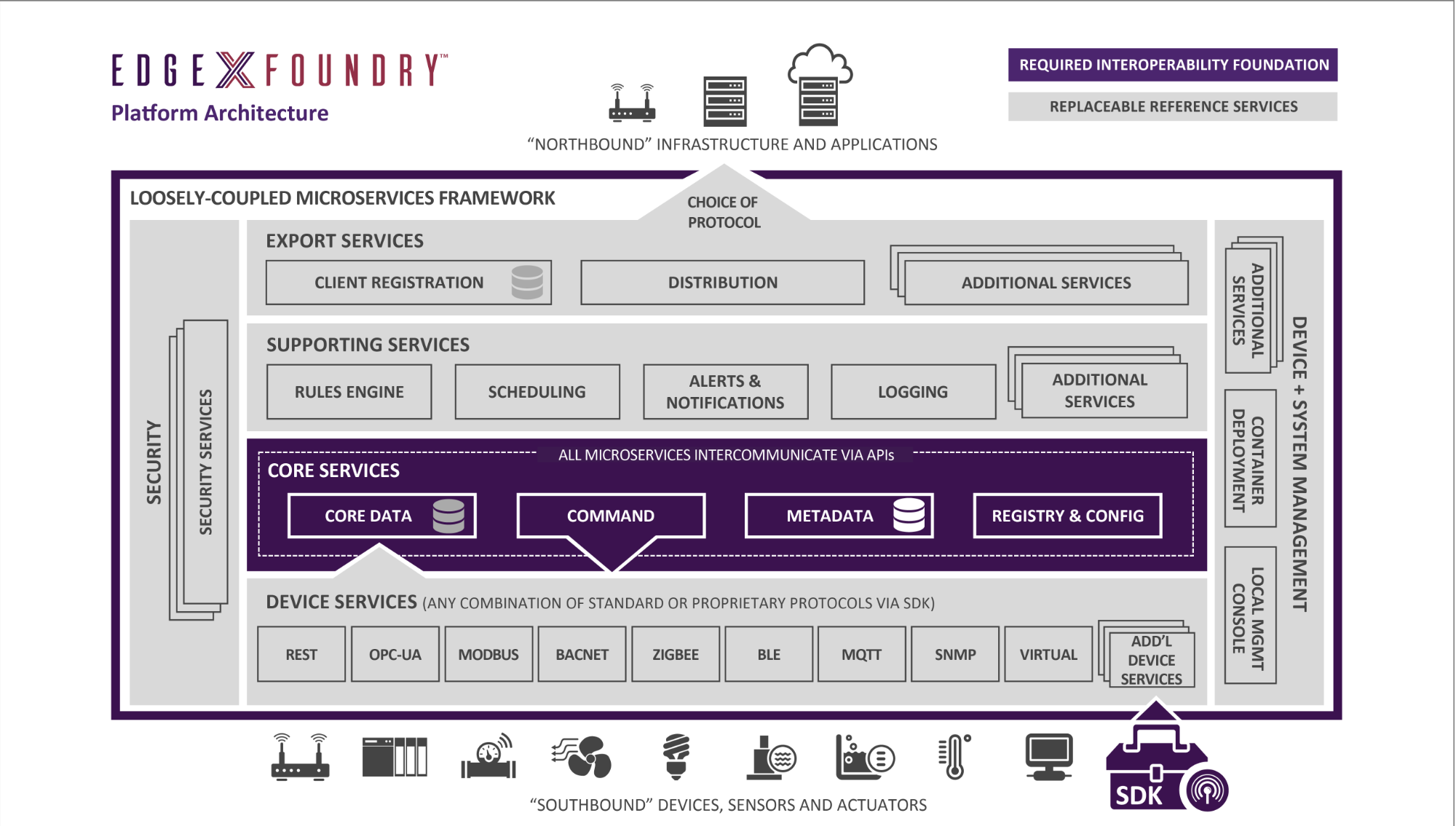
概述 2017年4 月份, Linux 基金组织启动开源项目 EdgeX Foundry ,为物联网边缘计算开发一个标准化互操作框架。 EdgeX Foundry 项目构建于戴尔早期基于 Apache2.0 协议的 FUSE 物联网中间件框架, 无关操作系统和硬件的边缘框架。 EdgeX Foundry 旨在创造一个互操作性、即插即用、模块化的物联网边缘计算的生态系统。 总体架构 部署 环境要求 内存: 不小于4 GB 硬盘空间: 大于3 GB OS: Windows (ver 7 - 10) Ubuntu Desktop (ver 14-16) Ubuntu Server (ver 14) Ubuntu Core (ver 16) Mac OS X 10 User 模式 安装Docker Mac 在安装Docker时自动安装Docker Composehttps://docs.docker.com/engine/getstarted/https://docs.docker.com/compose/install/ 下载EdgeX compose 文件 官方文档有问题,https://github.com/edgexfoundry/developer-scripts/blob/master/compose-files/docker-compose.yml,部分模块无法下载 与Jeremy Phelps 沟通,确认该文件存在问题,模块版本变化较多 解决方案 使用https://github.com/edgexfoundry/developer-scripts/blob/master/compose-files/docker-compose-california-0.5.2.yml,支持最新版本 部分模块需要权限,需要登入docker,docker login nexus3.edgexfoundry.org:10004 -u docker -p docker 运行EdgeX 拉取镜像 启动volume镜像 启动configuration/registry 微服务 启动mongo 启动logging微服务 启动notifications微服务 启动Metadata微服务 启动scheduling微服务 启动virtual device s微服务 同理启动其他微服务 检查微服务都启动完毕 微服务端口 镜像位置 Developers模式 准备工作 Githttps://git-scm.com/downloads Mongodbhttps://www.mongodb.com/download-center?jmp=nav#community Javahttp://www.oracle.com/technetwork/java/javase/downloads/index.html Eclipsehttp://www.eclipse.org/downloads/eclipse-packages EdgeX github地址https://github.com/edgexfoundry 模块依赖关系 安装启动Mongo Database 初始化数据库 启动微服务 Google IoT Core实战 待补充

优秀的个人博客,低调大师

直播转点播实践

场景简介 直播转点播(直转点)是将直播流同步录制为点播视频,并支持媒资管理、媒体处理(转码及内容审核/智能首图等AI处理)、内容制作(云剪辑)、CDN分发加速等一系列操作,可配置工作流自动处理,也可通过API/SDK灵活触发。 准备工作 开通视频点播服务,开通指引 开通视频直播服务,开通指引 添加直转点录制配置,帮助文档 上述准备工作完成后,即可开始进行接入(注:下述文档中的仅存储、仅合成模板组需联系点播进行激活) 名词解释 直转点,结合视频点播的转码、云剪辑、AI处理、事件通知等功能,可适应多种业务场景。名词解释: 录制转码模板组:直播录制到点播同时,点播会使用该模板组对视频进行转码操作 合成转码模板组:多个录制视频进行自动合成时,点播会使用该模板组对视频进行合成+转码操作 仅存储:对直播内容进行录制后,不进行任何后续操作 仅合成:对直播内容进行合成后

优秀的个人博客,低调大师

Android 快应用实践

1. 应用配置信息 1). package.json name: 项目名称 version: 版本信息 toolkit: hap 版本 description: 描述信息 dependencies: 依赖包 2). src/manifest.json package: 应用包名 name: 应用名称 versionName: 应用版本 versionCode: 应用号 mainPlatformVersion: 最小平台版本号 icon: 应用图标 permissions: 权限 config: 配置调试级别(debug, log, info, warn, error) router: 页面路由. 用于定义页面的实际地址、跳转地址。如果ux页面没有配置路由,则不参与项目编译。一个目录下最多只能存在一个主页面文件. 其中entry:配置主页,component:页面对应的ux文件名,path:页面路径,不填则默认为页面名称(<ProjectName>/src目录下,页面目录的相对路径) display: UI显示,用于定义与UI显示相关的配置。支持定义:页面公用的默认UI显示、页面私有的UI显示. titleBarBackgroundColor:导航栏颜色; titleBarTextColor:导航栏字体颜色; menu: 是否有菜单; pages: 页面私有配置(具体页面具体配置). 2. 调试日志 console.debug('debug') console.log('log') console.info('info') console.warn('warn') console.error('error') 可以使用Android Studio的Android Monitor输出来查看日志。 3. 跳转页面 routeDetail () { // 跳转到应用内的某个页面 router.push ({ uri: '/DemoDetail' }) console.debug('打开新页面') } 4. 生命周期 onInit: 表示VM的数据(events,props,data)已经准备好 onReady: 表示VM的模板已经编译完成 onShow:显示其中一个页面 onHide: 隐藏其中一个页面 onDestroy: 释放资源 onBackPress: 用户点击返回实体按键、左上角返回菜单、调用返回API时触发该事件 onMenuPress: 菜单返回时调用

优秀的个人博客,低调大师

单元测试实践

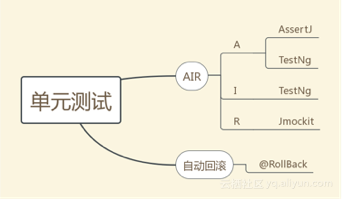
说在前面的话: 就像阿里规约里提到, 单元测试需要满足的AIR原则 : A:Automatic(自动化) I:Independent(独立性) R:Repeatable(可重复) 工欲善其事,必先利其器. 单元测试三剑客: TestNg:单元测试框架 AssertJ:断言工具 Jmockit:mock工具 TestNg testNg是个unit test/sut框架, 支持很多功能。但本篇文章重点不是介绍testNg,简单提一下我觉得比较有用的功能 Group:测试用例分组,根据业务/逻辑分组,以更小的粒度来执行case. Parallel:并行执行,可以配置多个线程来执行case.需要注意并发问题. <suite name="My suite" thread-count="10" parallel="classes"> <test name="mocking"> <packages> <package name="com.hz.constantine.jmockit.slideshare.mocking"/> </packages> </test> <test name="faking"> <packages> <package name="com.hz.constantine.jmockit.slideshare.faking"/> </packages> </test> <test name="testng"> <packages> <package name="com.hz.constantine.jmockit.slideshare.testng"/> </packages> </test> </suite> Listener:通过监听器集成自定义的功能 DataProvider:测试用例和测试数据分离 static final String expectData = DataProviderTest.class.getSimpleName(); static final class DataProvider{ @org.testng.annotations.DataProvider(name = "str") public static Object[][] provide(){ return new Object[][]{{expectData}}; } } @Test(dataProvider = "str",dataProviderClass = DataProvider.class) public void dataProviderTest(String data){ Assert.assertEquals(data,expectData); } Timeout/ExpectExceptions:支持用例执行超时 和 异常 @Test(timeOut = 5,expectedExceptions = {ThreadTimeoutException.class,NullPointerException.class}) public void timeout(){ try { Thread.sleep(10); } catch (InterruptedException e) { } } Tips:附上TestNg Tutorial, http://testng.org/doc/documentation-main.html TestNg 集成Jmockit Java instrumentation:开发者可以构建一个独立于应用程序的代理程序,监测和协助运行在JVM上的程序,虚拟机级别的AOP实现 TestNg Listener: TestNg Listener特性提供开发者扩展TestNg的能力. Jmockit 在jmockit的世界里,它提供两套不同的语法和api. 分别是mocking和faking.下面分别针对这两套做详细的说明 -1- mocking 注解 特性 Expectations.代表一组调用关联到当期的case. Record-Replay-Verify Mode. Record: 预准备依赖和数据. Replay:执行业务. Verify:校验. RecordingResult FlexibleArgumentTest Delegate表达式 Caputring: 用在Verification里. CasCadeMock: 级联Mock 其中最重要的是Record-Replay-Verify Mode ,三段式的表述方式。即 Record: 记录,即定义数据、并mock相关的依赖. Replay:回放,即执行被测试的业务逻辑. Verify:校验,即校验逻辑是否正确.废话不多说,直接上代码: @Test(expectedExceptions = MissingInvocation.class) public void recordReplyVerifyNotInOrder() { //Record ClassUnderTest classUnderTestInstance = newClassUnderTestInstance(); final String data = this.getClass().getSimpleName(); new Expectations(classUnderTestInstance.getEye(), classUnderTestInstance.getRepository()) { { classUnderTestInstance.getEye().find(); result = data; classUnderTestInstance.getRepository().insert(data); times = 1; } }; //Replay classUnderTestInstance.action(); //Verify new VerificationsInOrder(){ { classUnderTestInstance.getRepository().insert(data); classUnderTestInstance.getEye().find(); } }; } 其中 ClassUnderTest 是被测试类,依赖了Eye 和 Repository, 在Record阶段被定义了mocking. 其他特性的测试类,可以参看我的github: https://github.com/cscpswang/java-practice -2- faking Faking unspecifiedFaking Invocation Context第2个和第3个特性依然可以参看我的github,重点说明一下特性1: 1.定义一个被测试对象,一个echoServer(在io编程中,echoServer表示接受到任何消息不做处理,直接返回原消息) class EchoServer { private Dependency dependency=new Dependency(); public String echo(String msg) { return msg; } public String run(){ return dependency.run(); } } 2.定义一个依赖类,这个类会在单测中被faking. class Dependency { public String run(){ return "dependency run"; } } 3.case,测试EchoServer. public void applyFakesWithDependency(){ final String msg = "i'm constantine"; EchoServer echoServer = new EchoServer(); final class DependencyMock extends MockUp<Dependency> { @Mock public String run(){ return msg; } } new DependencyMock(); String actualMsg = echoServer.run(); Assert.assertEquals(actualMsg,msg); } tips: spring 中使用faking api时泛型指定到具体的impl类. 被jdk 代理的类(如spring bean被aop),并不是实现类的实例. 所以要么基于接口mocking(需要mock接口的所有方法),要么使用faking. 小结: Faking和Mocking是两套jmockit的api,在其官方文档,有下面一句话: In particular, the use ofboththe Faking API and the Mocking API in the same test class should be viewed with suspicion, as it strongly indicates misuse. 我更偏爱使用Mocking api, 因为它的特性很酷。 但它不能mocking私有方法,这点有时会不太方便。 最后,如果你要下jmockit的源码,并希望研究,注意一个坑。由于jmockit基于java agent(instrumentation),你需要在你的classpath下放置一个jmockit-xxx.jar.

优秀的个人博客,低调大师

实践android的RadioButton

一个一个组件的实习过来。 package com.tw.flag.ch02_button; import android.content.Context; import android.graphics.Color; import android.os.Bundle; import android.os.Vibrator; import android.support.design.widget.FloatingActionButton; import android.support.design.widget.Snackbar; import android.support.v7.app.AppCompatActivity; import android.support.v7.widget.Toolbar; import android.text.Editable; import android.text.TextWatcher; import android.view.MotionEvent; import android.view.View; import android.view.Menu; import android.view.MenuItem; import android.widget.Button; import android.widget.EditText; import android.widget.RadioGroup; import android.widget.TextView; import java.util.Random; public class MainActivity extends AppCompatActivity implements RadioGroup.OnCheckedChangeListener, TextWatcher{ RadioGroup unit; EditText value; @Override protected void onCreate(Bundle savedInstanceState) { super.onCreate(savedInstanceState); setContentView(R.layout.activity_main); Toolbar toolbar = (Toolbar) findViewById(R.id.toolbar); setSupportActionBar(toolbar); FloatingActionButton fab = (FloatingActionButton) findViewById(R.id.fab); fab.setOnClickListener(new View.OnClickListener() { @Override public void onClick(View view) { Snackbar.make(view, "Replace with your own action", Snackbar.LENGTH_LONG) .setAction("Action", null).show(); } }); unit = (RadioGroup) findViewById(R.id.unit); unit.setOnCheckedChangeListener(this); value = (EditText) findViewById(R.id.value); value.addTextChangedListener(this); } @Override public void onCheckedChanged(RadioGroup group, int checkedId) { calc(); } @Override public void beforeTextChanged(CharSequence s, int start, int count, int after) { } @Override public void onTextChanged(CharSequence s, int start, int before, int count) { } @Override public void afterTextChanged(Editable s) { calc(); } protected void calc() { TextView degF = (TextView)findViewById(R.id.degF); TextView degC = (TextView)findViewById(R.id.degC); double f, c; if (unit.getCheckedRadioButtonId() == R.id.unitF) { f = Double.parseDouble(value.getText().toString()); c = (f - 32) * 5/9; } else { c = Double.parseDouble(value.getText().toString()); f = c * 9/5 + 32; } degC.setText(String.format("%.1f", c) + getResources().getString(R.string.charC)); degF.setText(String.format("%.1f", f) + getResources().getString(R.string.charF)); } }

优秀的个人博客,低调大师

Mongodb基础实践(二)

在前面的文章里面主要介绍了MongoDB的文档,集合,数据库等操作和对文档的增、删、改相关知识,接下来会总结一点有关查询的相关知识。 在MySQL中,我们知道数据查询是优化的主要内容,读写分离等技术都是可以用来处理数据库查询优化的,足以见数据库查询是每个系统中很重要的一部分,之前介绍了find的简单使用,下面会介绍一些相对比较复杂一点的查询。 一、数据查询 MySQL数据库中主要是用select 结合where子句实现数据的查询,功能特别强大,例如多表联合查询、支持正则表达式等。不在这里做过多的相关介绍。这里主要介绍MongoDB的相关查询,MongoDB中主要用find()实现数据的查询,同时也可以使用一些条件限制。 1.1显示单条数据 在上篇文章中提到了find()的使用,但是每次查询数据,都是查询所有的,显示其中的一部分,可以用it迭代。有时候我们想要查询其中的一条数据,具体操作要根据具体需求实现。 MongoDB 查询数据的语法 1 db.collection. find (query,projection) query :可选,使用查询操作符指定查询条件 projection :可选,使用投影操作符指定返回的键。查询时返回文档中所有键值, 只需省略该参数即可(默认省略)。可以使用 pretty() 方法以易读的方式来读取数据,,语法格式如下 1 >db.col. find ().pretty() pretty() 方法以格式化的方式来显示所有文档。 例如: 1 2 3 4 5 6 7 8 9 10 11 db.winner. find ().pretty() { "_id" :ObjectId( "592e7d1caaa464fa8a557e95" ), "winne" :1955} { "_id" :ObjectId( "592e7d1eaaa464fa8a557e96" ), "winne" :1955} { "_id" :ObjectId( "592e7d1faaa464fa8a557e97" ), "winne" :1955} { "_id" :ObjectId( "592e7d1faaa464fa8a557e98" ), "winne" :1955} { "_id" :ObjectId( "592e7d21aaa464fa8a557e99" ), "winne" :1955} { "_id" :ObjectId( "592e7d22aaa464fa8a557e9a" ), "winne" :1955} { "_id" :ObjectId( "592e7e14aaa464fa8a557ec4" ), "winne" :41} { "_id" :ObjectId( "592e7e14aaa464fa8a557ec5" ), "winne" :42} { "_id" :ObjectId( "592e7e14aaa464fa8a557ec6" ), "winne" :43} { "_id" :ObjectId( "592e7e14aaa464fa8a557ec7" ), "winne" :44} 1、查询某个集合中的所有数据 1 2 3 4 5 6 7 8 9 10 11 12 13 14 15 16 17 18 19 20 21 22 db.winner. find () { "_id" :ObjectId( "592e7d1caaa464fa8a557e95" ), "winne" :1955} { "_id" :ObjectId( "592e7d1eaaa464fa8a557e96" ), "winne" :1955} { "_id" :ObjectId( "592e7d1faaa464fa8a557e97" ), "winne" :1955} { "_id" :ObjectId( "592e7d1faaa464fa8a557e98" ), "winne" :1955} { "_id" :ObjectId( "592e7d21aaa464fa8a557e99" ), "winne" :1955} { "_id" :ObjectId( "592e7d22aaa464fa8a557e9a" ), "winne" :1955} { "_id" :ObjectId( "592e7e14aaa464fa8a557ec4" ), "winne" :41} { "_id" :ObjectId( "592e7e14aaa464fa8a557ec5" ), "winne" :42} { "_id" :ObjectId( "592e7e14aaa464fa8a557ec6" ), "winne" :43} { "_id" :ObjectId( "592e7e14aaa464fa8a557ec7" ), "winne" :44} { "_id" :ObjectId( "592e7e14aaa464fa8a557ec8" ), "winne" :45} { "_id" :ObjectId( "592e7e14aaa464fa8a557ec9" ), "winne" :46} { "_id" :ObjectId( "592e7e14aaa464fa8a557eca" ), "winne" :47} { "_id" :ObjectId( "592e7e14aaa464fa8a557ecb" ), "winne" :48} { "_id" :ObjectId( "592e7e14aaa464fa8a557ecc" ), "winne" :49} { "_id" :ObjectId( "592e7e14aaa464fa8a557ecd" ), "winne" :50} { "_id" :ObjectId( "592e7e14aaa464fa8a557ece" ), "winne" :51} { "_id" :ObjectId( "592e7e14aaa464fa8a557ecf" ), "winne" :52} { "_id" :ObjectId( "592e7e14aaa464fa8a557ed0" ), "winne" :53} { "_id" :ObjectId( "592e7e14aaa464fa8a557ed1" ), "winne" :54} Type "it" for more 默认显示20条数据,其他数据可以输入it迭代。 2、显示一条数据 find()是输出所有结果,里面可能有些文档内容相同,但是“_id”肯定是不一样的,这时我们可以使用findOne()方法查询,或者可以使用db.winner.find({winne:1955}).limit(1)。 1 2 3 4 5 6 7 8 9 10 11 12 13 14 15 16 17 18 19 20 db.winner. find ({winne:1955}) { "_id" :ObjectId( "592e7d1caaa464fa8a557e95" ), "winne" :1955} { "_id" :ObjectId( "592e7d1eaaa464fa8a557e96" ), "winne" :1955} { "_id" :ObjectId( "592e7d1faaa464fa8a557e97" ), "winne" :1955} { "_id" :ObjectId( "592e7d1faaa464fa8a557e98" ), "winne" :1955} { "_id" :ObjectId( "592e7d21aaa464fa8a557e99" ), "winne" :1955} { "_id" :ObjectId( "592e7d22aaa464fa8a557e9a" ), "winne" :1955} 假如要查询winner集合中winne=1955的一条数据,而用 find ()查询出所有的数据,这时就可以使用findOne() db.winner.findOne({winne:1955}) { "_id" :ObjectId( "592e7d1caaa464fa8a557e95" ), "winne" :1955} 或者可以使用 db.winner. find ({winne:1955}).limit(1) { "_id" :ObjectId( "592e7d1caaa464fa8a557e95" ), "winne" :1955} 两者的区别 findOne()有点类似MySQL里面的distinct,会返回查询的第一条结果,如果搜索不到想要的数据就会 返回NULL, db.winner.findOne({winne:200888}) null db.winner. find ({winne:1955}).limit(1)方法就和MySQL里面的limit是一样的,主要是限制查询结果的条数。 3、查询满足一定条件的数据 在MySQL中查询时,可以结合where以及字段等信息查询数据,而MongoDB中也是可以的,同样可以支持一些条件判断语句。 格式 范例 RDBMS中的类似语句 等于 {<key>:<value>} db.col.find({"winne":"1995"}).pretty() wherewinne= '50' 小于 {<key>:{$lt:<value>}} db.col.find({"winne":{$lt:50}}).pretty() wherewinne< 50 小于或等于 {<key>:{$lte:<value>}} db.col.find({"winne":{$lte:50}}).pretty() wherewinne<= 50 大于 {<key>:{$gt:<value>}} db.col.find({"winne":{$gt:50}}).pretty() wherewinne> 50 大于或等于 {<key>:{$gte:<value>}} db.col.find({"winne":{$gte:50}}).pretty() wherewinne>= 50 不等于 {<key>:{$ne:<value>}} db.col.find({"winne":{$ne:50}}).pretty() wherewinne!= 50 1 2 3 4 5 6 7 8 9 10 11 12 13 14 15 16 17 18 19 20 21 22 23 24 25 26 27 28 29 30 31 32 33 $gt--------greaterthan$gte---------gtequal $lt-------- less than$lte---------ltequal $ ne -----------notequal 1、查询winner集合中winne<50的相关数据 db.winner. find ({winne:{$lt:50}}) { "_id" :ObjectId( "592e7e14aaa464fa8a557ec4" ), "winne" :41} { "_id" :ObjectId( "592e7e14aaa464fa8a557ec5" ), "winne" :42} { "_id" :ObjectId( "592e7e14aaa464fa8a557ec6" ), "winne" :43} { "_id" :ObjectId( "592e7e14aaa464fa8a557ec7" ), "winne" :44} { "_id" :ObjectId( "592e7e14aaa464fa8a557ec8" ), "winne" :45} { "_id" :ObjectId( "592e7e14aaa464fa8a557ec9" ), "winne" :46} { "_id" :ObjectId( "592e7e14aaa464fa8a557eca" ), "winne" :47} { "_id" :ObjectId( "592e7e14aaa464fa8a557ecb" ), "winne" :48} { "_id" :ObjectId( "592e7e14aaa464fa8a557ecc" ), "winne" :49} { "_id" :ObjectId( "592e7e17aaa464fa8a557f28" ), "winne" :41} { "_id" :ObjectId( "592e7e17aaa464fa8a557f29" ), "winne" :42} { "_id" :ObjectId( "592e7e17aaa464fa8a557f2a" ), "winne" :43} { "_id" :ObjectId( "592e7e17aaa464fa8a557f2b" ), "winne" :44} 2、查询winner集合中40=<winne<50的相关数据 db.winner. find ({winne:{$gte:40,$lt:45}}) { "_id" :ObjectId( "592e7e14aaa464fa8a557ec4" ), "winne" :41} { "_id" :ObjectId( "592e7e14aaa464fa8a557ec5" ), "winne" :42} { "_id" :ObjectId( "592e7e14aaa464fa8a557ec6" ), "winne" :43} { "_id" :ObjectId( "592e7e14aaa464fa8a557ec7" ), "winne" :44} { "_id" :ObjectId( "592e7e17aaa464fa8a557f28" ), "winne" :41} { "_id" :ObjectId( "592e7e17aaa464fa8a557f29" ), "winne" :42} { "_id" :ObjectId( "592e7e17aaa464fa8a557f2a" ), "winne" :43} { "_id" :ObjectId( "592e7e17aaa464fa8a557f2b" ), "winne" :44} { "_id" :ObjectId( "592e7e18aaa464fa8a557f8c" ), "winne" :41} { "_id" :ObjectId( "592e7e18aaa464fa8a557f8d" ), "winne" :42} { "_id" :ObjectId( "592e7e18aaa464fa8a557f8e" ), "winne" :43} { "_id" :ObjectId( "592e7e18aaa464fa8a557f8f" ), "winne" :44} 4、MongoDB AND 条件 MongoDB 的 find() 方法可以传入多个键(key),每个键(key)以逗号隔开,语法格式如下: >db.winner.find({key1:value1, key2:value2}).pretty() 1 2 3 4 5 6 7 8 9 10 11 12 13 14 15 16 17 18 19 20 21 22 23 24 25 26 27 28 29 30 31 32 33 34 35 36 37 38 39 40 41 42 43 44 45 46 47 48 49 50 51 52 53 54 55 56 57 58 59 60 61 62 63 64 #插入测试数据 for (i=0;i<20;i++)db.info2.insert({name: "linux" , object: "SA" , company: "docker" , phone:i}) for (i=0;i<20;i++)db.info2.insert({name: "openstack" , object: "DBA" , company: "could" , phone:i}) #检查测试数据 >db.info2. find () db.info2. find () { "_id" :ObjectId( "592f838dd276944818f7edb4" ), "name" : "linux" , "object" : "SA" , "company" : "docker" , "phone" :0} { "_id" :ObjectId( "592f838dd276944818f7edb5" ), "name" : "linux" , "object" : "SA" , "company" : "docker" , "phone" :1} { "_id" :ObjectId( "592f838dd276944818f7edb6" ), "name" : "linux" , "object" : "SA" , "company" : "docker" , "phone" :2} { "_id" :ObjectId( "592f838dd276944818f7edb7" ), "name" : "linux" , "object" : "SA" , "company" : "docker" , "phone" :3} { "_id" :ObjectId( "592f838dd276944818f7edb8" ), "name" : "linux" , "object" : "SA" , "company" : "docker" , "phone" :4} { "_id" :ObjectId( "592f838dd276944818f7edb9" ), "name" : "linux" , "object" : "SA" , "company" : "docker" , "phone" :5} { "_id" :ObjectId( "592f838dd276944818f7edba" ), "name" : "linux" , "object" : "SA" , "company" : "docker" , "phone" :6} { "_id" :ObjectId( "592f838dd276944818f7edbb" ), "name" : "linux" , "object" : "SA" , "company" : "docker" , "phone" :7} { "_id" :ObjectId( "592f838dd276944818f7edbc" ), "name" : "linux" , "object" : "SA" , "company" : "docker" , "phone" :8} { "_id" :ObjectId( "592f838dd276944818f7edbd" ), "name" : "linux" , "object" : "SA" , "company" : "docker" , "phone" :9} { "_id" :ObjectId( "592f838dd276944818f7edbe" ), "name" : "linux" , "object" : "SA" , "company" : "docker" , "phone" :10} { "_id" :ObjectId( "592f838dd276944818f7edbf" ), "name" : "linux" , "object" : "SA" , "company" : "docker" , "phone" :11} { "_id" :ObjectId( "592f838dd276944818f7edc0" ), "name" : "linux" , "object" : "SA" , "company" : "docker" , "phone" :12} { "_id" :ObjectId( "592f838dd276944818f7edc1" ), "name" : "linux" , "object" : "SA" , "company" : "docker" , "phone" :13} { "_id" :ObjectId( "592f838dd276944818f7edc2" ), "name" : "linux" , "object" : "SA" , "company" : "docker" , "phone" :14} { "_id" :ObjectId( "592f838dd276944818f7edc3" ), "name" : "linux" , "object" : "SA" , "company" : "docker" , "phone" :15} { "_id" :ObjectId( "592f838dd276944818f7edc4" ), "name" : "linux" , "object" : "SA" , "company" : "docker" , "phone" :16} { "_id" :ObjectId( "592f838dd276944818f7edc5" ), "name" : "linux" , "object" : "SA" , "company" : "docker" , "phone" :17} { "_id" :ObjectId( "592f838dd276944818f7edc6" ), "name" : "linux" , "object" : "SA" , "company" : "docker" , "phone" :18} { "_id" :ObjectId( "592f838dd276944818f7edc7" ), "name" : "linux" , "object" : "SA" , "company" : "docker" , "phone" :19} >db.info2. find ().count() #检查数据的条数 40 #筛选name=linuxobject=SAphone<5 db.info2. find ({name: "linux" ,object: "SA" ,phone:{$lt:5}}) 执行 db.info2. find ({name: "linux" ,object: "SA" ,phone:{$lt:5}}) { "_id" :ObjectId( "592f838dd276944818f7edb4" ), "name" : "linux" , "object" : "SA" , "company" : "docker" , "phone" :0} { "_id" :ObjectId( "592f838dd276944818f7edb5" ), "name" : "linux" , "object" : "SA" , "company" : "docker" , "phone" :1} { "_id" :ObjectId( "592f838dd276944818f7edb6" ), "name" : "linux" , "object" : "SA" , "company" : "docker" , "phone" :2} { "_id" :ObjectId( "592f838dd276944818f7edb7" ), "name" : "linux" , "object" : "SA" , "company" : "docker" , "phone" :3} { "_id" :ObjectId( "592f838dd276944818f7edb8" ), "name" : "linux" , "object" : "SA" , "company" : "docker" , "phone" :4} 筛选name=linuxobject=SA5<phone<=10 db.info2. find ({name: "linux" ,object: "SA" ,phone:{ "$gt" :5, "$lte" :10}}) db.info2. find ({name: "linux" ,object: "SA" ,phone:{ "$gt" :5, "$lte" :10}}) { "_id" :ObjectId( "592f838dd276944818f7edba" ), "name" : "linux" , "object" : "SA" , "company" : "docker" , "phone" :6} { "_id" :ObjectId( "592f838dd276944818f7edbb" ), "name" : "linux" , "object" : "SA" , "company" : "docker" , "phone" :7} { "_id" :ObjectId( "592f838dd276944818f7edbc" ), "name" : "linux" , "object" : "SA" , "company" : "docker" , "phone" :8} { "_id" :ObjectId( "592f838dd276944818f7edbd" ), "name" : "linux" , "object" : "SA" , "company" : "docker" , "phone" :9} { "_id" :ObjectId( "592f838dd276944818f7edbe" ), "name" : "linux" , "object" : "SA" , "company" : "docker" , "phone" :10} 筛选5<phone<=10 db.info2. find ({phone:{ "$gt" :5, "$lte" :10}}) { "_id" :ObjectId( "592f838dd276944818f7edba" ), "name" : "linux" , "object" : "SA" , "company" : "docker" , "phone" :6} { "_id" :ObjectId( "592f838dd276944818f7edbb" ), "name" : "linux" , "object" : "SA" , "company" : "docker" , "phone" :7} { "_id" :ObjectId( "592f838dd276944818f7edbc" ), "name" : "linux" , "object" : "SA" , "company" : "docker" , "phone" :8} { "_id" :ObjectId( "592f838dd276944818f7edbd" ), "name" : "linux" , "object" : "SA" , "company" : "docker" , "phone" :9} { "_id" :ObjectId( "592f838dd276944818f7edbe" ), "name" : "linux" , "object" : "SA" , "company" : "docker" , "phone" :10} { "_id" :ObjectId( "592f838fd276944818f7edce" ), "name" : "openstack" , "object" : "DBA" , "company" : "could" , "phone" :6} { "_id" :ObjectId( "592f838fd276944818f7edcf" ), "name" : "openstack" , "object" : "DBA" , "company" : "could" , "phone" :7} { "_id" :ObjectId( "592f838fd276944818f7edd0" ), "name" : "openstack" , "object" : "DBA" , "company" : "could" , "phone" :8} { "_id" :ObjectId( "592f838fd276944818f7edd1" ), "name" : "openstack" , "object" : "DBA" , "company" : "could" , "phone" :9} { "_id" :ObjectId( "592f838fd276944818f7edd2" ), "name" : "openstack" , "object" : "DBA" , "company" : "could" , "phone" :10} 5 MongoDB OR 条件 MongoDB 除了有类似MySQL的AND条件语句外,还有OR 条件语句,OR 条件语句使用了关键字 $or,语法格式如下: >db.collections.find( { $or: [ {key1: value1}, {key2:value2} ] } ).pretty() 1 2 3 4 5 6 7 8 9 10 11 12 13 14 15 16 17 18 19 20 21 22 23 24 25 26 27 28 29 30 31 32 33 34 35 36 37 38 39 40 41 42 43 #查name=linux或者object=redis db.info2. find ( {$or:[{name: "linux" },{object: "redis" }] } ) db.info2. find (db.info2. find ( ...{$or:[{name: "linux" },{object: "redis" }]{$or:[{name: "linux" },{object: "redis" }] ... ...}} ...)) { "_id" :ObjectId( "592f838dd276944818f7edb4" ), "name" : "linux" , "object" : "SA" , "company" : "docker" , "phone" :0} { "_id" :ObjectId( "592f838dd276944818f7edb5" ), "name" : "linux" , "object" : "SA" , "company" : "docker" , "phone" :1} { "_id" :ObjectId( "592f838dd276944818f7edb6" ), "name" : "linux" , "object" : "SA" , "company" : "docker" , "phone" :2} { "_id" :ObjectId( "592f838dd276944818f7edb7" ), "name" : "linux" , "object" : "SA" , "company" : "docker" , "phone" :3} { "_id" :ObjectId( "592f838dd276944818f7edb8" ), "name" : "linux" , "object" : "SA" , "company" : "docker" , "phone" :4} { "_id" :ObjectId( "592f838dd276944818f7edb9" ), "name" : "linux" , "object" : "SA" , "company" : "docker" , "phone" :5} { "_id" :ObjectId( "592f838dd276944818f7edba" ), "name" : "linux" , "object" : "SA" , "company" : "docker" , "phone" :6} { "_id" :ObjectId( "592f838dd276944818f7edbb" ), "name" : "linux" , "object" : "SA" , "company" : "docker" , "phone" :7} { "_id" :ObjectId( "592f838dd276944818f7edbc" ), "name" : "linux" , "object" : "SA" , "company" : "docker" , "phone" :8} { "_id" :ObjectId( "592f838dd276944818f7edbd" ), "name" : "linux" , "object" : "SA" , "company" : "docker" , "phone" :9} { "_id" :ObjectId( "592f838dd276944818f7edbe" ), "name" : "linux" , "object" : "SA" , "company" : "docker" , "phone" :10} { "_id" :ObjectId( "592f838dd276944818f7edbf" ), "name" : "linux" , "object" : "SA" , "company" : "docker" , "phone" :11} { "_id" :ObjectId( "592f838dd276944818f7edc0" ), "name" : "linux" , "object" : "SA" , "company" : "docker" , "phone" :12} { "_id" :ObjectId( "592f838dd276944818f7edc1" ), "name" : "linux" , "object" : "SA" , "company" : "docker" , "phone" :13} { "_id" :ObjectId( "592f838dd276944818f7edc2" ), "name" : "linux" , "object" : "SA" , "company" : "docker" , "phone" :14} { "_id" :ObjectId( "592f838dd276944818f7edc3" ), "name" : "linux" , "object" : "SA" , "company" : "docker" , "phone" :15} { "_id" :ObjectId( "592f838dd276944818f7edc4" ), "name" : "linux" , "object" : "SA" , "company" : "docker" , "phone" :16} { "_id" :ObjectId( "592f838dd276944818f7edc5" ), "name" : "linux" , "object" : "SA" , "company" : "docker" , "phone" :17} { "_id" :ObjectId( "592f838dd276944818f7edc6" ), "name" : "linux" , "object" : "SA" , "company" : "docker" , "phone" :18} { "_id" :ObjectId( "592f838dd276944818f7edc7" ), "name" : "linux" , "object" : "SA" , "company" : "docker" , "phone" :19} Type "it" for more >itit { "_id" :ObjectId( "592f8964d276944818f7eddc" ), "name" : "MongoDB" , "object" : "redis" , "company" : "winner" , "phone" :0} { "_id" :ObjectId( "592f8964d276944818f7eddd" ), "name" : "MongoDB" , "object" : "redis" , "company" : "winner" , "phone" :1} { "_id" :ObjectId( "592f8964d276944818f7edde" ), "name" : "MongoDB" , "object" : "redis" , "company" : "winner" , "phone" :2} { "_id" :ObjectId( "592f8964d276944818f7eddf" ), "name" : "MongoDB" , "object" : "redis" , "company" : "winner" , "phone" :3} { "_id" :ObjectId( "592f8964d276944818f7ede0" ), "name" : "MongoDB" , "object" : "redis" , "company" : "winner" , "phone" :4} { "_id" :ObjectId( "592f8964d276944818f7ede1" ), "name" : "MongoDB" , "object" : "redis" , "company" : "winner" , "phone" :5} { "_id" :ObjectId( "592f8964d276944818f7ede2" ), "name" : "MongoDB" , "object" : "redis" , "company" : "winner" , "phone" :6} { "_id" :ObjectId( "592f8964d276944818f7ede3" ), "name" : "MongoDB" , "object" : "redis" , "company" : "winner" , "phone" :7} { "_id" :ObjectId( "592f8964d276944818f7ede4" ), "name" : "MongoDB" , "object" : "redis" , "company" : "winner" , "phone" :8} { "_id" :ObjectId( "592f8964d276944818f7ede5" ), "name" : "MongoDB" , "object" : "redis" , "company" : "winner" , "phone" :9} 6、AND和OR综合使用 查询phone<5,name=MongoDB或者name=linux 1 2 3 4 5 6 7 8 9 10 11 12 db.info2. find ({phone:{$lt:5},$or:[{name: "MongoDB" },{name: "linux" }]}) db.info2. find ({phone:{$lt:5},$or:[{name: "MongoDB" },{name: "linux" }]}) { "_id" :ObjectId( "592f838dd276944818f7edb4" ), "name" : "linux" , "object" : "SA" , "company" : "docker" , "phone" :0} { "_id" :ObjectId( "592f838dd276944818f7edb5" ), "name" : "linux" , "object" : "SA" , "company" : "docker" , "phone" :1} { "_id" :ObjectId( "592f838dd276944818f7edb6" ), "name" : "linux" , "object" : "SA" , "company" : "docker" , "phone" :2} { "_id" :ObjectId( "592f838dd276944818f7edb7" ), "name" : "linux" , "object" : "SA" , "company" : "docker" , "phone" :3} { "_id" :ObjectId( "592f838dd276944818f7edb8" ), "name" : "linux" , "object" : "SA" , "company" : "docker" , "phone" :4} { "_id" :ObjectId( "592f8964d276944818f7eddc" ), "name" : "MongoDB" , "object" : "redis" , "company" : "winner" , "phone" :0} { "_id" :ObjectId( "592f8964d276944818f7eddd" ), "name" : "MongoDB" , "object" : "redis" , "company" : "winner" , "phone" :1} { "_id" :ObjectId( "592f8964d276944818f7edde" ), "name" : "MongoDB" , "object" : "redis" , "company" : "winner" , "phone" :2} { "_id" :ObjectId( "592f8964d276944818f7eddf" ), "name" : "MongoDB" , "object" : "redis" , "company" : "winner" , "phone" :3} { "_id" :ObjectId( "592f8964d276944818f7ede0" ), "name" : "MongoDB" , "object" : "redis" , "company" : "winner" , "phone" :4} 7、查询结果排序 在MySQL中是有order by条件,可以根据desc或者asc进行升序或者降序操作,而MongoDB中是可以利用sort()方法实现排序的,例如对6中的结果处理,根据phone排序。 基本语法 db.info2.find().sort({phone:1})#这里phone表示根据该key排序,1表示升序,-1表示降序。 1 2 3 4 5 6 7 8 9 10 11 db.info2. find ({phone:{$lt:5},$or:[{name: "MongoDB" },{name: "linux" }]}). sort ({phone:1}) { "_id" :ObjectId( "592f838dd276944818f7edb4" ), "name" : "linux" , "object" : "SA" , "company" : "docker" , "phone" :0} { "_id" :ObjectId( "592f8964d276944818f7eddc" ), "name" : "MongoDB" , "object" : "redis" , "company" : "winner" , "phone" :0} { "_id" :ObjectId( "592f838dd276944818f7edb5" ), "name" : "linux" , "object" : "SA" , "company" : "docker" , "phone" :1} { "_id" :ObjectId( "592f8964d276944818f7eddd" ), "name" : "MongoDB" , "object" : "redis" , "company" : "winner" , "phone" :1} { "_id" :ObjectId( "592f838dd276944818f7edb6" ), "name" : "linux" , "object" : "SA" , "company" : "docker" , "phone" :2} { "_id" :ObjectId( "592f8964d276944818f7edde" ), "name" : "MongoDB" , "object" : "redis" , "company" : "winner" , "phone" :2} { "_id" :ObjectId( "592f838dd276944818f7edb7" ), "name" : "linux" , "object" : "SA" , "company" : "docker" , "phone" :3} { "_id" :ObjectId( "592f8964d276944818f7eddf" ), "name" : "MongoDB" , "object" : "redis" , "company" : "winner" , "phone" :3} { "_id" :ObjectId( "592f838dd276944818f7edb8" ), "name" : "linux" , "object" : "SA" , "company" : "docker" , "phone" :4} { "_id" :ObjectId( "592f8964d276944818f7ede0" ), "name" : "MongoDB" , "object" : "redis" , "company" : "winner" , "phone" :4} 8、MongoDB Skip() 方法 在前面介绍了limit(),sort(),count()等方法,接下来要介绍一个比较有趣的skip()方法,在使用limit()的时候可以显示你要求的几条,而skip()方法是跳过几条。 1 2 3 4 5 6 7 8 9 10 11 12 13 14 15 16 17 18 19 20 21 db.info2. find ({phone:{$lt:5},$or:[{name: "MongoDB" },{name: "linux" }]}). sort ({phone:1}) { "_id" :ObjectId( "592f838dd276944818f7edb4" ), "name" : "linux" , "object" : "SA" , "company" : "docker" , "phone" :0} { "_id" :ObjectId( "592f8964d276944818f7eddc" ), "name" : "MongoDB" , "object" : "redis" , "company" : "winner" , "phone" :0} { "_id" :ObjectId( "592f838dd276944818f7edb5" ), "name" : "linux" , "object" : "SA" , "company" : "docker" , "phone" :1} { "_id" :ObjectId( "592f8964d276944818f7eddd" ), "name" : "MongoDB" , "object" : "redis" , "company" : "winner" , "phone" :1} { "_id" :ObjectId( "592f838dd276944818f7edb6" ), "name" : "linux" , "object" : "SA" , "company" : "docker" , "phone" :2} { "_id" :ObjectId( "592f8964d276944818f7edde" ), "name" : "MongoDB" , "object" : "redis" , "company" : "winner" , "phone" :2} { "_id" :ObjectId( "592f838dd276944818f7edb7" ), "name" : "linux" , "object" : "SA" , "company" : "docker" , "phone" :3} { "_id" :ObjectId( "592f8964d276944818f7eddf" ), "name" : "MongoDB" , "object" : "redis" , "company" : "winner" , "phone" :3} { "_id" :ObjectId( "592f838dd276944818f7edb8" ), "name" : "linux" , "object" : "SA" , "company" : "docker" , "phone" :4} { "_id" :ObjectId( "592f8964d276944818f7ede0" ), "name" : "MongoDB" , "object" : "redis" , "company" : "winner" , "phone" :4} 使用skip()方法 db.info2. find ({phone:{$lt:5},$or:[{name: "MongoDB" },{name: "linux" }]}). sort ({phone:1}).skip(3) { "_id" :ObjectId( "592f8964d276944818f7eddd" ), "name" : "MongoDB" , "object" : "redis" , "company" : "winner" , "phone" :1} { "_id" :ObjectId( "592f838dd276944818f7edb6" ), "name" : "linux" , "object" : "SA" , "company" : "docker" , "phone" :2} { "_id" :ObjectId( "592f8964d276944818f7edde" ), "name" : "MongoDB" , "object" : "redis" , "company" : "winner" , "phone" :2} { "_id" :ObjectId( "592f838dd276944818f7edb7" ), "name" : "linux" , "object" : "SA" , "company" : "docker" , "phone" :3} { "_id" :ObjectId( "592f8964d276944818f7eddf" ), "name" : "MongoDB" , "object" : "redis" , "company" : "winner" , "phone" :3} { "_id" :ObjectId( "592f838dd276944818f7edb8" ), "name" : "linux" , "object" : "SA" , "company" : "docker" , "phone" :4} { "_id" :ObjectId( "592f8964d276944818f7ede0" ), "name" : "MongoDB" , "object" : "redis" , "company" : "winner" , "phone" :4} skip方法有点类似于MySQL里面的limit之间间隔情况。 这里介绍了有关查询的问题,在数据库中,查询是非常重要的一部分,所以介绍的篇幅也是比较多的,后期遇到其他问题也会继续总结输出。 本文转自 tianya1993 51CTO博客,原文链接:http://blog.51cto.com/dreamlinux/1931384,如需转载请自行联系原作者

资源下载

更多资源
腾讯云软件源

腾讯云软件源

为解决软件依赖安装时官方源访问速度慢的问题,腾讯云为一些软件搭建了缓存服务。您可以通过使用腾讯云软件源站来提升依赖包的安装速度。为了方便用户自由搭建服务架构,目前腾讯云软件源站支持公网访问和内网访问。

Nacos

Nacos

Nacos /nɑ:kəʊs/ 是 Dynamic Naming and Configuration Service 的首字母简称,一个易于构建 AI Agent 应用的动态服务发现、配置管理和AI智能体管理平台。Nacos 致力于帮助您发现、配置和管理微服务及AI智能体应用。Nacos 提供了一组简单易用的特性集,帮助您快速实现动态服务发现、服务配置、服务元数据、流量管理。Nacos 帮助您更敏捷和容易地构建、交付和管理微服务平台。

Rocky Linux

Rocky Linux

Rocky Linux(中文名:洛基)是由Gregory Kurtzer于2020年12月发起的企业级Linux发行版,作为CentOS稳定版停止维护后与RHEL(Red Hat Enterprise Linux)完全兼容的开源替代方案,由社区拥有并管理,支持x86_64、aarch64等架构。其通过重新编译RHEL源代码提供长期稳定性,采用模块化包装和SELinux安全架构,默认包含GNOME桌面环境及XFS文件系统,支持十年生命周期更新。

WebStorm

WebStorm

WebStorm 是jetbrains公司旗下一款JavaScript 开发工具。目前已经被广大中国JS开发者誉为“Web前端开发神器”、“最强大的HTML5编辑器”、“最智能的JavaScript IDE”等。与IntelliJ IDEA同源,继承了IntelliJ IDEA强大的JS部分的功能。

用户登录
用户注册